
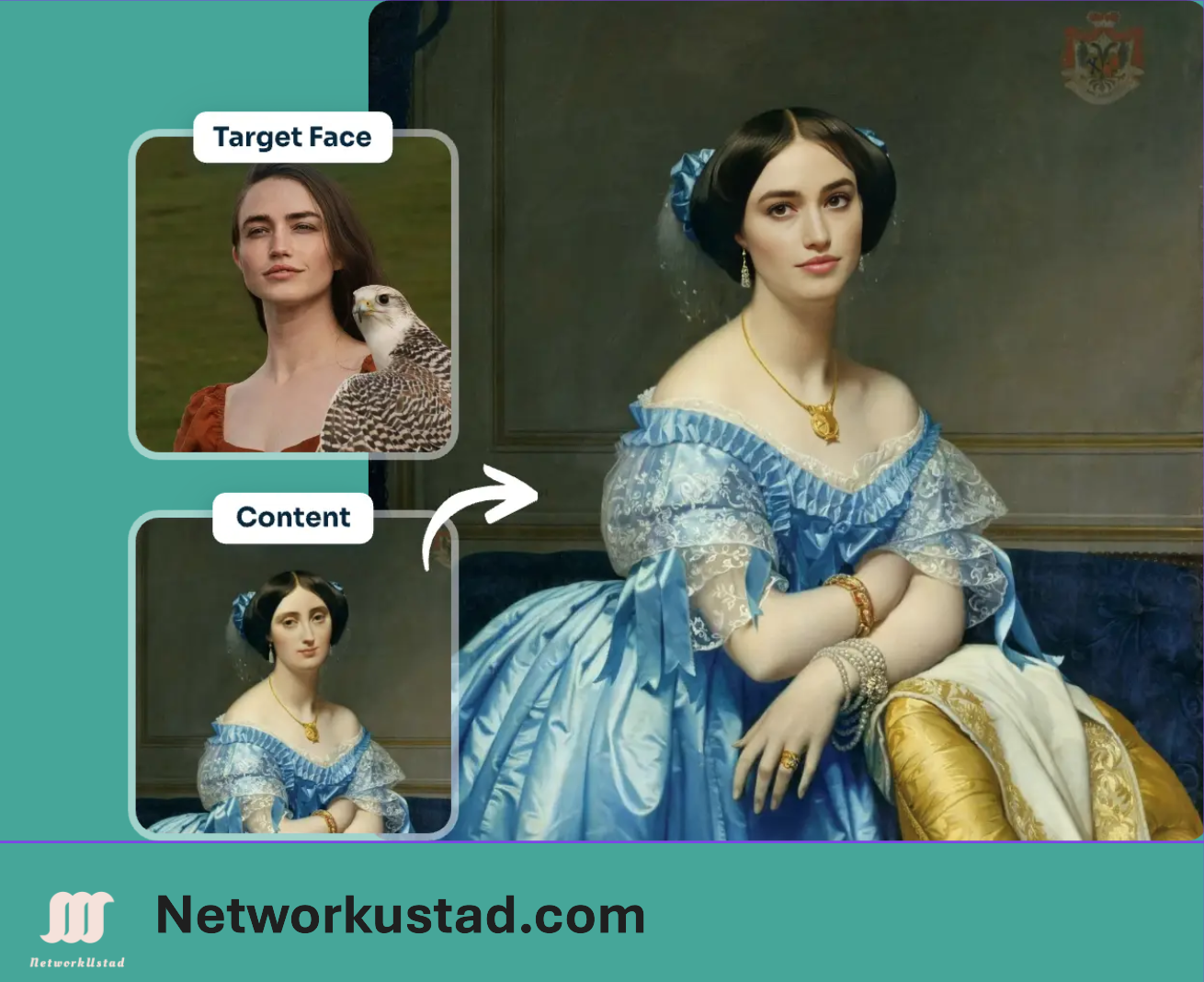
AI face-swap tools have become some of the most popular free creative apps online. In a few clicks, they let you place one face onto another photo — for memes, fixing a group shot where someone blinked, seeing yourself in a movie poster, or just having fun with friends. The technology that once required Photoshop skills and hours of manual work now runs in a browser in seconds.
But “free,” “unlimited,” and “private” are words these tools use freely in their marketing, and the reality is often more nuanced. Just as importantly, face-swap technology sits close to the same tech behind deepfakes — which carries real ethical and legal responsibilities that most promotional articles skip entirely. This guide covers how these tools actually work, how to evaluate the common claims, and how to use them without crossing legal or ethical lines.
How AI Face Swap Works
At a basic level, an AI face swapper does three things. First, it detects the faces in both your source image (the face you want to use) and your target image (the photo you want to place it into), mapping facial landmarks like the eyes, nose, mouth, and jawline. Second, it transfers the source face onto the target, adjusting for angle and position. Third — and this is where quality is won or lost — it blends the result, matching skin tone, lighting, and edges so the swap doesn’t look pasted on.
The better tools handle tricky conditions like sunglasses, shadows, side angles, and obscured features. The weaker ones produce visible seams, mismatched skin tones, or an “uncanny” look. Results improve dramatically when you use clear, well-lit, front-facing photos with similar lighting in both images — that single tip matters more than which tool you pick.
What These Tools Are Good For
Used responsibly, face swap has genuinely useful and harmless applications:
- Memes and creative content — the most common use, placing faces into templates or funny scenarios.
- Fixing group photos — swapping in a better expression when someone blinked or looked away in an otherwise perfect shot.
- Trying a look — experimenting with different styles or seeing yourself in a costume or theme.
- Content creation — social posts, thumbnails, and lighthearted video or GIF content.
Evaluating the Common Claims (Read the Fine Print)
Nearly every free face-swap tool advertises the same three things: 100% free, no watermarks, and total privacy. These claims are frequently oversimplified, and it’s worth understanding what they usually mean in practice.
“100% free and unlimited.” This is often only partly true. Many tools give new users a limited batch of free credits, then move to paid plans for heavier use. Others are free for photos but charge for video or GIF output, or impose daily limits. For example, one widely promoted tool, AI Ease, provides free credits to try its tools but reserves watermark-free export and higher volume for paid subscribers — its own terms note that some tools may add a watermark to free exports. The lesson: “free” almost always has boundaries. Check the tool’s actual pricing page before assuming unlimited use.
“No watermarks.” Some genuinely export clean images on the free tier; many others watermark free output (especially video) and remove it only on paid plans. Don’t assume — test with a throwaway image first, or read the FAQ.
“Private — we delete your images.” Most reputable tools do auto-delete uploads after a set window (commonly 1 to 48 hours), and that’s a reasonable practice. But this is a claim you’re taking on trust, and the specifics matter. Before uploading anything sensitive, read the tool’s privacy policy for how long files are kept, whether they’re used to train models, and whether anything is shared with third parties. Treat any blanket “100% secure, permanently deleted” promise as a marketing statement to verify, not a guarantee — especially since you’re uploading photos of real people’s faces.
A good rule of thumb: don’t upload any photo, of yourself or anyone else, that you’d be uncomfortable having stored on a server you don’t control.
The Part Most Articles Skip: Consent, Legality, and Responsible Use
This is the section that matters most, and it’s the one promotional articles almost always leave out. Face-swap technology is closely related to deepfake technology, and using it carelessly can cause real harm and real legal exposure.
Get consent. The single most important rule: don’t swap someone’s face without their permission. Using a friend’s, coworker’s, or stranger’s face — even for a harmless joke — without asking is a violation of their consent and, increasingly, their legal rights. This applies to celebrities and public figures too; being famous doesn’t waive their rights.
Understand the legal landscape. Several categories of use can carry serious legal consequences:
- Impersonation and fraud — using a swapped face to deceive people or misrepresent someone is illegal in many places.
- Non-consensual intimate imagery — creating sexual or explicit content using someone’s face without consent is a crime in a growing number of jurisdictions, and platforms ban it outright. Never do this.
- Defamation and harassment — putting someone’s face into a compromising or false scenario can expose you to civil liability.
- Right of publicity and likeness — using someone’s face commercially (in ads, for profit) without permission can violate publicity rights.
- Deepfake laws — many regions have passed or are passing legislation specifically targeting malicious synthetic media, particularly around elections and non-consensual content.
Notably, even the tools themselves put this responsibility on you. AI Ease’s terms, for instance, state that users are responsible for ensuring their content complies with applicable laws and doesn’t infringe third-party rights. That responsibility doesn’t disappear because the tool made it easy.
Label AI-generated content. Most major platforms — including TikTok, YouTube, and Meta — now require AI-generated or significantly manipulated media to be disclosed. Labeling your swaps isn’t just courteous; on many platforms it’s a rule, and failing to do so can get content removed or accounts penalized.
A simple ethical test: before you create or share a face swap, ask whether the person whose face you’re using would be okay with it, and whether anyone could be deceived or harmed by it. If the answer to the first is no, or the second is yes, don’t make it.
How to Use a Face Swap Tool: Step by Step
The process is broadly the same across tools:
- Open the tool in your browser (most require no download; some ask you to sign up for a free account).
- Upload your target image — the photo you want to place a face into.
- Upload or select the source face — the face you want to use. Many tools offer preset faces, but for real people, use only faces you have permission to use.
- Run the swap and wait a few seconds for processing.
- Review and download the result. Check for a watermark and confirm the output quality before relying on it.
For the most realistic result, use high-resolution, front-facing photos with clear features and matching lighting in both images.
Choosing a Tool
Rather than trusting any single tool’s marketing, evaluate options on a few practical points: Does the free tier actually meet your needs, or does the useful part sit behind a paywall? Does it watermark free output? What does its privacy policy say about retention and model training? And does it have a clear, enforced policy against harmful and non-consensual use — a sign the provider takes safety seriously? Tools that are transparent about limits and explicit about responsible use are generally the more trustworthy choice.
The Bottom Line
Free AI face-swap tools are genuinely fun and useful, and the technology is impressive. But approach the marketing with a critical eye: “free” usually has limits, “no watermark” often doesn’t apply to the free tier, and “private” is a claim worth verifying in the fine print. Above all, remember that the ease of these tools doesn’t remove your responsibility for how you use them. Get consent, stay within the law, label your creations, and never use face swapping to deceive, harass, or harm. Used that way, it’s a great creative toy. Used carelessly, it’s a fast route to real harm — and real liability.
This article covers face-swap technology in general and references specific tools for illustration only; it is not an endorsement. Tool features, pricing, and policies change frequently — always check a provider’s current pricing and privacy documentation before use. This is general information, not legal advice; laws on synthetic media vary by location.



