Picture yourself attempting to analyze how your site looks to visitors situated in Tokyo while you’re located in the USA or scraping price data from a location your service does not directly operate in. The demand for location-specific access and true anonymity has never been greater.
This is where “residential proxy server” comes up, a clever intermediary that can help your traffic appear like a standard home user. In this post, we will get under the hood: how it functions, where the IPs are coming from, what realistic performance will be in speed, and how and when you should use it.
Key Takeaways
➢ Residential proxy IPs originate from real home networks, making them harder to detect.
➢ Your app’s request is sent through the proxy, and the target sees the proxy’s IP instead of yours.
➢ Providers assemble large pools of actual user IPs via various sourcing methods.
➢ These servers support use cases such as geo testing, data collection, and account management.
➢ Despite the higher legitimacy, you’ll trade a higher cost/slower speed compared to datacenter proxies.
What “Residential” Actually Means
Within the proxy ecosystem, the term “residential” describes IP addresses that are allocated by Internet Service Providers (ISPs) to regular household devices, such as laptops, smartphones, or home routers. Unlike data centre IPs (from cloud servers), residential IPs are often treated as “normal user traffic,” resulting in a more trustworthy connection by default, from the perspective of the target site.
Because these IPs look like real consumer connections, they are less likely to be blocked or flagged altogether. Residential proxy networks can also present themselves in forms such as static (the same IP over time) vs rotating or shared vs dedicated. What this means is that, if you want to resemble a real user in a specific city/country, a residential proxy will usually offer more stealth and accuracy.
The Request Path – From Your App to the Target
Here are a few examples spotlighting how the traffic flows when you use residential proxies.
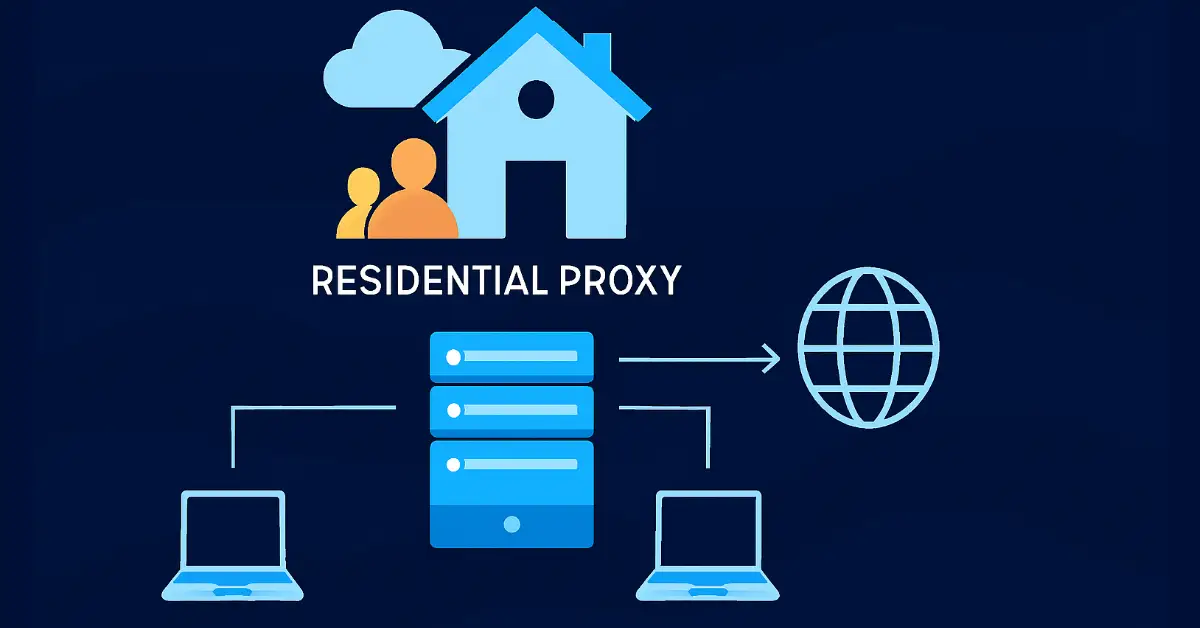
➢ Your app or device sends a request (for a webpage, API call or scraping task) to a proxy endpoint.
➢ The proxy forwards that request using one of its residential IPs (i.e., an IP from a real home network) to the target website.
➢ The target receives the request appearing to come from the residential IP, sends back the response, which the proxy relays to your app/device.
With the help of these steps, your actual IP stays hidden from the target site, only sharing the IP provided by the proxy. In addition to that, a few mechanics also include:
➢ IP rotation or sticking / session control (sticky IP = same IP for a session; rotating IP = new IP per request)
➢ DNS resolution and proxy authentication are handled by the provider
➢ Optionally, the proxy may select the best home network node in the requested geography
Where the IPs Come From
IP sourcing acts as a major pillar in creating a strong residential proxy network. For this, providers have to take from different models.
➢ Partnerships with ISPs or end users who opt in to share their home IPs via an SDK or app.
➢ Leasing or acquiring IP address blocks from residential users or device owners.
➢ Some networks may employ peer-to-peer models where users volunteer their idle devices’ IP addresses for rewards.
The importance of ethical sourcing is that transparency and written consent from users is crucial. The key challenges for providers are scaling to millions of IPs, rotating them in an efficient way, and keeping geographical diversity in order to target a city, region, or country. Some research even suggests concerns about risks when the sourcing is unclear (i.e., a home network used without consent).
Common, Legitimate Use Cases
Here are a few examples where a residential proxy server can be a notable and powerful tool.
➢ Geo location testing / Ad verification – Check how ads or websites appear to users in different countries or cities.
➢ Web scraping / Data collection – For websites with strong anti-bot measures, using residential IPs helps you look like real users.
➢ Account management / Social media / Market research – Managing multiple accounts across regions or monitoring region-specific social trends.
➢ Accessing region-locked content / Quality assurance across regions – Whether streaming, verifying e-commerce availability, or UX testing in local regions.
Each use case benefits from the fact that residential IPs mimic real-world homes and are less likely to be blocked or flagged.
Performance Reality
- Higher validity translates to lower risk of being blocked- due to the fact that you are using authentic home IPs, your traffic will be viewed as more ‘legitimate’ and not as likely to be blocked, as the majority of datacenter proxies do.
- Cost and latency trade-offs – residential proxies can tend to be more expensive AND can have a slightly higher latency since your traffic is routed through consumer networks.
- Static vs rotating IP addresses – it is important to consider whether you need the continuity of a session (i.e., being able to remain logged into the service); If so, utilizing a static residential IP may be more beneficial. If you need a large-scale or a variety of endpoints, then it’s better to use rotating proxies.
- Factors include – quality of the home ISP the IP is coming from, how many users share the same IP, geographic location, as well as time of day (network congestion), and the infrastructure of the providers.
Pro tip: Prior to going large-scale, test the proxy from your target geo location. Check the provider’s session/rotation policies, and monitor for DNS or IPv6 leaks, which can undermine anonymity.
Conclusion
Residential proxies offer the best of both worlds; they are both authentic and flexible, giving you access to geo-specific content, managing accounts, and scraping data, and doing it all with realistic home traffic. They still come with some trade-offs, such as being more expensive, marginally slower, and raising ethical questions about the original source of the data.
FAQs
What makes residential proxies harder to detect than datacenter proxies?
Residential proxies use real IPs from home networks via ISPs, mimicking everyday user traffic. This reduces blocks as sites view them as legitimate household connections, unlike datacenter IPs often flagged as server-based. Ideal for scraping or geo-testing.
How does the request path work in residential proxies?
Your app sends a request to the proxy endpoint; it forwards via a real home IP to the target site. The response routes back through the proxy, hiding your origin. Includes DNS handling and geo-selection for seamless, anonymous access.
What are the main sources of residential proxy IPs?
IPs come from ISP partnerships, user opt-ins via apps/SDKs, or peer-to-peer leasing with rewards. Ethical providers ensure consent and transparency, building diverse pools for global targeting while avoiding unauthorized home network use.
What are the performance trade-offs of residential proxies?
They offer high legitimacy to evade bans but cost more and have higher latency from consumer routing. Factors like ISP quality, sharing, and time-of-day congestion affect speed; test geo-specific proxies for optimal results in scraping or testing.
What are common legitimate use cases for residential proxies?
Geo-testing ads/websites, web scraping without detection, multi-account management on social platforms, market research, and accessing region-locked content. They enable accurate, stealthy data collection by simulating real users in specific locations.