AirPods Max 2 Review: Premium Sound and Comfort
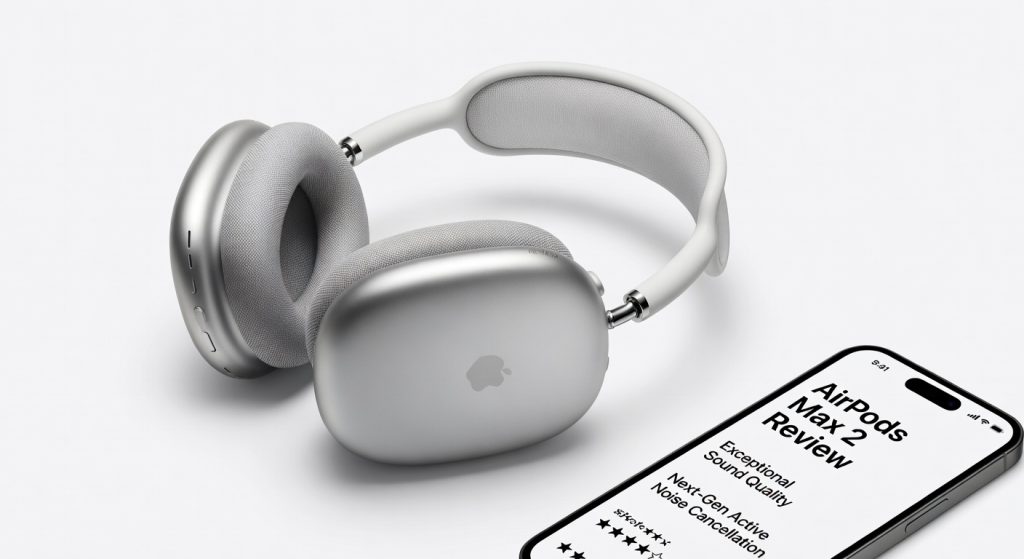
The Apple AirPods Max 2 brings the H2 chip, Bluetooth 5.3, and Adaptive Audio to Apple's flagship over-ear headphones, but its enterprise security story remains incomplete. For IT professionals and security-conscious organizations, the history of Bluetooth vulnerabilities, Find My network tracking exposure, and lack of MDM-native controls make corporate approval a complicated conversation. Readers familiar with enterprise Bluetooth security risks will find this review particularly relevant to endpoint audio policy decisions.
Bluetooth Security Vulnerabilities: A Corporate Wake-Up Call
The AirPods Max 2 upgrades to Bluetooth 5.3, a notable step from the 5.0 found in the original 2020 model. However, for enterprise security teams, the Bluetooth attack surface on Apple audio hardware has a documented history that deserves scrutiny. In June 2024, Apple patched CVE-2024-27867 — a critical authentication flaw that affected the AirPods Max, AirPods Pro, and several Beats models. The vulnerability allowed an attacker within Bluetooth range to spoof a previously paired device and gain unauthorized access to the headphones during a reconnection attempt, potentially enabling eavesdropping on active audio streams. Security researchers at Dark Reading confirmed that exploitation required only physical proximity — no prior authentication needed. While that specific CVE is now patched, it illustrates a systemic risk: Bluetooth headphones in corporate environments can become passive listening devices when security hygiene lapses. For organizations operating under ISO 27001, NIST SP 800-121 (Bluetooth security guidelines), or similar frameworks, deploying unmanaged Bluetooth audio peripherals in meeting rooms, C-suite offices, or secure operations centers represents a non-trivial policy exposure. The AirPods Max 2’s Bluetooth 5.3 implementation does narrow the legacy attack window — but the fundamental shared-medium nature of Bluetooth means proximity-based threats remain a category risk, not a solved problem.
Find My Network and Corporate Privacy Implications
The AirPods Max 2 participates in Apple’s Find My network by default — a crowdsourced location system that leverages hundreds of millions of Apple devices globally to relay Bluetooth signals from lost accessories back to their owner. While this is a useful consumer feature, it raises two distinct concerns in enterprise environments. First, an employee carrying AirPods Max 2 in or around secure facilities is passively broadcasting a trackable Bluetooth beacon. Third parties with access to iCloud-linked accounts — or, in the event of a compromised Apple ID — could use Find My data to infer physical presence, movement patterns, and facility access schedules. Second, the Find My network cannot be disabled by an IT administrator. There is no MDM profile or Apple Business Manager policy that allows corporate control over Find My participation on AirPods. This is fundamentally different from iPhone, iPad, or Mac management, where administrators can enforce device supervision, restrict iCloud features, and audit configurations. Security-conscious organizations should be aware that Apple's Find My network operates independently of corporate device management infrastructure, and AirPods Max 2 do not fall within the manageable device scope of Apple Business Manager or Jamf Pro at the time of this review.
H2 Chip: Privacy Features and On-Device Processing
One of the substantive enterprise-relevant improvements in AirPods Max 2 is the shift from the H1 to the H2 chip. From a privacy standpoint, the H2’s most significant characteristic is that all of its computational audio features — Adaptive Audio, Voice Isolation, Conversation Awareness, and Personalized Spatial Audio — run entirely on-device. No audio data is routed to Apple servers to enable these features; the processing happens locally in real time using the dual H2 chips embedded in each ear cup. This is materially different from cloud-dependent noise suppression solutions offered by some enterprise communications platforms, where audio streams may be briefly processed externally. For organizations concerned about call audio confidentiality, the H2’s on-device model is a legitimate privacy advantage. Apple’s platform security documentation confirms that AirPods audio features do not transmit audio content to Apple; the chips use the W3 wireless chip for device communication rather than any cloud-uplink pathway. However, it is important to note that Siri voice commands initiated via AirPods Max 2 are handled differently — Siri requests are processed through Apple’s servers unless the user is using on-device Siri introduced in Apple Intelligence, which requires a compatible iPhone 17 or later.
USB-C Attack Surface in Secure Environments
The USB-C port on AirPods Max 2 serves two functions: charging and wired digital audio via the included cable. For audio quality purposes, this is excellent — it enables 24-bit/48 kHz lossless playback that bypasses Bluetooth’s inherent compression and reduces the wireless attack surface entirely. However, in high-security organizational environments, the USB-C port itself becomes an attack surface consideration. In environments governed by strict endpoint security policies — defense contractors, financial institutions, law enforcement, or government agencies — USB-C ports on peripherals are sometimes flagged by security reviews because they can theoretically be exploited for data exfiltration, BadUSB-style injection attacks, or as a physical access point during device handling. It is worth noting that the AirPods Max 2 USB-C port is not a general-purpose data port equivalent to a computer’s USB-C; its primary functions are charging and audio. There is no publicly documented exploit using the AirPods Max USB-C port for malicious purposes as of this review. However, organizations that operate under DLP (Data Loss Prevention) hardware policies or require peripheral approval via security review boards should account for this port in their risk assessments. For most enterprises, the risk level here is low to moderate — but it is not zero, and it should be formally evaluated rather than assumed benign.
Corporate Meeting Confidentiality and Audio Policy
The scenario most relevant to IT security managers is this: an employee uses AirPods Max 2 during a sensitive boardroom call, a negotiation, or a classified project briefing. What are the actual risks? The most credible threat is a proximity-based Bluetooth intercept — particularly in conference centers, airports, or co-working environments where an adversary could be within the approximately 10-meter Bluetooth range without arousing suspicion. As documented in red team research published by Edgescan, spoofed Bluetooth device attacks have been demonstrated in controlled environments to intercept audio from headphones during active calls. While the CVE-2024-27867 flaw has been patched, the general class of Bluetooth interception attack is not fully eliminated by any firmware update. Additionally, the Conversation Awareness feature — which activates the external microphones when the wearer starts speaking — means the microphone array is continuously monitoring environmental audio to detect speech. For personnel operating in SCIF (Sensitive Compartmented Information Facility) environments or equivalent, this places AirPods Max 2 firmly outside approved peripheral lists. For standard corporate environments, IT security policy should address whether Bluetooth headphones are permissible during meetings classified as confidential, and should establish a clear firmware update mandate for any approved AirPods Max 2 units since Apple’s firmware delivery is paired-device-dependent rather than IT-push controlled.
Enterprise Audio Hardware Approval: What IT Teams Need to Know
Organizations considering AirPods Max 2 for corporate deployment — whether through a BYOD policy or as a provisioned peripheral — should evaluate the device against their existing hardware approval process. Key questions for the approval checklist include: Does the device support MDM enrollment or centralized configuration? (Answer: No — AirPods Max 2 are not MDM-enrollable.) Can Bluetooth be remotely disabled or scoped? (Answer: No — this is user-controlled.) Is firmware update management available through IT tooling? (Answer: No — firmware updates require proximity to a paired consumer Apple device.) Is the Find My location beacon controllable by the organization? (Answer: No.) For many large enterprises, particularly those in regulated sectors such as healthcare (HIPAA), finance (SOX, PCI-DSS), and government (FedRAMP, CMMC), these answers may result in AirPods Max 2 failing a formal peripheral approval review. Organizations that do choose to deploy or permit AirPods Max 2 should include Bluetooth security policies in their acceptable use agreements, mandate regular firmware verification, and consider restricting AirPods use in meeting rooms designated for confidential discussions. The NIST Special Publication 800-121 Guide to Bluetooth Security remains the most practical federal reference for framing these policies.
Verdict
The Apple AirPods Max 2 is an exceptional consumer audio product that lands in an awkward position when evaluated against enterprise security requirements. The H2 chip’s on-device audio processing, Bluetooth 5.3 upgrade, and lossless USB-C audio are genuine improvements — and the best-in-class ANC makes these headphones highly productive for focus work in noisy open-plan offices. However, the lack of MDM support, the absence of IT-controlled firmware management, the persistent Find My network exposure, and the historical Bluetooth vulnerability record mean that enterprise IT and security teams cannot yet approve AirPods Max 2 as a managed corporate peripheral in sensitive environments.
Rating: 3.8 / 5 — Premium audio with unresolved enterprise management and Bluetooth security gaps that matter in regulated and high-security environments.
Reviewed based on Apple Newsroom AirPods Max 2 announcement, Apple CVE-2024-27867 security advisory, NIST SP 800-121 Bluetooth Security Guide, MacRumors AirPods Max 2 coverage, Macworld AirPods Max 2 breakdown, Dark Reading CVE-2024-27867 — July 2026.
Frequently Asked Questions
Is the Apple AirPods Max 2 safe to use in corporate meetings?
What was CVE-2024-27867 and does it affect AirPods Max 2?
Can Apple AirPods Max 2 be managed through MDM or Apple Business Manager?
Does the Find My network on AirPods Max 2 pose a security risk for employees?
What does the H2 chip mean for audio privacy during enterprise calls?
Does USB-C on AirPods Max 2 create a security risk in regulated environments?
Are AirPods Max 2 approved for use in government or defense environments?
How does AirPods Max 2 Bluetooth 5.3 improve security over the original?
+Pros
- H2 chip delivers class-leading ANC and audio processing for open-plan offices and travel
- Bluetooth 5.3 reduces exposure to older BT protocol-level weaknesses
- Lossless USB-C audio enables secure wired operation that bypasses wireless attack surface entirely
- Voice Isolation meaningfully reduces ambient audio leakage on corporate calls
- Aluminum and mesh build quality is premium and durable for daily enterprise use
−Cons
- No MDM or enterprise enrollment support — cannot be provisioned via Apple Business Manager
- Find My network participation cannot be permanently disabled by an administrator
- USB-C port introduces a physical attack surface risk in high-security environments
- Historical CVE-2024-27867 exposed the entire AirPods Max lineup to Bluetooth spoofing
- Firmware updates are user-controlled via consumer iPhone pairing — no IT-managed update pathway