Microsoft Surface Pro 7 Review: A 2019 Classic That Still Makes Sense at the Right Price
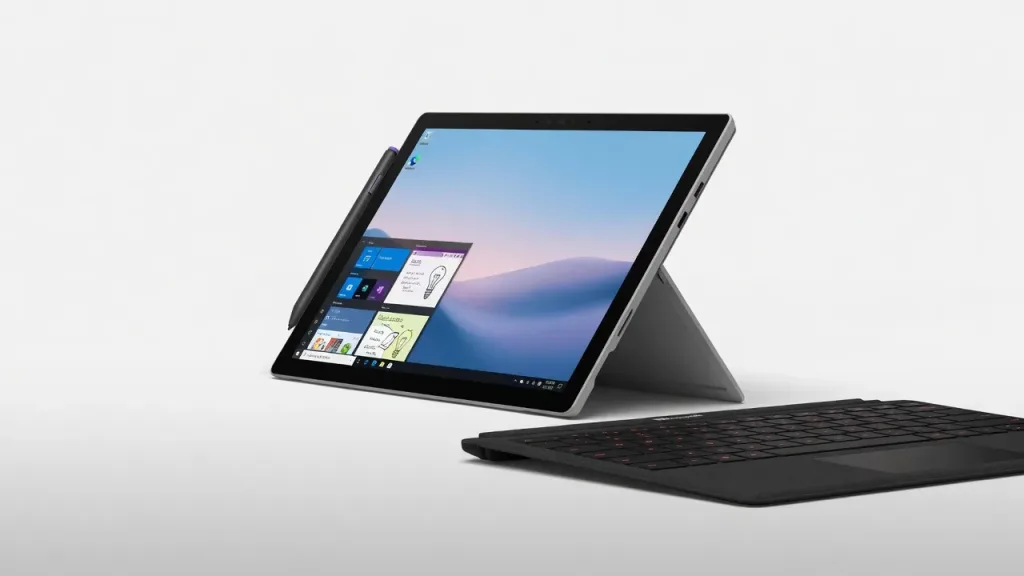
The Microsoft Surface Pro 7 launched in October 2019 — nearly seven years ago. In 2026, it is not a device you buy new (Microsoft discontinued direct sales years ago), but it remains widely available refurbished at $150–300, and at that price it tells a different story. For IT professionals, students, or enterprise users who need a portable Windows 11 device for office productivity, remote desktop work, or field tasks, a well-maintained Surface Pro 7 still holds up — with honest caveats about its battery life, dated bezels, and the absence of Thunderbolt. If you are considering a new 2-in-1, look at the Surface Pro 11 instead. If you are budget-constrained and need a reliable Windows tablet, read on.
What It Is
The Surface Pro 7 is a 12.3-inch Windows 2-in-1 tablet from Microsoft’s Surface line, released on October 23, 2019. It introduced 10th-generation Intel processors and a USB-C port to the Surface Pro lineup — the first USB-C in the series — while keeping the iconic kickstand design, 3:2 aspect ratio display, and Type Cover keyboard system unchanged from its predecessors.
It was succeeded by the Surface Pro 8 (2021), Surface Pro 9 (2022), Surface Pro 10 (2024), and Surface Pro 11 (2024/2025). The Surface Pro 7 is no longer sold new through Microsoft’s official store.
Design and Build
The Surface Pro 7 keeps the same aluminum chassis Microsoft has used since the Surface Pro 4. At 292 x 201 x 8.5mm and 770g (1.7 lbs), it is genuinely portable. The rear kickstand adjusts from 0 to 165 degrees — enough range for lap use, desk work, and near-flat drawing mode.
The magnesium-aluminum build feels solid and premium. Available in Platinum and Matte Black, both colorways have held up well over years of use, which is why refurbished units frequently appear in good cosmetic condition.
The main design weakness — acknowledged by every reviewer at launch — is the bezel size. The roughly 12mm bezels on all four sides were already thick by 2019 standards, and look noticeably dated in 2026. The screen-to-body ratio sits at approximately 76.7%. The Surface Pro X (launched the same day) had dramatically thinner bezels; the Pro 7 never caught up.
Display
The 12.3-inch PixelSense display at 2736 x 1824 resolution (267 ppi) and 3:2 aspect ratio is one of the Surface Pro 7’s lasting strengths. The 3:2 format provides more vertical space than 16:9 laptops — genuinely useful for reading documents, spreadsheets, and code without scrolling. Peak brightness is 400 nits, which is adequate for most indoor environments but struggles in direct sunlight.
The display supports 10-point multitouch and Surface Pen input with 4096 levels of pressure sensitivity (Pen sold separately, $99). Color accuracy and sharpness remain competitive for productivity tasks even against 2026 standards — 267 ppi is still a reasonable resolution for a 12-inch screen.
What it lacks: HDR support, high refresh rate (60Hz only), and wide color gamut coverage. These omissions were noted at launch in 2019 and remain unchanged.
Performance
The Surface Pro 7 shipped with 10th-generation Intel “Ice Lake” processors:
| Configuration | CPU | RAM | Storage | Launch Price |
|---|---|---|---|---|
| Entry | Core i3-1005G1 | 4GB | 128GB | $749 |
| Mid | Core i5-1035G4 | 8GB | 128GB | $899 |
| Recommended | Core i5-1035G4 | 8GB | 256GB | $1,199 |
| High-end | Core i7-1065G7 | 16GB | 256GB | $1,499 |
| Top | Core i7-1065G7 | 16GB | 512GB/1TB | $1,899–$2,299 |
In 2026, the Core i5 + 8GB configuration is the practical minimum for comfortable Windows 11 use. The Core i3 + 4GB configuration struggles with multiple browser tabs, Teams calls, and modern productivity software simultaneously. Geekbench 6 multi-core scores for the i5 model sit around 2,400–2,500 points — capable for office work, email, and remote desktop sessions, but not for video editing or heavy multitasking.
The Intel Iris Plus integrated graphics handle basic display output and video calls competently. Gaming or GPU-intensive tasks are not realistic use cases for this hardware.
Connectivity — The USB-C Caveat
The Surface Pro 7 introduced USB-C to the Surface line — a genuine improvement. However, it is USB-C 3.2 Gen 2 (10Gbps), not Thunderbolt 3. This distinction matters for IT professionals who use:
- High-speed external storage arrays (Thunderbolt 3 docks won’t work)
- Dual 4K external monitors via a single cable (limited without TB3)
- eGPU enclosures (not supported without Thunderbolt)
Full connectivity:
- 1x USB-A 3.1 Gen 1
- 1x USB-C 3.2 Gen 2 (no Thunderbolt)
- 1x Surface Connect port (proprietary charging)
- Surface Pro keyboard connector (bottom magnetic)
- 3.5mm headphone jack
- Wi-Fi 6 (802.11ax)
- Bluetooth 5.0
- microSDXC card reader
- Windows Hello (IR camera, front-facing)
No LTE option exists on the Surface Pro 7 — for cellular connectivity, the Surface Pro X (ARM) or newer Surface Pro 9/10/11 LTE variants are required.
Battery Life
Battery life was the Surface Pro 7’s most criticized specification at launch, and it remains a legitimate concern. Microsoft rated it at up to 10.5 hours — a figure that reflected mixed active use and standby, not sustained productivity work.
Real-world testing from multiple sources at launch consistently found 5–7 hours of active use under typical productivity workloads (browser, Office, Teams). This was worse than the Surface Pro 6 it replaced, a regression attributed to the 10th-gen Intel chip’s power characteristics.
In 2026, with battery degradation on used units, expect 4–6 hours of active use on a well-maintained refurbished device. Units with heavy previous use may perform worse. This is the strongest argument for buying from a reputable refurbisher that provides a warranty and has tested battery health.
The Type Cover Keyboard
The Surface Pro Type Cover ($129–159 original price, widely available used for $30–60) is consistently rated as one of the best detachable keyboards available. Backlit keys, good travel, well-spaced layout, and an integrated trackpad that works reliably. The Signature version adds Alcantara fabric palm rest.
The keyboard is not included in the tablet price — factor this into your total cost calculation. A complete Surface Pro 7 setup (tablet + keyboard + used Surface Pen) typically runs $250–450 refurbished in 2026, depending on configuration and condition.
Windows 11 Compatibility
The Surface Pro 7 is officially compatible with Windows 11, meeting the TPM 2.0 and hardware requirements. Microsoft officially supported the Surface Pro 7 with Windows 11 and provided security updates — check Microsoft’s Surface support page for the current end-of-support date, as this changes over time.
For enterprise deployments: the Surface Pro 7 supports Intune management, Autopilot, BitLocker, Windows Hello for Business, and standard enterprise security policies — all relevant for IT administrators deploying refurbished fleet devices.
Who Should Consider the Surface Pro 7 in 2026
Reasonable use cases:
- IT field technicians who need a portable Windows device for remote desktop, SSH, network management tools, and documentation
- Students or secondary education deployments where budget is constrained and Office 365 productivity is the primary workload
- Enterprise refurbishment programs deploying standardized Windows 11 devices at low cost
- Anyone replacing a Surface Pro 4/5/6 who wants to stay in the Surface ecosystem at low cost
Who should look at newer options:
- Anyone who needs more than 6 hours of battery life in regular use
- Professionals who need Thunderbolt docks, eGPU, or dual 4K display support
- Video editors, developers with heavy compile workloads, or anyone doing CPU-intensive tasks
- New buyers with budget for Surface Pro 9 or 10 — the newer generations offer substantially better performance, battery life, and connectivity
Compared to Current Alternatives
vs. Surface Pro 11 ($999+): The Pro 11 uses Qualcomm Snapdragon X Elite or Intel Core Ultra, offers substantially better battery life, thinner bezels, Thunderbolt 4, and Copilot+ AI features. If budget allows, buy the Pro 11 instead.
vs. Surface Pro 9 ($600–700 refurbished): The Pro 9 is a meaningful step up — better performance, Thunderbolt 4, thinner bezels, optional LTE. For roughly $200–300 more than a Pro 7 refurbished, the Pro 9 is a better investment.vs. iPad Pro (M4): For Windows-specific workflows (Active Directory, enterprise software, Windows-only tools), the Surface Pro 7 is the only choice. For general productivity where macOS/iPadOS apps work, the iPad Pro M4 is faster, has better battery life, and a better display — but requires buying into Apple’s ecosystem.
Final Verdict
The Microsoft Surface Pro 7 is a well-built, capable Windows tablet that has aged gracefully in some ways and honestly in others. Its PixelSense display remains excellent, the build quality holds up well in the refurbished market, and Windows 11 compatibility keeps it relevant for enterprise and productivity use.
What it cannot escape is its 2019 hardware: the battery life was poor at launch and only degrades over time, the thick bezels look dated, and the absence of Thunderbolt limits its use as a desktop replacement with high-bandwidth peripherals. At the right refurbished price — $150–250 for an i5/8GB unit — it is a legitimate budget Windows productivity device. Above $300, you are paying too much for hardware this old.
For IT professionals considering a refurbished fleet purchase: the Surface Pro 7 handles remote desktop, SSH clients, documentation, and standard enterprise software competently. For individuals looking for a new 2-in-1 Windows device: skip to the Surface Pro 9 or Surface Pro 11.
Note: The Surface Pro 7 is no longer sold new. Prices and availability refer to the refurbished and used market as of mid-2026.
Frequently Asked Questions
Is the Surface Pro 7 still worth buying in 2026?
Does the Surface Pro 7 support Windows 11?
What is the minimum configuration to buy?
Does it have LTE?
What accessories do I need?
+Pros
- 3:2 display ratio is genuinely better for productivity than 16:9 — more vertical space for documents, code, and spreadsheets
- Build quality remains excellent — magnesium-aluminum chassis holds up well in refurbished condition
- Best-in-class detachable keyboard (Type Cover) when purchased separately
- Windows 11 compatible with full enterprise management support (Intune, Autopilot, BitLocker)
- Wi-Fi 6 is current and fast
- Refurbished pricing ($150–300) makes it competitive value for basic Windows productivity
−Cons
- Battery life is genuinely poor — 5–7 hours new, likely 4–6 hours on used units
- No Thunderbolt — USB-C only, which limits dock and external display flexibility
- Thick bezels look dated against 2026 competition
- 10th-gen Intel is showing its age for heavy multitasking and modern AI workloads
- Type Cover, Surface Pen sold separately — adds $130–260 to total cost
- Core i3 / 4GB configurations are not recommended for Windows 11 in 2026