
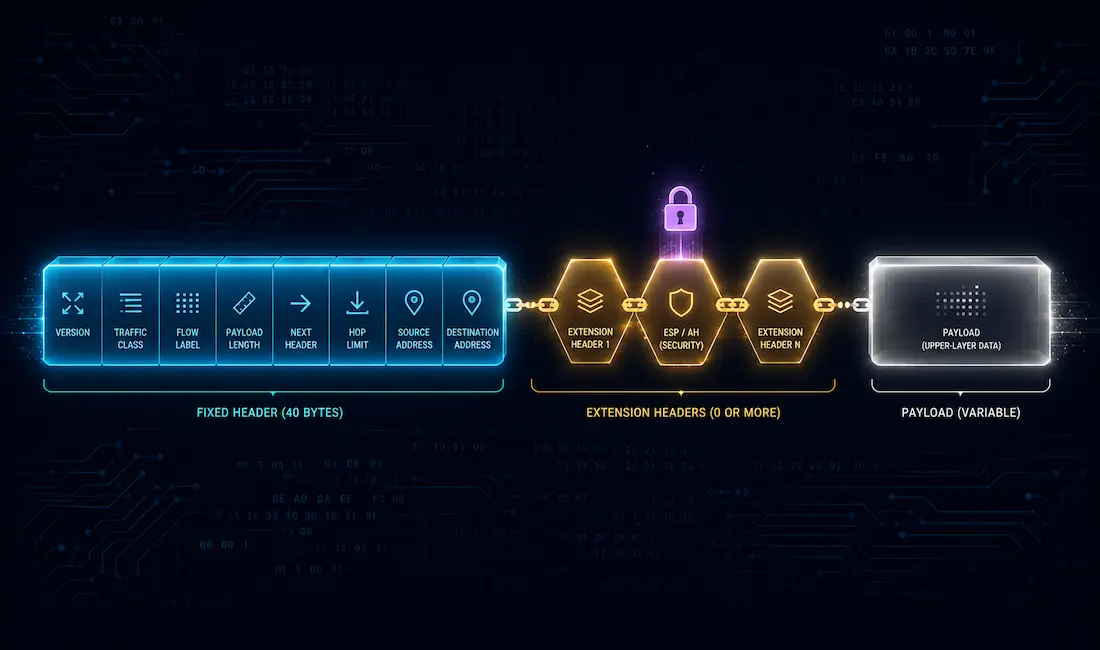
IPv6 is the improved version of the Internet Protocol, and the IPv6 header is one of its most significant improvements over the IPv4 header. The header format has been dramatically simplified: some IPv4 header fields have been removed entirely, others have moved into optional IPv6 Extension Headers, and the fields that remain are streamlined for faster processing at every router along a packet’s path.
The IPv6 header is exactly twice the size of the IPv4 header — 40 octets versus 20 octets — largely because IPv6 addresses are 128 bits long instead of IPv4’s 32 bits. Despite being physically larger, the IPv6 header is actually simpler to process, since fields like the IPv4 Options field and Header Checksum have been removed and replaced with more efficient functions handled through IPv6 Extension Headers instead.
IPv4 Header vs. IPv6 Header
The IPv4 header contains 20 octets and 12 basic header fields, not counting the optional Options field. When IPv6 was designed, some of those fields were kept as-is, some were renamed or repositioned, and some were dropped entirely because routers no longer needed to process them on every hop.
| IPv4 Field | IPv6 Equivalent | What Changed |
|---|---|---|
| Version | Version | Unchanged — value 0110 for IPv6 |
| Type of Service (ToS) | Traffic Class | Renamed, same DSCP/ECN structure |
| Total Length | Payload Length | Now measures only the payload, not the whole packet |
| Identification, Flags, Fragment Offset | (moved to Fragment Extension Header) | Removed from the fixed header; only used when fragmentation actually occurs |
| Time to Live (TTL) | Hop Limit | Renamed, same decrement-per-hop behavior |
| Protocol | Next Header | Renamed, same function, but can also point to an extension header |
| Header Checksum | (removed entirely) | Dropped — upper-layer and link-layer checksums already cover this |
| Source Address | Source Address | Same purpose, expanded from 32 bits to 128 bits |
| Destination Address | Destination Address | Same purpose, expanded from 32 bits to 128 bits |
| Options | (moved to Extension Headers) | No longer part of the fixed header at all |
| (none) | Flow Label | New field, not present in IPv4 |
The result is a fixed IPv6 header made up of exactly 8 fields, compared to IPv4’s 12 (not counting Options) — fewer fields for every router to inspect on every packet, which is a meaningful part of why IPv6 forwarding can be more efficient at scale.
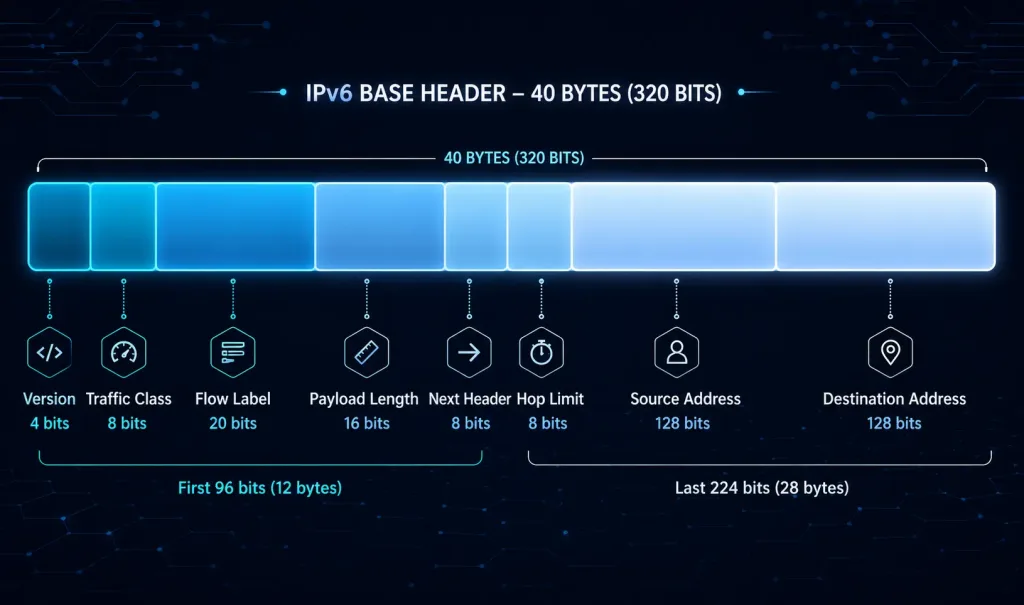
The 8 IPv6 Header Fields
- Version — A 4-bit field with a fixed binary value of
0110, identifying the packet as IPv6. - Traffic Class — An 8-bit field equivalent to IPv4’s Differentiated Services (DS) field, split into two parts: the first 6 bits carry the Differentiated Services Code Point (DSCP), telling routers what class of service to apply to the packet, and the last 2 bits carry Explicit Congestion Notification (ECN) information.
- Flow Label — A 20-bit field that lets all packets belonging to the same flow — for example, a single real-time media or streaming session — receive consistent handling by routers along the path. The source device labels a sequence of related packets so routers can recognize they belong together, which lets routers identify packets belonging to the same flow, so they can be treated consistently along the path — a building block for QoS handling, though the field itself doesn’t actively prevent reordering or guarantee QoS outcomes on its own.
- Payload Length — A 16-bit field indicating the length of the data that follows the IPv6 header (including any extension headers), telling routers exactly how much data to expect in the packet’s payload.
- Next Header — An 8-bit field equivalent to IPv4’s Protocol field. It indicates either the type of Extension Header that immediately follows, or, if no extension header is present, the upper-layer protocol carried in the payload (for example, 6 for TCP, 17 for UDP, or 58 for ICMPv6) — using the same protocol numbering IPv4 already uses.
- Hop Limit — An 8-bit field that replaces IPv4’s TTL, preventing packets from looping in the network indefinitely. Its value is decremented by 1 at each router that forwards the packet; when it reaches 0, the packet is discarded and an ICMPv6 Time Exceeded message is sent back to the originating host to indicate the packet never reached its destination.
- Source Address — A 128-bit field identifying the IPv6 address of the sending host.
- Destination Address — A 128-bit field identifying the IPv6 address of the receiving host.
These 8 fields are fixed and always present in every IPv6 packet — there’s no equivalent to IPv4’s variable-length Options field cluttering the base header.
IPv6 Extension Headers
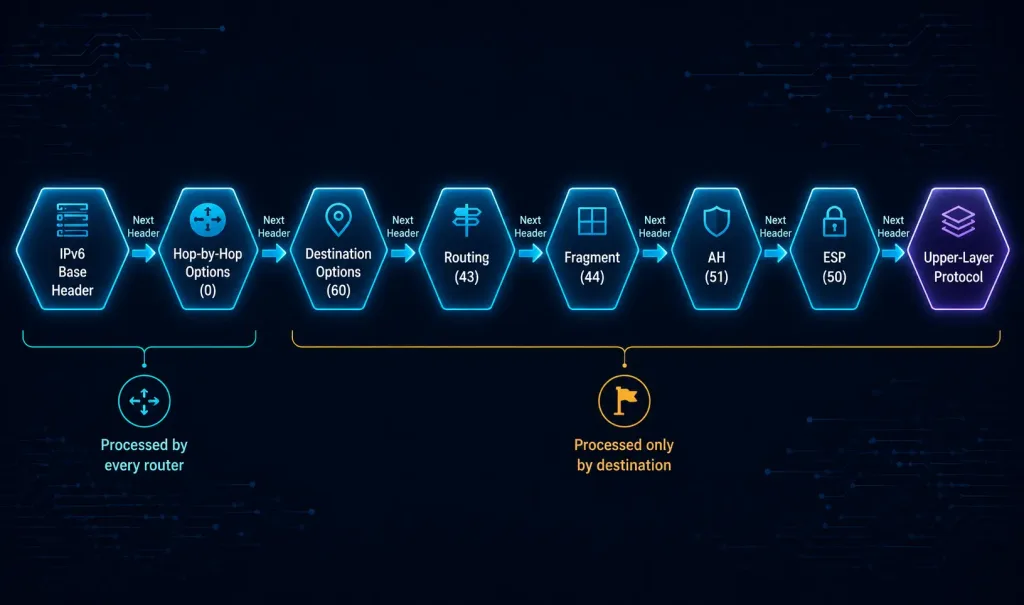
An IPv6 packet may also carry one or more Extension Headers (EH), which provide optional network-layer information without adding permanent overhead to every single packet. Extension headers sit between the fixed IPv6 header and the upper-layer payload, chained together using each header’s own Next Header field — the same field mechanism used by the base IPv6 header itself.
The commonly defined IPv6 extension headers, identified by their Next Header value, are:
| Extension Header | Next Header Value | Purpose |
|---|---|---|
| Hop-by-Hop Options | 0 | Carries information examined by every router along the path; must appear immediately after the base header if present |
| Destination Options | 60 | Carries information examined only by the destination node(s) |
| Routing | 43 | Lists intermediate nodes the packet should visit on its way to the destination |
| Fragment | 44 | Carries fragmentation information, used only by the sending and receiving hosts, since routers no longer fragment packets in transit under IPv6 |
| Authentication Header (AH) | 51 | Provides authentication and integrity verification for the packet |
| Encapsulating Security Payload (ESP) | 50 | Provides encryption, authentication, and integrity, forming the basis of IPsec for IPv6 |
| Mobility Header | 135 | Used for Mobile IPv6 signaling messages |
Except for the Hop-by-Hop Options header — which must come immediately after the base IPv6 header if it’s present at all — extension headers should generally follow the order shown above, since each one may depend on information processed by the header before it. For example, security headers (AH, ESP) are placed near the end of the chain because the packet generally needs to be fully reassembled from any fragments before authentication or decryption makes sense.
Only Hop-by-Hop Options is processed by every router a packet passes through. The Routing header is a partial exception — it’s examined by the specific intermediate nodes it names along the path. Every other extension header is examined only by the packet’s final destination node, which is a deliberate design choice that keeps per-hop router processing fast even when a packet carries several extension headers.
Why This Design Matters for Routing Performance
The shift from IPv4’s variable-length Options field to IPv6’s chained extension headers isn’t just a cosmetic reorganization — it changes what a router actually has to inspect on every packet it forwards. Under IPv4, a router technically needs to check whether Options are present and how long they are before it can find the payload. Under IPv6, a router forwarding a typical packet only needs to read the fixed 40-byte header and, in the common case where Hop-by-Hop Options isn’t present, can immediately hand the packet off based on the Next Header value pointing straight to the upper-layer protocol — without needing to parse any extension headers at all, since those are meant for the destination node, not for routers in between.
Viewing IPv6 Headers in Practice
For network engineers, seeing these fields in an actual packet capture makes the theory concrete. Capturing IPv6 traffic in Wireshark and expanding the “Internet Protocol Version 6” layer of any packet shows each of the 8 fixed fields discussed above laid out individually — Version, Traffic Class, Flow Label, Payload Length, Next Header, Hop Limit, Source Address, and Destination Address — along with any extension headers present, each shown as its own expandable layer between the base IPv6 header and the upper-layer protocol.
On Cisco IOS, the show ipv6 interface command displays the IPv6 addresses and related configuration for an interface, which is useful context when trying to match captured Source and Destination Address fields back to specific devices on your network:
Router# show ipv6 interface GigabitEthernet0/1
GigabitEthernet0/1 is up, line protocol is up
  IPv6 is enabled, link-local address is FE80::A8BB:CCFF:FE01:2C00
  Global unicast address(es):
    2001:DB8:1::1, subnet is 2001:DB8:1::/64
  Joined group address(es):
    FF02::1
    FF02::2
    FF02::1:FF01:2C00
  MTU is 1500 bytes
Comparing a live packet capture against the field-by-field breakdown above is a genuinely useful way to reinforce how the fixed header and any extension headers actually chain together in real traffic, rather than just memorizing field names and sizes.
FAQs
What are the mandatory fields in an IPv6 header?
The IPv6 header includes exactly 8 fixed fields that appear in every IPv6 packet: Version, Traffic Class, Flow Label, Payload Length, Next Header, Hop Limit, Source Address, and Destination Address. Unlike IPv4, there’s no variable-length Options field mixed into this fixed header — any optional information is instead carried in separate, chained Extension Headers that sit between the fixed header and the payload. This fixed 40-byte structure is part of why IPv6 headers are faster for routers to process than IPv4’s variable-length header.
How does the IPv6 header improve efficiency over IPv4?
IPv6 simplifies the header down to 8 fixed fields, compared to IPv4’s 12 basic fields (not counting Options), which reduces the amount of processing every router along a packet’s path has to do. Fields that don’t need per-hop processing — like fragmentation information and the header checksum — have either moved into optional Extension Headers examined only by the destination, or been removed entirely, since upper-layer and link-layer checksums already cover data integrity. The result is a header that’s larger in raw size (40 bytes vs. 20) but genuinely faster and simpler for routers to parse and forward.
What is the purpose of the Next Header field?
The Next Header field is an 8-bit field that tells a router or host what comes immediately after the current header — either the type of Extension Header that follows (using values like 0 for Hop-by-Hop Options or 43 for Routing), or, once there are no more extension headers left, the upper-layer protocol carried in the payload (such as 6 for TCP or 17 for UDP). This chaining mechanism is what lets IPv6 attach any number of optional extension headers to a packet in the first place, since each header’s own Next Header field points to whatever comes next, forming a linked chain that ends at the actual payload.
Why are extension headers used in IPv6?
Extension headers let IPv6 support optional features — routing instructions, fragmentation details, authentication, encryption, and more — without permanently bloating the fixed base header that every single packet has to carry. Because only Hop-by-Hop Options is processed by routers along the path, while every other extension header is examined solely by the destination node, most routers never have to parse this optional information at all, keeping per-hop forwarding fast even for packets that do carry several extension headers. This is a deliberate architectural improvement over IPv4, where the variable-length Options field lived directly inside the header every router had to inspect.
How does the Flow Label field optimize traffic?
The Flow Label is a 20-bit field that lets a source device tag a sequence of related packets — such as all packets belonging to a single video call or streaming session — so that routers along the path can recognize they belong to the same flow and handle them consistently. This helps avoid packet reordering for latency-sensitive, real-time traffic, since routers can make faster forwarding decisions for a recognized flow without needing to fully re-inspect deeper packet details each time. Flow Label support also enables more consistent Quality of Service (QoS) treatment for a given flow across a multi-hop path, particularly useful for applications like voice and video where consistent, in-order delivery matters more than for typical bulk data transfer.



