
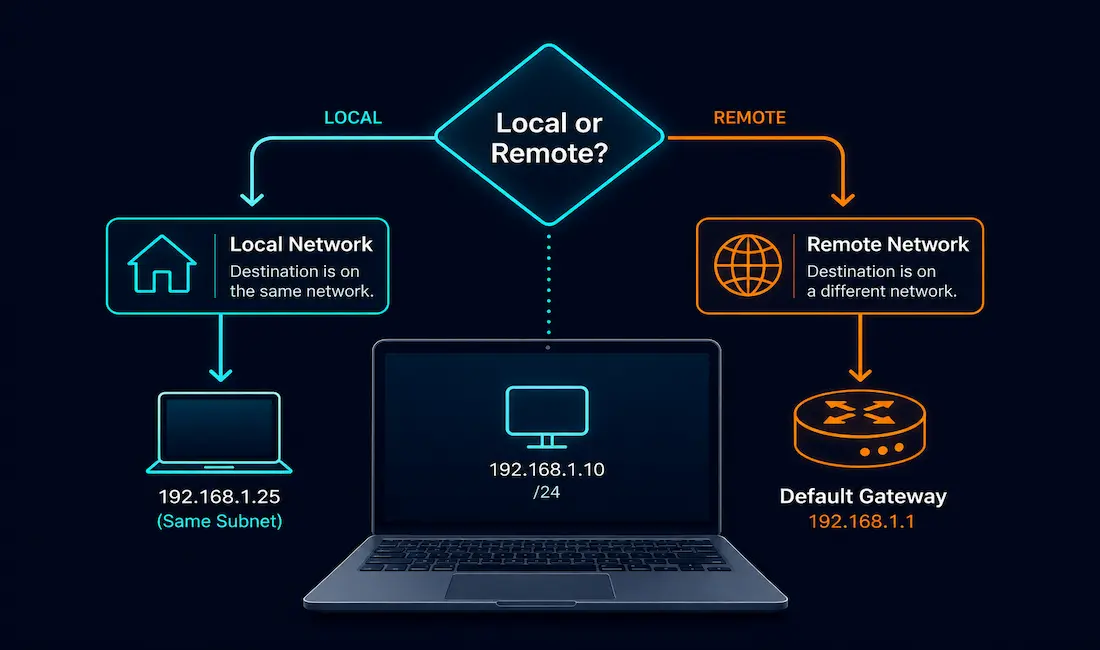
Every networked device, whether it’s a dedicated router or an ordinary laptop, has to decide how to get a packet toward its destination. Routers specialize in this, but end hosts, PCs, servers, phones, make their own forwarding decisions too, using a much simpler process built on subnetting, a minimal routing table, and address resolution. This guide walks through exactly how that process works, step by step, with the commands you’d actually use to inspect or troubleshoot it.
Three Categories of Forwarding Decisions
Every device, host or router, ultimately sorts an outgoing packet into one of three categories.
Itself
A host can send traffic to itself using the loopback address, 127.0.0.1 for IPv4 or ::1 for IPv6. This is genuinely useful for testing whether a device’s own TCP/IP stack is functioning correctly, independent of any actual network connectivity, since loopback traffic never leaves the device at all.
Local Host Forwarding
If the sending and receiving hosts share the same network address, they’re on the same local network and can communicate directly, without needing any intermediate routing device. When a host sends a packet to another device on its own subnet, that packet goes out the host’s interface, potentially through a switch, and directly to the destination device’s interface.
Remote Host Forwarding
If the sending and receiving hosts don’t share the same network address, they’re remote to each other, even if they’re both technically reachable, like most destinations elsewhere on the internet. Reaching a remote host requires routing: the source device sends the packet to its default gateway, a router connected to the local network, which then takes responsibility for getting the packet closer to its actual destination.
How Hosts Make Forwarding Decisions, Step by Step
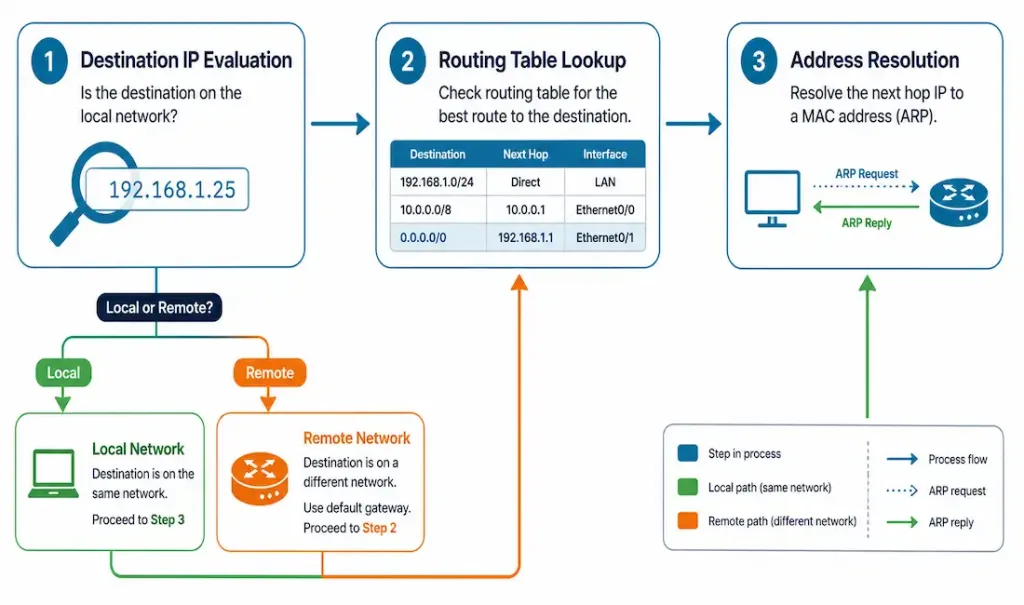
Step 1: Destination IP Evaluation
A host first checks whether a packet’s destination IP address is local or remote, using its own subnet mask to make that determination.
For example, a host with IP address 192.168.1.10/24 calculates its own network as 192.168.1.0/24. From there:
- Destination
192.168.1.25→ local network, since it falls within the same192.168.1.0/24range. - Destination
8.8.8.8→ remote network, since it clearly falls outside that range.
To check your own IP and subnet configuration:
# Linux
ip addr show

# Windows
ipconfig /all
Step 2: Routing Table Lookup
If the destination is remote, the host checks its routing table to determine the next hop, almost always the default gateway for a typical end-user device. Routing table entries are matched using longest prefix match, meaning the most specific matching entry wins over a more general one.
A typical simple host routing table looks something like this:
Destination     Gateway         Genmask         Flags
192.168.1.0     0.0.0.0         255.255.255.0   U      (Local network)
0.0.0.0         192.168.1.1     0.0.0.0         UG     (Default gateway)
To view your routing table:
# Linux
ip route show

# Windows
route print
Step 3: Address Resolution (ARP or IPv6 NDP)
Once the host knows where a packet needs to go next, local destination or default gateway, it still needs a MAC address to actually build the Ethernet frame.
For local traffic, the host uses ARP (IPv4) or Neighbor Discovery Protocol (IPv6) to resolve the destination device’s own MAC address directly.
For remote traffic, the host resolves the default gateway’s MAC address instead, since the packet’s actual destination is beyond the local segment; the gateway takes over routing responsibility from there.
To check your ARP cache:
# View ARP cache
arp -a
IPv6 replaces ARP entirely with Neighbor Discovery Protocol. To view IPv6 neighbor entries:
ip -6 neigh showAdvanced Scenarios
Multiple Gateways and Static Routes
Hosts can be configured with routes for specific networks beyond just a single default gateway, common in VPN configurations where certain destination ranges need to go through a different path.
# Add a static route on Linux
ip route add 172.16.0.0/16 via 192.168.1.2

# On Windows
route add 172.16.0.0 MASK 255.255.0.0 192.168.1.2
IPv6-Specific Forwarding Behavior
IPv6 hosts use Neighbor Discovery Protocol for MAC resolution, and they commonly learn their default gateway automatically through Router Advertisement (RA) messages, rather than requiring the gateway to be manually configured the way IPv4 often does.
Troubleshooting Forwarding Issues
“Destination Host Unreachable” errors. Check the subnet mask and default gateway configuration first, since an incorrect subnet mask can cause a host to misclassify a local destination as remote, or vice versa. Verifying ARP cache entries for the relevant address is a useful next step, since an incorrect or missing entry can produce this exact symptom even when the rest of the configuration is otherwise correct.
Default gateway failures. Confirm basic reachability to the gateway itself before troubleshooting further downstream, since a gateway that can’t be reached directly is almost certainly the root cause of any remote connectivity failure rather than something further along the path:
# Ping the gateway
ping 192.168.1.1

# Trace the route
traceroute 8.8.8.8   # Linux
tracert 8.8.8.8       # Windows
Stale ARP cache entries. A device that’s changed its MAC address, common after hardware replacement or certain virtualization scenarios, can leave a stale entry in another device’s ARP cache, causing intermittent or failed connectivity. Clear it directly:
# Windows
arp -d <ip>

# Linux
ip neigh flush <ip>
This forces a fresh ARP request the next time that address needs to be reached, which is usually enough to resolve connectivity that seemingly broke for no obvious reason.
IPv6-specific forwarding issues. Use ip -6 route show to check the IPv6 routing table directly. For basic reachability testing, modern systems generally handle this through the standard ping command with an IPv6 destination on Linux, or ping -6 specifically on Windows; older systems sometimes required a separate ping6 utility, which is largely unnecessary on current operating systems.
Conclusion
Understanding forwarding decisions is genuinely useful for troubleshooting connectivity issues and for understanding what’s actually happening under the hood every time a device sends traffic. Hosts rely on a comparatively simple process, subnetting, a minimal routing table, and ARP or NDP, while routers handle the much more complex job of maintaining full routing tables and running dynamic routing protocols across many networks simultaneously. Tools like ip route, arp, and traceroute turn this process from something abstract into something you can directly observe and diagnose.
A Worked Example: Tracing a Full Forwarding Decision
It helps to walk through the entire process for a single, concrete scenario. Say a laptop configured with IP 10.0.0.15/24 needs to reach a web server at 203.0.113.50.
First, destination IP evaluation: the laptop calculates its own network as 10.0.0.0/24. Since 203.0.113.50 clearly falls outside that range, the laptop classifies this as a remote destination.
Second, routing table lookup: with no more specific matching route available, the laptop’s routing table points it to the default route, 0.0.0.0/0, via its configured gateway, say 10.0.0.1.
Third, address resolution: since the destination is remote, the laptop doesn’t ARP for 203.0.113.50 directly, that address isn’t even on its local segment, so ARP wouldn’t get a response. Instead, it checks its ARP cache for 10.0.0.1‘s MAC address. If there’s no existing entry, it broadcasts an ARP request for the gateway’s MAC address specifically.
Once the laptop has the gateway’s MAC address, it builds an Ethernet frame with the gateway’s MAC as the destination, but crucially, the IP packet inside that frame still shows 203.0.113.50 as the actual destination IP address, unchanged. The gateway receives this frame, strips the Ethernet header, examines the IP packet’s real destination, and continues the routing process from there, entirely independent of whatever forwarding decisions the laptop itself already made. The laptop’s job ends the moment that frame leaves its network interface.
Why Hosts Don’t Need Router-Level Complexity
It’s worth understanding why this host-level process stays so much simpler than what a router does, rather than treating it as an arbitrary design choice. A router’s entire job is finding the best path across potentially many interconnected networks, which requires maintaining a full routing table, often populated dynamically through protocols like OSPF or BGP, and continuously recalculating best paths as the network topology changes.
A typical end host has a much narrower problem to solve: is this destination on my own local segment, or not? That binary question, plus a single default gateway for the “not local” case, covers the overwhelming majority of real-world host traffic without needing anything more sophisticated. Static routes for specific destination networks, as covered above, extend this slightly for cases like VPN split-tunneling, but even then, a host’s routing logic remains far simpler than a router’s, by design, and that simplicity is exactly what makes basic troubleshooting approachable even without deep routing expertise.
Pushing routing complexity onto dedicated routers, rather than requiring every single end device to run a full routing protocol, is exactly what keeps host configuration simple enough that most users never think about it at all. This separation of responsibility is one of those design decisions that quietly makes the entire internet’s scale manageable.
Frequently Asked Questions
What role does ARP play in host forwarding decisions?
ARP resolves the MAC address a host needs to actually build a frame, either the destination device’s own MAC address for local traffic, or the default gateway’s MAC address when the destination is remote. Without this resolution step, a host would know where a packet needs to logically go but wouldn’t have the Layer 2 addressing information needed to actually send it.
What happens if a host’s default gateway is misconfigured?
The host can still communicate normally with devices on its own local subnet, since that doesn’t require the gateway at all, but it won’t be able to reach anything outside its own network. This typically shows up as connectivity that works fine locally but fails completely for any remote destination, including the wider internet.
Do hosts maintain full routing tables like routers do?
No, hosts use a much simpler routing logic: determine whether a destination is local or remote, and if remote, send the packet to the default gateway. Routers, by contrast, maintain comprehensive routing tables covering many networks and often run dynamic routing protocols to keep those tables updated automatically as the network changes.
How does IPv6 NDP differ from ARP?
NDP replaces ARP entirely under IPv6, performing the equivalent address resolution function but using ICMPv6 multicast rather than Ethernet broadcast. NDP also handles additional functions ARP doesn’t, including automatic default gateway discovery through Router Advertisement messages, which reduces the need for manual gateway configuration on IPv6 networks.
Can a host have more than one route beyond its default gateway?
Yes, hosts can be configured with static routes for specific destination networks, commonly seen in VPN setups where particular address ranges need to route through a different gateway than the general default. These additional routes are evaluated alongside the default route using longest prefix match, so a more specific matching route always takes priority, exactly the same principle that governs routing decisions on a full router.
Why does clearing the ARP cache sometimes fix connectivity problems?
A stale ARP entry, pointing to a MAC address that’s no longer correct for a given IP, causes a host to send frames to the wrong physical device, resulting in intermittent or complete connectivity failure to that specific address. Clearing the stale entry forces the host to perform a fresh ARP request, learning the currently correct MAC address before communication resumes normally, which is usually all it takes to resolve what otherwise looks like a mysterious, unexplained outage.



