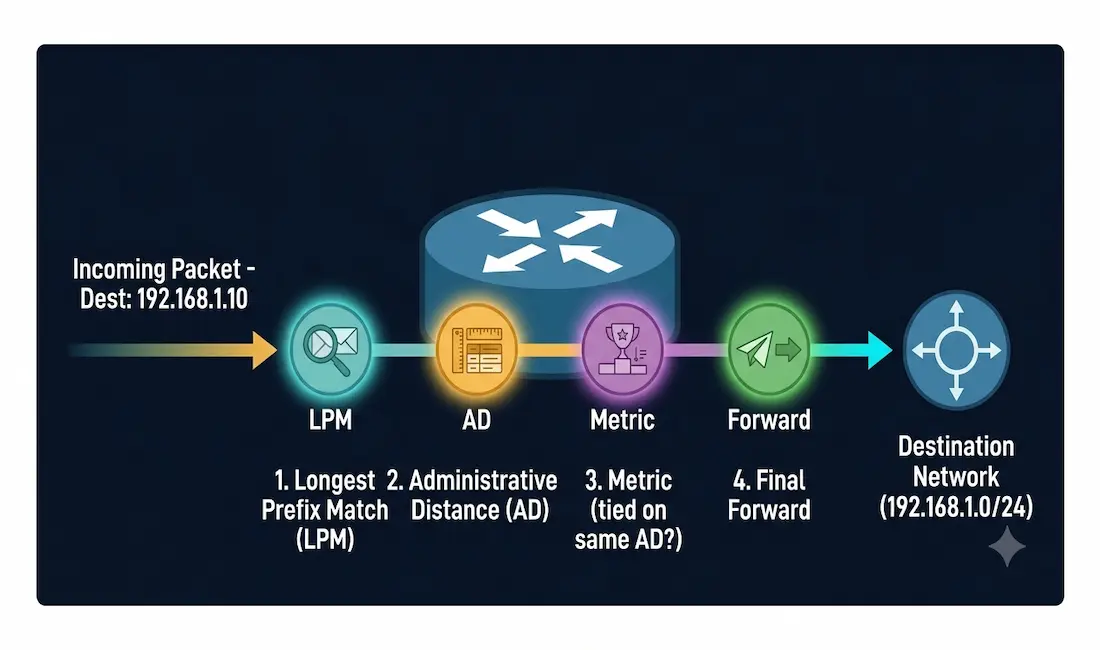
Routers are the traffic directors of the internet, guiding data packets to their destinations with precision. But how exactly do they decide where to send each packet? This guide breaks down the router packet forwarding process step by step, covers the Longest Prefix Match and Administrative Distance rules that actually determine route selection, and explains how modern innovations like SDN fit into the picture, plus troubleshooting tips and the differences between IPv4 and IPv6 forwarding.
Why Router Packet Forwarding Decisions Matter
Imagine a postal service sorting facility. Every package has an address, but the facility must decide the fastest, most efficient delivery route. Routers perform a similar role for data packets, using routing tables, protocols, and algorithms to determine the optimal path for each one.
When a host sends a packet to another host, it first checks its own routing table. If the destination host belongs to the same network, the host sends the data directly, without involving the default gateway at all. If the destination is on a different network, the data is forwarded to the default gateway, generally a router. That router then consults its own routing table to decide where to send the packet next. A router’s routing table contains three general categories of routes:
Directly Connected Routes
These come from the router’s own active interfaces. When an interface has an IP address configured and shows an “up/up” status, the subnet directly connected to that interface is automatically added to the routing table. A router can route all packets destined for hosts in any subnet directly connected to one of its active interfaces without needing any additional configuration.
Remote Routes
These come from networks reachable only through other routers, learned either through manual (static) configuration or dynamic routing protocols.
Default Route
Routers use a default route as a gateway of last resort when no other, more specific route exists for a destination. The default route is represented as 0.0.0.0/0. If a router has no specific matching entry for an incoming packet’s destination, it forwards the packet out the interface associated with the default route, if one is configured.
Example Topology: Directly Connected vs. Remote Routes
[See Topology Diagram: Router-1’s Routing Table]
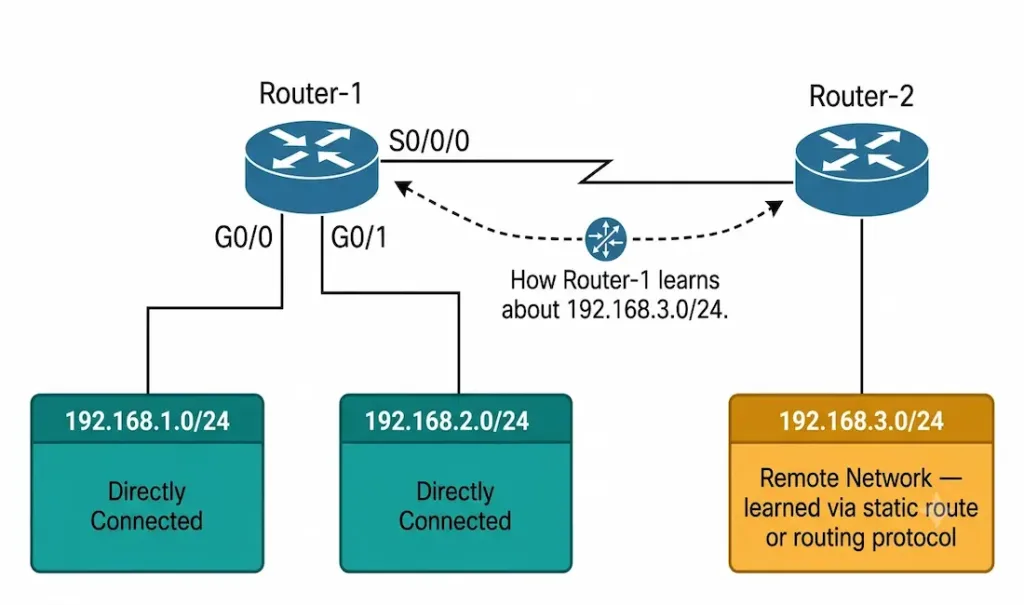
Consider Router-1 with three interfaces:
| Interface | Network | Route Type |
|---|---|---|
| G0/0 | 192.168.1.0/24 | Directly connected |
| G0/1 | 192.168.2.0/24 | Directly connected |
| S0/0/0 | Connects to Router-2 | (used to reach remote networks) |
Router-1 automatically knows about 192.168.1.0/24 and 192.168.2.0/24 the moment those interfaces come up with an IP address configured, no routing protocol or manual entry needed. But if Router-2, on the other end of the serial link, has its own local network (say, 192.168.3.0/24), Router-1 has no way to know that network exists unless it’s told, either through a manually configured static route or a dynamic routing protocol like OSPF or EIGRP running between the two routers. That 192.168.3.0/24 entry, once learned, is a remote route.
The Router Packet Forwarding Process, Step by Step
Step 1: Destination IP Lookup
When a router receives a packet, it first checks the destination IP address in the packet header. For example, a packet with destination IP 192.168.1.10 arrives, and the router scans its routing table for matching entries.
Step 2: Longest Prefix Match (LPM)
The router applies the Longest Prefix Match rule to find the most specific matching route available. A route for 192.168.1.0/24 (a 24-bit mask) is more specific than 192.168.0.0/16 (a 16-bit mask), and LPM always prefers the more specific match when both exist, ensuring the packet takes the most precise path available rather than a broader, less exact one.
Step 3: Administrative Distance (AD) Comparison
If more than one routing source (not protocol metric, source, meaning where the route was learned from) offers a route to the same destination network with the same prefix length, the router uses Administrative Distance, a trustworthiness ranking, to decide which source to believe.
| Source | Default AD |
|---|---|
| Directly Connected | 0 |
| Static Route | 1 |
| External BGP (eBGP) | 20 |
| Internal EIGRP | 90 |
| OSPF | 110 |
| RIP | 120 |
| Internal BGP (iBGP) | 200 |
A static route (AD=1) will always be preferred over an OSPF-learned route (AD=110) to the same destination with the same prefix length, and OSPF (AD=110) will always be preferred over RIP (AD=120), regardless of any metric either protocol calculates. This is the critical point: AD is compared before metrics, and it resolves competition between different routing sources entirely on its own. Metric comparison, the next step, only matters when the competing routes come from the exact same source.
Step 4: Routing Metric Evaluation
Metrics only come into play when two or more routes from the same routing protocol offer paths to the same destination with the same AD, since AD has already been used to eliminate cross-protocol competition in Step 3. Each protocol uses its own internal metric to compare its own routes:
- OSPF uses cost, based on interface bandwidth
- RIP uses hop count
- EIGRP uses a composite metric based on bandwidth, delay, and other factors
- BGP uses path attributes like AS path length and origin type
Example: if a router learns two separate OSPF routes to the same destination, one with a cost of 50 and one with a cost of 20, OSPF selects the lower-cost route (20), since lower cost indicates a faster or more efficient path in OSPF’s metric system. This comparison only happens because both routes came from OSPF specifically; an OSPF route is never compared metric-for-metric against a RIP route, since AD already settled that competition in the prior step.
Step 5: Forwarding the Packet
Once the best route is selected, the router forwards the packet out the corresponding next-hop interface, or drops it if no matching route exists at all (and no default route is configured to catch it). Modern routers use CEF (Cisco Express Forwarding) to speed up this entire process, using pre-built forwarding tables rather than performing a fresh routing table lookup for every single packet.
Beginner Summary: The Five-Step Decision in Plain Terms
[See Infographic: How a Router Decides Where to Send a Packet]
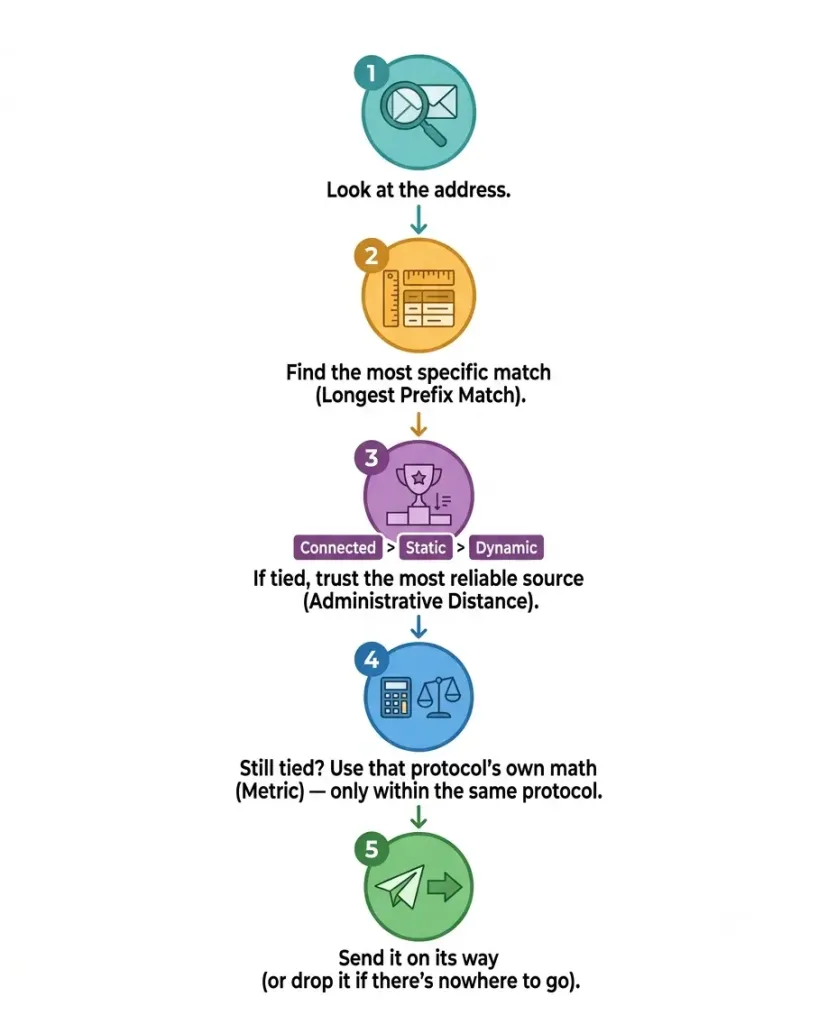
If you’re new to this topic, here’s the whole process condensed into plain language:
- Look at the address. The router reads where the packet is trying to go.
- Find the best-matching entry. Among everything in its routing table, the router picks the most specific match (Longest Prefix Match), not just any match that technically works.
- If there’s a tie between different sources, trust the most reliable one. This is Administrative Distance, directly connected routes are trusted completely, static routes next, then dynamic routing protocols in order of general reliability.
- If it’s still tied within the same protocol, use that protocol’s own math. Different protocols measure “best path” differently (hop count, cost, bandwidth), but this only matters when comparing routes from the same protocol against each other.
- Send it on its way, or drop it if there’s truly nowhere for it to go.
Routing Protocols: Static vs. Dynamic Routing
Static Routing
Manually configured routes are entered by an administrator by hand. They’re ideal for small, stable networks, but the drawback is they don’t adapt automatically to topology changes; if a link fails, a static route doesn’t reroute around it on its own.
Dynamic Routing
Protocols like RIP, OSPF, and BGP automatically discover and update routes:
- RIP uses hop count and is limited to 15 hops, making it unsuitable for larger, more complex networks today.
- OSPF is a link-state protocol offering faster convergence and better scalability for large networks.
- BGP is the routing protocol of the internet itself, using policy-based decisions to route traffic between autonomous systems.
Advanced Concepts in Packet Forwarding
IPv4 vs. IPv6 Forwarding
| Factor | IPv4 | IPv6 |
|---|---|---|
| Address Size | 32-bit | 128-bit |
| Address Resolution | Uses ARP | Uses NDP (Neighbor Discovery Protocol) |
| Fragmentation | Handled by routers along the path | Handled by the sending host only |
IPv6’s simplified header improves routing efficiency at each hop, but many networks today still rely on dual-stack (IPv4+IPv6) configurations during the ongoing transition.
SDN (Software-Defined Networking)
SDN decouples the control plane (the decision-making logic about where traffic should go) from the data plane (the actual forwarding of packets), centralizing route management in software rather than distributing it across each individual device’s own configuration. This enables centralized management and programmable routing, for example, a cloud provider dynamically rerouting traffic in response to a detected DDoS attack, without manually reconfiguring individual routers.
Troubleshooting Common Packet Forwarding Issues
Route Conflicts
Scenario: two routes to the same destination, from the same source, with the same AD and metric, cause instability or unpredictable path selection. Fix: adjust the metric or AD on one of the routes to establish a clear, intentional priority rather than leaving the outcome ambiguous.
Understanding Static Route vs. OSPF Priority (Not a “Bug,” a Design Choice)
Scenario: a network administrator configures both a static route (AD=1) and OSPF (AD=110) to the same destination. Traffic always follows the static route, even after OSPF learns a better, more current path, because static routes are, by design, always preferred over OSPF at the default AD values.
This is not a misconfiguration, it’s Administrative Distance working exactly as intended. The real question is whether that’s actually what you want. If the static route was only ever meant to be a backup, active only if OSPF’s dynamic path fails, then it’s genuinely misconfigured, and the fix is to raise the static route’s AD above OSPF’s (for example, to 130), turning it into a proper floating static route that only activates if OSPF has no path. If, instead, you deliberately want the static route to always take priority regardless of what OSPF learns, the original configuration is correct, and no change is needed. Understanding which outcome you actually want is the real fix here, not simply changing a number.
Emerging Trends in Routing
AI-driven routing is an increasingly discussed application of machine learning to predict congestion and proactively reroute traffic before problems occur, though this remains an evolving area rather than a mature, universally deployed CCNA-level topic.
QUIC (used in HTTP/3) is a transport-layer protocol built on UDP rather than TCP, reducing connection-setup latency by streamlining the handshake process. It’s worth being precise about what QUIC actually changes: it replaces TCP’s role at the transport layer, but QUIC traffic is still ordinary IP traffic, routed by routers exactly the same way as any other packet. QUIC does not bypass IP routing in any way; its latency improvements come entirely from transport-layer efficiency, not from any change to how routers make forwarding decisions.
CCNA Exam Pointers
- Order of operations: Longest Prefix Match → Administrative Distance (if tied) → Metric (only if same protocol and still tied)
- AD is compared before metrics, and it resolves cross-protocol competition entirely on its own; metrics are never compared across different protocols
- Key AD values: Connected (0), Static (1), eBGP (20), Internal EIGRP (90), OSPF (110), RIP (120), iBGP (200)
- A static route outranking a dynamic routing protocol at default AD values is expected behavior, not a bug, unless the intent was specifically for the dynamic protocol to take priority
- Floating static routes intentionally use a higher AD than the primary dynamic protocol specifically to serve as backup-only paths
- CEF speeds up forwarding using pre-built tables rather than a fresh lookup per packet
- QUIC changes the transport layer (replacing TCP), not the network/routing layer, IP routing behavior is unaffected
Conclusion
Routers use Longest Prefix Match, Administrative Distance, and protocol-specific metrics, applied in that exact order, to make packet forwarding decisions. The most common point of confusion for CCNA students is assuming metrics get compared across different protocols; in reality, Administrative Distance settles any cross-protocol competition before metrics are ever considered, and metrics only matter when comparing multiple routes from the exact same source. Modern networks layer IPv6, SDN, and emerging AI-driven optimizations on top of these same fundamental rules, but the core five-step decision process remains the foundation everything else builds on.
FAQs
What factors determine a router’s packet forwarding decision?
A router uses its routing table, applying Longest Prefix Match to find the most specific route to the destination IP address, then Administrative Distance if multiple sources offer competing routes with the same prefix length, and finally protocol-specific metrics only if multiple routes from the same protocol remain tied after that.
How does a routing table differ from a forwarding table?
The routing table stores all known routes the router has learned from every source, directly connected, static, and dynamic protocols alike. The forwarding table (built via CEF on modern Cisco devices) contains the optimized, pre-computed best paths actually used for real-time packet forwarding, allowing the router to avoid a full routing table lookup for every single packet.
Can a router prioritize certain types of traffic?
Yes, through Quality of Service (QoS) configurations, routers can prioritize latency-sensitive traffic like VoIP or video conferencing over less time-sensitive traffic, independent of the routing path selection process itself.
What happens if a router has multiple paths to the same destination?
If the paths come from different sources (for example, one static and one OSPF), Administrative Distance decides which is used, with the lower AD always winning. If the paths come from the same source with equal AD, the protocol’s own metric decides. If multiple paths are truly equal in both AD and metric, some routers can load-balance traffic across them if configured to do so.
How do static routes impact packet forwarding decisions?
Static routes have a default Administrative Distance of 1, meaning they’re preferred over essentially every dynamic routing protocol at default settings, including OSPF (110) and RIP (120). This gives administrators direct manual control over traffic paths, but it also means a static route will continue being used even if a dynamic protocol later learns a better path, unless the static route’s AD is deliberately raised above the dynamic protocol’s AD to make it a backup-only floating static route instead.