
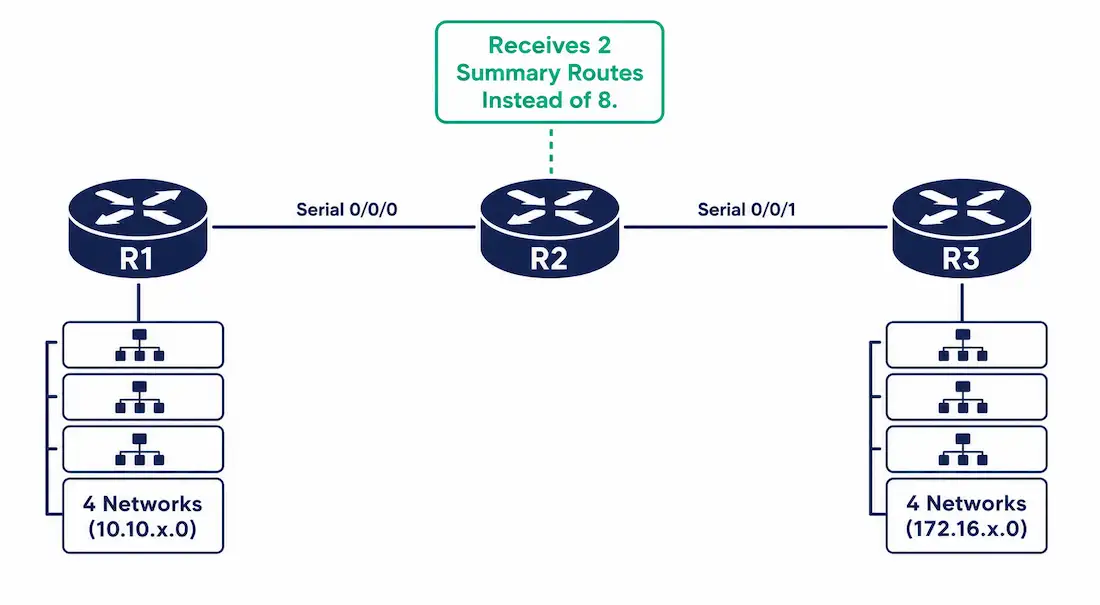
Route summarization lets a router advertise one compact route instead of several individual ones, cutting routing table size and update bandwidth without losing actual reachability. EIGRP supports this manually, independent of whether auto-summary is enabled, since EIGRP is a classless protocol that carries subnet mask information in every update it sends.
This guide covers how to calculate a manual summary route by hand, configure it correctly on Cisco EIGRP routers, verify it took effect, and troubleshoot the most common mistakes.
Why Manual Summarization Matters
Auto-summary only works at classful network boundaries, and it aggressively over-summarizes anything that doesn’t fit that pattern — which breaks routing entirely on networks using discontiguous subnets. Manual summarization solves this by letting you choose exactly which subnets to combine and at exactly which boundary, giving you full control regardless of whether auto-summary is on or off.
The benefits are concrete: fewer routes in downstream routing tables means faster lookups, less memory consumption, and less bandwidth spent propagating routing updates — a single summary route replaces several individual advertisements every time the topology sends an update. On a larger network with many summarized branch sites, this compounds significantly: a core router that would otherwise need to hold hundreds of individual branch subnets can instead hold a handful of clean summary routes, one per region or site, making both the routing table and the human effort of documenting it considerably more manageable.
The Topology
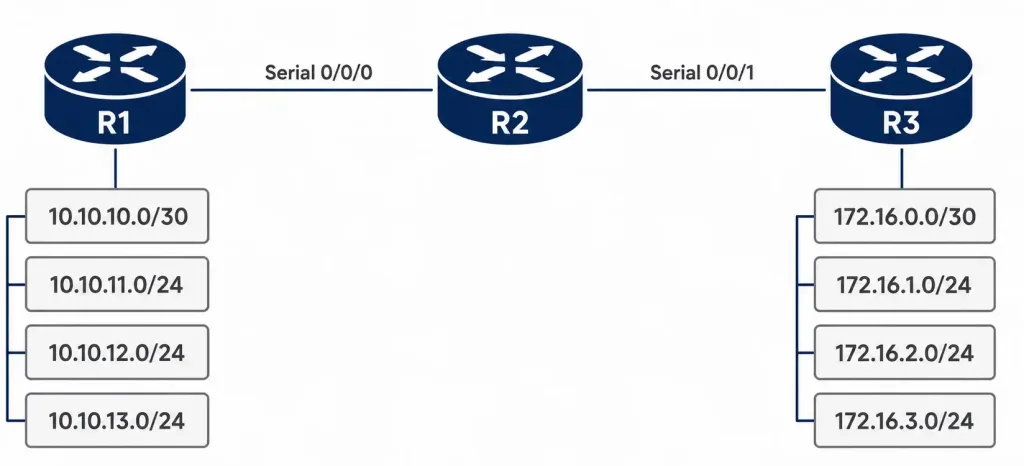
Consider three routers: R1 and R3 sit at the edges, each with four directly connected LAN and serial networks; R2 sits in the middle, connecting to both.
R1’s networks:
- 10.10.10.0/30 (serial link to R2)
- 10.10.11.0/24
- 10.10.12.0/24
- 10.10.13.0/24
R3’s networks:
- 172.16.0.0/30 (serial link to R2)
- 172.16.1.0/24
- 172.16.2.0/24
- 172.16.3.0/24
Before summarization, R2’s routing table carries all eight of these routes individually, learned via EIGRP from R1 and R3. The goal is to have R1 summarize its four networks into one route, and R3 do the same, so R2’s table shrinks to just two summary entries instead of eight individual ones.
Calculating a Summary Route by Hand
The manual process, step by step:
- Write each network’s relevant octet(s) in binary.
- Compare all the networks bit by bit, starting from the left (most significant bit).
- Find where the bits stop matching across all networks — that point marks your summary boundary.
- Count the number of consecutive matching bits from the left; this becomes your new prefix length.
- Take the matching bits, set every remaining bit to 0, and convert back to decimal to get the summary network address.
Worked Example: R1’s Networks
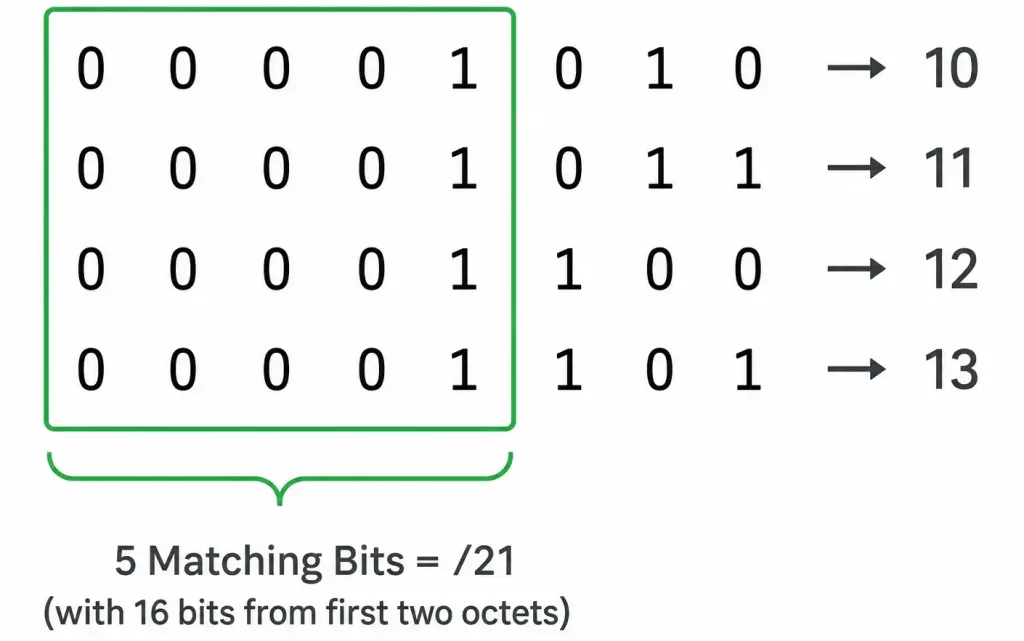
R1’s four networks share the same first two octets (10.10), so the calculation happens in the third octet — 10, 11, 12, and 13:
10 = 00001010
11 = 00001011
12 = 00001100
13 = 00001101
Comparing bit by bit from the left: the first 5 bits (00001) match across all four values. The 6th bit diverges — 0 for networks 10 and 11, but 1 for networks 12 and 13.
That gives 5 matching bits in the third octet, plus the 16 bits of the fully-matching first two octets, for a total prefix length of /21. Setting the remaining bits to 0 gives a third-octet value of 8 (binary 00001000), producing a summary address of 10.10.8.0/21.
Sanity check: a /21 covers eight consecutive third-octet values, 8 through 15 — our four networks (10, 11, 12, 13) all fall cleanly within that range, and no shorter prefix (like /22) could cover all four without also splitting across a block boundary. This is the minimal correct summary. Running this same sanity check after every manual calculation — confirming the resulting block actually contains every network you meant to summarize, and nothing extra beyond what’s genuinely needed — catches the majority of hand-calculation errors before they ever reach a live configuration.
Worked Example: R3’s Networks
R3’s networks share 172.16 as their first two octets, varying in the third octet — 0, 1, 2, and 3:
0 = 00000000
1 = 00000001
2 = 00000010
3 = 00000011
All four share their first 6 bits (000000), diverging only in the last 2 bits. That’s 6 matching bits in the third octet, plus 16 bits from the first two octets, for a total of /22. With the remaining bits set to 0, the summary address is 172.16.0.0/22.
Why Discontiguous Networks Break Auto-Summary
It’s worth understanding this failure mode concretely, since it’s the exact reason manual summarization exists as a deliberate alternative rather than just a minor configuration variant.
Imagine R1 and R3 both connect to R2, but R1’s LANs use 10.10.11.0/24 through 10.10.13.0/24 while R3’s use 10.10.21.0/24 through 10.10.23.0/24 — both sets technically belong to the same classful 10.0.0.0/8 network, just in different, non-adjacent subnet ranges. With auto-summary enabled, both R1 and R3 would each advertise a single summarized 10.0.0.0/8 route toward R2. R2 would then see two equally valid-looking paths to the entire 10.0.0.0/8 network — one via R1, one via R3 — with no way to tell that traffic for R1’s specific subnets needs to go through R1 specifically, and R3’s through R3. Depending on EIGRP’s path selection, this can silently black-hole traffic to whichever subnet range didn’t win the route selection, without any obvious error message indicating why.
Manual summarization avoids this entirely, since you choose the exact prefix length and boundary — 10.10.8.0/21 for R1’s specific range and a separate, non-overlapping summary for R3’s range keeps both paths distinct and correctly routable, rather than collapsing them into one ambiguous classful advertisement.
Configuring EIGRP Manual Summarization
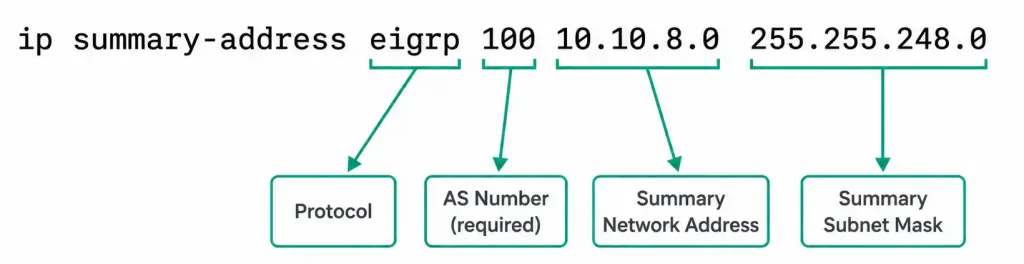
The command syntax, applied at the interface facing the direction you want the summary advertised:
Router(config-if)# ip summary-address eigrp <as-number> <network-address> <subnet-mask>The autonomous system number is required — it has to match the AS number your EIGRP process is actually running under, or the summary won’t apply correctly.
Configuring R1 (summarizing toward R2, out its serial interface):
R1> enable
R1# configure terminal
R1(config)# interface serial 0/0/0
R1(config-if)# ip summary-address eigrp 100 10.10.8.0 255.255.248.0
R1(config-if)# exit
Configuring R3 (summarizing toward R2, out its own serial interface):
R3> enable
R3# configure terminal
R3(config)# interface serial 0/0/1
R3(config-if)# ip summary-address eigrp 100 172.16.0.0 255.255.252.0
R3(config-if)# exit
This configuration will propagate the summary route (the original source article linked this exact phrase to a RIP passive-interface configuration article — a different protocol and a different topic than EIGRP summarization; flagged as a mismatch rather than carried forward here) out R3’s serial interface toward R2, the same way R1’s configuration does on its own side.
Note that the network address in each command has to exactly match what you calculated by hand — a common, easy-to-make mistake is configuring a plausible-looking but incorrect network address that doesn’t actually match the binary math, which silently summarizes the wrong range instead of failing with an obvious error. This is exactly the kind of mistake worth double-checking against your own worked calculation before deploying to a live network, since a summary that’s subtly wrong can still appear to “work” in casual testing while quietly misrouting traffic for specific subnets.
Verifying Manual Summary Routes
Check R2’s routing table — this is where the effect is actually visible, since R2 is the router receiving both summaries:
R2# show ip route eigrpBefore summarization, this would show all eight individual routes. After both R1 and R3 have their summaries configured, R2’s table instead shows exactly two EIGRP routes: 10.10.8.0/21 and 172.16.0.0/22, each pointing back toward the router that originated it.
Confirm the summary is actually configured on the originating interface:
R1# show ip protocols
R1# show running-config interface serial 0/0/0
Check EIGRP topology details, useful for confirming the summary route itself has a valid metric:
R1# show ip eigrp topologyManual vs. Auto-Summary
| Factor | Auto-Summary | Manual Summary |
|---|---|---|
| Boundary | Classful only (Class A/B/C) | Any boundary you choose |
| Control | None — automatic, all-or-nothing | Full control per interface |
| Safe with discontiguous networks | No — breaks routing | Yes, if configured correctly |
| Configuration effort | None (or no auto-summary to disable) | Manual calculation and per-interface command |
| Current best practice | Generally disabled (no auto-summary) on modern networks | Standard approach for deliberate summarization |
Auto-summary is disabled by default on current IOS versions specifically because of the discontiguous-network problem — manual summarization is the standard, deliberate approach for actually gaining summarization’s benefits without that risk.
Troubleshooting Manual Summary Routes
The summary route doesn’t appear in the downstream router’s table: confirm the command was applied to the correct interface — the one actually facing the router you want to receive the summary, not the interface facing the networks being summarized themselves.
show running-config interface serial 0/0/0The summary appears, but doesn’t cover the range you expected: recheck your binary math. A single incorrect bit in the comparison produces a summary that’s either too broad (accidentally including address space you don’t own) or too narrow (missing one of the networks you meant to include). Redo the calculation independently rather than assuming the original math was correct.
Individual routes still show up alongside the summary: this can happen if the summary is configured on the wrong interface, or if there’s an additional path where the individual routes are still being learned separately. Check show ip route eigrp on the downstream router and confirm which interface each route is actually being learned through.
EIGRP neighbors won’t form after adding summarization: this is usually unrelated to the summary configuration itself — check for a mismatched AS number, K-values, or a basic connectivity issue first, since summarization alone doesn’t affect neighbor formation. Treating these as separate troubleshooting tracks, rather than assuming the newly-added summary command broke something else entirely, usually leads to the actual root cause faster.
show ip eigrp neighborsFAQs
Why would I use manual summarization instead of auto-summary? Auto-summary only works at classful boundaries and actively breaks routing on networks with discontiguous subnets, while manual summarization lets you choose exactly which networks to combine and at exactly which prefix boundary. This is why auto-summary is disabled by default on current IOS versions, and manual summarization is the standard deliberate approach.
How do I calculate a summary route by hand? Write the relevant octets of each network in binary, compare them bit by bit from the left, and find where they stop matching across all networks — that point sets your new prefix length. Setting all the remaining bits to 0 and converting back to decimal gives you the summary network address.
What’s the correct syntax for configuring an EIGRP manual summary? Use ip summary-address eigrp <as-number> <network-address> <subnet-mask> in interface configuration mode, applied on the interface facing the router that should receive the summarized route. The AS number is required and must match your EIGRP process’s actual configured number, or the command won’t apply correctly.
How can I verify a manual summary route is actually working? Check the routing table on the downstream router with show ip route eigrp — you should see the single summary route instead of the individual routes it replaces. show running-config interface <interface> on the originating router confirms the command itself was applied to the correct interface.
What happens if my binary math is wrong? An incorrect summary calculation either advertises more address space than you actually own (potentially causing routing problems for networks that don’t really exist behind that router) or fails to cover all the networks you intended to summarize. Always double-check the bit-by-bit comparison independently rather than trusting a first pass, especially before applying the configuration to a production network.
Does manual summarization work if auto-summary is also enabled? Yes — manual summarization functions independently of the auto-summary setting, since EIGRP is a classless protocol that includes subnet mask information in every update regardless. That said, best practice is disabling auto-summary explicitly with no auto-summary and relying on manual summarization deliberately, rather than mixing both and risking auto-summary’s classful-boundary behavior interfering unexpectedly.



