
Network management is critical for businesses, IT teams, and CCNA students learning the fundamentals of how networks are administered. Two fundamental approaches — in-band and out-of-band (OOB) management — determine how administrators monitor, configure, and troubleshoot devices. Understanding when to use each method, how to configure them on Cisco IOS, and how they relate to security is essential knowledge for both the CCNA exam and real-world network engineering.
This guide covers how both methods work, their protocols and ports, Cisco IOS configuration commands, security implications, and when to use each approach.
What Is In-Band Network Management?
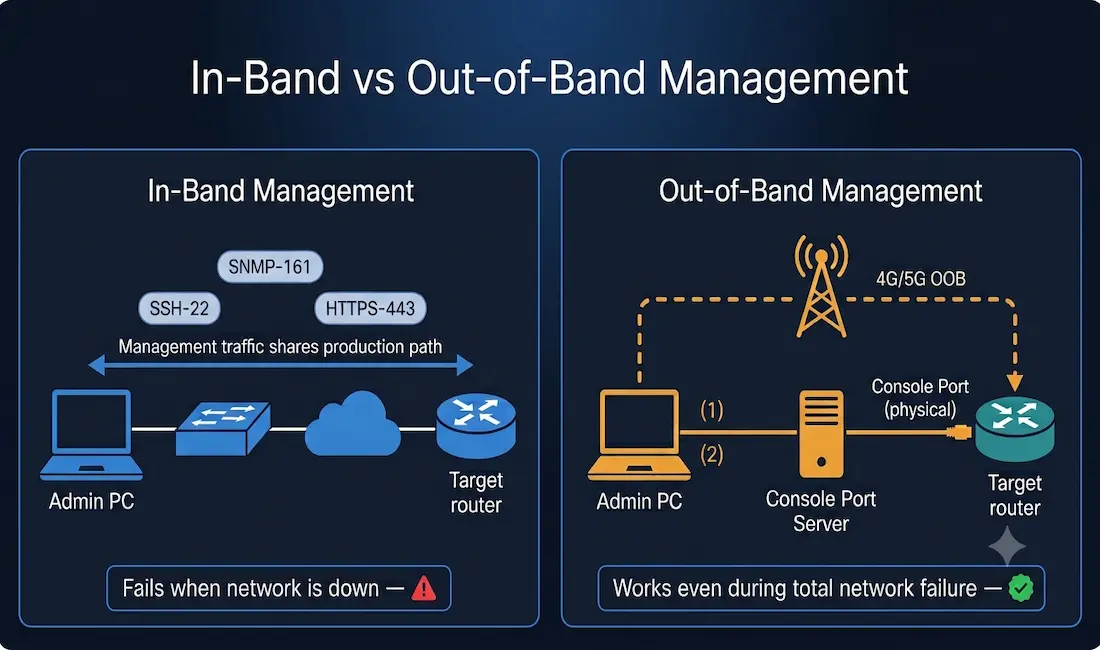
In-band network management uses the production data network as the management channel. The same physical links, switches, and routers that carry user traffic also carry management traffic — SSH sessions, SNMP polling, HTTPS to web interfaces, and NETCONF API calls all travel over the same infrastructure that your users depend on.
In-band management is practical and cost-effective because it requires no additional hardware beyond what already exists. For Gigabit Ethernet and Fast Ethernet interfaces configured with IP addressing, any device reachable on the network is manageable in-band.
In-Band Management Interfaces
In-band interfaces are the standard routed and switched interfaces that carry production traffic:
- LAN interfaces: GigabitEthernet, FastEthernet, Ethernet — the most common
- WAN interfaces: Serial, DSL, HWIC — standard WAN connections
- Switch Virtual Interfaces (SVIs): VLAN interfaces on Layer 2 switches that provide an IP address for SSH/Telnet management access without a routed physical interface
How In-Band Management Works
In-band management relies on the existing network infrastructure:
- Management traffic (SSH, SNMP, HTTPS) shares bandwidth with regular user data
- Requires the production network to be operational and reachable
- Management plane and data plane share the same physical path
Common Protocols and Ports (CCNA Focus)
| Protocol | Port | Purpose |
|---|---|---|
| SSH | 22 | Secure encrypted CLI access — always prefer over Telnet |
| Telnet | 23 | Unencrypted CLI access — legacy, avoid in production |
| SNMP | 161 (UDP) | Device monitoring (CPU, interface stats, error counters) |
| HTTP | 80 | Web-based device management (unencrypted) |
| HTTPS | 443 | Secure web-based device management |
| NETCONF | 830 | Modern API-driven network configuration (RFC 6242) |
| RESTCONF | 443 | REST-based API for network automation |
Configuring In-Band Management on Cisco Devices
On a Cisco router (using a physical interface):
Router(config)# hostname R1
R1(config)# username admin secret StrongPass123
R1(config)# interface GigabitEthernet0/0
R1(config-if)# ip address 192.168.1.1 255.255.255.0
R1(config-if)# no shutdown
R1(config-if)# exit
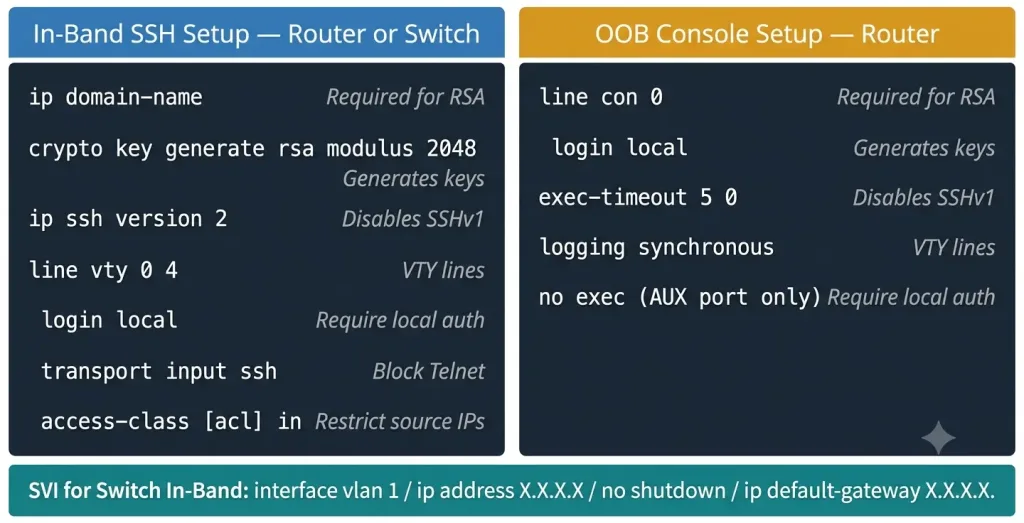
R1(config)# line vty 0 4
R1(config-line)# login local
R1(config-line)# transport input ssh
R1(config-line)# exit
R1(config)# ip domain-name networkustad.com
R1(config)# crypto key generate rsa modulus 2048
R1(config)# ip ssh version 2
On a Cisco switch (using an SVI — Switch Virtual Interface):
The SVI is the key in-band management concept for Layer 2 switches. A switch has no routed physical interfaces by default — the SVI gives it an IP address for management:
Switch(config)# hostname SW1
SW1(config)# username admin secret StrongPass123
SW1(config)# interface vlan 1
SW1(config-if)# ip address 192.168.1.10 255.255.255.0
SW1(config-if)# no shutdown
SW1(config-if)# exit
SW1(config)# ip default-gateway 192.168.1.1
SW1(config)# line vty 0 15
SW1(config-line)# login local
SW1(config-line)# transport input ssh
SW1(config-line)# exit
SW1(config)# ip domain-name networkustad.com
SW1(config)# crypto key generate rsa modulus 2048
SW1(config)# ip ssh version 2
Key points:
interface vlan 1creates the SVI for VLAN 1 — the default management VLANip default-gatewayis required on a Layer 2 switch to reach management traffic from other subnetstransport input sshrestricts VTY access to SSH only — blocks Telnetcrypto key generate rsa modulus 2048is required before SSH can be used
In-Band Limitation
In-band management is practical for routine administration but has a critical weakness: if the network is down, you lose management access. A misconfigured ACL, a routing failure, or a hardware fault can lock you out of the very devices you need to fix.
What Is Out-of-Band Network Management?
Out-of-band management provides a dedicated management channel that is separate from and independent of the production data network. It gives administrators a “back door” to reach network devices even when the primary network is completely down.
OOB encompasses management interfaces that are physically and logically separated from the data path. This includes console ports, AUX ports, dedicated management Ethernet ports, and modern cellular or cloud-based OOB solutions.
Out-of-Band Interfaces
- Console port — direct physical connection via RJ-45 or USB; requires physical presence or a console server
- AUX port — secondary asynchronous port; historically used for dial-up modem access, now less common
- Dedicated management port — some enterprise routers and switches have a separate Ethernet management port (typically labeled “MGMT”) that connects to an isolated management network
- Console server — a network-connected device that aggregates console connections from multiple devices, allowing remote SSH/Telnet access to the console of any connected device
How Out-of-Band Management Works
OOB creates an independent management path:
- Operates entirely separately from the production network
- Reaches devices even during total network failure, software lockups, or misconfiguration
- Physical console connections work regardless of IP connectivity
- Console servers enable remote OOB access without physically visiting each device
Configuring the Console Port on Cisco Devices
The console port is the most fundamental OOB access method. By default it requires no password, but production devices should always have a console password configured:
R1(config)# line con 0
R1(config-line)# login local
R1(config-line)# exec-timeout 5 0
R1(config-line)# logging synchronous
R1(config-line)# exit
Key commands:
line con 0— enters the console line configurationlogin local— requires local username/password authentication on the consoleexec-timeout 5 0— automatically logs out the console session after 5 minutes of inactivity (security best practice)logging synchronous— prevents log messages from interrupting commands being typed
Configuring the AUX Port
R1(config)# line aux 0
R1(config-line)# login local
R1(config-line)# exec-timeout 5 0
R1(config-line)# no exec
R1(config-line)# exit
Note: no exec disables the AUX port if it is not being used — a security best practice to prevent unauthorized access through an unused interface.
Modern OOB Methods
Console servers: Aggregator devices (such as those from Opengear or Raritan) connect to the console ports of multiple routers and switches and make them accessible over SSH from a management network or the internet. This is the most common enterprise OOB deployment.
Cellular/4G/5G OOB: Some console servers include cellular modem capability, allowing OOB access via a cellular network when the primary WAN connection is down. Increasingly common for branch offices and remote sites.
Cloud-based OOB: AWS Systems Manager Session Manager provides OOB-style access to EC2 instances and on-premises servers with the Systems Manager agent, without requiring an open inbound network port or SSH key. Similar capabilities exist in Azure Arc and Google Cloud’s OS Login.
Dedicated management network: Enterprise environments often deploy a completely separate physical management network (sometimes called an “out-of-band management network” or “OOBM network”) with its own switches, routers, and IP addressing scheme, connecting only to the management ports of production devices.
In-Band vs. Out-of-Band: Comparison
| Factor | In-Band | Out-of-Band |
|---|---|---|
| Infrastructure | Uses existing production network | Requires separate management channel |
| Cost | Lower — no additional hardware needed | Higher — dedicated hardware or cellular |
| Complexity | Simpler to configure | More complex to design and deploy |
| Reliability | Depends on production network health | Independent of production network |
| Access during outage | Lost when network fails | Available even during total failure |
| Security | Shares attack surface with production | Isolated — harder to reach for attackers |
| CCNA relevance | SSH/VTY/SVI configuration | Console port, AUX port configuration |
Security Implications
In-band security risks:
- Management traffic shares the same network as user traffic — a compromised host on the network could potentially intercept management sessions
- SNMP v1/v2c transmit community strings in plain text — always use SNMPv3 with authentication and encryption in production
- Telnet sends all data including passwords in plain text — never use Telnet in production
- A network-wide attack or misconfiguration can simultaneously affect both user traffic and management access
OOB security advantages:
- The management channel is isolated from the production attack surface
- Even if the production network is completely compromised, the OOB channel may remain accessible
- Physical console access requires physical presence or a secured console server — much harder for remote attackers to reach
- Dedicated management networks can implement strict ACLs and authentication that don’t apply to the production network
Best practice: Use SSH (not Telnet) for in-band management, restrict VTY access with ACLs (access-class command), enable SNMPv3, and always configure console port authentication even if you primarily manage devices in-band.
When to Use In-Band or Out-of-Band Management
In-Band Use Cases
- Routine maintenance — updating switch configurations, applying ACLs, checking interface statistics
- Small to medium networks with limited budgets where OOB infrastructure costs are hard to justify
- Monitoring device performance with SNMP in network management systems (NMS)
- Day-to-day configuration changes via SSH on stable, well-monitored networks
- Automated network provisioning via NETCONF or RESTCONF APIs
Out-of-Band Use Cases
- Emergency recovery — restoring a device that is unreachable via the production network due to misconfiguration, routing failure, or hardware fault
- Large data centres and carrier networks requiring 24/7 uptime with zero-tolerance for management access loss
- Security-sensitive environments (financial services, government, healthcare) where management traffic must be completely isolated
- Remote sites and branch offices where an engineer cannot be physically dispatched quickly
- Initial device provisioning — configuring a new device before its IP address and routing are established
Hybrid Approach
Most enterprise networks combine both methods:
- In-band for routine daily administration — cost-effective and sufficient for stable operations
- OOB as a permanent standby — always available when the production network fails or becomes unreachable
A common hybrid design: All devices configured for SSH in-band management (primary), with console ports connected to a console server on a dedicated OOB management network (backup). Administrators use SSH in-band for 99% of tasks and access the console server only when in-band access is unavailable.
Illustrative Scenarios
The following scenarios illustrate how in-band and OOB management apply in practice. These are representative examples, not attributed real-world events.
Scenario 1 — Hospital Network Recovery A critical network at a healthcare facility experiences a routing failure due to a misconfigured static route. All SSH management access is lost because the production network is down. The network engineer uses a console server connected to the core router’s console port to log in, identify the misconfiguration, and restore the route — without the OOB path, the only alternative would have been a physical site visit.
Scenario 2 — Data Centre Maintenance Window A large data centre uses a dedicated OOB management network connecting all rack equipment. During a planned IOS upgrade that temporarily disrupts network traffic, engineers maintain continuous access to all devices via the OOB network and can immediately roll back if the upgrade causes unexpected issues.
Scenario 3 — Branch Office Outage A branch office loses WAN connectivity due to a failed circuit. The branch router is unreachable via in-band management. A cellular OOB modem on the console server at the branch allows the NOC team to access the router’s console remotely over 4G, diagnose the issue, and reconfigure the router as a failover connection is established.
Practical Guide for CCNA Students
Lab Setup Recommendations
- In-band practice: Configure SSH on a Cisco router or switch in Packet Tracer or GNS3. Set up a username, generate RSA keys, and restrict VTY to SSH only. Confirm you can SSH in from another device.
- SVI practice: Configure a management VLAN and SVI on a Layer 2 switch, set a default gateway, and SSH to the switch from a router on a different subnet.
- OOB practice: Use a USB-to-RJ45 console cable to access a physical router or switch’s console port. Practice accessing the console from a terminal emulator (PuTTY, SecureCRT).
Key Commands to Learn
! In-band: SSH to a device
ssh -l admin 192.168.1.1

! View current configuration
show running-config

! View VTY line configuration
show line vty 0 4

! View console line configuration
show line con 0

! Check SSH status
show ip ssh

! Reload a device (usually done from console in OOB recovery)
reload

! View interface IP addresses for management
show ip interface brief
CCNA Exam Pointers
- In-band management uses the production network (SSH, Telnet, SNMP, HTTP/S, NETCONF)
- Out-of-band management uses separate channels (console port, AUX port, dedicated management network)
- SVI (Switch Virtual Interface) —
interface vlan [id]— provides in-band management IP for Layer 2 switches ip default-gatewayis required on Layer 2 switches for management traffic from remote subnets- Console port = OOB; configured under
line con 0 - VTY lines = in-band; configured under
line vty 0 4(or0 15for 16-line switches) - Always use
transport input sshon VTY lines — never leavetransport input telnetin production exec-timeouton console and VTY lines is a security best practice to prevent unattended sessions- SSH requires: hostname set, domain name set, RSA key generated (
crypto key generate rsa),ip ssh version 2 - OOB is available when production network is down; in-band is not
Cost Comparison
| OOB Solution | Approximate Cost | Best For |
|---|---|---|
| USB-to-console cable (direct) | $10–$30 | Students, lab use, physical on-site access |
| Console server (e.g., Opengear) | $500–$3,000+ | SMB to enterprise remote OOB access |
| Cisco Integrated Management Controller (IMC) | Included with UCS hardware | Enterprise Cisco server management |
| Cloud OOB (AWS Systems Manager) | Pay-per-use | Cloud and hybrid environments |
| Cellular OOB modem | $300–$1,500 | Branch offices, remote sites, WAN backup |
Conclusion
In-band and out-of-band management serve complementary purposes. In-band management is cost-effective, straightforward to configure, and sufficient for the vast majority of daily network administration tasks. Out-of-band management is the safety net that allows recovery when the production network is down, when a misconfiguration locks administrators out, or when physical access to a device is not practical.
For CCNA candidates, understanding both methods — including the SVI for switch in-band management, the console port for OOB, and the VTY line commands that control remote access — is directly testable knowledge. In production environments, the best approach is always a hybrid: SSH in-band for routine work, with OOB always available as a permanent backup.
Self-Assessment – In-band vs Out-of-band Network Management Self-Assessment – Network Layer Self-Assessment – Cisco Router Components Self-Assessment – Router Packet Forwarding Decisions Self-Assessment – Host Default Gateway and Routing Table
Frequently Asked Questions
What is the primary difference between in-band and out-of-band network management?
In-band management uses the same production data network to carry management traffic — SSH sessions, SNMP polls, and HTTPS connections all travel over the same infrastructure as user data. Out-of-band management uses a completely separate channel — typically the device’s console port, AUX port, a dedicated management network, or a cellular connection — that operates independently of the production network. The critical practical difference is availability during failures: in-band management is unavailable when the production network is down, while out-of-band management remains accessible precisely when the production network has failed and you need access the most.
Why is out-of-band management considered more secure than in-band?
Out-of-band management isolates management traffic from the production network attack surface. With in-band management, a compromised host on the production network could potentially intercept management sessions, or a network-wide attack could affect both user traffic and management access simultaneously. OOB management channels — particularly physical console ports or dedicated management networks with strict access controls — are much harder for remote attackers to reach because they require either physical access or authentication through a completely separate network path. This isolation is why security-sensitive industries (finance, healthcare, government) typically require OOB management for critical infrastructure devices.
How do you configure SSH for in-band management on a Cisco switch?
Configuring SSH in-band management on a Cisco Layer 2 switch requires five steps. First, set a hostname and domain name — both are required for RSA key generation. Second, create a local user account with a secret password using username [name] secret [password]. Third, create an SVI (Switch Virtual Interface) with interface vlan 1 and assign an IP address — this is the management IP for the switch. Fourth, configure the VTY lines with line vty 0 15, apply login local, and restrict to SSH with transport input ssh. Fifth, generate the RSA key pair with crypto key generate rsa modulus 2048 and enable SSH version 2 with ip ssh version 2. After these steps, SSH access to the switch’s management IP is functional.
When should a network administrator use in-band versus out-of-band management?
Use in-band management for all routine, day-to-day administration on a stable network — configuration changes, SNMP monitoring, firmware updates, and performance checks via SSH. It is simpler, costs nothing extra, and is sufficient when the network is healthy. Switch to out-of-band management when in-band access is unavailable — after a network failure, after a misconfigured ACL blocks SSH access, after a routing problem makes a device unreachable, or after a software crash leaves the device unresponsive to network-layer management. The best practice is to configure both simultaneously: SSH for routine work, console and OOB for emergencies. Never deploy a production network device without configuring the console port, even if you plan to manage it exclusively via SSH.
What is a console server and how does it enable remote OOB access?
A console server (also called a terminal server or out-of-band access server) is a device that aggregates the console port connections from multiple network devices and makes them accessible over SSH or HTTPS from a management network or the internet. For example, a console server might connect to the console ports of 32 routers and switches in a rack using RJ-45 console cables. An administrator working remotely can SSH to the console server and then access the console of any connected device — exactly as if they were sitting in front of it with a physical laptop connection. This enables out-of-band management without requiring an engineer to physically visit the data center. Enterprise console server vendors include Opengear, Raritan, and Lantronix. Some console servers also include cellular modems for OOB access when the primary internet connection is down.



