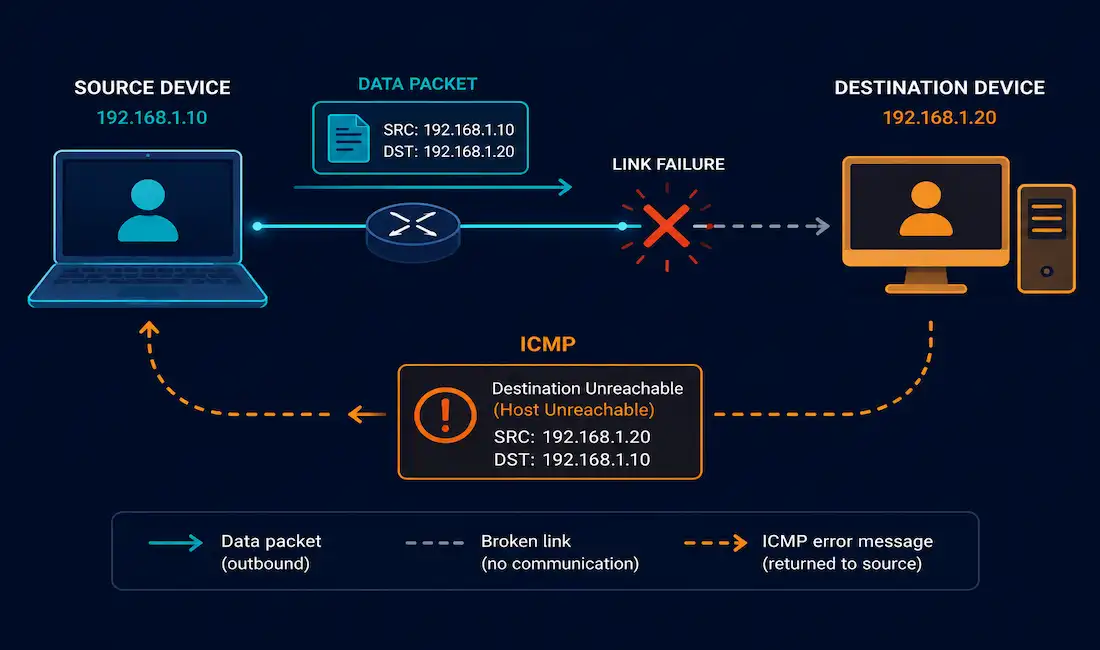
IP is deliberately unreliable: it has no built-in mechanism to report when something goes wrong. That’s exactly the gap the Internet Control Message Protocol (ICMP) fills. It doesn’t make IP more reliable, it doesn’t retransmit or guarantee delivery, but it does report problems back to the source, which is what makes tools like ping and traceroute possible in the first place. This guide covers every major ICMP message type, how tools like ping actually use them, and how to debug ICMP issues directly on a Cisco router, with a real worked troubleshooting example along the way.
What ICMP Actually Is
It operates at the network layer, working alongside IP rather than riding inside TCP or UDP the way most application traffic does. ICMP messages are their own distinct IP datagrams, carried with IP protocol number 1 (for ICMPv4) or 58 (for ICMPv6), separate from the TCP and UDP traffic most applications generate, which is worth knowing since it explains why ICMP behaves differently in firewall rules than ordinary port-based traffic does.
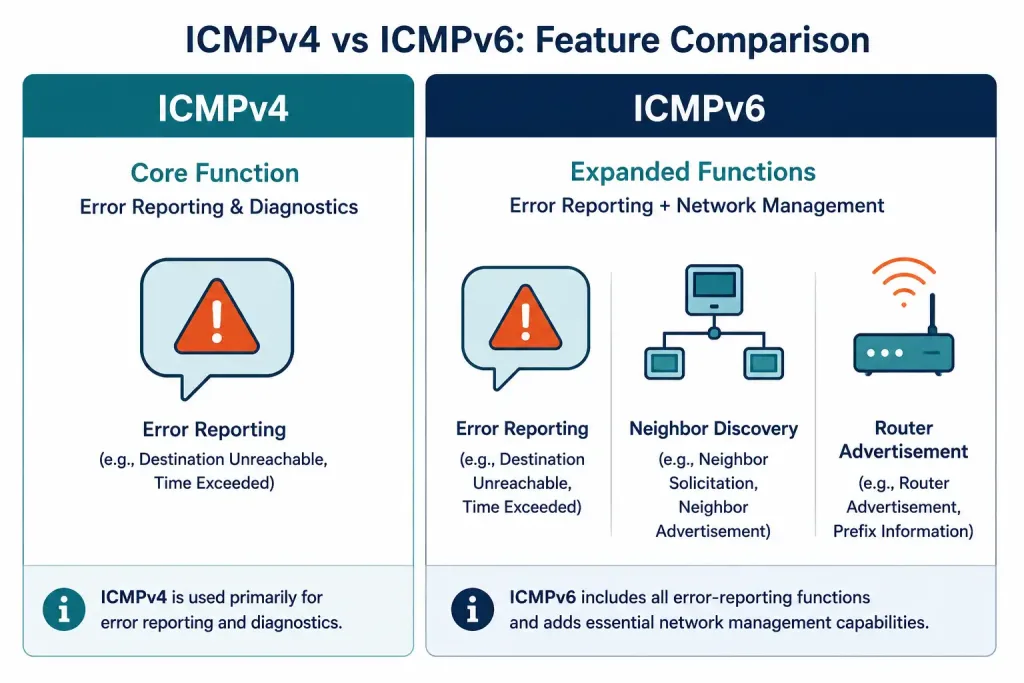
ICMP supports both IPv4 (ICMPv4) and IPv6 (ICMPv6), and it’s worth knowing upfront that they’re not identical: ICMPv6 takes on considerably more responsibility than ICMPv4 ever did, absorbing functions IPv4 handled through entirely separate protocols, most notably Neighbor Discovery, which effectively replaces ARP under IPv6.
| Feature | ICMPv4 | ICMPv6 |
|---|---|---|
| Error reporting | Yes | Yes |
| Neighbor Discovery | No (handled by separate ARP) | Yes (built into ICMPv6) |
| Address resolution | ARP (separate protocol) | ICMPv6 Neighbor Discovery |
Why ICMP Is Sometimes Blocked
Despite its diagnostic value, ICMP is often restricted or blocked entirely on production networks and public-facing servers, for real security reasons. ICMP flood attacks, overwhelming a target with a high volume of ICMP traffic, are a genuine denial-of-service technique, and ICMP-based reconnaissance can help an attacker map out a network’s structure before attempting anything more targeted. Access control lists and rate limiting are the standard mitigations, letting an organization retain enough ICMP functionality for legitimate diagnostics while limiting its usefulness to an attacker, a balance that’s generally preferable to blocking ICMP outright.
ICMP Message Types
Echo Request and Echo Reply (Ping)
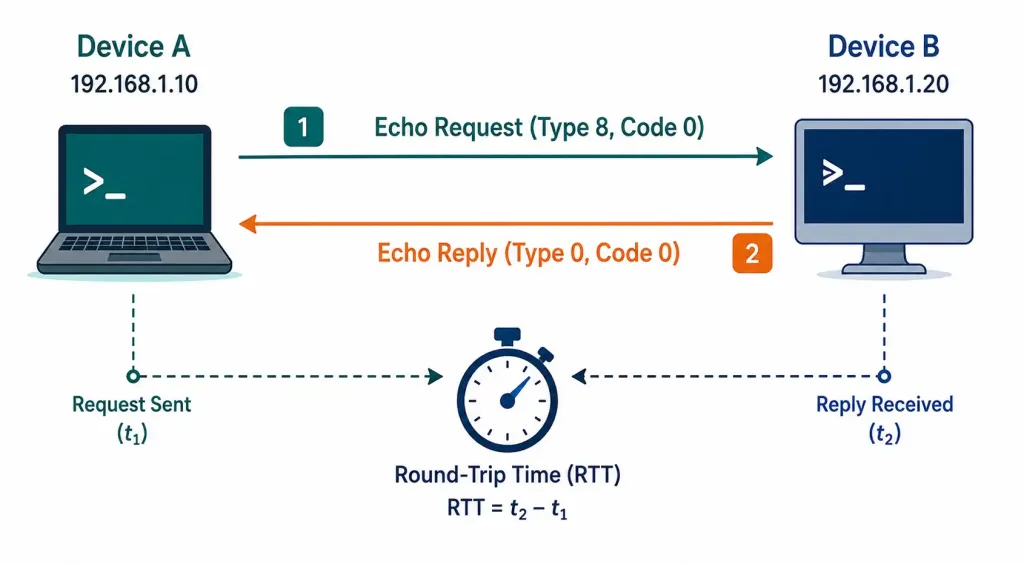
The most familiar ICMP exchange: a local host sends an Echo Request to a remote host, and if that host is reachable and correctly configured, it responds with an Echo Reply. This exchange is the entire mechanism behind the ping utility, and it also measures round-trip time in the process.
In a packet capture, an Echo Request appears as ICMP Type 8, Code 0, and an Echo Reply as Type 0, Code 0. Recognizing these Type/Code values directly in a Wireshark capture is a genuinely useful skill, since it lets you confirm exactly what’s happening at the ICMP level without relying entirely on a higher-level tool’s interpretation.
Destination Unreachable
When a router can’t deliver a packet, and that’s a general statement, this applies to any undeliverable IP traffic, not just ICMP Echo messages specifically, it sends a Destination Unreachable message back to the source, along with a code indicating exactly why delivery failed:
| Code | Meaning |
|---|---|
| 0 | Net unreachable |
| 1 | Host unreachable |
| 2 | Protocol unreachable |
| 3 | Port unreachable |
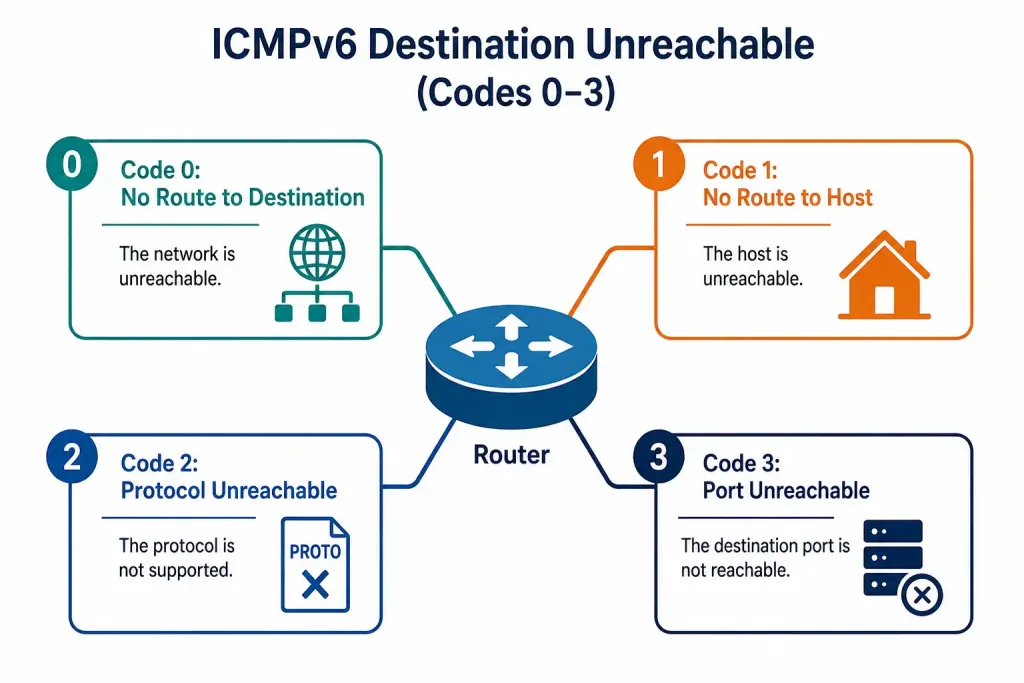
ICMPv6 has an equivalent Destination Unreachable message with its own, slightly different set of codes, reflecting some structural differences between how IPv4 and IPv6 handle routing and addressing.
Time Exceeded
A router decrements a packet’s TTL (IPv4) or Hop Limit (IPv6) by at least one at every hop. If that value reaches zero before the packet arrives at its destination, the router holding it discards the packet and sends a Time Exceeded message back to the source, rather than forwarding it any further. This exists specifically to prevent a packet from circulating indefinitely if a routing loop develops somewhere in the network.
Route Redirect
A Redirect message is a router’s way of telling a sender, “there’s a better next hop for this destination than the one you’re using.” This typically happens when a host’s default gateway isn’t actually the most efficient path to a given destination, and a smarter router on the same segment can offer a shortcut, letting the host update its own routing behavior for future packets to that destination without needing manual reconfiguration.
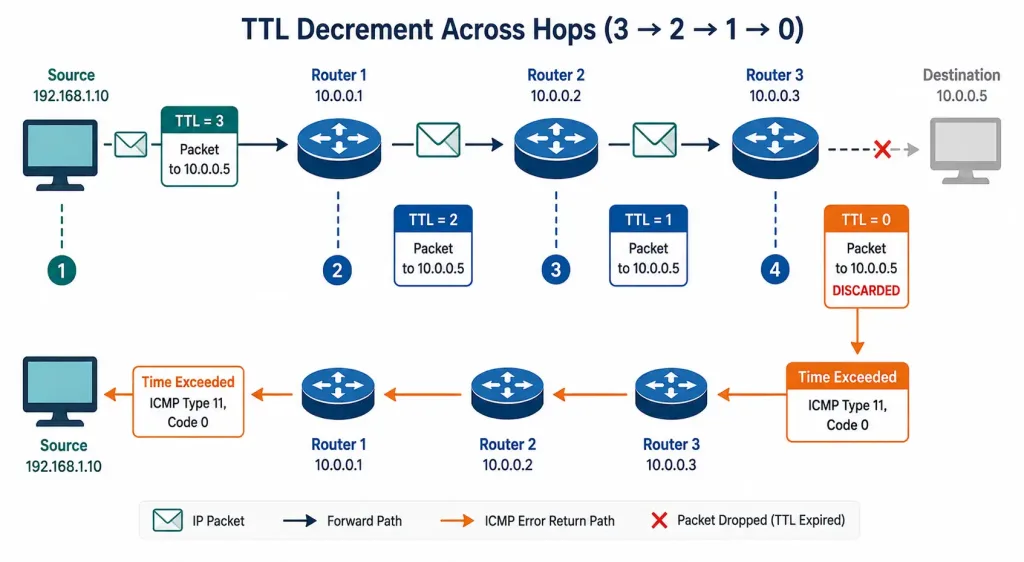
Debugging TTL Exceeded Issues on Cisco IOS
Time Exceeded messages are a common symptom of routing loops or misconfigured paths, and debugging them directly on a router is a genuinely useful CCNA/CCNP skill.
Enabling ICMP Debug
Router> enable
Router# configure terminal
Router(config)# interface GigabitEthernet0/0
Router(config-if)# ip address 192.168.1.1 255.255.255.0
Router(config-if)# no shutdown
Router(config-if)# exit
Router(config)# debug ip icmp
Router(config)# end
debug ip icmp displays real-time ICMP activity on the router’s console, including Time Exceeded notifications as they’re generated, which is exactly the visibility you need to catch a routing loop as it’s actively producing symptoms. Watching this output live, while a suspected problem is actively occurring, is considerably more useful than reviewing static configuration alone.
Follow-Up Diagnostic Commands
Router# show ip route
Router# show ip cef
Router# show ip icmp statistics
Router# ping 192.168.1.10
show ip route and show ip cef let you check whether the routing table and Cisco Express Forwarding table actually agree on the correct path, a mismatch between the two is a real, if less common, cause of unexpected forwarding behavior. show ip icmp statistics gives you aggregate counts of ICMP message types the router has sent and received, useful for spotting an unusually high volume of a specific message type. A basic ping confirms whether the immediate issue has actually cleared once you believe you’ve found and fixed the underlying cause, which is worth doing every time rather than assuming a configuration change worked as intended without directly verifying it.
Important: debug commands generate real-time console output and can meaningfully impact a router’s CPU under heavy traffic. Always disable debugging with no debug ip icmp (or undebug all) once you’re done, rather than leaving it running indefinitely on a production device. Leaving debug output running unattended on a busy router is a genuinely common way to accidentally degrade performance during an otherwise routine troubleshooting session, and it’s an easy step to forget once the actual problem has been resolved and attention has already moved elsewhere.
A Worked Example: Diagnosing a Routing Loop
Say pings to a specific destination consistently time out, and traceroute shows the same three hops repeating over and over rather than progressing toward the destination. That repeating pattern is the signature of a routing loop. Running debug ip icmp on the router at the start of that loop shows a steady stream of Time Exceeded messages being generated, one for each looping packet as its TTL finally hits zero, a clear real-time confirmation that the loop is actively happening rather than a one-off transient event.
Cross-referencing show ip route on each router in the suspected loop typically reveals the actual cause: two routers each pointing to the other as the best path for the same destination network, often the result of a misconfigured static route or a routing protocol that hasn’t converged correctly after a topology change. Correcting the conflicting route on one of the two routers breaks the loop immediately, and a follow-up ping confirms the destination is reachable again. This pattern, symptom first, then debug output confirms the mechanism, then the routing table reveals the root cause, is a genuinely reusable troubleshooting approach that extends well beyond just TTL exceeded issues specifically.
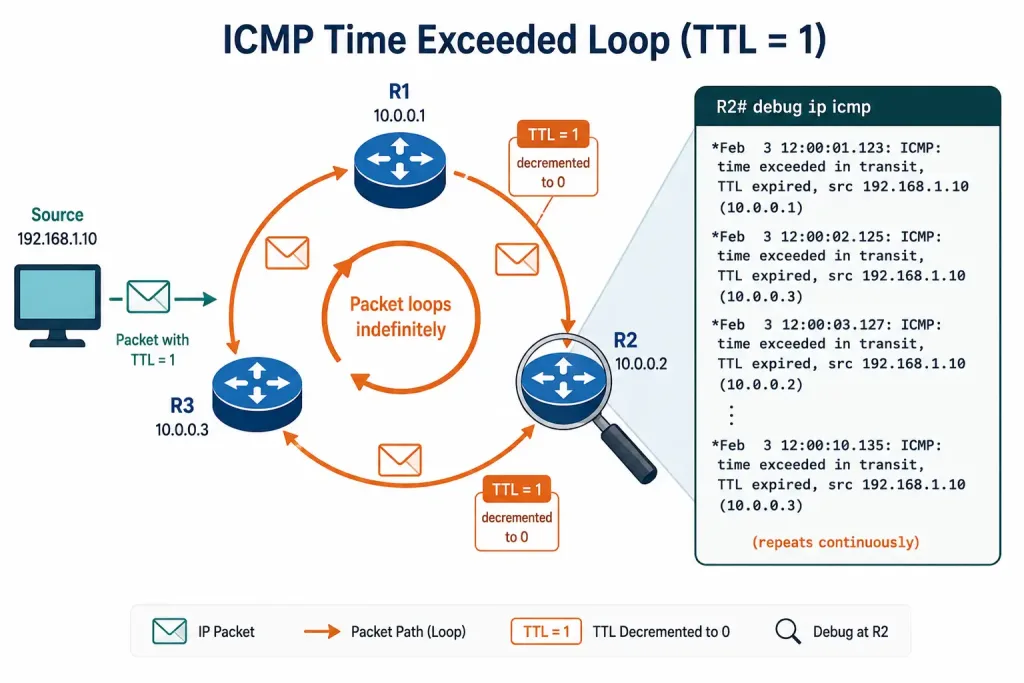
ICMPv6-Specific Message Types
Because ICMPv6 absorbs functionality that ICMPv4 never had to handle, it defines several message types with no direct IPv4 equivalent. Neighbor Solicitation and Neighbor Advertisement messages perform the same fundamental job ARP does under IPv4, resolving a known IPv6 address into its corresponding MAC address, but using multicast rather than broadcast. Router Solicitation and Router Advertisement messages let a host discover its default gateway and receive network prefix information automatically, forming the backbone of Stateless Address Autoconfiguration (SLAAC).
Neither of these functions exists as ICMP messages under IPv4; they’re handled by entirely separate protocols and mechanisms instead, which is exactly why ICMPv6 is meaningfully more central to how an IPv6 network actually operates, not just a diagnostic add-on the way ICMPv4 largely is. Losing ICMPv6 entirely on a network would break considerably more than diagnostics, a real consideration when applying the same aggressive ICMP-blocking policies to IPv6 that might be reasonable on an IPv4 network.
Ping vs. Traceroute: Two Different Uses of the Same Protocol
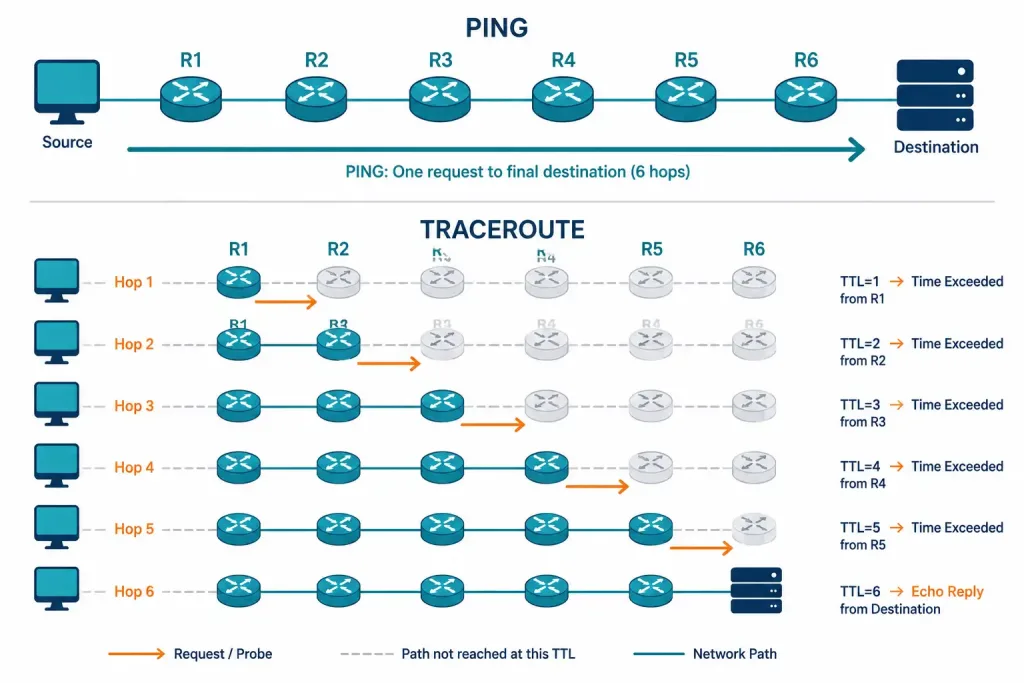
Ping and traceroute both rely on ICMP, but they use it in genuinely different ways worth distinguishing clearly. Ping sends Echo Requests directly to the final destination and simply reports whether Echo Replies come back, confirming reachability and measuring round-trip time to that one specific host. Traceroute takes a cleverer approach: it sends a series of packets with progressively increasing TTL values, starting at 1, and relies on the resulting Time Exceeded messages from each intermediate router along the path to map out the entire route, one hop at a time, rather than just confirming reachability to the final destination.
This is exactly why traceroute is more useful than ping for diagnosing where a connectivity problem actually lives. Ping alone tells you whether a destination is reachable or not, a binary result. Traceroute tells you how far a packet actually gets before something goes wrong, which hop is the last one to respond, and that’s often enough to immediately localize a problem to a specific router or link, rather than needing to guess at every point along the path individually. Combined, the two tools cover most of what a first-pass connectivity investigation actually needs.
Frequently Asked Questions
What is ICMP and what is its primary function?
It is a network layer protocol that provides error reporting and diagnostic messaging for both IPv4 and IPv6, without adding any reliability to IP itself. It’s the foundation behind essential diagnostic tools like ping and traceroute, and understanding its message types is genuinely useful for real-world troubleshooting, not just certification exams.
How does ping actually use ICMP?
Ping sends an ICMP Echo Request (Type 8) to a target host and waits for an Echo Reply (Type 0) in response, using the round-trip time between the two to measure latency. If no reply arrives within the expected window, ping reports the destination as unreachable, though this can also mean ICMP is simply being blocked somewhere along the path rather than the host actually being down.
What’s the real difference between ICMPv4 and ICMPv6?
ICMPv4 handles error reporting and diagnostics for IPv4, while ICMPv6 takes on considerably more responsibility, absorbing Neighbor Discovery, IPv6’s replacement for ARP, directly into itself. This makes ICMPv6 a more central, load-bearing part of how IPv6 networks function day to day, compared to ICMPv4’s narrower diagnostic role in IPv4 networks.
Why might ICMP be blocked on a network?
It is sometimes restricted to prevent ICMP flood denial-of-service attacks and to limit an attacker’s ability to map network structure through reconnaissance techniques that rely on ICMP responses. This does come at a real cost to legitimate diagnostics, which is why access control lists and rate limiting, rather than blanket blocking, are generally the more balanced approach.
How do I troubleshoot ICMP-related issues on a Cisco router?
debug ip icmp shows real-time ICMP activity directly on the router’s console, while show ip icmp statistics gives you an aggregate view of ICMP message counts by type. Combined with show ip route and show ip cef to verify the routing and forwarding tables agree, these commands cover the great majority of practical ICMP troubleshooting scenarios.
What does a Route Redirect message actually accomplish?
A Redirect message lets a router tell a host that a better next hop exists for a specific destination than the one it’s currently using, allowing the host to update its own forwarding behavior without manual reconfiguration. It’s a genuinely elegant mechanism for optimizing routing paths automatically, though it’s used less commonly in modern, more centrally managed network designs than it once was.