
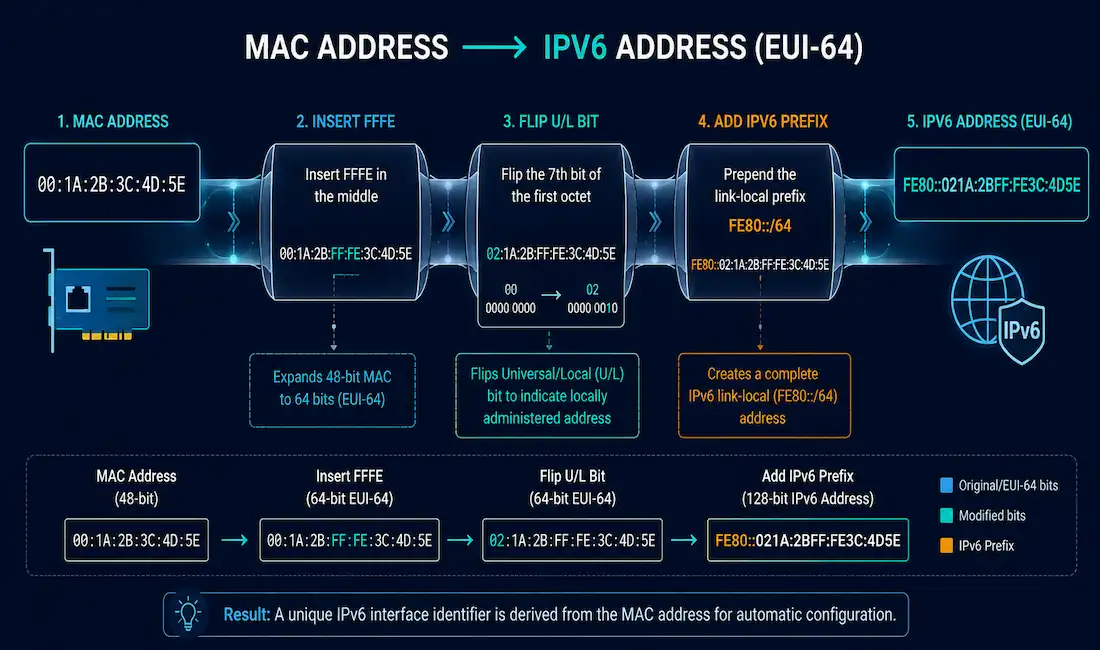
When a device configures an IPv6 address through Stateless Address Autoconfiguration (SLAAC), it gets the network prefix, typically a /64, from a Router Advertisement, but it has to generate its own 64-bit Interface ID independently. This guide covers exactly how that generation works: the EUI-64 process that derives an Interface ID from a MAC address, the randomized alternative most modern operating systems use instead, and Duplicate Address Detection, the mechanism that catches conflicts either method might produce.
How SLAAC and EUI-64 Fit Together
SLAAC differs from stateful DHCPv6 in a specific way: rather than a server assigning a complete address, the router advertises the network prefix via Router Advertisement messages, and the client autonomously builds its own 64-bit Interface ID to complete the address. That Interface ID can come from one of two sources: derived from the device’s MAC address using the EUI-64 process, or generated randomly for privacy. Either way, it gets combined with the advertised prefix to form a complete global unicast address.
The EUI-64 Process, Step by Step
EUI-64 (Extended Unique Identifier, 64-bit) takes a device’s 48-bit Ethernet MAC address and expands it into a 64-bit Interface ID by inserting 16 extra bits in the middle. A MAC address itself splits into two 24-bit halves:
- Organizationally Unique Identifier (OUI): The first three octets, purchased from and assigned by the IEEE, identifying the manufacturer.
- Device Identifier: The last three octets, assigned by the manufacturer to uniquely identify a specific device within its OUI block.
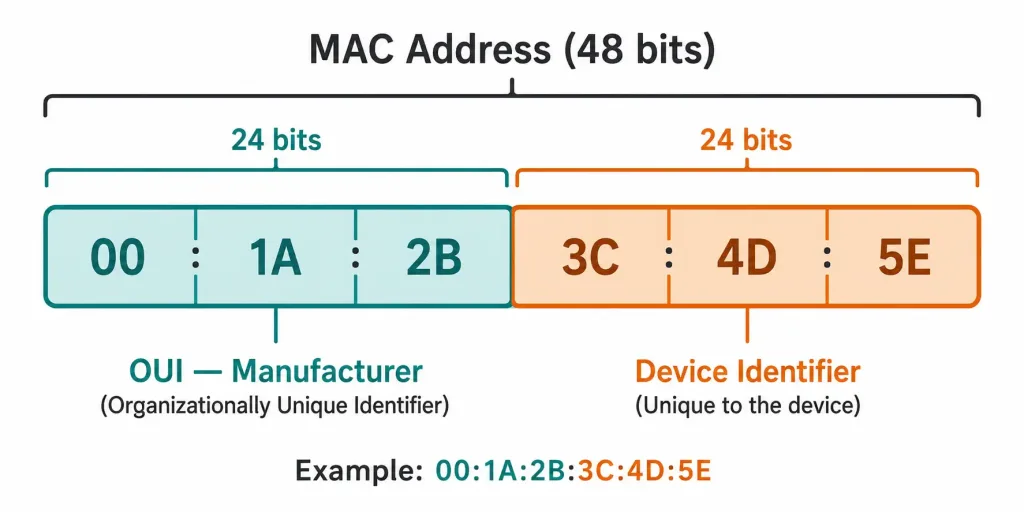
An EUI-64 Interface ID combines three pieces: the 24-bit OUI (with one bit flipped, covered below), the fixed 16-bit value FFFE inserted in the middle, and the 24-bit Device Identifier, in that order.
Worked Example: MAC Address BC:78:BA:B1:F8:55
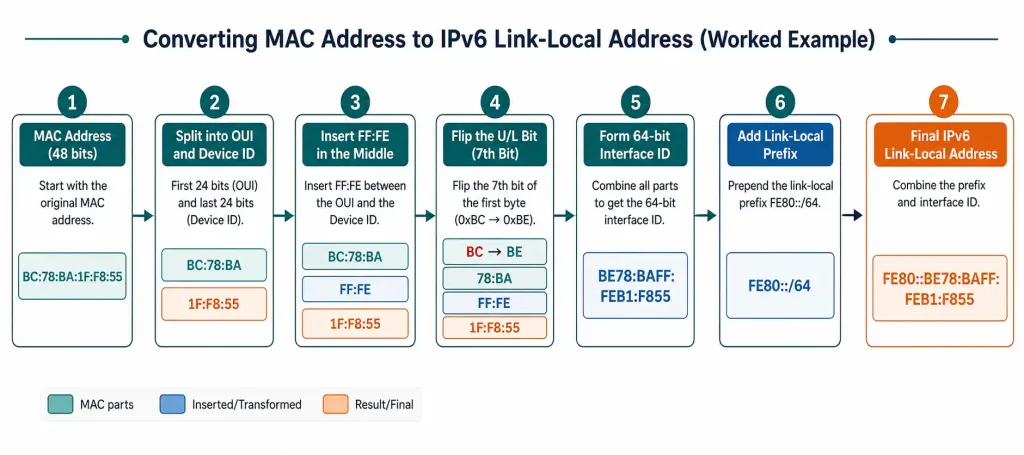
Step 1: Start with the MAC address. BC:78:BA:B1:F8:55
Step 2: Insert FFFE between the OUI and Device Identifier. BC:78:BA:FF:FE:B1:F8:55
Step 3: Group into four hextets for IPv6 notation. BC78:BAFF:FEB1:F855
This grouping step is purely notational, splitting the same 64 bits into four 16-bit chunks purely for readability, without changing any of the underlying values.
Step 4: Convert the first octet to binary and flip the 7th bit. BC in binary is 10111100. The 7th bit from the left, the universal/local (U/L) bit, is currently 0. Flipping it gives 10111110.
This bit flip exists for a specific reason: MAC-48 and EUI-64 formats interpret the universal/local bit with inverted meaning relative to each other. A standard, factory-assigned MAC address is universally administered, and flipping this bit during the EUI-64 conversion is what correctly preserves that “universally administered” status once the address is reformatted, rather than the flip existing simply to “ensure uniqueness” in some vaguer sense. It’s a small but genuinely important distinction for understanding what the conversion is actually doing, rather than treating it as an arbitrary rule to memorize.
Step 5: Convert the flipped binary back to hexadecimal. 10111110 converts to BE. This replaces the original BC in the first octet, and it’s worth double-checking this specific conversion by hand at least once, since it’s exactly the kind of step where a transcription slip can silently produce a wrong final address.
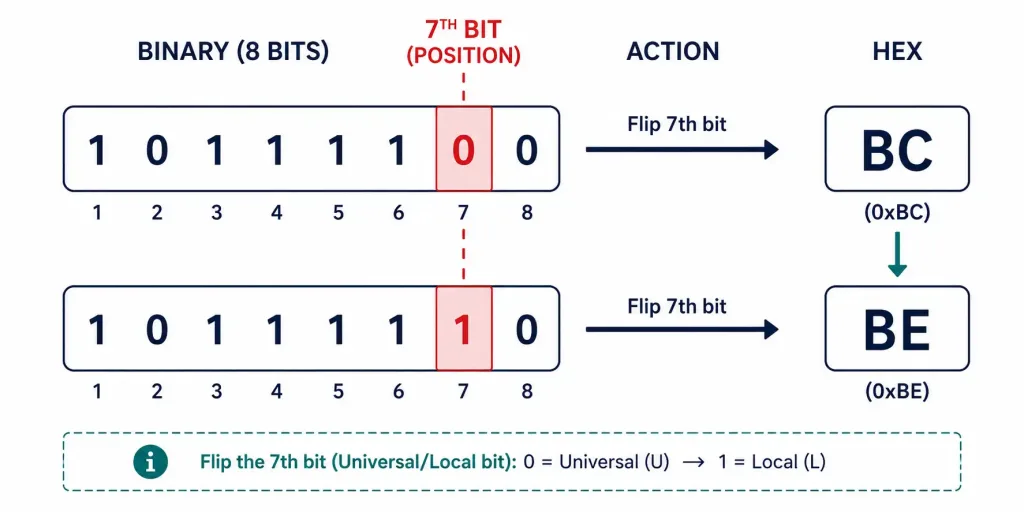
Step 6: Substitute the corrected octet. BE78:BAFF:FEB1:F855
Step 7: Prepend the link-local prefix. FE80::BE78:BAFF:FEB1:F855
Summary Table
| Step | Value |
|---|---|
| Original MAC | BC:78:BA:B1:F8:55 |
| Insert FFFE | BC:78:BA:FF:FE:B1:F8:55 |
| Group into hextets | BC78:BAFF:FEB1:F855 |
| Flip 7th bit (BC → BE) | BE78:BAFF:FEB1:F855 |
| Add link-local prefix | FE80::BE78:BAFF:FEB1:F855 |
Advantages and Disadvantages of EUI-64
EUI-64’s main advantage is traceability for network management: since the Interface ID is derived directly from the MAC address, administrators can often work backward from an IPv6 address to identify the specific device it belongs to, genuinely useful for inventory and troubleshooting in an enterprise environment. This can meaningfully shorten the time spent tracking down a specific misbehaving device on a large network.
That same traceability is also its biggest weakness. An EUI-64-derived address exposes enough of the original MAC address that a device, and by extension the physical hardware and potentially the specific user, can be tracked across multiple network connections over time, a real privacy concern. RFC 4941 addresses this directly, defining temporary, randomized Interface IDs specifically to break that traceability, without giving up the underlying benefits of SLAAC’s autonomous address configuration.
Randomly Generated Interface IDs
Modern operating systems, including current versions of Windows, Linux, and macOS, commonly use randomly generated Interface IDs by default instead of EUI-64, precisely for the privacy reasons above. On Windows, this behavior is controlled through:
netsh interface ipv6 set privacy state=enabledRun from an administrator Command Prompt, this enables IPv6 privacy extensions, causing the system to generate randomized, periodically rotating Interface IDs rather than deriving one from the MAC address.
Duplicate Address Detection (DAD)
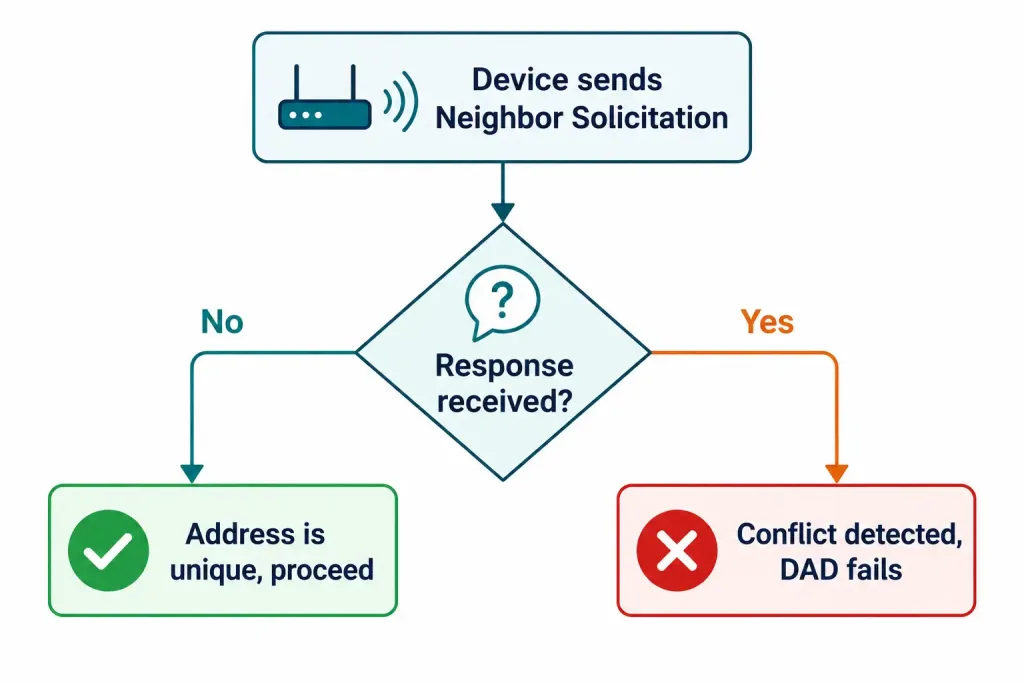
Whether an Interface ID comes from EUI-64 or random generation, a device needs to confirm no other device on the segment is already using the same address before it starts using it. DAD accomplishes this through Neighbor Solicitation messages, conceptually similar to how ARP works in IPv4, but using ICMPv6 rather than broadcast, a distinction consistent with IPv6’s broader shift toward multicast throughout its design.
The device sends a Neighbor Solicitation for its own proposed address; if no response comes back within the expected window, the address is considered unique and safe to use. If a conflicting device does respond, DAD has failed for that address, and the address can’t be assigned as-is. The number of DAD attempts is configurable and varies by platform, RFC 4862 specifies a default of a single transmission, though some implementations and configurations use more. If DAD consistently fails and no alternative Interface ID gets generated automatically, manual intervention becomes necessary, a genuinely useful troubleshooting skill to have.
Spotting EUI-64 vs. Random Addresses in the Wild
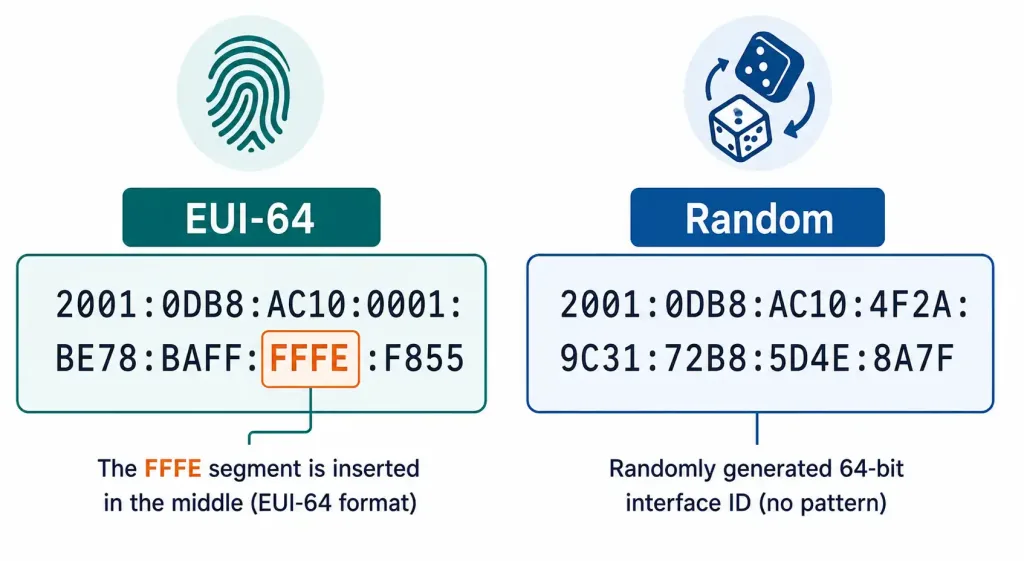
One genuinely practical skill worth building is recognizing which method produced a given IPv6 address just by looking at it. An EUI-64-derived address has a distinctive tell: FFFE sitting in the middle of the Interface ID, exactly as constructed in the worked example above. An address like 2001:db8::be78:baff:feb1:f855 is immediately recognizable as EUI-64-derived, since FFFE (here split across the third and fourth hextets as ...FF:FE...) is sitting right where the process always places it, a pattern that becomes easy to spot once you know to look for it.
A randomly generated Interface ID has no such pattern. Something like 2001:db8::4a1f:92e3:7c88:d901 gives no indication of the underlying MAC address at all, and won’t contain the FFFE signature anywhere, since it’s generated independently of any hardware identifier. This distinction is genuinely useful during troubleshooting or security review: spotting an unexpected EUI-64 address on a network where privacy extensions should be enforced can flag a misconfigured device worth investigating further, since it means that device’s traffic is potentially traceable in a way policy may not intend. Building the habit of scanning for that FFFE pattern turns this from a manual lookup into something you can often spot at a glance.
Why FFFE Specifically, and Why the Middle
It’s worth understanding why FFFE was chosen as the insertion value rather than treating it as an arbitrary constant to memorize. FFFE isn’t a coincidental choice: it’s a value IEEE reserved specifically for exactly this purpose, converting a 48-bit MAC-48/EUI-48 identifier into the 64-bit EUI-64 format. Because it’s reserved rather than a value that could otherwise appear as part of a legitimate device identifier, its presence unambiguously signals that an address was constructed via this specific conversion process, rather than being a naturally occurring 64-bit identifier assigned some other way.
The middle insertion point matters too, and it’s not arbitrary either. Placing FFFE between the OUI and Device Identifier means the resulting 64-bit value still preserves both halves of the original MAC address intact and separately identifiable within the new format, the OUI remains readable in the first 24 bits (plus the flipped bit), and the Device Identifier remains readable in the last 24 bits.
Splitting the MAC address anywhere else would scramble this readability, undermining exactly the traceability that makes EUI-64 useful for device inventory in the first place, even though that same traceability is also its core privacy weakness. This tension, between usefulness for inventory and risk for privacy, is really the whole story behind why RFC 4941 exists at all.
Troubleshooting EUI-64 and Interface ID Issues
An address doesn’t match what you’d expect from the device’s known MAC address. Confirm whether privacy extensions are enabled on that device first; if random Interface IDs are active, the resulting address won’t relate to the MAC at all, which is expected behavior, not a fault. This is worth checking early, before spending time comparing binary math that was never going to line up in the first place.
DAD keeps failing for a newly connecting device. This typically points to a genuine duplicate address on the segment, sometimes caused by two devices with cloned or manually misconfigured MAC addresses producing the same EUI-64 result. Checking for duplicate MAC addresses on the segment is a reasonable first step before assuming an IPv6-specific misconfiguration, since the root cause often traces back to Layer 2 rather than anything IPv6-specific at all.
A security review flags unexpected device traceability. If policy requires privacy extensions but an audit finds EUI-64-derived addresses in use, check whether privacy extensions were ever actually enabled on the affected devices, or whether a specific application or service is bypassing the system’s usual address selection and requesting the EUI-64 address directly for its own reasons. Some legacy applications and management tools specifically request the stable, MAC-derived address rather than a rotating temporary one, which can explain an otherwise-unexpected finding during an audit.
Frequently Asked Questions
What is the EUI-64 process in IPv6?
The EUI-64 process generates a 64-bit IPv6 Interface ID from a device’s 48-bit MAC address, inserting the fixed value FFFE in the middle and flipping the universal/local bit of the OUI. It’s one of two common ways a device can generate its own Interface ID under SLAAC, the other being random generation.
Why does the EUI-64 process flip a bit in the MAC address?
The flip corrects for a difference in how MAC-48 and EUI-64 formats interpret the universal/local bit, ensuring a standard, factory-assigned MAC address is still correctly represented as universally administered once converted into EUI-64 format. It’s a formatting correction tied to how the two standards define that specific bit, not an arbitrary step.
What’s the main privacy concern with EUI-64-derived addresses?
Because the Interface ID is derived directly from the MAC address, an EUI-64-based IPv6 address can potentially be used to trace a specific physical device across different networks over time. RFC 4941 addresses this by defining randomized, periodically changing temporary Interface IDs as a privacy-preserving alternative.
How do I enable randomized Interface IDs on Windows?
Run netsh interface ipv6 set privacy state=enabled from an administrator Command Prompt. This enables IPv6 privacy extensions, causing the system to generate randomized Interface IDs instead of deriving one from the MAC address via EUI-64.
What does Duplicate Address Detection actually check?
DAD confirms that a device’s proposed IPv6 address, whether derived via EUI-64 or generated randomly, isn’t already in use by another device on the same segment, using Neighbor Solicitation messages sent before the address is actually put into use. If a conflicting device responds, the address fails DAD and can’t be assigned as-is.
Does DAD work the same way as ARP?
Conceptually, yes, both exist to resolve or verify addressing information before communication begins, but DAD uses ICMPv6 Neighbor Solicitation messages rather than the broadcast-based ARP request IPv4 relies on. This is consistent with IPv6’s broader shift away from broadcast toward multicast-based mechanisms throughout its design.



