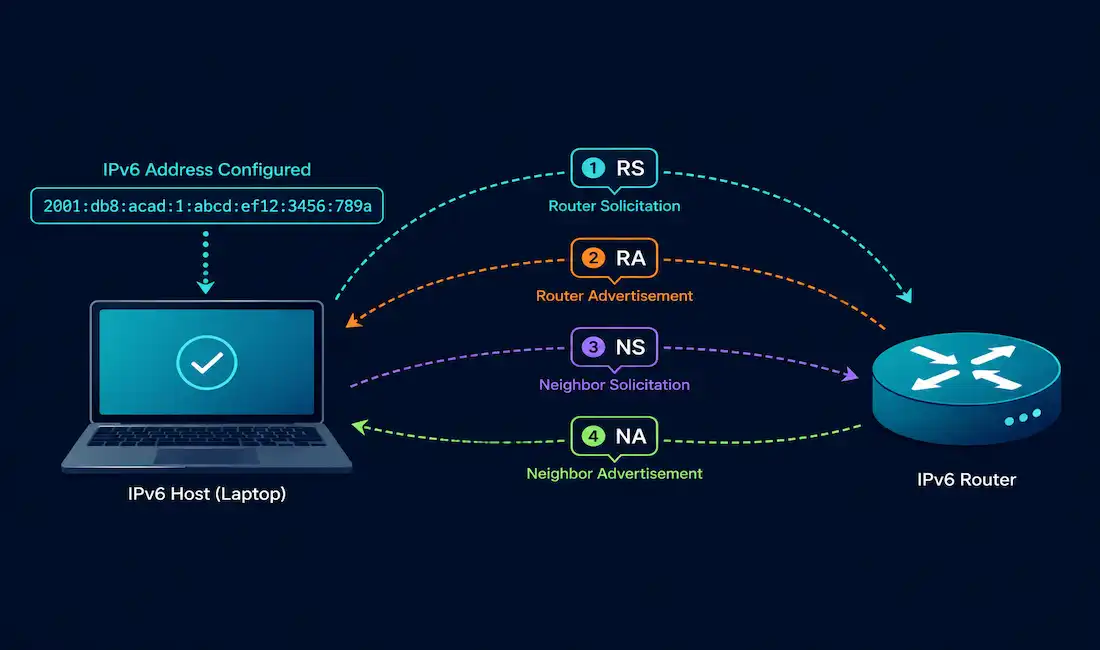
ICMPv6 does considerably more than its IPv4 counterpart. Beyond basic error reporting, it absorbs an entire protocol’s worth of functionality through the Neighbor Discovery Protocol (NDP), four distinct message types working together to replace ARP, handle address resolution, and drive SLAAC. This guide covers each of the four NDP message types, how they interact, and how to configure and troubleshoot them on Cisco equipment, working through a complete worked example along the way.
ICMPv4 vs. ICMPv6 at a Glance
| Feature | ICMPv4 | ICMPv6 |
|---|---|---|
| Encapsulation | IPv4 packets | IPv6 packets |
| Address resolution | ARP (separate protocol) | NDP (NS/NA messages) |
| Autoconfiguration | Not supported | SLAAC via RA messages |
| Multicast support | Limited (e.g., IGMP) | Extensive (e.g., FF02::2 for routers) |
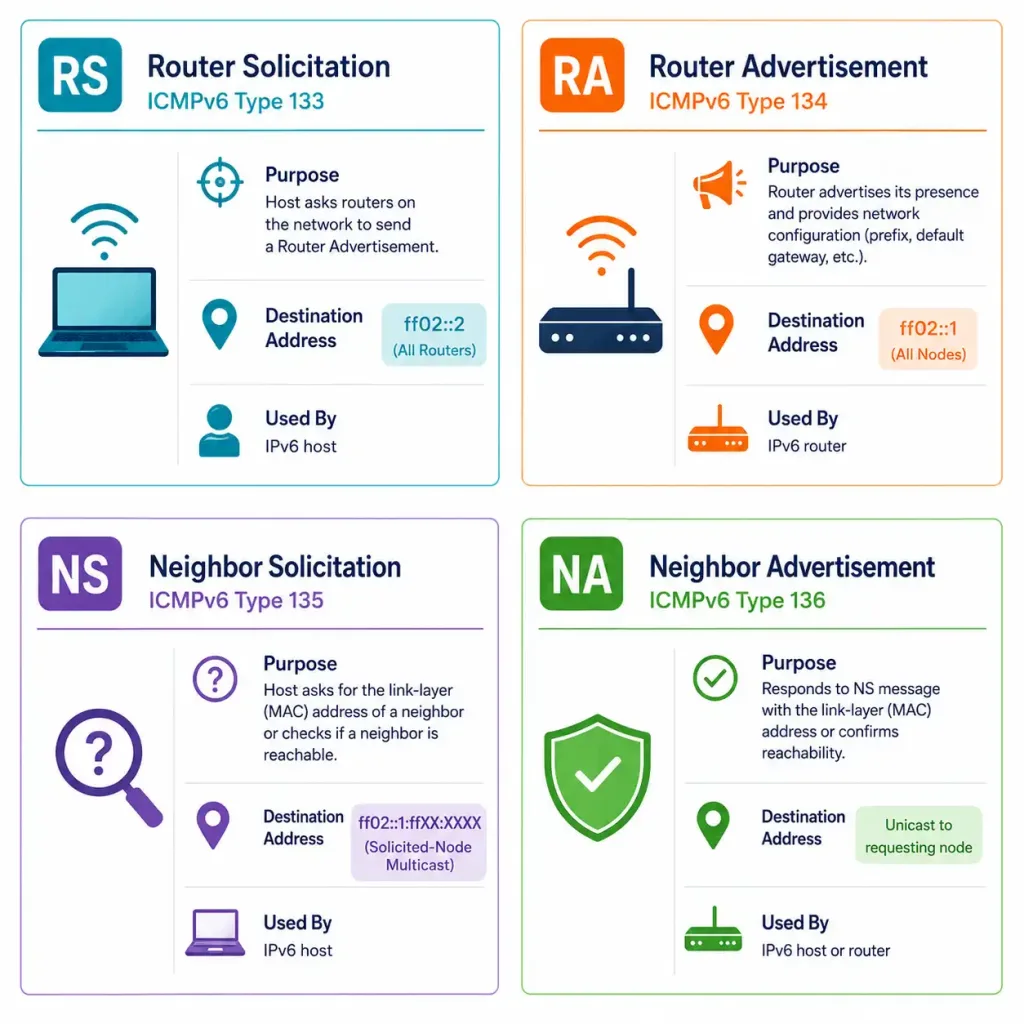
ICMPv6’s NDP consists of four message types: Router Solicitation (RS), Router Advertisement (RA), Neighbor Solicitation (NS), and Neighbor Advertisement (NA). RS/RA handle router discovery and autoconfiguration; NS/NA handle address resolution and duplicate address detection.
Router Solicitation (RS)
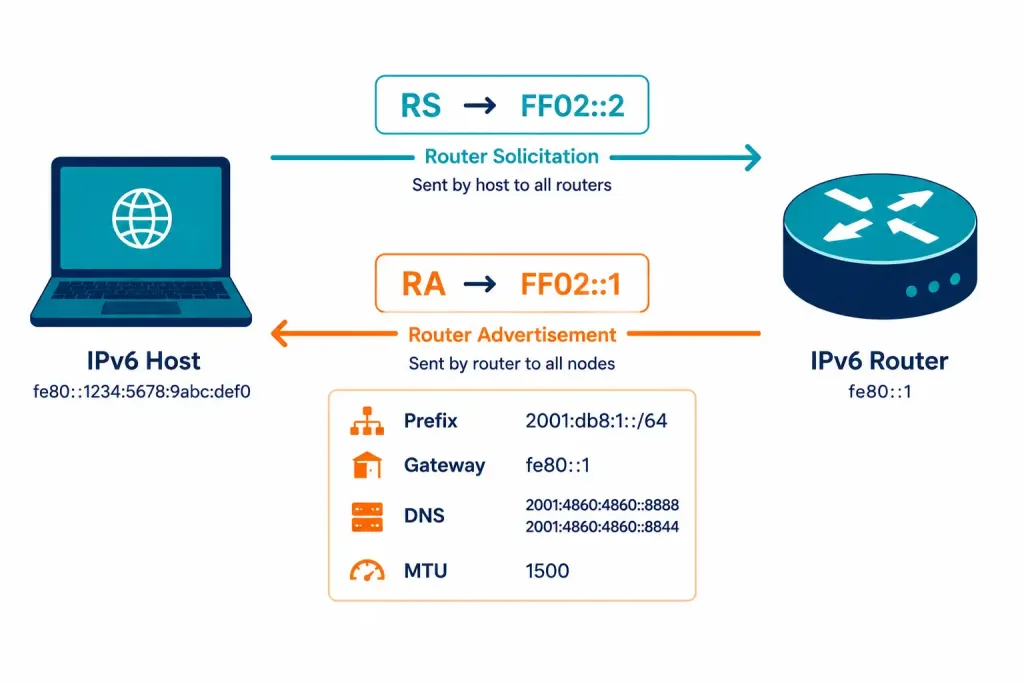
A host sends an RS message to prompt any routers on the segment to send a Router Advertisement immediately, rather than waiting for the next periodic RA broadcast. This matters directly for SLAAC, since a host needs prefix information from an RA before it can complete its own address configuration.
- ICMPv6 Type: 133
- Destination: FF02::2 (all-routers multicast)
- When sent: At startup, or whenever a host needs updated configuration information immediately
Router Advertisement (RA)
Routers send RA messages, either periodically or in direct response to an RS, to provide hosts with the network prefix, default gateway, DNS server, MTU, and neighbor discovery timers needed for SLAAC.
- ICMPv6 Type: 134
- Destination: FF02::1 (all-nodes multicast)
- Managed Address Configuration (M) flag: Set when hosts should use DHCPv6 for address assignment rather than SLAAC alone
- Other Configuration (O) flag: Set when hosts should use DHCPv6 for other settings, like DNS, even while still using SLAAC for the address itself
Configuring RS/RA on a Cisco Router
Before any of this works, IPv6 routing needs to be enabled globally, a step worth stating explicitly since it’s easy to assume interface-level configuration alone is sufficient:
Router(config)# ipv6 unicast-routingWith that in place, configure the interface:
Router(config)# interface GigabitEthernet0/0
Router(config-if)# ipv6 address 2001:db8::1/64
Router(config-if)# ipv6 nd ra interval 200
Router(config-if)# no ipv6 nd suppress-ra
Router(config-if)# ipv6 nd prefix 2001:db8::/64
Router(config-if)# ipv6 nd ra dns server 2001:db8::53
This sets the RA interval to 200 seconds, ensures RA messages aren’t suppressed, advertises the specified prefix, and includes a DNS server in the advertisement.
Verification:
Router# show ipv6 routersThis confirms exactly what RA information a Cisco device has received from routers on its segment, useful both for confirming your own router’s configuration and for spotting an unexpected or unauthorized RA source.
Neighbor Solicitation (NS) and Neighbor Advertisement (NA)
NS and NA together replace ARP entirely under IPv6, serving two distinct purposes: address resolution and Duplicate Address Detection.
Address Resolution
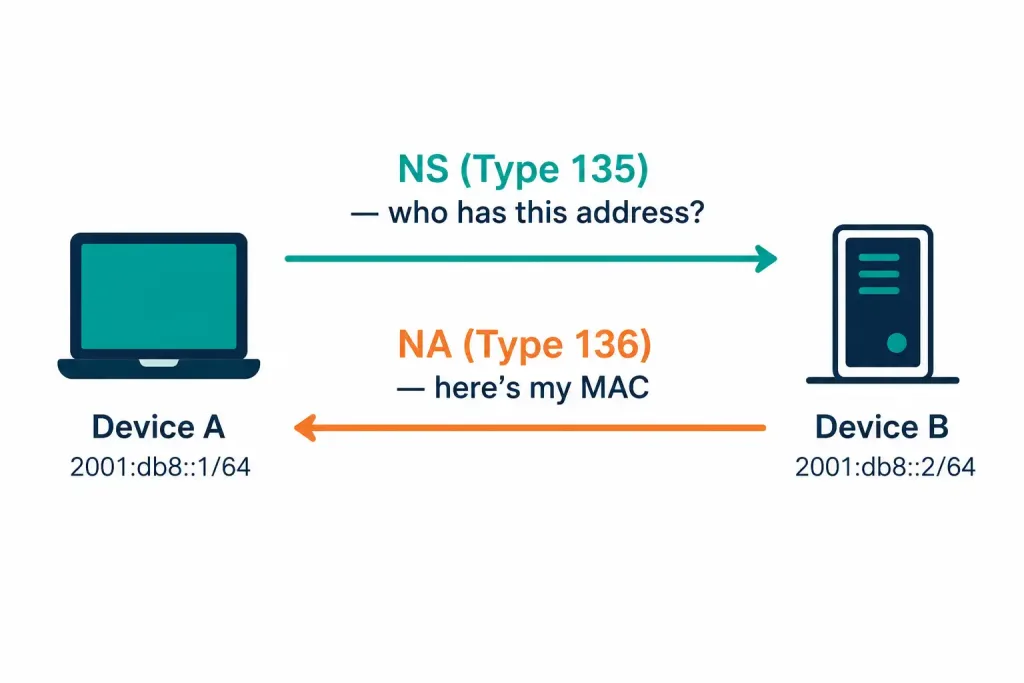
When a device knows a destination’s IPv6 address but not its MAC address, it sends an NS message to that address’s solicited-node multicast address, functionally equivalent to an ARP request under IPv4. The device owning that IPv6 address responds with an NA message containing its MAC address.
- NS — ICMPv6 Type: 135, containing the target address to resolve
- NA — ICMPv6 Type: 136, containing the responding device’s MAC address
Duplicate Address Detection (DAD)
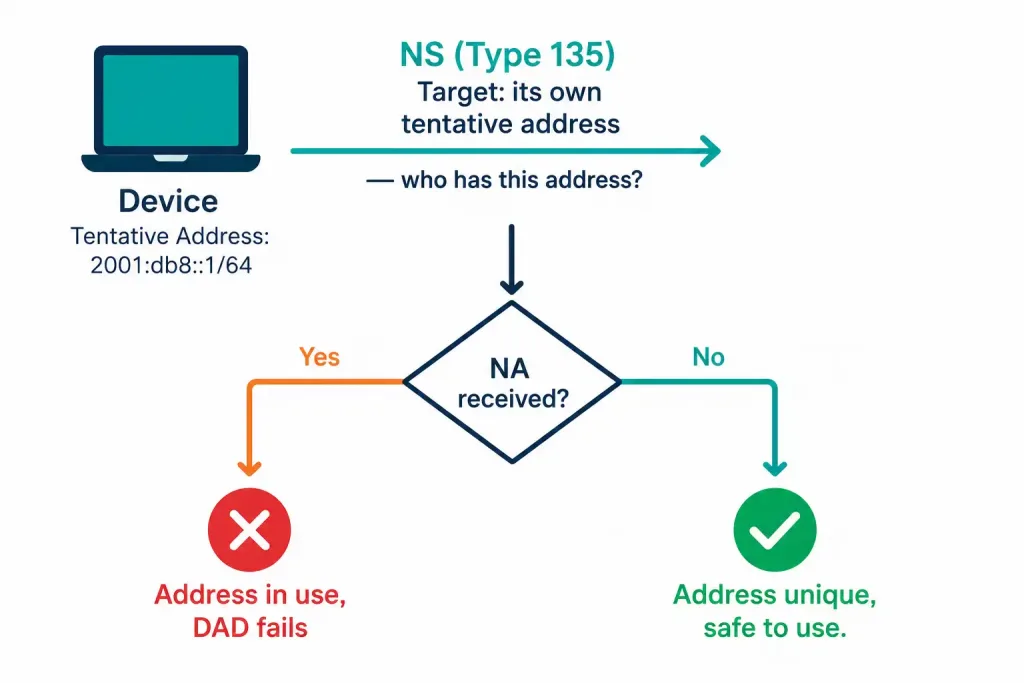
Before a device puts a newly assigned IPv6 address into actual use, it needs to confirm no other device on the segment already has it. DAD accomplishes this using the same NS message type, just for a different purpose:
- The device sends an NS message with its own tentative address as the target, essentially asking “does anyone already have this address?”
- If another device already holds that address, it responds with an NA message.
- If no NA arrives within the expected timeout, the address is confirmed unique and safe to use.
This mirrors what gratuitous ARP accomplishes for duplicate detection under IPv4, adapted to IPv6’s NS/NA mechanism instead.
Verifying Neighbor Entries
Router# show ipv6 neighborsThis displays the IPv6 address, corresponding MAC address, and interface for every neighbor the router has discovered, IPv6’s equivalent of checking an ARP table under IPv4.
Troubleshooting ICMPv6/NDP Issues
| Command | Purpose |
|---|---|
show ipv6 routers | Verify received RA messages |
show ipv6 neighbors | Check the neighbor (NDP) cache |
debug ipv6 nd | Real-time debugging of NDP message exchange |
A typical debug ipv6 nd session shows entries like:
ICMPv6-ND: Received RA from 2001:db8::1 on GigabitEthernet0/0confirming exactly when and from where RA messages are actually arriving, useful when a host isn’t autoconfiguring as expected and you need to confirm whether the RA itself is even reaching it, rather than assuming the problem is somewhere else entirely.
Security Considerations
RA Spoofing
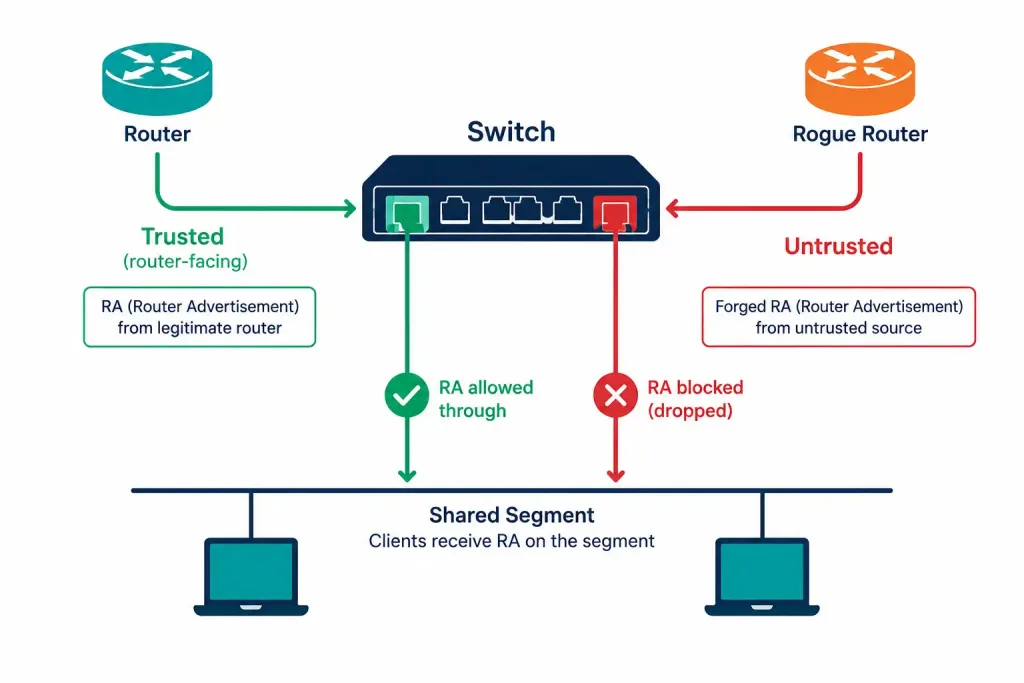
NDP has no built-in authentication, which means a malicious or simply misconfigured device on a segment can send forged RA messages, potentially disrupting SLAAC for every other host on that segment or redirecting their default gateway to an attacker-controlled device. RA Guard is the standard Cisco defense, filtering RA messages at the switch port level so only authorized ports can actually send them:
Switch(config)# ipv6 nd raguard policy RAGUARD
Switch(config-nd-raguard)# device-role router
Switch(config)# interface GigabitEthernet0/1
Switch(config-if)# ipv6 nd raguard attach-policy RAGUARD
The attach-policy keyword is essential here; simply entering ipv6 nd raguard without referencing the named policy won’t actually apply your specific RA Guard configuration to the interface.
DAD-Related Attacks
An attacker can exploit the DAD process itself, responding to every DAD attempt with an NA claiming the address is already taken, effectively preventing legitimate devices from ever completing address assignment. Secure Neighbor Discovery (SEND), where supported, adds cryptographic protection to NDP messages specifically to defend against this and similar NDP-based attacks.
A Worked Example: A Device Joining the Network
Tracing through a full sequence makes the relationship between these four message types concrete. A laptop connects to a network segment for the first time. It sends an RS message to FF02::2, prompting any routers present to respond immediately rather than waiting for the next scheduled broadcast. A router replies with an RA to FF02::1, including the network prefix, default gateway information, and relevant timers.
Using that prefix, the laptop generates a tentative IPv6 address, via EUI-64 or randomly, and immediately runs DAD: it sends an NS message targeting its own tentative address. If no NA response arrives within the timeout, the address is confirmed unique, and the laptop begins using it, all without any manual intervention from either the user or a network administrator. Later, when the laptop needs to reach another device on the same segment whose MAC address it doesn’t yet know, it sends a separate NS message, this time targeting that device’s known IPv6 address, and receives an NA in response containing the MAC address needed to actually build a frame.
Four message types, two entirely different purposes, RS/RA for network-level configuration, NS/NA for address-level resolution and verification, working together to get a new device fully operational on an IPv6 network without any manual configuration required. Understanding this full sequence end to end makes each individual message type’s purpose far easier to remember than treating them as four isolated facts.
Why NS Uses Solicited-Node Multicast Instead of Broadcast
It’s worth understanding why NS messages target a solicited-node multicast address rather than simply broadcasting the way ARP does under IPv4. A solicited-node multicast address is derived directly from the last 24 bits of the target IPv6 address, following a fixed formula, which means only devices whose own address shares those final 24 bits will actually be listening on that specific multicast group. In practice, this narrows the set of devices that even need to process a given NS message down to a very small number, often just one, rather than forcing every single device on the segment to inspect and discard an ARP-style broadcast the way IPv4 requires.
This is a genuinely meaningful efficiency gain at scale. On a segment with hundreds of devices, an IPv4 ARP broadcast interrupts every one of them, however briefly, for every single address resolution. The equivalent IPv6 NS message, thanks to solicited-node multicast, interrupts only the one or few devices that could plausibly be the actual target, letting everything else on the segment continue undisturbed.
A Second Worked Example: Diagnosing a Failed Autoconfiguration
Say a newly connected laptop never receives an IPv6 address on a segment where SLAAC should be working. debug ipv6 nd on the router shows no RS message ever arriving from that laptop’s MAC address, which immediately narrows the problem: either the laptop itself isn’t sending an RS at all, worth checking its own IPv6 configuration state, or the RS is being sent but never reaching the router, pointing toward a switch-level filtering issue, possibly RA Guard or another security policy misconfigured to block legitimate traffic rather than just spoofed traffic.
If the RS does show up in the debug output but no corresponding RA gets logged as sent, the problem sits on the router side instead: check show ipv6 routers and confirm ipv6 unicast-routing is actually enabled globally, along with no ipv6 nd suppress-ra on the relevant interface. Working through the exchange in order, RS first, then RA, is the fastest way to isolate exactly which side of the conversation is actually failing.
This kind of targeted, evidence-based narrowing, confirming exactly which message in the RS/RA exchange is missing, rather than guessing broadly at “IPv6 isn’t working,” is exactly the value debug ipv6 nd provides over just staring at end-host symptoms alone. It’s the same disciplined approach worth applying to almost any protocol-level troubleshooting, not just NDP specifically.
Frequently Asked Questions
What’s the difference between Router Solicitation and Router Advertisement?
Router Solicitation is sent by hosts requesting immediate router configuration information, while Router Advertisement is sent by routers, either periodically or in response to an RS, actually providing that configuration information. RS prompts; RA delivers.
How does Neighbor Discovery replace ARP under IPv6?
NS and NA messages perform the same address resolution job ARP performs under IPv4, resolving a known IPv6 address into its MAC address, but using ICMPv6 multicast to the solicited-node address rather than IPv4’s broadcast-based ARP request. This is more efficient, since it avoids interrupting every device on the segment for a resolution request that only concerns one specific device.
What’s the purpose of Duplicate Address Detection?
DAD confirms a device’s tentative IPv6 address isn’t already in use by another device on the same segment before that address gets put into actual use, using the same NS message type as address resolution but targeting the device’s own address instead of a remote one. This prevents address conflicts that could otherwise cause unpredictable connectivity problems for both devices involved.
Why is ipv6 unicast-routing necessary before configuring RA settings?
This global command enables IPv6 routing functionality on the device in the first place; without it, interface-level IPv6 configuration won’t actually result in the router processing and forwarding IPv6 traffic or sending RA messages the way you’d expect. It’s a genuinely easy step to overlook since it’s configured once globally rather than per-interface like most of the other settings covered here.
What is RA Guard and why does it matter?
RA Guard is a Cisco switch feature that filters Router Advertisement messages at the port level, allowing them only from ports explicitly designated as legitimate router-facing ports. This defends against RA spoofing, where a malicious or misconfigured device sends forged RA messages that could disrupt SLAAC or redirect victims’ default gateway to an attacker-controlled device.
How can I verify what RA information my router has actually received?
show ipv6 routers displays the Router Advertisement information a Cisco device has received, including source router, prefix, and lifetime details. This is genuinely useful both for confirming your own router configuration is being received correctly and for identifying an unexpected or unauthorized RA source during a security investigation.