
The User Datagram Protocol (UDP) is a lightweight Transport Layer protocol that provides fast, low-overhead data transmission between applications without establishing a connection first. Defined in RFC 768, UDP is one of the two core Transport Layer protocols alongside TCP and is directly tested on the CCNA 200-301 exam.
Understanding UDP — its header structure, encapsulation, how it differs from TCP, which applications use it, and why — is essential for network engineers working with DNS, VoIP, streaming, and real-time data applications.
UDP in the OSI Model
UDP operates at Layer 4 — the Transport Layer of the OSI model. It sits between the application protocols above and the IP layer below.
| OSI Layer | Protocol |
|---|---|
| 7 — Application | DNS, DHCP, NTP, SNMP, TFTP, VoIP apps |
| 6 — Presentation | — |
| 5 — Session | — |
| 4 — Transport | UDP (and TCP) |
| 3 — Network | IP |
| 2 — Data Link | Ethernet |
| 1 — Physical | Cables, signals |
UDP interacts directly with IP below it and with application layer protocols above it, providing port-based multiplexing and optional error checking — nothing more.
What Is UDP?
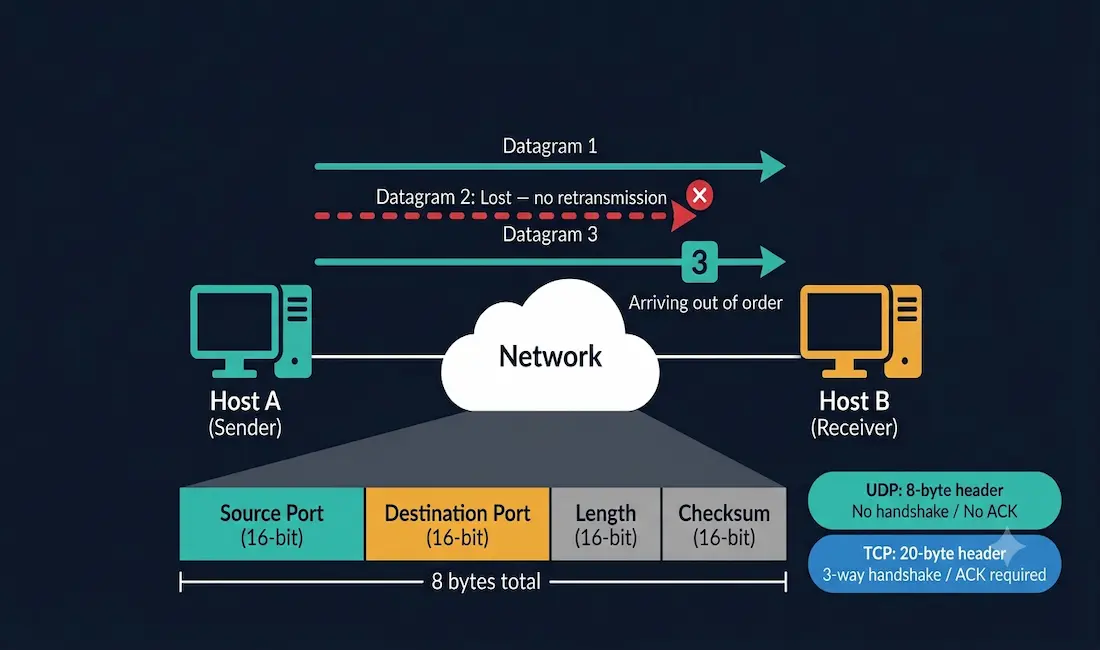
UDP is a connectionless protocol that sends data units called datagrams directly to the destination without first establishing a session. There is no handshake, no acknowledgment, and no guarantee that datagrams arrive at all — or in the order they were sent.
This design is intentional. For applications where speed matters more than guaranteed delivery — DNS lookups, VoIP calls, live video streams, online gaming — the overhead of TCP’s connection setup, acknowledgment, and retransmission mechanisms would introduce unacceptable latency. UDP eliminates that overhead entirely.
UDP operates as part of the application layer stack, sitting beneath application protocols and above IP. When paired with IP (UDP/IP), it provides the minimal transport service needed to move datagrams from source to destination port.
UDP Header Structure
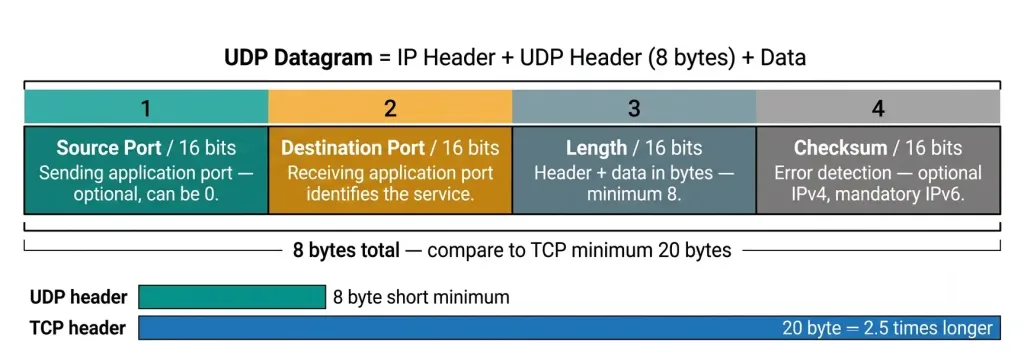
The UDP header is only 8 bytes — one of the smallest headers in the TCP/IP stack. This minimal size is central to UDP’s speed advantage over TCP (which has a 20-byte minimum header).
 0                   1                   2                   3
 0 1 2 3 4 5 6 7 8 9 0 1 2 3 4 5 6 7 8 9 0 1 2 3 4 5 6 7 8 9 0 1
+-+-+-+-+-+-+-+-+-+-+-+-+-+-+-+-+-+-+-+-+-+-+-+-+-+-+-+-+-+-+-+-+
|          Source Port          |       Destination Port        |
+-+-+-+-+-+-+-+-+-+-+-+-+-+-+-+-+-+-+-+-+-+-+-+-+-+-+-+-+-+-+-+-+
|             Length            |            Checksum           |
+-+-+-+-+-+-+-+-+-+-+-+-+-+-+-+-+-+-+-+-+-+-+-+-+-+-+-+-+-+-+-+-+| Field | Size | Description |
|---|---|---|
| Source Port | 16 bits | Port of the sending application (optional — can be 0 if no reply needed) |
| Destination Port | 16 bits | Port of the receiving application |
| Length | 16 bits | Total length of UDP header + data in bytes (minimum 8) |
| Checksum | 16 bits | Error detection over header and data (optional in IPv4, mandatory in IPv6) |
UDP Checksum
The UDP checksum covers three things: a 12-byte pseudo-header (source IP, destination IP, protocol number, UDP length), the 8-byte UDP header, and the UDP data payload. In IPv4, setting the checksum field to zero indicates no checksum was calculated — some high-performance applications disable it for speed, though this is not recommended as it removes the only error detection mechanism UDP has. In IPv6, the checksum is mandatory because IPv6 does not include a header checksum of its own.
UDP Datagram Encapsulation
When an application sends data over UDP, it is encapsulated layer by layer before transmission. Understanding this encapsulation stack is a core CCNA concept.
┌──────────────────────────────────────────────┐
│              APPLICATION DATA                │
├──────────────────────────────────────────────┤
│   UDP HEADER (8 bytes) + APPLICATION DATA    │  ← Transport Layer (UDP segment/datagram)
├──────────────────────────────────────────────┤
│   IP HEADER + UDP HEADER + APPLICATION DATA  │  ← Network Layer (IP packet)
├──────────────────────────────────────────────┤
│ ETHERNET │ IP │ UDP │ DATA │ FCS             │  ← Data Link Layer (Ethernet frame)
└──────────────────────────────────────────────┘
Each layer adds its own header (and in the case of Ethernet, a trailer FCS). The receiving host strips each header in reverse order as the data moves up the stack.
UDP vs TCP: Key Differences
For CCNA, understanding when to use UDP versus TCP is as important as understanding how each works.
| Feature | UDP | TCP |
|---|---|---|
| Connection type | Connectionless — no handshake | Connection-oriented — three-way handshake |
| Reliability | No guaranteed delivery | Guaranteed delivery with ACKs |
| Ordering | No sequencing | Sequenced — data reassembled in order |
| Retransmission | None | Lost segments retransmitted automatically |
| Flow control | None | Yes — sliding window mechanism |
| Congestion control | None | Yes — slow start, congestion avoidance |
| Header size | 8 bytes | 20 bytes minimum |
| Speed | Faster — minimal overhead | Slower — connection management overhead |
| Broadcast/Multicast | Supported | Not supported |
| Use cases | DNS, VoIP, streaming, gaming, TFTP, SNMP | HTTP/S, FTP, SSH, email, file transfer |
When to Use UDP vs TCP
The decision rule is straightforward:
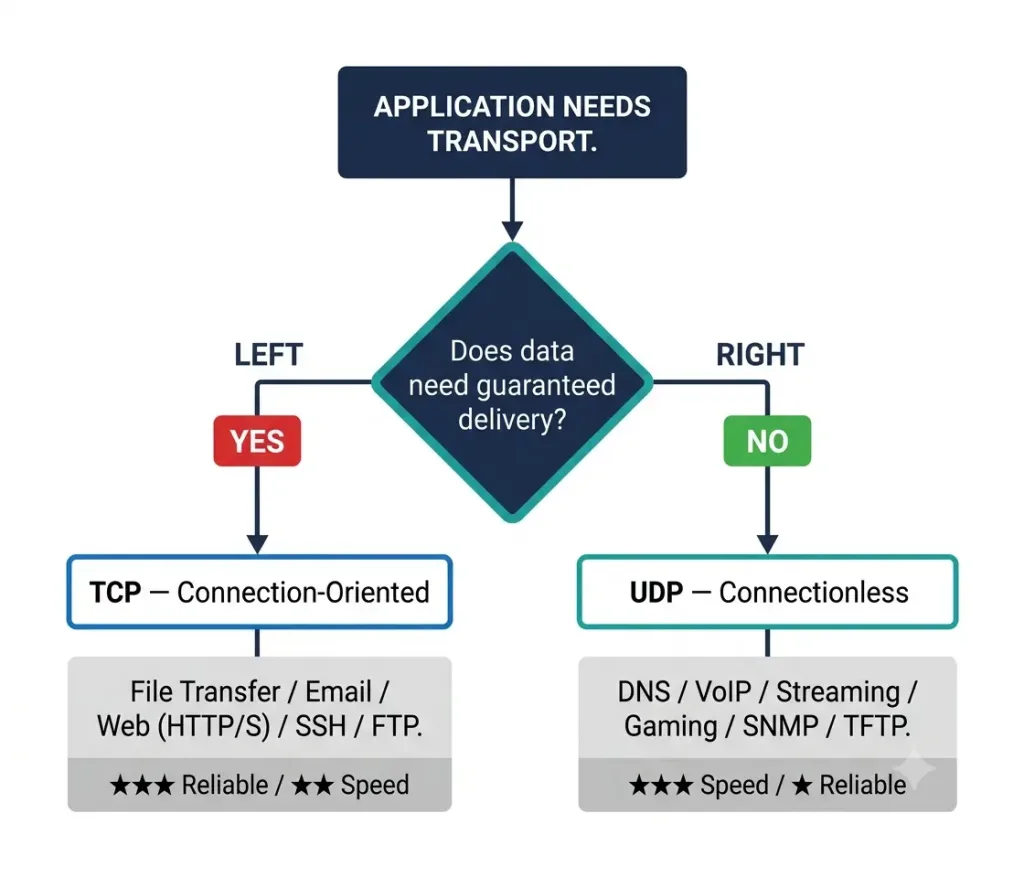
Choose TCP when every byte must arrive correctly and in order — file transfers, web pages, email, SSH sessions. Choose UDP when speed and low latency matter more than perfect delivery — DNS, VoIP, live video, real-time gaming, and network management protocols where occasional loss is tolerable.
UDP Low Overhead vs Reliability
UDP provides basic transport layer functions with lower bandwidth overhead and latency than TCP. As a connectionless protocol, it lacks retransmission, flow control, and sequencing for lost or out-of-order packets, making it less reliable than TCP. However, this does not mean UDP applications are inherently unreliable — these features can be implemented at the application layer when needed.
UDP’s low overhead makes it ideal for latency-sensitive applications. In a VoIP call, a retransmitted packet arriving 200ms late is useless — the conversation has already moved on. In live video streaming, a dropped frame is preferable to a frozen screen while TCP waits for retransmission. In DNS, the query and response are so small that TCP’s connection setup overhead would double the total transaction time.
Monitor active UDP connections:
bash
# Windows
netstat -u -a

# Linux
ss -u -l -p
UDP Datagram Reassembly
UDP datagrams may arrive out of order because they can take different routes through the network. Unlike TCP, UDP has no sequence numbers and no reordering mechanism. If an application requires ordered delivery over UDP, it must implement sequencing at the application layer.
Real-Time Protocol (RTP) — used for VoIP and video streaming — is an example of application-layer sequencing over UDP. RTP adds its own sequence numbers and timestamps above UDP, allowing the receiving application to reorder or discard late-arriving packets without waiting for TCP retransmission.
Verify UDP port activity for RTP:
bash
# Windows
netstat -u -a

# Linux
ss -u -l -p
UDP + IP Fragmentation
When a UDP datagram exceeds the network’s MTU (Maximum Transmission Unit) — typically 1500 bytes on Ethernet — the IP layer must fragment it into smaller packets. For Ethernet with a 1500-byte MTU, the maximum UDP payload without fragmentation is 1472 bytes (1500 − 20-byte IP header − 8-byte UDP header).
Fragmentation has important implications for UDP applications:
- If any single fragment is lost, the entire datagram is discarded — there is no partial delivery
- Fragmentation increases CPU load on intermediate routers
- Path MTU Discovery (PMTUD) allows UDP applications to detect the smallest MTU along the path and avoid fragmentation
Check fragmentation statistics on Cisco IOS:
Router# show ip traffic | include fragmentHigh fragment counts indicate that UDP applications are sending oversized datagrams. Configure PMTUD or reduce the application’s datagram size to stay below the path MTU.
UDP Server Processes and Requests
UDP server applications listen on well-known or registered port numbers. When a UDP datagram arrives, the Transport Layer reads the destination port number from the UDP header and passes the datagram to the matching application process.
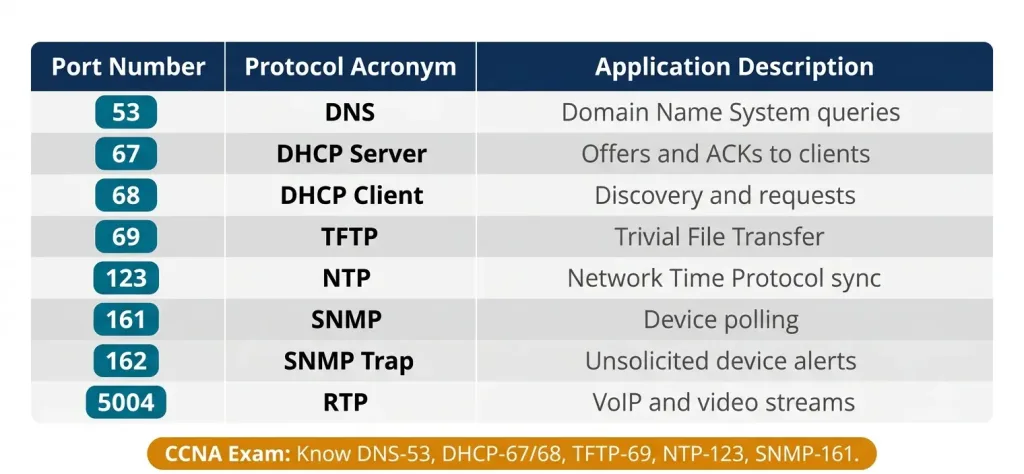
Well-Known UDP Ports (CCNA Reference)
| Port | Protocol | Application |
|---|---|---|
| 53 | DNS | Domain Name System queries and responses |
| 67 | DHCP Server | DHCP offers and acknowledgments to clients |
| 68 | DHCP Client | DHCP discovery and requests from clients |
| 69 | TFTP | Trivial File Transfer Protocol |
| 123 | NTP | Network Time Protocol clock synchronization |
| 161 | SNMP | Simple Network Management Protocol polling |
| 162 | SNMP Trap | SNMP unsolicited alerts from devices |
| 514 | Syslog | System log messages |
| 5004 | RTP | Real-Time Transport Protocol (VoIP/video) |
| 5005 | RTCP | RTP Control Protocol |
Allow a UDP port through the firewall:
bash
# Windows — allow DNS UDP 53
netsh advfirewall firewall add rule name="Allow UDP 53" dir=in protocol=UDP localport=53 action=allow

# Linux
sudo ufw allow 53/udp
Verify listening UDP ports:
bash
# Linux
ss -u -l
UDP Client Processes
When a UDP client application initiates communication, it:
- Selects a random ephemeral (source) port from the dynamic port range (49152–65535)
- Addresses the datagram to the server’s well-known destination port (e.g., port 53 for DNS)
- Sends the datagram — no connection setup required
Socket Pair Explanation
The source port and destination port together — combined with the IP addresses — form the socket pair that uniquely identifies the communication flow:
Socket Pair = Source IP : Source Port  ↔  Destination IP : Destination Port

UDP DNS Example:
Client: 192.168.1.100 : 54321  →  DNS Server: 8.8.8.8 : 53
          ↑              ↑                ↑          ↑
     Source IP     Source Port       Dest IP    Dest Port

Server replies by reversing the socket pair:
8.8.8.8 : 53  →  192.168.1.100 : 54321
The server reads the source port from the incoming datagram and uses it as the destination port in its reply — this is how the client knows which application to deliver the response to. The socket pair concept is identical for UDP and TCP; the difference is that UDP socket pairs exist only for the duration of a single datagram exchange while TCP socket pairs persist for the lifetime of the connection.
Test UDP client communication:
bash
# Windows — DNS lookup (uses UDP port 53)
nslookup networkustad.com

# Linux — send UDP datagram to NTP port 123
nc -u 192.168.1.1 123
UDP Broadcast and Multicast
A critical advantage UDP has over TCP is its support for broadcast and multicast delivery — one sender reaching many receivers simultaneously. TCP’s connection-oriented model requires a separate connection to each receiver, making broadcast and multicast impossible with TCP.
Broadcast (one-to-all in a subnet):
Source: 192.168.1.100:54321 → Destination: 255.255.255.255:67 (DHCP Discover)DHCP uses broadcast because the client has no IP address when it first starts — it cannot target a specific server. The UDP broadcast reaches all devices on the local subnet, including any DHCP servers.
Multicast (one-to-many group):
Source: 192.168.1.100:54321 → Destination: 239.255.0.1:5004 (RTP multicast stream)Multicast delivers a single stream to all hosts that have joined the multicast group, consuming only the bandwidth of one stream on each link rather than one stream per receiver.
Cisco IOS multicast configuration:
Router(config)# ip multicast-routing
Router(config)# interface GigabitEthernet0/0
Router(config-if)# ip pim dense-mode
Security Considerations
UDP’s connectionless, no-authentication design creates specific security vulnerabilities:
UDP Spoofing: Because UDP sends no handshake, an attacker can forge the source IP address of a UDP datagram. DNS and NTP are common spoofing targets.
UDP Amplification DDoS: An attacker sends small UDP requests with a spoofed source IP (the victim’s IP) to servers that reply with much larger responses. DNS, NTP, and SNMP are particularly susceptible. The amplified responses flood the victim. Mitigation includes BCP38 (source address validation at network edges) and rate-limiting UDP responses.
Mitigate with firewall rules:
bash
# Windows — block unused NTP if not required
netsh advfirewall firewall add rule name="Block UDP 123" dir=in protocol=UDP localport=123 action=block

# Linux
sudo ufw deny 123/udp
IPv6 UDP ACL on Cisco IOS:
Router(config)# ipv6 access-list MGMT-ACL
Router(config-ipv6-acl)# permit udp host 2001:DB8::100 any eq 161
Router(config-ipv6-acl)# permit udp host 2001:DB8::100 any eq 123
Router(config-ipv6-acl)# deny udp any any
Router(config-ipv6-acl)# exit
Router(config)# interface GigabitEthernet0/0
Router(config-if)# ipv6 traffic-filter MGMT-ACL in
Additional mitigations:
- Use SNMPv3 (with authentication and encryption) — SNMPv1/v2c are cleartext over UDP 161
- Implement BCP38 source address validation at network edges
- Rate-limit UDP responses from DNS and NTP servers
- Use ACLs on Cisco routers to restrict which sources can reach UDP management ports
ICMP Destination Unreachable for UDP
When a UDP datagram arrives at a destination port where no application is listening, the receiving host sends back an ICMP Type 3, Code 3 (Port Unreachable) message to the sender. This is the primary mechanism by which UDP applications discover that a service is not running at the destination — there is no RST flag as there is with TCP.
Source sends UDP → Destination port not listening
→ Destination responds: ICMP Type 3 Code 3 (Port Unreachable)
View ICMP unreachable statistics on Cisco IOS:
Router# show ip interface GigabitEthernet0/0 | include unreachableTroubleshooting UDP Issues
Problem 1: UDP Datagrams Being Dropped
Check the network path for general loss:
bash
# Windows
ping -n 10 192.168.1.1

# Linux
ping -c 10 192.168.1.1
Check interface error counters on Cisco IOS for physical or congestion issues:
Router# show interfaces GigabitEthernet0/0Look for input errors, CRC errors, and output drops — these cause datagram loss.
Problem 2: Port Conflicts
bash
# Windows
netstat -u -a

# Linux
ss -u -l -p
Problem 3: Firewall Blocking UDP
Verify on Cisco IOS:
Router# show access-lists
Router# show ip interface GigabitEthernet0/0
UDP Traceroute
Traceroute behaves differently on Linux and Windows regarding UDP:
bash
# Linux — uses UDP by default (sends UDP datagrams to high ports)
traceroute 8.8.8.8

# Windows — uses ICMP by default
tracert 8.8.8.8
Linux traceroute sends UDP datagrams to destination ports starting at 33434 with incrementing TTL values. Each router that discards the packet (TTL expired) sends back an ICMP Time Exceeded message, revealing its IP address. When the packet reaches the destination, the target port is closed and the destination sends ICMP Port Unreachable — which is how traceroute knows it reached the end.
Work Bottom-Up
- Physical layer → VLAN/switching → IP addressing → ACLs → application port → UDP socket binding
Performance Optimization
Linux — increase UDP socket buffer sizes for high-rate UDP applications:
bash
# Increase UDP receive and send buffers
sysctl -w net.core.rmem_max=16777216
sysctl -w net.core.wmem_max=16777216
sysctl -w net.ipv4.udp_mem=16777216

# Minimum UDP receive buffer (prevents loss under burst)
sysctl -w net.ipv4.udp_rmem_min=65536
Make permanent by adding to /etc/sysctl.conf. Note: net.ipv4.udp_no_csum = 0 keeps UDP checksums enabled — disabling checksums removes the only error detection mechanism UDP provides and is not recommended in production.
Cisco IOS — QoS prioritization for UDP real-time traffic:
Router(config)# class-map match-any UDP-CRITICAL
Router(config-cmap)# match protocol dns
Router(config-cmap)# match protocol ntp
Router(config-cmap)# match protocol snmp
Router(config-cmap)# exit
Router(config)# class-map match-any VOIP-UDP
Router(config-cmap)# match protocol rtp
Router(config-cmap)# exit
Router(config)# policy-map QOS-UDP
Router(config-pmap)# class UDP-CRITICAL
Router(config-pmap-c)# bandwidth percent 10
Router(config-pmap-c)# exit
Router(config-pmap)# class VOIP-UDP
Router(config-pmap-c)# priority percent 30
Use Cases
UDP excels in scenarios where the cost of retransmission exceeds the cost of the occasional lost packet:
DNS (Port 53): Every DNS query is a small UDP request and response completing in under 50ms. TCP would add handshake overhead — unacceptable for a lookup that precedes every internet connection.
DHCP (Ports 67/68): DHCP uses UDP broadcast because the client has no IP address when it sends its initial DISCOVER. UDP broadcast allows the client to reach the DHCP server before it has addressing.
TFTP (Port 69): Used for transferring Cisco IOS images and configuration files during device provisioning where TCP overhead is unwanted.
SNMP (Port 161): Management packets are typically small and occasional loss is tolerable. SNMP traps are one-way alerts where low overhead matters more than guaranteed delivery.
VoIP/RTP (Ports 5004/5005): Real-time human conversation cannot tolerate TCP retransmission latency. RTP adds its own sequencing above UDP.
NTP (Port 123): Time queries are small, frequent, and stateless — a natural UDP use case.
UDP in Modern Protocols
UDP continues to evolve as the foundation for newer high-performance protocols:
| Protocol | How UDP Is Used |
|---|---|
| QUIC | HTTP/3 runs over UDP; implements reliability, multiplexing, and encryption at the application layer |
| WebRTC | Real-time browser-to-browser audio/video over UDP with DTLS encryption |
| mDNS | Multicast DNS uses UDP port 5353 for local name resolution (no DNS server required) |
| SRT | Secure Reliable Transport for professional video streaming — adds reliability and encryption above UDP |
| DNS over HTTPS (DoH) | Uses TCP 443, but traditional DNS queries still use UDP 53 |
QUIC is particularly significant — by running over UDP, it avoids TCP’s head-of-line blocking and can establish encrypted connections in a single round trip, making HTTP/3 substantially faster than HTTP/2 over TCP.
UDP Load Balancing
Load balancers handle UDP differently from TCP because there is no connection state to track:
| Load Balancer Type | UDP Handling |
|---|---|
| Stateless (L4) | Distributes datagrams round-robin; no session stickiness |
| Stateful (L4) | Uses source IP:port hash for consistent backend routing across datagrams |
| L7 (Application) | Inspects UDP payload (e.g., DNS query content) for intelligent routing |
For DNS load balancing, stateful L4 with source IP hashing is the most common approach — ensuring all queries from a single client reach the same backend resolver for caching consistency.
CCNA Exam Pointers
- UDP is defined in RFC 768
- UDP header is 8 bytes — source port (16), destination port (16), length (16), checksum (16)
- UDP is connectionless — no three-way handshake, no session state
- UDP provides no guaranteed delivery, no sequencing, no flow control, no retransmission
- UDP supports broadcast and multicast — TCP does not
- Well-known UDP ports for CCNA: DNS 53, DHCP 67/68, TFTP 69, NTP 123, SNMP 161/162
- Ephemeral (client) ports: 49152–65535 (IANA dynamic range)
- Applications needing reliability over UDP implement it at the application layer (e.g., RTP, QUIC)
- TCP vs UDP decision: guaranteed delivery needed → TCP; speed/latency priority → UDP
- UDP checksum is optional in IPv4 (0 = no checksum), mandatory in IPv6
- Unreachable UDP port → ICMP Type 3 Code 3 (Port Unreachable) response
- Linux traceroute uses UDP by default; Windows tracert uses ICMP
- UDP fragmentation: datagrams > 1472 bytes on Ethernet (1500 MTU) are fragmented at IP layer; loss of one fragment = entire datagram lost
show ip traffic | include fragment— check fragmentation on Cisco IOS- data loss in UDP is handled at the application layer, not the transport layer
- Monitor network issues affecting UDP with
pingandshow interfaceson Cisco
Conclusion
UDP is the correct transport protocol when speed and low overhead matter more than guaranteed delivery. Its 8-byte header, connectionless design, and support for broadcast and multicast make it the dominant choice for DNS, DHCP, TFTP, NTP, SNMP, and real-time applications like VoIP and video streaming. Modern protocols like QUIC and WebRTC demonstrate that UDP remains the foundation of choice for next-generation high-performance networking — adding application-layer reliability only where it is genuinely needed rather than accepting all of TCP’s overhead. For CCNA candidates, mastering the UDP header structure, the well-known port table, the UDP vs TCP comparison, and the socket pair concept provides the foundation needed for both the exam and real-world network troubleshooting.
FAQs
What is the User Datagram Protocol (UDP)?
UDP is a Transport Layer protocol defined in RFC 768 that provides connectionless, low-overhead data transmission between applications. It sends datagrams — small, self-contained data packets — directly to the destination without establishing a session first. Unlike TCP, UDP provides no guaranteed delivery, no sequencing, and no retransmission of lost datagrams. These characteristics make UDP ideal for applications where speed is more important than perfect reliability, such as DNS lookups, VoIP calls, video streaming, and network management protocols like SNMP and NTP.
How does UDP differ from TCP?
The fundamental difference is connection management and reliability. TCP establishes a session with a three-way handshake before sending data, then uses sequence numbers, acknowledgments, and retransmission to guarantee that all data arrives in order. This reliability comes at the cost of latency and bandwidth overhead. UDP skips all of this — it sends datagrams immediately with no handshake, no acknowledgment, and no retransmission. UDP’s 8-byte header is also significantly smaller than TCP’s 20-byte minimum header. Additionally, UDP supports broadcast and multicast delivery while TCP cannot. The choice depends on the application: file transfers and web browsing need TCP’s reliability; DNS, VoIP, and streaming need UDP’s speed.
Why is UDP considered connectionless?
UDP is connectionless because it sends data without first establishing a communication channel between the sender and receiver. Each UDP datagram is independent and self-contained — it carries its own source port, destination port, and payload, and the network forwards it without any prior coordination between the two endpoints. There is no SYN/SYN-ACK/ACK exchange as there is with TCP, and there is no session state maintained at the Transport Layer. This eliminates handshake latency and reduces per-packet overhead, which is why UDP is preferred for applications that send many small, time-sensitive packets where the cost of connection setup would dominate the total transaction time.
What are the advantages of using UDP?
UDP’s primary advantages are low latency, minimal overhead, and support for broadcast and multicast delivery. The 8-byte header reduces per-packet overhead compared to TCP’s 20+ bytes. The absence of handshake, acknowledgment, and retransmission means UDP applications start transmitting immediately and do not pause waiting for acknowledgments. UDP also allows a single sender to efficiently reach multiple receivers through multicast and broadcast — DHCP uses broadcast because clients have no IP address yet, and video streaming platforms use multicast to deliver one stream to thousands of viewers. For real-time applications — VoIP, live video, online gaming, DNS — these advantages directly translate to better user experience than TCP would provide.
Can UDP ensure reliable data delivery?
UDP itself does not ensure reliable delivery — it has no acknowledgment mechanism, no retransmission, and no sequencing. However, reliability can be implemented at the application layer above UDP when needed. Real-Time Protocol (RTP) adds sequence numbers and timestamps above UDP so VoIP applications can detect missing packets and conceal the loss. QUIC — the protocol underlying HTTP/3 — implements its own reliability, congestion control, and multiplexing above UDP, combining UDP’s low overhead with TCP-like guarantees and avoiding TCP’s head-of-line blocking. The decision to use UDP does not mean abandoning reliability — it means implementing exactly the level of reliability the application needs, rather than accepting all of TCP’s overhead automatically.



