
Every device on a network needs a unique IP address, but “make sure nothing conflicts” is a low bar. Good IP address planning goes further: it groups devices logically, makes troubleshooting faster, and makes security policy dramatically easier to write and maintain. A network where you can tell a device’s role just by looking at its address is a network that’s much easier to manage six months later, by you or by whoever inherits it.
This guide walks through a complete, consistent IP addressing scheme for a small network, how to configure it on Cisco equipment, and the documentation and security practices that make the plan actually useful.
Why IP Address Planning Matters
A network administrator needs to document the addressing scheme and maintain it deliberately, based on device type, rather than letting addresses get assigned ad hoc as devices join. The devices on a typical small network generally fall into four categories:
- Servers: hosts running critical services — file servers, internal applications, DNS.
- End devices: PCs, laptops, and IP phones — the largest and most dynamic category, since these come and go as staff join, leave, or replace hardware.
- Intermediary devices: routers, switches, and access points — the infrastructure itself, which should have stable, predictable addresses since so much else depends on them.
- Internet-accessible hosts: servers that need to be reachable from outside the network, such as an e-commerce server or a public-facing web application.
Without a plan, a host ends up with whatever address happened to be free at the time — which makes writing firewall rules, blocking a specific compromised device, or even just explaining the network to a new hire far harder than it needs to be. A logically-grouped address range means an entire category of devices can be referenced with a single, simple rule instead of a scattered list of individual addresses.
A Worked Example: 192.168.1.0/24
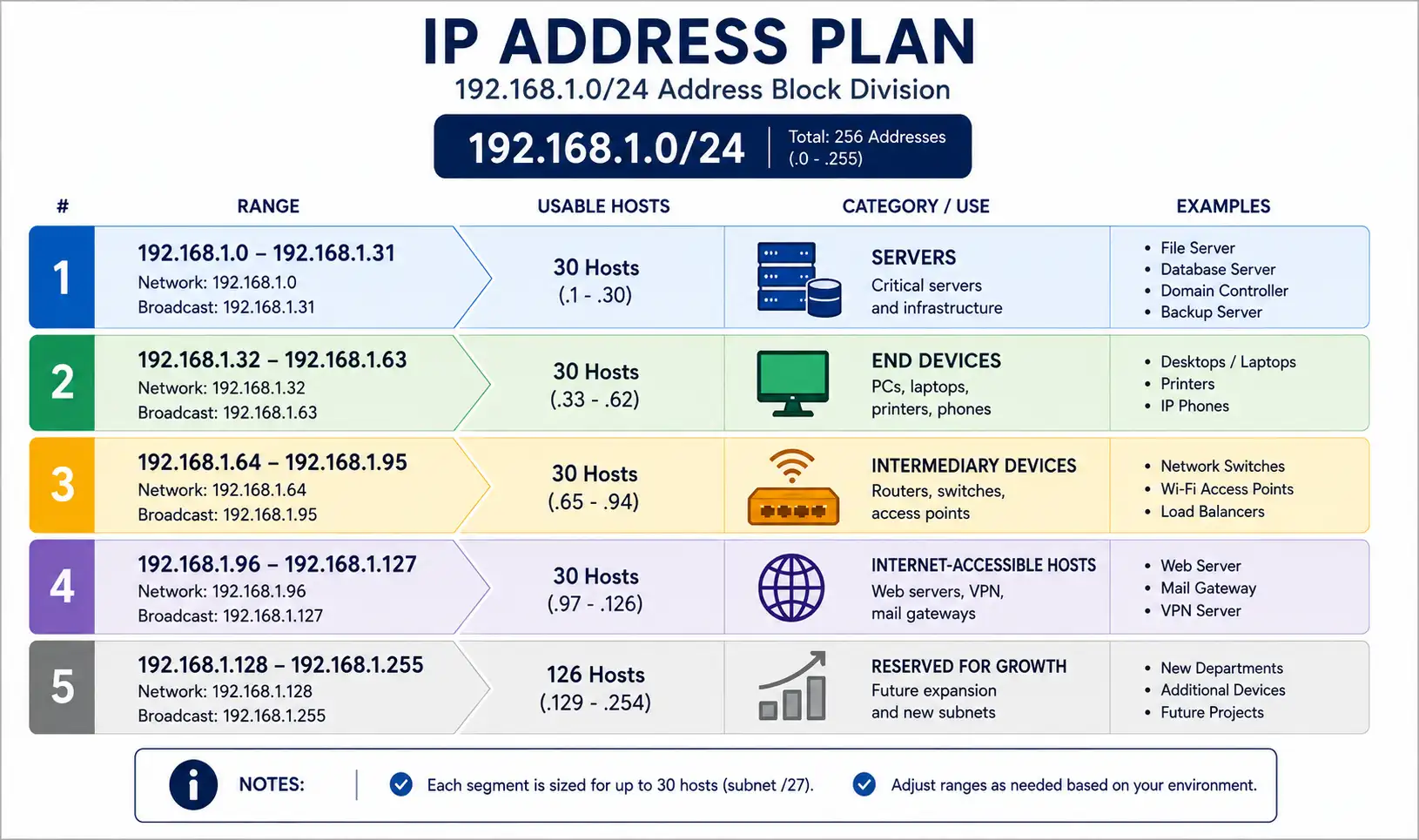
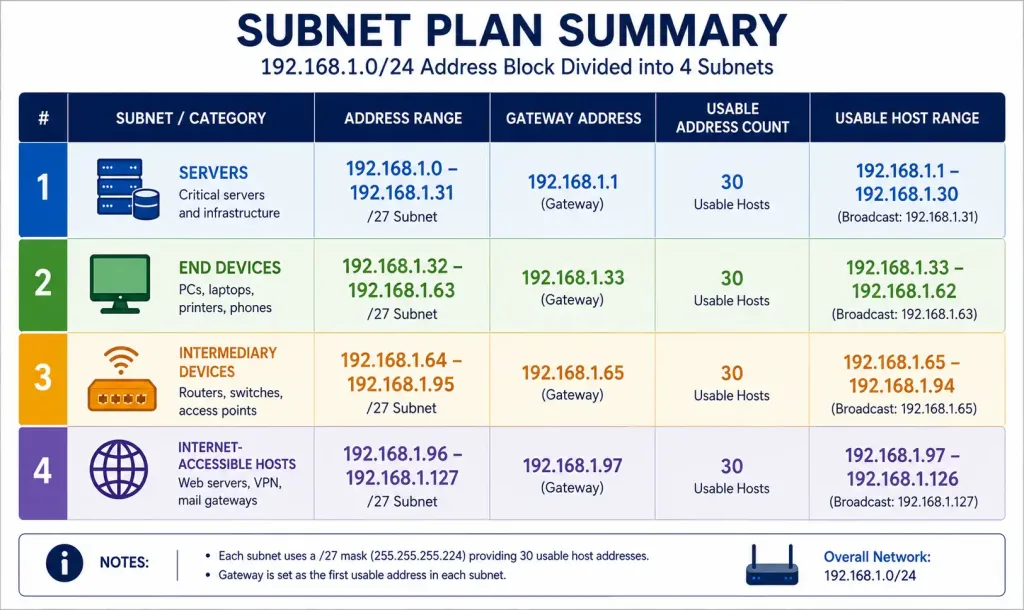
For a small network supporting up to around 100 devices, the 192.168.1.0/24 range provides plenty of room. Subnetting it into four /27 blocks — 32 addresses each, 30 usable per block after the network and broadcast addresses — gives each device category its own clearly bounded range:
| Category | Address Range | Gateway | Usable Addresses |
|---|---|---|---|
| Servers | 192.168.1.0 – 192.168.1.31 | 192.168.1.1 | 30 |
| End devices | 192.168.1.32 – 192.168.1.63 | 192.168.1.33 | 30 |
| Intermediary devices | 192.168.1.64 – 192.168.1.95 | 192.168.1.65 | 30 |
| Internet-accessible hosts | 192.168.1.96 – 192.168.1.127 | 192.168.1.97 | 30 |
That leaves 192.168.1.128 through 192.168.1.255 — four more full /27 blocks — reserved for future growth, whether that’s a new device category, a guest network, or simply room to expand an existing one without renumbering anything already deployed.
Configuring the Subnets on a Cisco Router
Each subnet needs its own VLAN interface, with inter-VLAN routing enabling traffic to move between them where appropriate:
Router> enable
Router# configure terminal
Router(config)# interface vlan 10
Router(config-if)# description Servers
Router(config-if)# ip address 192.168.1.1 255.255.255.224
Router(config-if)# exit
Router(config)# interface vlan 20
Router(config-if)# description End_Devices
Router(config-if)# ip address 192.168.1.33 255.255.255.224
Router(config-if)# exit
Router(config)# interface vlan 30
Router(config-if)# description Intermediary_Devices
Router(config-if)# ip address 192.168.1.65 255.255.255.224
Router(config-if)# exit
Router(config)# interface vlan 40
Router(config-if)# description Internet_Accessible
Router(config-if)# ip address 192.168.1.97 255.255.255.224
Router(config-if)# exit
Router(config)# ip routing
255.255.255.224 is the dotted-decimal equivalent of a /27 mask — worth double-checking against your own subnet math before deploying, since a mismatched mask here is one of the most common causes of “why can’t these two devices on the same VLAN reach each other” tickets.
Verify the configuration:
show ip interface brief
show vlan brief
Static Assignment vs. DHCP: Which Devices Get Which
Not every device category should be addressed the same way:
- Servers and intermediary devices generally warrant static addressing, or at minimum a DHCP reservation tied to the device’s MAC address, so their address never changes unexpectedly. Too much else — DNS records, firewall rules, monitoring configuration — depends on these staying put.
- End devices are the natural fit for standard DHCP, since they’re numerous, come and go frequently, and rarely need a fixed address. A phone or laptop getting a new address after a reboot is a non-issue in practice.
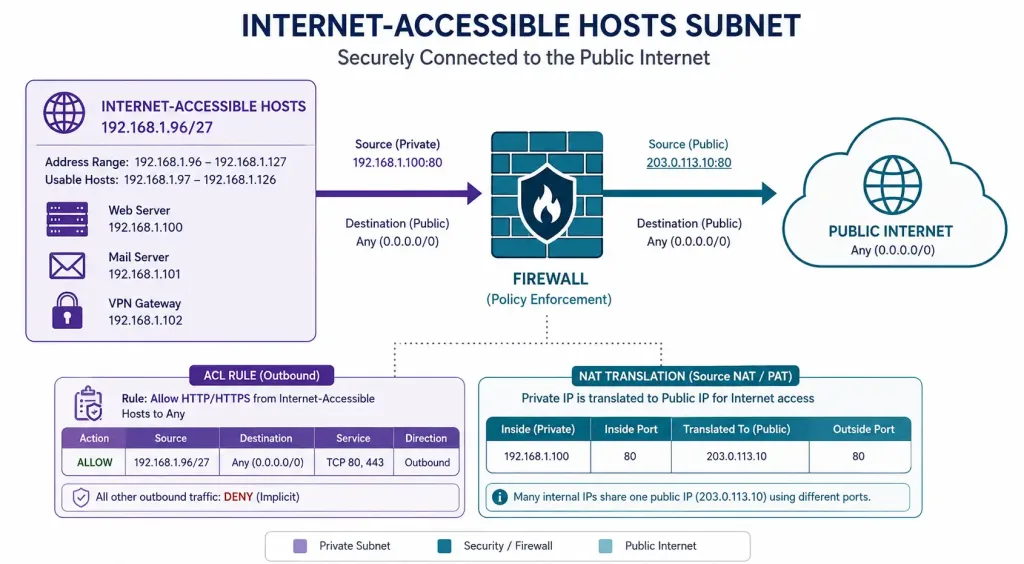
- Internet-accessible hosts almost always need static internal addressing, since they’re the target of NAT rules and firewall policy that reference a specific, unchanging internal IP.
Security Benefits of a Documented Address Plan
A clear addressing scheme pays off directly in security configuration, since policy can target entire device categories with simple, readable rules instead of a growing list of individual exceptions.
Block rogue DHCP servers from handing out conflicting or malicious configuration:
ip dhcp snoopingRestrict inbound access to a specific internet-facing host — for example, allowing only HTTPS traffic to a web server:
access-list 101 permit tcp any host 192.168.1.98 eq 443Map an internal server to a public address with static NAT, so the internet-accessible host can be reached from outside while keeping its actual internal address private:
ip nat inside source static 192.168.1.98 203.0.113.10Verify the rules are actually being applied as expected:
show access-lists
show ip nat translations
Because internet-accessible hosts already live in their own dedicated /27 block in this scheme, writing a rule like “permit only specific inbound ports to addresses in 192.168.1.96/27” is both simpler to write and easier to audit later than tracking individual exceptions scattered across the whole /24.
Documentation Practices
A written addressing plan is only useful if it’s kept current and accessible to whoever needs it. A few practices make this sustainable:
- Keep a single source of truth — a spreadsheet, a dedicated IPAM tool, or even a well-maintained document — rather than relying on memory or scattered notes across different administrators.
- Record the reason for each static assignment, not just the address itself. “192.168.1.10 — primary file server, static, DNS record FS01” is far more useful six months later than a bare IP-to-hostname mapping with no context.
- Update the documentation at the same time you make the change, not as a separate follow-up task that’s easy to forget. An addressing plan that’s out of sync with reality is often worse than no plan at all, since it actively misleads whoever trusts it.
- Review reserved ranges periodically as the network grows, so unused blocks get reused deliberately rather than sitting forgotten while new devices get squeezed into whatever range happens to have room.
Troubleshooting an Addressing Scheme
A device can’t reach anything outside its own subnet: this is almost always a gateway or mask misconfiguration. Confirm the device has the correct gateway address for its subnet, and that the subnet mask matches what’s actually configured on the router’s VLAN interface.
show ip interface briefTwo devices in different subnets can’t communicate at all: verify ip routing is actually enabled on the router and that both VLAN interfaces are up:
show ip route
show vlan brief
An internet-accessible host isn’t reachable from outside: check the NAT translation table to confirm the static mapping is active, and verify the ACL permitting inbound traffic is applied to the correct interface in the correct direction.
show ip nat translations
show access-lists
A newly added device got an address you didn’t expect: this usually means it landed in the wrong DHCP scope, or a static assignment wasn’t documented and got silently overridden. Cross-reference the device against your documented plan rather than assuming the address itself is authoritative.
Planning for IPv6 Alongside IPv4
Even on a network still primarily using IPv4, it’s worth applying the same category-based thinking if IPv6 is enabled — most small networks with a modern ISP connection already have IPv6 available whether or not it’s actively being planned for. A /64 subnet per VLAN, mirroring the IPv4 structure, keeps IPv6 addressing just as organized as its IPv4 counterpart rather than leaving it as an afterthought layered on top of a carefully planned IPv4 scheme.
Common Addressing Mistakes to Avoid
A few patterns show up repeatedly in poorly-planned small networks, and each one is easy to avoid with a little upfront thought:
Mixing device categories within one flat range. Assigning servers, printers, and laptops addresses interspersed throughout the same broad range — rather than in their own dedicated blocks — makes every future firewall rule, ACL, or troubleshooting session harder than it needs to be. Even on a network too small to strictly need subnetting for performance reasons, logical grouping still pays off operationally.
Under-provisioning a subnet that later needs to grow. A /27 block with 30 usable addresses can run out surprisingly fast once an end-device subnet includes laptops, phones, tablets, and IoT devices for the same group of users. Sizing each subnet with real headroom, not just current headcount, avoids a disruptive re-subnetting project down the line.
Leaving DHCP scopes overlapping with statically-assigned addresses. If a DHCP pool includes addresses also assigned statically to servers or infrastructure, a conflict is only a matter of time — a new device requests an address, gets handed one already in static use, and two devices end up fighting over the same IP. Explicitly excluding the static range from the DHCP pool prevents this entirely.
Treating the address plan as a one-time task. Networks change — new device categories get added, subnets fill up, staff turn over. An address plan that isn’t revisited periodically drifts out of sync with reality, at which point it stops being useful and starts being actively misleading.
FAQs
What is the importance of IP address planning for a small network?
IP address planning ensures every device has a unique, appropriately-categorized address, which prevents conflicts and makes both troubleshooting and security policy significantly easier to manage. A documented, consistent scheme also makes it far easier for a new administrator to understand the network quickly, without having to reverse-engineer it from scratch.
How do I subnet a small network with around 100 devices?
Using the 192.168.1.0/24 range, divide it into four /27 blocks of 32 addresses each — one for servers, one for end devices, one for intermediary devices, and one for internet-accessible hosts. Configure each as its own VLAN interface with a matching /27 mask (255.255.255.224), and enable ip routing so traffic can move between subnets where appropriate.
What security measures should be applied to IP address planning?
Enable DHCP snooping to block rogue or unauthorized DHCP servers from handing out conflicting configuration, and use access control lists combined with static NAT to tightly control which internal hosts are reachable from outside the network. Keeping internet-accessible hosts in their own dedicated subnet makes writing and auditing these rules considerably simpler than managing individual exceptions scattered across a flat address space.
How do I allocate IP addresses for internet-accessible hosts specifically?
Assign these hosts private addresses within their own dedicated subnet block — for example, 192.168.1.96 through 192.168.1.127 — then map each one to a public address using static NAT, such as ip nat inside source static 192.168.1.98 203.0.113.10. This keeps the internal address structure consistent with the rest of the plan while still allowing controlled, specific external access.
Should every device on the network have a static IP address?
No — static addressing makes the most sense for servers, network infrastructure, and internet-accessible hosts, where a stable, predictable address genuinely matters. End-user devices like laptops and phones are usually better served by standard DHCP, since they’re numerous, change frequently, and rarely need a fixed address at all.
How much room should I leave for future growth in an IP address plan?
As a general guideline, plan for meaningfully more than your current device count — the four-subnet example in this guide uses only half of a /24, leaving four full /27 blocks entirely unused for future categories or expansion. Renumbering an existing, populated subnet later is disruptive enough that it’s almost always worth over-provisioning address space up front rather than trying to be maximally efficient from day one.



