
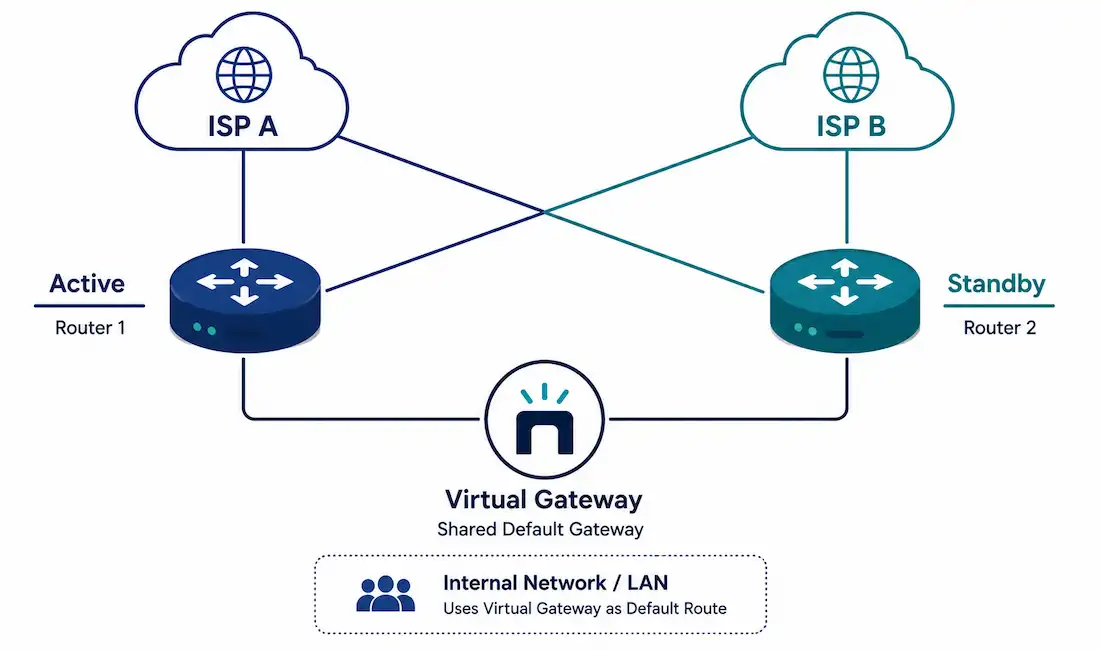
A single point of failure is exactly what it sounds like: one router, one link, or one ISP connection that, if it fails, takes the whole network down with it. Redundancy eliminates these single points of failure. Traffic management ensures that when bandwidth gets tight, the traffic that actually needs priority — voice, video — gets it. Together, they’re what separates a network that degrades gracefully from one that simply goes dark.
This guide covers how to build redundancy into a small network at the gateway, link, and ISP level, the real difference between HSRP and VRRP, working QoS configuration, and realistic expectations for failover time.
Why Redundancy Matters in a Small Network
Many small networks rely on a single default gateway — for example, 192.168.1.1 — with no backup. If that router fails, every device behind it loses connectivity to everything, including the internet, until it’s physically repaired or replaced. For a business, that’s not just an inconvenience; it’s measurable downtime with a real cost attached.
Redundant network design addresses this at a few different levels:
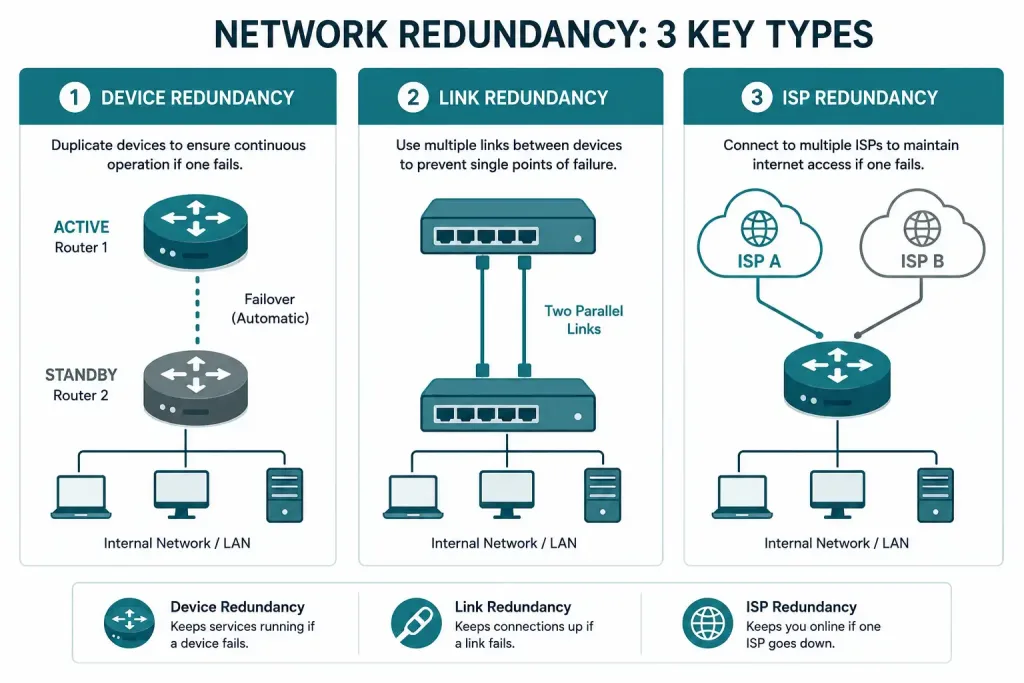
- Device redundancy: a standby router or switch ready to take over if the primary fails.
- Link redundancy: duplicate physical connections between critical points in the network, so a single cable or port failure doesn’t isolate anything.
- ISP redundancy: a second internet connection, ideally from a different provider entirely, so an outage at one ISP doesn’t take down internet access completely.
A common, practical setup for a small business is a dual-WAN configuration using two different providers — for example, cable internet from one company and a separate connection from another, such as Comcast Xfinity and AT&T Internet. Using genuinely different providers, rather than two connections from the same company, protects against outages that affect an entire provider’s infrastructure in a given area, not just a single line.
HSRP vs. VRRP: Choosing a Gateway Redundancy Protocol
Both HSRP and VRRP solve the same core problem — giving a group of routers a shared virtual IP address so that if the active router fails, a standby router takes over transparently, without any device on the network needing to change its configured gateway. They are not interchangeable, and you configure one or the other for a given virtual gateway, not both at once.
HSRP (Hot Standby Router Protocol) is Cisco-proprietary, meaning it only works between Cisco devices. Configuration example:
Router(config)# interface GigabitEthernet0/0
Router(config-if)# standby 1 ip 192.168.1.1
Router(config-if)# standby 1 priority 110
Router(config-if)# standby 1 preempt
Setting priority above the default of 100 makes this router the active one; preempt lets it reclaim the active role automatically once it comes back online after a failure, rather than leaving the standby router active indefinitely.
VRRP (Virtual Router Redundancy Protocol) is an open IETF standard (RFC 5798), which makes it the right choice in a mixed-vendor environment where not every router is a Cisco device. Configuration example:
Router(config)# interface GigabitEthernet0/0
Router(config-if)# vrrp 1 ip 192.168.1.1
Router(config-if)# vrrp 1 priority 110
Functionally, the two protocols behave very similarly. The deciding factor is almost always your equipment: an all-Cisco environment can use either, but a mixed environment needs VRRP for interoperability.
Verify and test either protocol:
show standby
show vrrp
Test actual failover by disconnecting or shutting down the active router’s interface, then confirming connectivity continues:
ping 8.8.8.8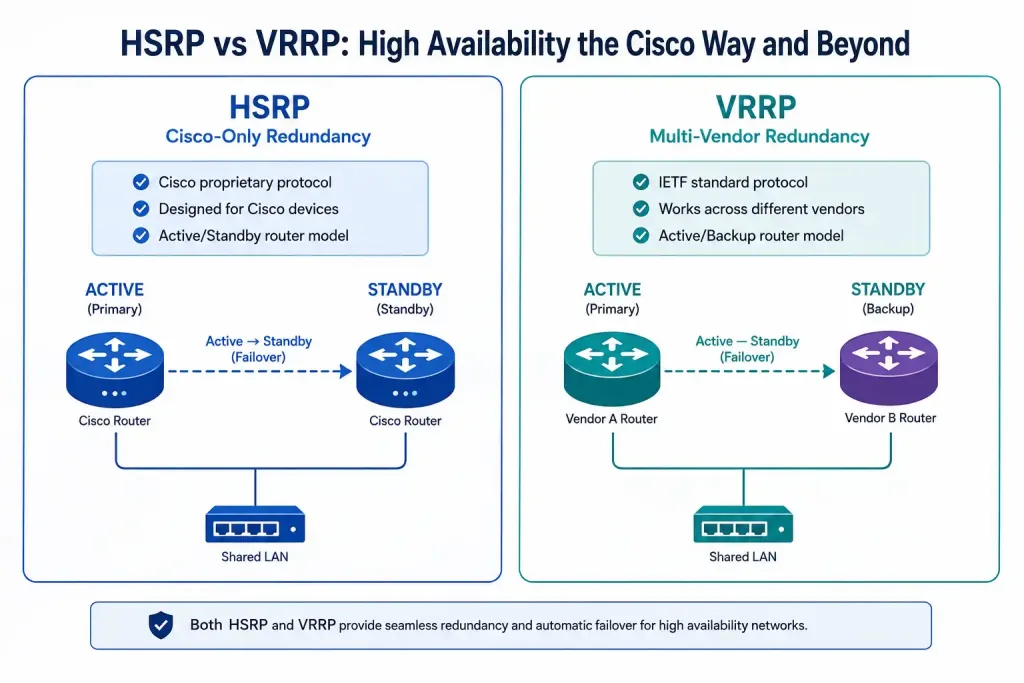
What Realistic Failover Looks Like
With default timers, both HSRP and VRRP typically detect a failure and complete failover to the standby router in well under 15 seconds — the default hello interval is 3 seconds and the hold time is 10 seconds, meaning the standby declares the active router down and takes over shortly after three missed hellos. Failover measured in minutes generally points to a misconfiguration, not a working setup; if you’re seeing multi-minute gaps during a failover test, check your timer configuration and confirm preempt (HSRP) is actually enabled before assuming the redundancy itself has failed.
For latency-sensitive applications like VoIP, even a 10-second gap is noticeable to users on an active call. Tuning the hello and hold timers more aggressively (for example, a 1-second hello and 3-second hold) can bring failover down to a few seconds, at the cost of slightly more control-plane traffic between the routers — usually a reasonable trade-off for a business that depends on continuous voice service.
Traffic Management with QoS
Redundancy keeps the network up. Traffic management keeps it usable when bandwidth is under pressure, by giving latency-sensitive traffic priority over traffic that can tolerate delay without anyone noticing.
A proper Cisco QoS configuration uses the Modular QoS CLI (MQC), which requires defining a class map before referencing it in a policy map:
Router(config)# class-map VOICE-TRAFFIC
Router(config-cmap)# match protocol rtp audio
Router(config-cmap)# exit
Router(config)# policy-map WAN-QOS
Router(config-pmap)# class VOICE-TRAFFIC
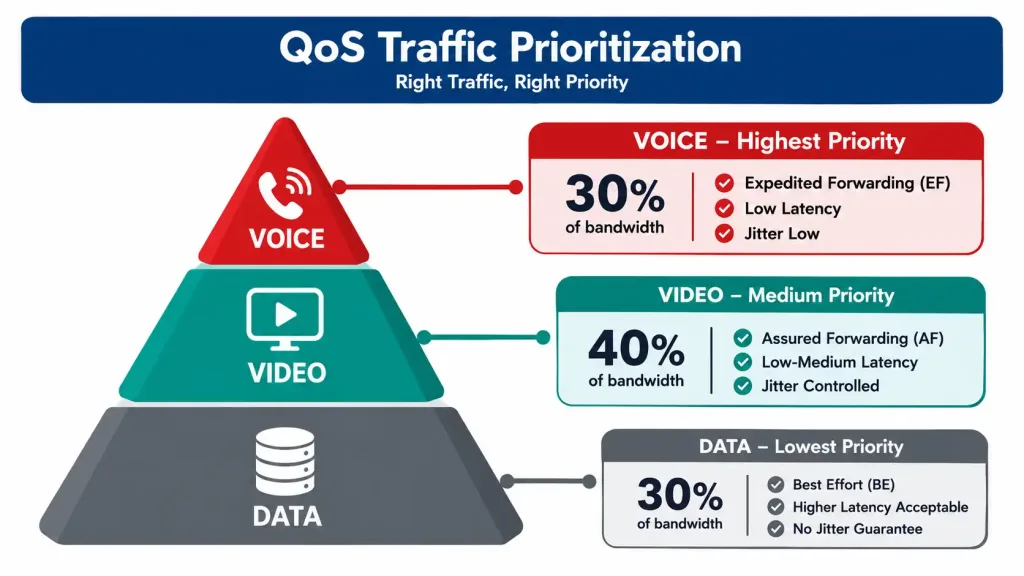
Router(config-pmap-c)# priority percent 30
Router(config-pmap-c)# exit
Router(config-pmap)# class class-default
Router(config-pmap-c)# fair-queue
Router(config-pmap-c)# exit
Router(config)# interface GigabitEthernet0/0
Router(config-if)# service-policy output WAN-QOS
This defines a class that matches voice traffic, guarantees it 30% of available bandwidth with strict priority, and applies fair queuing to everything else so no single data flow can starve the rest.
Traffic Priority Reference
| Priority | Traffic Type | Example | QoS Treatment |
|---|---|---|---|
| 1 | Voice | VoIP calls | Strict priority, ~30% guaranteed bandwidth |
| 2 | Video | Video conferencing, streaming | Guaranteed minimum bandwidth (e.g., 20%) |
| 3 | Data | Email, web browsing, file transfers | Fair queuing, best-effort |
Voice gets strict priority because even small delays or jitter are immediately audible to users. Video needs a guaranteed minimum but tolerates slightly more variation than voice. Everything else — email, web browsing, routine file transfers — works fine on a best-effort basis with fair queuing, which prevents any single large transfer from monopolizing the link.
Case Study: A 20-User Retail Network
A small retail business with 20 users implemented gateway redundancy using HSRP between two routers, combined with a second internet connection from a different provider for ISP-level redundancy. During a planned failover test — deliberately disconnecting the primary router’s WAN interface — the standby router took over within roughly 8 seconds, well within the expected range for default HSRP timers, and connectivity to 8.8.8.8 resumed with no manual intervention required.
The business later tuned the HSRP hello and hold timers more aggressively specifically to protect their VoIP phone system, since even the default sub-15-second gap was noticeable on active calls. After tuning, failover time dropped to roughly 3 seconds — a meaningful improvement for a business where phone calls are business-critical, though it came with a small increase in the routine control traffic exchanged between the two routers.
Troubleshooting Redundancy and QoS
Standby router isn’t taking over during a failure: confirm both routers are actually configured with the same virtual IP and group number, and that preempt is set correctly if you expect the primary to reclaim its role automatically after recovery.
show standbyFailover takes far longer than expected: check the configured hello and hold timers — if they’re still at default values and failover is taking multiple minutes rather than seconds, something other than the timers themselves is likely the problem, such as a routing protocol reconvergence delay elsewhere in the path.
QoS doesn’t seem to be prioritizing voice traffic: confirm the service policy is actually applied to the correct interface and direction with show policy-map interface, and verify the class map is actually matching the traffic you expect — a class map that doesn’t match anything will silently do nothing, without generating an obvious error.
show policy-map interface GigabitEthernet0/0One ISP link goes down but traffic doesn’t fail over to the second one: verify the dual-WAN router’s failover configuration is actually monitoring the primary link’s health (not just its physical link state) — a link that’s technically “up” but not passing traffic can fool a router that only checks interface status rather than actual reachability.
Redundancy Planning Checklist
Before deploying redundancy, it’s worth working through a few planning questions rather than just duplicating whatever hardware you already have:
Which failures actually matter to your business? A single router failure, a single ISP outage, and a single switch failure are three different risks, and not every small network needs protection against all three equally. A business that can tolerate a brief internet outage but never a phone system outage should prioritize its redundancy investment accordingly, rather than treating every component as equally critical.
Are your two “redundant” paths actually independent? Two internet connections from the same provider, running through the same physical infrastructure in your area, don’t protect against a provider-wide outage the way two genuinely different ISPs do. The same logic applies to power: a backup router plugged into the same power circuit as the primary doesn’t help during a power outage — that’s what a UPS or generator is for, not network redundancy configuration.
Have you actually tested failover, not just configured it? A redundancy setup that’s never been tested under real conditions is an assumption, not a guarantee. Scheduling a deliberate failover test — during a planned maintenance window, not during business hours — is the only way to know your configuration actually works the way you expect before you need it to.
Does your monitoring actually detect the failures you’re protecting against? Redundancy that fails over silently, with no alert to anyone, means a business can be running on its backup path for days without anyone noticing — right up until the backup also fails, at which point there’s no redundancy left at all. Basic monitoring that alerts when the standby router becomes active, or when a WAN link’s status changes, closes this gap.
FAQs
What is network redundancy and why is it important?
Network redundancy means having backup paths, devices, or connections — such as a standby router or a second internet connection from a different provider — so a single failure doesn’t take down the whole network. It’s especially important for any business where downtime has a real cost, whether that’s lost sales, missed calls, or simply lost productivity while staff wait for connectivity to return.
How does traffic management improve network performance?
Traffic management uses QoS to prioritize latency-sensitive traffic like voice and video over traffic that can tolerate delay, such as email or routine file transfers. This prevents a large download or backup job from degrading call quality or video conferencing during periods of high network usage.
What’s the actual difference between HSRP and VRRP?
HSRP is a Cisco-proprietary protocol that only works between Cisco devices, while VRRP is an open IETF standard supported across multiple vendors. They solve the same problem in very similar ways — a shared virtual gateway IP with automatic failover to a standby router — so the choice usually comes down to whether your network is all-Cisco or mixed-vendor.
Can I set up redundancy with different internet providers?
Yes — connecting to two genuinely different ISPs through a dual-WAN router is one of the most effective ways to protect against an internet outage, since it protects against provider-wide outages, not just a single line failure. This does typically require a router capable of dual-WAN failover or load balancing, rather than a basic single-WAN consumer router.
How long should failover actually take?
With default HSRP or VRRP timers, failover to a standby router typically completes in well under 15 seconds. If a real failover test shows multi-minute downtime, that’s a sign of a configuration problem — missing preempt, a mismatched virtual IP between routers, or an issue elsewhere in the network — not evidence that redundancy itself is working as intended.
What equipment is needed for traffic management and redundancy?
At minimum, you need a router capable of running HSRP or VRRP (or dual-WAN failover, for ISP-level redundancy) and QoS features to prioritize traffic. For a business network, a dual-WAN router with configurable QoS policies covers most small-network redundancy and traffic management needs without requiring separate specialized appliances.



