
Trunk ports carry traffic for multiple VLANs across a single physical link by default, which is exactly what makes VLANs so convenient to administer — and exactly what creates an attack surface if that trunk configuration isn’t locked down properly. Understanding how these attacks actually work is what makes the standard mitigations make sense, rather than feeling like arbitrary best-practice checkboxes.
This guide covers the major VLAN attack categories — switch spoofing, double-tagging, CAM table overflow, ARP spoofing, VMPS/VQP abuse, and CDP information leakage — how each one works mechanically, and the specific Cisco configuration that defends against it.
Switch Spoofing (VLAN Hopping)
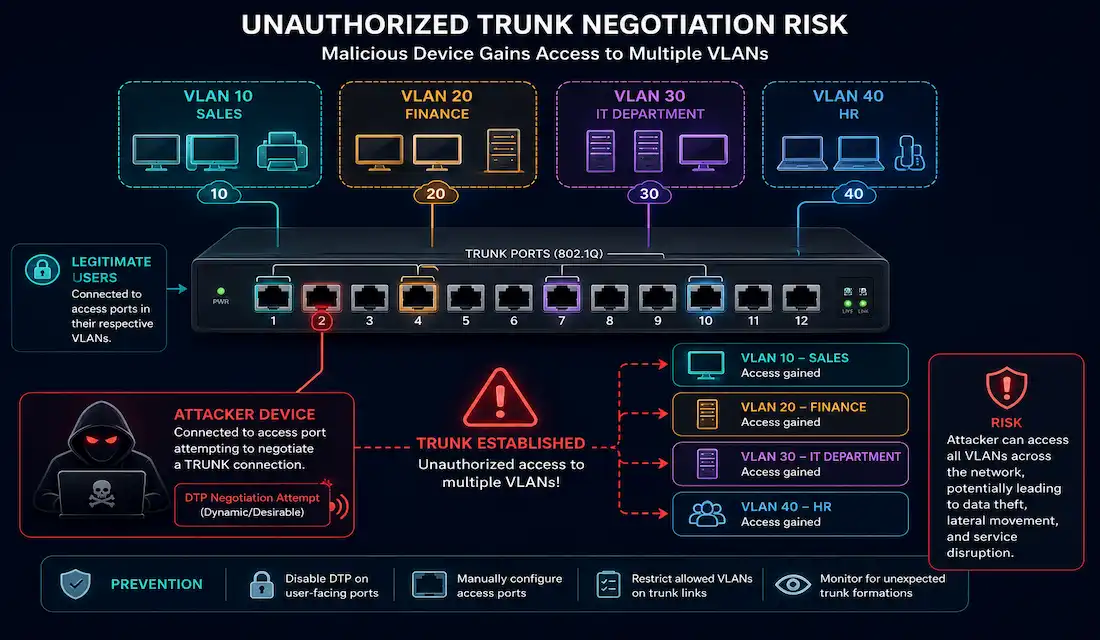
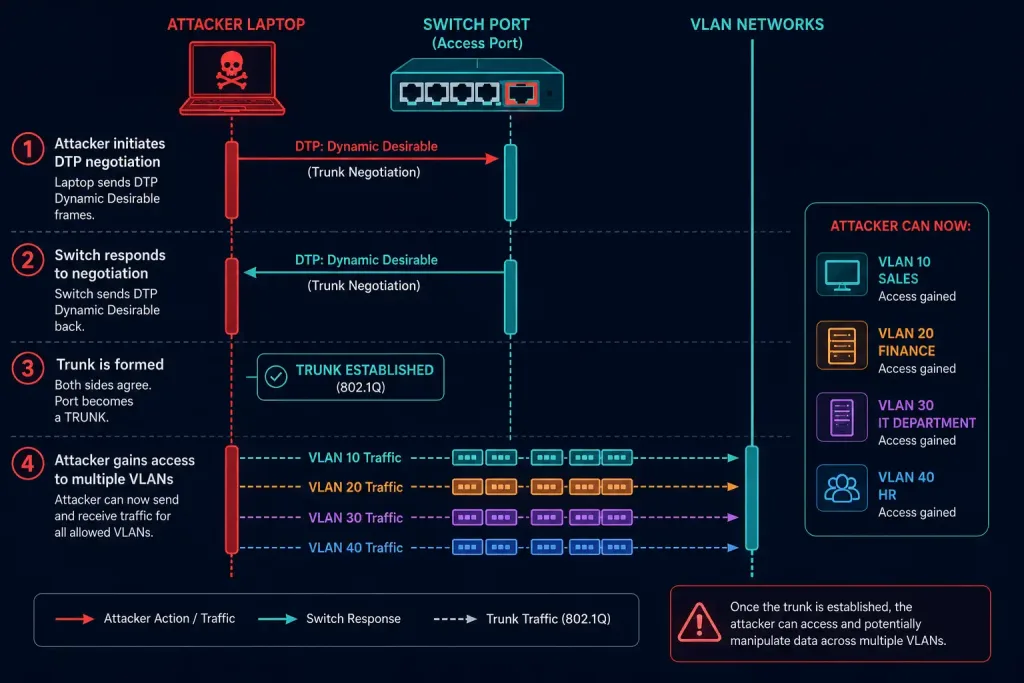
Switch spoofing exploits a switch port left in its default dynamic auto mode. An attacker configures their own system to mimic a switch attempting to negotiate a trunk via DTP (Dynamic Trunking Protocol). If the port they’re connected to is willing to negotiate — which it is, by default — the attacker’s system successfully forms a trunk, gaining access to every VLAN allowed on that trunk rather than being confined to a single access VLAN.
Mitigation: disable trunk negotiation everywhere it isn’t explicitly needed. Configure every access port as a fixed access port with DTP disabled:
Switch1(config)# interface range fastethernet 0/0 - 20
Switch1(config-if-range)# switchport mode access
Switch1(config-if-range)# switchport nonegotiate
Configure legitimate trunk ports explicitly, also with DTP disabled:
Switch1(config)# interface range gigabitethernet 0/20 - 23
Switch1(config-if-range)# switchport mode trunk
Switch1(config-if-range)# switchport nonegotiate
switchport nonegotiate matters on both port types — it stops the port from generating or responding to DTP negotiation at all, which closes off the entire attack regardless of what an attacker attempts to negotiate.
[See Infographic: Switch Spoofing VLAN Hopping Attack]
Double-Tagging VLAN Attacks
Double-tagging, also called double-encapsulated VLAN hopping, is a fundamentally different technique from switch spoofing. It doesn’t require the attacker’s port to be a trunk at all — it works even against a plain access port, provided that port happens to sit on the native VLAN of a trunk elsewhere in the network. This is also a one-directional attack: it lets an attacker send traffic into a victim VLAN, but doesn’t provide a return path for response traffic the same way.
How it works, step by step:
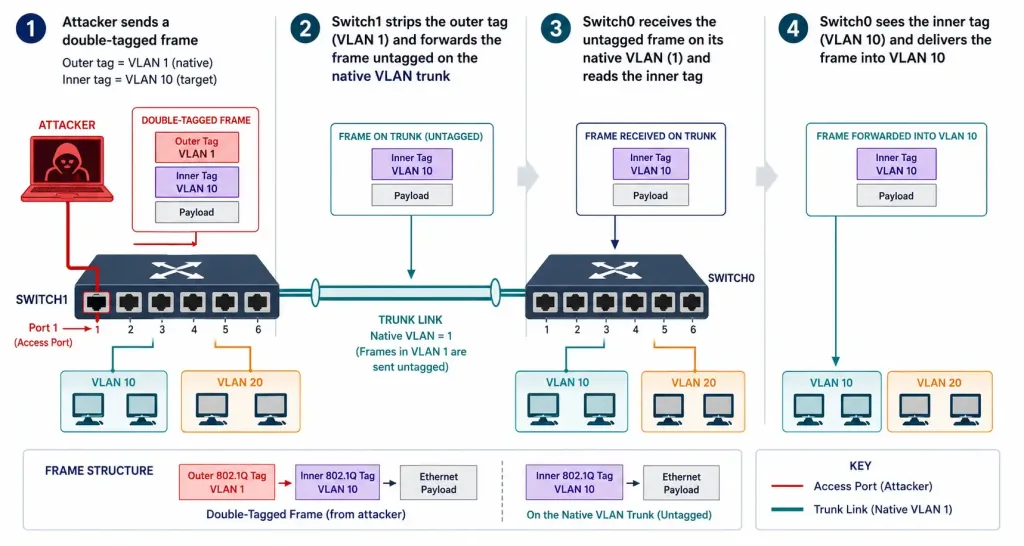
- The attacker crafts a frame with two 802.1Q tags stacked on top of each other. The outer tag matches the native VLAN of the trunk (commonly VLAN 1) — the same VLAN the attacker’s own port belongs to. The inner tag specifies the target victim VLAN (for example, VLAN 10).
- The attacker sends this frame to Switch1. Since a switch doesn’t normally expect a tagged frame arriving on what it considers an access port, this is already an unusual condition the attack depends on.
- Switch1 reads only the outer tag, sees VLAN 1 (its native VLAN), strips that outer tag, and forwards the frame — including out the trunk port, since the trunk is itself part of native VLAN 1. Critically, Switch1 doesn’t add a new tag when forwarding out the trunk in the native VLAN, because native VLAN traffic travels untagged. The inner VLAN 10 tag, still present in the frame, goes completely unexamined by Switch1.
- Downstream, Switch0 receives the frame and reads what is now its outermost (and only remaining) tag — VLAN 10. Switch0 strips this tag and forwards the frame onto VLAN 10, either to a specific port (if the destination MAC is known) or flooded across the VLAN.
The frame has effectively hopped from VLAN 1 into VLAN 10, crossing a boundary it should never have been able to cross, entirely because of how native VLAN untagging interacts with a second, hidden tag.
[See Infographic: Double-Tagging VLAN Hopping Attack]
Mitigation: keep the native VLAN of every trunk distinct from any VLAN actually assigned to user access ports. The standard, well-documented practice is dedicating a single unused VLAN — not VLAN 1, and not any in-use user VLAN — as the native VLAN across every 802.1Q trunk in the network. Without a legitimate user port sitting on that native VLAN, an attacker has no foothold to launch the attack from in the first place.
PVLAN Edge (Protected Ports)
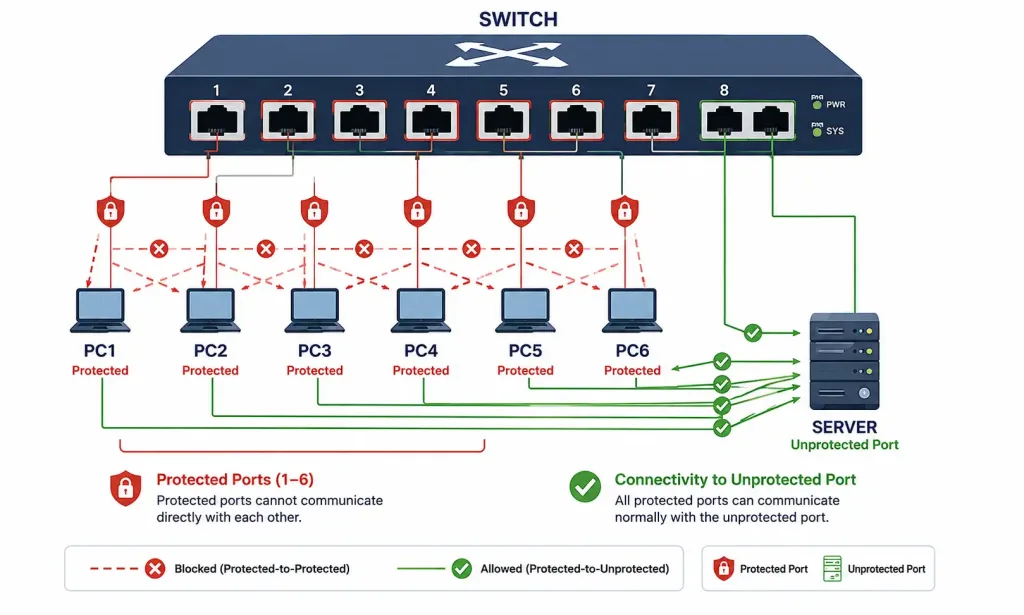
It’s worth being precise about terminology here, since “PVLAN” gets used loosely. True Private VLANs are a more elaborate, multi-switch feature involving primary and secondary VLAN relationships. PVLAN Edge, also called protected ports, is a simpler, single-switch feature: it restricts direct Layer 2 communication between any two ports on the same switch that are both configured as protected, without requiring the full Private VLAN structure at all.
This is useful anywhere devices shouldn’t be able to see each other’s traffic directly — for example, guest devices on the same switch that should each reach the internet but never each other.
An important limitation: protected ports only affect Layer 2 forwarding. They don’t protect against Layer 3 attacks, and traffic between a protected port and a non-protected port continues to forward normally. Two protected devices can still reach each other indirectly through a Layer 3 device (a router or Layer 3 switch) unless additional ACLs specifically block that path.
Configuring protected ports on host-facing access ports:
Switch> enable
Switch# configure terminal
Switch(config)# spanning-tree portfast default
Switch(config)# interface range fastethernet 0/1 - 20
Switch(config-if-range)# switchport mode access
Switch(config-if-range)# switchport protected
Server or shared-resource ports that all protected hosts still need to reach are left unprotected:
Switch(config)# interface range fastethernet 0/21 - 24
Switch(config-if-range)# switchport mode access
Verify the configuration:
Switch# show interfaces switchportThis shows each interface’s protected status directly, confirming which ports are actually isolated from each other.
[See Infographic: Protected Ports Blocking Peer-to-Peer Traffic]
CAM Table Overflow (MAC Flooding)
A switch’s CAM (Content Addressable Memory) table — the MAC-address-to-port mapping every switch relies on for forwarding decisions — has finite capacity. An attacker connected to a single physical port can generate a flood of frames using randomized, fake source MAC addresses, filling the table entirely.
Once full, the switch can no longer learn legitimate new entries. Traffic destined for MAC addresses that never made it into the table gets flooded out every port in the relevant VLAN instead of being switched directly — the switch effectively starts behaving like a hub for that traffic, letting the attacker passively observe traffic that should never have reached their port. Devices that already have a valid CAM entry aren’t affected directly, though switches elsewhere on the network can be affected as flooded traffic propagates.
Mitigation: port security, limiting how many MAC addresses a given port is allowed to learn.
Switch(config)# interface fastethernet0/1
Switch(config-if)# switchport port-security
Switch(config-if)# switchport port-security maximum 2
Switch(config-if)# switchport port-security violation restrict
If an unauthorized MAC address is detected beyond the configured maximum, the switch can restrict the offending traffic, or shut the port down entirely, depending on the configured violation action.
Address Resolution Protocol (ARP) Attacks
ARP spoofing exploits the fact that ARP was designed for efficiency, not security — it has no built-in authentication at all. An attacker sends forged ARP messages, associating their own MAC address with the IP address of a legitimate host or gateway. Once other devices on the LAN update their ARP tables based on this forged information, traffic intended for the spoofed IP address gets sent to the attacker instead, enabling interception, modification, or outright blocking of that traffic — a classic man-in-the-middle setup. This attack is confined to a single local network segment, since ARP itself doesn’t operate beyond a local broadcast domain.
Mitigation: Dynamic ARP Inspection (DAI), which validates ARP packets against the same trusted binding table built by DHCP snooping, dropping ARP traffic that doesn’t match a known, legitimate IP-to-MAC binding.
Switch(config)# ip dhcp snooping
Switch(config)# ip arp inspection vlan 10
VMPS/VQP Attacks
VMPS (VLAN Management Policy Server) dynamically assigns switch ports to VLANs based on connecting device MAC addresses, stored in a central database. Client switches query this database using VQP (VLAN Query Protocol) — and VQP is the specific piece worth understanding for security purposes: it’s unauthenticated and runs over UDP, which makes it straightforward to spoof or manipulate.
Because there’s no authentication built into VQP, an attacker can potentially join a VLAN they aren’t authorized to access simply by manipulating VQP queries or responses.
Mitigation: monitor the network for unusual VMPS-related behavior, send VQP queries out-of-band where the deployment supports it, or disable the protocol entirely in favor of a more modern alternative like 802.1X with RADIUS-based dynamic VLAN assignment — which is the direction most current deployments have moved, given VQP’s age and lack of authentication.
Cisco Discovery Protocol (CDP) Attacks
CDP is enabled by default on most Cisco equipment, broadcasting device information periodically to build a local topology database on each connected device. It’s a Layer 2 protocol, so routers don’t propagate it beyond a local segment — but within that segment, all CDP information travels in cleartext, with no encryption at all.
An attacker with access to the segment can capture this traffic with Wireshark or similar tools and learn detailed information about connected Cisco equipment — device models, IOS versions, and IP addressing — all useful reconnaissance for planning further attacks.
Mitigation: disable CDP specifically on user-facing access ports, where the discovery information serves no legitimate purpose, while keeping it enabled on infrastructure links between Cisco devices where it genuinely aids management.
Switch(config)# interface fastethernet0/1
Switch(config-if)# no cdp enable
Disable it globally if CDP isn’t needed anywhere in the deployment:
Switch(config)# no cdp run[See Infographic: VLAN Attack Types and Their Mitigations]
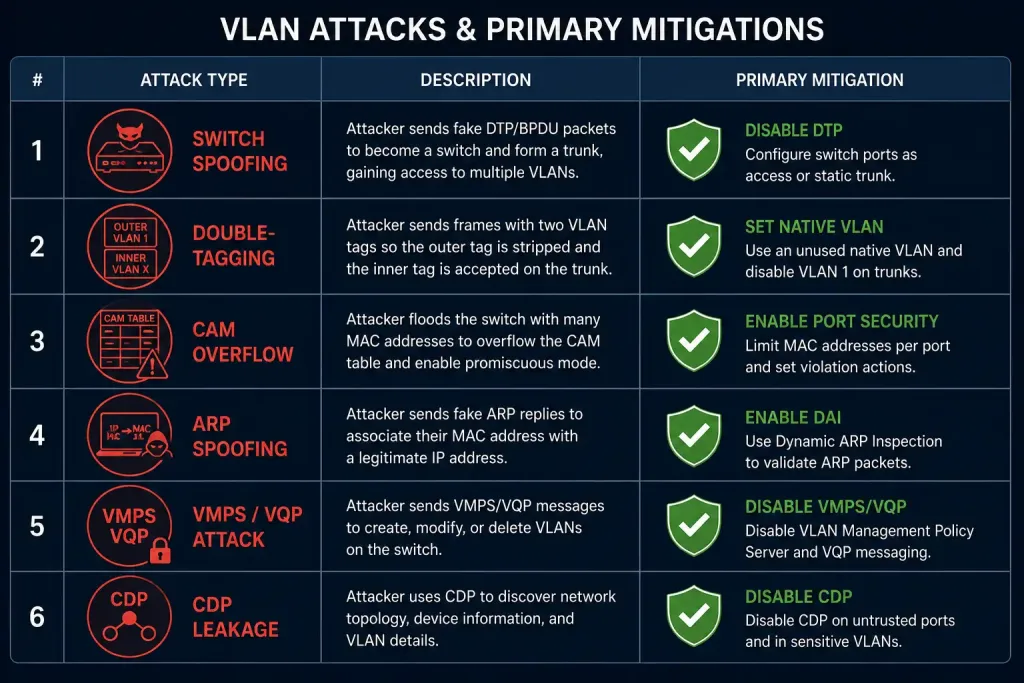
VLAN Attack Types at a Glance
| Attack | Requires Trunk Access | Primary Mitigation |
|---|---|---|
| Switch Spoofing | No (exploits default DTP) | switchport nonegotiate on all ports |
| Double-Tagging | No (works from access port on native VLAN) | Dedicated, unused native VLAN |
| CAM Table Overflow | No | Port security with MAC limits |
| ARP Spoofing | No | Dynamic ARP Inspection |
| VMPS/VQP Abuse | No | Disable VQP or migrate to 802.1X |
| CDP Information Leakage | No | Disable CDP on access ports |
Notably, none of these attacks strictly require the attacker to already have trunk access — most are specifically designed to exploit access-port-level weaknesses to gain unauthorized VLAN access in the first place, which is exactly why access port hardening matters as much as trunk configuration.
FAQs
What is VLAN hopping, and how does switch spoofing achieve it?
VLAN hopping is any technique that lets an attacker access VLANs they shouldn’t have access to from their actual connection point. Switch spoofing achieves this by tricking a switch port left in default dynamic auto mode into negotiating a trunk with the attacker’s device, granting access to every VLAN allowed on that trunk rather than a single access VLAN.
Why is the double-tagging attack considered one-directional?
The attack relies on a very specific sequence — an outer tag matching the native VLAN gets stripped by the first switch, exposing an inner tag that routes the frame into the victim VLAN. This mechanism only works in one direction; there’s no equivalent process that would let return traffic from the victim VLAN travel back to the attacker the same way, which is why double-tagging is useful for injecting traffic but not for two-way communication.
How does port security prevent CAM table overflow attacks?
Port security limits how many MAC addresses a given switch port is allowed to learn, so a single port attempting to flood the CAM table with thousands of fake addresses gets blocked or restricted once it exceeds its configured maximum. This stops the attack at the point of origin, before the switch’s shared CAM table capacity is ever actually threatened.
What makes ARP spoofing possible, and how can it be prevented?
ARP has no built-in authentication, so any device on a local network segment can send ARP replies that other devices will trust and act on without verification. Dynamic ARP Inspection prevents this by validating incoming ARP traffic against a trusted binding table, built from DHCP snooping data, and dropping any ARP packets that don’t match a legitimate, known IP-to-MAC pairing.
Why is VQP considered insecure?
VQP, the protocol client switches use to query a VMPS server for VLAN assignment information, has no built-in authentication and runs over UDP, making it straightforward to spoof or manipulate. This is why many current deployments have moved away from VMPS/VQP entirely in favor of 802.1X with RADIUS-based dynamic VLAN assignment, which supports proper authentication.
Should CDP always be disabled for security reasons?
Not necessarily everywhere — CDP provides genuine value on infrastructure links between Cisco devices, aiding troubleshooting and topology discovery. The standard security practice is disabling it specifically on user-facing access ports, where an attacker could otherwise passively capture detailed device information, while leaving it enabled on trunk and infrastructure links where its benefits outweigh the limited exposure.



