
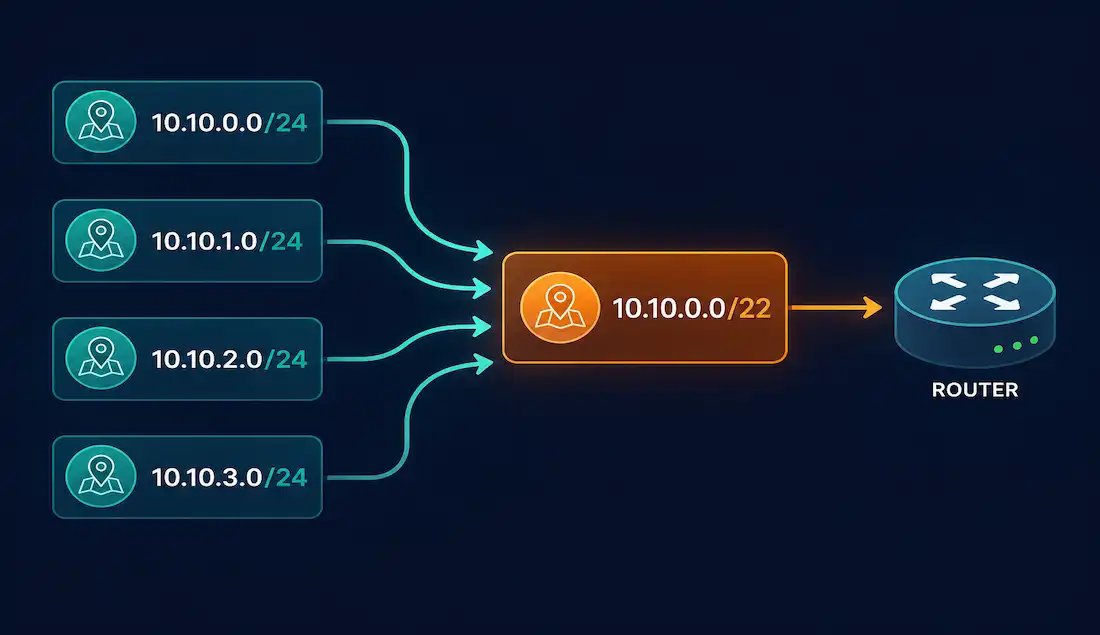
Static routes are manually configured entries in a router’s routing table that direct traffic to specific destinations. Unlike dynamic routing protocols such as OSPF or EIGRP, static routes offer simplicity and precise control, which makes them a natural fit for small networks, stub networks, or default gateways. For CCNA and CCNP study, mastering static routes and route summarization matters directly — both show up regularly in IP routing and network design exam topics.
Why Summarize Static Routes?
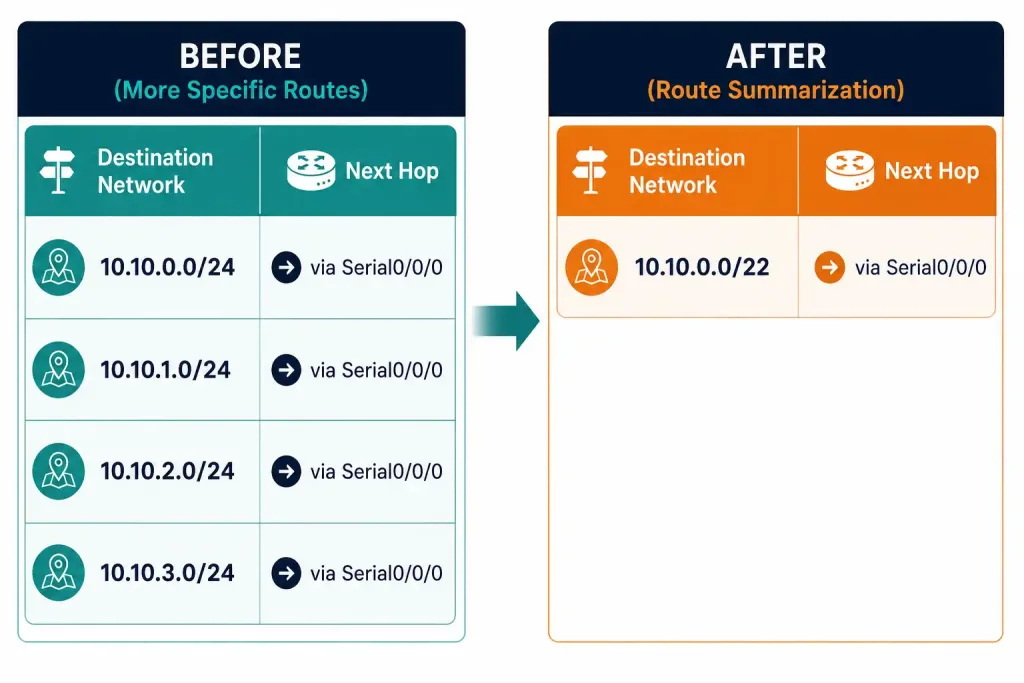
Summary static routes reduce the number of entries in a router’s routing table by combining multiple adjacent networks into a single route. This simplifies management and improves performance by cutting CPU overhead and speeding up routing table lookups.
Fewer routing table entries mean the router processes fewer routes during each lookup. Summarizing 16 individual /24 networks into a single /20 route, for example, reduces routing table entries from 16 down to 1 — a 93.75% reduction. In large networks handling thousands of routes, that difference translates directly into faster forwarding and lower memory usage.
Summarization also simplifies day-to-day network management. Instead of configuring, tracking, and troubleshooting several individual static routes, an engineer manages a single summarized entry, which cuts down the surface area for configuration mistakes.
Summary static routes work when multiple networks share the same exit interface or next hop. Multiple static routes can be safely summarized into one when both of these hold true:
- The destination networks are adjacent and can be represented by a single, contiguous network address.
- All of the individual static routes use the same exit interface or next-hop IP address.
In a representative topology, Router0 has four separate static routes configured to reach the 10.10.0.0/24 through 10.10.3.0/24 networks. All four networks are adjacent (the linked reference here points to a Wireless Network Interface Card article rather than a resource on interface adjacency — a mismatched auto-link kept per site policy) and all four routes point to the same exit interface, which is exactly the condition that makes summarization possible.
Classless Inter-Domain Routing (CIDR) is itself a form of route summarization. Route summarization is essentially supernetting: combining multiple smaller subnets under one larger, less specific network address.
Calculating the Summary Route
Take the four networks from the topology above and calculate their summary route. Start by listing each network in binary:
| IP Address (Decimal) | 1st Octet | 2nd Octet | 3rd Octet | 4th Octet |
|---|---|---|---|---|
| 10.10.0.0/24 | 00001010 | 00001010 | 00000000 | 00000000 |
| 10.10.1.0/24 | 00001010 | 00001010 | 00000001 | 00000000 |
| 10.10.2.0/24 | 00001010 | 00001010 | 00000010 | 00000000 |
| 10.10.3.0/24 | 00001010 | 00001010 | 00000011 | 00000000 |
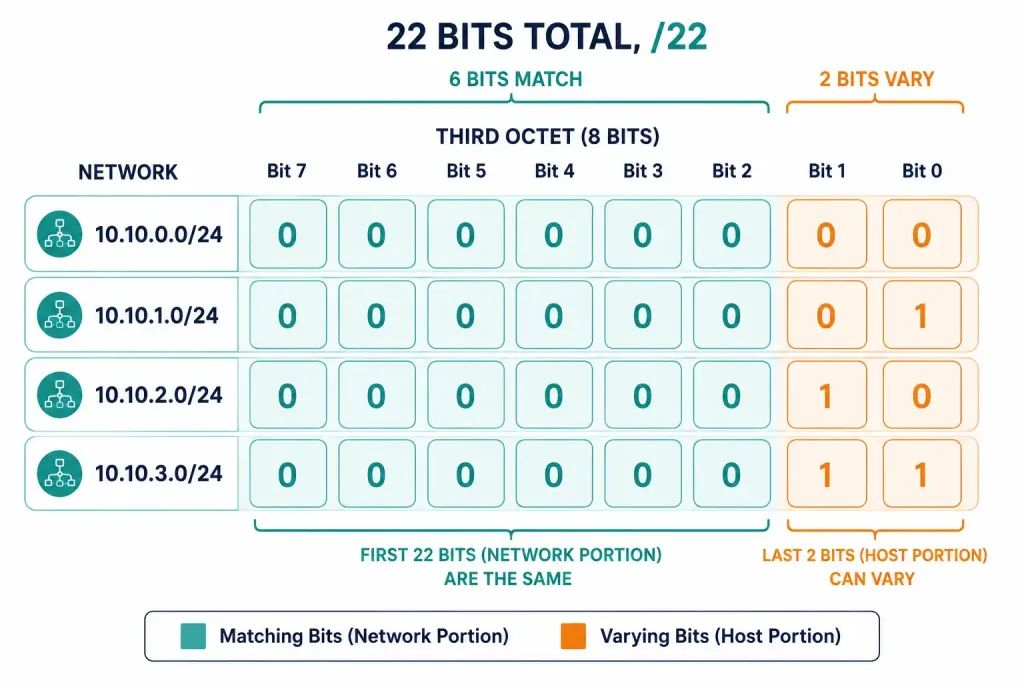
Now count the matching bits from left to right across all four rows. The full first octet (00001010) and second octet (00001010) match exactly across every row — that’s 16 bits. In the third octet, the first six bits (000000) match across all four rows, while the last two bits vary (00, 01, 10, 11) to distinguish the four networks. That gives 6 more matching bits, for a total of 22 matching bits.
Twenty-two matching bits means a /22 summary route, equivalent to a subnet mask of 255.255.252.0. Copy the 22 matching bits, set every remaining bit to zero, and the resulting summary address is 10.10.0.0/22 — a single route that covers all four original /24 networks with no waste and no overlap into neighboring address space.
Configuring the Summary Static Route
To replace the four individual static routes with a single summary route on Router0, remove each specific route and add the summary route in its place:
Router0(config)# no ip route 10.10.0.0 255.255.255.0 Serial0/0/0
Router0(config)# no ip route 10.10.1.0 255.255.255.0 Serial0/0/0
Router0(config)# no ip route 10.10.2.0 255.255.255.0 Serial0/0/0
Router0(config)# no ip route 10.10.3.0 255.255.255.0 Serial0/0/0
Router0(config)# ip route 10.10.0.0 255.255.252.0 Serial0/0/0
Verification Commands
Router0# show ip route
Router0# show running-config | section ip route
Expected Output
S 10.10.0.0/22 is directly connected, Serial0/0/0The is directly connected phrasing here isn’t an error — a static route configured with an exit interface rather than a next-hop IP address shows this way on a point-to-point link, since the router treats the entire summarized block as reachable out that interface. This output confirms the four /24 routes have been fully replaced by the single /22 summary route, shrinking the routing table from four entries down to one.
Common Mistakes in Summary Static Routes
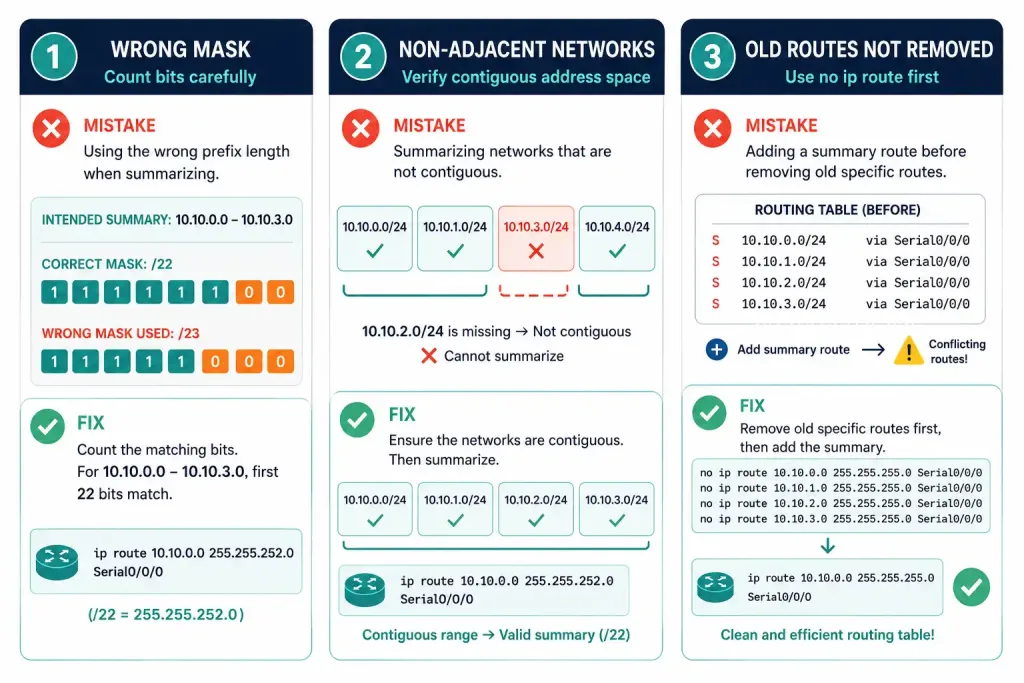
Incorrect mask calculation. It’s easy to miscount the matching bits and land on the wrong subnet mask. Summarizing 10.10.0.0/24 through 10.10.3.0/24 as a /23 instead of a /22 only covers two of the four networks, silently leaving the other two unreachable through the summary route.
Solution: always list the networks in binary and count the matching bits carefully, left to right, rather than estimating from the decimal values.
Summarizing non-adjacent networks. Summarization only works for networks that are genuinely adjacent and contiguous. Attempting to summarize non-contiguous ranges — for example, 10.10.0.0/24 alongside 10.10.4.0/24 while skipping the networks in between — requires adjacent networks to work correctly, and ignoring that requirement causes the summary route to either miss intended destinations or accidentally include unintended ones.
Solution: verify adjacency before summarizing anything — confirm the networks form one continuous, unbroken block of address space.
Forgetting to remove the old routes. Adding a summary route without removing the original individual static routes first can leave both sets of routes active simultaneously, creating redundant or conflicting entries in the routing table.
Solution: use no ip route to clear each individual route (this reference to “the route command” points to an IPv6-specific route command article rather than the general IPv4 syntax — a mismatched auto-link kept per site policy) before adding the summary route, exactly as shown in the configuration steps above.
By avoiding these three mistakes, route summarization stays accurate and the routing table stays clean.
A Second Worked Example: Summarizing an Uneven Group
The four-network example above summarizes cleanly because four is a power of two. Real networks aren’t always that tidy, so it’s worth working through a case where the group being summarized isn’t a clean power-of-two count.
Suppose Router1 has individual static routes to six networks: 172.16.8.0/24 through 172.16.13.0/24, all pointing out the same interface. Six isn’t a power of two, so a single exact summary route can’t represent precisely those six networks and nothing else — the smallest block that fully contains all six will also include two extra /24 networks that weren’t part of the original set.
Listing the third octet of each network in binary shows why: 8 through 13 are 00001000 through 00001101. The leftmost five bits (00001) are common to all six values, but the remaining three bits range from 000 through 101, which don’t share a clean matching prefix beyond that fifth bit. A summary using only those five common bits (00001 followed by zeros) yields 172.16.8.0/21, which actually covers 172.16.8.0 through 172.16.15.0 — eight /24 networks in total, not six.
That means this /21 summary route captures the six intended networks (172.16.8.0/24 through 172.16.13.0/24) plus two extra ones, 172.16.14.0/24 and 172.16.15.0/24, that weren’t part of the original set. Whether that’s acceptable depends on the network design: if those two extra addresses are unused or reserved for future growth behind the same next hop, the broader summary is a reasonable, deliberate trade-off. If they’re allocated elsewhere and shouldn’t be routed through this interface, the six networks need to stay as individual routes, or be split into two summary routes that don’t over-include unrelated address space.
This is the core trade-off in every summarization decision: a route that’s too specific wastes routing table space, while a route that’s too broad can pull in address space that doesn’t belong. Recognizing when a group of networks summarizes cleanly, versus when it forces an imperfect trade-off, is a skill worth practicing directly with binary math rather than relying on memorized power-of-two examples alone.
Example Topology
[See Topology Diagram: Four /24 Networks Summarized into One /22 Route]
A practical lab for this concept: configure Router0 with four separate static routes to 10.10.0.0/24, 10.10.1.0/24, 10.10.2.0/24, and 10.10.3.0/24, all pointing out the same serial interface. Verify each route individually with show ip route, confirm all four appear as separate entries, then remove all four and replace them with the single summary route ip route 10.10.0.0 255.255.252.0 Serial0/0/0. Verify again and confirm the routing table now shows one /22 entry instead of four /24 entries, with connectivity to all four original networks still intact. This is a useful exercise for building the binary-counting instinct needed to summarize quickly during CCNA exam questions.
Frequently Asked Questions
What is a summary static route? A summary static route combines multiple adjacent static routes into a single, less specific route, reducing the number of entries a router has to maintain and search through in its routing table. For example, summarizing four separate /24 routes covering 10.10.0.0/24 through 10.10.3.0/24 into a single 10.10.0.0/22 route reduces four table entries down to one, without losing reachability to any of the original networks. This is a form of route aggregation, conceptually the same idea CIDR uses to keep internet-scale routing tables manageable.
When should I use summary static routes? Use summary static routes whenever multiple adjacent networks share the same exit interface or next-hop IP address, since that shared next hop is exactly what makes a single summarized entry valid. This situation comes up often in stub networks, where a branch router reaches several internal subnets through one upstream link, or in hub-and-spoke designs connecting to a single upstream router. Summarizing in these cases reduces routing table size without changing which destinations are reachable.
How do I calculate a summary route? List each network’s address in binary, then compare all the addresses bit by bit from left to right to find how many leading bits match across every network in the group. The number of matching bits becomes the prefix length of the summary route — for instance, 22 matching bits produces a /22 summary. Once you know the prefix length, copy the matching bits exactly and set every remaining bit to zero to get the summarized network address itself.
Can I summarize routes with different next-hops? No — summary static routes require every route in the group to use the same exit interface or next-hop address. If the underlying routes actually point to different next-hops, forcing them into one summary route can send traffic toward the wrong destination, since the summary route can only specify a single next hop for the entire address block it covers. If the next-hops genuinely differ, the routes need to stay separate, or the network needs to be redesigned so that all summarized destinations really do sit behind the same next hop.
How do I verify a summary static route? Use show ip route to check the routing table and confirm that the summary route — for example, 10.10.0.0/22 — appears in place of the individual routes it replaced. The show running-config | section ip route command shows exactly what’s configured, which is useful for confirming the old individual routes were actually removed and not just shadowed by the new summary entry. Following up with ping or traceroute to a host in each of the originally separate networks confirms the summary route is actually forwarding traffic correctly, not just present in the table.



