
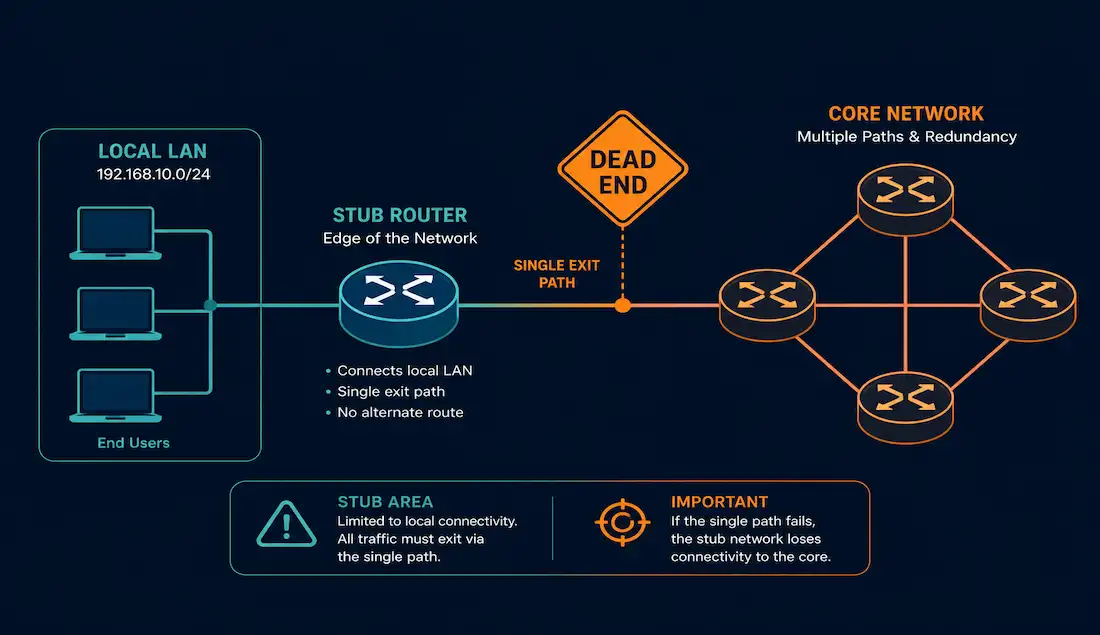
Understanding stub networks and stub routers is fundamental to designing efficient networks, and a direct requirement for the CCNA exam. Stub networks show up in branch office designs, service provider edge connections, and anywhere a network segment has only one path in and out. This guide covers what a stub network is, why static and default routes are the right tool for it, how to configure and verify those routes in Cisco IOS, and how OSPF and EIGRP each handle stub scenarios at the protocol level.
What Is a Stub Network?
A stub network is a network with only one route out — one entry and one exit point to the rest of the internetwork. All traffic from devices on a stub network must pass through a single router to reach any external destination. That router is called a stub router.
The simplest mental model: a stub network is a dead end. Traffic can enter and exit, but only through one door, with no alternative path.
Examples of stub networks in real deployments:
- A branch office connected to corporate headquarters by a single WAN link
- A small remote site connected to a service provider with a single point-to-point circuit
- A home network connected to the internet through a single ISP router
- An end-user LAN behind a single access router in a campus design
Stub Network vs. Transit Network
The concept becomes clearer when contrasted with a transit network.
| Feature | Stub Network | Transit Network |
|---|---|---|
| Exit paths | One (single router) | Multiple |
| Traffic role | Originates and terminates traffic | Passes traffic between other networks |
| Routing complexity | Low — one path | High — must route between segments |
| Best routing type | Static or default route | Dynamic routing protocol |
| Common location | Branch offices, edge sites | Core and distribution layer routers |
A transit network carries traffic between multiple segments — it’s not the source or destination of that traffic, just a pathway. A stub network only ever sends or receives traffic; it never routes traffic through itself toward another network.
Topology Example
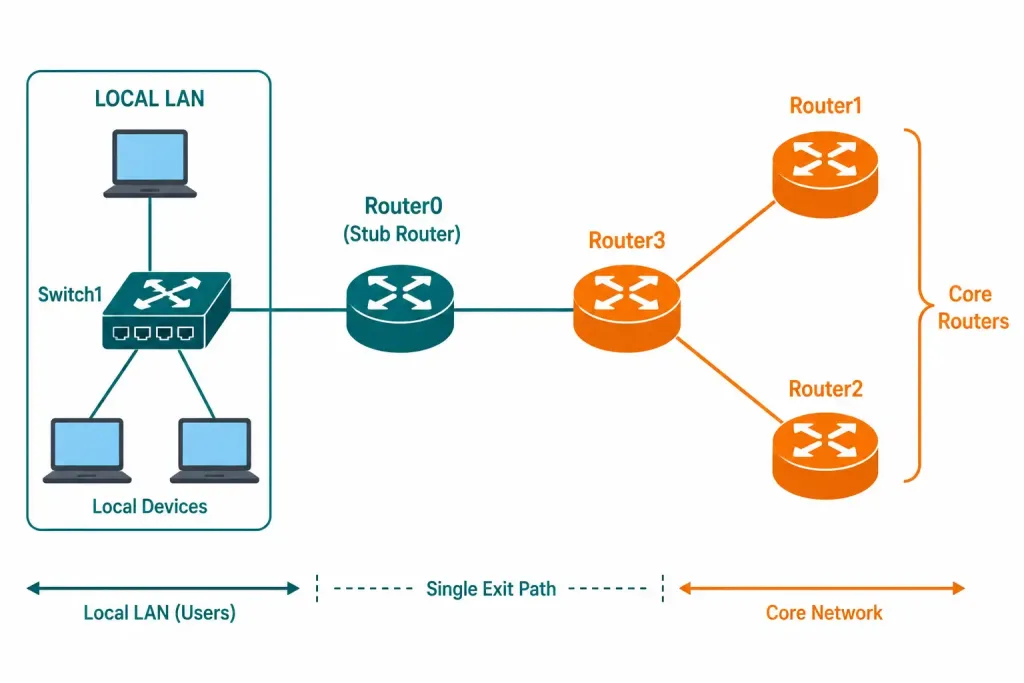
Consider a simple topology: Router0 is the stub router. It connects to Switch1 — and through Switch1, to local laptops — on one interface, and to Router3 on another. There’s only one path out to the core network, through Router3.
- The LAN behind Switch1 (for example, 192.168.2.0/24) is the stub network. All traffic from those laptops must exit through Router0.
- Router1, Router2, and Router3 are core routers. They have multiple connections and carry transit traffic between segments — they are not stub routers.
The key identifier for a stub topology: if you removed Router0, the LAN behind Switch1 would be completely isolated. There’s no alternative path.
Why Avoid Dynamic Routing on Stub Routers?
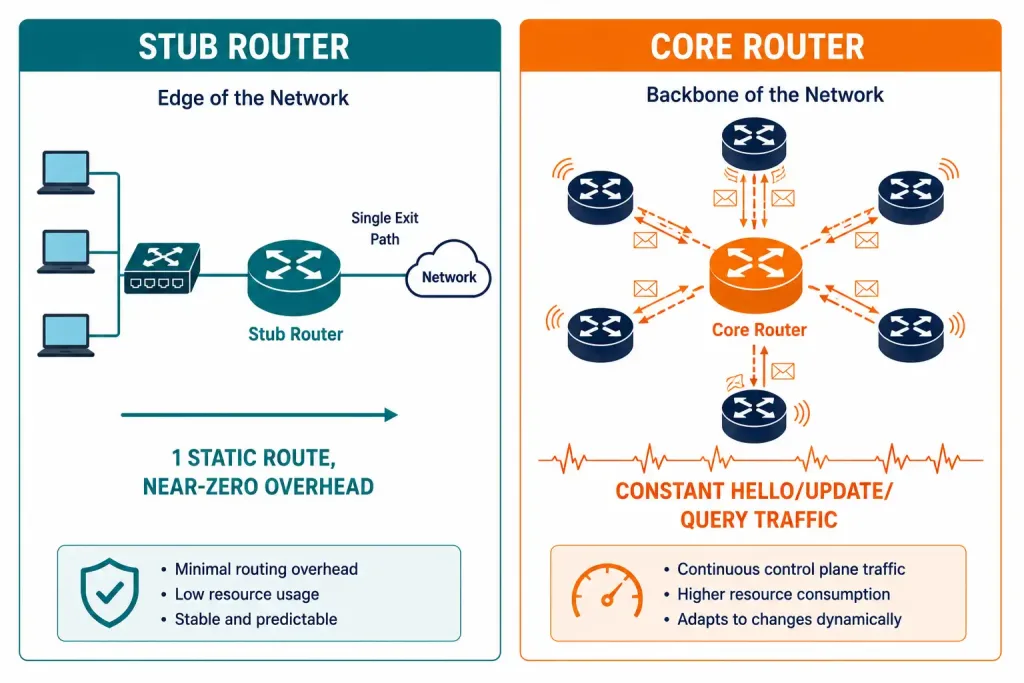
Dynamic routing protocols like OSPF and EIGRP are built for networks with multiple paths. They continuously exchange topology information — hello packets, routing updates, and for OSPF, full link-state databases — so every router can calculate the best path to every destination.
For a stub router like Router0, all of that overhead is unnecessary. Router0 has exactly one path to the rest of the network, through Router3. There’s no topology calculation to perform. Running OSPF or EIGRP on Router0 would consume CPU, memory, and bandwidth exchanging information that will never change the routing decision.
The rule for stub networks: use static routes. The simpler the topology, the more appropriate static routing becomes.
The one exception is when the stub network connects to multiple upstream routers for redundancy — in that case, a dynamic protocol handles failover automatically. A true single-exit stub is best served by static or default routes.
Configuring Static Routes for Stub Networks
A static route is a manually configured path that doesn’t change unless an administrator edits it. For a stub router, the static route points toward the upstream core router.
On Router0 (Stub Router) — IPv4
Router0(config)# ip route 10.10.10.0 255.255.255.0 172.16.0.1
Router0(config)# ip route 10.10.2.0 255.255.255.0 172.16.0.1
Here, 172.16.0.1 is Router3’s interface address on the link between Router0 and Router3. Both remote networks are reachable via the same next hop.
On Router3 (Upstream Core Router) — IPv4
Router3 needs a return route to the stub LAN so it can forward traffic back:
Router3(config)# ip route 192.168.2.0 255.255.255.0 172.16.0.2Here, 172.16.0.2 is Router0’s interface address on the link between them. Without this return route, Router3 would drop traffic destined for the stub LAN.
IPv6 Static Route on Router0
Router0(config)# ipv6 route 2001:DB8::/64 2001:DB8:1::1The syntax is ipv6 route [destination-prefix] [next-hop-IPv6-address]. The logic matches IPv4 exactly.
Verifying Static Routes
Router0# show ip route
Router0# show ip route static
In the routing table, static routes appear with the code S. A correctly configured static route looks like:
S    10.10.0.0/24 [1/0] via 10.10.10.1
S    10.10.2.0/24 [1/0] via 10.10.10.1
The [1/0] is [administrative distance / metric]. Static routes have an administrative distance of 1 by default, giving them priority over most dynamic routes. A floating static route deliberately uses a higher AD — for example, 5 or 10 — so it only activates if the primary dynamic route is lost.
Test reachability after configuration:
Router0# ping 10.10.0.1
Router0# traceroute 10.10.2.1
Using Default Routes in Stub Networks
For a true stub router, a single default route is more efficient than configuring individual static routes to every remote network. A default route matches any destination that doesn’t have a more specific entry in the routing table — it’s the “send everything else here” instruction.
IPv4 Default Route
Router0(config)# ip route 0.0.0.0 0.0.0.0 10.10.10.1This tells Router0: for any destination without a specific route, forward to 10.10.10.1 (Router3). Once Router3 receives the traffic, it routes to the correct destination using its own, more complete routing table.
The default route appears in show ip route as:
S* 0.0.0.0/0 [1/0] via 10.10.10.1The S* means it’s both a static route (S) and the gateway of last resort (*).
IPv6 Default Route
Router0(config)# ipv6 route ::/0 2001:DB8:1::1::/0 is the IPv6 equivalent of 0.0.0.0/0 — it matches all IPv6 destinations.
When to Use a Default Route vs. Specific Static Routes
Use a default route when the stub router sends all non-local traffic to one upstream next hop — the case for most single-exit stub scenarios. Use specific static routes when the upstream network is large and the stub router only needs to reach particular remote segments, or when you need more precise control over traffic paths.
Important: don’t configure a default route on Router1, Router2, or Router3 in the topology above. Those are core routers with multiple paths — they need specific routing table entries, from a dynamic protocol or multiple static routes, to make informed forwarding decisions. A default route on a core router with multiple paths would force all unknown traffic through one exit, ignoring the other available paths.
OSPF Stub Areas
OSPF extends the stub concept to stub areas — a mechanism for reducing the size of link-state databases in areas that don’t need full topology information.
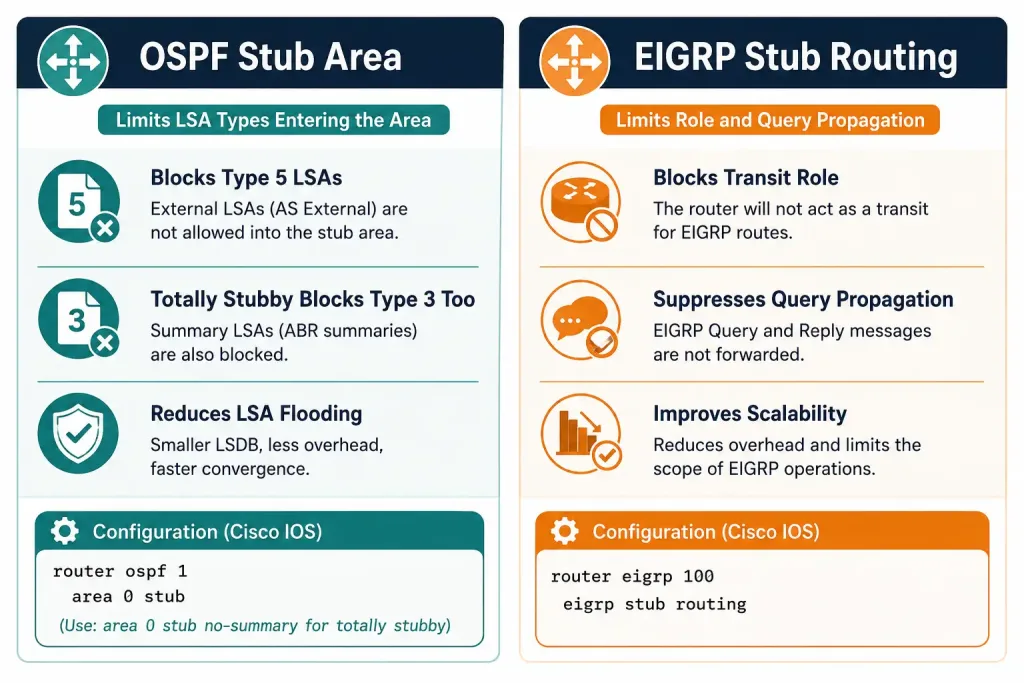
In an OSPF stub area, Type 5 LSAs (external routes) are blocked from entering the area. Routers in the stub area receive a default route from the ABR (Area Border Router) instead of the full set of external routing information, reducing memory and CPU usage.
A totally stubby area — a Cisco-proprietary extension — blocks both Type 5 and Type 3 LSAs, leaving stub area routers with only a default route and intra-area routes. This is the most aggressive route summarization option OSPF offers.
OSPF stub area configuration:
Router0(config)# router ospf 1
Router0(config-router)# area 1 stub
The ABR must also be configured for the same area type. OSPF route summarization covers additional techniques for reducing routing table size across area boundaries.
EIGRP Stub Routing
EIGRP handles stub scenarios differently from OSPF. Declaring a stub router in EIGRP does two things:
- Prevents the stub router from being used as a transit router — upstream routers won’t forward traffic through the stub to reach other networks.
- Suppresses EIGRP query propagation — when an EIGRP router loses a route, it queries all neighbors. Querying a stub router slows down convergence, so declaring it as a stub keeps queries from reaching it.
EIGRP stub configuration:
Router0(config)# router eigrp 100
Router0(config-router)# eigrp stub connected summary
The connected and summary keywords control which routes the stub router advertises:
- connected — advertise only directly connected networks
- summary — advertise summary routes
- static — advertise redistributed static routes
- receive-only — accept routes but advertise nothing (the most restrictive option)
Verify EIGRP stub status:
Router0# show ip eigrp neighbors detailThe output shows Stub Peer Advertising (CONNECTED SUMMARY) Routes for stub-declared neighbors.
Pros and Cons of Static Routing
| Aspect | Pros | Cons |
|---|---|---|
| Resource usage | Minimal CPU and memory, no protocol overhead | Manual updates required whenever topology changes |
| Predictability | Fixed, deterministic paths, easy to audit | No automatic adaptation to link failures |
| Scalability | Ideal for small and stub networks | Poor for large, dynamic topologies with many paths |
| Security | No routing protocol traffic to intercept or manipulate | Requires ACLs or other controls to protect route integrity |
| Configuration | Simple and explicit | Every route must be entered manually on every affected router |
Static routing is most appropriate for stub networks, small networks with stable topologies, and floating static routes used as backup paths. For configuring static or default routes on the branch router connecting to a hub site, static routes are almost always the right choice.
Dynamic vs. Static Routing in Stub Environments
Unlike static routes, dynamic protocols like OSPF or EIGRP automatically discover paths and handle failures. In transit networks with redundant paths, dynamic routing is essential — it detects link failures and recalculates paths without manual intervention.
In stub networks, the trade-off is clear:
- Static routing — zero protocol overhead, deterministic, simple to configure and verify, but requires manual updates if anything changes.
- Dynamic routing on a stub — full routing protocol overhead for zero benefit, since the path doesn’t change when there’s only one path available. Every hello packet, update, and query is wasted CPU and bandwidth on the stub router.
A hybrid approach works well for larger organizations: run a dynamic routing protocol between core routers for automatic convergence, and use static or default routes to connect stub sites to the nearest core router. This gives the core network automatic failover while keeping stub site configurations simple. OSPF route summarization at the boundary between stub and core is a common technique to keep the stub’s routes from cluttering the core routing table.
Real-World Scenarios
Branch office design. A retail branch has 20 workstations connected to a local switch, which connects to a branch router with a single WAN link to corporate headquarters. The branch router is configured with a default route pointing to the WAN link, and the corporate HQ router has a specific static route back to the branch LAN. The branch runs no dynamic routing protocol — it has nothing to gain from one.
Service provider customer edge. A customer stub network connects to an ISP via a single circuit. The customer router has a default route pointing to the ISP’s Provider Edge router. The PE router has a static or BGP-learned route back to the customer’s prefix. This is the same stub pattern at a different scale.
Remote monitoring site. An IoT monitoring installation at a remote location has a single cellular uplink. The router at the site runs a default route toward the uplink. No dynamic routing is needed — there’s exactly one path, and a static default route costs nothing in overhead on a resource-constrained edge device.
CCNA Exam Pointers
- A stub network has exactly one exit point — one path in and out.
- A stub router has only one connection to the broader network — a single uplink to the core.
- Static routes use
ip route [network] [mask] [next-hop]; default routes use0.0.0.0 0.0.0.0as the destination. - The default administrative distance of a static route is 1 — lower than OSPF (110) and EIGRP (90 internal / 170 external), so a static route overrides a dynamic route to the same destination by default.
- A floating static route uses an AD higher than the primary dynamic route (for example, AD 5 as a backup to EIGRP) so it only activates when the dynamic route is lost.
- OSPF stub areas block Type 5 (external) LSAs; totally stubby areas additionally block Type 3 (inter-area summary) LSAs.
- EIGRP stub routing prevents query propagation and prevents the stub router from being used as a transit router.
- Verify static routes with
show ip route static; verify the default route withshow ip route 0.0.0.0.
Conclusion
A stub network is one of the most practical concepts in networking — it appears constantly in real deployments, from branch offices to IoT edge sites, and is tested directly on the CCNA exam. Its defining characteristic, a single exit path, is exactly what makes dynamic routing unnecessary and static or default routing the right fit. Configure a default route on the stub router pointing upstream, configure a specific return route on the upstream router, verify with show ip route, and test with ping. For larger stub scenarios, OSPF stub areas and EIGRP stub routing extend the concept to limit protocol overhead without abandoning dynamic routing entirely.
Recognizing when a network is a stub, and choosing the right routing approach for it — static for true single-exit stubs, OSPF/EIGRP stub configurations for protocol-managed stub scenarios — is foundational to efficient network design.
Self-Assessment – Static Route Configuration
Frequently Asked Questions
What is a stub router and how does it differ from a core router?
A stub router is a device with only one connection to the broader network, making it the single exit point for a stub network. All traffic from devices behind the stub router must pass through it to reach any external destination. A core router, by contrast, has multiple connections to other routers and carries transit traffic — it routes packets between segments rather than serving as the endpoint for a local network.
In terms of routing protocol behavior, stub routers benefit from simplified configurations, such as static or default routes, because they have nothing to gain from a full topology exchange. Core routers need dynamic routing protocols to make informed decisions across multiple available paths.
Why should dynamic routing protocols be avoided in stub network topologies?
Dynamic routing protocols like OSPF and EIGRP continuously exchange topology information — hello packets, routing updates, and link-state databases — so every router can calculate optimal paths to every destination. For a stub router with exactly one exit path, all of that overhead produces no benefit: the routing decision is always the same regardless of what the topology table contains.
Running OSPF or EIGRP on a stub router wastes CPU, memory, and bandwidth on exchanges that will never influence the forwarding decision. Static routes or a single default route achieve the same forwarding behavior with zero protocol overhead, which is why they’re the correct choice for single-exit stub deployments.
What is the difference between a stub network and a transit network?
A stub network has a single entry and exit point — all traffic originates from or is destined for devices on that network, and there’s exactly one router through which it can enter or leave. A transit network, by contrast, carries traffic between other networks — it’s not the source or destination of that traffic, just a pathway between other segments.
A branch office LAN is a stub network; the WAN backbone connecting multiple branch offices is a transit network. The routing implications matter: stub networks need only a default route or a few specific static routes, while transit networks require dynamic routing protocols, or extensive static route tables, to handle traffic across multiple paths.
How do you configure and verify static and default routes on Cisco routers for IPv4 and IPv6?
For IPv4, a specific static route uses ip route [destination-network] [subnet-mask] [next-hop-IP] — for example, ip route 10.10.0.0 255.255.255.0 10.10.10.1. A default route uses ip route 0.0.0.0 0.0.0.0 [next-hop-IP]. For IPv6, the equivalent commands are ipv6 route [prefix/length] [next-hop-IPv6] and ipv6 route ::/0 [next-hop-IPv6]. After configuration, verify with show ip route static (IPv4) or show ipv6 route static (IPv6) — static routes appear with the code S and default routes with S*. Test reachability with ping [destination] and traceroute [destination] to confirm the path works end to end.
What are the advantages and disadvantages of using static routing in Cisco stub networks?
The primary advantages are resource efficiency (no protocol overhead, no hello packets, no routing updates), path predictability (forwarding behavior is exactly as configured and doesn’t change automatically), and simplicity (easier to configure, verify, and troubleshoot than a dynamic routing protocol). Static routing is also more secure, since there are no routing protocol messages that could be manipulated or spoofed.
The key disadvantages are operational overhead — every change to the network topology requires manual updates to all affected static routes — lack of automatic failover (if the upstream link or router fails, the static route stays in the table but traffic is dropped with no automatic rerouting), and poor scalability, since the number of static routes to manage grows along with the network. For stable stub networks where the topology rarely changes and there’s only one path anyway, these disadvantages are minimal and the advantages are compelling.



