
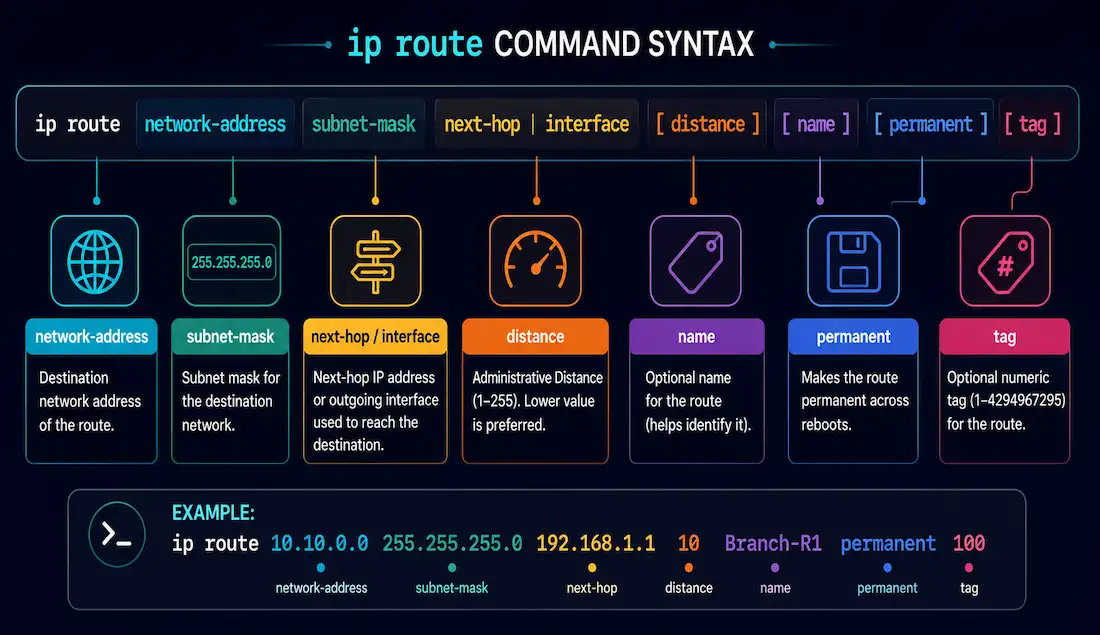
The ip route command is the fundamental tool for configuring static routes on Cisco IOS devices. Static routes give a secure, predictable way to direct traffic in small to medium-sized networks, and understanding every parameter of this command is a core CCNA and CCNP skill.
Router(config)# ip route network-address subnet-mask {ip-address | interface-type interface-number [ip-address]} [distance] [name name] [permanent] [tag tag]Here’s what each parameter does.
network-address
The first parameter — the destination network address you want added to the routing table.
subnet-mask
The subnet mask for that destination network. This can also be a summarized mask covering a group of networks at once, cutting routing table size and speeding up lookups — see route summarization for the full calculation method.
ip-address
The IP address of the next router in the path — the next hop — used to reach the destination network. This is the most common way to point a static route.
exit-interface
Does effectively the same job as ip-address, but by naming the outgoing interface instead of a next-hop address. The router forwards any packet matching the destination out that interface, and whatever device is connected there handles it from there.
At least one of ip-address or exit-interface must be specified — the route needs to know where to send matching traffic.
distance
Administrative distance (AD) reflects how trustworthy a route source is, on a scale from 0 to 255 — lower values are preferred. When multiple routes to the same destination exist, the router always picks the one with the lowest AD.
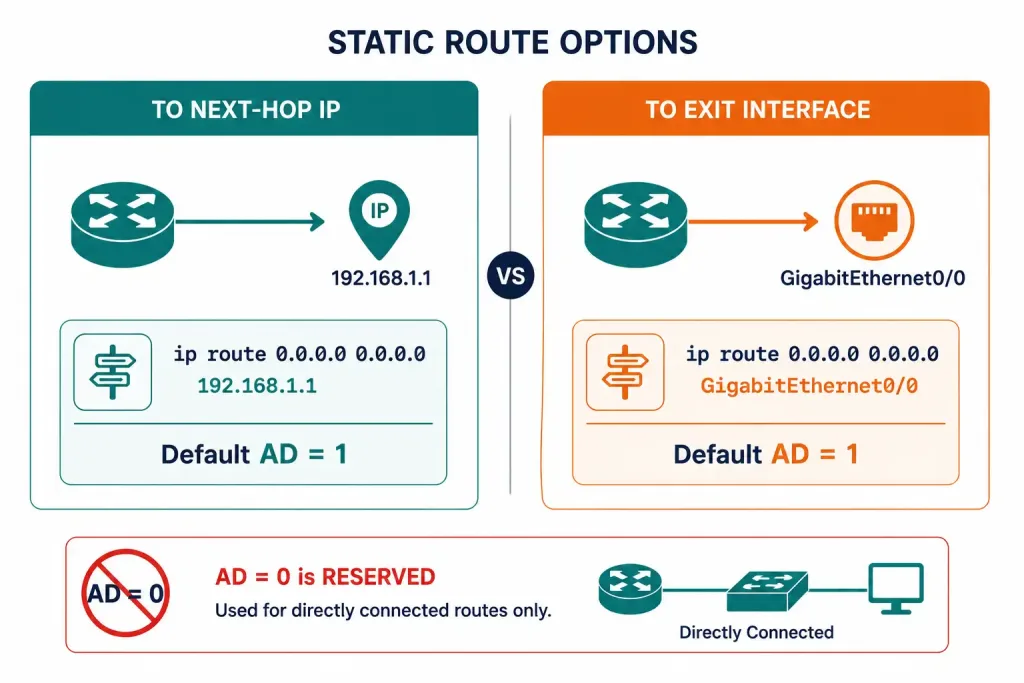
A static route’s default administrative distance is 1, whether it’s configured with a next-hop IP address or an exit interface — there’s no difference in the default AD between the two forms. Manually setting a higher AD than the default is how floating static routes work: configuring a backup route with an AD deliberately higher than the primary route means it stays inactive until the primary route disappears from the table.
Router(config)# ip route 10.0.0.0 255.0.0.0 192.168.1.2
Router(config)# ip route 10.0.0.0 255.0.0.0 192.168.2.2 5
The first line is a normal static route at the default AD of 1. The second line is a floating backup route to the same destination via a different next hop, given an AD of 5 so it only takes over if the first route fails.
name
Assigns a readable name to the route, useful for identifying its purpose in the running configuration.
Router(config)# ip route 10.0.0.0 255.0.0.0 192.168.1.2 name BACKUP-WANpermanent
Keeps the route in the routing table even if its associated interface goes down. Without this keyword, a static route is normally removed from the table automatically if the interface it depends on becomes unavailable.
It’s optional, and most static routes don’t use it — but it matters when you need a route to persist regardless of interface state, for example when the route’s reachability doesn’t actually depend on that interface staying up.
tag
Attaches a numeric tag to the static route, which a route map can then match on. Route maps are policy tools that permit, deny, or modify the parameters of what gets advertised in routing updates — tagging a static route is a common way to control exactly how that specific route gets redistributed into a dynamic routing protocol.
Quick Reference
| Parameter | Required? | Purpose |
|---|---|---|
| network-address | Yes | Destination network |
| subnet-mask | Yes | Mask for the destination network |
| ip-address / exit-interface | Yes (at least one) | Where to forward matching traffic |
| distance | No | Overrides the default AD of 1 |
| name | No | Human-readable label for the route |
| permanent | No | Keeps the route even if the interface goes down |
| tag | No | Value a route map can match on for redistribution control |
Frequently Asked Questions
What is the default administrative distance of a static route?
A static route’s default administrative distance is 1, regardless of whether it’s configured with a next-hop IP address or an exit interface — the two forms don’t differ in their default AD. This puts static routes ahead of every common dynamic routing protocol by default, since OSPF uses 110 and EIGRP uses 90 internally, which is why a static route to the same destination normally wins unless it’s deliberately configured with a higher AD.
When should I use an exit interface instead of a next-hop IP address?
An exit interface works cleanly on point-to-point links, where there’s no ambiguity about which device receives the traffic. On broadcast-capable multi-access links, such as Ethernet, pointing a static route at the next-hop IP address is usually the better choice, since routing to a bare exit interface on that kind of link can trigger unnecessary proxy ARP traffic for every destination covered by the route.
How does the tag parameter get used in practice?
The tag parameter attaches a numeric value to a static route that a route map can later match against, typically during redistribution into a dynamic routing protocol. This lets an administrator selectively permit, deny, or modify specific static routes as they’re advertised elsewhere in the network, without needing a separate mechanism to distinguish one static route from another with similar characteristics.



