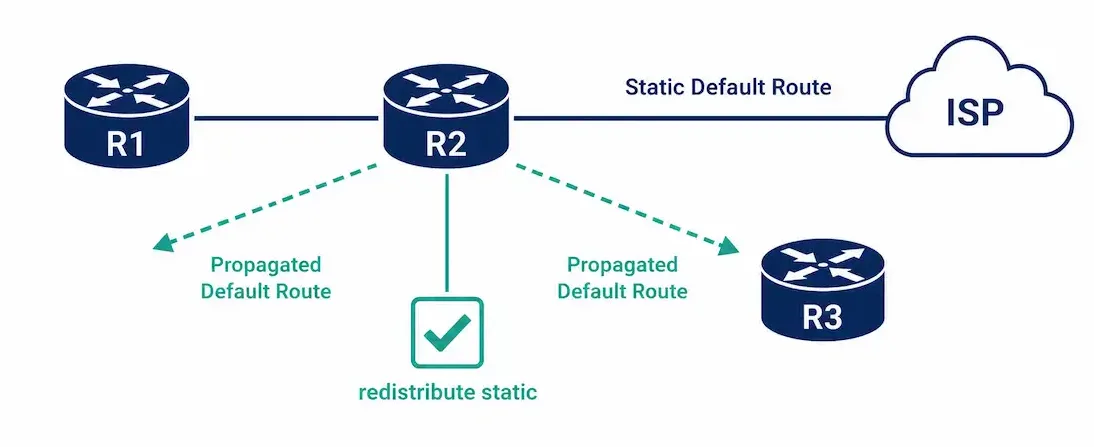
A default route configured on one router doesn’t automatically become known to every other router in the network — static routes and dynamic routing protocols are separate systems by default, and bridging them requires a deliberate redistribution step. This is exactly the case with an EIGRP domain’s internet gateway: without redistribution, only the gateway router itself knows how to reach the internet, leaving every other router in the domain with no path out at all.
This guide covers configuring and propagating a default static route through an EIGRP domain, for both IPv4 and IPv6, with verification and troubleshooting.
Why Redistribution Is Necessary
The address 0.0.0.0/0 is reserved for the default route in IPv4, and it isn’t tied to any specific routing protocol — it works the same way regardless of whether EIGRP, OSPF, or another protocol is running. Typically, the static default route is configured on the edge router, where the network connects to something outside the EIGRP domain entirely — an ISP, for instance.
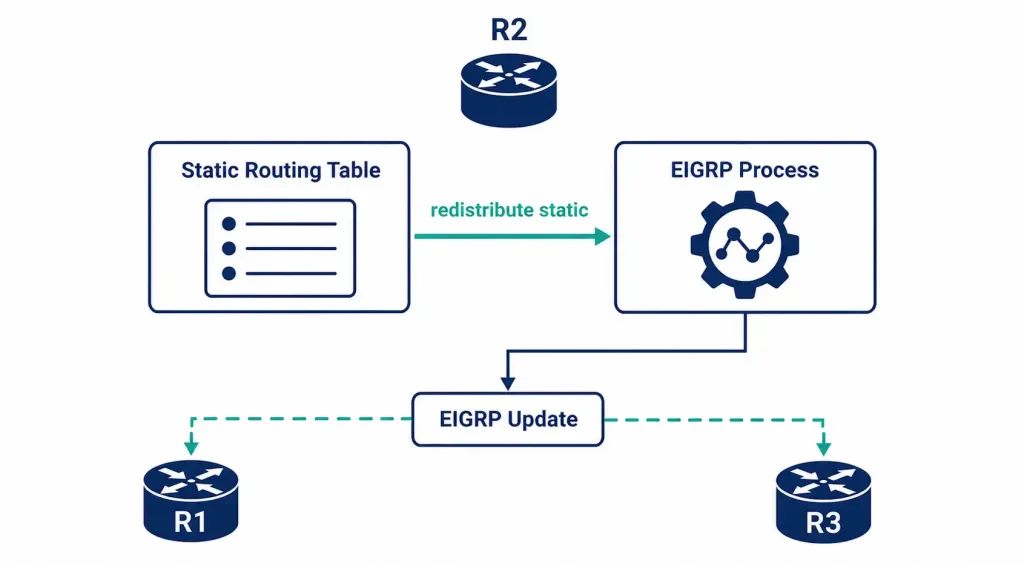
The problem: configuring a static route on one router doesn’t broadcast that information to EIGRP neighbors on its own. EIGRP only advertises routes it’s specifically told to advertise, and a manually-configured static route isn’t automatically included in that set. The redistribute static command bridges this gap, taking routes from the static routing table and injecting them into EIGRP’s routing updates.
The Topology
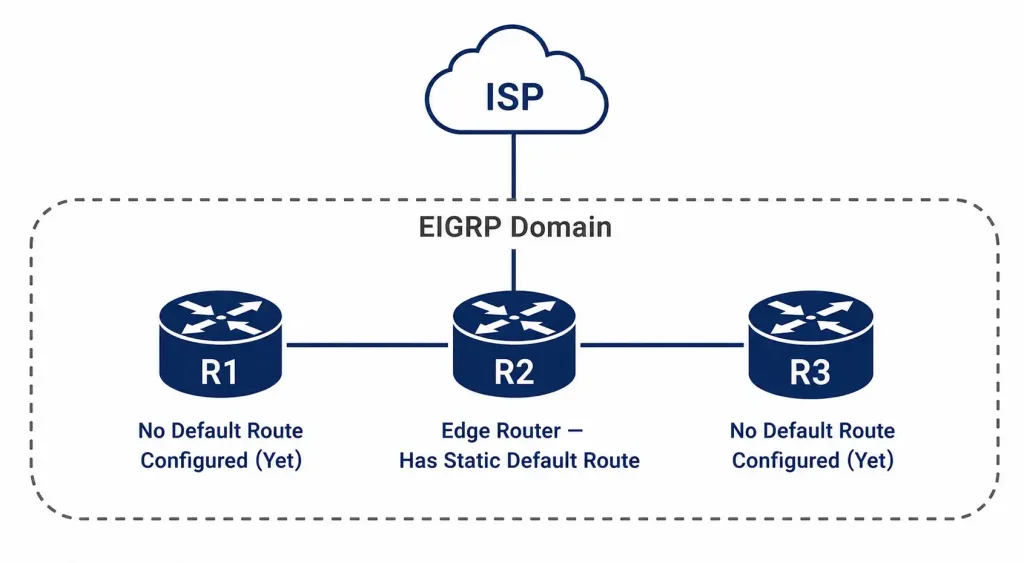
Consider three routers in an EIGRP domain: R2 sits at the edge, connected to an ISP router outside the domain. R1 and R3 sit further inside the domain, each depending on R2 for any traffic destined outside the network entirely.
R2 has a static default route pointing toward the ISP. Without redistribution, R1 and R3 have no route at all for destinations outside the EIGRP domain — any traffic to an unknown external address gets dropped at whichever router first has no matching entry.
Configuring the Static Default Route on R2
First, configure the actual static default route pointing toward the ISP:
R2> enable
R2# configure terminal
R2(config)# ip route 0.0.0.0 0.0.0.0 <isp-next-hop-address>
Redistributing the Static Route into EIGRP
With the static route in place, redistribute it into EIGRP so R1 and R3 learn about it too:
R2(config)# router eigrp 100
R2(config-router)# redistribute static
R2(config-router)# exit
This single command adds any previously-configured static routes — including the default route — into R2’s outgoing EIGRP updates, making them visible to every other router in the domain.
Verifying the Configuration on R2
Confirm redistribution is actually active:
R2# show ip protocolsRouting Protocol is "eigrp 100"
...
Redistributing: static, eigrp 100
...The Redistributing: static line confirms the command took effect. If it’s missing, the redistribute static command either wasn’t entered, was entered under the wrong AS number, or was removed by a later configuration change.
Verifying the Learned Default Route on R1 and R3
On R1 and R3 — where no default route was configured directly — check the routing table:
R1# show ip routeGateway of last resort is 10.10.10.1 to network 0.0.0.0
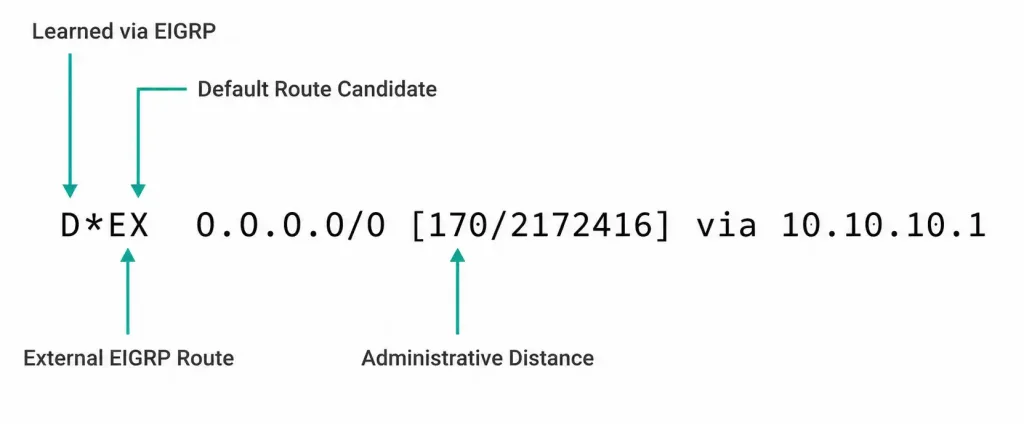
D*EX 0.0.0.0/0 [170/2172416] via 10.10.10.1, 00:02:14, Serial0/0/0We can identify the EIGRP-learned default route by the following parameters (the original source article linked this exact phrase to an unrelated healthcare-assistant career-advice page — flagged here as a clear mismatch rather than carried forward as a genuine reference). Reading this route entry:
- D: the route was learned via an EIGRP routing update.
- *: this route is a candidate default route — the asterisk specifically marks it as eligible to serve as the Gateway of Last Resort.
- EX: this is an EIGRP external route — meaning it originated from outside EIGRP itself (in this case, from the redistributed static route) rather than being calculated natively by EIGRP.
- 170: the administrative distance for an external EIGRP route, higher than internal EIGRP’s AD of 90, reflecting that externally-redistributed routes are trusted somewhat less than natively-learned ones by default.
- 2172416: the EIGRP composite metric for this route, calculated the same way as any other EIGRP metric.
Confirm R3 shows the same pattern independently — both routers should show an identical D*EX default route pointing back toward R2.
EIGRP for IPv6: Default Route
IPv6 default route configuration and propagation work in parallel to IPv4, using separate commands, but follow the same underlying logic.
Configuring the IPv6 static default route on R2:
R2(config)# ipv6 route ::/0 GigabitEthernet0/0 2001:db8::1The prefix ::/0 is IPv6’s equivalent of 0.0.0.0/0 — both represent an all-zero address with a /0 prefix length, matching any destination with no more specific route available.
A detail worth getting right: on a multi-access interface like Ethernet, it’s best practice to specify both the exit interface and a next-hop IPv6 address together, as shown above, rather than the interface alone. IPv6 static routes on broadcast-capable media generally need a next-hop address to resolve correctly via Neighbor Discovery — specifying only an exit interface on this kind of link can behave unreliably, unlike a genuinely point-to-point link (like a serial interface), where the interface alone is typically sufficient since there’s only one possible next-hop device.
Redistributing into EIGRP for IPv6 uses the same command, entered under the IPv6 address-family or classic EIGRP for IPv6 process:
R2(config)# ipv6 router eigrp 100
R2(config-rtr)# redistribute static
Verifying IPv6 Default Route Propagation
R1# show ipv6 routeD*EX ::/0 [170/2172416]
via FE80::1, GigabitEthernet0/0The same route-code logic applies: D for EIGRP-learned, * marking it as the default route candidate, EX for external, and 170 as the external EIGRP administrative distance — identical interpretation to the IPv4 example above.
Redistribution Risks Worth Understanding
Redistributing static routes into a dynamic routing protocol is powerful, but it’s worth understanding the risks alongside the benefit, rather than treating redistribute static as a purely mechanical step.
Redistributing more than you intend. redistribute static propagates every static route configured on that router by default, not just the default route specifically. If R2 also has other static routes configured for internal testing or temporary purposes, those get redistributed too, potentially advertising routes into the EIGRP domain that were never meant to be shared network-wide. Reviewing exactly what static routes exist on a router before redistributing is worth doing deliberately, rather than assuming only the intended route will propagate.
Redistribution loops in more complex topologies. In a network redistributing between multiple protocols (EIGRP and OSPF, for instance, both redistributing into each other), it’s possible to create a routing loop where a route learned from one protocol gets redistributed back into the protocol it originally came from, with a worse metric each time. This specific scenario — single-protocol redistribution of static routes — doesn’t carry this particular risk, but it’s worth knowing the pattern exists once a network grows to involve multiple routing protocols redistributing into each other.
Metric and administrative distance implications. A redistributed route’s administrative distance (170 for external EIGRP, as covered above) means it will always lose to a natively-learned EIGRP route to the same destination, which is generally the desired behavior — but it’s worth confirming this is actually what you want in your specific topology, rather than assuming it by default.
Static Default Route vs. Redistributed Default Route
| Factor | Configured Directly on Each Router | Redistributed via EIGRP |
|---|---|---|
| Configuration effort | Manual, on every router individually | One command, on the edge router only |
| Consistency | Risk of routers pointing to different or stale gateways | All routers automatically stay consistent |
| Reacts to edge router failure | No — each static route stays fixed regardless | Yes — route disappears from EIGRP if R2’s static route or connectivity fails |
| Scalability | Poor beyond a handful of routers | Scales cleanly to any domain size |
| Administrative distance | 1 (standard static route) | 170 (external EIGRP) on receiving routers |
This comparison is exactly why redistribution is the standard approach in any EIGRP domain larger than a couple of routers — manually configuring and maintaining an identical static default route on every single router works for a small lab topology, but becomes a genuine maintenance burden and consistency risk as a network grows, with no automatic mechanism to detect or route around a failure at the edge.
Troubleshooting Default Route Propagation
R1 and R3 don’t show a default route at all: confirm redistribution is actually active on R2 first, since this is the most common root cause.
R2# show ip protocolsIf Redistributing: static doesn’t appear, re-enter redistribute static under the correct EIGRP process.
The default route appears but traffic still isn’t reaching the internet: verify the static route on R2 itself is actually valid and the next-hop is reachable — redistribution only propagates a route that R2’s own routing table actually contains and considers usable.
R2# show ip route static
R2# ping <isp-next-hop-address>
EIGRP neighbors between R1/R3 and R2 aren’t forming, so nothing propagates regardless: this is unrelated to redistribution itself — check for a mismatched AS number or basic connectivity issue first.
R1# show ip eigrp neighborsThe IPv6 default route isn’t resolving correctly on a multi-access link: confirm the static route was configured with both an exit interface and a next-hop address, not the interface alone — this is exactly the kind of configuration gap covered above that behaves inconsistently on Ethernet-type interfaces specifically.
R2# show running-config | section ipv6 routeFAQs
Why doesn’t a static route automatically appear in EIGRP updates?
Static routes and EIGRP are separate systems by default — EIGRP only advertises routes it learns natively through its own routing process, not routes an administrator has configured manually elsewhere in the router’s configuration. The redistribute static command is what explicitly bridges the two, injecting static routes into EIGRP’s advertised updates.
What does the D*EX route code actually mean?
D indicates the route was learned via EIGRP, the asterisk marks it as a candidate default route (the Gateway of Last Resort), and EX indicates it’s an external EIGRP route — meaning it originated outside EIGRP’s own native route calculation, in this case from a redistributed static route. Together, these tell you both how the route was learned and that it isn’t a route EIGRP calculated on its own.
Why does an external EIGRP route have a higher administrative distance than an internal one?
External EIGRP routes carry an administrative distance of 170, compared to 90 for internal EIGRP routes, reflecting that a redistributed route from another source is trusted somewhat less by default than a route EIGRP calculated natively within its own domain. This distinction matters if a redistributed route and a natively-learned EIGRP route both exist for the same destination — the natively-learned one wins.
How does IPv6 default route propagation differ from IPv4?
The core process is parallel — a static default route (::/0 instead of 0.0.0.0/0) configured on the edge router, then redistributed into EIGRP for IPv6 using the same redistribute static command. The main practical difference worth knowing is that IPv6 static routes on multi-access interfaces generally need an explicit next-hop address alongside the exit interface to resolve reliably, unlike some IPv4 static route configurations that can work with just an interface specified.
What should I check first if a router isn’t receiving the propagated default route?
Verify redistribution is actually active on the edge router with show ip protocols, checking specifically for a Redistributing: static line. If that’s present and correct, the next most likely cause is an EIGRP neighbor relationship that never formed in the first place, which would prevent any routes — redistributed or native — from propagating at all.
Can I redistribute a static route into EIGRP without it becoming the default route specifically?
Yes — redistribute static propagates any and all configured static routes, not just a default route specifically. Whether a given redistributed route ends up functioning as the Gateway of Last Resort depends on whether it’s actually a 0.0.0.0/0 (or ::/0 for IPv6) route; other static routes redistributed the same way appear as ordinary external EIGRP routes without the asterisk marking them as default-route candidates.