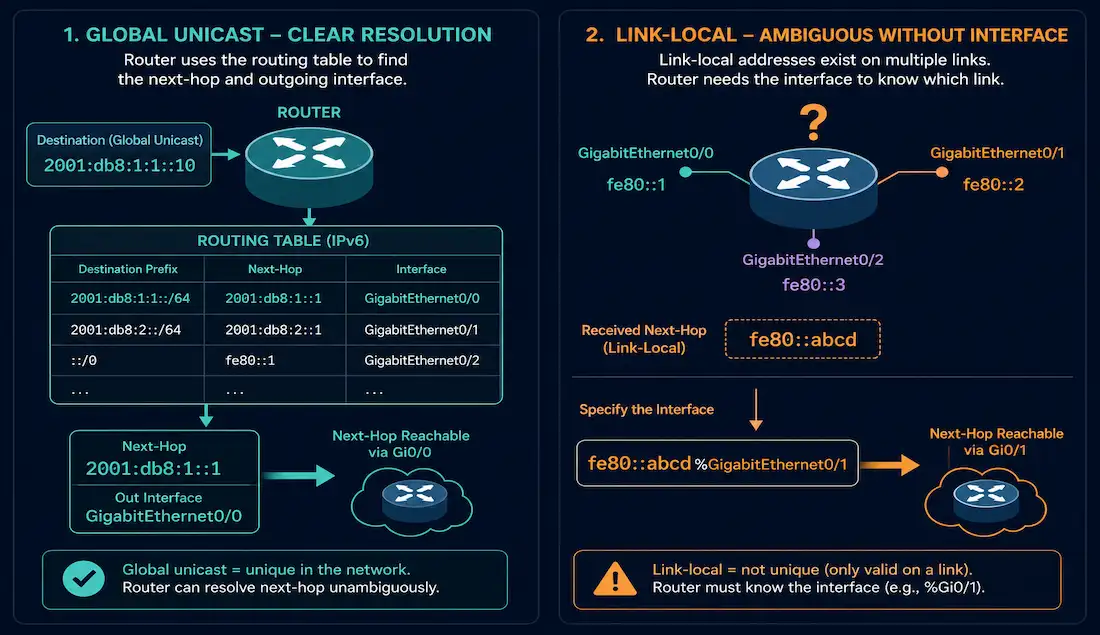
Configuring a static IPv6 route looks almost identical to configuring a static IPv4 route — but IPv6 has one real syntax wrinkle that trips up a lot of people moving from IPv4: whether the next hop needs an interface specified alongside it depends entirely on whether that next hop is a global unicast address or a link-local address. Understanding that distinction is the actual substance behind “the IPv6 route next-hop option,” and it’s a genuinely useful thing to get right, both for CCNA study and for real configurations.
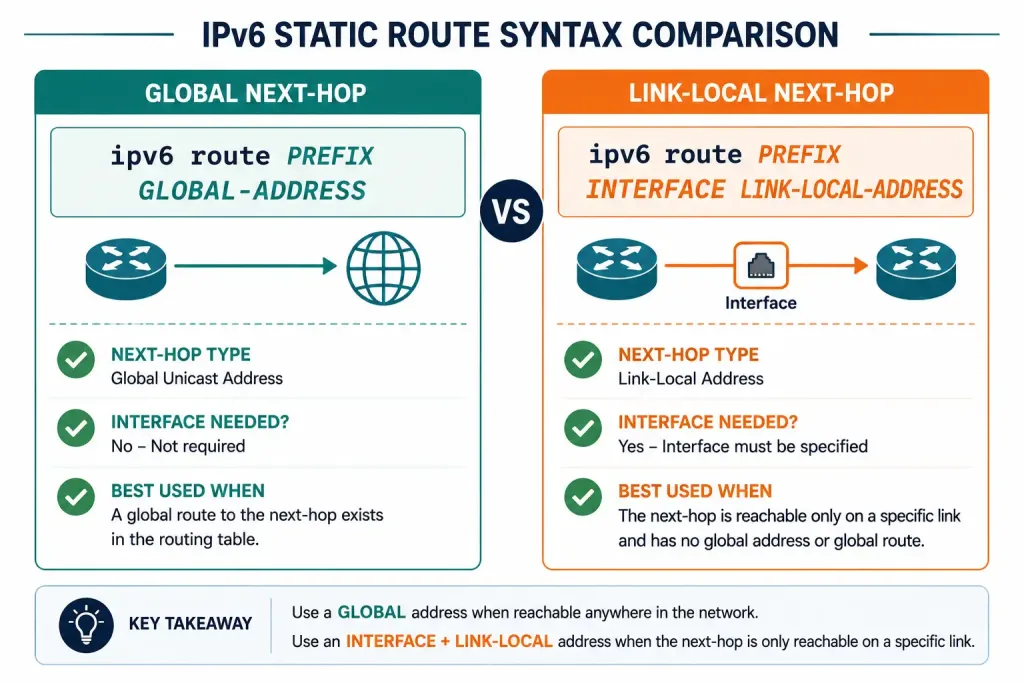
The Basic Command Syntax
The core command is:
Router(config)# ipv6 route ipv6-prefix/prefix-length {ipv6-address | interface-type interface-number [ipv6-address]} [administrative-distance]This mirrors the IPv4 ip route command closely: a destination prefix, then either a next-hop address, an exit interface, or both, followed by an optional administrative distance.
Before configuring any IPv6 static route, IPv6 unicast routing must be enabled globally:
Router(config)# ipv6 unicast-routingWhy Link-Local Next-Hops Need an Interface
Every IPv6-enabled interface automatically gets a link-local address in the fe80::/10 range, used for on-link communication and by routing protocols like OSPFv3. Link-local addresses are only unique within a single link — the same fe80:: address can legitimately exist on many different interfaces across a network, since each link has its own independent link-local scope.
That non-uniqueness is exactly why a link-local next-hop address alone isn’t enough information for a router to resolve a route. If you configure a static route with only a link-local next-hop and no interface, the router genuinely can’t tell which link that address belongs to, and Cisco IOS will reject the command outright with an error to that effect.
A global unicast address doesn’t have this problem — it’s unique across the whole routing domain, so the router can look it up in its routing table and determine the correct outgoing interface on its own, exactly the way an IPv4 static route works with a next-hop IP address.
! This fails — link-local next-hop with no interface specified
Router(config)# ipv6 route 2001:DB8:1::/64 FE80::2
% Interface has to be specified for a link-local nexthop

! This works — link-local next-hop with the interface included
Router(config)# ipv6 route 2001:DB8:1::/64 GigabitEthernet0/1 FE80::2

! This also works — global unicast next-hop, no interface needed
Router(config)# ipv6 route 2001:DB8:1::/64 2001:DB8:12::2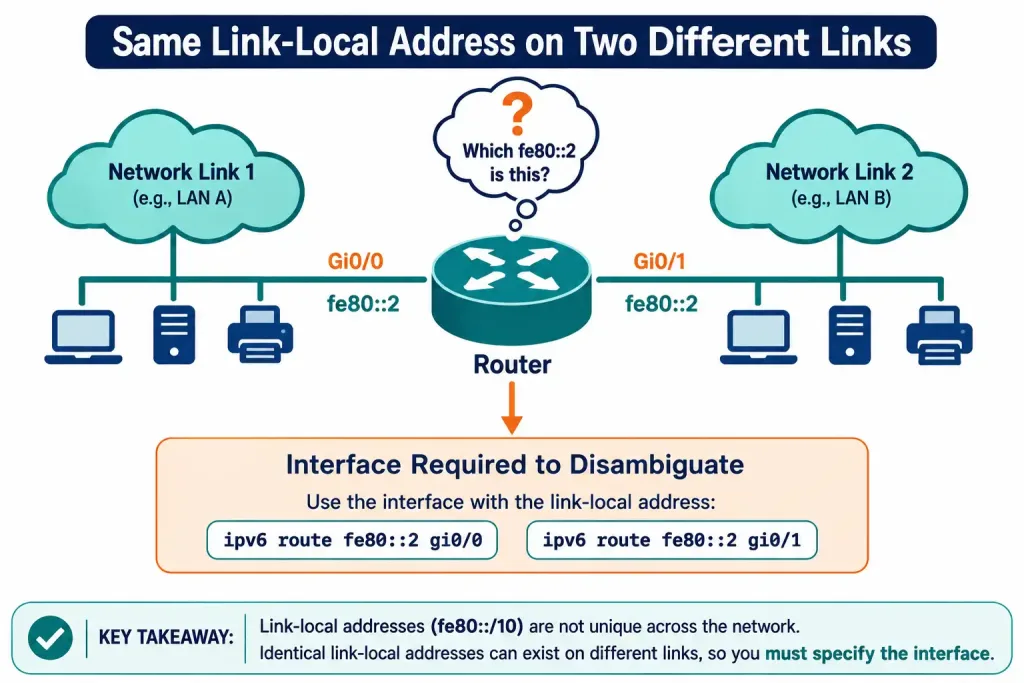
Exit-Interface-Only Static Routes
Just like IPv4, an IPv6 static route can also be configured with only an exit interface and no next-hop address at all — but this only makes sense on a genuine point-to-point link:
Router(config)# ipv6 route 2001:DB8:2::/64 Serial0/0/0On a multi-access interface, an interface-only static route is technically accepted by the CLI but doesn’t reliably work in practice, since the router has no way to determine which specific neighbor on that segment should receive the traffic. Unlike IPv4, IPv6 has no ARP and therefore no proxy-ARP fallback mechanism to paper over that ambiguity — IPv6 uses Neighbor Discovery Protocol instead, and the practical result is the same underlying problem: don’t use interface-only static routes on broadcast or multi-access IPv6 links. Reserve that form for point-to-point connections, and use a next-hop address — global or link-local-with-interface — everywhere else.
Fully Specified Static Routes
There’s a third form worth knowing: a fully specified static route, which includes both the outgoing interface and the next-hop address together, even when the next-hop is a global unicast address:
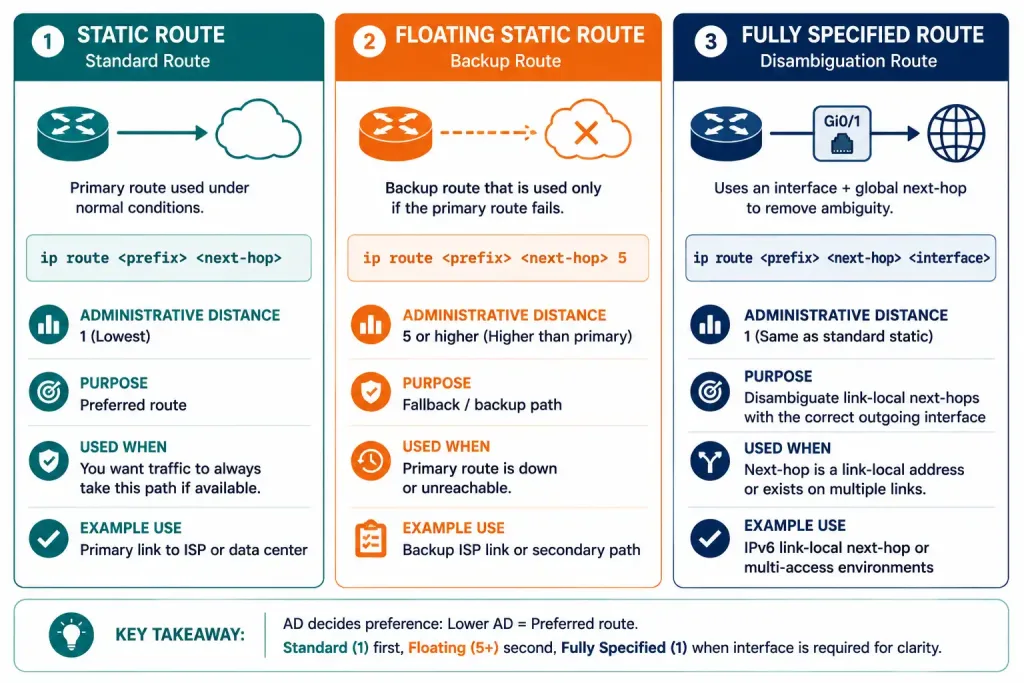
Router(config)# ipv6 route 2001:DB8:3::/64 GigabitEthernet1/0/0 2001:DB8:3000::1This isn’t required when the next hop is global — the router can resolve the interface on its own — but it’s useful on a multi-access interface where you want to remove any ambiguity about which physical path the route should use, or where the next hop’s reachability depends on a specific interface rather than the router’s general routing table lookup.
Administrative Distance
A static IPv6 route’s default administrative distance is 1, exactly matching IPv4 static route behavior — this applies whether the route uses a global next-hop, a link-local next-hop with an interface, or an interface-only form on a point-to-point link. Administrative distance 0 remains reserved for genuinely, directly connected interfaces, not for any form of static route.
Router(config)# ipv6 route 2001:DB8:1::/64 2001:DB8:12::2 5This example configures the same route with an explicit AD of 5 instead of the default — the standard technique behind a floating static IPv6 route, used as a backup path that only activates if a lower-AD primary route (static or dynamic) fails.
Why This Matters Beyond Static Routes
The global-vs-link-local distinction isn’t unique to static routing — it’s actually foundational to how IPv6 dynamic routing protocols work in the first place. OSPFv3 and EIGRP for IPv6 both use link-local addresses as their next-hop addresses by default when advertising routes to neighbors on a shared link, which is why understanding this distinction has value beyond just configuring static routes correctly.
This design choice is deliberate, not incidental. Because link-local addresses are automatically assigned to every IPv6-enabled interface and don’t depend on any routing table entry to be reachable, routers can establish adjacencies and exchange routing information over link-local addresses even before global addressing is fully configured. It also means a network’s global IPv6 prefix can be renumbered without breaking router-to-router adjacencies, since those adjacencies never depended on the global addresses in the first place.
Static routes matter as a starting point for understanding this because the same rule applies in miniature: a link-local address always needs its link — its interface — specified explicitly, whether that’s a static route you configured by hand or a dynamic routing protocol resolving next-hops automatically behind the scenes. Once this clicks for static routing, the same logic explains a lot of default OSPFv3 and EIGRPv6 behavior that otherwise looks unusual coming from an IPv4 background.
Verifying IPv6 Static Routes
Router# show ipv6 route static
Router# show ipv6 route
Look for the S code marking a static route, and check the via field to confirm which next-hop address and interface the route is actually resolving to. For a link-local next-hop route, the output will show both the link-local address and the interface it’s tied to; for a global next-hop route, it typically shows just the address, since the interface is resolved automatically.
To confirm actual reachability rather than just table presence, test with:
Router# ping ipv6 2001:DB8:1::1
Router# traceroute ipv6 2001:DB8:1::1
Comparison: Global vs. Link-Local Next-Hop
| Next-Hop Type | Interface Required? | Why |
|---|---|---|
| Global unicast address | No | Globally unique — router resolves the interface via its routing table |
| Link-local address | Yes | Only unique per-link — router can’t determine which link without it |
| Exit interface only | N/A (no address given) | Valid only on point-to-point links, where the far end is unambiguous |
| Fully specified (interface + address) | Optional, but often used deliberately | Removes any ambiguity on multi-access links even with a global address |
Troubleshooting IPv6 Next-Hop Route Issues
Route rejected at configuration time. If IOS rejects a static route command outright with an “interface has to be specified” error, the next-hop address given is a link-local address and the interface argument is missing. Add the correct outgoing interface to the command and it should accept immediately.
Route accepted but traffic doesn’t forward. If a route appears correctly in show ipv6 route static but pings still fail, confirm the next-hop address is actually reachable on that link with show ipv6 neighbors, and confirm IPv6 unicast routing is enabled globally with show running-config | include ipv6 unicast-routing. A route can be syntactically valid and still fail if the neighbor relationship underneath it isn’t actually up.
Interface-only route works intermittently. This is the classic symptom of an interface-only static route mistakenly applied to a multi-access link rather than a genuine point-to-point connection. Reconfigure the route with an explicit next-hop address — global or link-local-with-interface — instead of relying on the interface alone to resolve ambiguity that IPv6 has no built-in mechanism to resolve automatically.
Example Topology
[See Topology Diagram: Global vs Link-Local Next-Hop on the Same Link]
A useful lab for this concept: connect two routers, R1 and R2, over a shared segment, and configure R1 with two separate static routes to the same destination network behind R2 — one using R2’s global unicast address as the next hop, and one using R2’s link-local address with the connecting interface explicitly specified. Verify both routes with show ipv6 route static, confirm both actually work with ping ipv6, and then try configuring the link-local version without the interface to see the router reject the command directly — a fast, hands-on way to internalize exactly why the interface is required in one case and not the other.
Frequently Asked Questions
Why does my IPv6 static route fail with a link-local next-hop but work fine with a global address?
A link-local address is only unique within a single link — the same fe80:: address can legitimately exist on multiple different links across a network — so a router genuinely cannot resolve a route using a link-local next-hop alone. Specifying the outgoing interface alongside the link-local address gives the router the missing piece of information it needs to identify exactly which link the address belongs to. A global unicast address doesn’t have this ambiguity, since it’s unique across the entire routing domain, so the router can look up the correct outgoing interface itself without any extra help.
Do I need to specify both an interface and a next-hop address for every IPv6 static route?
No — only link-local next-hops require the interface to be specified alongside them. A route using a global unicast address as the next hop resolves correctly with just the address, exactly like a typical IPv4 static route. Specifying both together anyway, called a fully specified static route, is optional but sometimes used deliberately on multi-access links to remove any ambiguity about which physical path a route should take.
What administrative distance does an IPv6 static route use by default?
An IPv6 static route defaults to an administrative distance of 1, identical to IPv4 static routes, regardless of whether it uses a global next-hop, a link-local next-hop with an interface, or an interface-only form on a point-to-point link. Administrative distance 0 is reserved exclusively for directly connected interfaces, never for any form of static route. Configuring an IPv6 static route with a manually specified AD higher than 1 — for example, AD 5 — is the standard way to build a floating IPv6 static route as a backup path.
Is it safe to configure an IPv6 static route with only an exit interface and no next-hop address?
It’s safe and common practice on genuine point-to-point links, where there’s no ambiguity about which device is on the other end of the connection. On a multi-access link with multiple potential neighbors, an interface-only static route is technically accepted by the router but isn’t reliable in practice, since IPv6 has no ARP-style fallback mechanism to resolve which specific neighbor should receive the traffic. On multi-access IPv6 links, use a next-hop address instead — either global, or link-local paired with the correct interface.