
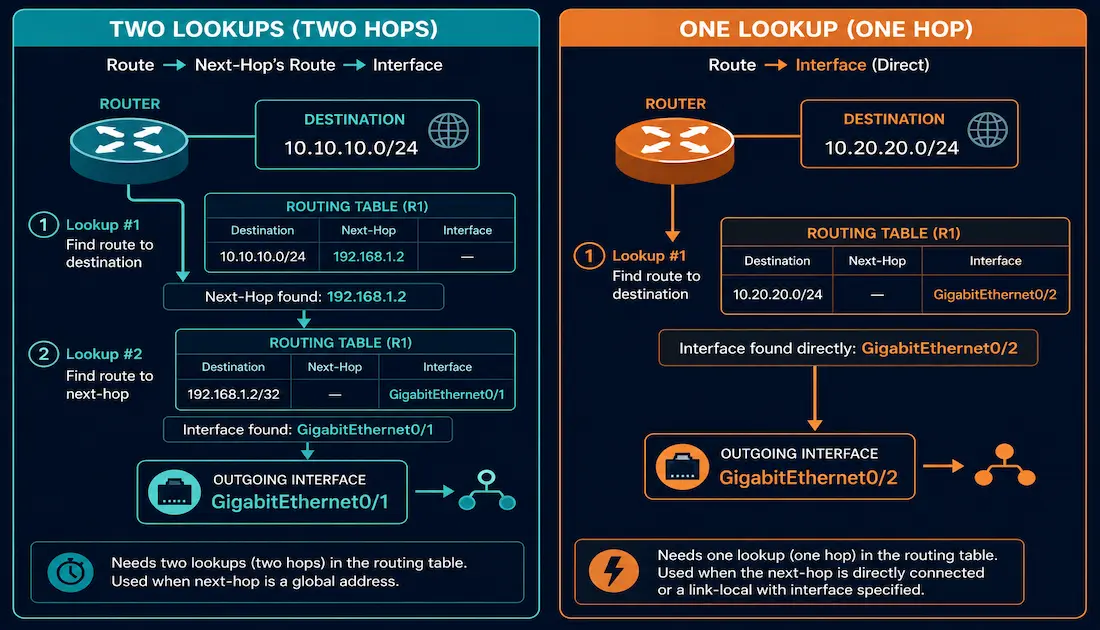
A static IPv6 route can be built two different ways: pointing only at a next-hop IPv6 address, or pointing at an exit interface directly. These aren’t just two syntax options — they produce genuinely different lookup behavior in the router, and understanding that difference is core CCNA and CCNP material. This guide covers both forms, how each resolves a packet’s outgoing path, and when to reach for one over the other.
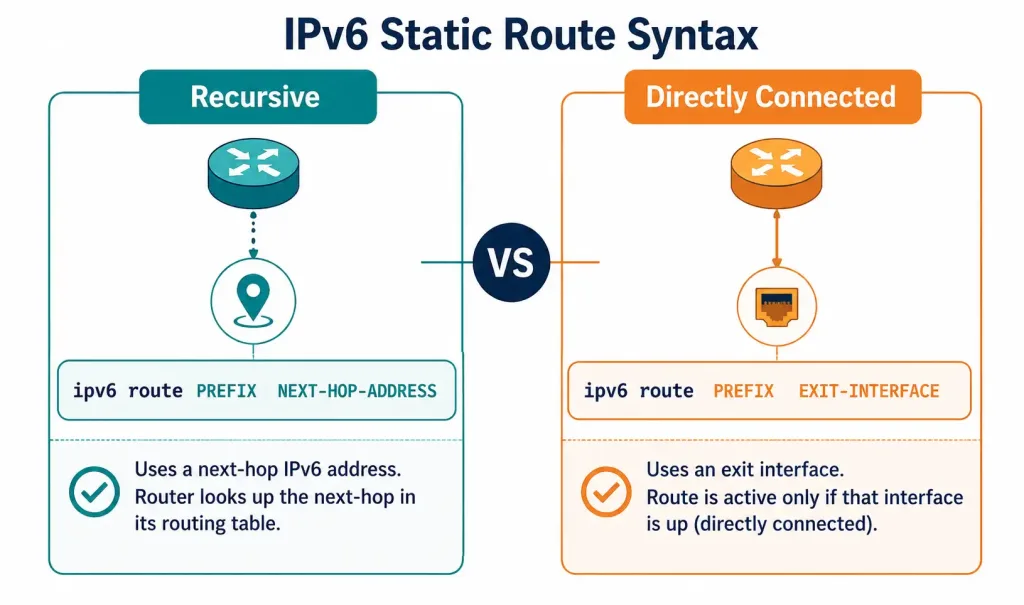
[See Infographic: Two Ways to Build a Static IPv6 Route]
Next-Hop-Only Static IPv6 Routes and the Recursive Lookup
When a static IPv6 route specifies only a next-hop IPv6 address — no exit interface — the router has to do extra work before it can actually forward a packet. This extra work is called a recursive lookup, and it’s worth walking through exactly why it happens.
Before forwarding any packet, a router has to resolve the route to determine which physical interface to send it out. Exactly how that resolution happens depends on the forwarding mechanism the router is using — modern Cisco platforms default to Cisco Express Forwarding (CEF) starting with IOS 12.0, but it’s useful to understand what happens without it, since that’s the scenario that makes the recursive lookup visible.
Take a router with a static route configured only with a next-hop address — say, 2001:AD10:110B:0003::2 — and no exit interface. When a packet arrives destined for the network that route covers, here’s what happens without CEF:
- The router checks the routing table and finds a match: forward to next-hop
2001:AD10:110B:0003::2. But that route entry doesn’t specify an exit interface, so the router doesn’t yet know which physical port to use. - The router has to search the routing table a second time, this time looking for a route that tells it how to reach
2001:AD10:110B:0003::2itself. It finds a directly connected route to the2001:AD10:110B:0003::/64network, with exit interface FastEthernet0/0. - Only now, after two separate table lookups, does the router actually forward the packet out FastEthernet0/0.
This two-step process — a route lookup that only resolves to another route, which then resolves to an actual interface — is what “recursive lookup” means. Without CEF, the router repeats this two-step process for every single packet forwarded via that route, which adds real CPU overhead at scale.
A next-hop-only static route is only valid — meaning it will actually appear in the routing table and be usable — when its next hop resolves, directly or indirectly, to some route with a genuine exit interface. If the next hop can’t be resolved that way, the route is invalid and won’t install.
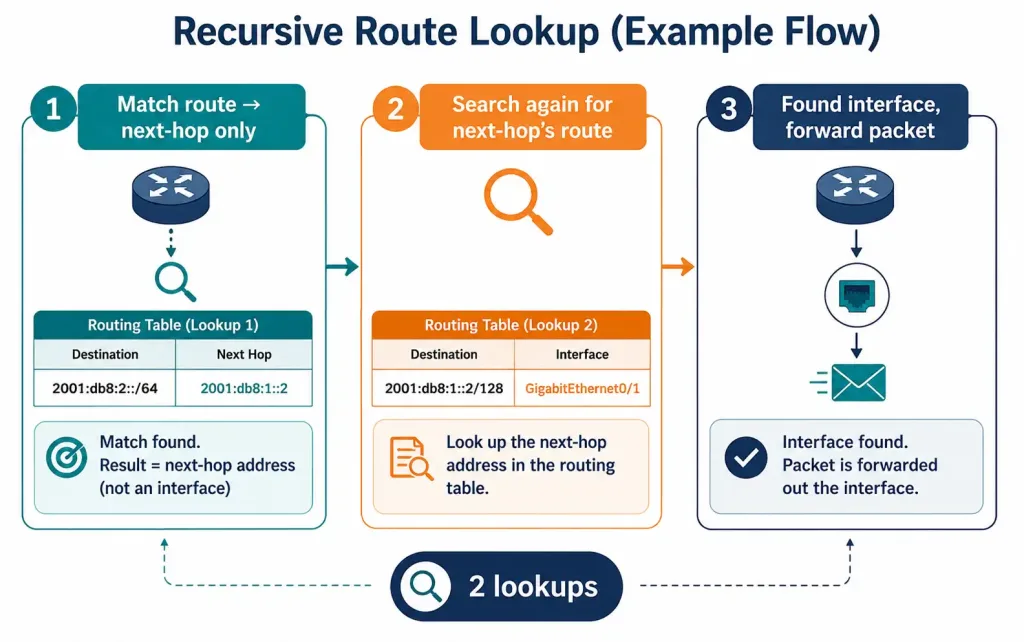
[See Infographic: How a Recursive Lookup Resolves a Next-Hop-Only Route]
Directly Connected (Exit-Interface) Static IPv6 Routes
The alternative is to configure the static route with an exit interface directly, instead of a next-hop address. This is called a directly connected static route, and its whole purpose is to skip the recursive lookup entirely.
Router1(config)# ipv6 route 2001:AD10:110B::/64 FastEthernet0/0With this configuration, when a packet destined for 2001:AD10:110B::/64 arrives, Router1 checks the routing table, finds the match, and sees the exit interface — FastEthernet0/0 — specified directly in that same entry. No second lookup is needed. This is precisely why it’s called “directly connected”: the route behaves, in terms of lookup efficiency, like an actually connected network, even though it’s really a manually configured static route to a remote destination.
This approach predates CEF and was the standard way to avoid the recursive-lookup performance cost on IOS releases before version 12.0. It remains the most straightforward choice on point-to-point links, where there’s no ambiguity about which single device sits at the other end of the connection.
A key fact worth memorizing: the administrative distance of a directly connected static IPv6 route is still 1 — exactly like any other static route. The “directly connected” label describes how the route resolves its next hop, not its administrative distance. Only a genuinely, physically connected interface — one configured with its own IPv6 address, not referenced by a static route — carries an AD of 0.
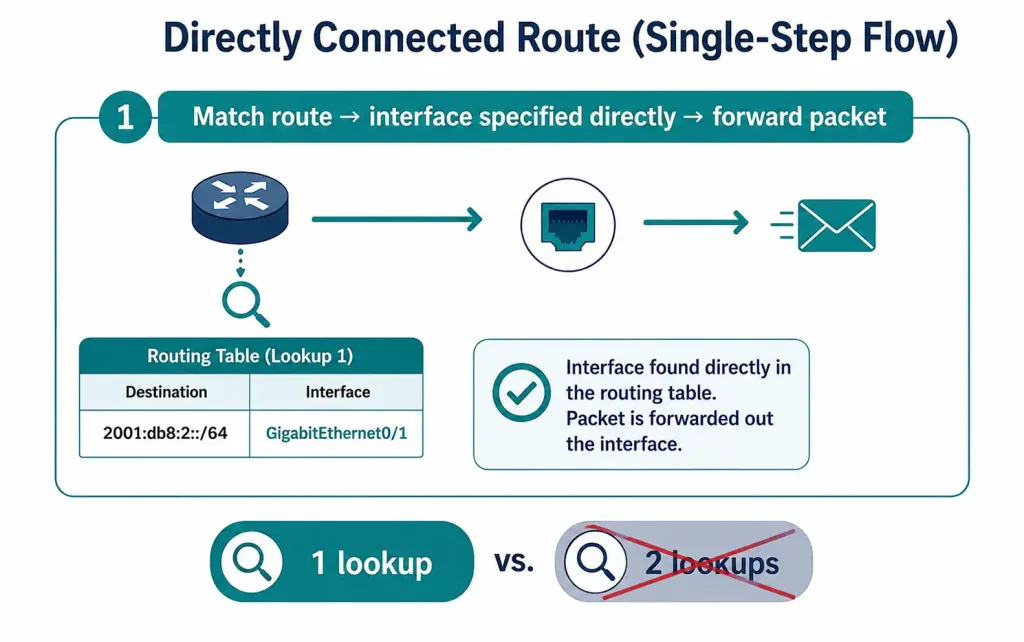
[See Infographic: Skipping the Recursive Lookup with an Exit Interface]
Comparing the Two Forms Side by Side
| Aspect | Next-Hop-Only Route | Directly Connected (Exit-Interface) Route |
|---|---|---|
| Command form | ipv6 route PREFIX NEXT-HOP-ADDRESS | ipv6 route PREFIX EXIT-INTERFACE |
| Lookups required (without CEF) | Two — route, then next-hop’s route | One |
| Administrative distance | 1 | 1 (not 0 — only connected interfaces get AD 0) |
| Best fit | Multi-access links, or where the next hop matters | Point-to-point links |
| CEF dependency | Recursive lookup penalty removed by CEF | No penalty either way — CEF is irrelevant to this form |
Both forms produce a working static route with the same default administrative distance. The real difference is purely about how the router resolves the outgoing interface, and — as covered in the IPv6 route next-hop option guide — whether the next-hop address involved is global (self-resolving) or link-local (requiring an explicit interface).
Configuring and Verifying Both Forms
A representative topology: Router0 needs a static route to 2001:AD10:110B:0001::/64, reachable via next-hop 2001:AD10:110B:0003::2, which is itself reachable through the directly connected network 2001:AD10:110B:0003::/64 on FastEthernet0/0.
Next-hop-only form:
Router0(config)# ipv6 route 2001:AD10:110B:0001::/64 2001:AD10:110B:0003::2Directly connected (exit-interface) form, for a genuinely point-to-point equivalent:
Router1(config)# ipv6 route 2001:AD10:110B::/64 FastEthernet0/0Verify either form with:
Router# show ipv6 route
Router# show ipv6 route static
For the next-hop-only route, the output shows the next-hop address in the via field, and the route is only present at all if that next hop successfully resolves to an interface elsewhere in the table. For the exit-interface route, the output shows the interface directly, typically phrased as connected via that interface, with an administrative distance of 1 confirmed in the [1/0] bracket next to the entry — not [0/0], which would incorrectly suggest a genuinely connected network rather than a static route.
Test actual reachability, not just table presence, with:
Router# ping ipv6 2001:AD10:110B:0001::1
Router# traceroute ipv6 2001:AD10:110B:0001::1
Choosing Between the Two Forms in Practice
Neither form is universally “better” — the right choice depends on the link type and what the route needs to accomplish.
Favor a directly connected (exit-interface) route when:
- The link is genuinely point-to-point, so there’s no ambiguity about which device receives the traffic.
- You’re working on older IOS (pre-12.0) without CEF, where the recursive-lookup penalty is a real, measurable cost.
- You want the routing table entry to be self-contained and easy to read at a glance, without needing to trace through a second route to understand where traffic actually goes.
Favor a next-hop-only route when:
- The link is multi-access (like Ethernet), where an exit-interface-only route would be ambiguous about which specific neighbor should receive the traffic.
- The next hop’s own reachability might change independently of the destination route — for example, if it’s reachable via more than one interface and the router should figure that part out itself.
- You’re configuring routes based on a global unicast next-hop address, which resolves cleanly without needing an interface specified at all, avoiding the interface-ambiguity problem link-local next-hops introduce.
In modern networks running CEF, the performance argument for one form over the other has mostly disappeared, so the decision usually comes down to link type and configuration clarity rather than raw lookup efficiency — the same conclusion that applies to the equivalent IPv4 static route decision.
Example Topology
[See Topology Diagram: Recursive vs Directly Connected Static IPv6 Route]
A useful side-by-side lab: configure Router0 with a next-hop-only static route to a remote /64 network, and configure Router1 — connected to a genuine point-to-point link — with a directly connected static route to a different /64 network using its exit interface. Verify both with show ipv6 route static, confirming the next-hop route shows a via address while the exit-interface route shows the interface directly. Then compare the administrative distance shown for each — both should read [1/0], reinforcing that “directly connected” in the routing table output describes lookup behavior, not trust level.
Frequently Asked Questions
What is a static IPv6 route with a next-hop, and how is it different from a directly connected static route?
A next-hop static IPv6 route specifies only the next router’s IPv6 address, leaving the router to resolve the actual outgoing interface through a second, recursive lookup elsewhere in the routing table. A directly connected static route specifies the exit interface itself, so the router resolves the outgoing path in a single lookup with no recursion needed. Both forms are equally valid ways to configure a static route; the choice mainly depends on the link type and whether avoiding the extra lookup step matters for the platform in question.
How does recursive lookup work in IPv6 static routing?
When a static route only has a next-hop address, the router first matches the destination to that route, then has to search the routing table a second time to find out which interface actually reaches that next-hop address. This second search might itself resolve to another route with a next-hop rather than an interface, in which case the process repeats until an actual exit interface is found — hence “recursive.” Without CEF, this recursive process repeats for every packet forwarded via that route, adding real per-packet overhead compared to a route that already specifies its interface directly.
What role does CEF play in static IPv6 route resolution?
Cisco Express Forwarding precomputes forwarding information so that next-hop addresses are resolved to their outgoing interfaces once, ahead of time, rather than being recalculated through a recursive lookup for every packet. This removes the performance penalty that motivated directly connected static routes in the first place, and it’s been the default forwarding behavior on Cisco platforms running IOS 12.0 or later. Even with CEF active, both route forms remain valid configuration options — CEF just equalizes their performance, not their underlying syntax or lookup logic.
How do I verify whether a static IPv6 route is actually installed and working?
Use show ipv6 route static to confirm the route appears in the table at all — a next-hop-only route won’t install if its next hop can’t be resolved to a genuine exit interface anywhere in the routing table. Check the via field or interface listed in the output to confirm the route is resolving the way you expect, and confirm the administrative distance shows as [1/0] for either form, since directly connected static routes are commonly and incorrectly assumed to show AD 0. Follow up with ping ipv6 or traceroute ipv6 to the destination network to confirm the route isn’t just present in the table but is actually forwarding traffic correctly.
When is a recursive (next-hop-only) static IPv6 route considered valid? A next-hop-only static route is valid, and will actually be installed in the routing table, only when its specified next hop resolves — directly or through a further chain of routes — to a route with a genuine exit interface. If that resolution chain breaks anywhere, for example if the next hop becomes unreachable or the directly connected network it depends on goes down, the route becomes invalid and is removed from the table, and any traffic that depended on it is dropped rather than rerouted automatically, since a static route provides no built-in failover on its own.



