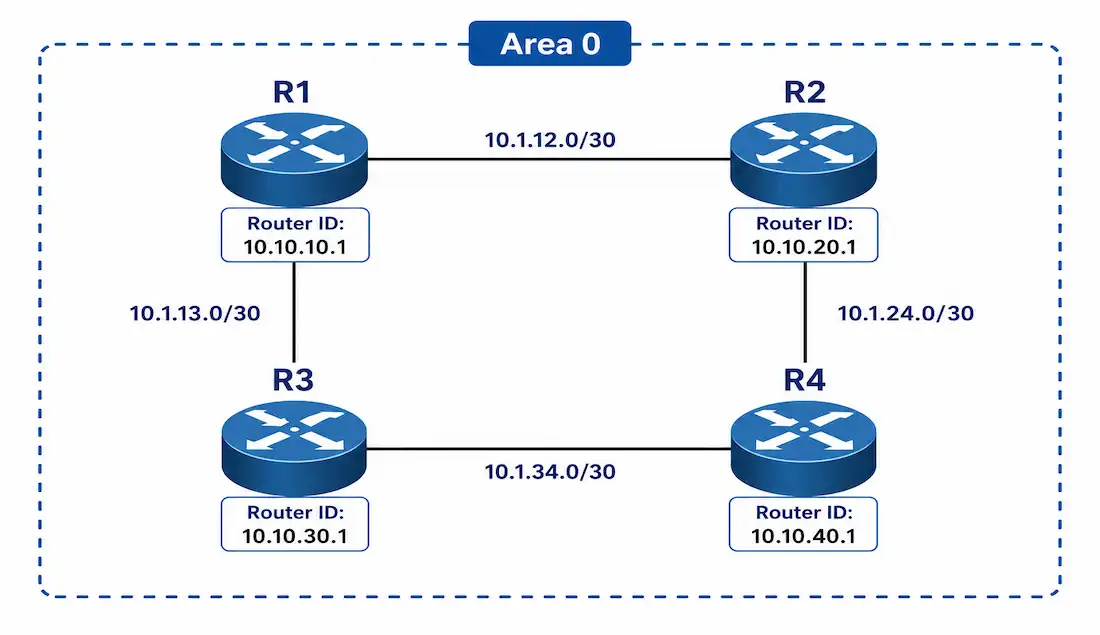
OSPFv2 is a link-state routing protocol for IPv4, first drafted in 1991 (RFC 1247) and standardized in 1998 (RFC 2328). It’s the scalable, classless alternative to the distance-vector Routing Information Protocol (RIP). OSPF uses Dijkstra’s algorithm to compute shortest paths, which is what makes it a solid fit for larger networks where RIP’s hop-count limit and slow convergence become real problems.
This guide walks through configuring single-area OSPFv2 on a small topology: four routers, interfaces already addressed, no static or dynamic routing configured yet. That’s the right starting point for CCNA fundamentals and for CCNP candidates who want a clean baseline before layering on tuning and optimization.
Router OSPF Configuration Mode and Process ID
Enable OSPFv2 with router ospf <process-id> in global configuration mode:
R1(config)# router ospf 1This starts OSPF process 1 on R1. The process-id is a locally significant number between 1 and 65,535. It doesn’t need to match between neighboring routers for adjacencies to form, and it has no bearing on OSPF packets or LSAs at all — it exists purely to let one router run multiple independent OSPF processes, which matters more in CCNP-level scenarios like VRF-aware OSPF than in a basic single-area design. You can run different process IDs on every router in your network without breaking anything.
OSPF Router ID
Every router in an OSPF network needs a unique router ID to participate in the domain. It can be set manually or assigned automatically. The router ID does three jobs:
- Uniquely identifies the router, and every packet it originates, within the OSPF domain.
- Originates the router’s Link-State Advertisements, which build the topology database every router shares.
- Breaks DR/BDR election ties on multi-access networks. Priority decides first; if two routers tie on priority, the higher router ID wins.
Determining Router ID
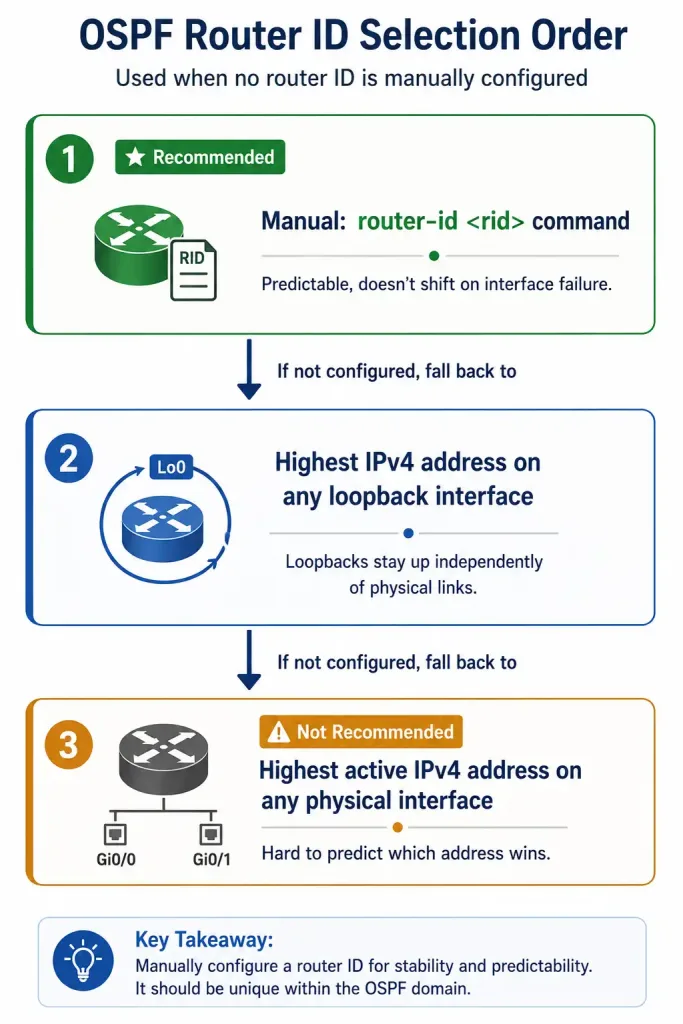
Cisco routers pick a router ID using one of three methods, in this order of preference:
- Manual configuration. The
router-id <rid>command, entered in router configuration mode. Theridis any 32-bit value written in IPv4 address format. This is the recommended method — it’s predictable and doesn’t shift if an interface goes down. - Highest loopback address. If no router ID is manually configured, OSPF picks the highest IPv4 address among any configured loopback interfaces. Loopbacks never go down on their own, so this is the second-best option.
- Highest active physical interface address. If there’s no loopback either, OSPF falls back to the highest active IPv4 address on any physical interface. Most administrators avoid relying on this method, since it makes it hard to predict or recognize which address is actually serving as the router ID.
The interface supplying the router ID doesn’t need to be OSPF-enabled itself — it just needs to be active and in the up state. And since the router ID is an IP address in format only, it’s not routable on its own. It never shows up in the routing table unless that same address is separately included via a network command.
Configuring an OSPF Router ID
Set the router ID with router-id <rid> inside router configuration mode:
R1(config)# router ospf 1
R1(config-router)# router-id 10.10.10.1
In the reference topology, R1 uses 10.10.10.1, R2 uses 10.10.20.1, R3 uses 10.10.30.1, and R4 uses 10.10.40.1. Verify any router’s ID with show ip protocols.
Entering a router ID on an already-running OSPF process doesn’t take effect immediately — the change only applies after the process reloads or gets cleared. If two neighboring routers end up with the same router ID, OSPF logs a duplicate router ID error and adjacency won’t form correctly between them. Fix it by assigning unique router IDs across the whole domain.
Modifying Router ID
Router IDs sometimes need to change — a misconfiguration, a renumbering project, whatever the reason. An active OSPF process won’t apply a new router ID on its own; it needs a nudge.
The preferred method is clearing the OSPF process rather than reloading the whole router:
R2# clear ip ospf process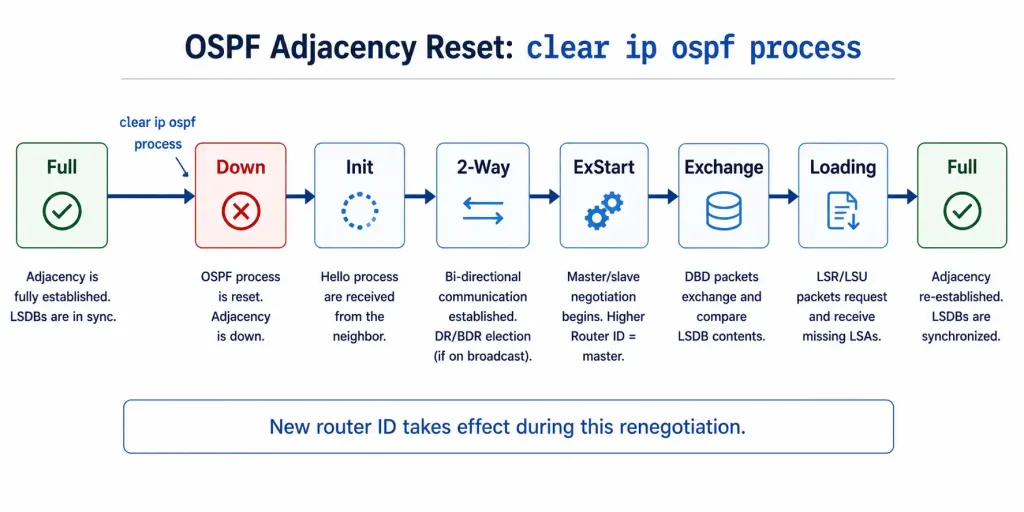
Run in privileged EXEC mode, this command tears down the OSPF process’s current adjacencies and rebuilds them under the new router ID. You’ll see the adjacency drop from Full to Down, and then renegotiate back up through the full state sequence — Init, 2-Way, ExStart, Exchange, Loading — before landing on Full again. That full renegotiation is expected; it’s how the new router ID actually gets adopted. Confirm the change afterward with show ip protocols.
Using a Loopback Interface as the Router ID
A loopback interface makes a strong router ID source, since loopbacks are software constructs that stay up as long as the router itself is running — no physical link to fail. Configure the loopback’s IPv4 address with a 255.255.255.255 (/32) subnet mask. That mask means the address represents exactly one host, and by itself it won’t get advertised as a route to other OSPF routers unless you explicitly include it in a network command.
R1(config)# interface loopback 0
R1(config-if)# ip address 10.10.10.1 255.255.255.255
Configure Single-Area OSPFv2
The network command, entered in router configuration mode, is what actually enables interfaces for OSPF. Any interface whose address matches the network address specified starts sending and receiving OSPF packets, and its subnet gets included in OSPF routing updates. The full syntax:
network <network-address> <wildcard-mask> area <area-id>The area-id is whatever the network administrator has planned for that segment. For single-area OSPF, every router’s network command needs to use the same area ID. Convention favors area 0 even for a single-area design, since it means the network can later grow into multi-area OSPF without renumbering the original area.
Wildcard Mask
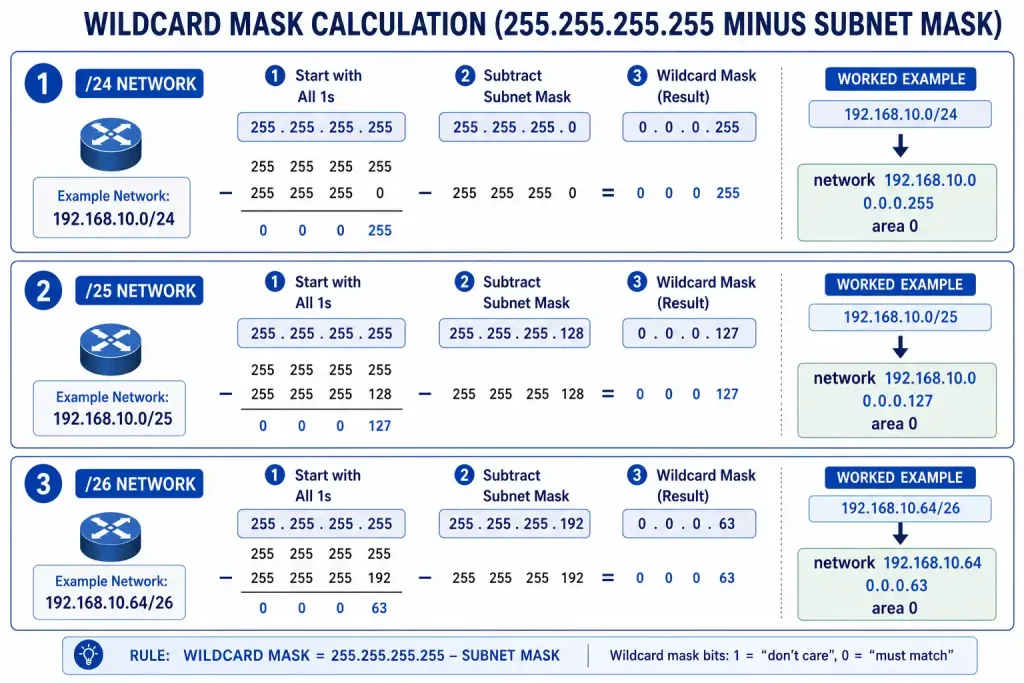
OSPF’s network command uses a wildcard mask, not a subnet mask, because OSPF is a classless protocol and needs a flexible way to match interfaces regardless of their actual subnet boundary. A wildcard mask is the inverse of a subnet mask: where a subnet mask uses binary 1 to mean “match,” a wildcard mask uses binary 0 to mean “match” instead.
Calculate a wildcard mask by subtracting the subnet mask from 255.255.255.255, octet by octet:
- A /24 network (255.255.255.0) gives a wildcard mask of 0.0.0.255.
- A /25 network (255.255.255.128) gives a wildcard mask of 0.0.0.127.
- A /26 network (255.255.255.192) gives a wildcard mask of 0.0.0.63.
Worked example: for 192.168.10.64/26, subtract 255.255.255.192 from 255.255.255.255. That leaves 0.0.0.63. So the interface gets matched with network 192.168.10.64 0.0.0.63 area 0.
The Network Command
Putting it together, R2 joins area 0 of the OSPF process like this:
R2(config)# router ospf 1
R2(config-router)# network 10.10.20.0 0.0.0.255 area 0
R2(config-router)# network 192.168.20.0 0.0.0.63 area 0
Since this is single-area OSPF, every network command across every router uses area 0.
There’s a shortcut worth knowing: specifying the exact interface address with a 0.0.0.0 wildcard instead of calculating the subnet’s wildcard mask.
network <interface-ip-address> 0.0.0.0 area <area-id>With this form, OSPF uses the interface’s actual address and subnet mask to figure out what to advertise, so you skip the wildcard mask calculation entirely. Some IOS versions also accept a subnet mask directly in the network command and convert it to wildcard format automatically, though relying on that isn’t universal across platforms — calculating the wildcard mask yourself is the more portable habit.
Worked Example: Full Four-Router Configuration
Putting every piece together, here’s the complete OSPF configuration for all four routers in the reference topology. Each router uses a manually set router ID, joins area 0, and advertises its directly connected networks using the exact-interface wildcard shortcut.
R1(config)# router ospf 1
R1(config-router)# router-id 10.10.10.1
R1(config-router)# network 10.1.12.1 0.0.0.0 area 0
R1(config-router)# network 10.1.13.1 0.0.0.0 area 0

R2(config)# router ospf 1
R2(config-router)# router-id 10.10.20.1
R2(config-router)# network 10.1.12.2 0.0.0.0 area 0
R2(config-router)# network 10.1.24.2 0.0.0.0 area 0

R3(config)# router ospf 1
R3(config-router)# router-id 10.10.30.1
R3(config-router)# network 10.1.13.3 0.0.0.0 area 0
R3(config-router)# network 10.1.34.3 0.0.0.0 area 0

R4(config)# router ospf 1
R4(config-router)# router-id 10.10.40.1
R4(config-router)# network 10.1.24.4 0.0.0.0 area 0
R4(config-router)# network 10.1.34.4 0.0.0.0 area 0
Each router only needs a network statement per directly connected interface it wants OSPF running on — there’s no need to advertise a neighbor’s networks, since OSPF learns those through LSA flooding once adjacencies form. With this configuration, R1 and R2 become neighbors over the 10.1.12.0/30 link, R1 and R3 over 10.1.13.0/30, R2 and R4 over 10.1.24.0/30, and R3 and R4 over 10.1.34.0/30 — a small full-mesh-adjacent topology where every router ends up with routes to every subnet through OSPF, not static configuration.
Troubleshooting Common Configuration Mistakes
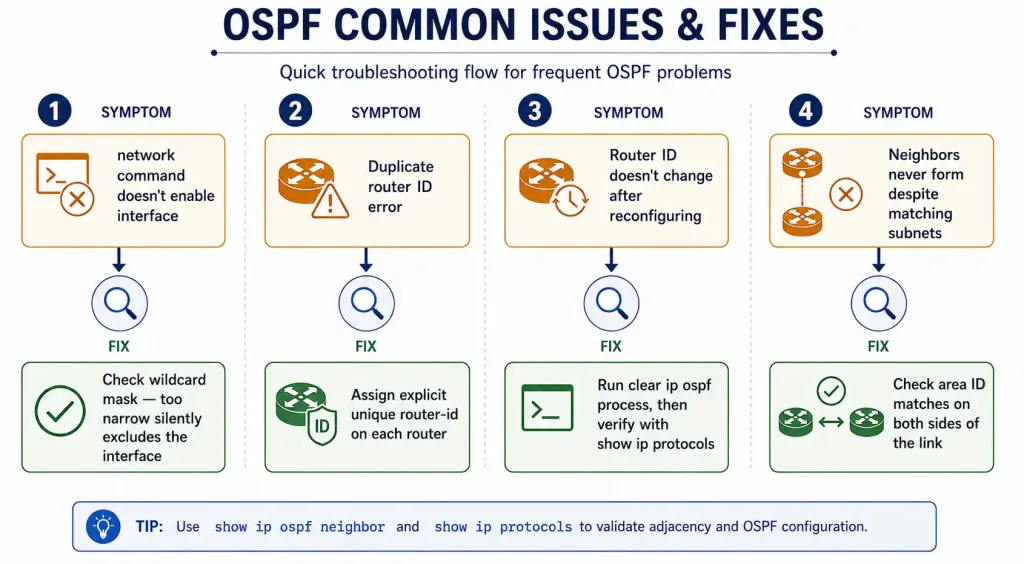
network command doesn’t seem to enable an interface. The wildcard mask is almost always the culprit. A mask that’s too narrow silently excludes the interface instead of throwing an error — there’s no warning message telling you the interface was skipped. Double-check the math, or switch to the exact-interface 0.0.0.0 wildcard form to sidestep the calculation entirely.
Duplicate router ID error. Two routers ended up with the same router ID, usually because both fell back to auto-selection from overlapping loopback or interface addressing. Assign explicit, unique router IDs with router-id on each router rather than relying on auto-selection in a lab or production network of any real size.
Router ID doesn’t change after reconfiguring it. A running OSPF process won’t adopt a new router ID until it’s cleared or the router reloads. Run clear ip ospf process in privileged EXEC mode, then re-verify with show ip protocols.
Neighbors never form despite matching subnets. Confirm the area ID matches on both sides of the link — a single-area design mistakenly using area 0 on one router and a non-zero area on another is a common copy-paste error, and OSPF won’t form an adjacency across a mismatched area ID.
Verifying the Configuration
Two commands cover most verification needs after configuring OSPF:
show ip protocols confirms the router ID, process ID, and which networks are being advertised.
show ip ospf neighbor confirms adjacencies have actually formed, and shows each neighbor’s state — Full for the DR and BDR, 2-Way for other DROTHER relationships on a broadcast segment, both expected outcomes rather than problems.
If a network command doesn’t seem to be enabling an interface, double-check the wildcard mask first. A wildcard mask that’s too narrow silently excludes the interface instead of throwing an error, which makes it one of the more common single-area OSPF misconfigurations to chase down.
FAQs
What is the purpose of the OSPF router ID?
The router ID uniquely identifies a router within the OSPF domain, and every LSA that router originates carries it. It also factors into DR/BDR election on multi-access networks, breaking ties when two routers share the same priority. It can be set manually, inherited from a loopback interface, or picked from the highest active physical interface address as a last resort.
How do you calculate a wildcard mask for OSPF?
Subtract the subnet mask from 255.255.255.255, octet by octet. A /24 (255.255.255.0) produces 0.0.0.255. A /26 (255.255.255.192) produces 0.0.0.63. The wildcard mask is what lets OSPF’s classless network command match interfaces regardless of their specific subnet boundary.
Why use a loopback interface for OSPF router ID?
A loopback interface stays up as long as the router itself is running, since it’s a software interface with no physical link that can fail. That makes it a more stable router ID source than a physical interface, which can flap or go down independently of the router. Configure it with a /32 mask, and it won’t get advertised as a route unless it’s explicitly included in a network command.
How do you modify an existing OSPF router ID?
Run clear ip ospf process in privileged EXEC mode rather than reloading the whole router. This tears down current adjacencies and rebuilds them under the new router ID, moving through the full state sequence from Down back up to Full. Confirm the new ID took effect with show ip protocols.
What is the network command in OSPFv2?
network <network-address> <wildcard-mask> area <area-id> enables OSPF on any interface whose address matches, causing it to send and receive OSPF packets and advertise its subnet. For single-area OSPF, every router uses the same area ID — conventionally area 0, even in a design that will stay single-area, so it can grow into multi-area later without renumbering.