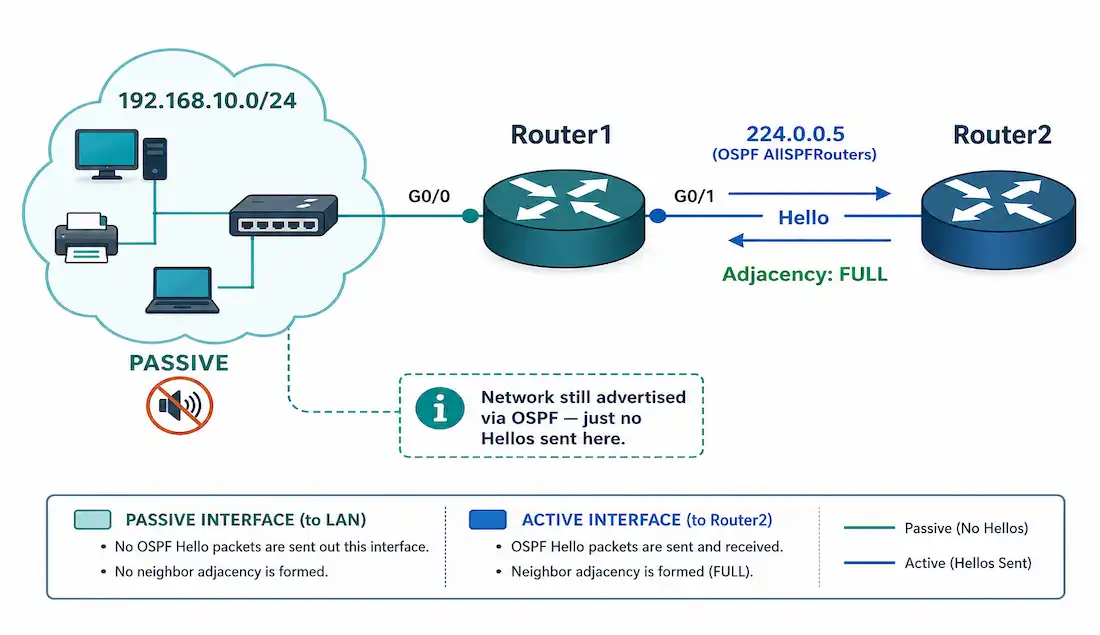
In OSPF (Open Shortest Path First), a passive interface is an interface on which the router stops sending OSPF Hello packets, while still advertising that interface’s connected network in OSPF. Because no Hellos are sent, no OSPF neighbor adjacency can form on that link — but the subnet remains reachable and advertised to the rest of the OSPF domain. This is an important concept for CCNA and CCNP students, because passive interfaces save bandwidth and router resources and close a real security gap on networks that connect to end hosts rather than to other routers.
Passive interfaces are especially useful where an interface connects to non-OSPF devices — a typical LAN full of end-user devices, for example — so the router isn’t sending OSPF multicast Hellos to 224.0.0.5 onto a segment where no OSPF router is listening.
Why You Need Passive Interfaces
By default, once you bring an interface into OSPF with the network command, two things happen:
- The interface’s connected network is advertised in OSPF.
- The router begins sending OSPF Hello packets out that interface periodically.
Consider a simple topology: Router1, Router2, Router3, and Router4 are all running OSPF. Router1 has a GigabitEthernet interface connected to the 192.168.10.0/24 LAN. That LAN contains only end hosts — there is no other OSPF router on it — but Router1 still needs to advertise 192.168.10.0/24 to the rest of the network so the subnet is reachable.
Once Router1 is configured with a network command that includes 192.168.10.0/24, it will start sending OSPF Hello packets onto that LAN, even though no OSPF router is there to hear them. That’s undesirable for three reasons:
- Inefficient use of bandwidth — the unnecessary OSPF multicast Hellos consume network bandwidth on the segment.
- Inefficient use of resources — every host on the LAN receives and processes each multicast Hello before discarding it, wasting CPU on those devices.
- Increased security risk — sending OSPF Hellos onto a broadcast segment exposes the routing protocol to anyone on that network. If a host on the LAN runs software that replies with OSPF Hellos, Router1 will attempt to form an adjacency with it. An attacker could exploit this to inject false routes and misdirect traffic. Making the interface passive removes this attack surface entirely, because Router1 no longer speaks OSPF on that link.
Configuring OSPF Passive Interfaces
You prevent all of this with the passive-interface command in router configuration mode, the same router ospf process-id and network-command workflow used to bring an interface into OSPF in the first place. passive-interface tells OSPF to stop sending Hello packets on the specified interface, while still advertising that interface’s network to other routers.
Router1> enable
Router1# configure terminal
Router1(config)# interface GigabitEthernet0/0
Router1(config-if)# ip address 192.168.10.1 255.255.255.0
Router1(config-if)# no shutdown
Router1(config-if)# exit
Router1(config)# router ospf 20
Router1(config-router)# router-id 10.10.10.1
Router1(config-router)# network 192.168.10.0 0.0.0.255 area 0
Router1(config-router)# passive-interface GigabitEthernet0/0
Router1(config-router)# end
Router1# copy running-config startup-config
Once GigabitEthernet0/0 is passive, Router1 no longer sends Hellos on it, so no adjacency can be built over that interface — link-state packets are neither sent nor acknowledged there. The key point is that this does not withdraw the network: 192.168.10.0/24 is still advertised in the OSPF updates that Router1 sends out its other (non-passive) interfaces to its real OSPF neighbors.
You can verify the result with show ip protocols. GigabitEthernet0/0 now appears under the Passive Interface(s) section, while 192.168.10.0 is still listed under Routing for Networks — confirming the network remains part of OSPF even though Hellos are suppressed on that interface.
Router1# show ip protocols
*** Output omitted for brevity ***
Routing Protocol is "ospf 20"
  Outgoing update filter list for all interfaces is not set
  Incoming update filter list for all interfaces is not set
  Router ID 10.10.10.1
  Number of areas in this router is 1. 1 normal 0 stub 0 nssa
  Maximum path: 4
  Routing for Networks:
    192.168.10.0 0.0.0.255 area 0
    10.1.1.0 0.0.0.3 area 0
    10.1.1.4 0.0.0.3 area 0
  Passive Interface(s):
    GigabitEthernet0/0
  Routing Information Sources:
    Gateway         Distance      Last Update
    10.1.1.2        110           00:00:22
    10.1.1.6        110           00:00:25
  Distance: (default is 110)
Configuring Passive Interfaces for IPv6 (OSPFv3)
OSPFv3 (OSPF for IPv6) uses the same passive-interface concept, but the router configuration mode you enter differs depending on the IOS version and configuration style. There are two you may encounter, and it’s important not to mix them:
Traditional OSPFv3 — the syntax used on most CCNA-level IOS and in the majority of study material. You configure it under the ipv6 router ospf process:
Router1(config)# ipv6 router ospf 20
Router1(config-rtr)# passive-interface GigabitEthernet0/2
Address-family OSPFv3 — a newer, unified style (OSPFv3 address families) found on some platforms and later IOS versions, entered with router ospfv3:
Router1(config)# router ospfv3 20
Router1(config-router)# address-family ipv6 unicast
Router1(config-router-af)# passive-interface GigabitEthernet0/2
These are two distinct approaches, not interchangeable commands — use whichever your platform supports, and stay consistent. For CCNA study, the traditional ipv6 router ospf form is the one to know.
As with IPv4, you can also apply the setting globally and selectively re-enable interfaces (covered next). Verify OSPFv3 interface behavior with:
Router1# show ipv6 ospf interfaceBest Practices for OSPF Passive Interfaces
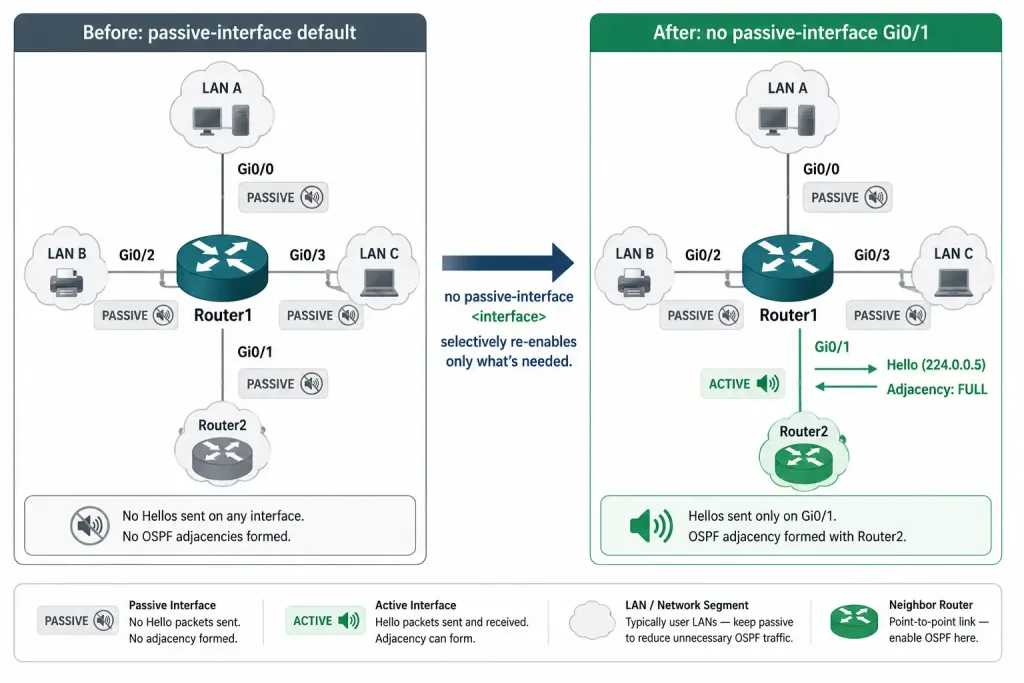
- Default to passive, then enable selectively. In production networks, configure
passive-interface defaultunder the OSPF process to make every interface passive by default, then useno passive-interface <interface>only on the links where an adjacency is genuinely needed (typically router-to-router WAN links). This “secure by default” approach means a newly added interface can’t accidentally start forming OSPF neighbors, which is far safer than remembering to make each host-facing interface passive one at a time.
Router1(config)# router ospf 20
Router1(config-router)# passive-interface default
Router1(config-router)# no passive-interface GigabitEthernet0/1- Apply to LAN, stub, and loopback interfaces. Any host-facing interface, or a loopback that’s advertised into OSPF, should be passive — there’s no OSPF neighbor to reach there, so sending Hellos only wastes resources.
- Combine with OSPF authentication. Passive interfaces protect segments where you don’t want OSPF at all. On the links where OSPF does run, pair it with OSPF authentication (MD5 or, preferably, SHA-based) so that only trusted routers can form adjacencies. Together these give defense in depth against rogue-neighbor attacks.
- Verify with show commands. Use
show ip ospf interface(andshow ip ospf neighbor) regularly to confirm that adjacencies exist only where you intend and that no unexpected neighbors have appeared.
Troubleshooting OSPF Passive Interfaces
- Adjacency not forming where you expect one. The most common cause is an interface that is unintentionally passive — often because
passive-interface defaultis set and you forgot the matchingno passive-interface. Check withshow ip ospf interface <interface>; a passive interface is flagged as such in the output. Addno passive-interfaceto activate it. - Network not being advertised. Make sure the interface’s subnet is actually included by a
networkstatement (or interface-level OSPF configuration). Passive suppresses Hellos, but the network still has to be brought into OSPF to be advertised. - High CPU or unexpected multicast on a LAN. If Hellos are being flooded onto host-facing segments, those interfaces should be made passive.
- Interface down. A frequent beginner mistake is forgetting
no shutdownon the interface. Verify interface status withshow ip interface brieforshow interfacesbefore troubleshooting OSPF itself.
Comparison with EIGRP Passive Interfaces
EIGRP also supports the passive-interface command, and the practical effect is the same as in OSPF: it stops the router from sending Hello packets out the interface, which prevents any EIGRP neighbor adjacency from forming there, while the interface’s connected network can still be advertised to established neighbors.
The mechanics behind that shared behavior differ because the protocols differ. OSPF is a link-state protocol, so suppressing Hellos means the interface takes no part in exchanging link-state information and builds no adjacency on that link. EIGRP is an advanced distance-vector protocol that uses Hello packets to discover and maintain neighbors and DUAL (the Diffusing Update Algorithm) to choose loop-free routes; making an interface passive stops those Hellos, so no neighbor is discovered on the interface. In both protocols, the headline outcome is identical — no Hellos, no adjacency, but the network is still advertised.
The configuration mirrors OSPF, applied under the EIGRP process instead:
Router1(config)# router eigrp 100
Router1(config-router)# passive-interface GigabitEthernet0/0
One historical note that sometimes causes confusion: in older RIP configurations, passive-interface behaved differently — it stopped sending updates but still received them. In OSPF and EIGRP, that is not how it works: a passive interface simply doesn’t run the Hello protocol on that link, so no neighbor relationship exists in either direction.
Passive Interface Behavior by Protocol
| Protocol | Effect of Passive Interface | Network Still Advertised? |
|---|---|---|
| OSPF | Hellos suppressed both directions; no adjacency possible | Yes |
| EIGRP | Hellos suppressed both directions; no adjacency possible | Yes |
| RIP | Outbound updates suppressed only; inbound updates still processed | Yes |
This table is the fastest way to avoid a common exam trap: assuming RIP’s passive-interface behavior generalizes to OSPF and EIGRP. It doesn’t. If a question describes a router still receiving routes on a “passive” interface, that’s a RIP-specific detail, not something that happens in OSPF or EIGRP.
Illustrative Scenario: Passive Interface Left Off a New LAN
Here’s a common scenario, meant to show the troubleshooting logic in action rather than describe a specific real event.
A network team adds a new access-layer switch uplink to Router1, connecting a new user LAN on 192.168.20.0/24. They bring the interface into OSPF with a network statement, copy the running config, and move on. Weeks later, a printer on that LAN starts appearing in show ip ospf neighbor output as a stuck, flapping neighbor, and the help desk starts seeing intermittent slowness on that segment.
Checking show ip ospf interface GigabitEthernet0/1 on Router1 confirms the interface is not passive — it’s actively sending Hellos onto a LAN that has no other OSPF router on it. The printer, running a management stack that happens to respond to OSPF multicast, is receiving those Hellos and attempting to reply, without ever completing a real adjacency. That flapping neighbor entry is the printer trying and failing to become an OSPF neighbor.
Adding passive-interface GigabitEthernet0/1 under the OSPF process resolves it immediately. The flapping neighbor disappears from show ip ospf neighbor, the LAN’s multicast traffic drops, and 192.168.20.0/24 remains fully reachable, since it’s still advertised. This is exactly the scenario passive-interface default is meant to prevent — a newly added LAN interface staying non-passive simply because nobody remembered to configure it.
FAQs
What is an OSPF passive interface?
It’s an interface on which the router stops sending OSPF Hello packets, so no OSPF adjacency can form there, while the interface’s connected network is still advertised in OSPF. It’s used on segments that connect to end hosts rather than to other OSPF routers, saving bandwidth and CPU and removing a security exposure.
Why should you configure OSPF passive interfaces?
To avoid sending unnecessary OSPF multicast Hellos onto segments where no OSPF router exists. This saves bandwidth, spares end hosts from processing Hellos, and prevents an attacker on that segment from trying to form an OSPF adjacency and inject false routes — all while keeping the network advertised.
How do you configure OSPF passive interfaces for IPv6 (OSPFv3)?
With traditional OSPFv3, enter ipv6 router ospf <process> and use passive-interface <interface>, or passive-interface default to make all interfaces passive and then no passive-interface on the ones that need adjacencies. Some platforms use the newer address-family style under router ospfv3 instead. Verify with show ipv6 ospf interface.
What are the best practices for OSPF passive interfaces?
Use passive-interface default and then no passive-interface only on router-to-router links, so interfaces are passive by default rather than active by default. Make LAN, stub, and loopback interfaces passive, pair the active OSPF links with MD5 or SHA authentication, and verify adjacencies with show ip ospf interface and show ip ospf neighbor. Treating “passive by default” as the starting posture, rather than something to remember per interface, is what keeps a growing network from accidentally exposing OSPF on a new LAN port.
How do OSPF passive interfaces differ from EIGRP passive interfaces?
Functionally they’re the same: in both, passive-interface stops Hellos so no neighbor adjacency forms, while the network stays advertised. The difference is only in the underlying protocol — OSPF is link-state and EIGRP is advanced distance-vector using DUAL — not in what the command does. The configuration is the same, applied under each protocol’s process.