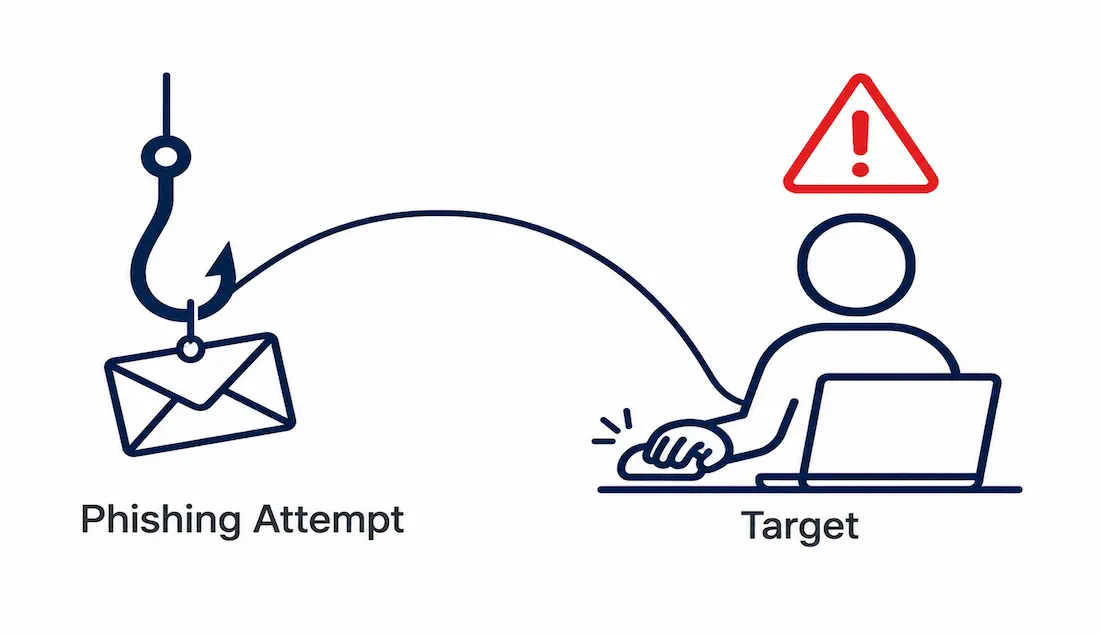
Phishing remains one of the most common entry points for cyberattacks precisely because it doesn’t need to break through a firewall or crack encryption — it just needs to convince one person to make one mistake. What began as clumsy, typo-riddled scam emails has evolved considerably, with AI now making messages more grammatically polished, more personalized, and delivered through channels people are less trained to scrutinize: text messages, QR codes, phone calls, and even calendar invites.
This guide explains what phishing is, its major variants, how AI has genuinely changed the threat landscape, how to recognize an attempt, and the protection strategies that actually hold up against modern attacks.
What Is Phishing?
Phishing is a social engineering attack in which a criminal impersonates a trusted person, brand, or institution to trick a victim into revealing sensitive information, clicking a malicious link, downloading malware, or transferring money. The name plays on “fishing” — the attacker casts bait and waits for someone to bite.
The mechanics are straightforward, which is part of why it’s so effective. A message arrives appearing to come from a legitimate source — your bank, your employer, a delivery company. It creates urgency (“Your account has been locked,” “Suspicious login detected”) and pushes you to act before you have time to think critically. Clicking the link leads to a fake login page designed to harvest credentials, or triggers a malware download.
It exploits human psychology rather than technical vulnerabilities, which is exactly why it remains effective even as technical defenses improve — it doesn’t need to defeat your security software if it can convince you to hand over access voluntarily.
The Main Types of Phishing Attacks
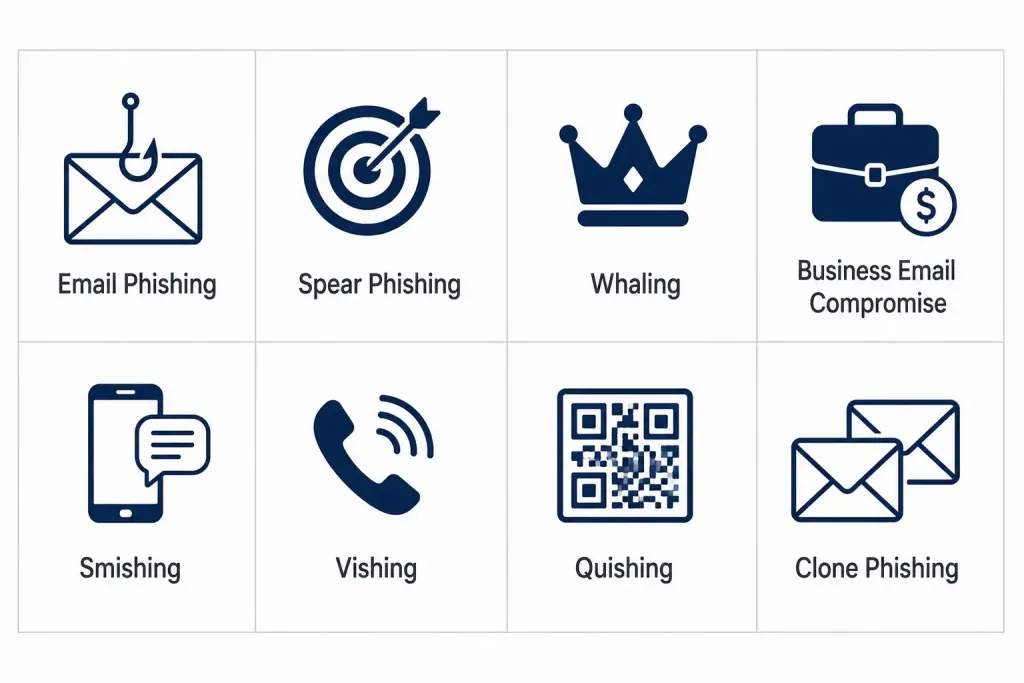
Email phishing is the classic and still most common form: mass-sent fraudulent emails impersonating trusted brands, hoping a percentage of recipients take the bait.
Spear phishing targets a specific individual using personal details — name, role, employer, colleagues — to make the message far more convincing than a generic mass email.
Whaling targets high-value individuals like executives and finance staff, since compromising a CEO or CFO can unlock significant fraud in a single successful attempt.
Business Email Compromise (BEC) impersonates an executive, vendor, or partner to authorize fraudulent wire transfers. BEC is among the most financially damaging attack categories, despite typically involving no mass mailing at all — just one carefully crafted message.
Smishing is phishing via SMS text message, exploiting the trust people place in texts and the small mobile screens that make full URLs hard to inspect.
Vishing is voice phishing — fraudulent phone calls, increasingly enhanced with AI voice synthesis, designed to extract credentials or authorize payments.
Quishing is QR-code phishing, where a malicious QR code leads to a fraudulent site. QR codes obscure their actual destination and are frequently scanned on phones with weaker built-in scrutiny than a desktop browser might apply, making this a genuinely growing vector.
Clone phishing copies a legitimate message you’ve already received and resends it with malicious links swapped in, exploiting your familiarity with the original.
How AI Has Changed the Threat Landscape
The clearest recent shift in phishing is the role of generative AI. For years, AI-generated phishing was a negligible share of overall attack volume. That has changed substantially — AI has made convincing phishing content dramatically cheaper and faster to produce, collapsing the gap between an attacker’s intent (“impersonate a CFO requesting a wire transfer”) and a polished, convincing message. An attacker no longer needs strong writing skills or fluency in the target’s language to produce a professional-sounding lure.
A few other genuine shifts define the current landscape, worth understanding even without attaching an overly precise statistic to each:
Phishing has moved beyond email. QR-code phishing embedded directly in email bodies, SMS-based attacks, social media impersonation, and even malicious calendar invites are all documented, growing vectors — attackers are diversifying delivery channels specifically because users are more trained to scrutinize email than these newer formats.
Voice phishing and deepfakes are a real, growing concern. AI-cloned voices and video capable of convincingly impersonating an executive have moved from a theoretical risk to a documented attack technique, putting a previously expensive, skill-intensive scam within reach of far more attackers than before.
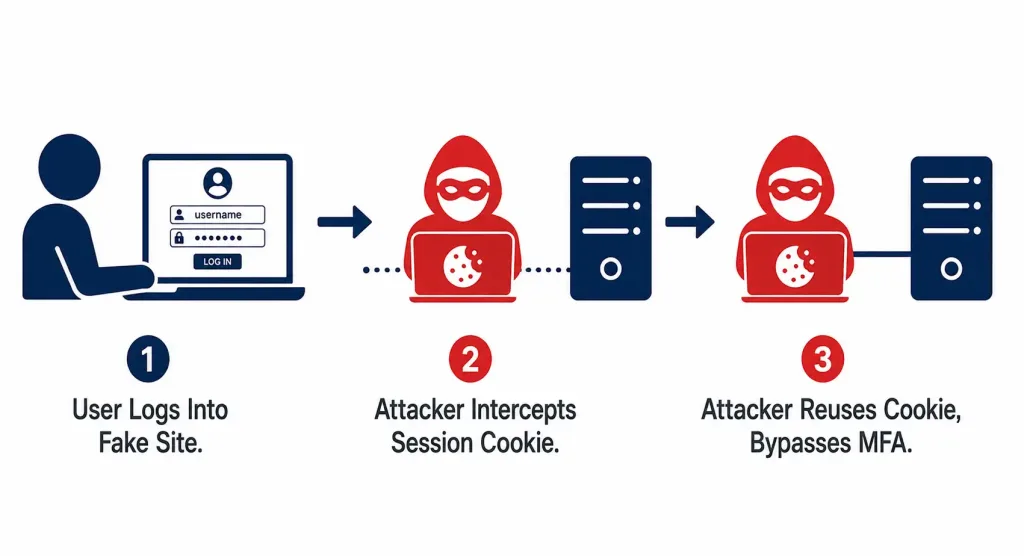
MFA is being actively bypassed, not just occasionally defeated. As organizations adopted multi-factor authentication broadly, attackers adapted with two specific well-documented techniques: adversary-in-the-middle (AiTM) attacks that intercept session cookies in real time to defeat MFA after the fact, and MFA-fatigue (“push bombing”) attacks that spam approval prompts until a fatigued user taps “approve” just to make the notifications stop.
Phishing Statistics Worth Trusting
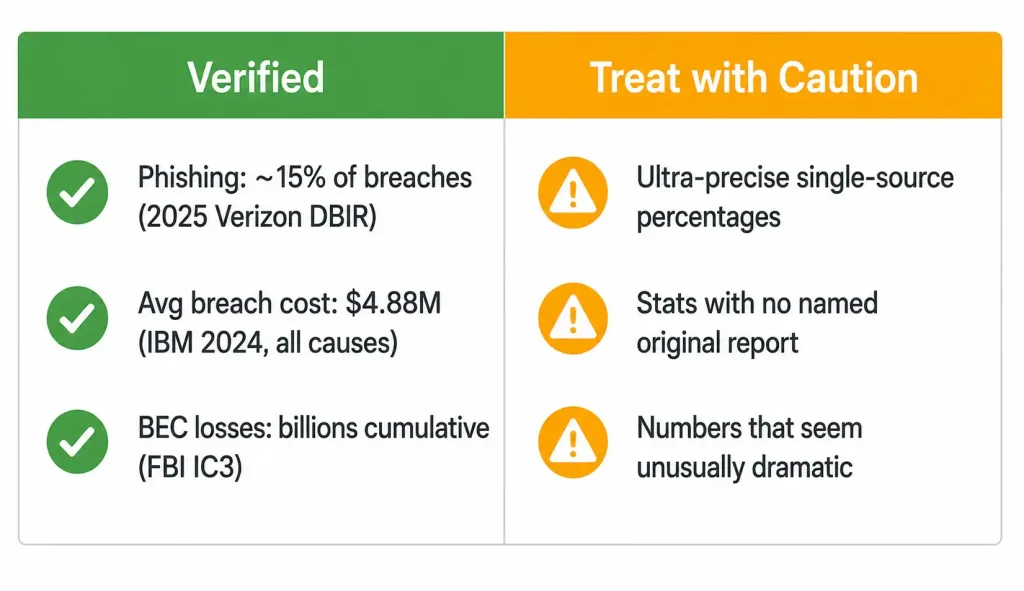
Security statistics vary meaningfully by source and methodology, and it’s worth being appropriately skeptical of any single very-precise number, especially one presented without a clear, checkable citation. A few figures are well-documented enough to cite with real confidence:
Phishing is a leading, though not dominant, breach vector. The 2025 Verizon Data Breach Investigations Report found phishing accounted for roughly 15% of breaches as an initial access vector specifically, with vulnerability exploitation (20%) and credential abuse (22%) both ranking higher that year — a meaningful shift from phishing’s traditional position as the single most common entry point. Social engineering more broadly, which includes phishing, accounted for around 17% of incidents.
Data breaches are expensive overall. IBM’s 2024 Cost of a Data Breach Report found the global average cost of a data breach reached $4.88 million, though this figure covers breaches from all causes, not phishing specifically — a distinction worth keeping clear, since phishing-specific breach costs aren’t the same figure even though phishing contributes to many breaches broadly.
Business Email Compromise losses are substantial and well-documented. The FBI’s Internet Crime Complaint Center (IC3) has tracked billions of dollars in cumulative BEC losses over the past decade, with median losses per incident in the tens of thousands of dollars range according to recent Verizon DBIR data — this is one of the more reliably-documented categories of phishing-adjacent financial harm.
Organizations are targeted persistently, not occasionally. Proofpoint’s State of the Phish research has consistently found the overwhelming majority of organizations face regular phishing attempts, reinforcing that this is a baseline, ongoing threat rather than an occasional incident to plan around.
The honest throughline: phishing remains a significant, persistent threat even as its relative share of breach statistics shifts year to year, and AI has genuinely lowered the cost and skill required to produce convincing attacks — durable conclusions worth acting on, even where the most precise headline percentages deserve a healthy dose of skepticism until independently checked against the original report.
How to Recognize a Phishing Attempt
Even sophisticated, AI-polished phishing usually contains warning signs if you know what to look for:
- Urgency and threats: phishing almost always pressures immediate action (“within 24 hours or your account will be closed”). Legitimate organizations rarely demand instant action under threat.
- Check the actual sender address, not just the display name: attackers spoof familiar display names while the underlying address is subtly wrong.
- Hover over links before clicking to reveal the true destination URL, and be wary if it doesn’t match the sender’s claimed domain.
- Requests for sensitive information: reputable companies don’t ask for passwords, full card numbers, or verification codes via email or text.
- Unexpected attachments and QR codes: common malware and credential-theft vectors, worth treating with default suspicion.
- Unusual payment or gift-card requests, especially ones claiming to come from an executive, warrant verification through a separate channel before acting.
The single most powerful habit is verification through an independent channel. If your “bank” emails about a problem, don’t click — call the number on the back of your card. If your “CEO” requests a wire transfer, confirm by phone or in person. This one practice defeats the majority of phishing and BEC attempts, regardless of how convincing the original message looked.
Protection Strategies That Actually Work
Adopt Phishing-Resistant MFA
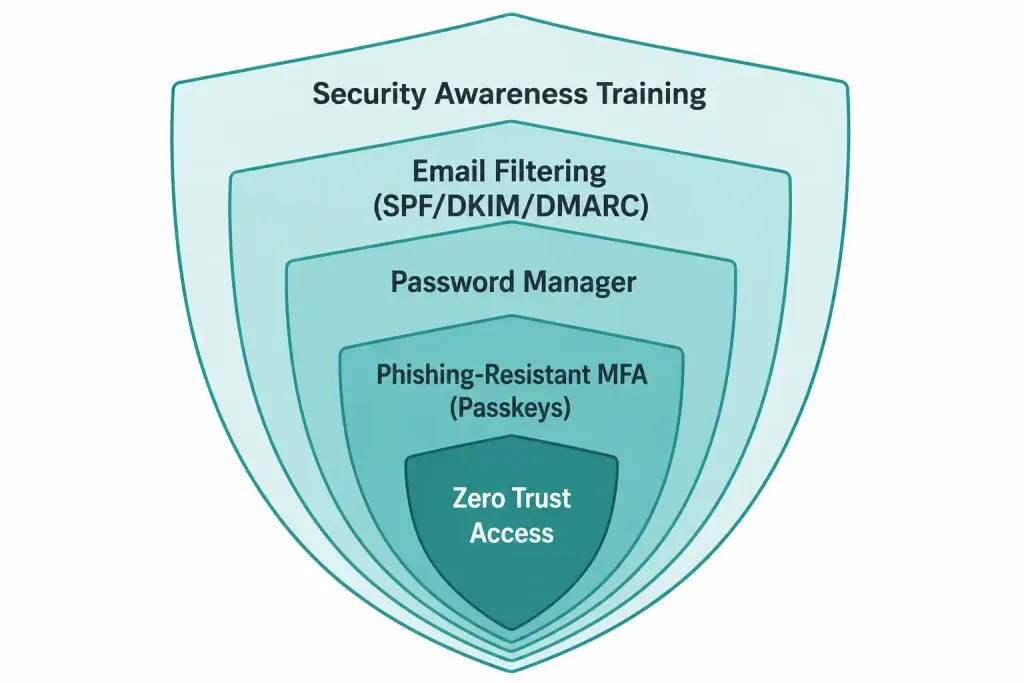
Not all MFA is equal. SMS codes, email codes, and even push notifications can be phished or bypassed through the AiTM and push-bombing techniques covered above. The standard strongly recommended by the U.S. Cybersecurity and Infrastructure Security Agency (CISA) is phishing-resistant MFA based on the FIDO2/WebAuthn standard — hardware security keys and passkeys.
Why it actually works: FIDO-based authentication uses public-key cryptography tied to the legitimate website’s specific origin. When you register a passkey or security key, your device generates a key pair; the private key never leaves your device, and authentication only succeeds against the real site’s actual domain. A phishing page at a different address simply cannot receive a valid response — no credential is ever transmitted for an attacker to steal or replay, which is a structurally different (and stronger) guarantee than “the code was correct.” Passkeys are now natively supported across Apple, Google, and Microsoft platforms, making this genuinely accessible rather than a niche enterprise-only capability.
Use a Password Manager
A password manager generates and stores strong, unique passwords per account, so a breach of one service doesn’t cascade into others. It also provides a subtle phishing defense: password managers auto-fill credentials only on the genuine, matching domain, so landing on a look-alike phishing site produces no auto-fill at all — a useful, easy-to-notice warning sign in itself.
Keep Software and Systems Updated
Many phishing attacks deliver malware exploiting known, already-patched vulnerabilities. Promptly applying security updates closes doors attackers specifically rely on staying open. Automated patching is one of the most cost-effective defenses available, precisely because it requires no ongoing user judgment once configured.
Deploy Email Security and Filtering (Organizations)
Modern email security gateways use AI and threat intelligence to detect and quarantine phishing before it reaches inboxes. SPF, DKIM, and DMARC (covered in more detail in our guide on identifying spam mail) help prevent attackers from spoofing your organization’s own domain. No filter catches everything, especially genuinely novel AI-generated lures, but strong email security meaningfully reduces the volume reaching users in the first place.
Invest in Security Awareness Training
Because phishing targets people, training people is a genuinely proven defense. Regular, realistic phishing simulations, followed by targeted education for those who click, measurably reduce susceptibility over time — training needs to now cover smishing, vishing, quishing, and deepfake scenarios specifically, not just traditional email phishing.
Adopt a Zero Trust Mindset
At the organizational level, Zero Trust architecture — “never trust, always verify” — limits the damage when phishing does succeed. Requiring continuous verification and granting least-privilege access ensures a single compromised credential doesn’t automatically hand an attacker broad network access. Combined with phishing-resistant MFA, this is a genuinely powerful structural defense that assumes individual failures will happen and limits their blast radius accordingly.
What to Do If You Fall for a Phishing Attack
Even careful people get caught, especially against well-crafted modern lures. If you suspect you’ve been phished:
- Change the password immediately for the affected account, and any other account sharing that password, ideally from a different, trusted device.
- Enable phishing-resistant MFA on the account right away if you have access to do so.
- Contact the relevant institution — your bank, the impersonated company, or your IT/security team — to report the compromise and watch for fraudulent activity.
- Monitor accounts closely if financial information was exposed, and consider a fraud alert or credit freeze.
- Report work-related incidents to your security team immediately — speed of reporting is one of the biggest factors in containing a breach and limiting its cost.
- Run a security scan on your device to check for any malware that may have been installed alongside the credential theft.
The instinct to feel embarrassed and stay quiet is understandable but genuinely counterproductive. Reporting quickly is always the right move — attackers specifically count on victims’ silence to extend their access undetected.
FAQs
What is phishing in simple terms?
Phishing is a scam where a criminal pretends to be a trusted person or company to trick you into giving up sensitive information, clicking a malicious link, or sending money. It relies on deceiving people rather than exploiting a technical vulnerability directly.
What is the most common type of phishing?
Email phishing remains the most common overall form, but attacks have spread meaningfully to SMS (smishing), phone calls (vishing), and QR codes (quishing), with AI making all of these variants more convincing than their earlier equivalents.
How has AI actually changed phishing?
AI has made phishing content cheaper, faster to produce, and more convincing — eliminating the tell-tale spelling and grammar errors that once made older phishing relatively easy to spot, and enabling more personalized attacks at greater scale than a human writer could produce alone.
What is the best protection against phishing?
Phishing-resistant MFA — passkeys and FIDO2 hardware security keys — is the single most effective technical defense, since it structurally cannot be defeated by a fake login page the way password- or code-based authentication can. Combined with healthy skepticism, independent-channel verification, and security awareness training, it stops the large majority of attacks.
Is basic MFA enough to stop phishing?
Basic MFA (SMS codes or push notifications) helps but can be bypassed through adversary-in-the-middle attacks and MFA-fatigue tactics, both genuinely documented techniques attackers actively use. Phishing-resistant MFA based on FIDO2/WebAuthn is meaningfully stronger and is the standard security experts now recommend for high-value accounts specifically.
What should I do if I clicked a phishing link?
Change the affected password immediately from a trusted device, enable strong MFA if possible, report the incident to the relevant institution or your IT team, monitor for fraud, and scan your device for malware. Acting quickly meaningfully limits the damage compared to waiting even a few hours.
Conclusion
Phishing endures as one of the most common cyberattack categories because it targets the one vulnerability no software patch can fix: human trust. AI has genuinely supercharged this longstanding tactic, producing more polished, more personalized, multi-channel attacks that are harder to spot on sight than their predecessors. But the defenses are equally real and increasingly accessible — phishing-resistant MFA, password managers, consistent patching, evolved training, and independent-channel verification together neutralize the large majority of phishing attempts. When a message pressures you to act immediately, the single habit that matters most is simple: pause, verify through a separate channel, and only then proceed.