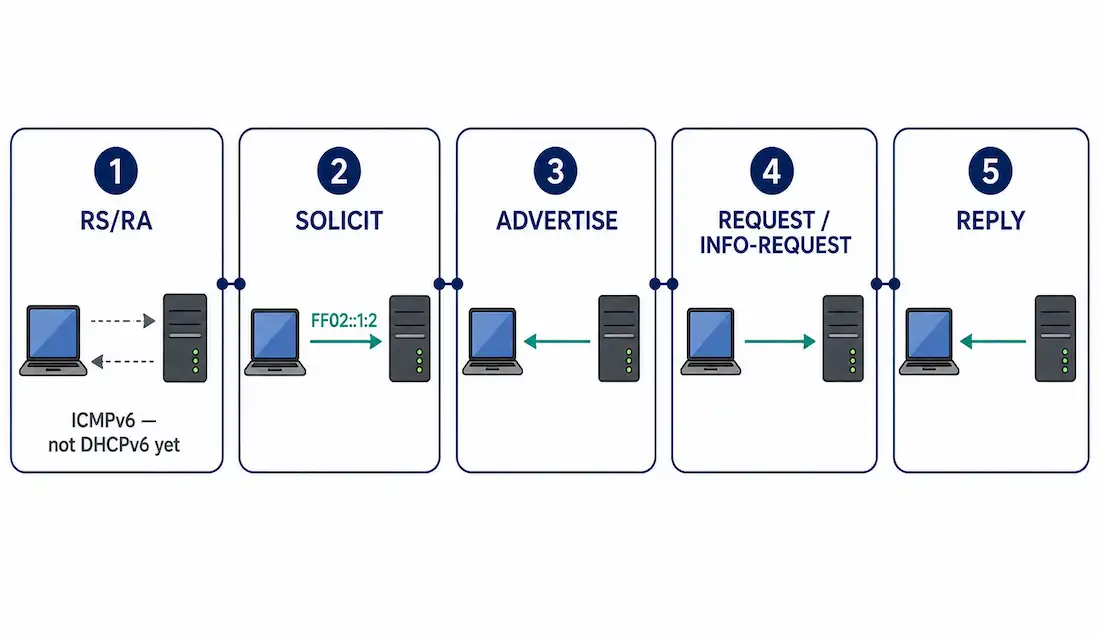
DHCPv6 doesn’t start the way DHCPv4 does. There’s no equivalent of a client blindly broadcasting into the dark hoping something answers — in IPv6, the very first thing that happens is an ICMPv6 Router Advertisement, and that message is what tells a client whether it should even bother starting a DHCPv6 conversation at all in the first place.
This guide walks through what actually triggers DHCPv6, the SOLICIT/ADVERTISE exchange, how stateless and stateful modes diverge from there, and the multicast addressing and ports involved — including a terminology mix-up worth clearing up, since it trips people up in exam prep specifically.
What Triggers DHCPv6 in the First Place
Both stateless and stateful DHCPv6 begin with an ICMPv6 Router Advertisement (RA) from the local router — either sent periodically on its own, or in response to a client’s Router Solicitation (RS) message. This RS/RA exchange is part of IPv6’s neighbor discovery process, not DHCPv6 itself, but it’s the gate DHCPv6 sits behind: the RA carries flags telling the client whether to use DHCPv6 at all, and if so, which mode.
Two flags in the RA matter here, and they’re worth knowing by name since exam questions and real troubleshooting both reference them directly:
- M flag (Managed Address Configuration) — when set to 1, tells the client to get its address from a stateful DHCPv6 server.
- O flag (Other Configuration) — when set to 1 (typically alongside the A flag for SLAAC), tells the client to self-generate its address via SLAAC and use stateless DHCPv6 only for extra options like DNS.
Only once the RA indicates one of these does the client actually start a DHCPv6 exchange.
Locating a DHCPv6 Server: the SOLICIT Message
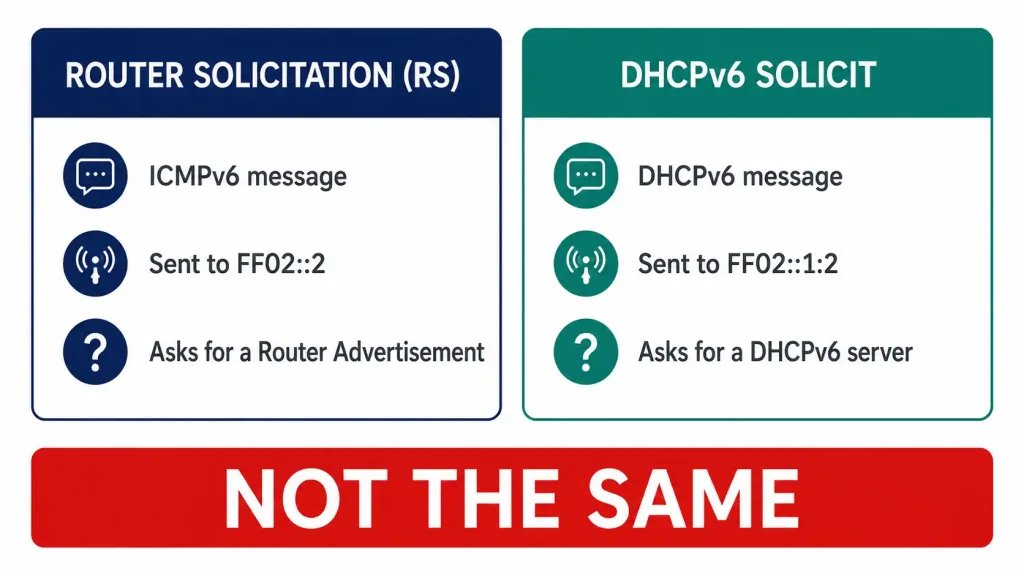
Once the RA has indicated DHCPv6 is needed, the client sends a DHCPv6 SOLICIT message to the reserved multicast address FF02::1:2 — the all-DHCPv6-servers address. This is a genuinely different message from the earlier Router Solicitation, despite the similar name: RS is an ICMPv6 message asking routers for an RA, sent to FF02::2 (all-routers); SOLICIT is a DHCPv6 protocol message asking DHCPv6 servers to respond, sent to a different multicast address entirely. Mixing these two up is an easy trap in exam prep specifically, since both start with “Router” or “Solicit” language depending on how they’re abbreviated.
FF02::1:2 has link-local scope, meaning routers never forward it beyond the local segment — a DHCPv6 server has to be either directly on the same link, or reachable through a DHCPv6 relay agent configured specifically on that segment, exactly the same structural requirement DHCPv4 has with ip helper-address on a router interface.
Every DHCPv6 server available on the link that receives the SOLICIT responds with a DHCPv6 ADVERTISE message, letting the client know that particular server is available and willing to help with the request.
Ports Used
DHCPv6 runs entirely over UDP, using two ports:
- UDP 547 — the port DHCPv6 servers and relay agents listen on. Client-to-server messages use this as the destination port.
- UDP 546 — the port DHCPv6 clients listen on. Server-to-client messages use this as the destination port.
This is the reverse pairing from how it’s easy to remember at first glance — the lower number (546) belongs to the client, not the server, which is the opposite of the DHCPv4 pattern where the lower port (67) belongs to the server. Worth deliberately memorizing rather than assuming the pattern carries over from DHCPv4.
Stateless vs. Stateful: Where the Client Goes From Here
After receiving one or more ADVERTISE responses, the client’s next message depends entirely on which mode the original RA indicated.
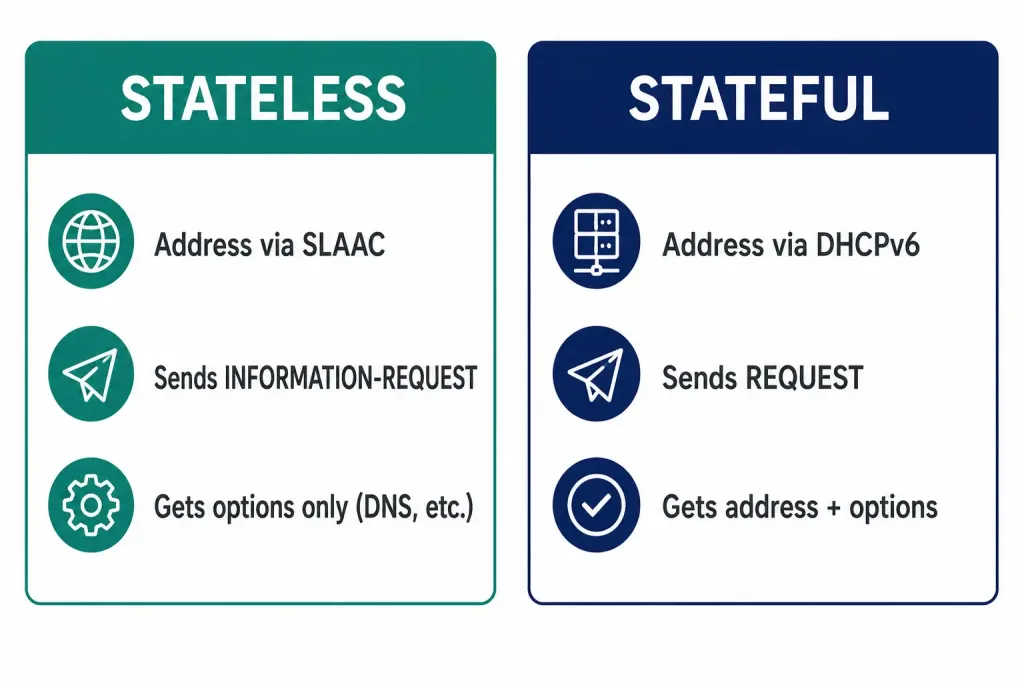
Stateless DHCPv6
The client has already generated its own IPv6 address using SLAAC — combining the prefix from the RA with a self-generated interface ID. It doesn’t need an address from DHCPv6 at all. Instead, it sends a DHCPv6 INFORMATION-REQUEST message, asking only for supplementary configuration — DNS servers, domain name, and similar options — not an address. The server replies with just that information.
Stateful DHCPv6
The client needs the DHCPv6 server to provide the address itself, not just supplementary options. It sends a DHCPv6 REQUEST message, and the server replies with a full address assignment plus any additional configuration parameters — functionally the IPv6 equivalent of DHCPv4 handing out both an address and options together.
The Full Exchange, Named Correctly
Putting the whole sequence together, using the correct message names throughout:
- RS/RA (ICMPv6, separate from DHCPv6) — client discovers the router and learns whether DHCPv6 is needed, and in which mode.
- SOLICIT (client →
FF02::1:2) — client looks for available DHCPv6 servers. - ADVERTISE (server → client) — each available server responds, indicating it can help.
- REQUEST or INFORMATION-REQUEST (client → chosen server) — stateful clients ask for an address plus options; stateless clients ask for options only.
- REPLY (server → client) — the server’s final response, completing the exchange.
This sequence is sometimes shortened to SARR (Solicit, Advertise, Request, Reply) for stateful DHCPv6 — a naming pattern worth knowing since it mirrors DORA from DHCPv4 conceptually, even though the actual message names and multicast addressing are entirely different.
How This Compares to DHCPv4’s DORA
The four-message pattern (SOLICIT, ADVERTISE, REQUEST, REPLY) mirrors DHCPv4’s DORA conceptually, but the differences matter for anyone moving between the two:
| DHCPv4 (DORA) | DHCPv6 (SARR) | |
|---|---|---|
| Discovery message | DHCPDISCOVER (broadcast) | SOLICIT (multicast to FF02::1:2) |
| Server response | DHCPOFFER | ADVERTISE |
| Client acceptance | DHCPREQUEST | REQUEST or INFORMATION-REQUEST |
| Final confirmation | DHCPACK | REPLY |
| Address always assigned? | Yes, always | Only in stateful mode — stateless clients self-assign via SLAAC |
| Default gateway learned via DHCP? | Yes | No — always learned from the RA, never from DHCPv6 itself |
| Ports | 67 (server) / 68 (client) | 547 (server) / 546 (client) |
That last row is worth sitting with carefully: DHCPv6 genuinely cannot hand out a default gateway under any circumstances, stateful or stateless — that information only ever comes from the Router Advertisement, full stop. A DHCPv6 server configured with what looks like gateway-related options is either misconfigured or those options are being repurposed for something else entirely; the RA remains the sole source for that specific piece of information anywhere in IPv6.
This is the exact problem DHCPv6 relay solves, structurally identical to how DHCPv4 relay works even though the message names, ports, and multicast addressing involved are all completely different from their DHCPv4 counterparts.
Verifying DHCPv6 on a Cisco Device
A few commands confirm whether the RA/DHCPv6 sequence is actually working as expected, whether troubleshooting a client or a router acting as the DHCPv6 server or relay.
Router# show ipv6 interface gigabitEthernet 0/1This shows the interface’s joined multicast groups — FF02::1:2 should appear in that list on a router or client actively participating in DHCPv6, confirming it’s actually listening for the relevant traffic on that group rather than merely configured to be.
Router# show ipv6 dhcp interfaceShows whether an interface is acting as a DHCPv6 client, server, or relay, and which mode (stateless or stateful) it’s currently configured for — useful for catching a mismatch between what an interface is actually doing in practice and what the overall network design expects it to be doing.
Router# debug ipv6 dhcp detailShows the DHCPv6 message exchange in real time as it happens — SOLICIT, ADVERTISE, REQUEST or INFORMATION-REQUEST, and REPLY — which is the fastest way to confirm exactly where a stalled exchange is actually failing, the same diagnostic value debug ip dhcp client events provides for DHCPv4 troubleshooting. Running this before reproducing a client issue, rather than after, is usually the difference between catching the actual failure point and only seeing its aftermath.
On a Windows client, ipconfig /all shows the DHCPv6-relevant fields directly — DHCPv6 IAID and DHCPv6 Client DUID confirm the client has actually engaged in a DHCPv6 exchange (stateful or stateless), separate from whatever address it may have also self-generated via SLAAC in parallel. Seeing both a SLAAC-derived global address and a populated DHCPv6 IAID on the same interface is completely normal for a stateless client — it’s not a conflict, just two different mechanisms doing two different jobs on the same connection.
Worked Example: Watching a Stateful Exchange
Seeing the message sequence with realistic addressing makes the abstract flow concrete. A client on a segment with a stateful DHCPv6 server:
1. Client → FF02::2 (RS)
   Src: FE80::1A2B:3C4D:5E6F   Dst: FF02::2

2. Router → FF02::1 (RA)
   Src: FE80::1   Dst: FF02::1
   M flag: 1   (use stateful DHCPv6)

3. Client → FF02::1:2 (SOLICIT), UDP dst port 547
   Src: FE80::1A2B:3C4D:5E6F   Dst: FF02::1:2

4. Server → Client (ADVERTISE), UDP dst port 546
   Src: FE80::DHCPSRV   Dst: FE80::1A2B:3C4D:5E6F

5. Client → Server (REQUEST), UDP dst port 547
   Src: FE80::1A2B:3C4D:5E6F   Dst: FE80::DHCPSRV
   Requesting: address + options

6. Server → Client (REPLY), UDP dst port 546
   Src: FE80::DHCPSRV   Dst: FE80::1A2B:3C4D:5E6F
   Assigned address: 2001:db8:1::100
   DNS: 2001:db8:1::53
A few details worth noticing directly from this sequence: steps 1–2 use ICMPv6 entirely, with no UDP ports involved at all — DHCPv6 hasn’t started yet at that point, since the client and router are still working through neighbor discovery rather than DHCPv6 itself. Steps 3 onward switch to UDP 546/547, and every message after the initial SOLICIT is addressed directly between the client and the specific server it chose, not back to the multicast address — SOLICIT is the only message in the whole exchange that’s actually sent to FF02::1:2. If a stateless client were doing this instead, step 5 would read INFORMATION-REQUEST instead of REQUEST, and step 6’s reply would omit the assigned address entirely, since the client already generated its own via SLAAC back at step 2 and has no need for the server to provide one.
FAQs
What triggers the start of DHCPv6 operation?
An ICMPv6 Router Advertisement, either sent periodically or in response to a client’s Router Solicitation. If the RA’s M or O flag indicates DHCPv6 is needed, the client begins the DHCPv6 exchange from there.
How does a stateless DHCPv6 client obtain its configuration?
It generates its own address via SLAAC using the RA’s prefix and a self-generated interface ID, then sends a DHCPv6 INFORMATION-REQUEST asking only for supplementary options like DNS — no address is assigned by the DHCPv6 server in this mode.
What UDP ports does DHCPv6 use?
Port 547 for messages sent to the server (client-to-server destination port), and port 546 for messages sent to the client (server-to-client destination port). Note this is the reverse of the intuitive lower-number-means-server pattern DHCPv4 uses.
What’s the difference between DHCPv6 REQUEST and INFORMATION-REQUEST?
REQUEST (stateful) asks the server for both an IPv6 address and configuration options. INFORMATION-REQUEST (stateless) asks only for options, since the client has already generated its own address through SLAAC before this message is ever sent.
Is “Router Solicitation” the same thing as the DHCPv6 SOLICIT message?
No — these are two different messages from two different protocols. Router Solicitation (RS) is an ICMPv6 message sent to FF02::2 (all-routers), used to request a Router Advertisement. The DHCPv6 SOLICIT message is sent to FF02::1:2 (all-DHCPv6-servers), used specifically to locate a DHCPv6 server, and only happens after the RS/RA exchange has already indicated DHCPv6 is needed.
Why doesn’t the DHCPv6 SOLICIT message reach a server on a different subnet?
Because FF02::1:2 has link-local scope by design, and routers don’t forward link-local multicast traffic between segments. A DHCPv6 server on a different subnet needs a relay agent configured on the client’s segment — the same structural requirement as DHCPv4’s ip helper-address, just using DHCPv6-specific relay configuration instead.
Can DHCPv6 assign a default gateway to a client?
No, under any mode — stateful or stateless. The default gateway is always learned exclusively from the Router Advertisement, never from a DHCPv6 exchange. This is a structural difference from DHCPv4, where the DHCP server routinely hands out the default gateway alongside the address itself.