
EtherChannel is Cisco’s specific implementation of the link aggregation concept — bundling multiple physical Ethernet ports into a single logical channel. This article focuses on the bandwidth math, the point-to-point requirements, and the hard limits worth knowing; for PAgP and LACP negotiation modes, see the link aggregation article, which covers that side in full.
How Much Bandwidth EtherChannel Actually Provides
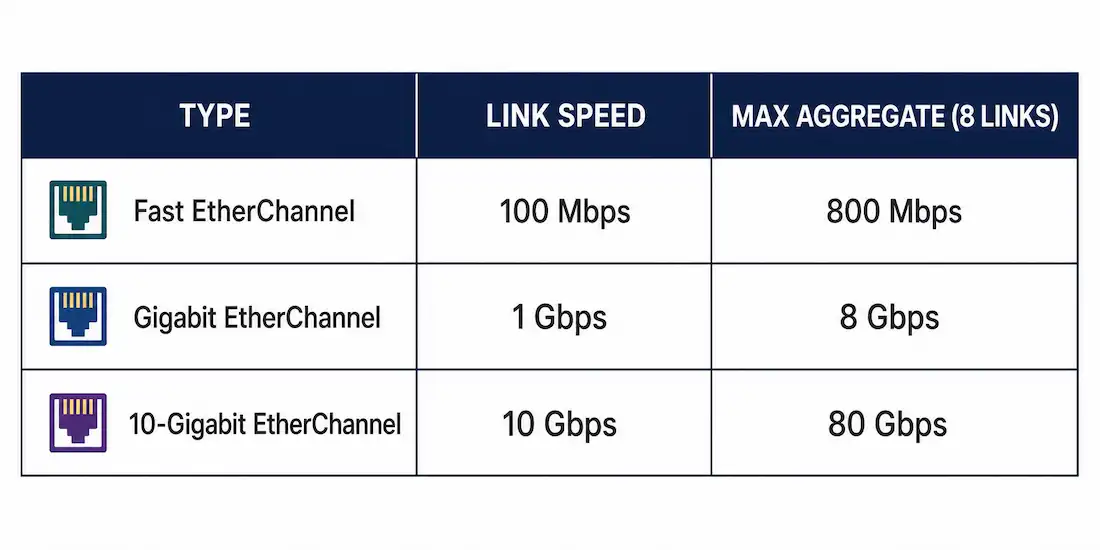
Ether Channel bundles up to eight compatibly-configured physical Ethernet ports of the same speed and type into one logical channel. The aggregate full-duplex bandwidth scales directly with link speed:
| EtherChannel Type | Member Link Speed | Maximum Aggregate Bandwidth (8 links) |
|---|---|---|
| Fast EtherChannel | 100 Mbps (Fast Ethernet) | 800 Mbps |
| Gigabit EtherChannel | 1 Gbps (Gigabit Ethernet) | 8 Gbps |
| 10-Gigabit EtherChannel | 10 Gbps | 80 Gbps |
These are the industry-standard figures — 8 links × the member link speed. All member links in a single EtherChannel bundle must be the same speed and type; you can’t mix Fast Ethernet and Gigabit Ethernet ports in one bundle.
How Many EtherChannel Groups Can a Switch Support?
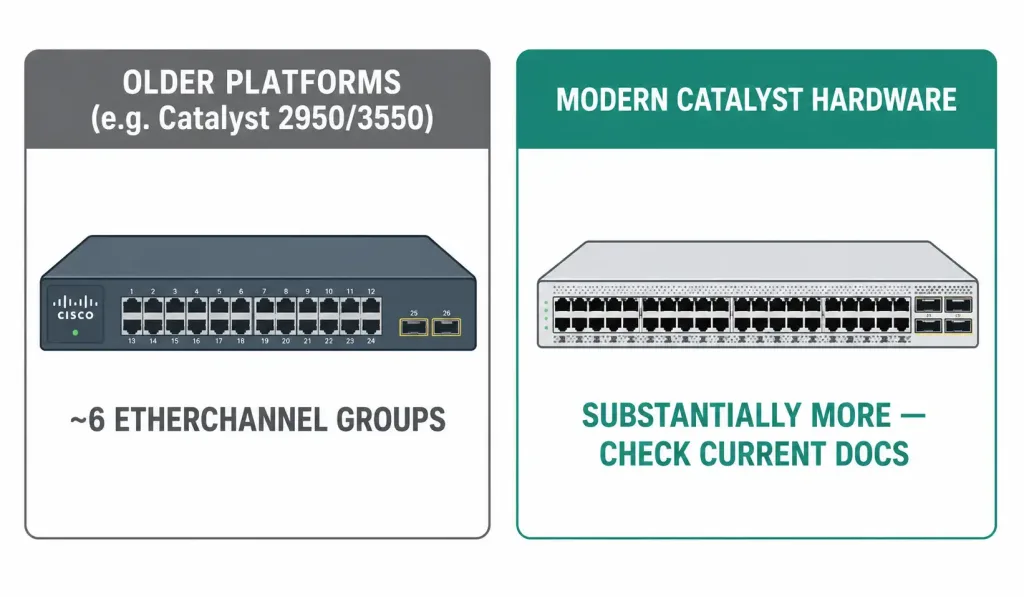
This is a genuinely platform-dependent number, and it’s worth being precise about rather than quoting a single figure as universal. Older Cisco platforms, such as certain Catalyst 2950 and 3550-series switches, historically supported as few as six EtherChannel groups per switch. Current Cisco Catalyst hardware supports dramatically more — the exact ceiling depends on the specific model, IOS/IOS-XE version, and Supervisor engine in use. Always confirm the actual limit for a specific switch model in its current configuration guide rather than relying on a remembered number from an older platform generation, since this is one of the figures that has changed the most as Cisco hardware has evolved.
EtherChannel Is Strictly Point-to-Point
An Ether Channel bundle connects exactly two devices — it can’t span traffic across two different switches on the far end of the same bundle. This matters when planning a topology: if you need redundancy toward two separate upstream switches, that requires either two separate EtherChannel bundles (one to each switch) or a multi-chassis technology like Cisco’s Virtual Switching System (VSS) or StackWise Virtual, which makes two physical switches appear as one logical device specifically so a single EtherChannel bundle can legitimately terminate across both of them. Without that kind of chassis virtualization, a standard EtherChannel bundle is always one-to-one.
Configuration Consistency Requirements
Every member port on both ends of an EtherChannel bundle needs matching configuration:
- Matching speed and duplex across every member port.
- Matching trunk or access mode. If one side’s physical ports are configured as trunks, the other side’s ports must also be trunks, using the same native VLAN.
- All Layer 2, or all Layer 3 — a bundle can’t mix port types.
Configuration should be applied to the logical Port-channel interface rather than to each individual physical member port once the bundle is formed — a setting applied to the Port-channel interface propagates to every physical port bundled underneath it, which is what keeps configuration consistent across all member links automatically.
Layer 2 vs. Layer 3 EtherChannel
A Layer 2 EtherChannel functions as a trunk or access switchport, the most common use case for increasing bandwidth between two switches. A Layer 3 EtherChannel is assigned a single IP address directly on the logical Port-channel interface, functioning as a routed point-to-point link — used between switches or routers performing Layer 3 forwarding rather than switching.
Load Balancing
Traffic isn’t split evenly frame-by-frame across bundle members — EtherChannel uses a hashing algorithm to assign each conversation consistently to one physical link, covered in more depth in the link aggregation article. Depending on the hardware platform, available hashing inputs include:
- Source MAC address to destination MAC address
- Source IP address to destination IP address
Because the same conversation always hashes to the same physical link, a single high-throughput conversation between two hosts is still bounded by one member link’s speed, not the bundle’s full aggregate — the benefit shows up across many simultaneous conversations, not any single one.
How EtherChannel Interacts with Spanning Tree
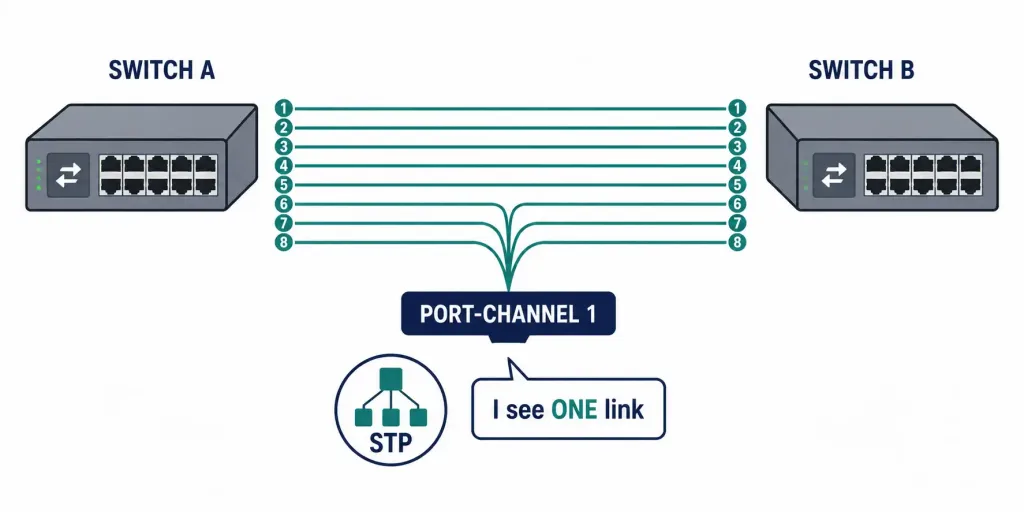
This is one of EtherChannel’s most practically useful properties: Spanning Tree Protocol sees an entire EtherChannel bundle as a single logical link, not as multiple physical links.
This has two direct consequences:
- No links sit idle inside a working bundle. Where classic STP would block all but one of several redundant physical links between two switches, an Ether Channel bundle presents those same physical links to STP as a single logical interface — so STP has nothing to block among them, and every member link stays active and carries traffic.
- Losing one member link doesn’t trigger a spanning-tree recalculation. As long as at least one physical link in the bundle remains up, the logical Port-channel interface stays up from STP’s perspective. The bundle’s throughput decreases proportionally, but the topology itself doesn’t change, so there’s no reconvergence delay — a meaningful advantage over relying on STP’s own failover between separate, unbundled redundant links, covered in the troubleshooting STP article.
If multiple separate EtherChannel bundles exist between the same two switches, STP still treats each bundle as its own logical link and can block one entire bundle to prevent a loop — blocking an entire bundle means every physical port in that bundle stops forwarding together, not just one port within it.
Worked Example: Bandwidth Math in Practice
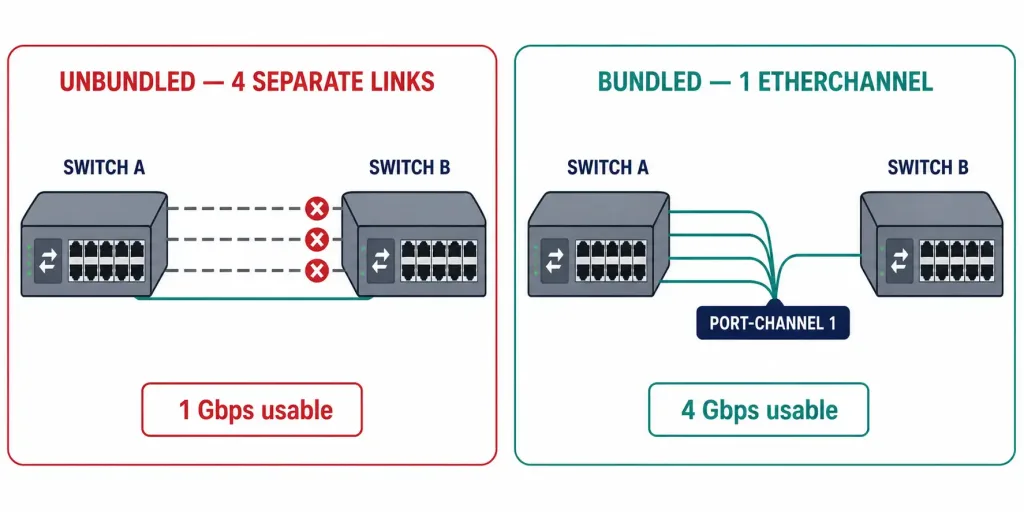
Consider a distribution switch connecting to a core switch with four Gigabit Ethernet ports bundled into a single Gigabit EtherChannel. Individually, four separate 1 Gbps links would give STP a loop to resolve — it would block three of them, leaving only 1 Gbps of usable bandwidth despite four physical links being present.
Bundled into one EtherChannel instead, STP sees a single logical link. All four physical members stay active, giving a maximum aggregate bandwidth of 4 Gbps full-duplex — not the full 8 Gbps ceiling, since only four of the possible eight member slots are used in this example, but still four times the bandwidth STP’s default behavior would have allowed across four unbundled links.
If a fifth Gigabit link were added to the same bundle, aggregate bandwidth would scale to 5 Gbps, continuing up to the 8 Gbps ceiling at eight members. This linear scaling — each additional member link adding its full speed to the aggregate, up to the eight-link maximum — is the entire practical value proposition of EtherChannel over relying on STP’s default single-active-path behavior.
Verifying an EtherChannel Bundle
show etherchannel summaryThe fastest way to confirm which physical ports are actually bundled together, and whether the channel is operational. Ports show as P (bundled in port-channel) when working correctly; a port stuck showing something other than P — such as I for individual, meaning it’s not actually part of the bundle — points directly at a configuration mismatch on that specific port.
show interfaces port-channel 1Shows the logical Port-channel interface’s own status, speed, and duplex — useful for confirming the aggregate bandwidth Cisco IOS reports matches what the math above predicts for the number of active members.
A common troubleshooting pattern: if a bundle forms with fewer active members than physically connected, check each individual member port’s speed and duplex settings first — a single mismatched port is often silently excluded from the bundle rather than causing the whole bundle to fail, which can make the problem easy to miss until someone notices the aggregate bandwidth is lower than expected.
Benefits Summary
- Increased aggregate bandwidth without new hardware, by combining existing ports.
- Simplified configuration, since most settings apply once to the Port-channel interface rather than to every physical member port individually.
- Redundancy without STP reconvergence — a lost member link reduces throughput but doesn’t change the topology.
- No wasted capacity from STP blocking, since STP only sees the bundle as one link, with nothing to block among the physical members.
Frequently Asked Questions
How much bandwidth can a single EtherChannel bundle actually provide?
Up to 800 Mbps for Fast EtherChannel (eight 100 Mbps links), 8 Gbps for Gigabit EtherChannel (eight 1 Gbps links), and 80 Gbps for 10-Gigabit EtherChannel (eight 10 Gbps links) — all figures assume full-duplex operation across the maximum eight member links, and all member links in one bundle must be the same speed.
How many EtherChannel groups can one switch support?
This varies significantly by platform and can’t be answered with one universal number. Older switches historically supported as few as six groups; modern Cisco Catalyst hardware supports substantially more. Always check the specific switch model’s current configuration guide rather than assuming based on older documentation.
Can an EtherChannel bundle connect to two different switches?
No, not with standard EtherChannel — it’s strictly point-to-point between two devices. Spanning traffic across two separate switches on the far end requires a multi-chassis technology like VSS or StackWise Virtual, which presents two physical switches as one logical device to the far end.
What’s the difference between Layer 2 and Layer 3 EtherChannel?
A Layer 2 EtherChannel operates as a trunk or access switchport, most commonly used between two switches. A Layer 3 EtherChannel gets its own IP address on the logical Port-channel interface and functions as a routed point-to-point link, used between Layer 3-forwarding devices.
Does EtherChannel eliminate the need for Spanning Tree Protocol?
No — STP still runs and still matters if multiple separate EtherChannel bundles exist between the same two switches, since STP can block one entire bundle to prevent a loop between bundles. What EtherChannel eliminates is STP blocking individual physical links within a single bundle, since STP only ever sees that bundle as one logical link.
Does losing a member link inside an EtherChannel bundle cause an outage?
Not typically. As long as at least one physical link in the bundle stays up, the logical Port-channel interface remains up and STP sees no topology change, so there’s no reconvergence delay. Aggregate throughput drops proportionally to the lost link’s share of the bundle, but connectivity itself continues uninterrupted.
Conclusion
EtherChannel’s core value is straightforward math: bundle up to eight matching physical links, and the aggregate bandwidth scales linearly with each one added, all while Spanning Tree Protocol sees the whole thing as a single logical link with nothing to block. The bandwidth figures — 800 Mbps, 8 Gbps, 80 Gbps depending on member link speed — are fixed by the eight-link maximum and the underlying Ethernet standard in use, while platform-specific limits like the total number of EtherChannel groups a given switch supports vary enough by hardware generation that they’re always worth checking directly rather than assuming. For the negotiation protocols that actually bring a bundle up dynamically — PAgP and LACP — the link aggregation article covers that mechanism in full.



