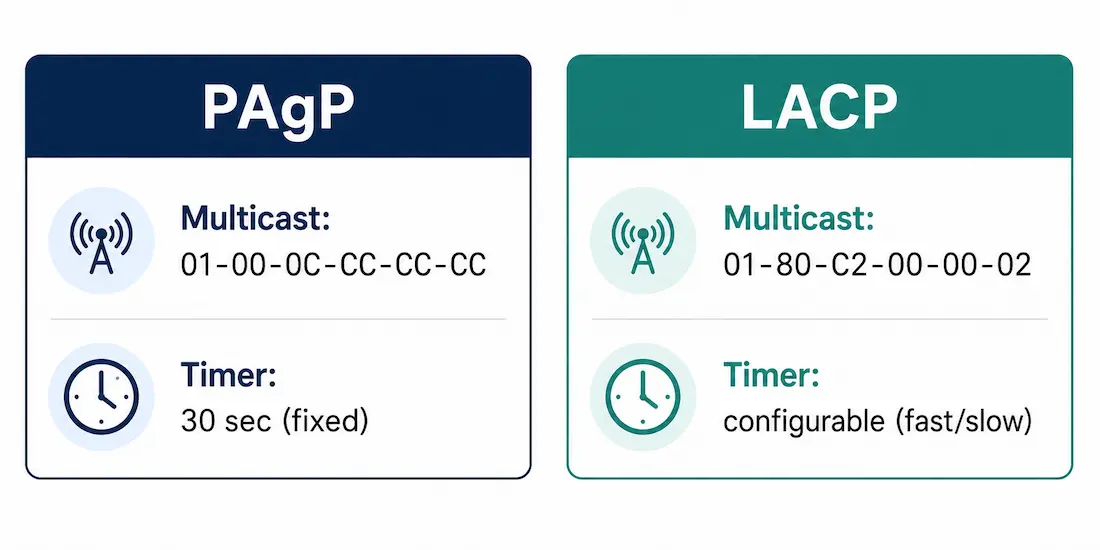
EtherChannel bundles multiple physical links into a single logical link, and link aggregation is the general concept behind it. This article goes one level deeper: the actual negotiation protocols — PAgP and LACP — that bring a bundle up dynamically, including their multicast addresses, timers, and exact mode compatibility rules.
Because Spanning Tree Protocol sees the bundle as one logical link rather than several parallel ones, it doesn’t block any member links — you get the full aggregate bandwidth without STP shutting links down to prevent loops.
Two Protocols, One Static Fallback
Two protocols negotiate EtherChannel formation: Cisco’s proprietary Port Aggregation Protocol (PAgP) and the IEEE-standard Link Aggregation Control Protocol (LACP). A third option skips negotiation entirely — a static (unconditional) EtherChannel using on mode.
Every EtherChannel is a channel group. A physical port joins one with:
channel-group [group-number] mode {on | auto | desirable | active | passive}Once negotiated, the protocol tracks each member link continuously — when a link fails or is restored, it’s removed from or added back to the bundle automatically, without STP needing to reconverge.
Why the 8-Link Limit Exists
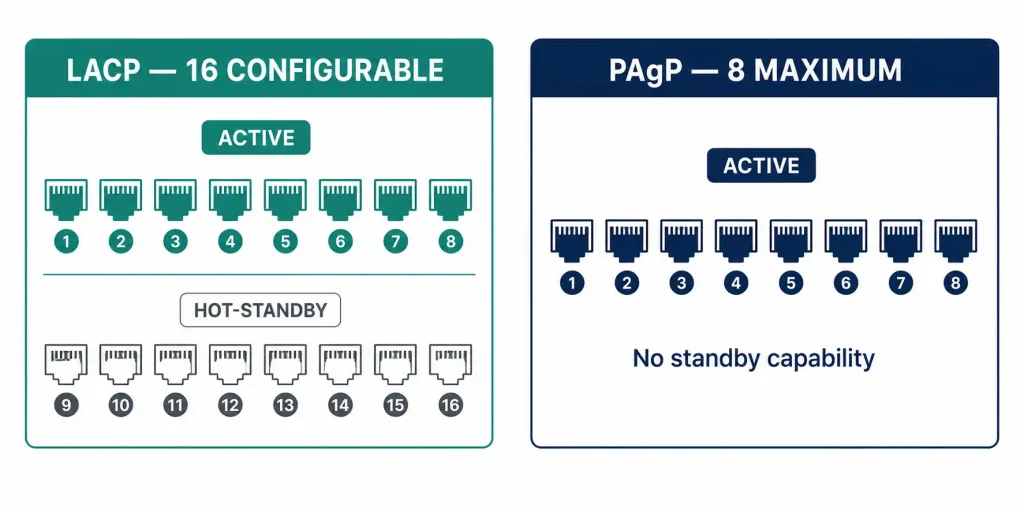
A single EtherChannel supports up to 8 active links. This isn’t an arbitrary round number — it traces back to the load-balancing hash, which produces a 3-bit result (a value from 0 to 7, eight possible outcomes) used to select which physical link carries a given conversation. That 3-bit hash width is where the 8-link ceiling actually comes from.
LACP adds a wrinkle here worth getting exactly right: you can configure up to 16 ports in an LACP bundle, but only 8 can be active at any one time — the remaining ports sit in hot-standby, ready to activate automatically if an active link fails. PAgP has no equivalent hot-standby capability; it supports up to 8 active links and nothing more. So the practical forwarding maximum is 8 active links either way — LACP’s advantage is the extra 8 standby slots for faster failover on platforms that support it.
Port Aggregation Protocol (PAgP)
PAgP is Cisco-proprietary, running only on Cisco switches (or switches specifically licensed to support it). It negotiates by exchanging PAgP packets between EtherChannel-capable ports, carrying each side’s identity and PAgP capability, then dynamically grouping compatibly-configured ports into a single logical link.
Protocol specifics:
- PAgP packets are sent every 30 seconds by default, with no faster timer option — unlike LACP, PAgP has no equivalent to a “fast” hello interval.
- PAgP uses the Layer 2 multicast destination address 01-00-0C-CC-CC-CC — notably, this is the same Cisco-reserved multicast address shared by CDP, VTP, DTP, and UDLD, so a packet capture showing this destination requires checking the protocol type field to identify which specific protocol sent it.
For a channel to form, every member port needs matching speed, duplex, and VLAN configuration. PAgP performs an active configuration check on participating interfaces and confirms the neighbor is genuinely running PAgP — ports without matching configuration simply don’t participate, which is what prevents an accidental loop from a half-matched bundle.
PAgP Modes
- On — Forces the port into a channel without exchanging any PAgP packets. Forms a channel only if the far end is also
on. - Desirable — Actively initiates negotiation, sending PAgP packets to request the other side form a channel.
- Auto — Passive: responds to PAgP packets received, but never initiates.
Mode compatibility: desirable pairs successfully with either desirable or auto. Two auto ports never negotiate with each other — since neither initiates, no PAgP packets are ever exchanged and the channel never forms. on only pairs with on; it doesn’t negotiate at all, so pairing it with desirable or auto fails.
PAgP Configuration Example
Switch1 (auto — passive):
Switch1> enable
Switch1# configure terminal
Switch1(config)# interface range ethernet0/0-3
Switch1(config-if-range)# channel-group 1 mode auto
Switch1(config-if-range)# exit
Switch1(config)# interface port-channel 1
Switch1(config-if)# switchport mode trunk
Switch1(config-if)# exit
Switch1(config)# end
Switch2 (desirable — active):
Switch2> enable
Switch2# configure terminal
Switch2(config)# interface range ethernet0/0-3
Switch2(config-if-range)# channel-group 1 mode desirable
Switch2(config-if-range)# exit
Switch2(config)# interface port-channel 1
Switch2(config-if)# switchport mode trunk
Switch2(config-if)# exit
Switch2(config)# end
Switch2’s desirable side initiates; Switch1’s auto side responds — a valid, working combination.
Link Aggregation Control Protocol (LACP)
LACP is an open standard, originally published as IEEE 802.3ad and later folded into IEEE 802.1AX. It negotiates the same way PAgP does conceptually — exchanging packets, checking compatibility, grouping ports — but as a vendor-neutral standard, it can bundle links between devices from entirely different vendors (Cisco, Juniper, HP, Arista, and others), not just Cisco-to-Cisco.
Protocol specifics:
- LACP uses the destination multicast address 01-80-C2-00-00-02, the IEEE “Slow Protocols” multicast address, also shared with other 802.3 slow protocols like link OAM.
- LACP supports port priority and system priority values, used to determine which ports become active versus hot-standby when more than 8 compatible ports are configured in one bundle — the switch with the numerically lower system priority gets to decide, and within that, lower port priority values are preferred for active status.
LACP Modes
- On — Forces a static channel with no LACP negotiation, same concept as PAgP’s
on. - Active — Initiates negotiation by sending LACP packets.
- Passive — Responds to LACP packets received, but never initiates.
Mode compatibility: active pairs with either active or passive. Two passive ports never form a channel, since neither side initiates. on requires on on both ends, same as PAgP.
LACP Configuration Example
Switch1 (active):
Switch1> enable
Switch1# configure terminal
Switch1(config)# interface range ethernet0/0-1
Switch1(config-if-range)# channel-group 1 mode active
Switch1(config-if-range)# exit
Switch1(config)# interface port-channel 1
Switch1(config-if)# switchport mode trunk
Switch1(config-if)# exit
Switch1(config)# end
Switch2 (passive):
Switch2> enable
Switch2# configure terminal
Switch2(config)# interface range ethernet0/0-1
Switch2(config-if-range)# channel-group 1 mode passive
Switch2(config-if-range)# exit
Switch2(config)# interface port-channel 1
Switch2(config-if)# switchport mode trunk
Switch2(config-if)# exit
Switch2(config)# end
Only the mode keyword differs from the PAgP example — active initiates, passive responds, and Switch1/Switch2 here form a valid pair.
Comparison of PAgP and LACP
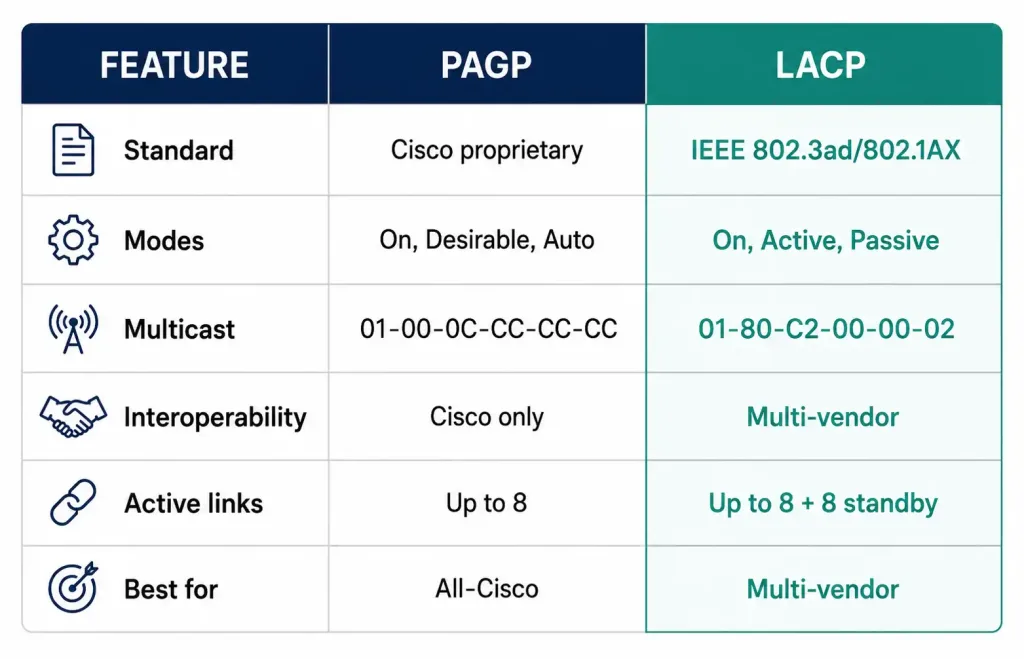
| Feature | PAgP | LACP |
|---|---|---|
| Standard | Cisco proprietary | IEEE standard (802.3ad / 802.1AX) |
| Modes | On, Desirable, Auto | On, Active, Passive |
| Multicast address | 01-00-0C-CC-CC-CC | 01-80-C2-00-00-02 |
| Hello interval | 30 seconds (fixed) | Configurable (fast/slow) |
| Interoperability | Cisco devices only | Multi-vendor |
| Active links | Up to 8 | Up to 8, plus up to 8 hot-standby |
| Best suited for | All-Cisco environments | Multi-vendor / standards-based |
EtherChannel Guard: Protecting Against Misconfiguration
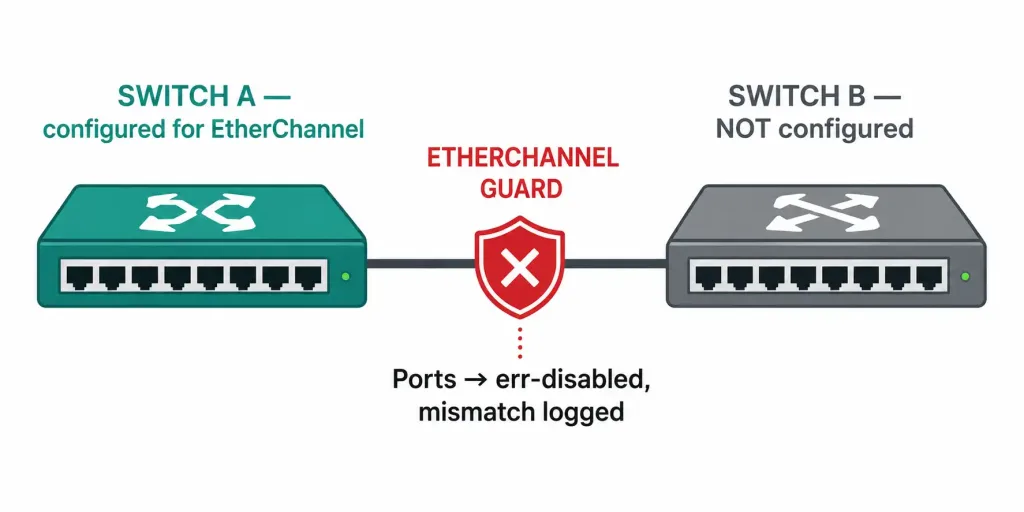
Cisco switches include EtherChannel Guard by default, a feature that detects a specific misconfiguration: ports on one switch configured for EtherChannel while the corresponding ports on the neighboring switch aren’t, or are configured inconsistently. Rather than allowing a partial, potentially loop-prone bundle to form silently, EtherChannel Guard puts the affected ports into an err-disabled state and logs the inconsistency, giving a clear signal that something on one side doesn’t match rather than leaving an ambiguous partial channel to troubleshoot later. This default-on protection is easy to overlook until it’s the reason a bundle that “should” have formed didn’t — checking the switch log for an EtherChannel Guard message is often the fastest path to a root cause.
Load Balancing and Troubleshooting
Load balancing. EtherChannel distributes traffic across member links using a hash of address information, configured with port-channel load-balance — for example, port-channel load-balance src-dst-ip hashes on source and destination IP. A single conversation is generally carried on one physical link due to the hash, so aggregate bandwidth benefits many simultaneous conversations rather than any single one. Available hash methods vary by platform, so check what a specific switch supports before choosing one.
Troubleshooting commands:
show etherchannel summary— the fastest way to spot a channel that didn’t form, showing each channel group, its protocol, and member port status.show interfaces— confirm member links have matching speed and duplex.show lacp neighbor— view LACP peer information directly.show pagp neighbor— the PAgP equivalent, showing the neighbor’s PAgP capability and identity.
PAgP and LACP are mutually exclusive on the same bundle — both ends of a link must run the same negotiation protocol, or both must use on. A protocol mismatch prevents the channel from forming, and the ports simply operate as individual, unbundled links instead.
Frequently Asked Questions
What is the main difference between PAgP and LACP?
PAgP is Cisco’s proprietary negotiation protocol and works only between Cisco (or Cisco-licensed) devices. LACP is an open IEEE standard (802.3ad / 802.1AX) that works across vendors. Both negotiate compatible modes to bundle links, but LACP is preferred wherever multi-vendor interoperability matters.
How do I configure EtherChannel using LACP?
Enter interface range configuration mode, apply channel-group 1 mode active on one side and mode passive (or active) on the other, then configure the resulting port-channel interface, commonly as a trunk. Verify with show etherchannel summary.
Why does PAgP use the same multicast address as CDP and VTP?
01-00-0C-CC-CC-CC is a general Cisco-reserved multicast address shared across several proprietary Layer 2 protocols, including CDP, VTP, DTP, UDLD, and PAgP. The protocol type field inside the frame, not the destination address alone, is what identifies which specific protocol sent a given packet.
What’s the difference between LACP’s active and hot-standby ports?
Active ports actually forward traffic as part of the bundle, up to 8 at a time. Hot-standby ports (up to 8 additional, for 16 configured total) are fully negotiated and ready but not currently forwarding — one activates automatically the moment an active port fails, without needing to renegotiate from scratch.
What does EtherChannel Guard actually protect against?
A scenario where one switch’s ports are configured for EtherChannel but the neighboring switch’s corresponding ports aren’t configured to match. Rather than letting an inconsistent, partially-working bundle form, EtherChannel Guard puts the affected ports into an err-disabled state and logs the mismatch clearly.
How many links can an EtherChannel bundle have?
Up to 8 active links for both PAgP and LACP. LACP additionally supports up to 8 hot-standby links (16 configured total), which activate automatically if an active link fails — a capability PAgP doesn’t offer at all.
Conclusion
PAgP and LACP solve the same problem — negotiating an EtherChannel bundle automatically rather than relying on manually-matched static configuration — but with real, verifiable differences: PAgP’s fixed 30-second timer and Cisco-only scope versus LACP’s configurable timers, multi-vendor support, and hot-standby capacity. Getting the mode pairing right (desirable/auto for PAgP, active/passive for LACP) and knowing exactly what show etherchannel summary and show lacp neighbor reveal is the practical foundation for working with either protocol in production.