
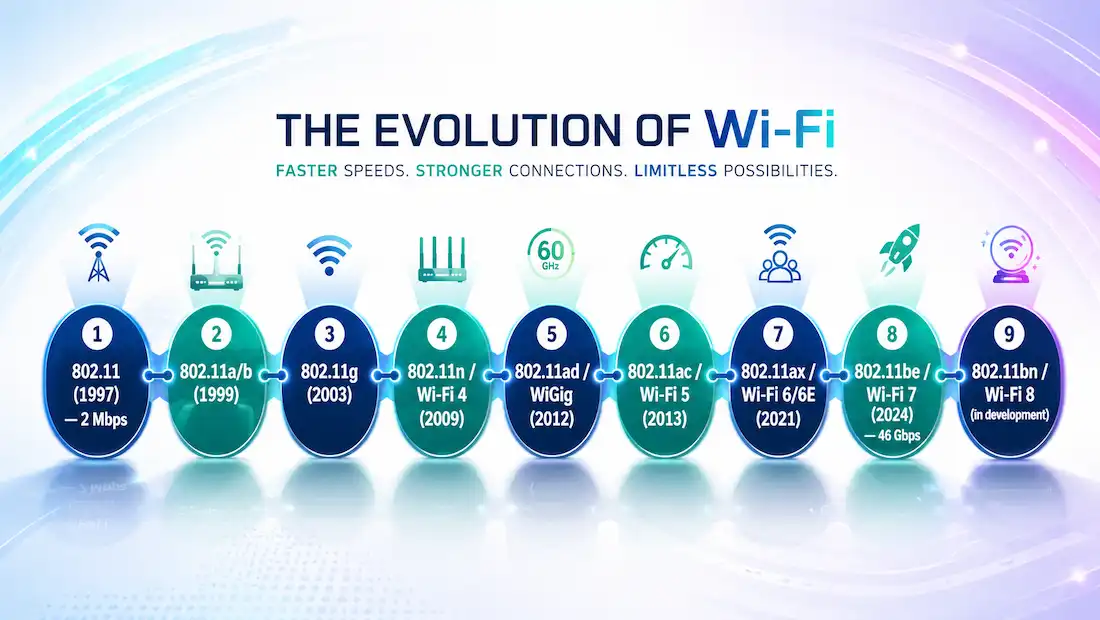
IEEE 802.11 is the family of standards that defines how wireless local area networks (WLANs) operate. Maintained by the Institute of Electrical and Electronics Engineers (IEEE), these standards specify how radio frequency signals in unlicensed ISM frequency bands are used at the Physical layer and the MAC sublayer of wireless links. Every Wi-Fi device you have ever used — laptop, phone, access point, or smart home device — operates on one or more of these standards.
What All IEEE 802.11 Standards Share
A frame format related to, but not identical to, Ethernet. 802.11 frames follow a similar overall structure to Ethernet — header, payload, frame check sequence — but they are not the same framing, and there is no such thing as wireless and wired devices communicating “without protocol translation.” An 802.11 frame carries up to four MAC address fields versus Ethernet’s two, along with management and control frame types Ethernet has no equivalent for. This is exactly why an access point exists as a distinct device: it actively translates between 802.11 wireless framing and 802.3 Ethernet framing every time it bridges traffic from the wireless side onto the wired network, and vice versa. Without that translation step happening continuously, a wireless client and a wired switch port couldn’t understand each other’s frames at all.
CSMA/CA access method. Wired Ethernet uses CSMA/CD (Collision Detection). Wireless networks cannot detect collisions while transmitting, so 802.11 uses CSMA/CA (Carrier Sense Multiple Access with Collision Avoidance). Before transmitting, a device listens to confirm the channel is idle, then waits a random backoff period before sending. If the channel is busy, it waits again. This avoids, rather than detects, collisions — at the cost of some overhead.
IEEE 802.11 Standards by Generation
Original 802.11 (1997) — Wi-Fi’s Starting Point
Released in 1997, the original 802.11 standard was the first IEEE specification for wireless networking. It operated in the 2.4 GHz band and delivered maximum speeds of up to 2 Mbps — at a time when wired Ethernet was already running at 10 Mbps. This standard is now obsolete and no modern devices use it, but it established the foundation for everything that followed.
IEEE 802.11a (1999)
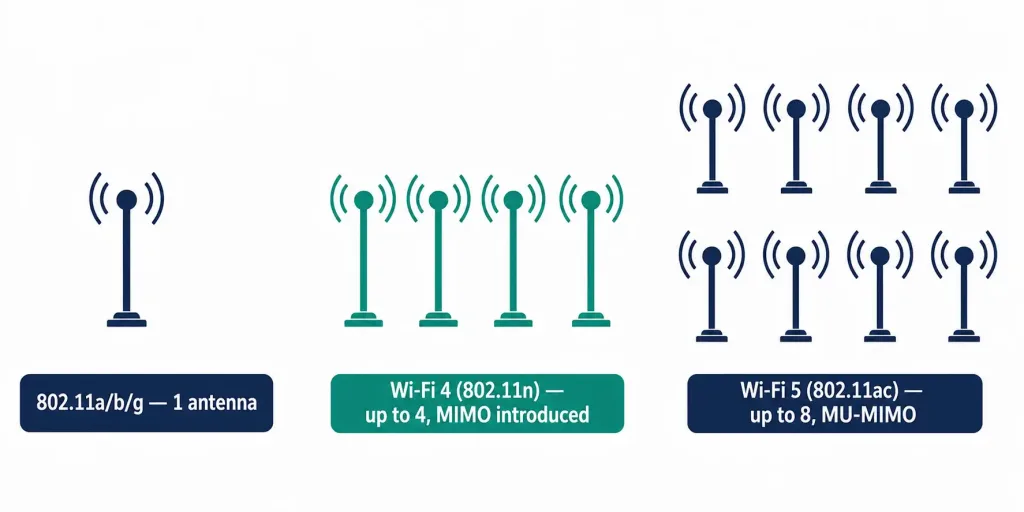
802.11a moved to the 5 GHz band and pushed speeds to up to 54 Mbps using OFDM (Orthogonal Frequency-Division Multiplexing). The higher frequency provided more available channels and less interference from household appliances, but shorter range and weaker wall penetration compared to 2.4 GHz devices. It is incompatible with 802.11b and 802.11g, which operate on 2.4 GHz. Devices use a single antenna for transmission and reception.
IEEE 802.11b (1999)
Released the same year as 802.11a, 802.11b stayed in the 2.4 GHz band and reached speeds of up to 11 Mbps using DSSS (Direct-Sequence Spread Spectrum). Its lower frequency meant longer range and better penetration through building structures than 802.11a — advantages that drove its widespread adoption in homes and offices. Devices use a single antenna. It is incompatible with 802.11a.
IEEE 802.11g (2003)
802.11g combined the best of 802.11a and 802.11b: 2.4 GHz band operation (giving it 802.11b’s range and wall penetration) with OFDM (giving it 802.11a’s speeds of up to 54 Mbps). It is backward compatible with 802.11b, though mixed-mode operation reduces overall network throughput because the access point must accommodate the slower standard. Like 802.11a and 802.11b before it, 802.11g devices use a single antenna — MIMO didn’t arrive until the next generation. 802.11g was the dominant standard in homes for much of the 2000s.
IEEE 802.11n — Wi-Fi 4 (2009)
802.11n, branded Wi-Fi 4 by the Wi-Fi Alliance, introduced three significant advances.
Dual-band operation — it was the first standard to support both 2.4 GHz and 5 GHz, allowing devices and access points to choose the band that best suits their environment.
MIMO — 802.11n was the first 802.11 standard to specify MIMO (Multiple Input, Multiple Output). MIMO uses multiple antennas at both the transmitter and receiver simultaneously to send independent data streams, dramatically increasing throughput. Up to four antennas can be used with 802.11n devices — every prior generation (a, b, and g) was limited to a single antenna, which is exactly what made MIMO’s arrival in 802.11n a genuine architectural shift rather than an incremental speed bump.
Speed — data rates range from 150 Mbps to 600 Mbps depending on channel width and antenna configuration, covering distances of up to 70 meters indoors.
802.11n is backward compatible with 802.11a, 802.11b, and 802.11g.
IEEE 802.11ac — Wi-Fi 5 (2013)
802.11ac, branded Wi-Fi 5, operates exclusively in the 5 GHz band and delivers data rates from 450 Mbps to 1.3 Gbps (and higher with additional spatial streams). It extended MIMO to support up to eight antennas and introduced MU-MIMO (Multi-User MIMO), which allows an access point to serve multiple clients simultaneously rather than sequentially. Channel widths increased to 80 MHz and optionally 160 MHz.
802.11ac is backward compatible with 802.11a and 802.11n devices, though mixed-mode operation limits achievable throughput. Most home routers sold between 2014 and 2021 were 802.11ac devices.
IEEE 802.11ad — WiGig (2012)
802.11ad, commonly known as WiGig, added a third band — 60 GHz — to the existing 2.4 GHz and 5 GHz options. The 60 GHz band enables theoretical speeds of up to 7 Gbps, but comes with a critical constraint: the 60 GHz signal cannot penetrate walls and has an effective range of approximately 3.3 meters (11 feet). In practice, 802.11ad is useful only for line-of-sight, short-range applications such as wireless docking stations and cable replacement. When the 60 GHz band is unavailable, devices fall back to 2.4 GHz or 5 GHz bands for broader compatibility. The standard was ratified by IEEE in 2012.
IEEE 802.11ax — Wi-Fi 6 and Wi-Fi 6E (2021)
802.11ax, branded Wi-Fi 6, was ratified in 2021 and represents the most significant architectural redesign of Wi-Fi since 802.11n. Where previous generations focused on increasing peak speed, Wi-Fi 6 focused on efficiency in dense environments — stadiums, offices, apartment buildings — where many devices compete for the same channel.
Key technologies introduced in 802.11ax:
OFDMA (Orthogonal Frequency-Division Multiple Access) — divides each channel into smaller sub-channels called Resource Units (RUs), allowing an access point to serve multiple clients simultaneously in a single transmission. Previous generations served one client per transmission.
MU-MIMO expansion — Wi-Fi 6 extended MU-MIMO to support up to 8 simultaneous spatial streams in both uplink and downlink directions (802.11ac supported downlink only).
BSS Coloring — a mechanism that reduces co-channel interference between overlapping networks by tagging each access point’s transmissions with a color identifier, allowing devices to ignore transmissions from neighboring networks more efficiently.
Target Wake Time (TWT) — allows the access point to schedule when devices wake to transmit or receive, significantly reducing power consumption for IoT and battery-powered devices.
Speeds — maximum throughput of up to 9.6 Gbps across all spatial streams, with typical real-world speeds 30–40% faster than 802.11ac in dense environments.
Wi-Fi 6E extends 802.11ax into the newly opened 6 GHz band (in regions where it is available), adding up to 14 additional 80 MHz channels or 7 additional 160 MHz channels — reducing congestion significantly in areas with dense Wi-Fi deployments.
IEEE 802.11be — Wi-Fi 7 (2024)
802.11be, branded Wi-Fi 7, was approved by IEEE in 2024. It operates across all three bands — 2.4 GHz, 5 GHz, and 6 GHz — and introduces three headline advances.
Multi-Link Operation (MLO) — the most significant new feature. MLO allows a device to connect to an access point on multiple bands simultaneously and aggregate or load-balance traffic across them. A device can send data on 5 GHz and 6 GHz at the same time, reducing latency and improving reliability. Previous Wi-Fi generations could only use one band per connection at a time.
320 MHz channel width — Wi-Fi 7 doubles the maximum channel width from 160 MHz (Wi-Fi 6E) to 320 MHz, available only on the 6 GHz band. This alone can meaningfully increase throughput compared to Wi-Fi 6E.
4096-QAM modulation (4K-QAM) — encodes more bits per symbol than Wi-Fi 6’s 1024-QAM, increasing peak throughput per stream under ideal signal conditions.
Preamble puncturing — allows a Wi-Fi 7 device to use most of a wide channel even when a portion is occupied by interference, instead of stepping down to a narrower channel entirely.
Maximum throughput — the widely-cited, current theoretical maximum is 46 Gbps across all spatial streams, achieved through the combination of 320 MHz channels, 4096-QAM, and up to 16 spatial streams. Earlier pre-finalization estimates from industry sources cited lower figures (some as low as 23-30 Gbps) before the full combination of features was locked in — if you encounter a lower Wi-Fi 7 speed figure in older material, it likely reflects one of these earlier, superseded estimates rather than the finalized standard’s actual ceiling. As with every generation before it, real-world throughput in typical deployments is substantially lower than this theoretical maximum.
IEEE 802.11bn — Wi-Fi 8 (In Development)
802.11bn, designated Wi-Fi 8 and formally titled “Ultra High Reliability” (UHR), is currently under development within the IEEE 802.11 working group. Unlike previous generations which prioritized peak speed, Wi-Fi 8 shifts focus to reliability and consistency: meaningfully higher throughput in challenging signal conditions, lower latency at high percentiles, fewer dropped packets during roaming between access points, and reduced power consumption. It also improves multi-AP coordination and seamless roaming — particularly relevant for enterprise deployments and dense IoT environments. As with any standard still in development, specific performance targets and the final ratification timeline remain subject to change until the standard is formally finalized.
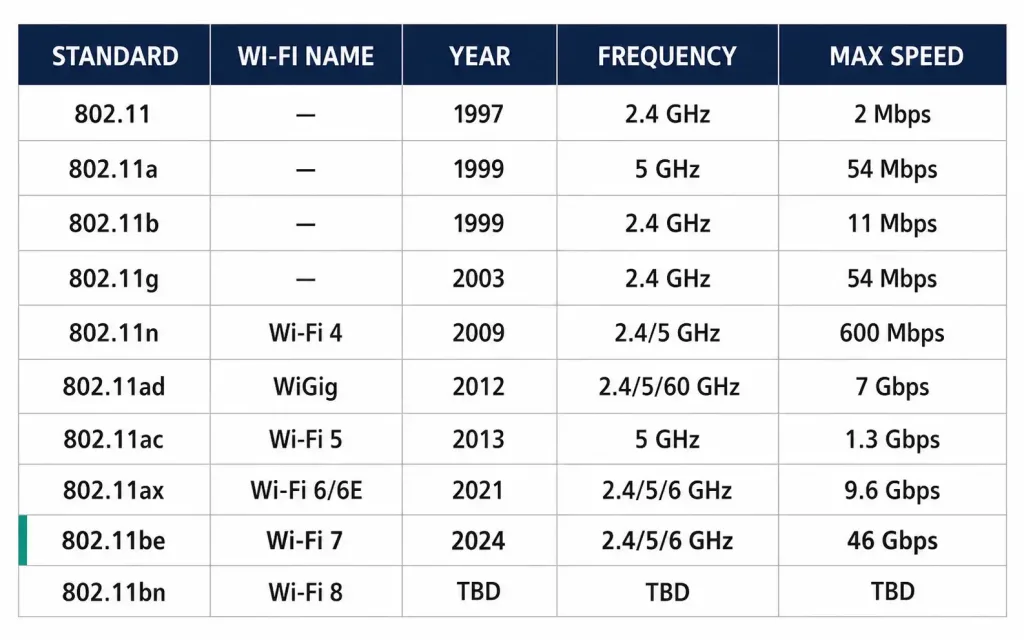
IEEE 802.11 Standards Comparison Table
| Standard | Wi-Fi Name | Year | Frequency | Max Speed | Key Technology |
|---|---|---|---|---|---|
| 802.11 | — | 1997 | 2.4 GHz | 2 Mbps | DSSS |
| 802.11a | — | 1999 | 5 GHz | 54 Mbps | OFDM |
| 802.11b | — | 1999 | 2.4 GHz | 11 Mbps | DSSS |
| 802.11g | — | 2003 | 2.4 GHz | 54 Mbps | OFDM |
| 802.11n | Wi-Fi 4 | 2009 | 2.4 / 5 GHz | 600 Mbps | MIMO, dual-band |
| 802.11ad | WiGig | 2012 | 2.4 / 5 / 60 GHz | 7 Gbps (60 GHz, line-of-sight) | Tri-band |
| 802.11ac | Wi-Fi 5 | 2013 | 5 GHz | 1.3 Gbps | MU-MIMO, 8 antennas |
| 802.11ax | Wi-Fi 6 / 6E | 2021 | 2.4 / 5 / 6 GHz | 9.6 Gbps | OFDMA, MU-MIMO, TWT, BSS Coloring |
| 802.11be | Wi-Fi 7 | 2024 | 2.4 / 5 / 6 GHz | 46 Gbps | MLO, 320 MHz channels, 4K-QAM |
| 802.11bn | Wi-Fi 8 | In development | TBD | TBD | Ultra High Reliability, multi-AP coordination |
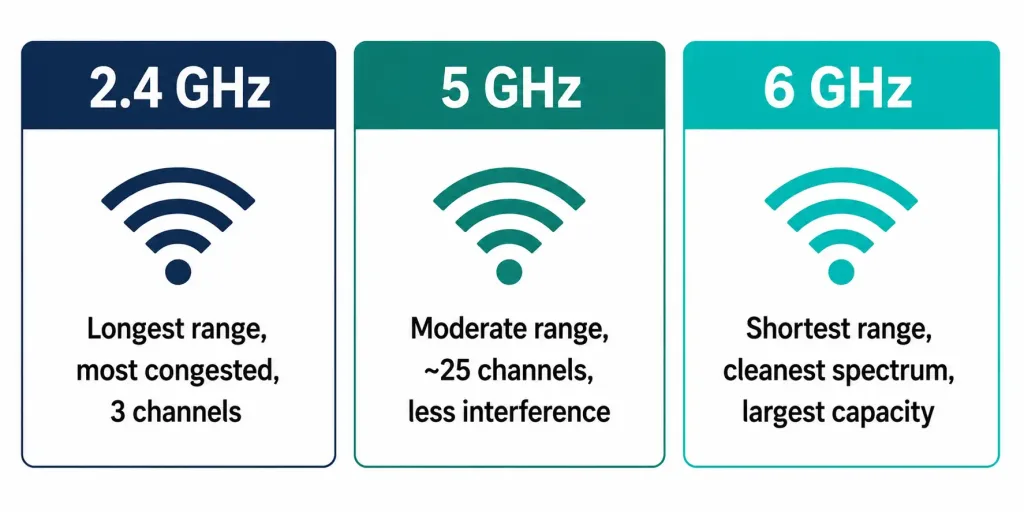
Frequency Bands: 2.4 GHz vs 5 GHz vs 6 GHz
Understanding the trade-offs between frequency bands is as important as knowing the standard versions.
2.4 GHz — longest range, best wall penetration, most congested (only 3 non-overlapping 20 MHz channels in most regions). Shared with Bluetooth, microwaves, and many other devices. Best for IoT devices, devices far from the access point, and backward compatibility.
5 GHz — shorter range, weaker wall penetration, but significantly more available channels (up to 25 non-overlapping 20 MHz channels) and less interference. Best for high-throughput applications at moderate distances.
6 GHz — available with Wi-Fi 6E and Wi-Fi 7 in regions that have opened this spectrum. Shortest range but the cleanest spectrum currently available, with the largest channel capacity. Best for high-density enterprise deployments and applications requiring low latency at close range.
IEEE 802.11 and the CCNA
For CCNA candidates, the IEEE 802.11 standards are tested primarily on recognition and comparison. Key exam points include:
- All 802.11 standards use CSMA/CA (not CSMA/CD used by wired Ethernet)
- 802.11b and 802.11g operate in 2.4 GHz; 802.11a operates in 5 GHz
- 802.11n (Wi-Fi 4) was the first dual-band and first MIMO standard
- 802.11ac (Wi-Fi 5) operates only in 5 GHz and supports up to 8 spatial streams
- 802.11ax (Wi-Fi 6) introduced OFDMA for dense-environment efficiency
- 802.11be (Wi-Fi 7) introduced Multi-Link Operation (MLO)
- Backward compatibility: 802.11n supports a/b/g; 802.11ac supports a/n; operating in mixed mode reduces overall throughput
- Access points, not a shared frame format, are what let wireless and wired segments communicate — the AP actively translates between 802.11 and 802.3 framing
Conclusion
IEEE 802.11 standards have evolved from a 2 Mbps experimental protocol in 1997 to a multi-gigabit, multi-band, multi-link technology that underpins wireless communication for billions of devices. Each generation addressed the primary limitation of its predecessor: 802.11n brought MIMO and dual-band, 802.11ac brought MU-MIMO and gigabit speeds, 802.11ax brought OFDMA and dense-environment efficiency, and 802.11be brings Multi-Link Operation for simultaneously using multiple bands. Wi-Fi 8 (802.11bn), still in development, will shift the focus from peak speed to reliability and consistent latency — a sign of how mature and widely deployed wireless networking has become.
Frequently Asked Questions
What does IEEE 802.11 mean?
IEEE 802.11 is the designation given by the Institute of Electrical and Electronics Engineers (IEEE) to the family of wireless LAN standards. “802” refers to the IEEE working group on networking standards, and “11” identifies the wireless LAN subgroup.
What is the difference between 802.11n and 802.11ac?
802.11n (Wi-Fi 4) operates on both 2.4 GHz and 5 GHz and supports up to four MIMO antennas with a maximum speed of 600 Mbps. 802.11ac (Wi-Fi 5) operates only on 5 GHz, supports up to eight MU-MIMO antennas, and achieves speeds up to 1.3 Gbps and beyond with additional spatial streams.
What is Wi-Fi 6 and what makes it different?
Wi-Fi 6 (802.11ax) introduced OFDMA, which allows an access point to serve multiple clients simultaneously within a single transmission slot. This makes it significantly more efficient in dense environments with many connected devices, even if peak single-client speed is not dramatically higher than Wi-Fi 5.
What is Multi-Link Operation in Wi-Fi 7?
MLO (Multi-Link Operation), introduced in 802.11be (Wi-Fi 7), allows a device to connect to an access point on multiple frequency bands simultaneously and aggregate or balance traffic across them. This reduces latency and improves reliability compared to previous generations where only one band could be used at a time.
Do wireless and wired devices communicate without any frame translation?
No — this is a common misconception. 802.11 wireless frames and 802.3 Ethernet frames are structurally different, with 802.11 carrying up to four address fields versus Ethernet’s two, plus wireless-specific management and control frame types Ethernet has no equivalent for. An access point actively translates between the two formats every time it bridges traffic between the wireless and wired sides of the network.
Why does operating in mixed mode reduce Wi-Fi speed?
When a newer access point serves a mix of newer and older clients, it must include compatibility overhead in its transmissions so older devices can understand them. This reduces the total efficiency of the channel, because time is spent on backward-compatibility mechanisms that faster clients don’t need.
What is CSMA/CA and why does Wi-Fi use it instead of CSMA/CD?
CSMA/CD (Collision Detection) works on wired Ethernet because a device can detect a collision while transmitting. In wireless networks, a transmitting device cannot listen for collisions at the same time it is sending, so CSMA/CA (Collision Avoidance) is used instead — devices listen before transmitting and wait a random backoff period to reduce the chance of simultaneous transmissions.



