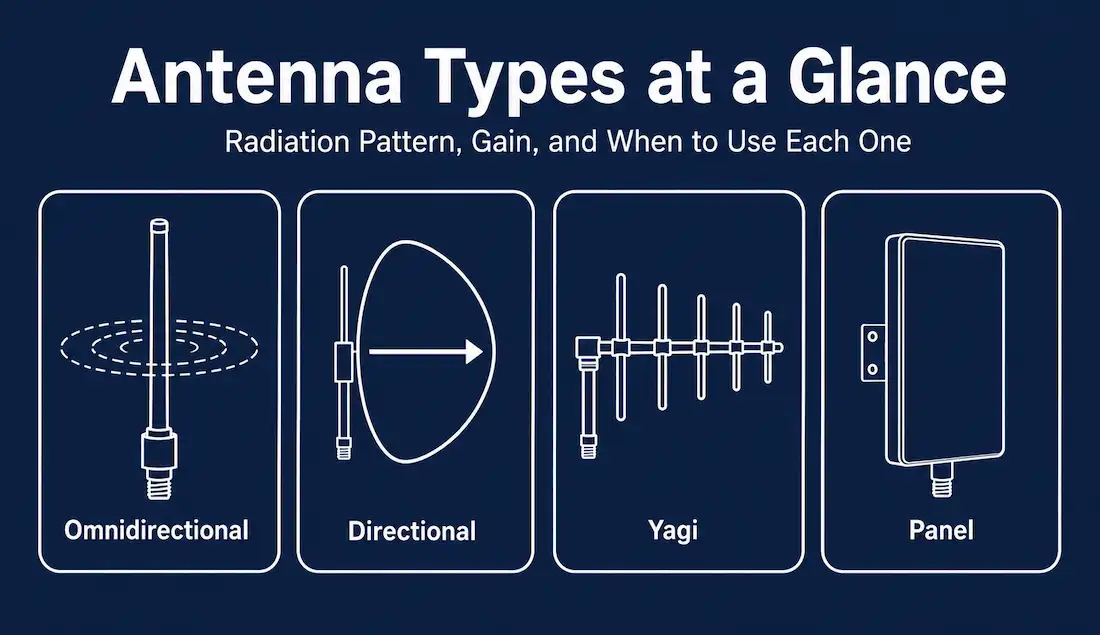
A wireless antenna is the component that actually radiates and collects radio frequency (RF) energy — it’s the physical interface between an electrical signal inside a device and a radio wave traveling through the air. Antennas connect to radios through low-loss coaxial cable, or in many consumer devices, directly to the radio chip inside the housing. Outdoor antennas typically mount via clamps to a mast or brackets on a building; indoor antennas are usually ceiling- or wall-mounted.
Antenna choice matters more than most people realize when deploying Wi-Fi. The right antenna type, matched to the coverage area and distance involved, can be the difference between reliable connectivity and a network full of dead zones.
Why antennas matter for access points
Antennas are a core component of any access point. Business-class APs commonly use external antennas rather than the fixed internal antennas found in most home routers, because external antennas can be positioned, oriented, and upgraded independently of the AP itself. Cisco and other enterprise vendors offer a range of antenna types for their 802.11 APs, and the right choice depends on the deployment’s layout, coverage area, and required distance.
Omnidirectional antennas
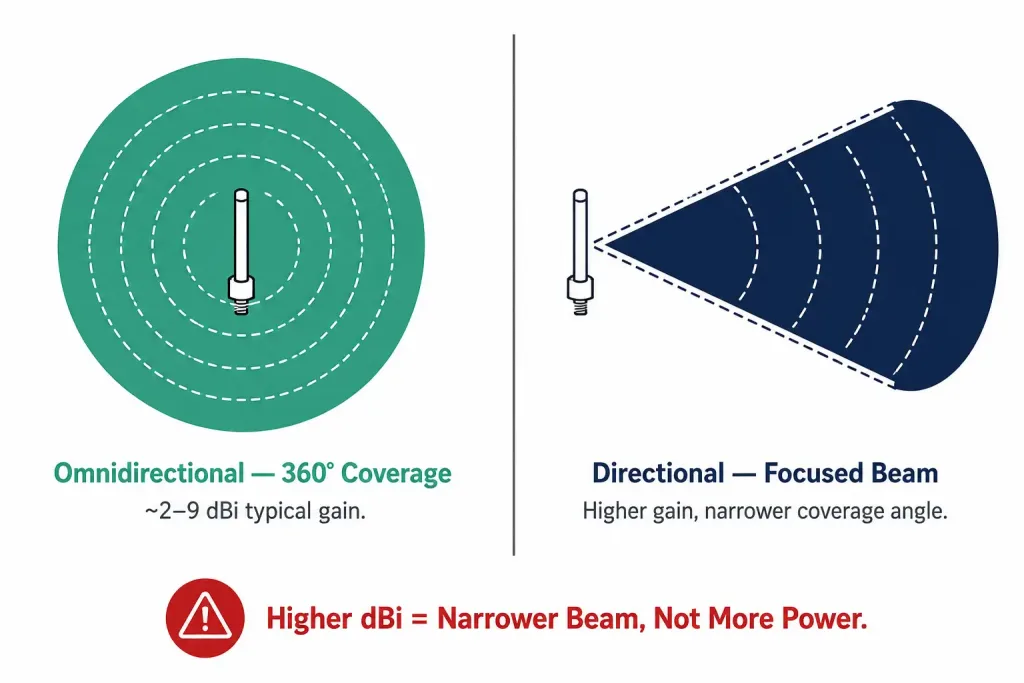
Omnidirectional antennas radiate and receive signal in all directions across a full 360 degrees, making them the standard choice for open areas like hallways, conference rooms, and general indoor or outdoor coverage where clients could approach from any direction.
Most Wi-Fi routers and mobile adapters use basic dipole antennas of the familiar “rubber duck” design, which fall into the omnidirectional category. These antennas typically have a gain in the range of about 2 to 9 dBi. Gain, measured in dBi (decibels relative to an isotropic radiator), describes how effectively an antenna concentrates energy rather than spreading it evenly — a higher dBi number means a more focused pattern, not more raw transmit power.
Directional antennas
Directional antennas focus their radiation pattern — the “lobe” of strongest signal — in a specific direction, trading 360-degree coverage for significantly higher gain in that direction. A directional Wi-Fi antenna strengthens both transmission and reception along its aimed axis.
The tradeoff is straightforward: a directional antenna sends and receives a strong signal in one direction and a much weaker signal everywhere else. This makes directional antennas the right tool for extending range into a specific hard-to-reach area of a building, or for point-to-point links, rather than for general coverage where clients could be anywhere.
Yagi antennas
A Yagi (or Yagi-Uda) antenna is a common type of directional antenna built from a series of parallel elements along a boom, designed for long-distance, single-direction communication. Yagi antennas are frequently paired with outdoor access points to extend range in a specific direction, with typical gain figures ranging from roughly 7 dBi up to 15–20 dBi or higher depending on the specific design and element count — higher gain generally means a longer boom and a narrower beamwidth.
Panel and other directional options
Beyond Yagi antennas, flat panel antennas are another common directional option. Panel antennas typically offer somewhat lower gain than a comparable Yagi, but their compact, low-profile shape makes them easier to mount discreetly on walls or poles, and they’re often preferred for covering a sector of an area rather than a single fixed point. Panel antennas also commonly support dual polarization, which makes them a natural fit for MIMO point-to-multipoint links where multiple spatial streams need to reach several clients across a defined sector rather than one fixed target. For the very longest point-to-point links, parabolic dish or grid antennas provide the highest gain and narrowest beam of any common Wi-Fi antenna type, at the cost of a larger physical footprint. A grid or dish antenna can often achieve the same gain as a very long Yagi in a more compact and easier-to-mount form, since the parabolic reflector concentrates gain through its width rather than through the boom length a Yagi design requires.
MIMO and multiple antennas
MIMO (Multiple Input, Multiple Output) technology uses several antennas simultaneously to send and receive more data than a single antenna could handle alone, which is one of the main ways modern Wi-Fi standards increase bandwidth without needing more spectrum.
It’s worth being precise about which Wi-Fi standards actually use MIMO in this sense. 802.11n and 802.11ac both use true spatial-multiplexing MIMO, sending multiple independent data streams over multiple antennas simultaneously; 802.11ac added multi-user MIMO (MU-MIMO) on top of that, letting an access point serve several clients’ streams at once. Wi-Fi 6 (802.11ax) and Wi-Fi 7 (802.11be) continue to build on this with MU-MIMO and additional spatial streams.
802.11ad (WiGig), which operates in the 60 GHz band, is a notable exception. Despite sometimes being grouped with n/ac in older material, 802.11ad does not use spatial-multiplexing MIMO — it uses a single spatial stream combined with beamforming, an antenna array technique that focuses a directional beam toward the client rather than sending multiple independent streams. This distinction exists because propagation at 60 GHz behaves very differently from the 2.4/5 GHz bands, making narrow-beam beamforming the more practical technique at that frequency. Its eventual successor, 802.11ay, does add MIMO with multiple spatial streams.
More antennas generally means more available spatial streams, and more spatial streams generally means higher throughput — but only up to the number of antennas the connecting client device also supports. A four-antenna router communicating with a single-antenna phone still only achieves single-stream throughput to that phone; the additional antennas mainly help when serving multiple clients simultaneously or when connecting to other multi-antenna devices. This is why router marketing that emphasizes antenna count alone can be misleading — the number that matters is the number of spatial streams actually negotiated between a specific router and a specific client, not the antenna count printed on the box. A router advertised as “8-antenna” is only using all eight when talking to a client capable of an 8×8 MIMO configuration, which is uncommon outside of high-end access points and specialized equipment; most phones and laptops support far fewer spatial streams than a flagship router’s antenna count suggests.
Antenna polarization
Beyond radiation pattern and gain, antennas also have a polarization — the orientation of the electromagnetic wave they emit, typically either vertical or horizontal. Most omnidirectional Wi-Fi antennas are vertically polarized, and most client devices are designed to receive vertically polarized signals as well, which is why standing a router upright generally performs better than laying it flat.
Directional antennas, including Yagis, can often be mounted with elements oriented vertically or horizontally to match the desired polarization. Mismatched polarization between a transmitting and receiving antenna can noticeably reduce signal strength, even when both antennas are otherwise well-aimed and rated for adequate gain — this is a common oversight in point-to-point link installations that otherwise look correctly configured.
Installation and mounting considerations
Getting the antenna type right is only part of a successful deployment. Physical installation affects performance just as much:
- Height and obstruction clearance. Outdoor directional links need a clear line of sight, or as close to it as possible, between the two ends. Trees, buildings, and terrain that block even a portion of the Fresnel zone — the elliptical region around the direct line of sight that also carries usable signal — can degrade a link significantly even when the two antennas can technically “see” each other.
- Cable loss. Coaxial cable between the radio and the antenna introduces signal loss that increases with cable length and frequency. Longer cable runs, especially at higher frequencies like 5 GHz, can meaningfully offset an antenna’s gain advantage if the cable itself isn’t low-loss and kept as short as practical.
- Aiming precision for high-gain directional antennas. The narrower an antenna’s beamwidth, the more precisely it needs to be aimed at its target. A high-gain Yagi with a narrow beam can require careful, sometimes iterative aiming adjustments to hit peak signal strength, while a wider-beamwidth panel antenna tolerates more aiming error at the cost of some peak gain.
- Weatherproofing for outdoor installations. Outdoor antennas and their connectors need weatherproof housings or sealing to prevent water ingress, which can degrade or destroy an antenna connection over time even if the initial installation performed well.
Choosing the right antenna for a deployment
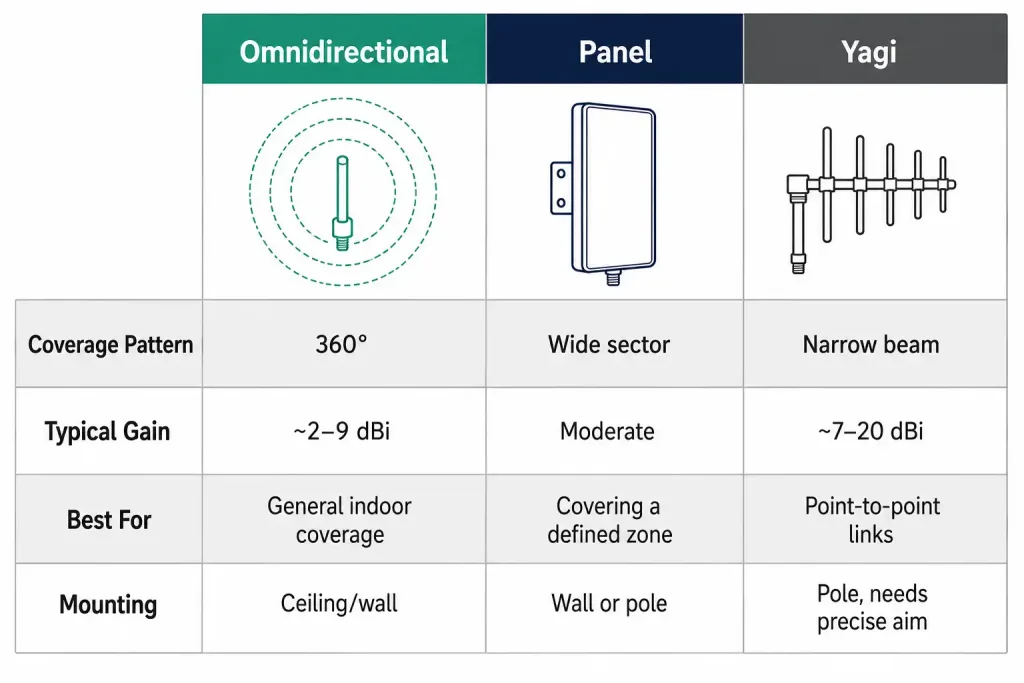
| Antenna Type | Coverage Pattern | Typical Gain | Best For |
|---|---|---|---|
| Omnidirectional (dipole) | 360° | ~2–9 dBi | General indoor coverage, home routers, open areas |
| Panel | Sector (wide directional) | Moderate | Covering a defined area or zone from one mounting point |
| Yagi | Narrow directional | ~7–20 dBi | Point-to-point links, extending range in one direction |
| Parabolic/grid | Very narrow directional | Highest | Longest-distance point-to-point outdoor links |
Frequently Asked Questions
Does a higher dBi number always mean better Wi-Fi performance? No. Higher gain concentrates the signal into a narrower beam rather than making the radio itself more powerful. A high-gain omnidirectional antenna covers a flatter, wider disc-shaped area with less vertical reach, while a high-gain directional antenna reaches much farther but only within a narrow angle. The “best” antenna depends entirely on the coverage shape needed.
Can I replace a router’s internal antenna with an external one? On routers and access points with removable, connectorized antennas, yes — this is a common way to improve range or reception in a specific direction without replacing the whole device. Devices with antennas built into the enclosure generally cannot be upgraded this way, since the antenna element is integrated directly into the housing rather than attached through a swappable connector.
Why do enterprise access points use external antennas instead of built-in ones? External antennas can be swapped for a different type or gain level as a deployment’s requirements change, and they can be positioned independently of the AP body for better coverage — flexibility that a fixed internal antenna doesn’t offer. This matters most in enterprise environments, where a site’s coverage requirements can change as walls go up, furniture layouts shift, or a building’s use case changes, and swapping an antenna is far cheaper than replacing the entire access point.
Does 802.11ad support MIMO? No. 802.11ad (WiGig) uses a single spatial stream with beamforming rather than spatial-multiplexing MIMO, unlike 802.11n and 802.11ac. Its successor, 802.11ay, does add MIMO support.
Why does my point-to-point link perform poorly even though both antennas are aimed correctly? Beyond aiming, check cable loss, connector quality, and polarization match between the two ends. A link with correctly aimed but mismatched polarization, or with a long run of poor-quality coax between the radio and antenna, can underperform significantly even with otherwise ideal alignment. Fresnel zone obstruction is another common culprit — a link can have clear line of sight between the antennas while still losing significant signal if trees or structures intrude on the surrounding Fresnel zone.
Conclusion
Antenna choice is one of the more overlooked variables in wireless network design, but it directly shapes coverage shape, range, and reliability. Omnidirectional antennas suit general-purpose coverage where clients approach from any direction; directional antennas — Yagi, panel, or parabolic — suit extending range in a specific direction or building a long point-to-point link. Layering MIMO’s multiple spatial streams on top of the right antenna type is what lets modern Wi-Fi standards deliver the throughput increases they’re known for — with 802.11ad’s beamforming-only approach as the notable exception among current standards. Beyond picking the right antenna type, getting the installation details right — polarization matching, cable loss, aiming precision, and weatherproofing — is often what separates a link that works on paper from one that performs reliably in practice.