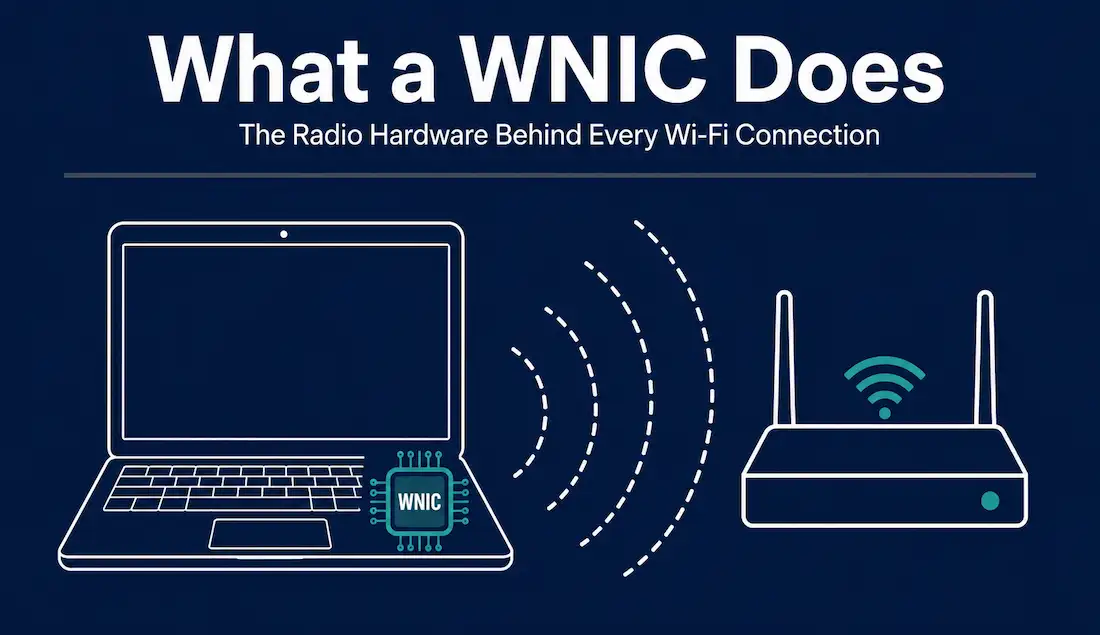
Every device that connects to Wi-Fi does so through a Wireless Network Interface Card — the radio hardware that turns your data into radio waves and back again. Whether it’s a chip soldered onto your laptop’s motherboard, an M.2 module inside a desktop, or a USB dongle you plug in, the WNIC is what actually talks to your access point. This guide explains how a WNIC works, the forms it takes, what changed with Wi-Fi 7, and how to choose and troubleshoot one — with an honest account of where the marketing numbers diverge from real-world performance.
What is a WNIC, and how does it work?
A Wireless Network Interface Card (WNIC), commonly called a Wi-Fi adapter, is the hardware that connects a device to a wireless network. It contains a radio transceiver that converts digital data into radio signals for transmission and converts received radio signals back into data — all according to the IEEE 802.11 family of standards. Unlike a wired NIC, which pushes electrical signals down a cable, a WNIC does the same job over the air.
The main components
Antenna — converts electrical signals into electromagnetic waves and vice versa. Antenna quality and placement have an outsized effect on real-world range. Integrated laptop antennas usually run along the display bezel, which is why signal strength often drops noticeably when a laptop lid is nearly closed or when the display is angled away from the access point.
RF chipset — handles the radio front end, modulating data onto carrier frequencies in the 2.4 GHz, 5 GHz, and (on newer cards) 6 GHz bands. This is also the part that determines which channel widths and modulation schemes a card can actually use, regardless of what the connected access point supports.
Baseband processor — performs the digital signal processing, including modulation schemes such as OFDM and OFDMA. On combo cards, this processor is frequently shared with a Bluetooth radio, which is why a single M.2 module can usually handle both Wi-Fi and Bluetooth at once.
MAC controller — implements the 802.11 MAC layer: addressing, framing, and access to the shared medium.
Firmware/memory — stores the protocol logic the card runs, which is why driver and firmware updates can meaningfully change a card’s behaviour and stability. A firmware update can add support for a newly opened frequency channel or fix a specific compatibility issue with certain router models, without any change to the physical hardware.
Modern WNICs also use MIMO (Multiple Input Multiple Output) — multiple antennas transmitting and receiving simultaneously — and MU-MIMO, which lets an access point serve several clients at once rather than one at a time.
Who makes WNIC chipsets?
Most WNICs on the market are built around silicon from a small handful of manufacturers. Broadcom, Qualcomm, and MediaTek lead the market by revenue and shipment volume, followed by Intel and Realtek. Intel’s chipsets are common in Windows laptops sold with Intel processors, largely because Intel bundles its Wi-Fi silicon closely with its CPU platforms. Broadcom chips are widespread in Apple devices and in enterprise-grade access points. MediaTek and Realtek chipsets show up heavily in budget laptops, smart home devices, and lower-cost routers. Qualcomm’s chipsets dominate the smartphone side of the market and increasingly appear in premium Windows laptops as well. The chipset vendor rarely matters to a typical user, but it does affect driver quality and how quickly a device receives updates for new Wi-Fi features — something worth checking if you rely on Linux, where driver support timelines vary noticeably between vendors.
Form factors: which type do you need?
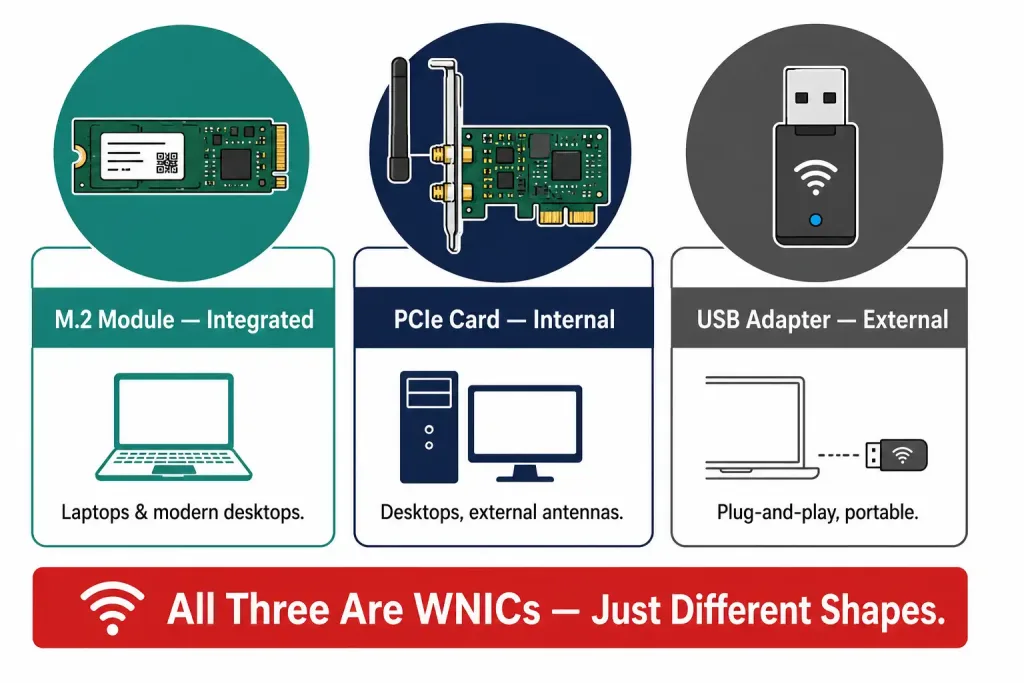
Integrated modules (M.2) — what’s inside virtually every modern laptop, and increasingly in desktop motherboards. Best balance of performance and power efficiency.
PCIe cards — desktop expansion cards, typically with external antennas you can position for better signal. Good choice for a desktop that needs solid, stable wireless.
USB adapters — the most portable and the easiest to install (genuinely plug-and-play). Convenient, and fine for everyday use, though they’re constrained by the USB bus and their small built-in antennas, so a good internal card usually performs better.
Worth clearing up a common confusion: a USB Wi-Fi adapter is a WNIC. The distinction isn’t “WNIC vs. USB adapter” — it’s just different form factors of the same thing. The real trade-off is internal (better antennas, more stable, more throughput) versus external (portable, no case to open).
A brief history of the standards
Wi-Fi’s evolution is really the story of the 802.11 amendments, each roughly doubling capability:
- 802.11b (1999) — the first mainstream generation, 11 Mbps on 2.4 GHz with just three 20 MHz channels.
- 802.11g (2003) — 54 Mbps, still on 2.4 GHz.
- 802.11n (2009) — introduced MIMO to mainstream Wi-Fi, pushing rates into the hundreds of Mbps.
- 802.11ac — moved the action to 5 GHz with wider channels.
- Wi-Fi 6 / 802.11ax (2019) — added OFDMA and 1024-QAM, focused on efficiency in dense environments rather than raw peak speed. Theoretical maximum: 9.6 Gbps.
- Wi-Fi 6E — extended Wi-Fi 6 into the newly opened 6 GHz band.
- Wi-Fi 7 / 802.11be — the current generation. The final IEEE standard was published in July 2025, though certified products have shipped since the Wi-Fi Alliance launched Wi-Fi Certified 7 in January 2024.
What Wi-Fi 7 actually changes
Wi-Fi 7 (802.11be, “Extremely High Throughput”) brings four changes that matter for WNICs:
Multi-Link Operation (MLO) — the headline feature, and the one that genuinely matters most. In every previous generation, a device connected to one band at a time and had to hand off between them. MLO lets a client maintain simultaneous connections across bands (for example 5 GHz and 6 GHz), aggregating them for throughput or using one as a low-latency backup. The practical benefit is lower, steadier latency and fewer interruptions — which is more valuable day-to-day than any peak-speed number.
320 MHz channels — double Wi-Fi 6’s 160 MHz maximum, available only in the 6 GHz band. Twice the lane width, but it consumes a large slice of spectrum, so it’s practical mainly close to the access point.
4096-QAM (4K-QAM) — packs 12 bits per symbol instead of Wi-Fi 6’s 10, giving roughly 20% higher theoretical rates. Important caveat: 4K-QAM demands a very high signal-to-noise ratio, so the benefit fades quickly as you move away from the router.
Preamble puncturing and Multi-RU — allow a wide channel to stay usable even when part of it is hit by interference, instead of abandoning the whole channel.
The honest truth about “46 Gbps”
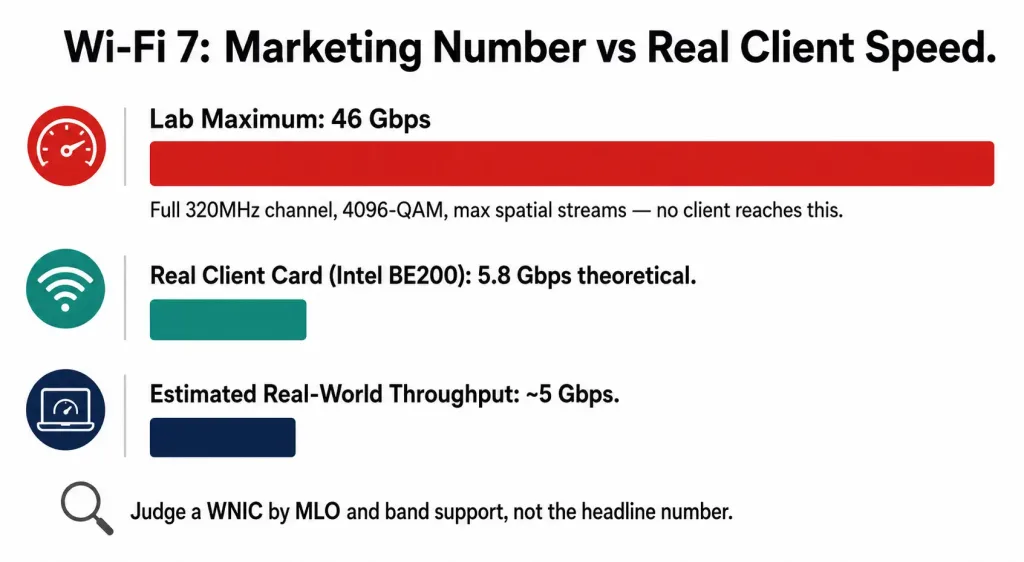
You’ll see Wi-Fi 7 advertised at 46 Gbps. That figure is real as a protocol maximum — but it’s a laboratory number that assumes a full 320 MHz channel, 4096-QAM, and a very high number of spatial streams simultaneously. No client device you can buy achieves anything close to it.
For a realistic anchor, look at actual silicon. Intel’s Wi-Fi 7 BE200 module — a common 2×2 client card — is specified at a theoretical maximum of about 5.8 Gbps (5.76 Gbps for a 2×2 device using 320 MHz in the 6 GHz band with 4096-QAM), with Intel’s own estimated real-world over-the-air throughput closer to 5 Gbps. Note also that while the 802.11be spec signals support for up to 16 spatial streams, today’s products implement up to 8 — another reason the headline number is unreachable in practice.
The takeaway: judge a WNIC by MLO support, band support, and antenna configuration — not by the biggest number on the box.
Advantages and limitations
Where WNICs win: mobility (connect anywhere in range), no cabling infrastructure to install, and easy scaling to many devices.
Where they’re constrained, and what helps:
- Interference and congestion — mitigated by beamforming, MU-MIMO, moving to the cleaner 6 GHz band, and sensible channel selection.
- Security exposure — wireless is inherently a shared medium. Use WPA3 where both the card and the access point support it.
- Range and obstruction — walls, distance, and building materials degrade throughput sharply. External antennas, better placement, mesh nodes, or extenders help.
- Less deterministic than wired — for anything where consistency is critical, Ethernet still wins.
Security: what a WNIC needs to support
A WNIC’s security capability is set largely by its chipset and firmware, not just by the access point it connects to. WPA3, the current wireless security standard, requires support on both ends of the connection — an old WNIC will silently fall back to the weaker WPA2 even if the router advertises WPA3, so it’s worth confirming WPA3 support directly in the card’s specification sheet rather than assuming it.
For home and small office use, WPA3-Personal (using a shared passphrase) is the practical baseline. For enterprise and campus networks, WPA3-Enterprise adds 802.1X authentication, which validates each device and user individually against a RADIUS server rather than relying on one shared passphrase for the entire network. This individual authentication is what lets an administrator revoke a single compromised device or departing employee’s access without changing the password for everyone else. A WNIC intended for enterprise deployment should list 802.1X and EAP method support explicitly, since not every consumer-grade card implements it.
WNIC vs. the alternatives
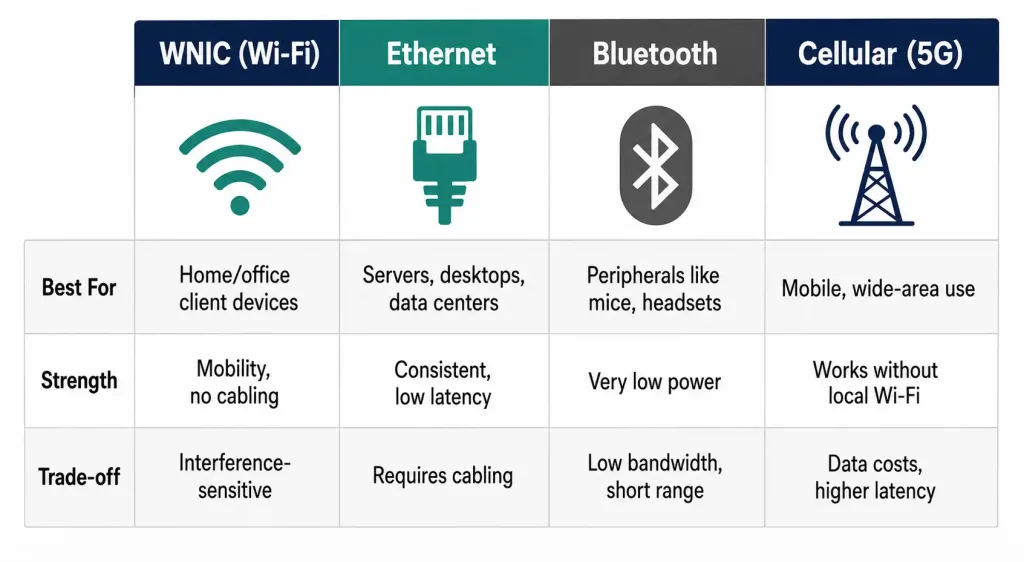
| Technology | Typical role | Strengths | Trade-offs |
|---|---|---|---|
| WNIC (Wi-Fi 7) | Home / office client connectivity | High bandwidth, mobility, no cabling | Variable performance; interference-sensitive |
| Wired Ethernet | Desktops, servers, data centres | Consistent, low latency, high reliability | Requires cabling; no mobility |
| Bluetooth | Peripherals (mice, headsets, sensors) | Very low power | Low bandwidth; short range |
| Cellular (5G) modem | Mobile / wide-area connectivity | Works anywhere with coverage | Data costs; typically higher latency than local Wi-Fi |
For a stationary desktop, gaming rig, or anything latency-critical, Ethernet remains the better choice. A WNIC is the right tool when mobility or cabling constraints make wired impractical.
Choosing and installing a WNIC
What to look for: support for Wi-Fi 6E or Wi-Fi 7 (which means 6 GHz band access), MLO if you’re buying Wi-Fi 7, WPA3 support, at least a 2×2 antenna configuration, and confirmed driver support for your operating system. That last point catches people out — check Linux support specifically before buying, as it often lags Windows.
Installing a PCIe or M.2 card:
- Power down and unplug the machine, then open the case.
- Locate a free PCIe slot (or the M.2 E-key slot for a wireless module).
- Seat the card firmly and secure it with its screw.
- Attach the antennas, and position them clear of the GPU and metal panels.
- Close up, boot, and install the latest drivers from the manufacturer’s website — not a third-party driver site.
Installing a USB adapter: plug it in, install the vendor’s drivers if Windows doesn’t handle it automatically, and you’re done.
Power consumption and mobile devices
On laptops, phones, and other battery-powered devices, the WNIC is one of the more power-hungry components when actively transmitting. Wi-Fi 6 and later standards include Target Wake Time (TWT), which lets a device negotiate scheduled sleep windows with the access point instead of constantly polling for data. This matters most for IoT devices and older phones, where a WNIC that supports TWT can meaningfully extend battery life compared to one that doesn’t. On laptops, keeping the WNIC in a lower-power state when idle — something the operating system and driver manage together — is usually a bigger factor in battery life than the choice of Wi-Fi generation itself.
Troubleshooting: WNIC not detecting networks
Work through these in order:
- Check the obvious. Many laptops have a physical Wi-Fi switch or an Fn key toggle. Confirm Wi-Fi isn’t disabled in the OS.
- Check Device Manager (Windows) or
ip link/iw dev(Linux) to see whether the adapter is recognised at all. If it isn’t, the problem is hardware, seating, or drivers — not the network. - Update or reinstall drivers from the manufacturer. Outdated firmware is a very common cause of instability and missing features.
- Re-seat the card and check antenna connectors — a detached antenna lead produces exactly the “very weak or no signal” symptom.
- Rule out the band. If the card only supports 2.4/5 GHz, it will never see a 6 GHz-only SSID.
- Try a different channel on the router if you’re in a congested environment.
- Run the OS network troubleshooter and reboot before assuming hardware failure.
Frequently Asked Questions
Is a Wi-Fi adapter the same thing as a WNIC? Yes. “Wi-Fi adapter” and “wireless network interface card” refer to the same hardware, regardless of whether it comes as a built-in module, a PCIe card, or a USB dongle.
Do I need a WNIC if my desktop is already wired to Ethernet? Not strictly, but many desktop motherboards include one anyway for convenience — useful for temporary connections, printers that only offer Wi-Fi, or as a backup if the wired connection ever fails.
Can I use a WNIC and a wired Ethernet connection at the same time? Yes, most operating systems support both being active simultaneously, though by default the system will typically prioritize one connection (usually wired) for outgoing traffic rather than load-balancing between them automatically.
Why does my new Wi-Fi 7 router not show any speed improvement? Wi-Fi 7 features only activate when both the router and the client device’s WNIC support them. Upgrading the router alone does nothing for a laptop or phone still running an older Wi-Fi 5 or Wi-Fi 6 card.
Does a better WNIC fix a weak Wi-Fi signal everywhere in the house? It can help at the margins — better antennas and higher sensitivity extend usable range — but a WNIC upgrade cannot compensate for walls, distance, and building materials the way adding a mesh node or extender can.
What’s next
The IEEE is already working on 802.11bn (Wi-Fi 8), which is expected to focus on reliability — consistent, dependable throughput even at the edge of coverage — rather than chasing another peak-speed headline. First specifications are anticipated around the end of the decade. For now, Wi-Fi 7’s MLO is the meaningful upgrade, and it will take time for the client-device fleet to catch up with the access points.
Key takeaways
- A WNIC is the radio hardware connecting your device to Wi-Fi; USB adapters, PCIe cards, and M.2 modules are all WNICs in different shapes.
- MLO is the Wi-Fi 7 feature worth paying for, not the 46 Gbps headline number — that’s a lab figure no client reaches.
- A real Wi-Fi 7 client card like Intel’s BE200 tops out around 5–5.8 Gbps theoretical, and less in practice.
- Prioritise WPA3, 6 GHz support, a solid antenna configuration, and good driver support for your OS.
- Upgrading the router alone does little — the client card must support Wi-Fi 7 too for its features to activate.
- If the connection has to be consistent above all else, Ethernet still beats wireless.
Sources
- IEEE 802.11be / Wi-Fi 7 standard (published July 2025); Wi-Fi Alliance Wi-Fi Certified 7 program (January 2024)
- Intel Wi-Fi 7 BE200 product brief and specifications (theoretical 5.76 Gbps for 2×2, 320 MHz, 4096-QAM)
- Cisco Meraki — Wi-Fi 7 (802.11be) Technical Guide (MLO, 4K-QAM, preamble puncturing, SNR requirements)
- HPE Aruba Networking TechDocs — Wi-Fi 7 features and benefits
- Wikipedia — Wi-Fi 7 — source for the standard’s publication date (22 July 2025), Wi-Fi Certified 7 launch (8 January 2024), and the detail that 16 spatial streams were signalled but products implement 8