
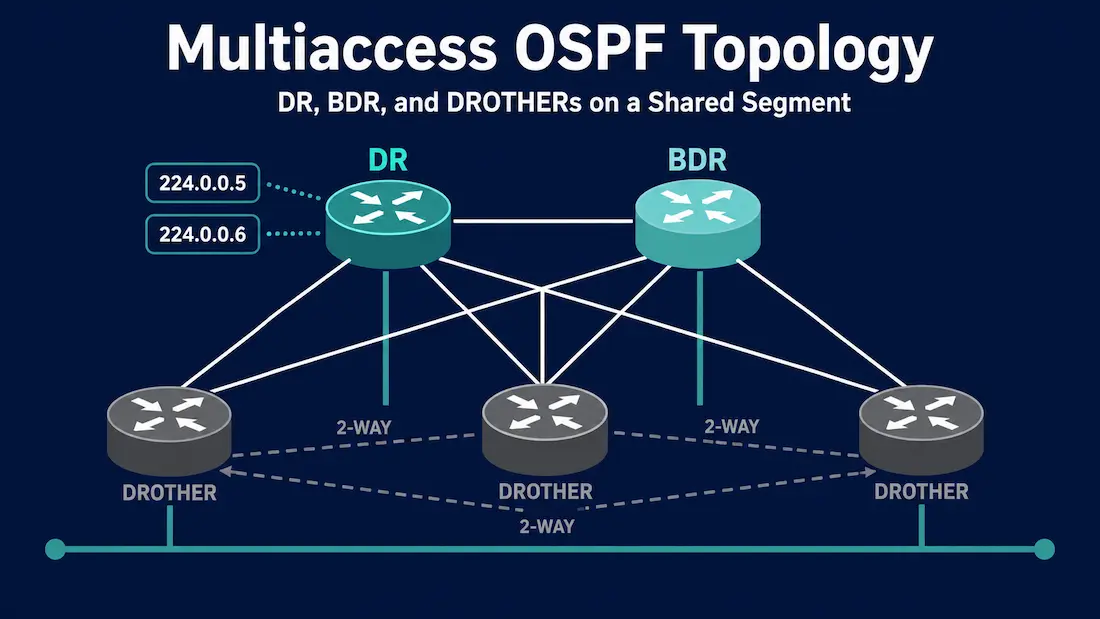
OSPF operates differently on multiaccess network segments than it does on point-to-point links. When multiple OSPF routers share a single broadcast or non-broadcast segment — such as an Ethernet LAN or a Frame Relay network — adjacency management, LSA flooding, and Designated Router (DR) election introduce challenges that do not exist on simple point-to-point connections.
Understanding these challenges — why they occur, how OSPF solves them with the DR/BDR mechanism, how to configure OSPF network types, and how to troubleshoot adjacency issues on multiaccess segments — is directly tested on the CCNA 200-301 exam and essential for real-world enterprise network design.
What Is a Multiaccess Network?
A multiaccess network is a network segment where more than two routers connect to the same shared medium and can communicate directly with each other. The most common example is an Ethernet LAN — multiple routers connected to the same switch, all sharing one broadcast domain.
Multiaccess networks come in two types:
Broadcast Multiaccess: All devices on the segment can receive broadcast and multicast frames. Ethernet LANs are the primary example. OSPF uses multicast addresses 224.0.0.5 (AllSPFRouters) and 224.0.0.6 (AllDRouters) for communication on broadcast segments.
Non-Broadcast Multiaccess (NBMA): Multiple devices share the segment but broadcast/multicast is not natively supported. Frame Relay and ATM are the classic examples. OSPF must use unicast to communicate with neighbours on NBMA networks, and neighbour relationships must often be configured manually.
In contrast, a point-to-point link connects exactly two routers — there is no need for DR election or adjacency management beyond the single neighbour relationship.
The Core Challenge: Adjacency Scalability
The fundamental challenge on a multiaccess segment is the number of OSPF adjacencies that would form if every router established a full adjacency with every other router.
The n(n-1)/2 Problem
On a multiaccess segment with n routers, if every router formed a full adjacency with every other router, the total number of adjacencies would be:
Adjacencies = n × (n-1) / 2For example:
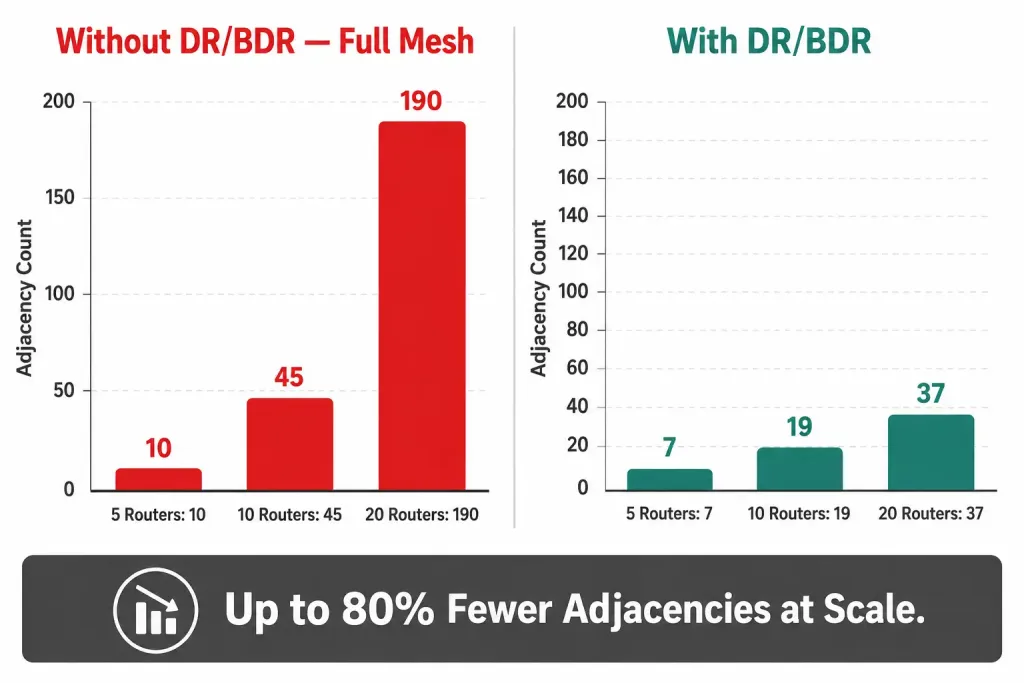
- 5 routers: 5 × 4 / 2 = 10 adjacencies
- 10 routers: 10 × 9 / 2 = 45 adjacencies
- 20 routers: 20 × 19 / 2 = 190 adjacencies
Each full adjacency requires:
- Hello packets exchanged at regular intervals (every 10 seconds on broadcast)
- Database Description (DBD) packets during initial synchronisation
- LSA flooding — every topology change must be flooded to every adjacent neighbour
- SPF recalculations triggered by each received LSA
With 20 routers forming 190 full adjacencies, the volume of Hello traffic, LSA flooding, and SPF recalculations would consume significant CPU and bandwidth — and every single topology change would trigger 190 LSA floods and 20 independent SPF calculations. This does not scale.
OSPF’s Solution: The Designated Router (DR) and Backup DR (BDR)
OSPF solves the adjacency scalability problem on multiaccess segments by electing two special routers:
Designated Router (DR): The central point for LSA exchange on the segment. All other routers form full adjacencies only with the DR (and BDR), not with each other. The DR collects LSAs from all routers on the segment and refloods them to all others — acting as the single distribution point for topology information.
Backup Designated Router (BDR): Stands ready to assume the DR role if the DR fails. All routers also form a full adjacency with the BDR to ensure rapid failover.
DROTHERs: All other routers on the segment are called DROTHERs. They form full adjacencies only with the DR and BDR — not with each other. DROTHERs remain in the 2-Way state with other DROTHERs, which means they exchange Hello packets but do not synchronise their LSDBs directly.
How DR/BDR Reduces Adjacencies
With the DR/BDR mechanism, the number of full adjacencies on a segment with n routers drops dramatically:
Full adjacencies = 2 × (n - 2) + 1

Where:
- Each DROTHER forms 2 adjacencies (one to DR, one to BDR)
- DR and BDR form 1 adjacency with each other
For 20 routers: 2 × 18 + 1 = 37 full adjacencies (vs 190 without DR/BDR — an 80% reduction).
DR/BDR Election Process
The DR election occurs when OSPF starts on a multiaccess interface. The election uses two criteria in order:
1. OSPF Priority (First Criterion)
Every OSPF interface has a priority value (0–255, default 1). The router with the highest priority on the segment becomes the DR; second-highest becomes the BDR.
Priority 0 is special: A router with OSPF priority 0 is ineligible for DR or BDR election. It will always be a DROTHER.
Router(config)# interface GigabitEthernet0/0
Router(config-if)# ip ospf priority 200
2. Router ID (Tiebreaker)
If multiple routers share the same highest priority, the router with the highest Router ID wins. The Router ID is selected in this order:
- Manually configured
router-idcommand - Highest loopback interface IP address
- Highest active physical interface IP address
DR Election Is Non-Preemptive
A critical CCNA exam point: the DR election is non-preemptive. Once a DR is elected, a new router joining the segment with a higher priority does not take over the DR role. The existing DR remains until it fails or its OSPF process restarts. The new high-priority router becomes a DROTHER and waits.
To force a new election after changing priorities:
Router# clear ip ospf processThis restarts the OSPF process and triggers a new election — but it temporarily disrupts all OSPF adjacencies on the router. Use with caution in production.
Challenges Specific to Multiaccess OSPF
Challenge 1: LSA Flooding Overhead
On a multiaccess segment, every topology change generates LSAs that must reach every router. Without DR/BDR, each router would flood the LSA to all neighbours independently — creating duplicate LSAs and wasted bandwidth.
With the DR:
- A router detects a topology change and sends the LSA to the DR via multicast 224.0.0.6 (AllDRouters)
- The DR refloods the LSA to all routers on the segment via multicast 224.0.0.5 (AllSPFRouters)
- Only one copy of the LSA traverses the segment — the DR handles distribution
Type 2 LSAs (Network LSAs) are generated exclusively by the DR on multiaccess segments. They describe all routers attached to the segment and are not generated on point-to-point links. If the DR fails and the BDR takes over, the new DR generates a new Type 2 LSA — triggering SPF recalculation on all routers in the area.
Challenge 2: DR Failure and Convergence Delay
When the DR fails, the BDR assumes the DR role immediately. A new BDR election then occurs among the remaining DROTHERs. During this transition:
- All routers must form new adjacencies with the new DR
- The new DR generates a new Type 2 LSA for the segment
- All area routers run SPF recalculation
- The total convergence time depends on the OSPF Dead interval (default 40 seconds on broadcast) — the failure is not detected until the Dead timer expires
Mitigation: Use BFD (Bidirectional Forwarding Detection) alongside OSPF to detect failures in milliseconds rather than waiting for the 40-second Dead timer:
Router(config)# interface GigabitEthernet0/0
Router(config-if)# bfd interval 50 min_rx 50 multiplier 3
Router(config-if)# ip ospf bfd
Challenge 3: Non-Preemptive Election Causes Suboptimal DR Placement
Because DR election is non-preemptive, the router that happens to boot first on the segment often becomes the DR — even if a more powerful, better-connected router boots later. This can result in a low-capacity router serving as DR on a busy segment.
Mitigation: Always configure explicit OSPF priorities on multiaccess segments. Set the intended DR to the highest priority (e.g., 200), the intended BDR to a medium priority (e.g., 100), and all other routers to priority 1 or 0:
! Intended DR
Router-A(config-if)# ip ospf priority 200

! Intended BDR
Router-B(config-if)# ip ospf priority 100

! All other routers — DROTHER only
Router-C(config-if)# ip ospf priority 0
Router-D(config-if)# ip ospf priority 0
Challenge 4: NBMA Networks Require Manual Neighbour Configuration
On Non-Broadcast Multiaccess networks (Frame Relay, ATM), OSPF cannot discover neighbours via multicast because the underlying technology does not support broadcast/multicast natively. Neighbours must be configured manually:
Router(config)# router ospf 1
Router(config-router)# neighbor 10.1.1.2
Router(config-router)# neighbor 10.1.1.3
Additionally, the OSPF network type must be set correctly. Cisco defaults Ethernet interfaces to broadcast and serial/Frame Relay interfaces to non-broadcast, but in hub-and-spoke Frame Relay topologies, point-to-multipoint is often the better choice because it eliminates the DR election entirely:
Router(config-if)# ip ospf network point-to-multipointChallenge 5: Network Type Mismatch Between Routers
If two routers on the same segment have different OSPF network types configured (e.g., one is set to broadcast and the other to point-to-multipoint), they will not form an adjacency — the Hello packets will contain mismatched network type fields and be rejected.
Verify with:
Router# show ip ospf interface GigabitEthernet0/0Check the “Network Type” line. Both routers must show the same type.
OSPF Network Types Reference
For the full breakdown of all five OSPF network types — including virtual links, which don’t appear in the table below — see Types of OSPF Network: Point-to-Point, Broadcast, NBMA, and More. The table here focuses specifically on the four types relevant to multiaccess and hub-and-spoke segments.
Broadcast and Non-Broadcast segments elect a DR/BDR. Point-to-Multipoint and Point-to-Point do not — eliminating DR overhead entirely.
| Network Type | DR/BDR Election | Hello/Dead Timers | Neighbour Discovery | Default On |
|---|---|---|---|---|
| Broadcast | Yes | 10/40 seconds | Automatic (multicast) | Ethernet |
| Non-Broadcast | Yes | 30/120 seconds | Manual (neighbor command) | Frame Relay (multipoint) |
| Point-to-Multipoint | No | 30/120 seconds | Automatic (multicast) | None (must configure) |
| Point-to-Point | No | 10/40 seconds | Automatic (multicast) | Serial, GRE tunnels |
Key distinction: Broadcast and Non-Broadcast both elect a DR/BDR. Point-to-Multipoint and Point-to-Point do not — every adjacency is treated as a direct neighbour relationship with no DR overhead.
Verifying OSPF on Multiaccess Segments
show ip ospf neighbor
Router# show ip ospf neighbor
Neighbor ID     Pri   State           Dead Time   Address         Interface
1.1.1.1           200   FULL/DR         00:00:35    192.168.1.1     Gi0/0
2.2.2.2           100   FULL/BDR        00:00:38    192.168.1.2     Gi0/0
4.4.4.4             0   2WAY/DROTHER    00:00:33    192.168.1.4     Gi0/0
Key fields: FULL/DR and FULL/BDR indicate full adjacencies with the DR and BDR. 2WAY/DROTHER indicates a healthy but non-adjacent relationship with another DROTHER — this is normal and expected.
If a neighbour shows INIT or EXSTART/EXCHANGE for an extended period, there is an adjacency formation problem — typically an MTU mismatch, authentication failure, or network type mismatch.
show ip ospf interface
Router# show ip ospf interface GigabitEthernet0/0
GigabitEthernet0/0 is up, line protocol is up
  Internet Address 192.168.1.3/24, Area 0
  Process ID 1, Router ID 3.3.3.3, Network Type BROADCAST, Cost: 1
  Transmit Delay is 1 sec, State DROTHER, Priority 0
  Designated Router (ID) 1.1.1.1, Interface address 192.168.1.1
  Backup Designated router (ID) 2.2.2.2, Interface address 192.168.1.2
  Timer intervals configured, Hello 10, Dead 40
  Neighbor Count is 3, Adjacent neighbor count is 2
Key fields: Network Type BROADCAST, State DROTHER (this router’s role), Priority 0 (ineligible for DR/BDR), Designated Router and Backup Designated Router IDs, and Adjacent neighbor count (should be 2 — one to DR, one to BDR).
debug ip ospf adj
For troubleshooting adjacency formation problems in real time:
Router# debug ip ospf adjLook for messages about Hello mismatches (network type, area ID, authentication, timers) and DBD exchange failures (MTU mismatch is the most common). Always disable after use:
Router# undebug allCCNA Exam Pointers
- Multiaccess networks = multiple routers on one shared segment (Ethernet LAN, Frame Relay)
- Without DR/BDR: n(n-1)/2 adjacencies — does not scale
- With DR/BDR: DROTHERs form full adjacencies only with DR and BDR — 2-Way with each other
- DR election criteria: highest OSPF priority → highest Router ID (tiebreaker)
- Priority 0 = ineligible for DR/BDR; always DROTHER
- DR election is non-preemptive — new high-priority routers do not take over until
clear ip ospf process - Type 2 LSA (Network LSA) generated only by the DR on multiaccess segments
- DROTHERs send LSAs to 224.0.0.6 (AllDRouters); DR refloods to 224.0.0.5 (AllSPFRouters)
- Broadcast: Hello 10s/Dead 40s; Non-Broadcast: Hello 30s/Dead 120s
- NBMA requires manual
neighborcommands; considerpoint-to-multipointto avoid DR election - Network type mismatch between routers = adjacency will not form
show ip ospf neighbor— FULL/DR, FULL/BDR = healthy; 2WAY/DROTHER = normal for DROTHERsshow ip ospf interface— verify network type, priority, DR/BDR IDs, timer values
Conclusion
Multiaccess OSPF segments introduce scalability challenges that do not exist on point-to-point links — the n(n-1)/2 adjacency explosion, LSA flooding overhead, DR failure convergence, and non-preemptive election behaviour. OSPF’s DR/BDR mechanism solves the core scalability problem by centralising LSA distribution through one elected router, but it introduces its own operational complexity: suboptimal DR placement if priorities are not configured, convergence delay during DR failure, and manual neighbour requirements on NBMA networks. For CCNA candidates, understanding the DR election process, the OSPF network types, and the difference between FULL and 2-Way neighbour states on multiaccess segments is essential — these concepts appear consistently in both exam questions and real-world troubleshooting.
Frequently Asked Questions
What is a multiaccess network in OSPF?
A multiaccess network is a network segment where more than two OSPF routers connect to the same shared medium and can communicate directly with each other. Ethernet LANs are the most common broadcast multiaccess example — multiple routers connected to the same switch all share one broadcast domain. Frame Relay multipoint interfaces are the classic non-broadcast multiaccess (NBMA) example. The challenge on multiaccess segments is that without the DR/BDR mechanism, every router would need to form a full OSPF adjacency with every other router, creating an n(n-1)/2 adjacency scaling problem that consumes excessive CPU and bandwidth.
Why does OSPF elect a Designated Router on multiaccess networks?
OSPF elects a DR to reduce the number of full adjacencies and centralise LSA flooding on multiaccess segments. Without a DR, five routers on one Ethernet segment would form 10 full adjacencies and flood every LSA to every neighbour independently. With a DR, those five routers form only 7 full adjacencies (each DROTHER to DR and BDR, plus DR to BDR), and the DR handles all LSA redistribution as a single point of distribution. The DR also generates the Type 2 Network LSA that represents all routers on the segment, which other areas use to understand the multiaccess topology.
Why is the OSPF DR election non-preemptive?
The DR election is non-preemptive to prevent unnecessary adjacency teardown and reconvergence. If a new router joined the segment with a higher priority and immediately took over the DR role, every existing adjacency on the segment would need to be reformed, the old DR’s Type 2 LSA would be flushed, a new Type 2 LSA would be generated, and every router in the area would run SPF recalculation — all for a change that provides no operational benefit if the current DR is functioning correctly. By making the election non-preemptive, OSPF prioritises stability over optimality. To force a new election after changing priorities, use clear ip ospf process.
What is the difference between FULL and 2-Way neighbour states?
FULL means two routers have completely synchronised their LSDBs and have a full adjacency — they actively exchange LSAs and routing information. 2-Way means two routers have acknowledged each other’s Hello packets and recognise each other as neighbours, but have not synchronised their databases. On a multiaccess segment, DROTHERs form FULL adjacencies only with the DR and BDR. Between two DROTHERs, the relationship stops at 2-Way — this is normal and expected, not an error. If you see 2WAY/DROTHER in show ip ospf neighbor, the network is working correctly.
How do I change which router becomes the DR on a multiaccess segment?
Configure explicit OSPF priorities on each router’s interface facing the multiaccess segment using ip ospf priority [0-255]. Set the intended DR to the highest priority (e.g., 200), the intended BDR to a lower priority (e.g., 100), and all other routers to priority 0 (ineligible for DR/BDR). Because the election is non-preemptive, changing priorities alone does not trigger a new election — you must also restart the OSPF process with clear ip ospf process on all routers on the segment to force a fresh election. In production, schedule this during a maintenance window as it temporarily disrupts all OSPF adjacencies.



