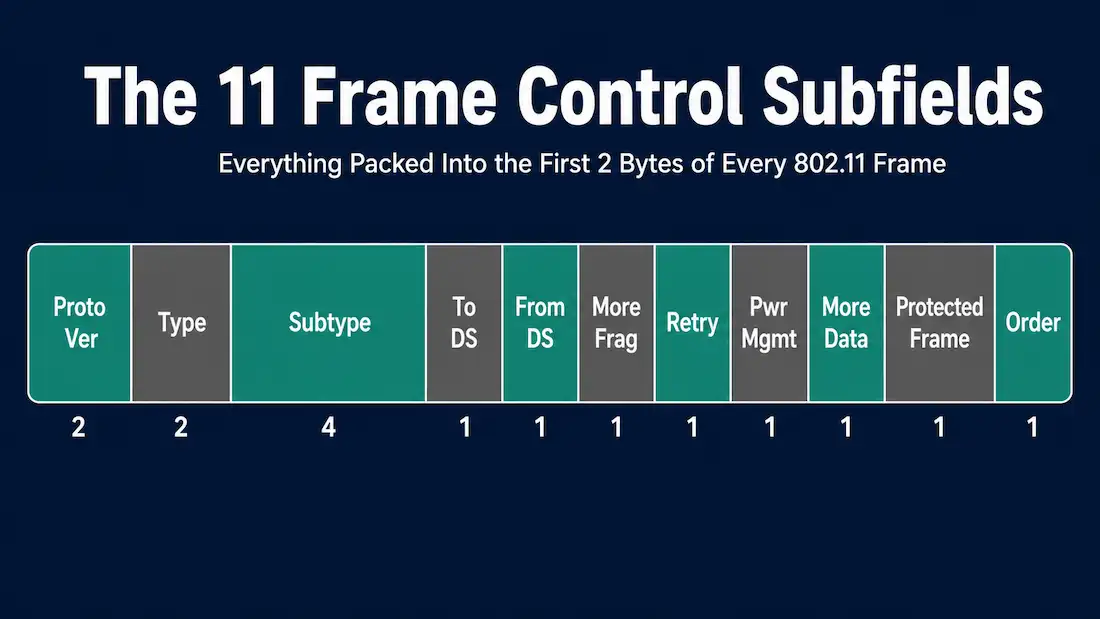
The Frame Control field is the first two bytes of every 802.11 frame, and it’s arguably the single most important part of the header — it’s what tells a receiving station what kind of frame it’s looking at before anything else gets parsed. This guide breaks down all eleven subfields packed into those 2 bytes (16 bits), using the naming a packet capture or the IEEE standard itself actually uses, since a couple of the field names that circulate in older study material don’t match what you’ll see in a tool like Wireshark.
This is a companion to What is Wireless 802.11 Frame, which covers the full frame structure — this article goes deeper specifically into Frame Control.
Protocol Version (2 bits)
Indicates which version of the 802.11 protocol the frame uses. In every currently deployed 802.11 network, this value is always 00 — no second protocol version has ever shipped in mainstream Wi-Fi, so a receiving device uses this field mainly to confirm compatibility rather than to distinguish between versions in practice.
Type and Subtype (2 bits + 4 bits)
Type identifies the frame’s broad category: 00 for Management, 01 for Control, 10 for Data. The value 11 is reserved.
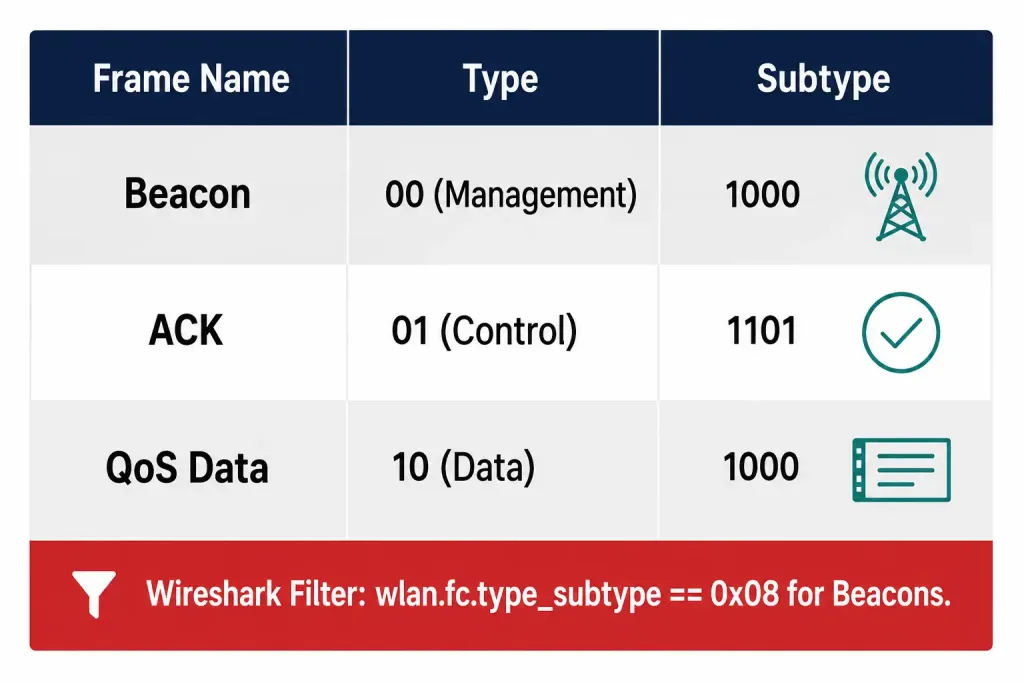
Subtype narrows that down to the frame’s specific function — 0000 for an Association Request, 1000 for a Beacon, and so on. Every management, control, and data frame you’ll ever capture is identified by its Type/Subtype combination, and this is exactly what Wireshark’s wlan.fc.type and wlan.fc.subtype filters expose directly. A few examples worth knowing: a Beacon is type 0 (management), subtype 8; an ACK is type 1 (control), subtype 13; a QoS Data frame is type 2 (data), subtype 8.
To DS and From DS (1 bit each)
These two bits together indicate whether a frame is heading toward the Distribution System (the wired infrastructure an AP bridges into) or arriving from it. They matter enormously because they determine how the frame’s address fields should be interpreted — a frame from a client to an AP, an AP to a client, and an AP to another AP over a wireless distribution system link all use a different combination of these two bits, and each combination assigns a different meaning to Address 1 through Address 4.
More Fragments (1 bit)
Set to 1 when the current fragment is not the last piece of a larger MAC Service Data Unit (MSDU) that’s been split up for transmission. A receiver seeing this bit set knows to expect additional fragments and holds onto what it has so far rather than passing an incomplete payload up the stack.
Retry (1 bit)
Set to 1 when the frame is a retransmission of an earlier frame that wasn’t acknowledged in time. This bit exists because wireless links lose frames (and acknowledgments) far more often than wired Ethernet does, and a receiver uses it, together with the Sequence Control field, to detect and discard duplicate frames that arrive because the original acknowledgment was lost even though the data got through.
Power Management (1 bit)
Indicates the power state the sending station will be in immediately after this frame exchange completes: 0 means the station will stay in active mode, 1 means it’s switching to power-save mode. Access points always transmit this bit as 0, since an AP itself never enters power-save mode — only client stations do.
More Data (1 bit)
Used by an AP to tell a station in power-save mode that additional buffered frames are waiting for it. A station checks this bit after waking from power-save mode to decide whether it needs to poll the AP again for more data before returning to sleep, or whether it’s received everything the AP was holding.
Protected Frame (1 bit)
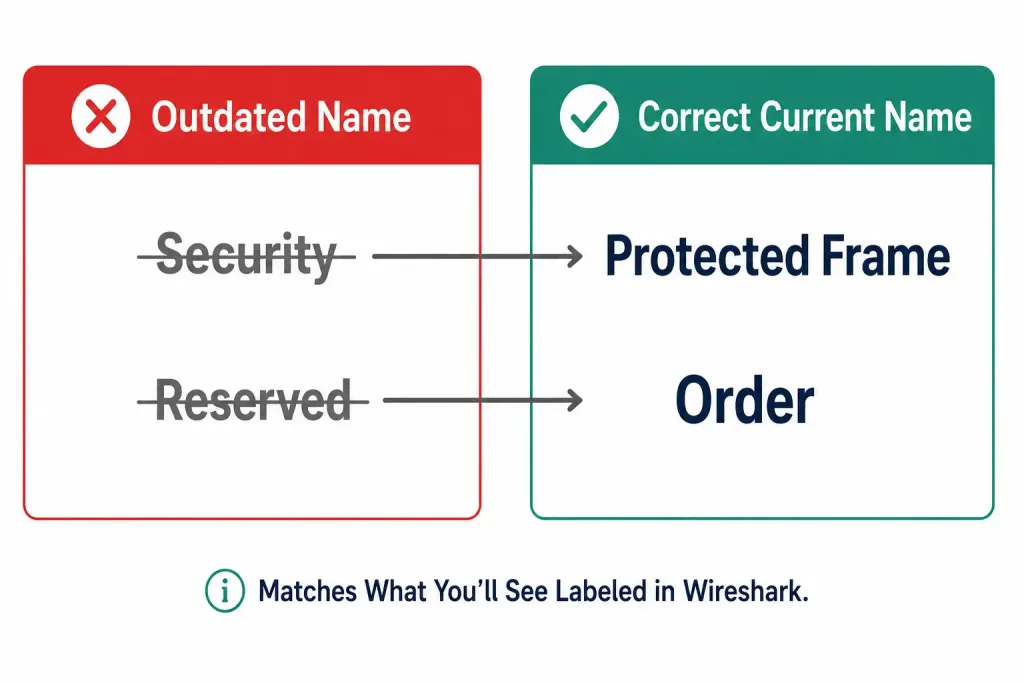
This is the field some older material calls “Security,” but the standard and current term — the one you’ll see labeled directly in Wireshark’s field name wlan.fc.protected — is Protected Frame. It’s set to 1 when the frame body has been encrypted using WEP, TKIP, or CCMP/AES. It can appear on data frames and on the specific management frame subtype used for shared-key authentication, since that older authentication method encrypts a portion of its own frame exchange.
Order (1 bit)
This is the field some older material calls “Reserved,” but its actual, current name is Order, and it hasn’t meant “reserved” since well before most currently taught 802.11 material was written. When set to 1 on a non-QoS data frame, it indicates the frame is being sent using the Strictly Ordered service class, meaning the receiving station must process frames in the exact order they were sent rather than allowing for reordering.
On QoS-capable frames, this same bit position instead signals the presence of an HT Control field appended after the address and sequence control fields, which is why it’s sometimes labeled “+HTC/Order” in more detailed references. In practice, the Strictly Ordered service class is rarely used by modern devices — the Order bit’s role signaling an HT Control field is by far the more common reason you’ll see it set today.
How Frame Control connects to the rest of the header
Frame Control doesn’t operate in isolation — several of its subfields directly determine what else appears later in the frame. The Type and Subtype together decide whether a QoS Control field will follow the address and sequence fields at all, since only QoS Data and QoS Management frames carry one.
The To DS and From DS combination decides whether a fourth address field is present, since Address 4 only shows up when both bits are set to 1 for a wireless distribution system frame. And the Order bit, on a frame from an HT-capable device, decides whether an additional 4-byte HT Control field is tacked on right before the Frame Body. In effect, Frame Control acts as a kind of table of contents for the rest of the frame — parsing it correctly is what tells a receiver, or a piece of analysis software, exactly which of the header’s optional fields to expect next.
Frame Control differences across frame types
The 2-byte Frame Control field is structurally identical across Management, Control, and Data frames — every subfield occupies the same bit position regardless of frame type — but which subfields actually carry meaningful information varies. Management frames use nearly every subfield since they handle the full range of network setup and maintenance tasks. Control frames, being deliberately minimal, typically leave More Fragments and Retry at 0 since a short frame like RTS, CTS, or ACK has no concept of fragmentation. Data frames make the heaviest use of Power Management and More Data, since client stations moving in and out of power-save mode are almost always exchanging data frames when they do so.
Worked example: decoding a Beacon frame’s Frame Control byte
It helps to see the abstract subfields applied to a real value. A typical Beacon frame’s Frame Control field, read as it appears in a packet capture, breaks down like this:
- Protocol Version:
00— standard, unchanging value. - Type:
00— Management. - Subtype:
1000— Beacon. - To DS / From DS:
0/0— Beacons are broadcast by the AP directly, not routed through the Distribution System in the addressing sense these bits track. - More Fragments:
0— Beacons are never fragmented. - Retry:
0— Beacons aren’t acknowledged individually, so retransmission in this sense doesn’t apply. - Power Management:
0— an AP transmits Beacons in active mode. - More Data: typically
0for a Beacon, unless the AP is signaling buffered broadcast/multicast traffic is about to follow. - Protected Frame:
0— Beacon bodies are not encrypted, since they need to be readable by any device scanning for networks. - Order:
0in the vast majority of Beacons, unless the AP is using an HT Control field.
Recognizing this pattern is genuinely useful: a huge share of the frames in any Wi-Fi capture are Beacons, and being able to glance at the Frame Control byte and immediately confirm “yes, this is a Beacon” without reading the rest of the frame saves real time when filtering a busy capture.
Bit ordering: a common source of confusion
One detail that trips up a lot of people reading raw hex dumps rather than a decoded capture: 802.11, like the rest of the 802 family, transmits bits within each octet least significant bit first. This means the bit order shown in most diagrams — Protocol Version first, Order last — corresponds to bit positions B0 through B15 in transmission order, but doesn’t necessarily match the order you’d expect if you were reading the raw byte value as a normal binary number. Tools like Wireshark handle this translation automatically and display each subfield with its correct decoded value, which is one more reason to rely on a proper packet analyzer rather than manually decoding raw hex when learning this material.
Reading Frame Control in a packet capture
Every field described above has a direct, matching name in Wireshark’s 802.11 dissector, which makes Frame Control one of the easier parts of a capture to verify against this guide:
wlan.fc.typeandwlan.fc.subtype— filter by frame type/subtype, e.g.wlan.fc.type_subtype == 0x08for Beacon frames.wlan.fc.retry == 1— isolate retransmitted frames; a high proportion of these usually points to RF interference or a marginal link.wlan.fc.pwrmgt— check a station’s declared power-save state on a given frame.wlan.fc.protected == 1— confirm a data frame’s payload is encrypted; unexpectedly seeing0on frames that should be protected is a useful troubleshooting signal.wlan.fc.order— check the Order bit, most often relevant when investigating whether HT Control is present on a frame from an 802.11n-or-later device.
Frequently Asked Questions
Is the “Security” field the same thing as “Protected Frame”? Yes, conceptually — but “Protected Frame” is the correct, current term, matching both the IEEE standard’s language and Wireshark’s field name. “Security” is a description of what the field does, not its actual name, and using the informal name can cause confusion when cross-referencing a packet capture or exam material.
Why does older material call the last Frame Control bit “Reserved”? Some early or simplified 802.11 references used “Reserved” as a placeholder name for this bit before its role was as widely documented. Its correct, current name is Order, and it has a well-defined function — signaling strict-ordering service class on older frames, or the presence of an HT Control field on newer ones. Calling it “Reserved” today is outdated and can mislead anyone cross-checking against a real packet capture, where the field is explicitly labeled “Order.”
Does the Protocol Version field ever change from 00? Not in any currently deployed network. All mainstream 802.11 amendments — from the original standard through Wi-Fi 6E and Wi-Fi 7 — have kept Protocol Version at 00. A nonzero value is reserved for a future, fundamentally incompatible revision of the standard that hasn’t occurred yet.
Why do control frames often have fewer Frame Control subfields that actually matter? The subfields are always present in the 2-byte field regardless of frame type, but several — like More Fragments and Retry — are simply left at 0 and ignored in most control frames, since concepts like fragmentation don’t apply to a short frame like an ACK or CTS.
Conclusion
The Frame Control field’s eleven subfields tell a receiving station everything it needs to know before parsing the rest of a frame: what kind of frame this is, which direction it’s traveling, whether it’s a retransmission, whether the sender is about to sleep, and whether its payload is encrypted. Getting the field names right matters beyond terminology — “Protected Frame” and “Order” are what you’ll actually see labeled in a packet capture, and using the older “Security” and “Reserved” names can create a mismatch between what a student has studied and what they see the first time they open Wireshark.