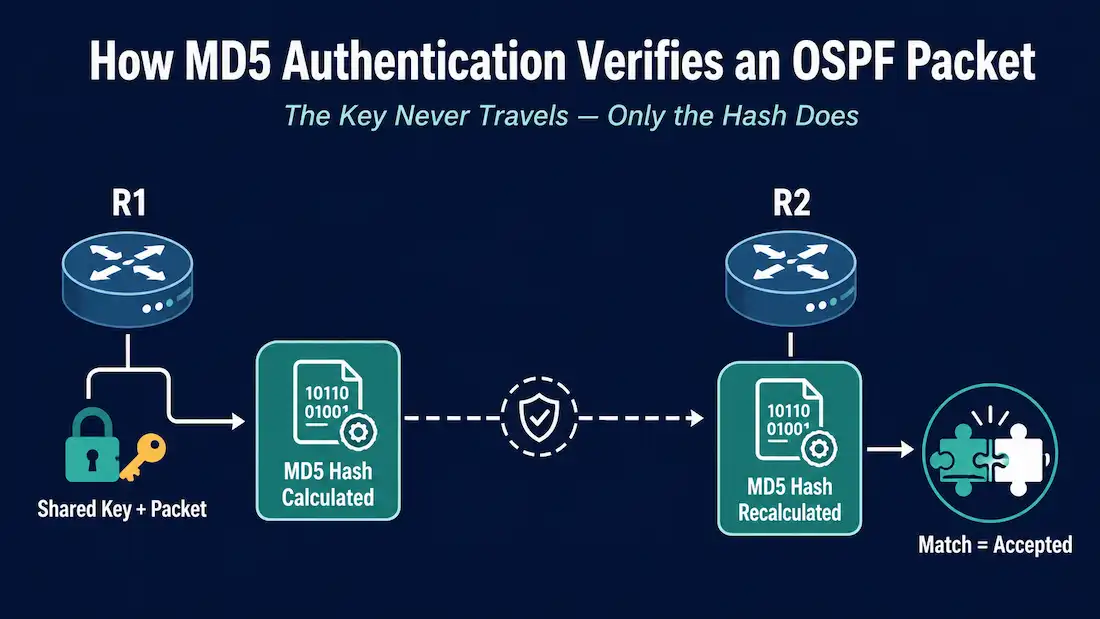
MD5 authentication is OSPF’s long-standing cryptographic option for verifying that routing updates come from a trusted neighbor rather than an attacker or a misconfigured device. This guide covers exactly how MD5 authentication works, the two ways to enable it (area-wide and per-interface), a full worked example including the adjacency drop you’ll see mid-migration, and how to verify it’s actually working.
This is a companion to OSPF Authentication: Configuration, Migration, and Best Practices, which covers the broader picture including HMAC-SHA and OSPFv3. This guide focuses specifically on the MD5 configuration mechanics.
How MD5 Authentication Works
OSPF MD5 authentication calculates a hash value from the contents of the OSPF packet combined with a shared secret key, then transmits that hash alongside the packet — never the key itself. The receiving router, which has the same key configured locally, performs the identical calculation on the packet it received. If the two hash values match, the packet is accepted as authentic and unmodified; if they don’t match, or if the receiver doesn’t have a matching key configured at all, the packet is silently dropped.
This is a meaningful improvement over plain-text authentication, where the key itself travels across the wire in the clear and can be read directly out of a captured packet. With MD5, an attacker who captures traffic sees only the resulting hash, not the key used to produce it, which is a real (if imperfect) barrier compared to no protection at all.
Two Ways to Enable MD5 Authentication
OSPF MD5 authentication can be enabled at two different scopes, and it’s worth being precise about the distinction, since “enabling it for the whole area” and “enabling it globally for the router” are not the same thing.
Area-Wide Authentication
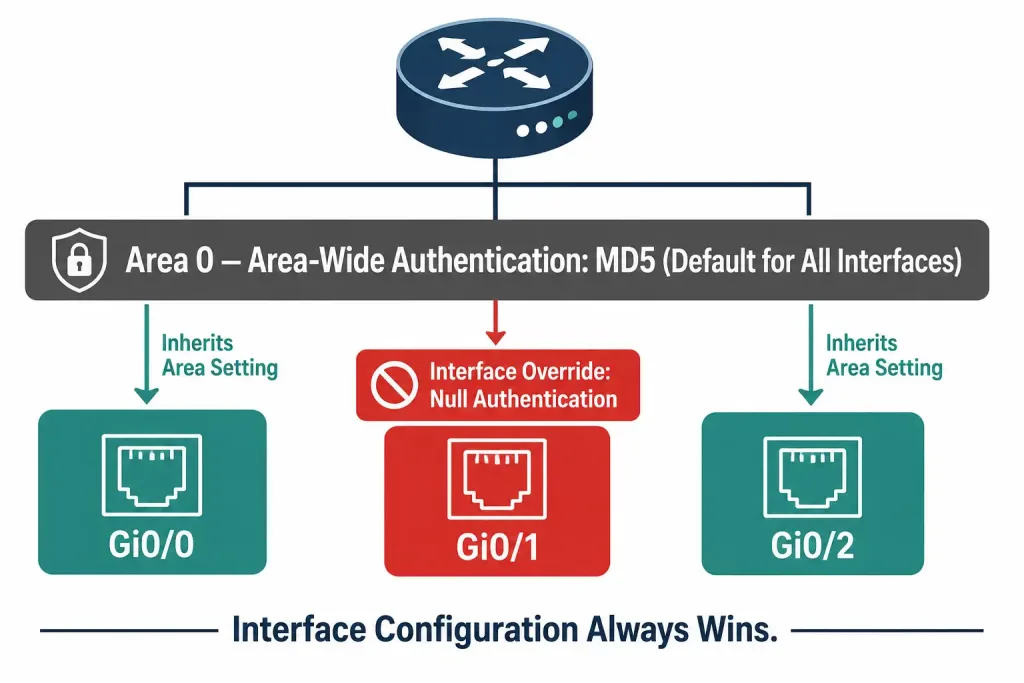
The area <area-id> authentication message-digest command, entered under the OSPF process, enables MD5 authentication for every interface participating in that specific area — not for the entire router, and not for other areas unless you configure them separately. A router with interfaces in multiple OSPF areas can have different authentication settings in each area.
Router(config)# router ospf 1
Router(config-router)# area 0 authentication message-digest
Once this is configured for an area, every interface in that area still needs its own key configured:
Router(config)# interface GigabitEthernet0/0
Router(config-if)# ip ospf message-digest-key 1 md5 SECRETKEY
If you enable area-wide authentication but forget to configure a key on one of that area’s interfaces, that interface will fail to form adjacencies with its neighbors — the area setting makes authentication mandatory, but it doesn’t supply the key itself.
Per-Interface Authentication
Alternatively, MD5 authentication can be enabled directly on a specific interface, without touching the area-wide setting at all:
Router(config)# interface GigabitEthernet0/0
Router(config-if)# ip ospf message-digest-key 1 md5 SECRETKEY
Router(config-if)# ip ospf authentication message-digest
This approach is useful when only some interfaces in an area need authentication, or when different interfaces in the same area need different authentication types entirely.
Which One Wins When Both Are Configured
A router can have both an area-wide authentication setting and a per-interface authentication setting configured at the same time. When they conflict, the interface-level setting always takes precedence over the area-wide setting. This is intentional — it lets an administrator set a sensible area-wide default while still overriding it on individual interfaces that need to behave differently, without needing to touch every other interface in the area.
One detail that trips people up: MD5 keys don’t need to be identical across an entire area. What actually matters is that the key matches between each pair of directly connected neighbors — router A and router B, sharing a link, need matching key IDs and key strings on that link, but router A and router C on a different link within the same area can use a completely different key.
Worked Example: Enabling Area-Wide MD5 Authentication
Consider three routers — R1, R2, and R3 — already forming full OSPF adjacencies with each other in Area 0, with no authentication currently configured.
Step 1: Enable area-wide MD5 authentication on R1 first.
R1(config)# router ospf 1
R1(config-router)# area 0 authentication message-digest
R1(config-router)# exit
R1(config)# interface GigabitEthernet0/0
R1(config-if)# ip ospf message-digest-key 1 md5 CCNAKEY
What happens immediately after this step: R1’s console will log adjacency change messages showing R1’s neighbors (R2 and R3) dropping from FULL state to DOWN. This is expected, not an error — R1 is now requiring MD5 authentication on every packet it sends and receives on this interface, but R2 and R3 haven’t been configured with a matching key yet, so their Hello packets fail R1’s authentication check and get dropped.
Step 2: Configure matching authentication on R2 and R3.
R2(config)# router ospf 1
R2(config-router)# area 0 authentication message-digest
R2(config-router)# exit
R2(config)# interface GigabitEthernet0/0
R2(config-if)# ip ospf message-digest-key 1 md5 CCNAKEY
Repeat the equivalent configuration on R3. Once all three routers share the same key ID and key string on their shared links, the adjacencies re-form and return to FULL state.
A practical note on migration order: in a live network, this means there will be a brief window during which some adjacencies are down — exactly the operational concern that leads teams to delay authentication rollouts. For a live production network, this kind of change should happen in a planned maintenance window, configuring all routers on a segment as close together as practically possible to minimize the outage window.
Worked Example: Per-Interface MD5 Authentication
As an alternative to the area-wide approach, the same result can be achieved entirely at the interface level, without ever touching the area authentication command:
R1(config)# interface GigabitEthernet0/0
R1(config-if)# ip ospf message-digest-key 1 md5 CCNAKEY
R1(config-if)# ip ospf authentication message-digest
If area-wide authentication was previously configured and is still active, this per-interface configuration overrides it for this specific interface only — every other interface in the area continues following the area-wide setting.
[See Infographic: Full MD5 Authentication Rollout Sequence]
Rotating an MD5 Key Without Dropping Adjacencies
Because a new key ID and the old key ID can coexist temporarily on the same interface, MD5 supports a limited form of graceful key rotation — though it’s more manual than the key-chain-based rotation available with HMAC-SHA.
R1(config-if)# ip ospf message-digest-key 2 md5 NEWKEYAdding a second key ID (here, key 2) alongside the existing key 1 doesn’t remove the old key — a router can hold multiple message-digest keys on the same interface simultaneously, and by default it continues sending authenticated packets using its lowest-numbered key while still accepting packets authenticated with any of its configured keys. This means you can add the new key to every router in a segment first, confirm it’s present everywhere, and only then remove the old key — rather than needing every router to switch simultaneously.
R1(config-if)# no ip ospf message-digest-key 1 md5 OLDKEYRemoving the old key should only happen after confirming every neighbor on the segment has the new key configured and adjacencies remain stable. Removing it too early, before all neighbors have the new key, will cause the same adjacency drop seen during initial rollout — the router will stop accepting packets authenticated with the key it just removed.
Verifying OSPF MD5 Authentication
The show ip ospf interface command confirms whether authentication is active on a given interface and what type:
R1# show ip ospf interface GigabitEthernet0/0
GigabitEthernet0/0 is up, line protocol is up
  Internet Address 192.168.1.1/24, Area 0
  Process ID 1, Router ID 1.1.1.1, Network Type BROADCAST, Cost: 1
  Message digest authentication enabled
  Youngest key id is 1
The “Message digest authentication enabled” line confirms MD5 is active on this interface, and “Youngest key id” shows which key ID is currently being used to sign outgoing packets — useful for confirming a key rotation actually took effect.
A second, indirect way to confirm authentication is working correctly across the whole network is to check that the routing table on every router still shows routes learned via OSPF as expected. If authentication were silently broken somewhere, the affected adjacency would drop, and routes that depended on it would disappear from the routing table — so a healthy, complete routing table is a reasonable secondary confirmation that authenticated adjacencies are functioning, on top of directly checking show ip ospf interface.
Common Mistakes
Enabling area-wide authentication without configuring a key first. This immediately breaks every adjacency in that area until every interface gets its key configured — plan the key configuration and the area-wide enable command together, ideally applying the key first.
Assuming the same key must be used across an entire area. As covered above, the requirement is only that neighbors on the same link match — a network can legitimately use different keys on different links within the same area.
Forgetting that interface settings override area settings. If an interface seems to be using the “wrong” authentication type despite the area being configured a certain way, check for an interface-level override before assuming something else is broken.
Rolling out a key change across a whole area sequentially instead of together. Each router that gets the new key before its neighbors will temporarily lose adjacency with those neighbors, which is expected but should be planned for rather than discovered mid-change.
Frequently Asked Questions
Does OSPF MD5 authentication encrypt the routing updates themselves?
No. MD5 authentication verifies the integrity and origin of a packet — confirming it came from a router that knows the shared key and wasn’t altered in transit — but the OSPF packet contents themselves are not encrypted and remain readable to anyone capturing traffic on the segment.
Do all routers in an OSPF area need the exact same MD5 key?
No. The key only needs to match between directly connected neighbors sharing a link. Different links within the same area can use different keys, as long as both ends of each individual link agree.
What happens if I enable area-wide authentication but forget to configure a key on one interface?
That interface will fail to form or maintain adjacencies with its neighbors, since area-wide authentication makes MD5 mandatory for every interface in the area, and a missing key means that interface can neither send valid authenticated packets nor validate the packets it receives.
Which takes precedence: area-wide or per-interface authentication configuration?
Per-interface configuration always overrides area-wide configuration. This lets you set an area-wide default while still customizing individual interfaces that need to behave differently.
Is MD5 authentication still worth configuring given its known cryptographic weaknesses?
For most networks, yes, as a meaningful improvement over null or plain-text authentication, even though HMAC-SHA (via RFC 5709) is the stronger and more current option where platform support allows it. See OSPF Authentication: Configuration, Migration, and Best Practices for the full comparison and a migration path from MD5 to HMAC-SHA.
Can I have multiple MD5 keys configured on the same interface at once?
Yes, and this is exactly what makes graceful key rotation possible. A router can hold several message-digest keys on one interface simultaneously, sending with its lowest-numbered key by default while accepting packets authenticated with any of its configured keys, which lets you introduce a new key across a segment before removing the old one.
Conclusion
OSPF MD5 authentication comes down to two configuration points — enabling it either area-wide or per-interface, with per-interface settings always winning when both are present — and one operational reality worth planning around: enabling authentication on a router with neighbors that aren’t yet configured to match will drop those adjacencies until every side of the link agrees. Understanding that this is expected behavior, not a fault, makes rolling out authentication in a live network considerably less stressful than it first appears.