
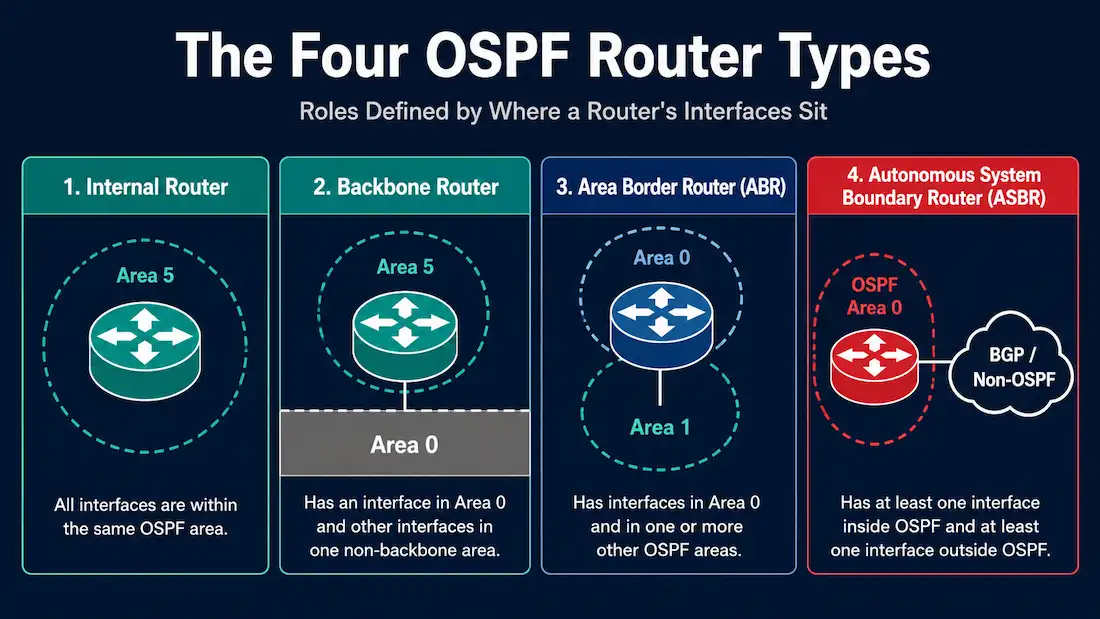
OSPF classifies every router in a multi-area domain into one or more of four functional categories, based on where its interfaces sit within the area hierarchy. These categories aren’t just naming conventions — they determine what kind of Link-State Advertisements (LSAs) a router generates and how many separate link-state databases it has to maintain. This guide covers all four types, and corrects a common point of confusion: these categories overlap, they aren’t mutually exclusive.
Internal Router
An internal router has every one of its interfaces in the same single OSPF area. Because it never needs to track topology outside that one area, an internal router maintains exactly one link-state database. Internal routers are the simplest and most common router type in any OSPF deployment — most routers in a well-designed multi-area network are internal routers, with only a smaller number handling area boundaries or external connections.
Backbone Router
A backbone router is any router with at least one interface in Area 0, the backbone area that all other areas must connect to (directly or via a virtual link). That’s the entire definition — a backbone router doesn’t need every interface in Area 0, just one.
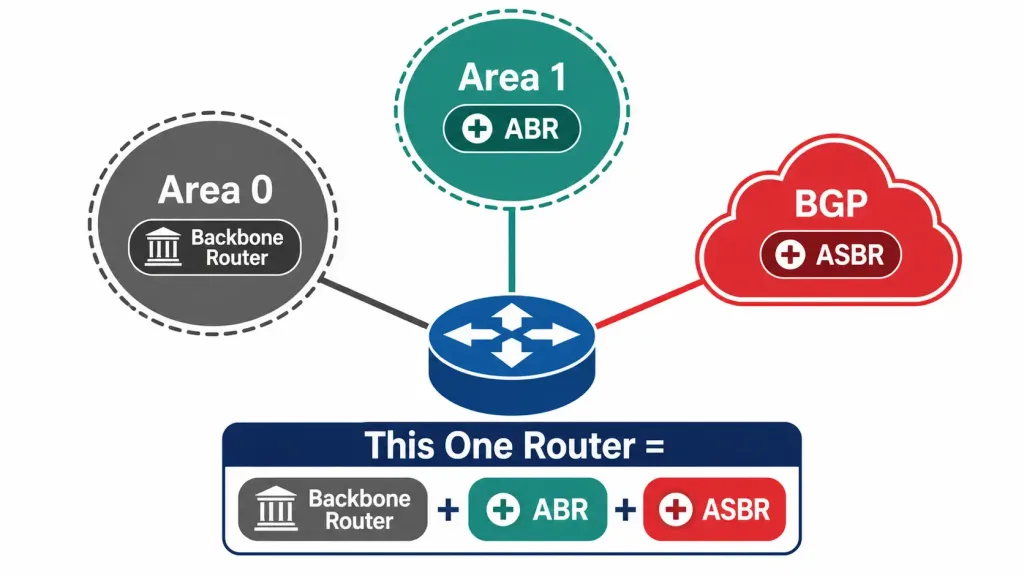
This is the point where the previous version of this guide got something wrong, and it’s worth being precise about it: a backbone router and an Area Border Router (ABR) are not mutually exclusive categories. A router with one interface in Area 0 and another interface in Area 1 is simultaneously a backbone router (because of the Area 0 interface) and an ABR (because it connects Area 0 to another area). It doesn’t stop being a backbone router just because it also qualifies as an ABR — it’s both, at the same time, for as long as it keeps that Area 0 interface.
Area Border Router (ABR)
An Area Border Router connects one or more non-backbone areas to the backbone. An ABR is a member of every area it touches, and it maintains a separate link-state database for each area it’s connected to — this is what allows different areas to have their own independent topology views rather than one enormous shared database for the whole domain, which matters a great deal as an OSPF deployment scales past a handful of routers.
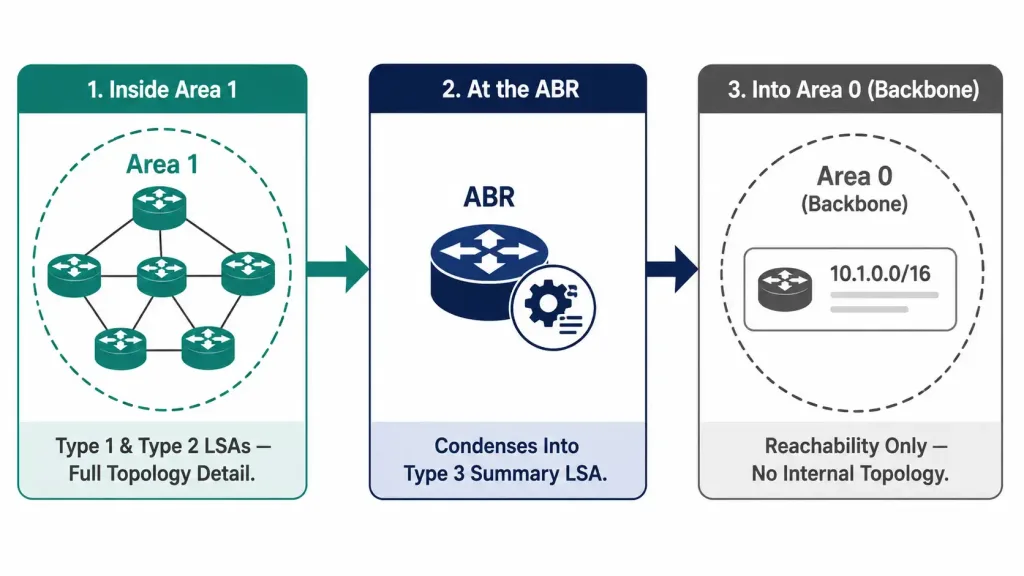
The ABR’s central job is summarization: it takes the detailed topology information (Type 1 Router LSAs and Type 2 Network LSAs) from each area it belongs to and converts that into condensed Type 3 Summary LSAs, which it then advertises into the other areas it’s connected to. This is why a non-backbone area doesn’t need to know the full internal topology of every other area in the domain — it only needs to know the summarized reachability information an ABR provides. For the full breakdown of what each LSA type carries and which router generates it, see OSPF LSA Types.
Per the OSPF specification, an ABR technically doesn’t have to be directly connected to Area 0 — a router with interfaces in two non-backbone areas but no Area 0 connection still meets the formal definition of an ABR, though in practice this configuration can create routing complications since inter-area traffic is expected to transit the backbone, and most real deployments ensure every ABR has a direct or virtual-link connection to Area 0.
Autonomous System Boundary Router (ASBR)
An Autonomous System Boundary Router has at least one connection to a network or routing domain outside of OSPF — most commonly this means the router runs OSPF alongside another routing protocol (such as EIGRP or BGP) or a set of static routes, and redistributes routes between them.
The ASBR’s job is to advertise these external routes into the OSPF domain using Type 5 External LSAs. Because Type 5 LSAs need to be reachable from every area, ABRs relay a companion Type 4 ASBR Summary LSA that tells routers in other areas how to reach the ASBR itself, since the ASBR’s exact location wouldn’t otherwise be visible outside its own area. This two-LSA relationship — Type 5 for the external route itself, Type 4 for locating the router that originated it — is why ABRs and ASBRs are so often discussed together, even though they solve different problems: one summarizes between OSPF areas, the other bridges OSPF to something outside it entirely.
ASBRs cannot exist inside a stub area. Stub areas are specifically designed to block Type 5 External LSAs from entering, in order to reduce the size of the routing tables for routers inside that area — so an ASBR placed inside a stub area would have its external route advertisements blocked at the area boundary, defeating the purpose of being an ASBR in the first place. An ASBR must sit in a normal (non-stub) area, or in the backbone itself.
Why These Categories Overlap
A single router can legitimately hold two, three, or even all four of these classifications at once, depending on how many interfaces it has and where they connect:
- A router with all interfaces in Area 5 and nothing else is only an internal router.
- A router with one interface in Area 0 and nothing else is only a backbone router (specifically, an “internal backbone router,” since none of its interfaces leave Area 0).
- A router with an interface in Area 0 and an interface in Area 1 is both a backbone router and an ABR.
- A router with an interface in Area 0, an interface in Area 1, and a redistribution point into BGP is a backbone router, an ABR, and an ASBR simultaneously.
The categories describe roles a router is performing based on its interface placement and configuration — they were never designed to be mutually exclusive, and treating them that way is a common source of confusion for anyone studying OSPF’s area hierarchy for the first time.
Verifying Router Roles
Cisco IOS labels a router’s role directly in show ip ospf output, which is the fastest way to confirm which categories a given router actually falls into rather than reasoning it out from the topology alone:
Router# show ip ospf
Routing Process "ospf 1" with ID 1.1.1.1
 Supports only single TOS(TOS0) routes
 It is an area border and autonomous system boundary router
 Redistributing External Routes from,
    bgp 65000
 Number of areas in this router is 2. 2 normal 0 stub 0 nssa
The line “It is an area border and autonomous system boundary router” confirms both roles directly — this router is simultaneously an ABR and an ASBR, exactly the kind of overlap this guide has been emphasizing. If a router were only an internal router with no special roles, this line would simply be absent from the output.
Design Considerations for Combining Roles
While a single router can legitimately combine all four roles, there are practical reasons larger networks often choose not to concentrate every role onto one device:
CPU and memory load. An ABR maintains a separate LSDB per area, and an ASBR handles redistribution processing on top of that. A router combining both roles across several areas, especially one also acting as the sole exit point to an external network, can become a resource bottleneck as the network grows.
Single point of failure. If one router is simultaneously the only ABR for an area and the only ASBR providing external connectivity, its failure disconnects that area from both inter-area and external routing at once. Distributing these roles across at least two routers per area is a common resiliency practice, particularly for the ABR role, since redundant ABRs let an area survive the loss of one border router.
Troubleshooting clarity. When ABR and ASBR functions are combined on the same device, diagnosing whether a routing problem stems from inter-area summarization or external redistribution can take an extra step, since both processes are happening on the same router and can be harder to isolate than when they’re on separate devices.
None of this makes combining roles wrong — plenty of legitimate, well-functioning networks do it, especially smaller ones where dedicating a separate router to each function isn’t cost-effective. It’s simply a design tradeoff worth being deliberate about rather than an automatic default.
Summary Table
| Router Type | Interface Placement | Key Behavior |
|---|---|---|
| Internal Router | All interfaces in one area | Single LSDB |
| Backbone Router | At least one interface in Area 0 | May also be an ABR |
| Area Border Router (ABR) | Interfaces in Area 0 (or another area) plus at least one other area | Separate LSDB per area; generates Type 3 Summary LSAs |
| Autonomous System Boundary Router (ASBR) | At least one connection outside OSPF | Generates Type 5 External LSAs; cannot sit inside a stub area |
Frequently Asked Questions
Can a router be both a backbone router and an ABR at the same time?
Yes — this is the norm, not an exception. Any ABR that has one of its interfaces in Area 0 (which is the typical, recommended design) is automatically also a backbone router, since a backbone router is simply defined as any router with at least one interface in Area 0.
Does an ABR need to be physically connected to Area 0?
The formal OSPF specification doesn’t strictly require it, but in practice, nearly every real ABR either connects directly to Area 0 or reaches it through a virtual link, since inter-area traffic is expected to transit the backbone rather than pass directly between two non-backbone areas.
Why can’t an ASBR be located inside a stub area?
Because stub areas block Type 5 External LSAs specifically to reduce routing table size for routers inside them — and Type 5 LSAs are exactly what an ASBR generates to advertise external routes. Placing an ASBR inside a stub area would mean its external route advertisements get blocked at the area boundary.
How many link-state databases does an ABR maintain?
One separate LSDB for each area it’s connected to. This is what lets each area maintain its own independent topology view rather than sharing one combined database across the whole OSPF domain.
Is it normal for one router to hold three or four of these classifications simultaneously?
Yes, particularly in smaller OSPF deployments where a single edge router might connect Area 0, a secondary area, and an external BGP peering point all at once. Larger, more segmented designs often spread these roles across separate dedicated routers instead, but there’s nothing wrong with combining them where the topology calls for it.
How can I quickly check which roles a specific router is playing?
Run show ip ospf in privileged EXEC mode. The output includes a line explicitly stating whether the router is functioning as an area border router, an autonomous system boundary router, both, or neither — removing the need to manually trace every interface’s area assignment to work it out.
Conclusion
OSPF’s four router types — internal, backbone, ABR, and ASBR — describe roles based on where a router’s interfaces sit, not fixed, exclusive labels. A router earns the “backbone router” label the moment it has an interface in Area 0, and it can simultaneously be an ABR if another interface reaches a different area, or an ASBR if it also touches something outside OSPF entirely.
Understanding that these roles stack, rather than being assigned one-at-a-time, clears up a common point of confusion when first learning how OSPF’s area hierarchy actually works — and it’s exactly the kind of distinction that separates a surface-level memorization of the four category names from an actual working understanding of why OSPF’s area design looks the way it does.



