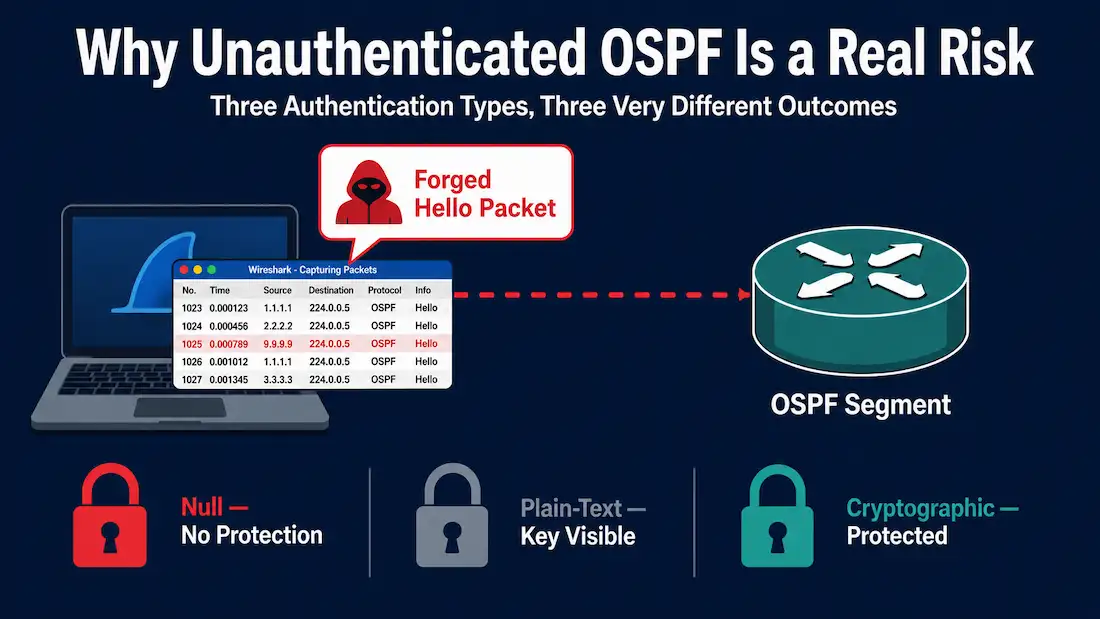
OSPF packets are not encrypted or authenticated by default. Any device on a shared broadcast segment can listen to, replay, or forge Hello and Link-State Advertisement (LSA) packets unless authentication is explicitly configured. This guide covers how OSPF authentication actually works — MD5, the modern HMAC-SHA replacement, vendor configuration differences, common failure modes, and how to migrate from MD5 to HMAC-SHA without dropping adjacencies.
A note on sourcing: an earlier version of this guide cited a specific industry survey and a named academic paper to quantify how widespread unauthenticated OSPF deployments are. Neither citation could be verified against any real publication, so they’ve been removed rather than repeated. What follows sticks to protocol mechanics and RFC-documented behavior, which can be checked directly.
Why Plain-Text and Null Authentication Aren’t Enough
OSPF supports three authentication types on an interface: null (no authentication at all), plain-text (a shared key sent unencrypted inside the Hello packet), and cryptographic (MD5 or HMAC-SHA digest-based authentication).
Plain-text authentication stops the most casual misconfiguration — a stray router accidentally joining the wrong OSPF domain — but it offers no real protection against a deliberate attacker. Because the key travels in the clear, anyone with packet capture access to the segment can read it directly out of a captured Hello packet and use it to forge future packets. Cisco’s own documentation has long recommended against plain-text authentication in favor of cryptographic methods, yet it still appears in older configuration templates and training material as if it were a meaningful security control.
The practical reason many networks still run with null or plain-text authentication isn’t ignorance of the risk — it’s operational friction. Rolling out authentication keys across every OSPF neighbor relationship in a large, multi-area network is a coordination exercise: a single mismatched key drops an adjacency, and in a production network carrying BGP, MPLS, or QoS-dependent traffic, an unplanned adjacency flap is genuinely disruptive. That operational cost is real, even though it doesn’t change the underlying security exposure of leaving OSPF unauthenticated.
MD5 Authentication
MD5-based OSPF authentication, defined in RFC 2328 Appendix D, has been the long-standing default cryptographic option for OSPFv2. It works by appending a 16-byte MD5 digest to each OSPF packet, computed over the packet contents plus a shared secret key. The receiving router recomputes the digest locally and compares it against the received value; a match means the packet is accepted, a mismatch means it’s silently dropped.
MD5 as a general-purpose cryptographic hash function has well-documented weaknesses — practical collision attacks against MD5 itself were demonstrated by researchers (Wang et al.) back in 2004–2005, and MD5 has not been considered suitable for new security designs for a long time. Worth being precise here: the well-known “SHAttered” collision attack from 2017 targeted SHA-1, not MD5, and was carried out by researchers at Google and CWI Amsterdam — it’s a different, later attack against a different algorithm, and shouldn’t be cited as evidence specifically about MD5’s weaknesses.
Despite MD5’s known weaknesses as a general-purpose hash, it remains extremely common in OSPF deployments in practice, largely because it’s supported on essentially every router platform in service and migrating a live network to a different authentication mechanism requires coordinated changes across every neighbor relationship. For CCNP and CCIE-level exam preparation, MD5 configuration remains a required topic, and troubleshooting scenarios frequently hinge on mismatched keys or mismatched authentication types between neighbors.
HMAC-SHA Cryptographic Authentication
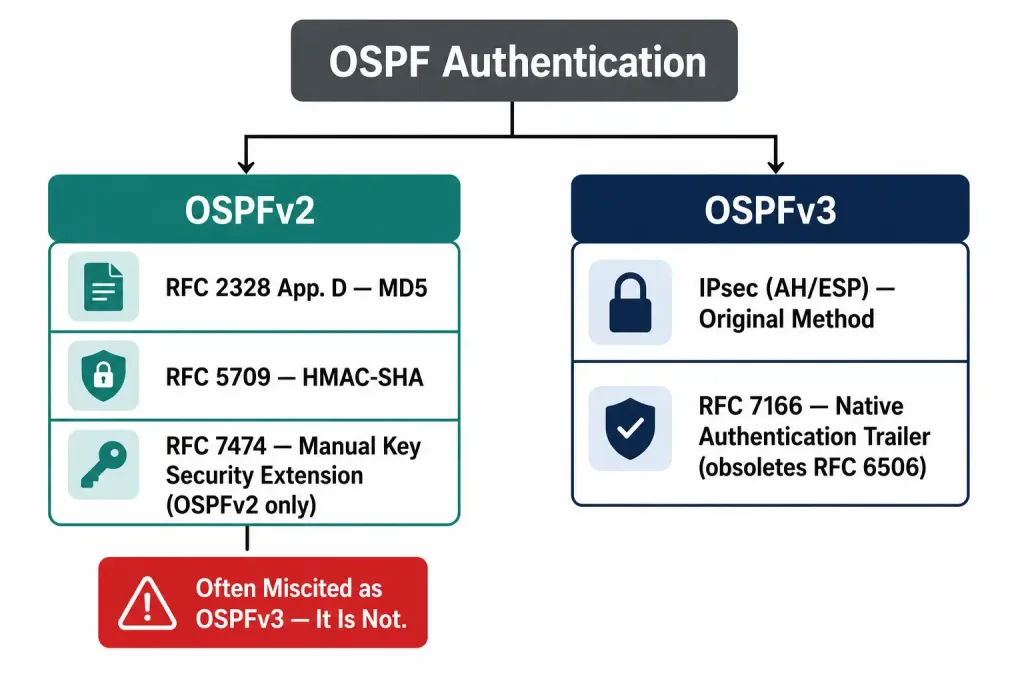
RFC 5709 introduced HMAC-SHA authentication for OSPFv2, providing a modern replacement for MD5 built on a true HMAC construction rather than a simple keyed digest. The sender computes an HMAC (commonly HMAC-SHA-256, though other SHA variants are supported) over the OSPF packet payload plus a sequence number, and the receiver verifies it using the same shared key.
The sequence number is what gives HMAC-SHA authentication meaningful replay protection that MD5 authentication lacks in practice: the receiving router tracks the last accepted sequence number per neighbor, and any packet arriving with a sequence number equal to or lower than the last accepted value is dropped, regardless of whether its HMAC is otherwise valid. This prevents an attacker from capturing a legitimately authenticated packet and replaying it later to disrupt or confuse the routing domain.
OSPFv3 Authentication
OSPFv3, which runs over IPv6, originally had no native authentication mechanism at all — the original design relied entirely on IPsec (AH/ESP) for packet-level security, since IPv6 was expected to have IPsec support built in more broadly. RFC 7166 (which obsoletes the earlier RFC 6506) changed this by defining a native Authentication Trailer for OSPFv3, supporting HMAC-SHA-1, HMAC-SHA-256, HMAC-SHA-384, and HMAC-SHA-512, giving OSPFv3 a built-in cryptographic authentication option that doesn’t depend on IPsec being separately configured. In practice, many OSPFv3 deployments still rely on IPsec, particularly in environments where it was already configured for other reasons, but the native Authentication Trailer reduces complexity where IPsec isn’t already in place.
It’s worth being precise about RFC scope here, since this is an easy point to mix up: RFC 7474 — sometimes cited in connection with OSPFv3 — is actually about OSPFv2. It defines a security extension for OSPFv2’s manual key management to close replay-attack gaps that existed in the original RFC 2328/RFC 5709 mechanism. It does not apply to OSPFv3 at all; OSPFv3’s native authentication is defined separately by RFC 7166.
Basic Cisco IOS Configuration
The configuration difference between MD5 and cryptographic (HMAC-SHA) authentication is straightforward on modern Cisco platforms. To require MD5 authentication on an interface:
Router(config)# interface GigabitEthernet0/0
Router(config-if)# ip ospf authentication message-digest
Router(config-if)# ip ospf message-digest-key 1 md5 SECRETKEY
To disable authentication entirely (not recommended for production use):
Router(config-if)# ip ospf authentication nullFor HMAC-SHA authentication, Cisco IOS uses a key chain rather than a single inline key, which is what makes rolling key updates possible without dropping adjacencies:
Router(config)# key chain OSPF-KEYS
Router(config-keychain)# key 1
Router(config-keychain-key)# cryptographic-algorithm hmac-sha-256
Router(config-keychain-key)# key-string SECRETKEY
A common configuration pitfall: the key ID (the 1 in message-digest-key 1) must match on both sides of a link. The key ID is not itself a security parameter — it’s an index that exists specifically to support key rotation. If router A uses key ID 1 and router B expects key ID 2, the adjacency will fail even if the actual key string is identical on both routers.
Configuration Differences Across Vendors
Authentication configuration syntax varies meaningfully between platforms, and this is a common source of misconfiguration in mixed-vendor environments. A few structural differences worth knowing:
- Cisco IOS configures authentication under the interface, with the key itself either inline (MD5) or via a key chain (HMAC-SHA).
- Juniper Junos configures authentication under the interface’s address family rather than under the OSPF process directly. This means a single physical interface with multiple IP addresses can carry different authentication keys per address — useful in environments running multiple OSPF instances over shared physical interfaces.
- FortiOS nests authentication configuration under the OSPF process’s area and interface hierarchy rather than directly under the interface, and SHA-256 support was added in a specific FortiOS release rather than being available from the start — always check the release notes for the FortiOS version actually in use before assuming SHA-256 is available.
Rather than reproduce vendor-specific command syntax that changes across software releases, the safest practice is to check each vendor’s current official configuration guide at the time of deployment, since exact keywords and available algorithms do shift between releases.
The Five Most Common OSPF Authentication Failures
1. Mismatched authentication type. One router is configured for MD5, the other for null or plain-text. The adjacency will not form, and show ip ospf neighbor shows the neighbor stuck in INIT state. Fix by ensuring both sides use the same authentication type.
2. Mismatched key string. Both routers use MD5 with the same key ID, but the key strings differ. The adjacency may form briefly before dropping, with OSPF logging a packet authentication failure. Fix by verifying the key string matches exactly on both sides.
3. Mismatched key ID. Router A uses key ID 1, router B expects key ID 2. The adjacency fails to form even with an identical key string. Fix by aligning key IDs across all neighbors on the same segment.
4. Sequence number handling after a reboot. If a router restarts, its authentication sequence number resets. A neighbor that remembers a higher sequence number from before the restart may reject the router’s first post-reboot packets until the neighbor relationship is fully re-established. This is a known source of confusion during maintenance windows.
5. Missing authentication on passive interfaces. A passive interface doesn’t send Hello packets, but it still processes incoming OSPF traffic if the interface remains part of the OSPF process. If authentication is configured inconsistently between the active and passive sides of a relationship, unexpected authentication failures can result.
For deeper troubleshooting workflows, OSPF troubleshooting and verification covers the relevant debug commands and log messages in more depth.
OSPF Authentication on Certification Exams
OSPF authentication is a recurring topic on Cisco’s certification exams. The CCNA 200-301 blueprint includes OSPF authentication under its OSPF configuration and verification objectives — candidates should know how to enable MD5 authentication on an interface and verify it with show ip ospf interface.
CCNP Enterprise-level material goes further, expecting candidates to configure both OSPFv2 and OSPFv3 authentication, understand the practical difference between MD5 and HMAC-SHA, and troubleshoot authentication failures across multi-area topologies, including key chain configuration for rolling key updates.
Two scenarios worth knowing for exam purposes: on an NBMA network, authentication is typically configured per manually-defined neighbor rather than applying automatically to the whole segment the way it does on broadcast networks. And for OSPF virtual links, the virtual link must use matching authentication type and key with the transit area it passes through, or the virtual link will fail to form — a detail that catches people in lab exams because it’s easy to configure the endpoints correctly while forgetting the transit area’s authentication settings need to match too.
Migrating from MD5 to HMAC-SHA Without Dropping Adjacencies
The core fear engineers have about changing OSPF authentication in a live network is the adjacency flap during the transition. The standard mitigation is a key chain with overlapping key lifetimes, allowing both the old and new authentication methods to be accepted simultaneously during a defined transition window.
A general migration approach:
- Configure a new HMAC-SHA key on all routers in the OSPF domain, with its accept lifetime starting immediately but its send lifetime starting later (for example, 24 hours out). During this window, routers can accept either the old MD5 key or the new HMAC-SHA key, but continue sending MD5.
- Once the transition window has passed and all routers have picked up the new key’s accept lifetime, change the send lifetime to start immediately, so routers begin actually sending HMAC-SHA packets.
- Confirm all adjacencies remain stable with the new authentication method in active use.
- Remove the old MD5 key once you’ve confirmed stability.
This approach depends on synchronized clocks across all routers involved — key lifetime windows are defined in absolute time, so if router clocks drift relative to each other, some routers may reject packets that others still accept, defeating the purpose of the overlapping-lifetime approach. NTP synchronization is effectively a prerequisite for this migration method, not an optional nicety.
Conclusion
OSPF’s authentication options exist on a real spectrum of protection: null authentication provides none, plain-text stops accidental misconfiguration but nothing deliberate, MD5 provides meaningful protection against casual attackers despite its general cryptographic weaknesses, and HMAC-SHA (via RFC 5709 for OSPFv2, RFC 7166 for OSPFv3) provides the strongest and most current option, including genuine replay protection through sequence numbers. Migrating from MD5 to HMAC-SHA doesn’t have to mean a scheduled outage — overlapping key lifetimes and synchronized clocks make a live migration possible — but it does require deliberate planning rather than a single-step key swap.