
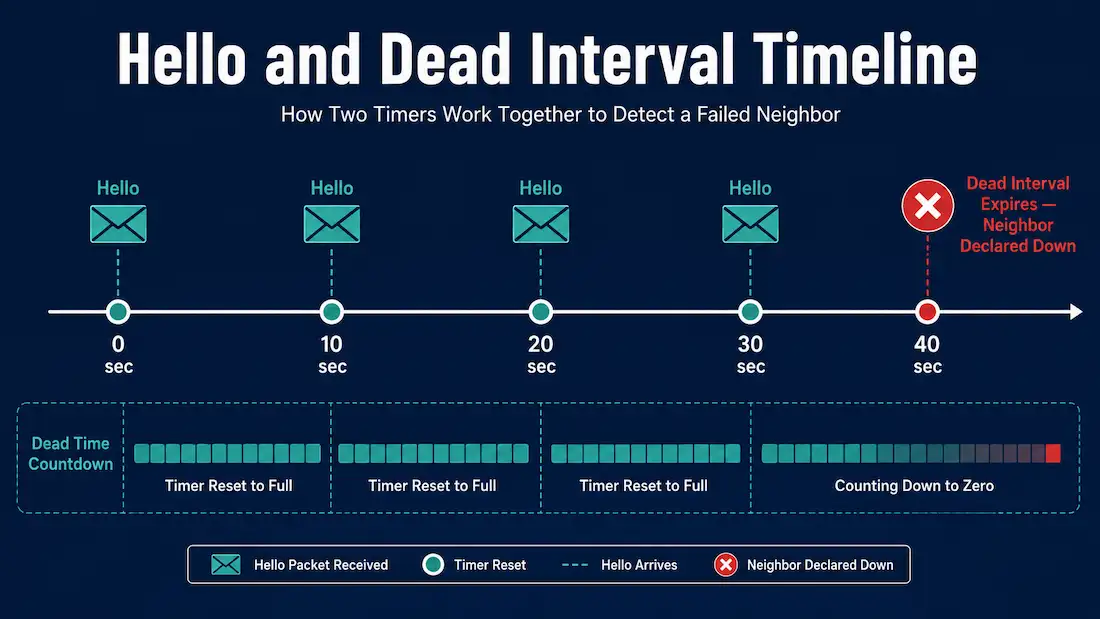
OSPF routers constantly track whether their neighbors are still alive using two timers built into every Hello packet: the Hello interval and the Dead interval. Understanding how these two timers interact — including a genuinely useful Cisco IOS behavior that surprises a lot of people — is essential for both the CCNA exam and real-world adjacency troubleshooting.
What the Hello Interval Does
The Hello interval defines how often a router sends Hello packets out an interface to discover and maintain neighbor relationships. This value must match exactly between two routers on the same link — if it doesn’t, they will not form an adjacency at all.
The default Hello interval depends on the OSPF network type:
- 10 seconds on broadcast and point-to-point networks (the common case — Ethernet, serial point-to-point links, GRE tunnels)
- 30 seconds on Non-Broadcast Multi-Access (NBMA) networks
What the Dead Interval Does
The Dead interval defines how long a router waits without receiving a Hello packet from a neighbor before declaring that neighbor down and removing it from its topology. Once the Dead interval expires without a Hello, the router marks the neighbor as unreachable, triggering a fresh SPF recalculation to route around it.
Like the Hello interval, the Dead interval must match exactly between neighbors sharing a link. By default, it is four times the Hello interval — 40 seconds on broadcast/point-to-point networks, 120 seconds on NBMA networks.
Verifying the Current Timer Values
The show ip ospf interface command shows the currently configured Hello and Dead intervals for a specific interface:
R1# show ip ospf interface GigabitEthernet0/0
GigabitEthernet0/0 is up, line protocol is up
  Internet Address 192.168.1.1/24, Area 0
  Process ID 1, Router ID 1.1.1.1, Network Type BROADCAST, Cost: 1
  Timer intervals configured, Hello 10, Dead 40, Wait 40, Retransmit 5
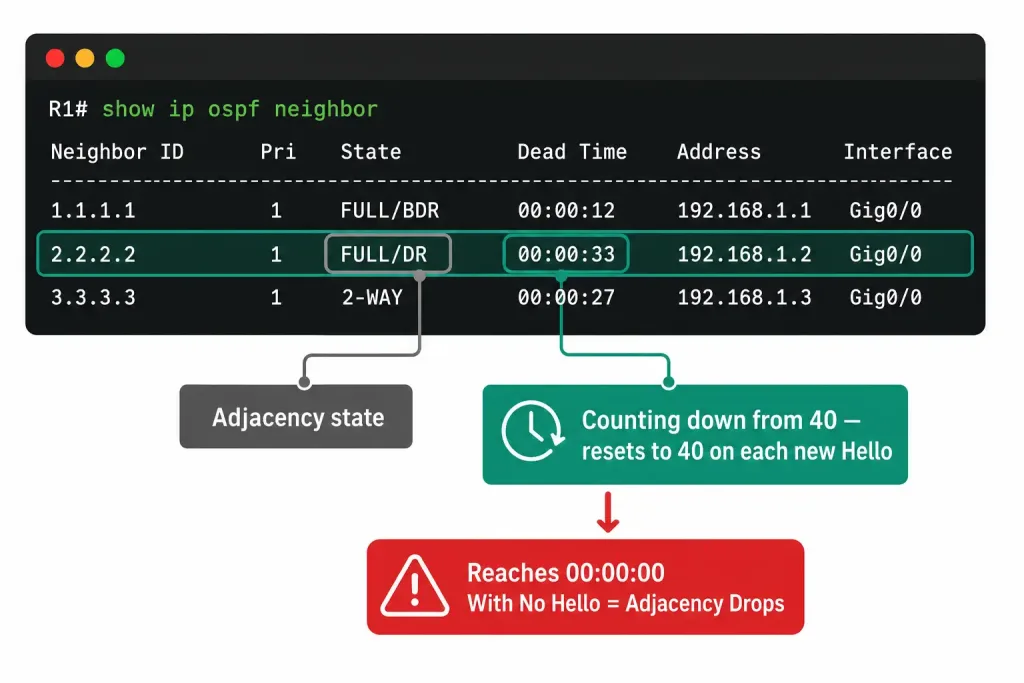
The show ip ospf neighbor command reveals the Dead timer actively counting down in real time for each neighbor:
R1# show ip ospf neighbor
Neighbor ID     Pri   State           Dead Time   Address         Interface
2.2.2.2           1   FULL/DR         00:00:33    192.168.1.2     Gig0/0
3.3.3.3           1   FULL/BDR        00:00:38    192.168.1.3     Gig0/0
The Dead Time column counts down from the configured Dead interval (40 seconds by default) and resets back to the maximum every time a fresh Hello arrives from that neighbor — normally every 10 seconds. If the countdown ever reaches zero without a Hello arriving, the adjacency drops. The State column here (FULL/DR, FULL/BDR) reflects each neighbor’s role in the DR/BDR election, a separate mechanism from the timers covered in this article.
Why Adjust the Default Timers
The default timers are based on established best practices and work well for the overwhelming majority of networks — they’re deliberately conservative, trading a bit of failure-detection speed for lower overhead and stability. Lowering the Hello and Dead intervals reduces convergence time (a failure gets detected faster), but at the cost of more Hello traffic and more CPU overhead processing it. This tradeoff is usually only worth making on links where fast failure detection genuinely matters — and even then, many network designs now reach for BFD (Bidirectional Forwarding Detection) instead, which can detect failures in milliseconds without touching OSPF’s own timers at all.
Modifying OSPFv2 Intervals
Both timers are configurable per interface in interface configuration mode:
Router(config)# interface GigabitEthernet0/0
Router(config-if)# ip ospf hello-interval <seconds>
Router(config-if)# ip ospf dead-interval <seconds>
To restore either value to its default:
Router(config-if)# no ip ospf hello-interval
Router(config-if)# no ip ospf dead-interval
A Cisco IOS Behavior Worth Knowing
Here’s something that catches a lot of people off guard: if you change the Hello interval without touching the Dead interval, Cisco IOS automatically recalculates the Dead interval to four times the new Hello value. Set the Hello interval to 5 seconds, and IOS will silently adjust the Dead interval to 20 seconds behind the scenes — you don’t need to configure both manually for the 4:1 ratio to hold. This is confirmed, documented Cisco IOS behavior, not just a coincidence of matching defaults.
That said, this automatic adjustment is easy to miss, since show running-config only displays values that were explicitly configured — an auto-adjusted Dead interval won’t show up in the running config, only in show ip ospf interface output. For that reason, explicitly configuring both values is still the recommended practice, even though it isn’t strictly required for the math to work out. Being explicit makes the configuration self-documenting and avoids any confusion later about whether a given Dead interval value was deliberate or just an automatic side effect.
Both Sides Must Match
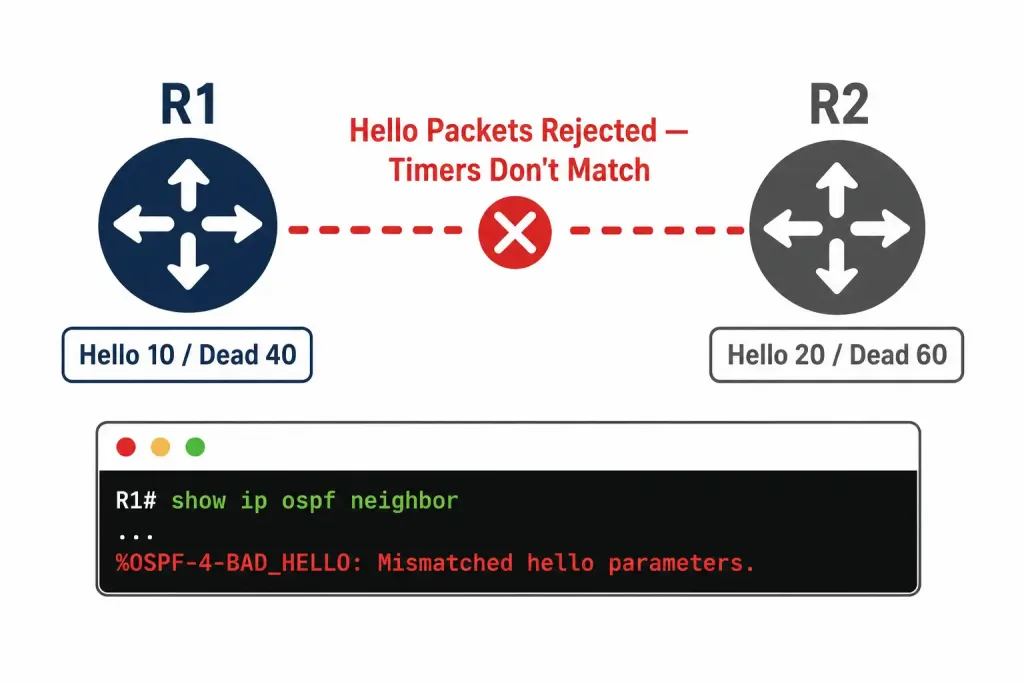
Whatever values you land on, they need to match on both ends of the link. If you change the Hello and Dead intervals on only one router, that router’s neighbor will keep using its old (default) values. Since the timers no longer match, the two routers reject each other’s Hello packets, and any existing adjacency between them will drop once the mismatched side’s Dead interval expires. Always change both routers on a shared segment together.
Modifying OSPFv3 Intervals
OSPFv3 (the IPv6 implementation of OSPF) uses the identical concept, defaults, and 4:1 relationship as OSPFv2 — only the command syntax differs:
Router(config)# interface GigabitEthernet0/0
Router(config-if)# ipv6 ospf hello-interval <seconds>
Router(config-if)# ipv6 ospf dead-interval <seconds>
To restore defaults:
Router(config-if)# no ipv6 ospf hello-interval
Router(config-if)# no ipv6 ospf dead-interval
The same automatic-adjustment behavior applies here too: changing the OSPFv3 Hello interval to 5 seconds causes Cisco IOS to automatically recalculate the Dead interval to 20 seconds behind the scenes. As with OSPFv2, explicitly configuring both values remains good practice for clarity and self-documentation — it is not a requirement for the timers to function correctly, since the automatic adjustment already produces a working 4:1 ratio on its own.
Verify OSPFv3 timer values with:
Router# show ipv6 ospf neighbor
Router# show ipv6 ospf interface GigabitEthernet0/0
Both commands mirror their OSPFv2 counterparts closely, showing the same Dead Time countdown and configured interval values, just for the IPv6 address family.
How the Timers Affect Total Convergence Time
It’s worth understanding what “convergence time” actually adds up to when a neighbor fails. With default timers, a router doesn’t detect the failure until the full 40-second Dead interval elapses without a Hello. After that, OSPF runs its SPF (Shortest Path First) calculation to recompute routes around the failure — an additional few seconds depending on network size and complexity, with a commonly cited rule of thumb adding roughly 5 more seconds before the new topology is fully installed. In practice, this means a default-configured OSPF network can take up to roughly 45 seconds to fully reroute around a failed neighbor, purely from waiting out the Dead interval before SPF even runs.
This is precisely why some designs lower the Hello and Dead intervals, or deploy BFD instead: for latency-sensitive applications like voice or financial trading traffic, a 45-second outage window is often unacceptable, even though it’s perfectly fine for less time-sensitive traffic. The right choice depends entirely on what’s actually running over the link — there’s no universally correct interval setting, only a tradeoff to make deliberately rather than leave at the default without thinking about it.
Troubleshooting Timer Mismatches
When an OSPF adjacency won’t form or unexpectedly drops, mismatched timers are one of the first things worth ruling out. The debug ip ospf adj command surfaces this directly:
Router# debug ip ospf adj
%OSPF-4-BAD_HELLO: Mismatched hello parameters from 10.0.0.2
    Dead R 40 C 60, Hello R 10 C 20 Mask R 255.255.255.0 C 255.255.255.0
This output is read as R (received from the neighbor) versus C (configured locally) — in this example, the local router expects a 20-second Hello and 60-second Dead interval, but received Hello packets advertising 10 and 40 instead. That mismatch alone is enough to prevent the adjacency from forming, even if every other OSPF parameter matches perfectly. Always disable debugging once you’ve identified the issue:
Router# undebug allCommon Mistakes
Assuming the Dead interval auto-adjusts when it doesn’t apply. The automatic 4x recalculation only triggers when you change the Hello interval without also specifying the Dead interval in the same command sequence. If you’ve previously set a custom Dead interval explicitly, changing the Hello interval afterward will not silently override your custom Dead interval value.
Changing timers on only one router. As covered above, this is the single most common cause of a suddenly-dropped adjacency after a timer change. Always update both ends of a link together.
Confusing “not required” with “not recommended.” The automatic adjustment genuinely works — but that doesn’t mean leaving it implicit is the better choice. Explicit configuration on both timers avoids ambiguity for the next engineer who reads the config and won’t necessarily know an automatic adjustment happened.
Mixing OSPF network types with mismatched default timers. A point-to-point link (10/40 default) and a point-to-multipoint link (30/120 default) will not match by default even if neither side has been manually configured — the defaults themselves differ by network type, not just by explicit configuration.
Frequently Asked Questions
What happens if the Hello interval doesn’t match between two OSPF routers?
The adjacency will never form, or an existing one will drop. OSPF requires the Hello interval (along with the Dead interval, area ID, and a few other parameters) to match exactly between routers on the same link before Hello packets are accepted.
Does changing the Hello interval always change the Dead interval automatically?
Yes, in Cisco IOS, changing the Hello interval alone triggers an automatic recalculation of the Dead interval to four times the new value — confirmed behavior for both OSPFv2 and OSPFv3. This only happens when you don’t also explicitly set the Dead interval; an already-configured custom Dead interval isn’t silently overwritten.
Is it required to manually configure the Dead interval after changing the Hello interval?
No — the automatic adjustment already produces a working, correctly matched 4:1 ratio. Manually setting both values explicitly is a best practice for clarity and documentation, not a functional requirement, since show running-config won’t reveal an interval that changed only automatically.
Why would I lower the OSPF Hello and Dead intervals?
Lower values mean OSPF detects a failed neighbor and reroutes around it faster, improving convergence time. The tradeoff is more frequent Hello traffic and CPU overhead. Many modern designs use BFD instead of aggressively tuned OSPF timers, since BFD can detect failures in milliseconds with much less overhead than very short OSPF Hello intervals would require.
What’s the default Hello and Dead interval on an NBMA network like Frame Relay?
30 seconds Hello and 120 seconds Dead — three times longer than the broadcast/point-to-point defaults, reflecting the slower and less reliable WAN links NBMA networks were originally designed around.
How do I tell if a dropped adjacency was caused by a timer mismatch specifically?
Run debug ip ospf adj and watch for a %OSPF-4-BAD_HELLO: Mismatched hello parameters message, which explicitly lists the received (R) versus configured (C) values for Dead interval, Hello interval, and subnet mask. If those values differ between the two routers, that mismatch alone explains the failed or dropped adjacency, without needing to look any further.
Conclusion
OSPF’s Hello and Dead intervals work together to detect neighbor failures — Hello packets prove a neighbor is alive, and the Dead interval sets how long to wait before giving up on one. Both values must match exactly between neighbors, and Cisco IOS’s automatic 4x recalculation when you change the Hello interval is a genuinely useful behavior worth knowing, even though explicitly configuring both remains the clearer, more maintainable practice. Whether working in OSPFv2 or OSPFv3, the underlying mechanism and defaults are identical — only the command syntax changes.



