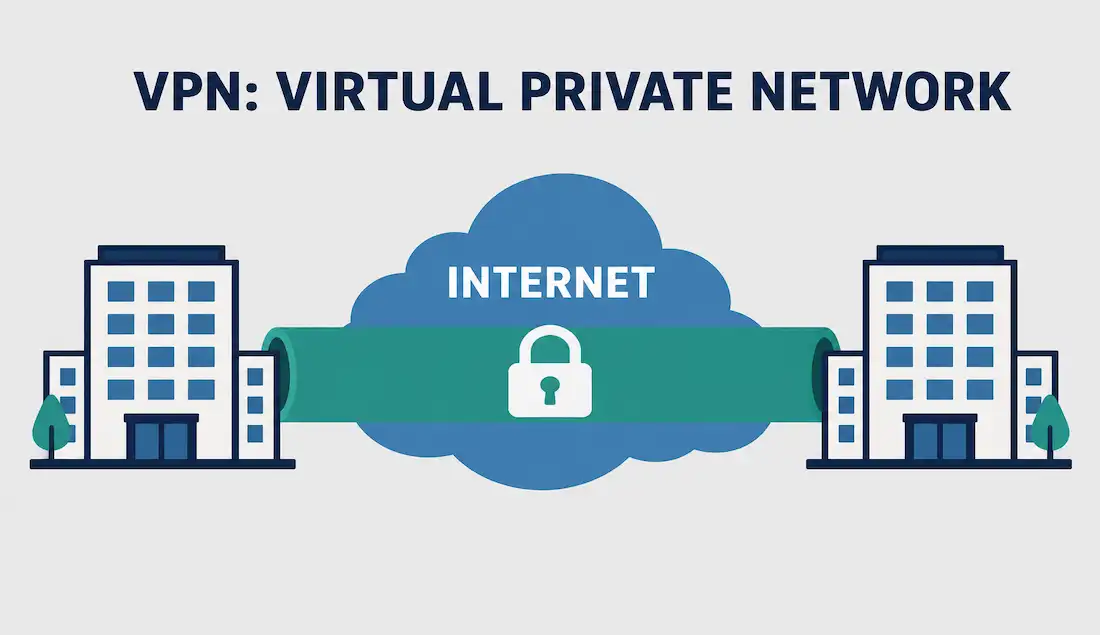
VPN is the abbreviation for Virtual Private Network. VPN technology creates a safe, encrypted connection over an unsecured network, such as the Internet. It effectively extends a private network across a public network, letting remote users and offices communicate as if they were directly connected to the same private infrastructure.
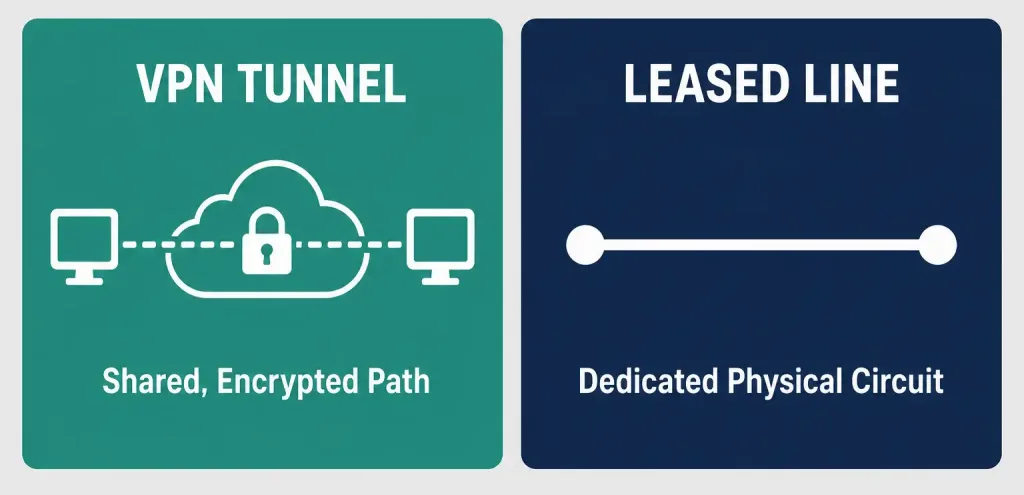
A virtual private network uses virtual connections called VPN tunnels instead of a dedicated physical circuit like a leased line. This distinction matters: a leased line is a dedicated physical circuit reserved exclusively for one customer, operating below the data link layer protocols that typically run on top of it, while a VPN tunnel is a logical, encrypted path carved out of a shared public network — no dedicated physical infrastructure required, which is exactly why VPNs are dramatically cheaper to deploy and scale than leased lines.
How a VPN Tunnel Works
The virtual connection is routed through the Internet from a company’s private network to a remote site or an individual employee’s device. To access protected resources through a VPN, the user must authenticate using credentials such as a username and password, a security certificate, or a hardware or software token. Once authenticated, all traffic flowing through the tunnel is encrypted, protecting it from anyone intercepting traffic on the public network in between.
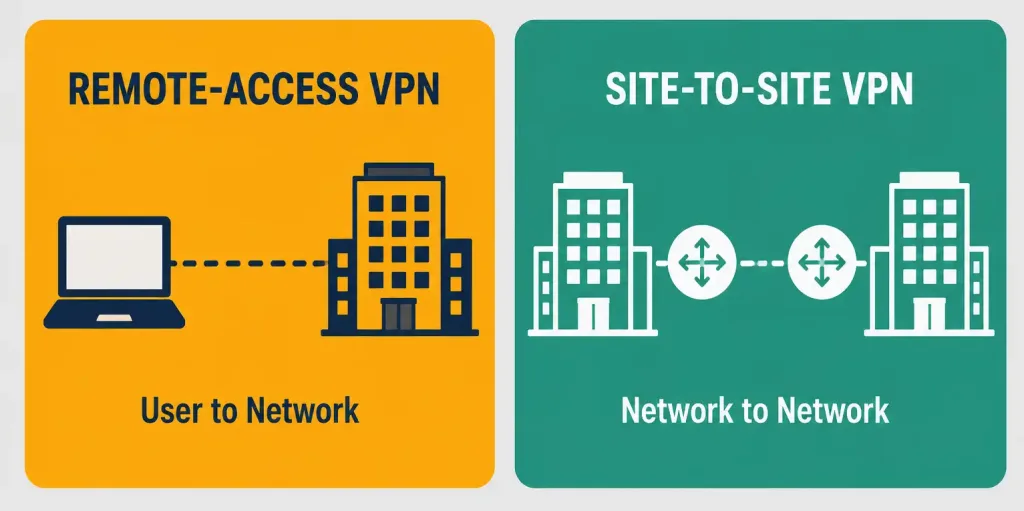
There are two primary types of VPNs: remote-access VPN and site-to-site VPN, each designed for a different connectivity scenario.
Remote-Access VPN
Remote-access VPN enables an individual user to connect to a private network and access its resources and services from anywhere with an Internet connection. Corporate employees commonly use remote-access VPN to connect to their company’s private network and reach internal files and resources while working away from the office.
Each employee typically has VPN client software installed on their laptop, phone, or tablet, though many organizations also offer a web-based client for remote access without installing dedicated software. Beyond corporate use, individual users also rely on VPN services to bypass regional Internet restrictions, access geographically blocked content, and generally improve their privacy and security when using untrusted networks like public Wi-Fi.
Site-to-Site VPN
Corporate organizations most commonly use site-to-site VPN to connect offices in different geographic locations, which is why it’s also known as a router-to-router VPN. A site-to-site VPN connects the network at one office location to the network at another, allowing devices on both networks to communicate as though they shared a single local network.
Each site is equipped with a VPN gateway — typically a router, firewall, or dedicated VPN concentrator. During tunnel setup, the two gateways negotiate and authenticate with each other before any traffic flows; while some documentation loosely describes this as one gateway acting as a “client” and the other as a “server,” site-to-site VPN gateways function more accurately as peers, each capable of both initiating and responding to connection requests, unlike the clearer client-server relationship seen in remote-access VPN.
There are two types of site-to-site VPNs:
Intranet-Based VPN
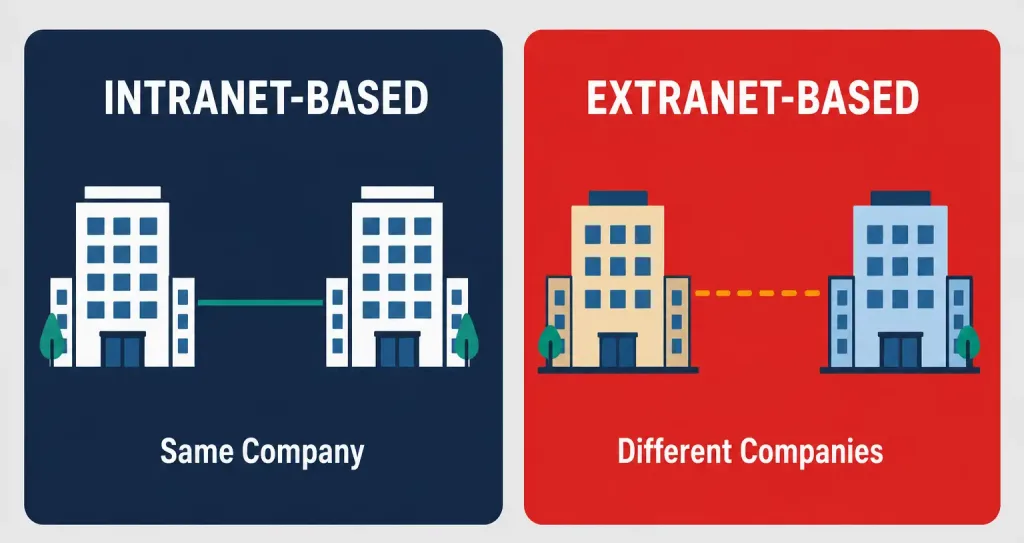
When one or more remote offices belonging to the same company are connected using a site-to-site VPN, it’s called an intranet-based VPN. This is the most common site-to-site scenario — a company connecting its own headquarters to its own branch offices.
Extranet-Based VPN
When a company uses a site-to-site VPN to connect to a different company’s network — such as a supplier or business partner — it’s called an extranet-based VPN. An extranet-based site-to-site VPN creates a virtual bridge between the networks of geographically separate organizations, letting them maintain secure and private communication over the public Internet without either party needing direct physical access to the other’s internal network.
VPN Protocols and Encryption
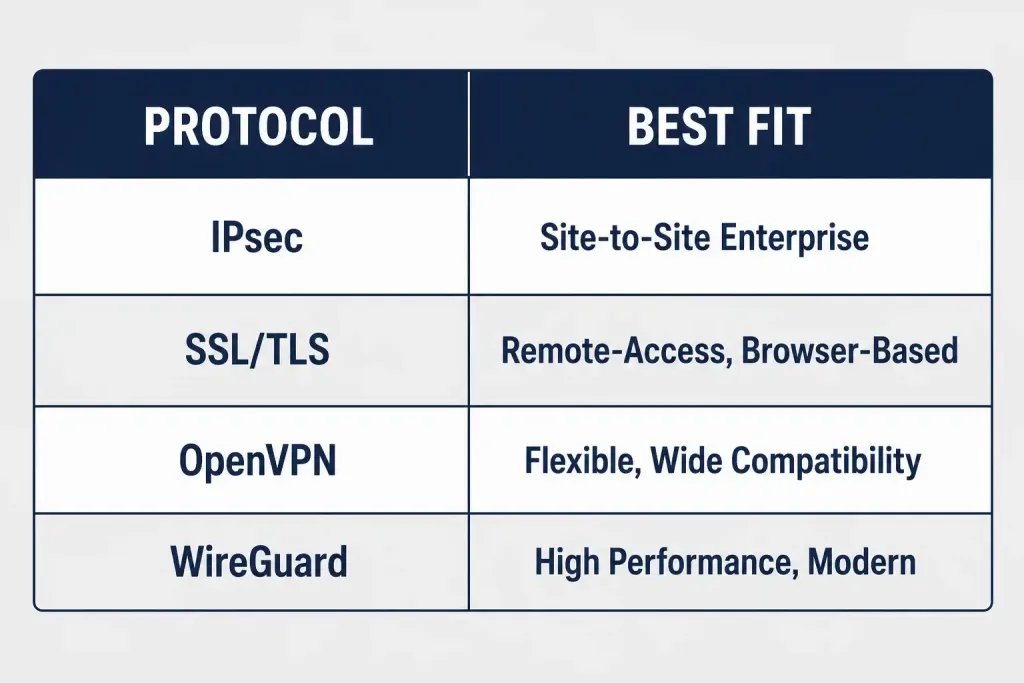
The security and performance of a VPN depend heavily on which underlying protocol it uses to build and encrypt the tunnel. Several protocols are in common use today, each with different tradeoffs:
- IPsec (Internet Protocol Security): The dominant standard for site-to-site VPN between enterprise routers and firewalls. IPsec is fully standardized, supported by virtually every router and firewall vendor, and often benefits from hardware encryption offload on dedicated appliances, though its configuration (Phase 1 and Phase 2 negotiation, multiple cipher options) is more complex than newer alternatives.
- SSL/TLS VPN: Commonly used for remote-access VPN, since it can run over standard HTTPS ports and often works through a web browser without dedicated client software, making it easier to deploy for users on unmanaged devices.
- OpenVPN: An open-source protocol that uses SSL/TLS for key exchange, valued for its flexibility and wide compatibility, though it requires installing dedicated client software and isn’t built into most operating systems by default.
- WireGuard: A newer, streamlined protocol emphasizing simplicity and high performance, increasingly popular for both consumer and site-to-site VPN deployments where all endpoints support it.
- PPTP (Point-to-Point Tunneling Protocol): An older protocol that should be avoided today — its authentication and encryption mechanisms have known, practical vulnerabilities, and modern deployments should use IPsec, OpenVPN, or WireGuard instead.
Worked Example: Choosing a VPN Type for a Growing Business
Consider a company with a headquarters, two branch offices, and a growing remote workforce. Connecting the headquarters and branch offices to each other calls for an intranet-based site-to-site VPN using IPsec, since all three locations belong to the same organization and need constant, always-on connectivity between their networks.
For the remote workforce, a remote-access VPN using SSL/TLS or a modern protocol like WireGuard makes more sense, since employees need to connect individually from varying locations and devices rather than maintaining a permanent site-to-site tunnel. If the company later partners with a key supplier that needs limited access to a shared inventory system, an extranet-based site-to-site VPN — carefully scoped to only the specific resources the partner needs — would be the appropriate way to extend connectivity without exposing the company’s full internal network.
Real-World Deployment Context
Consider a mid-sized retail chain with a headquarters, a distribution warehouse, and 30 retail stores spread across a region. The headquarters and warehouse — both owned and operated by the same company, with constant, predictable traffic between inventory and logistics systems — are natural candidates for a permanent intranet-based site-to-site VPN using IPsec. The 30 retail stores, needing to reach the same central inventory system but with lighter, more sporadic traffic, might instead use lighter-weight site-to-site tunnels or even a managed SD-WAN overlay built on top of VPN technology, since deploying and managing 30 individually hand-configured IPsec tunnels doesn’t scale as cleanly as a centrally managed overlay solution.
Meanwhile, the company’s field sales representatives, who need occasional access to the same systems from hotels, client offices, and home networks, are a textbook case for remote-access VPN rather than site-to-site: each representative authenticates individually with client software or a browser-based portal, without any of the fixed infrastructure a site-to-site tunnel requires. This mix of connectivity types within a single organization — some site-to-site, some remote-access — is typical of how VPN technology actually gets deployed in practice, rather than picking one VPN type for an entire company.
Advantages of VPN
VPN technology was originally developed to protect people’s data, particularly when sending information over an unsecured or less secure network. Beyond core security, VPNs offer several other meaningful advantages:
- Cost savings: Once established, a VPN’s ongoing maintenance cost is low. Companies can use existing Internet connectivity to link remote offices and users to the main corporate site, eliminating the far higher cost of dedicated leased lines.
- Enhanced security: Modern VPN protocols provide strong encryption and authentication, protecting data from unauthorized access as it crosses public networks.
- Scalability: Because VPNs run over the existing Internet rather than requiring new dedicated infrastructure, adding new users or sites is comparatively simple and doesn’t require major new physical infrastructure.
- Compatibility with existing broadband: Mobile workers and telecommuters can access the corporate network using their existing high-speed broadband service — DSL, cable, or fiber — without needing specialized connectivity.
- Access to blocked content: VPNs can be used to bypass geographic or network-level restrictions and reach blocked websites, though this use case carries its own legal and policy considerations depending on jurisdiction and organizational rules.
Disadvantages of VPN
- Performance overhead: Encryption and the extra routing hop through a VPN gateway or tunnel endpoint can introduce latency and reduce throughput compared to a direct, unencrypted connection.
- Configuration complexity: Especially with IPsec, correctly configuring site-to-site tunnels (matching cipher suites, negotiation parameters, and routing) requires real networking expertise and can be a common source of connectivity troubleshooting.
- Single point of failure risk: If a VPN gateway or concentrator fails, all traffic depending on that tunnel loses connectivity, making redundant gateway design important for critical site-to-site links.
- Not a complete security solution: A VPN encrypts traffic in transit but doesn’t protect against compromised endpoints, weak authentication, or malware already present on a connected device — it’s one layer of defense, not a complete security strategy.
Troubleshooting and Exam Tips
- Remember the two core VPN types: remote-access (individual user to network) and site-to-site (network to network), and the two site-to-site subtypes: intranet-based (same company) and extranet-based (different companies).
- Don’t describe a leased line as a “Layer 2 connection” — it’s a Layer 1 physical circuit; Layer 2 protocols like PPP or HDLC run on top of it.
- Site-to-site VPN gateways function as peers negotiating a tunnel, not strictly as a client and server — that framing applies more accurately to remote-access VPN.
- Know the major VPN protocols by use case: IPsec for site-to-site enterprise deployments, SSL/TLS or WireGuard for remote-access scenarios, and avoid PPTP due to known security weaknesses.
- If a scenario describes connecting a company’s own branch offices, that’s intranet-based; if it describes connecting to a supplier or partner’s network, that’s extranet-based.
Conclusion
VPN technology extends a private network across a public network like the Internet using encrypted virtual tunnels rather than dedicated physical circuits. Remote-access VPN connects individual users to a private network from anywhere, while site-to-site VPN connects entire networks to each other — either within the same company (intranet-based) or between different organizations (extranet-based). Modern protocols like IPsec, SSL/TLS, and WireGuard each serve different deployment scenarios, and understanding which protocol and VPN type fits a given situation remains foundational knowledge for both the CCNA exam and real-world enterprise network design.
Frequently Asked Questions
What is a VPN in networking?
A VPN (Virtual Private Network) creates a safe, encrypted connection over an unsecured network like the Internet, extending a private network across public infrastructure using virtual tunnels instead of dedicated physical circuits.
What is the difference between remote-access and site-to-site VPN?
Remote-access VPN connects an individual user’s device to a private network from any location. Site-to-site VPN connects two entire networks — such as a branch office and headquarters — to each other, typically using dedicated VPN gateways at each site rather than individual client software.
What is the difference between intranet-based and extranet-based VPN?
Intranet-based VPN connects multiple offices belonging to the same company. Extranet-based VPN connects a company’s network to a different organization’s network, such as a supplier or business partner, typically with more restricted access scoped to specific shared resources.
Which VPN protocol should I use?
It depends on the scenario. IPsec is the standard choice for site-to-site VPN between enterprise routers and firewalls. SSL/TLS VPN and WireGuard are common for remote-access scenarios. PPTP should be avoided entirely due to well-documented security vulnerabilities.
Is a VPN tunnel the same as a leased line?
No. A leased line is a dedicated physical Layer 1 circuit reserved exclusively for one customer. A VPN tunnel is a logical, encrypted path built over a shared public network, requiring no dedicated physical infrastructure — which is why VPNs are significantly cheaper to deploy and scale.