Cellular networks are a type of wireless WAN technology. They provide connectivity to users and remote locations where no other WAN access technologies are available. Millions of users rely on cellular networks daily to email, browse the web, download apps, stream video, and make voice calls from smartphones, tablets, laptops, and even routers equipped with cellular interfaces.
For CCNA candidates, understanding cellular network architecture — how cells work, how devices hand off between towers, what each generation delivers, and how cellular serves as a WAN backup technology — provides essential context for the WAN and wireless sections of the exam.
How Cellular Networks Work
A cellular network divides a geographic area into smaller zones called cells. Each cell is served by a cell site (base station) — a tower or structure equipped with antennas that communicate with user devices via radio waves. The devices at the user end use small internal antennas, while the service provider uses large directional antennas installed on the top of the tower to provide coverage across the cell.
Cell Architecture
Cells are typically represented as hexagons in network diagrams, though actual coverage areas are irregular due to terrain, buildings, and interference. The hexagonal model illustrates how cells tile together to cover a region without gaps:
    ___       ___
   /   \     /   \
  / Cell\   / Cell\
  \ A   /   \ B   /
   \___/ ___/\___/
   /   \/   \
  / Cell\Cell\
  \ C   /\ D /
   \___/  \__/
Each cell site connects to a Mobile Switching Centre (MSC) — the central controller that manages call routing, handoffs between cells, authentication, and connection to the public switched telephone network (PSTN) or the internet backbone. In modern LTE and 5G networks, the MSC equivalent is the Evolved Packet Core (EPC) and 5G Core (5GC) respectively.
Key Components
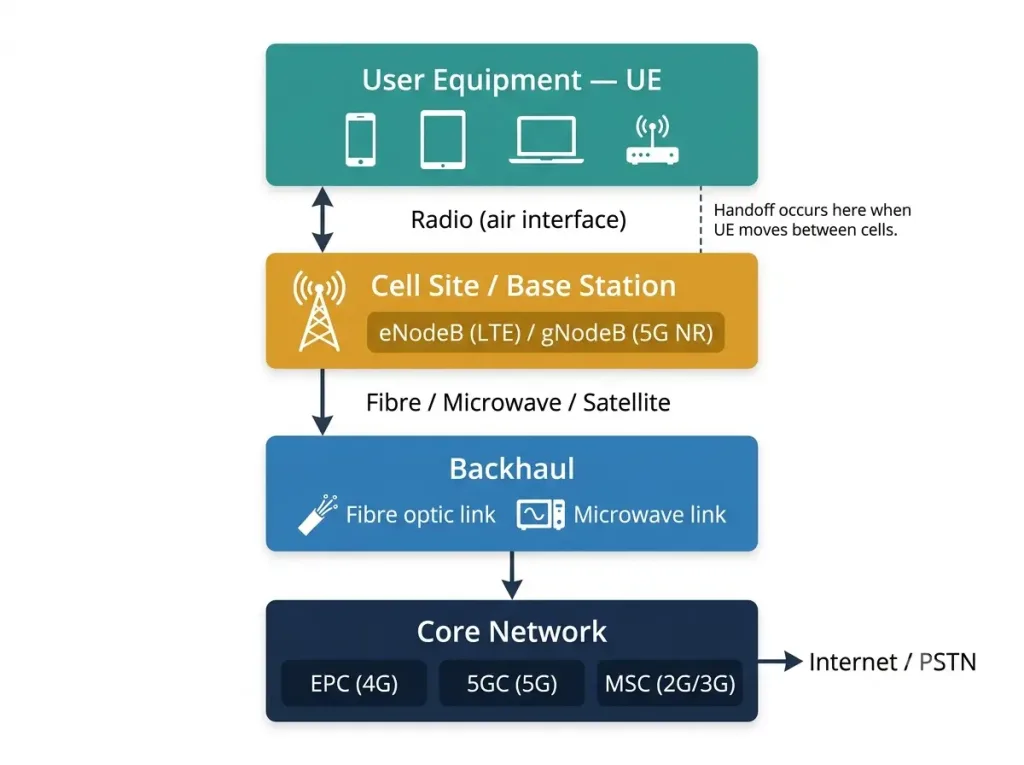
| Component | Function |
|---|---|
| User Equipment (UE) | The subscriber’s device — smartphone, tablet, laptop, or cellular router |
| Cell Site / Base Station | Tower with antennas serving one cell; called eNodeB in LTE, gNodeB in 5G NR |
| Backhaul | Connection from the cell site to the carrier’s core network — fibre, microwave, or satellite |
| Mobile Switching Centre (MSC) | Routes calls and data; manages handoffs and authentication (2G/3G) |
| Evolved Packet Core (EPC) | Core network for LTE — handles authentication, IP addressing, QoS, mobility |
| 5G Core (5GC) | Core network for 5G NR — service-based architecture with network slicing |
Handoff (Handover)
When a mobile device moves from one cell’s coverage area into an adjacent cell, the network performs a handoff (also called handover) — seamlessly transferring the active connection from the current cell site to the neighbouring one without dropping the call or data session.
There are two types of handoff:
Hard Handoff: The device disconnects from the current cell site before connecting to the new one. There is a brief interruption. Used in GSM/2G networks.
Soft Handoff: The device communicates with both the current and new cell sites simultaneously during the transition. No interruption is experienced by the user. Used in CDMA/3G networks.
In LTE and 5G, handoffs are managed by the core network and are effectively seamless — the user experiences no perceptible interruption during normal operation.
Cellular Network Generations
The common types of cellular networks are 2G, 3G, 4G LTE, and 5G NR. Each generation introduced significant improvements in speed, capacity, and capability.
2G — Second Generation
2G was the first digital standard for cellular networks, introduced in the early 1990s. It replaced the original analogue 1G systems and introduced digital voice encryption, SMS text messaging, picture messaging (MMS), and low-speed data services.
2G encompasses three main technologies:
| Technology | Upstream (Theoretical) | Downstream (Theoretical) |
|---|---|---|
| GSM (Global System for Mobile) | 14.4 Kbps | 14.4 Kbps |
| GPRS (General Packet Radio Service) | 26.8 Kbps | 53.6 Kbps |
| EDGE (Enhanced Data Rates for GSM Evolution) | 108.8 Kbps | 217.6 Kbps |
GPRS introduced packet-switched data to GSM networks — the first time cellular devices could maintain an “always-on” data connection rather than dialling up for each session. EDGE further improved data speeds and is sometimes referred to as “2.5G” or “2.75G.”
2G networks are being decommissioned globally — most major carriers have shut down or announced sunset dates for their 2G infrastructure by 2025–2027.
3G — Third Generation
3G brought broadband-class data speeds to mobile devices for the first time, enabling HTML web browsing, photo and video viewing, and mobile app downloads. The primary 3G technology is UMTS (Universal Mobile Telecommunications System), which uses W-CDMA (Wideband Code Division Multiple Access) as its radio interface.
| Technology | Upstream (Theoretical) | Downstream (Theoretical) | Notes |
|---|---|---|---|
| UMTS (W-CDMA) | 384 Kbps | 2 Mbps | Base 3G standard |
| HSPA (3.5G) | 5.76 Mbps | 14.4 Mbps | High Speed Packet Access upgrade |
| HSPA+ (3.75G) | 23 Mbps | 168 Mbps | Evolved HSPA — peak theoretical |
Important: The 168 Mbps downstream figure commonly associated with “3G” refers specifically to HSPA+ — the most advanced 3G evolution — not to the base 3G/UMTS standard. Real-world HSPA+ speeds typically range from 5–20 Mbps depending on network load, signal quality, and carrier configuration. Base UMTS delivers real-world speeds of approximately 0.5–2 Mbps.
Most carriers have completed or announced 3G network shutdowns by 2024–2026 to reallocate spectrum for 4G and 5G.
4G LTE — Fourth Generation
4G LTE (Long-Term Evolution) represents the dominant cellular technology in current global deployment. LTE is the access technology that delivers the 4G experience — the terms “4G” and “LTE” are commonly used interchangeably, though technically LTE was initially classified as “pre-4G” because early implementations did not meet the ITU-R IMT-Advanced peak speed requirement of 1 Gbps. LTE-Advanced (LTE-A) meets the full 4G specification.
| Technology | Upstream (Theoretical) | Downstream (Theoretical) | Notes |
|---|---|---|---|
| LTE (Cat 3) | 50 Mbps | 100 Mbps | Initial LTE deployment |
| LTE (Cat 6) | 50 Mbps | 300 Mbps | Carrier aggregation |
| LTE-Advanced (LTE-A) | 500 Mbps | 1,000 Mbps (1 Gbps) | Full ITU-R 4G specification |
Real-world LTE speeds typically range from 10–50 Mbps downstream and 5–20 Mbps upstream. The 1 Gbps peak figure for LTE-Advanced is a theoretical maximum achievable only under ideal lab conditions with maximum carrier aggregation and MIMO configuration. Actual user experience depends on network congestion, signal strength, carrier configuration, and device capability.
LTE uses an all-IP architecture — voice calls are carried as VoIP (Voice over LTE / VoLTE) rather than circuit-switched connections. This is a fundamental shift from 2G/3G architectures that maintained separate circuit-switched voice and packet-switched data paths.
5G NR — Fifth Generation
5G NR (New Radio) is the latest cellular standard, commercially deployed since 2019 and expanding rapidly through 2026. 5G is designed to serve three distinct use cases:
Enhanced Mobile Broadband (eMBB): Ultra-fast consumer data — streaming 4K/8K video, cloud gaming, AR/VR applications. Peak theoretical speeds reach 10 Gbps downstream.
Ultra-Reliable Low-Latency Communications (URLLC): Mission-critical applications requiring sub-1ms latency — autonomous vehicles, remote surgery, industrial automation.
Massive Machine-Type Communications (mMTC): Connecting billions of IoT sensors and devices with low power consumption and small data payloads — smart cities, agriculture sensors, industrial monitoring.
| Technology | Upstream (Theoretical) | Downstream (Theoretical) | Latency |
|---|---|---|---|
| 5G NR Sub-6 GHz | 100 Mbps | 1–2 Gbps | ~10 ms |
| 5G NR mmWave | 1 Gbps | 10 Gbps | ~1 ms |
5G frequency bands:
- Sub-6 GHz (low/mid-band): Wider coverage, moderate speed improvement over LTE. Most common 5G deployment globally.
- mmWave (millimetre wave, 24–100 GHz): Extremely high speeds but very short range (hundreds of metres). Requires dense small-cell deployment. Used primarily in urban hotspots, stadiums, and dense commercial areas.
Real-world 5G Sub-6 GHz speeds typically range from 50–300 Mbps, with mmWave delivering 500 Mbps–2 Gbps in optimal conditions.
Generation Comparison Table
| Feature | 2G | 3G | 4G LTE | 5G NR |
|---|---|---|---|---|
| Era | 1990s | 2000s | 2010s | 2020s |
| Peak Download | 217.6 Kbps (EDGE) | 168 Mbps (HSPA+) | 1 Gbps (LTE-A) | 10 Gbps (mmWave) |
| Real-World Download | 20–80 Kbps | 5–20 Mbps | 10–50 Mbps | 50–300 Mbps (Sub-6) |
| Latency | 300–500 ms | 50–150 ms | 20–50 ms | 1–10 ms |
| Switching | Circuit + Packet | Circuit + Packet | All-IP (VoLTE) | All-IP |
| Key Technology | GSM, GPRS, EDGE | UMTS, HSPA+ | LTE, LTE-A | NR Sub-6, mmWave |
| Use Cases | Voice, SMS | Web, apps, video | Streaming, VoIP | IoT, AR/VR, autonomous |
| Status (2026) | Shutting down | Mostly shut down | Active — dominant | Expanding rapidly |
Cellular as a WAN Backup (Enterprise Use)
For enterprise networks, cellular connectivity serves as a critical WAN backup path. When the primary WAN circuit (MPLS, broadband, or dedicated fibre) fails, a 4G LTE or 5G cellular interface on the router automatically takes over, maintaining connectivity for branch offices, retail locations, and remote sites.
This is directly relevant to CCNA and enterprise network design:
Cisco Cellular WAN Interface Configuration
Many Cisco ISR routers support cellular WAN modules (4G LTE and 5G). Basic configuration:
Router(config)# interface Cellular0/1/0
Router(config-if)# ip address negotiated
Router(config-if)# dialer in-band
Router(config-if)# no shutdown
Router(config-if)# exit
Cellular as SD-WAN Backup
In Cisco SD-WAN (Viptela) deployments, cellular interfaces are commonly configured as transport links with lower priority than the primary WAN circuit. The SD-WAN controller automatically routes traffic over the cellular link when the primary circuit fails and returns traffic to the primary when it recovers — without manual intervention.
Out-of-Band Management via Cellular
As covered in our in-band and out-of-band management guide, cellular modems on console servers provide out-of-band access to network devices when the primary WAN connection is down. This is the most common enterprise use of cellular for network management.
Cellular Network Security Considerations
Cellular networks introduce specific security concerns for enterprise deployments:
- SIM-based authentication: Cellular connections authenticate using the SIM card’s credentials with the carrier network. Physical SIM security (preventing SIM swapping or theft) is essential for enterprise cellular deployments.
- eSIM and remote provisioning: Modern devices support eSIM, allowing remote carrier profile provisioning without physical SIM cards — important for IoT and fleet deployments.
- VPN over cellular: Enterprise traffic over cellular should always be encrypted via IPsec or SSL VPN back to the corporate network. Cellular traffic traverses the public carrier network and should be treated as untrusted.
- APN configuration: The Access Point Name (APN) determines how the device connects to the carrier’s data network. Enterprise APN configurations can provide dedicated or private routing separate from consumer traffic.
CCNA Exam Pointers
- Cellular networks are wireless WAN technologies — they provide WAN connectivity where wired access is unavailable
- The cellular hierarchy: UE → Cell Site (eNodeB/gNodeB) → Backhaul → Core Network (EPC/5GC) → Internet/PSTN
- Handoff (handover) is the process of transferring a connection from one cell to another without interruption
- 2G = GSM/GPRS/EDGE; 3G = UMTS/HSPA+; 4G = LTE/LTE-A; 5G = NR Sub-6/mmWave
- LTE uses all-IP architecture — voice is VoLTE (VoIP), not circuit-switched
- 5G NR three use cases: eMBB (speed), URLLC (low latency), mMTC (IoT)
- Cellular interfaces on Cisco routers provide WAN backup for branch offices
- Always encrypt enterprise traffic over cellular with IPsec or SSL VPN
- Real-world speeds differ significantly from theoretical peaks — know both for the exam
- 2G and 3G networks are being decommissioned globally in favour of 4G/5G spectrum reuse
Conclusion
Cellular networks have evolved from the 14.4 Kbps voice-and-SMS service of 2G in the 1990s to the multi-gigabit, sub-millisecond-latency 5G NR networks of 2026. Each generation built upon the last — 3G brought mobile broadband, 4G LTE delivered all-IP architecture and VoLTE, and 5G NR extends cellular into IoT, autonomous vehicles, and mission-critical industrial applications. For CCNA candidates, the key concepts are the cellular architecture (UE → cell site → core), the handoff process, the generation comparison, and the enterprise use case of cellular as a WAN backup — all directly testable topics in the WAN technology section of the exam.
Frequently Asked Questions
What is a cellular network and how does it work?
A cellular network is a wireless WAN technology that divides a geographic area into smaller zones called cells, each served by a base station (cell site) equipped with antennas. User devices communicate with the nearest cell site via radio waves, and the cell site connects to the carrier’s core network through a backhaul link (fibre, microwave, or satellite). When a device moves from one cell to another, the network performs a handoff — seamlessly transferring the active connection to the new cell site without dropping the call or data session. The core network handles authentication, IP addressing, routing, and connection to the internet or telephone network.
What is the difference between 4G LTE and 5G?
4G LTE delivers real-world download speeds of 10–50 Mbps with latency of 20–50 ms, using an all-IP packet-switched architecture. 5G NR operates in two frequency ranges: Sub-6 GHz (50–300 Mbps real-world, wider coverage) and mmWave (500 Mbps–2 Gbps, very short range). 5G’s most significant improvement beyond speed is latency — as low as 1 ms for mmWave — which enables use cases impossible on 4G: autonomous vehicles, remote surgery, and real-time industrial automation. 5G also introduces network slicing, which allows carriers to create isolated virtual networks with guaranteed performance characteristics for different applications on the same physical infrastructure.
Why is LTE sometimes called pre-4G?
The ITU-R body that defines cellular generation standards set the 4G performance requirement at 1 Gbps peak download speed for stationary users (IMT-Advanced specification). Early LTE deployments (Category 3) achieved a theoretical peak of only 100 Mbps — well below the 1 Gbps threshold. LTE-Advanced (LTE-A), introduced later, meets the full 4G specification with carrier aggregation and advanced MIMO techniques reaching 1 Gbps theoretical peaks. Despite this technical distinction, carriers and the industry universally marketed LTE as “4G” from the start, and the ITU-R eventually accepted LTE as a legitimate 4G technology given its significant advancement over 3G.
How is cellular used as a WAN backup in enterprise networks?
Enterprise routers — particularly Cisco ISR series — support cellular WAN modules that accept a SIM card and connect to the carrier’s LTE or 5G network. When the primary WAN circuit (MPLS, broadband, or dedicated fibre) fails, the router automatically fails over to the cellular interface, maintaining connectivity for the branch office. In SD-WAN deployments, the cellular link is configured as a lower-priority transport — the SD-WAN controller routes traffic over it only when the primary circuit is unavailable and returns traffic to the primary when it recovers. Enterprise traffic over cellular should always be encrypted with an IPsec or SSL VPN tunnel because it traverses the public carrier network.
What does EDGE stand for in 2G cellular networking?
EDGE stands for Enhanced Data Rates for GSM Evolution. It is the most advanced 2G data technology, providing theoretical peak speeds of 217.6 Kbps downstream and 108.8 Kbps upstream — a significant improvement over the 53.6 Kbps of GPRS and the 14.4 Kbps of base GSM. EDGE is sometimes referred to as “2.75G” because it bridges the gap between 2G and 3G performance. EDGE achieves its speed improvement through a more efficient modulation scheme (8PSK) compared to the GMSK modulation used by standard GSM and GPRS, allowing more data to be transmitted in the same radio channel bandwidth.