
Formatting a BitLocker-encrypted drive by accident is one of the more alarming mistakes you can make with Windows — and the honest answer about whether you can get your data back depends entirely on how it was formatted and whether you still have the recovery key. Here’s what actually happens at a technical level, when recovery is realistically possible, and how to manage BitLocker recovery keys properly so you never end up in this situation in the first place.
How BitLocker Actually Protects a Drive
BitLocker encrypts an entire volume at the sector level using AES encryption. The data itself stays unreadable without the correct decryption key, but just as important is a smaller piece of information called the BitLocker metadata — stored on the volume — which tells Windows that the drive is BitLocker-protected and which key is needed to unlock it. Decryption only works when both pieces are present: the correct password or 48-digit recovery key, and intact metadata confirming how the volume was encrypted.
This distinction matters more than most explanations of BitLocker make clear, because it’s exactly what determines whether a formatted drive can be recovered.
What Formatting Actually Does
Not all formatting is the same, and the method matters:
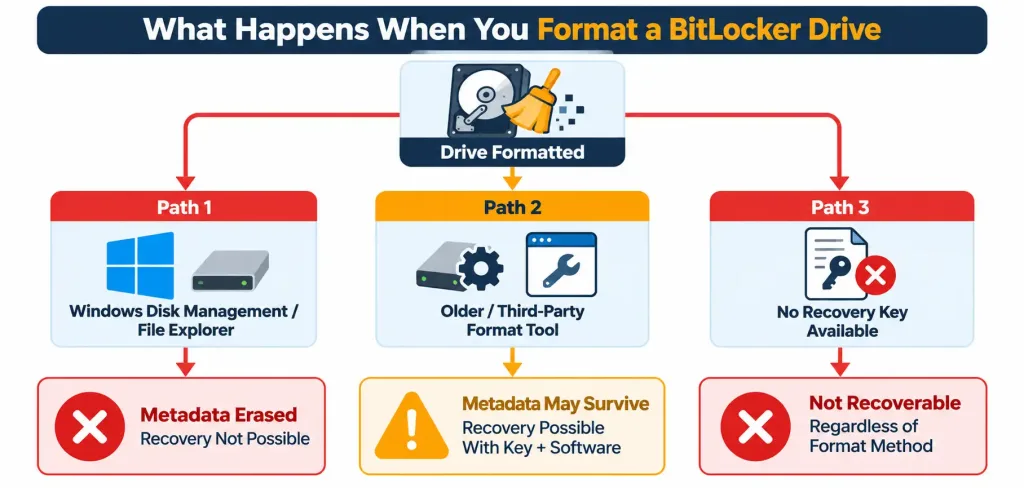
- Formatting through Windows’ own Disk Management or File Explorer (on any version from Vista through Windows 11) erases the BitLocker metadata along with the file system structure. Once that metadata is gone, Windows has no way to confirm the drive was ever BitLocker-encrypted or which key would unlock it — which means recovery through normal means becomes effectively impossible, even with the correct recovery key in hand, because there’s nothing left pointing to how to apply it.
- Formatting through Windows XP’s format tool, or through certain third-party formatting utilities, can leave the underlying BitLocker metadata intact in some cases. When that happens, and the encrypted sectors underneath haven’t been overwritten, recovery may genuinely be possible — but only with the correct password or recovery key, and typically requiring BitLocker-aware recovery software designed specifically to read that intact metadata.
- Without the password or recovery key at all, recovery is not possible under any formatting scenario. This is BitLocker working exactly as intended — the entire point of full-disk encryption is that the data is unreadable without the key, format or no format.
The practical takeaway: if you’ve formatted a BitLocker drive through normal Windows tools and don’t have a very recent backup, treat the data as likely gone rather than assuming a recovery tool will save it. If the format happened through an unusual path (an older format utility, a third-party tool) and you still have the recovery key, it’s worth trying BitLocker-specific recovery software before giving up — but don’t count on it working.
How BitLocker Recovery Keys Actually Work
Understanding recovery keys properly is the best way to avoid ever needing to test the scenario above.
Under normal conditions, BitLocker unlocks your operating system drive automatically at startup — the TPM (Trusted Platform Module) chip releases the volume’s master key, but only if the boot chain is verified as intact (no unexpected changes to boot files, firmware, or hardware configuration). If you’ve set up an additional PIN or startup key requirement, or if the TPM can’t verify the boot chain for some reason (a BIOS update, a hardware change), BitLocker falls back to asking for the 48-digit recovery key instead. Entering that key unlocks the drive itself — it’s a separate step from signing into Windows, so normal account sign-in still happens afterward.
Where that recovery key actually lives matters a lot if you ever need it:
- Active Directory or Microsoft Entra ID — the standard approach for organizations, where IT administrators can retrieve a lost key on a managed device, with access controlled by specific permissions.
- A personal Microsoft account — the default option for individual users who aren’t on a managed/enterprise device; the key gets backed up automatically when BitLocker is turned on this way.
- A printed copy or saved text file — the manual option, useful as a backup even when one of the above applies, as long as it’s kept somewhere genuinely secure and not on the same device it protects.
Enterprise Recovery Key Management: What Actually Matters
For organizations managing BitLocker across multiple devices, a few practices make a real difference:
- Confirm every encrypted device actually has a recovery key backed up before relying on PIN or startup-key protection — a device with no recoverable key and a forgotten PIN can become permanently unbootable, which is a genuinely serious outcome, not a minor inconvenience.
- Decide deliberately who can self-recover their own key. Microsoft Entra ID has a tenant-level setting controlling whether end users can view their own recovery keys; it defaults to allowing this, so review whether that fits your organization’s security posture or whether recovery should go through IT instead.
- Restrict self-service recovery to enrolled, managed devices. Self-service key retrieval through Entra ID typically requires the device to be enrolled in Intune (or equivalent mobile device management); unmanaged devices need an administrator to handle recovery directly.
- Monitor recovery key access. Both administrator and self-service key retrievals are logged in Entra ID’s audit logs — worth reviewing periodically, since a pattern of frequent recovery key access can indicate a device or user running into recurring boot problems worth investigating.
- Plan for what happens after recovery, not just the unlock itself. On a domain-joined machine, successfully unlocking the drive with a recovery key doesn’t automatically restore normal domain sign-in — there can be follow-up steps needed before domain credentials work again, which is worth testing in advance rather than discovering during an actual incident.
The Bottom Line
BitLocker does exactly what full-disk encryption is supposed to do: without the correct recovery key, formatted or not, the data stays unreadable. The nuance worth understanding is that formatting through normal Windows tools destroys the metadata BitLocker needs to apply that key at all, which is what turns “I have the recovery key” into “the recovery key no longer helps.” The realistic defense isn’t a recovery trick after the fact — it’s making sure your recovery key is properly backed up (to Entra ID, Active Directory, or a Microsoft account) before you ever need it, and keeping real backups of anything you can’t afford to lose, encrypted drive or not.
Frequently Asked Questions
Can I recover data from a BitLocker drive formatted through Windows Disk Management?
Generally no. Formatting through Disk Management or File Explorer erases the BitLocker metadata needed to apply the recovery key, which makes standard recovery methods ineffective even if you still have the correct key.
Is there any situation where a formatted BitLocker drive can be recovered?
Yes, in limited cases — if the format was done through an older format utility or certain third-party tools that leave the BitLocker metadata intact, and the underlying data hasn’t been overwritten, BitLocker-aware recovery software may be able to recover it, provided you still have the correct password or recovery key.
Where should I store my BitLocker recovery key?
For managed/enterprise devices, Active Directory or Microsoft Entra ID is standard. For personal devices, a Microsoft account backup is the default option. A printed copy or saved text file kept somewhere secure is a reasonable additional backup in either case.
What happens if I lose both my BitLocker PIN and my recovery key?
The device can become permanently unbootable, and the data on it is not recoverable through BitLocker. This is why confirming a backed-up recovery key before relying on PIN protection matters — it’s the single most effective safeguard against this outcome.