
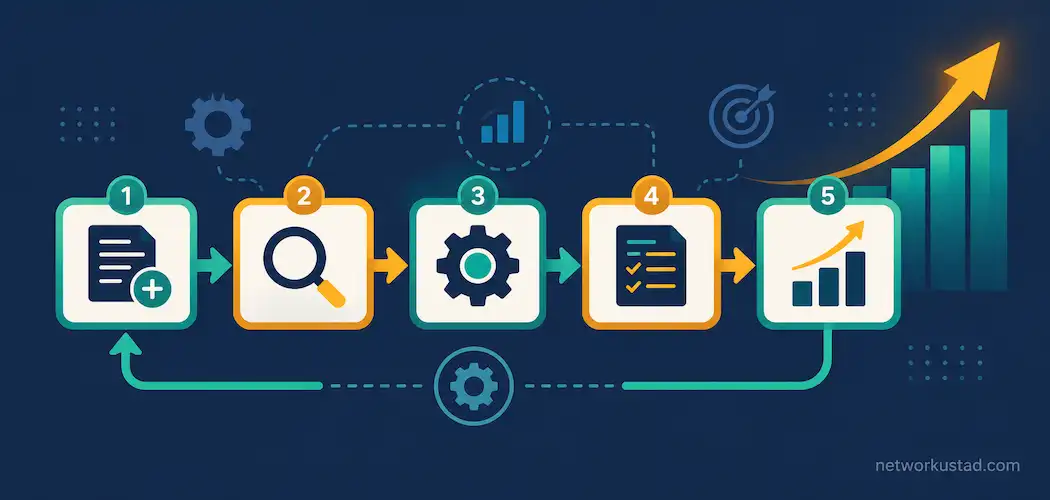
Business process management software, usually shortened to BPM software, exists to do one thing well: take a process that currently lives in someone’s head, a messy email thread, or a scattered spreadsheet, and turn it into something documented, repeatable, and measurable. That sounds unglamorous. It’s also one of the more reliable ways a growing company avoids the chaos that shows up once too many people are involved in a process nobody fully wrote down.
Plenty of companies reach for business process management software only after a process has already broken down publicly — a missed deadline, a client complaint, an audit finding a gap nobody noticed. Adopting it earlier, before that breaking point, tends to be a lot less painful.
Why This Is Worth Taking Seriously Right Now
The market itself says something about how seriously companies are taking this. The global BPM software market was valued at $18.9 billion in 2023 and is projected to reach $83.2 billion by 2032, a 17.9% annual growth rate, according to DataHorizzon Research. Labor shortages and rising labor costs are cited as a specific driver in the US market — when it’s harder and more expensive to hire, automating and documenting processes becomes a more attractive way to get more done with the team you already have.
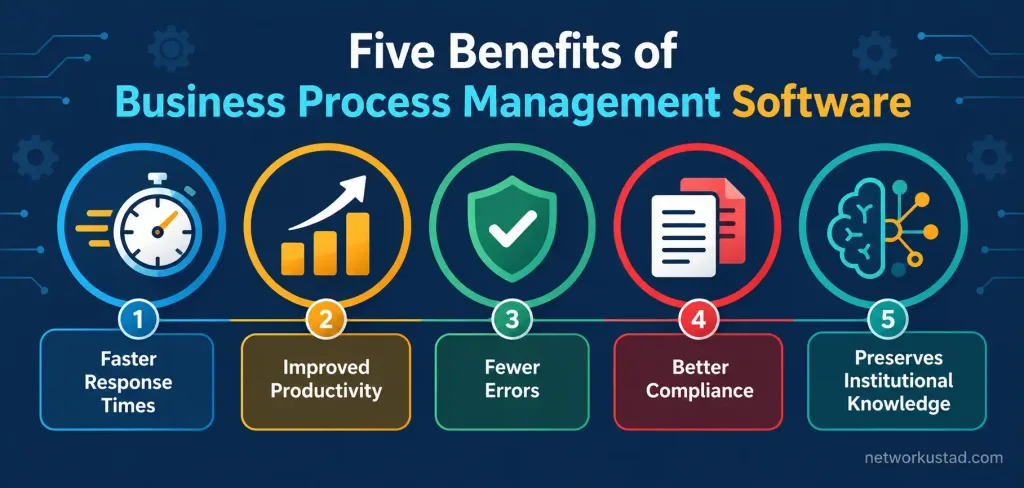
1. Faster, More Confident Response to Change
A company running on undocumented, informal processes struggles to adapt quickly, mostly because nobody’s entirely sure how the current process actually works end to end. BPM software fixes that by making each step visible and owned by someone specific. When a problem shows up — a bottleneck, a compliance gap, a step that’s become unnecessary — it’s far easier to find and fix when the process is mapped out, rather than scattered across institutional memory and a dozen different people’s personal habits.
2. Measurable Productivity Gains
This is the benefit most companies adopt BPM software for in the first place. According to ADP’s In(Sight) workforce research, 78% of business leaders say automation improves organizational productivity, and 42% specifically say it frees up staff time for higher-value work. Those numbers track with the basic logic of BPM: a documented, monitored process removes a lot of the redundant checking, re-explaining, and manual handoffs that eat up time in informal workflows.
It’s worth being honest that these are self-reported survey figures, not independently verified productivity studies — the real gain for any specific company depends heavily on how poorly its current process actually runs before BPM software gets involved. A company with a genuinely chaotic process has more room to gain than one that’s already reasonably well organized.
3. Fewer Errors From Unclear Ownership
Spreadsheets and email threads are notoriously bad at making clear who’s responsible for what, at which step, and by when. The same ADP research found 50% of business leaders say automation reduces or eliminates human error — largely because BPM software assigns a specific owner and a specific deadline to each stage of a process, instead of leaving responsibility implicit and easy to drop. When something goes wrong, there’s a clear point in the process to look at, rather than a guessing game about who touched what, when.
4. Stronger Compliance Documentation and Fraud Resistance
A documented workflow is also a paper trail. For industries with real compliance requirements — finance, healthcare, anything handling sensitive data — having a system that automatically records who approved what, and when, is meaningfully more defensible in an audit than a process that lived mostly in people’s inboxes. It also makes certain kinds of fraud or quiet process-skipping harder to pull off, since each step requires a specific, logged action rather than an informal nod from a colleague.
This benefit scales with how regulated a business actually is. A small business with light compliance obligations gets a smaller version of this benefit than, say, a healthcare provider subject to strict documentation requirements — but the underlying mechanism holds either way. Even outside heavily regulated industries, having a clear record of who approved a purchase, a refund, or a policy exception is useful the moment a dispute arises internally, well before any external auditor is ever involved.
5. Institutional Knowledge That Survives Employee Turnover
One of the quieter but genuinely valuable benefits: a documented process map doesn’t walk out the door when an employee leaves. Without BPM software, a lot of institutional knowledge about how things actually get done lives only in the heads of whoever’s been doing the job longest — and that knowledge disappears, sometimes all at once, when that person moves on. Documented process maps turn that tacit knowledge into something a new hire can actually learn from, which shortens onboarding time and reduces the disruption a departure causes.
What to Look For in a BPM Platform
Rather than picking a platform based on which one has the flashiest demo, a few practical questions matter more:
- Does it integrate with the tools your team already uses? A BPM platform that can’t connect to your existing CRM, accounting software, or communication tools creates manual re-entry work that undercuts the whole point of automating a process.
- Can non-technical staff actually build and edit workflows? Platforms that require a developer for every small process change tend to get used less over time, since even minor updates become a bottleneck of their own.
- How does it handle exceptions? Real processes have edge cases. A platform that only handles the happy path forces people back into manual workarounds the moment something unusual happens.
- What does reporting actually show you? Look for visibility into where processes slow down or stall, not just confirmation that a step was technically completed.
- What’s the actual learning curve for your team? A short trial with your own real process, rather than a vendor’s demo data, is the most reliable way to judge this before committing.
When BPM Software Isn’t the Right Fix
It’s worth being direct about a limitation that often gets glossed over: BPM software documents and automates a process — it doesn’t fix a fundamentally bad one. If a process is broken because of unclear ownership between departments, a conflicting incentive structure, or a step that genuinely shouldn’t exist anymore, automating it as-is just makes a bad process run faster and more consistently. It’s worth reviewing and improving a process before formalizing it in BPM software, rather than assuming the software itself will surface and fix the underlying problem on its own.
Common Mistakes Companies Make When Adopting BPM Software
A few patterns show up often enough to name directly. Automating a process before anyone’s actually mapped it out properly is one of the most common — teams sometimes buy business process management software expecting it to reveal the ideal process on its own, when really it just executes whatever you’ve told it to do, good or bad. Taking the time to map the current process honestly, including the awkward exceptions nobody likes to admit happen, produces a far better result than rushing straight into automation.
Rolling out business process management software to an entire organization at once is another frequent misstep. Starting with one well-understood process, proving the benefit there, and expanding gradually tends to produce better adoption than a company-wide switch that overwhelms staff with new tools and new habits simultaneously. Employees who feel like a new system was dropped on them without explanation are far more likely to work around it than actually use it as intended.
A third mistake is treating the initial setup as finished rather than ongoing. Processes change as a business grows, and a workflow that was perfectly documented a year ago may no longer reflect how work actually gets done. Business process management software needs periodic review, not a one-time setup, to keep delivering the productivity and error-reduction benefits it’s capable of.
The Bottom Line
Business process management software earns its growing market because the benefits are real and compounding: faster adaptation to change, measurable productivity gains, fewer ownership-related errors, stronger compliance documentation, and institutional knowledge that survives staff turnover. The honest caveat is that it works best on a process worth formalizing in the first place — reviewing and fixing a genuinely broken process before automating it gets more value out of the investment than documenting dysfunction and calling it progress.
How BPM Software Differs by Business Size
Business process management software isn’t a one-size-fits-all category, and what a small business needs from it looks quite different from what a large enterprise needs. A small business typically benefits most from a lightweight platform that handles a handful of core processes — client onboarding, invoice approval, basic HR workflows — without requiring dedicated technical staff to maintain it. A mid-size or larger company, by contrast, often needs a platform that can model more complex, cross-department processes, integrate with a wider range of existing software, and support more detailed compliance and audit reporting.
Pricing tends to scale with that complexity too. A simple business process management software plan built for a small team can cost relatively little per month, while enterprise-grade platforms with advanced analytics, custom integrations, and dedicated support carry a meaningfully higher price tag. Matching the platform’s complexity to your actual needs, rather than buying more capability than the business currently requires, avoids both the under-powered-tool problem and the overpriced-overkill problem that show up at either end of this market.
Getting Buy-In Before You Roll It Out
Choosing the right platform doesn’t guarantee the rollout actually sticks. The people who’ll use business process management software every day are the ones worth consulting before a final decision, not after. A process owner who feels like a tool was chosen for them, without any input into how their own workflow gets modeled, has less reason to use it carefully — and a tool used carelessly loses most of the benefits covered above. Running a short pilot with the team that will actually use the system, and asking directly what’s missing before expanding further, tends to surface problems a vendor demo never shows.
Frequently Asked Questions
What’s the actual difference between BPM software and basic workflow automation tools?
BPM software generally covers the full lifecycle — modeling a process, automating it, monitoring its performance, and continuously improving it — while basic workflow tools often just automate one specific task or handoff without the broader modeling and analysis layer.
Is BPM software worth it for a small business?
It depends on how chaotic the current process actually is and how much compliance burden the business carries. A small business with a handful of well-understood processes may get limited benefit; one juggling multiple departments, vendors, or compliance requirements tends to see more measurable gains.
Does BPM software actually reduce errors, or is that just marketing?
There’s real survey-based evidence behind it — ADP’s In(Sight) research found 50% of business leaders report automation reduces or eliminates human error, largely because BPM assigns clear ownership to each process step. It’s not a guarantee, but it’s a documented, commonly reported benefit.
Can BPM software fix a process that’s already broken?
Not on its own. It documents and automates whatever process you build into it — if the underlying process has unclear ownership or unnecessary steps, automating it just runs the same problems faster and more consistently. Fixing the process itself should come before formalizing it in software.
How fast is the BPM software market actually growing?
The global market was valued at $18.9 billion in 2023 and is projected to reach $83.2 billion by 2032 — a 17.9% annual growth rate, according to DataHorizzon Research, driven partly by labor shortages pushing companies toward automation.



