

Cloud collaboration software gets sold as an easy win — faster communication, lower costs, work from anywhere. All of that can be true. None of it is automatic. The teams that get real value from these tools are the ones that went in understanding the actual tradeoffs, not just the pitch.
This guide weighs cloud collaboration software honestly: what it genuinely does well, what it costs beyond the subscription price, and the risks that vendor marketing tends to leave out of the conversation entirely.
Defining the Terms, Since They Get Used Interchangeably
Cloud collaboration software is any tool hosted on a provider’s infrastructure rather than your own servers, used for shared work — document editing, messaging, video conferencing, project tracking. An intranet is a private internal network for an organization, which can be hosted on-premises or in the cloud; a cloud intranet specifically runs that internal network on a vendor’s cloud infrastructure rather than company-owned hardware. These terms overlap but aren’t identical: a company can use cloud collaboration tools (like a shared document editor) without having a cloud intranet, and vice versa.
What Cloud Collaboration Software Actually Does Well
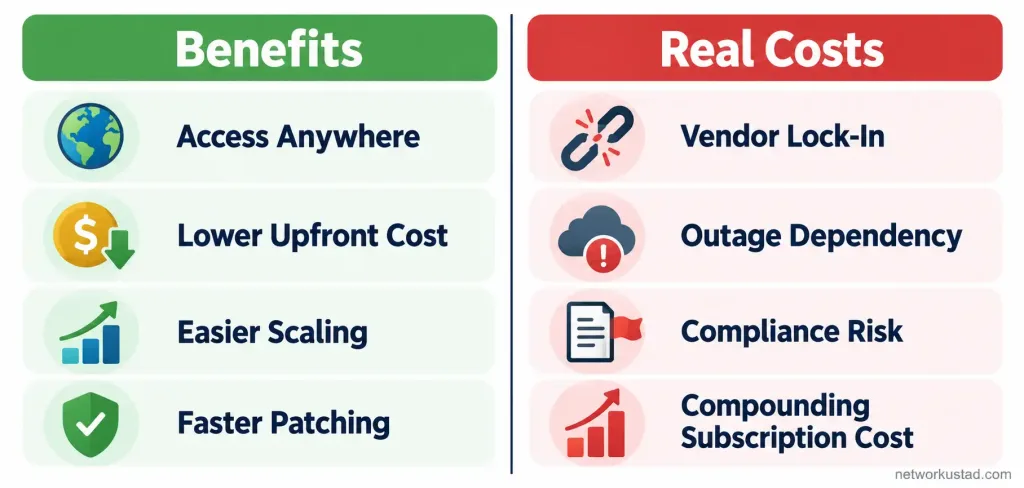
Access from anywhere with an internet connection. This is the most genuine, consistently real benefit — team members can work from different locations, time zones, and devices without being tied to a specific office network, which matters more now that hybrid and remote work are standard rather than exceptional at most organizations.
Lower upfront infrastructure cost. Instead of buying and maintaining your own servers, you pay a subscription and let the provider handle hardware, scaling, and most routine maintenance. This genuinely reduces upfront capital investment, though — as covered below — it doesn’t make the ongoing cost disappear, just shifts its shape.
Easier scaling for a growing team. Adding users to a cloud tool is usually a matter of adjusting a subscription tier, not provisioning new physical infrastructure. This is real and valuable for a growing organization, though “scalable” doesn’t mean “unlimited” or “free” — costs scale with usage too.
Faster security patching, in general. Cloud providers typically push security updates across their entire platform centrally, which can mean faster patching than an understaffed internal IT team managing on-premises software update cycles manually. This is a real advantage, but it depends entirely on the specific provider’s practices — it’s not an automatic property of “being in the cloud.”
The Real Costs and Risks the Pitch Leaves Out
Data breaches are expensive, and cloud environments aren’t automatically safer. The global average cost of a data breach reached $4.44 million in 2025, according to IBM’s Cost of a Data Breach Report. Cloud-hosted data isn’t inherently safer or riskier than on-premises data — what actually matters is access control configuration, and IBM’s own research found that a large share of recent AI-related breaches specifically involved missing access controls, not a flaw in cloud infrastructure itself. The security benefit of cloud tools depends on your organization actually configuring access correctly, not on the cloud label alone.
Vendor lock-in is real and often underestimated. Once a team’s documents, workflows, and institutional knowledge live inside a specific platform’s format and structure, switching providers later can be expensive and disruptive — migrating years of structured data between platforms rarely goes as smoothly as the sales pitch for the new tool suggests. It’s worth asking about data export options and format portability before committing, not after.
Provider outages affect your business, not just the vendor’s. When a cloud provider experiences downtime, your team loses access to the tools and data they depend on, with no internal fallback unless you’ve deliberately built one. An on-premises system has its own failure risks too, but the dependency on a third party’s uptime is a real, specific cost of the cloud model that deserves honest acknowledgment.
Data residency and compliance requirements can conflict with where your provider actually stores data. Depending on your industry and jurisdiction, where customer or employee data physically resides can carry real regulatory weight — healthcare, finance, and government-adjacent organizations in particular need to verify a provider’s data-residency options rather than assume cloud storage location doesn’t matter.
Subscription costs compound over time and across users. A per-seat monthly cost looks small until you multiply it by a growing headcount over several years. This isn’t necessarily more expensive than on-premises infrastructure over the same period, but it’s a different cost shape — ongoing and tied to headcount, rather than a large upfront purchase — and it’s worth modeling honestly rather than assuming cloud is automatically cheaper over the long run.
Internet dependency is a real operational risk. A cloud tool is only as available as your internet connection. For teams in locations with unreliable connectivity, this is a genuine practical limitation that an on-premises system wouldn’t share.
What the Actual Market and Usage Data Shows
The collaboration tools market was valued at roughly $48.9 billion globally in 2025, with a projected growth to $143.9 billion by 2035 — a compound annual growth rate above 11%, reflecting how central these tools have become to how organizations actually work. That growth reflects real adoption, not just vendor marketing: by one widely cited estimate, employees lose several hours a week on average to collaboration inefficiencies specifically, which is the underlying problem these tools are generally trying to solve, with mixed results depending on how well a given tool actually fits a team’s workflow.
That gap between “widely adopted” and “solves the stated problem reliably” is worth sitting with. Buying collaboration software doesn’t automatically fix collaboration problems that have organizational or process causes rather than tooling causes.
Security Practices Worth Knowing About Beyond “the Cloud Is Secure”
Zero trust architecture treats every access request as untrusted by default, regardless of whether it originates inside or outside the traditional network perimeter, requiring continuous verification rather than one-time login trust. This is increasingly standard guidance for any cloud-hosted collaboration environment, not just a buzzword — it directly addresses the access-control gap that drives a large share of real-world breaches.
Passkeys and modern authentication are increasingly replacing or supplementing traditional passwords for cloud service logins, reducing the risk of credential theft and phishing-based account takeover, which remains one of the most common ways attackers gain access to cloud-hosted collaboration tools in the first place.
Neither of these is something a vendor’s marketing page will necessarily lead with, but both are worth asking about directly when evaluating any cloud collaboration provider’s actual security posture.
A Practical Framework for Deciding
Rather than treating cloud collaboration software as a universal “boon,” weigh it against your organization’s actual situation:
Team distribution: A fully co-located team gets less marginal benefit from remote-access features than a distributed or hybrid one.
Regulatory environment: Healthcare, finance, government, and similarly regulated organizations need to verify data residency and compliance specifics before adopting any cloud tool, not after.
Internet reliability: Teams in locations with unreliable connectivity should weigh the internet-dependency risk seriously, not as a theoretical edge case.
Growth trajectory: A team expecting significant headcount growth benefits more from the scaling advantages than a stable, small team where the ongoing per-seat cost may outweigh the convenience over time.
Existing data and workflow investment: An organization already deeply invested in a specific on-premises system should weigh migration cost and disruption honestly against the actual benefit gained, rather than assuming newer is automatically better.
A Practical Example of Weighing the Tradeoffs
Picture a 40-person company split across two offices and several remote employees, currently running an on-premises file server and email-only communication. Moving to cloud collaboration software would genuinely solve a real problem here — remote employees currently can’t access shared files without a VPN connection that frequently drops, which is exactly the kind of distributed-team pain point cloud tools are built to address.
But the honest evaluation doesn’t stop there. The company handles some customer financial data, so data residency and compliance requirements need checking against specific providers before any decision, not after signing a contract. The IT lead also needs to model the five-year subscription cost against the current server’s remaining useful life and maintenance cost, rather than assuming the cloud option is automatically cheaper just because the upfront number looks smaller.
And before committing, someone should actually test the shortlisted provider’s data-export process, so that if the relationship doesn’t work out in two years, migrating away isn’t a crisis discovered too late. None of this means cloud collaboration software is the wrong choice for this company — it very well might be the right one. It means the right choice comes from working through these specific factors, not from treating the move as an obvious upgrade with no real tradeoffs attached.
Common Mistakes When Evaluating Cloud Collaboration Software
Treating “cloud” as automatically synonymous with “more secure” is one of the most common mistakes — security depends on configuration and access control, not the hosting model alone. Underestimating the long-run cost of per-seat subscription pricing against a growing headcount is another. Skipping a real evaluation of data export and portability options before committing is a third, and it’s the one most likely to cause real pain years later when switching providers becomes necessary. And buying collaboration software to fix what’s actually a process or organizational communication problem, rather than a tooling gap, tends to produce disappointing results regardless of how good the specific tool is.
Frequently Asked Questions
Is cloud collaboration software actually more secure than on-premises systems?
Not inherently. Security depends mainly on access control configuration and how well the specific provider and your own organization implement it, not on whether the system is hosted in the cloud or on-premises. Cloud providers often patch faster, which is a real advantage, but it doesn’t make cloud storage automatically safer on its own.
What’s the biggest hidden cost of cloud collaboration tools?
Per-seat subscription costs compounding over a growing headcount and multiple years is the most commonly underestimated one, followed closely by the cost and disruption of migrating away from a platform later if your needs change or the vendor relationship doesn’t work out.
Does cloud collaboration software actually improve productivity?
It can, but it’s not automatic. The tools address real collaboration inefficiencies many organizations experience, but results depend heavily on whether the specific tool fits the team’s actual workflow and whether the underlying collaboration problems are tooling-related in the first place, rather than organizational or process issues the software can’t fix.
What should a regulated business check before adopting a cloud collaboration tool?
Data residency (where your data is actually physically stored), compliance certifications relevant to your industry, and the provider’s data-handling and breach-notification practices, verified directly rather than assumed from general marketing claims.
Is vendor lock-in a real concern with cloud collaboration tools?
Yes, and it’s often underestimated. Once a team’s documents and workflows are built inside a specific platform’s structure, switching later can be costly and disruptive. Checking data export and format portability options before committing meaningfully reduces this risk later.
The Bottom Line
Cloud collaboration software isn’t simply a boon or a bane — it’s a tool with real, specific benefits (remote access, lower upfront infrastructure cost, easier scaling, generally faster patching) and real, specific costs (breach risk tied to access-control configuration, vendor lock-in, provider-outage dependency, compliance considerations, compounding subscription costs, and internet dependency). The organizations that get genuine value from these tools are the ones that weighed both sides honestly against their actual situation, rather than adopting on the strength of the pitch alone.



