
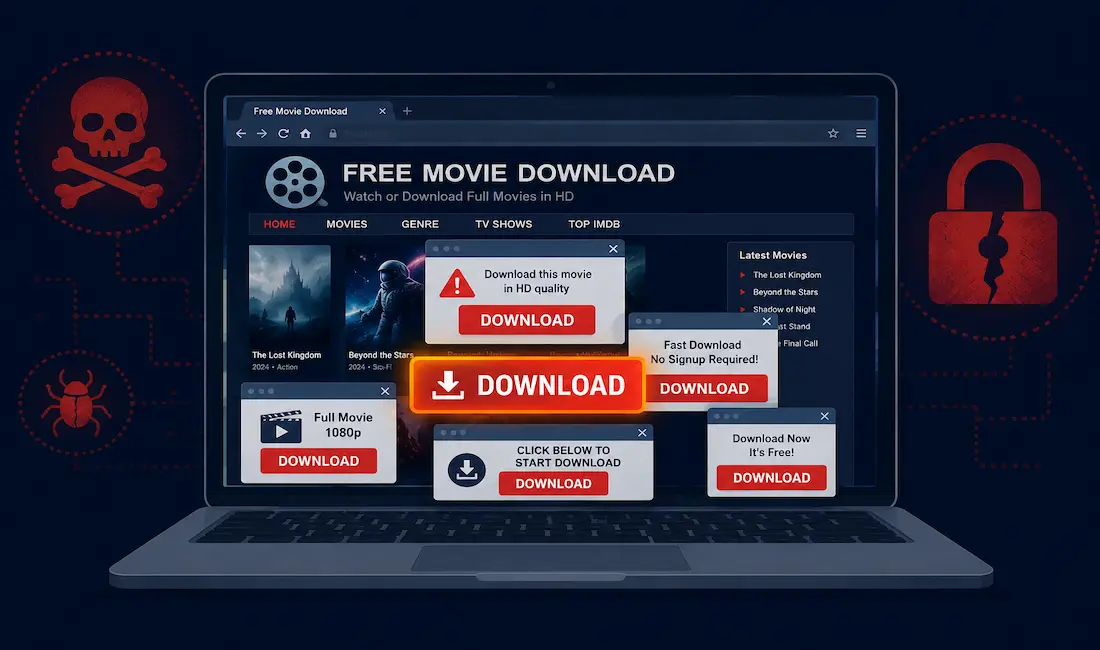
If you’ve searched for Downloadhub4u, you were probably looking for a way to download movies online without paying for them. Before you visit a site like this, it’s worth understanding what you’re actually exposing your device and your personal data to. Sites in this category aren’t just a legal gray area, they’re a well-documented vector for malware, credential theft, and financial fraud. This guide breaks down exactly how that risk works, what to watch for, and what to use instead.
What Sites Like Downloadhub4u Actually Are
Downloadhub4u belongs to a broad category of piracy-adjacent sites that offer free movie downloads and streaming links, typically pulling copyrighted content without licensing rights from the studios that own it. These sites generate revenue almost entirely through advertising, and because legitimate ad networks won’t work with copyright-infringing platforms, they rely on a different tier of ad brokers, ones with far looser standards about what gets served to visitors.
That distinction matters more than it sounds. Legitimate ad networks screen for malicious payloads. The ad networks willing to work with piracy sites frequently don’t, and some are run by the same operators distributing the malware in the first place. The free movie is the bait; the ad ecosystem around it is where the actual business model lives.
How These Sites Actually Make Money Off Visitors
Malvertising. Ads on piracy sites are a common delivery mechanism for malicious code. A single ad impression, without any click required in some cases, can be enough to trigger a drive-by download or redirect your browser to an exploit kit that probes for unpatched vulnerabilities.
Fake download buttons. Piracy sites are notorious for surrounding the real download link with multiple fake “Download” buttons, styled to look identical to the real one, that actually launch ads, redirect to scam pages, or trigger unwanted software installs. Visitors clicking through in a hurry frequently hit two or three of these before finding the legitimate link, if one even exists.
Bundled malware in the “movie” file itself. Some downloads aren’t movies at all; they’re executables disguised with a video file icon and a misleading extension trick, or legitimate-looking video files bundled with a malicious payload that installs alongside the media player needed to “unlock” playback. Fake codec prompts, in particular, are a long-running distribution method for trojans.
Browser hijacking and unwanted extensions. Many of these sites prompt visitors to install a “required” browser extension or media plugin to play content. These are frequently adware or hijackers that change your default search engine, inject additional ads into every page you visit afterward, and can be difficult to fully remove.
Cryptojacking scripts. Some piracy sites run cryptocurrency-mining JavaScript directly in the browser tab while you’re browsing or “waiting” for a download to start, quietly consuming your device’s CPU and battery for someone else’s profit.
Credential phishing via fake login walls. Sites in this category sometimes gate premium-looking content behind a fake account creation or login screen designed to harvest email addresses and reused passwords, which are then tested against other services, a technique called credential stuffing.
Legal Exposure, Separately From the Malware Risk
Setting the malware question aside entirely, downloading copyrighted movies without a license is illegal in most countries, and enforcement varies but is real. ISPs in several jurisdictions forward copyright infringement notices to subscribers, some rights holders actively monitor torrent swarms and file-sharing traffic to identify infringing IP addresses, and penalties can include fines that scale well beyond the cost of a legitimate subscription. This is a separate risk from the security one above, but it compounds it: you’re taking on legal exposure and security exposure for the same download.
How to Tell If a Download Link Is Risky
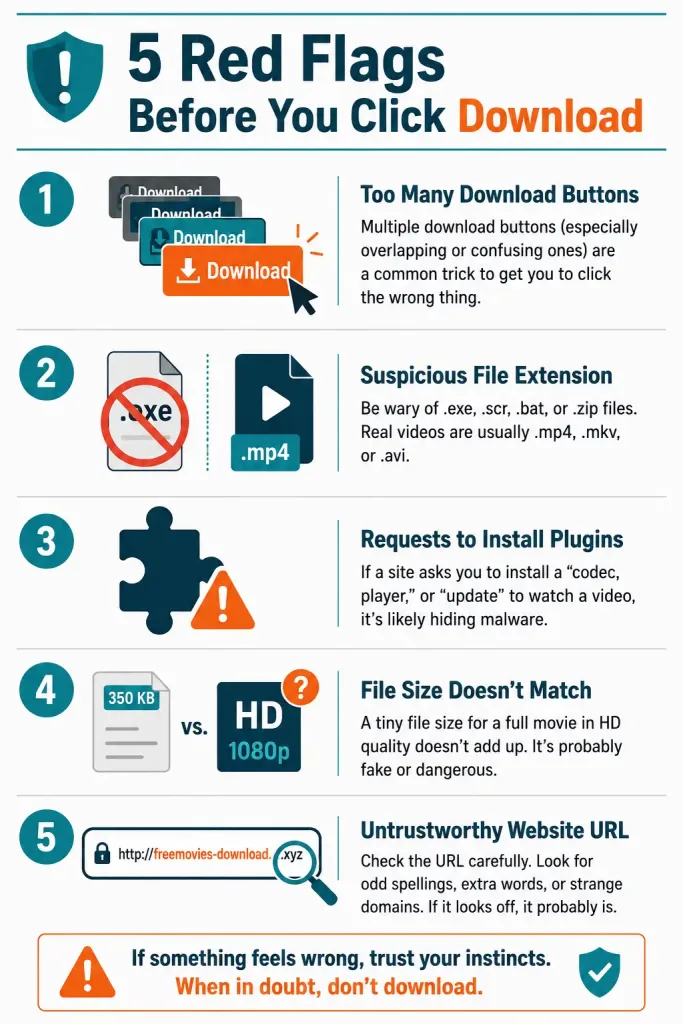
A few practical signals are worth checking before you trust any download source, not just movie sites specifically:
- Multiple overlapping “Download” buttons on one page is close to a guaranteed sign that most of them are ads, not the actual file.
- File extensions that don’t match what you expect. A movie file should never end in
.exe,.scr, or.bat. If a “video” download prompts you to run an executable, stop immediately. - Prompts to install a codec, plugin, or extension before playback. Legitimate streaming rarely requires this anymore; treat it as a red flag by default.
- Unusually small file sizes for HD claims. A file claiming to be a full 1080p movie at a fraction of the expected size is often a dropper for something else entirely, not a compression miracle.
- Domain age and reputation. Tools like VirusTotal let you check a URL or file hash against dozens of security vendors before you click through, and a quick check takes seconds compared to the time lost recovering from an infection.
What to Use Instead
Legal streaming and rental options have become genuinely comprehensive over the past several years, and the cost difference is small compared to the realistic cost of a malware infection or a legal notice:
- Subscription services like Netflix, Amazon Prime Video, Hulu, and Disney+ cover the overwhelming majority of mainstream new releases and back catalog titles.
- Digital rental and purchase platforms, including Apple TV, Google Play Movies, and Vudu, let you rent or buy individual titles without a subscription commitment, which is often cheaper than it sounds for occasional viewing.
- Free, ad-supported legal platforms, such as Tubi, Pluto TV, and Freevee, offer genuinely free, fully licensed movie and TV libraries, funded by standard, vetted advertising rather than malvertising.
- Public library streaming access. Many public libraries offer free access to services like Kanopy or Hoopla with just a library card, covering a substantial catalog of film at zero cost and zero legal risk.
If You’ve Already Downloaded From a Site Like This
If you’ve already used a piracy site and are concerned about what may have installed alongside your download, a few immediate steps help limit the damage:
- Disconnect from the internet if you suspect an active infection, to cut off communication with any command-and-control server before doing anything else.
- Run a full scan with a reputable, updated antivirus or anti-malware tool, not just a quick scan, since some payloads specifically evade quick-scan detection.
- Check installed browser extensions and default search engine settings, since hijackers frequently modify these without an obvious separate installer.
- Change passwords for any accounts you logged into around the same time, from a different, known-clean device if possible, in case credentials were harvested.
- Review recent financial statements for unauthorized charges if the site prompted any form of payment information at any point.
Why These Sites Keep Reappearing Under New Domains
If you’ve noticed variations of this same site name with different numbers or suffixes over the years, that’s not a coincidence. When a domain gets blocked by ISPs, delisted from search engines, or taken down following a copyright complaint, the operators typically relaunch under a near-identical name on a new domain within days. This mirror-domain pattern is standard practice across the piracy site ecosystem, not unique to any one platform.
This matters practically for two reasons. First, a domain you visited safely last year may now be an entirely different operation squatting on an expired or abandoned name, with no continuity in who’s actually running it or what’s bundled with the downloads. Second, it means blocking a specific URL is a short-term fix at best; the underlying business model, and the malware ecosystem attached to it, simply resurfaces under a new name.
Comparing Legal Alternatives
| Service | Cost | Library Type | Notes |
|---|---|---|---|
| Netflix | Subscription | Originals + licensed catalog | Broadest mainstream new-release coverage |
| Amazon Prime Video | Subscription (or included with Prime) | Originals + licensed catalog | Also offers pay-per-title rentals within the app |
| Tubi | Free, ad-supported | Licensed catalog | No account required for basic viewing |
| Pluto TV | Free, ad-supported | Licensed catalog + live channels | Includes live, scheduled channel-style viewing |
| Apple TV / Google Play Movies | Pay-per-title | Rental or purchase | Best for occasional viewers who don’t want a subscription |
| Kanopy / Hoopla (via library card) | Free with library membership | Licensed catalog, rotating | Genuinely free, zero legal or security risk |
None of these require installing an unfamiliar browser extension, clicking through multiple ad-disguised buttons, or trusting an unverified executable to watch a movie, which is itself a meaningful part of what you’re paying for, even on the free options.
A Quick Note on “Safe” Piracy Sites
You’ll sometimes see individual piracy sites described online as “safe” or “clean” compared to others in the same category, usually in forum comments or third-party “best sites” listicles. Treat this kind of claim skeptically. There’s no independent security auditing body verifying piracy site safety, the sites themselves have every incentive to claim safety regardless of the truth, and the mirror-domain rotation described earlier means today’s “safe” version may be an entirely different operator by next month. A reputation built on anonymous forum comments isn’t the same thing as a verified security track record, and there’s no reliable way to tell the difference from the outside. If a claim of safety can’t be independently checked against a real security vendor’s data, it’s not worth acting on.
The Risk Isn’t Just Yours If You Share a Network
Malware picked up from a piracy site rarely stays contained to the one device that visited it. Adware and browser hijackers can spread to other devices sharing the same home network through compromised router settings or shared file access, and a cryptojacking script draining one laptop’s battery is invisible to everyone else on the network until performance problems show up elsewhere too. If you’re on a shared or family network, a “just my problem” download decision often isn’t, which is worth factoring in before treating the risk as purely personal.
Frequently Asked Questions
Is it actually illegal to download from sites like Downloadhub4u?
Yes, in most jurisdictions, downloading copyrighted movies without a license or authorization is a form of copyright infringement, and enforcement includes both civil penalties and, in some countries, criminal exposure for large-scale distribution. Even personal, non-commercial downloading carries legal risk that varies by country.
Can my device really get infected just from visiting a piracy site, without downloading anything?
Yes, this is a real and well-documented risk called a drive-by download, where malicious ads or compromised page scripts exploit browser or plugin vulnerabilities without requiring you to click or download a file at all. Keeping your browser and operating system fully patched significantly reduces this risk, though it doesn’t eliminate it.
Are ad blockers enough to stay safe on these kinds of sites?
Ad blockers help significantly by reducing exposure to malvertising, but they aren’t a complete solution, since some threats come from the page content itself, fake buttons, or bundled installers rather than the ad network specifically. Treat an ad blocker as one layer of protection, not a reason to lower your guard on the rest.
Why do free legal streaming services like Tubi or Pluto TV not carry the same risk?
Legitimate ad-supported platforms work with vetted, mainstream ad networks that screen creative content for malicious code, and they have a direct business incentive to protect their user base, unlike sites whose entire model depends on traffic that can’t complain to a legitimate advertiser. That structural difference is why the ad experience feels so different between the two.
What should I do if a site prompts me to install a “required” video plugin?
Close the page and don’t install it. Modern browsers support standard video playback natively, and a legitimate streaming service will never require you to install a separate plugin or extension just to watch content in your browser.
Is a VPN enough to make piracy site downloading safe?
No. A VPN can obscure your IP address from some forms of monitoring, but it does nothing to protect you from malware, fake download buttons, or credential phishing on the site itself, since those threats operate after your traffic has already reached the destination. A VPN addresses one specific risk category and leaves the security risks completely unaddressed.



