

The traffic capacity of a small business website reaches its breaking point with only a few hundred visitors. The problem occurs because customers want to access the service. A sale goes live, a post gets shared, or a campaign performs better than expected.
The other situation involves attackers who use their computer systems to create fake traffic. DDoS attacks exist to achieve their objective.
The Distributed Denial of Service attack will flood a website, application, or even the network with excess traffic.
There are three possibilities in which the system gets affected, which include slower loading of the web pages, failure of some of the requests, and complete unavailability of the website. You can seek assistance from your hosting service to deal with some of that load.
What actually happens during a DDoS attack?
A DDoS attack usually comes from many systems sending traffic toward the same target at the same time.
That target could be:
- A website
- An API
- A web application
- A game server
- A DNS service
- A login page
The aim is simple: consume enough bandwidth, connections, or application resources that real users struggle to get through.
The important thing to understand is that DDoS attacks do not all behave the same way.
Some attacks try to flood the network. Others target the way servers handle connections. Some send requests that look relatively normal but force the application to do expensive work.
That is why one security control is rarely enough.
The three kinds of pressure small businesses should understand
You do not need to memorize every attack name. It is more useful to know which part of the system is under stress.
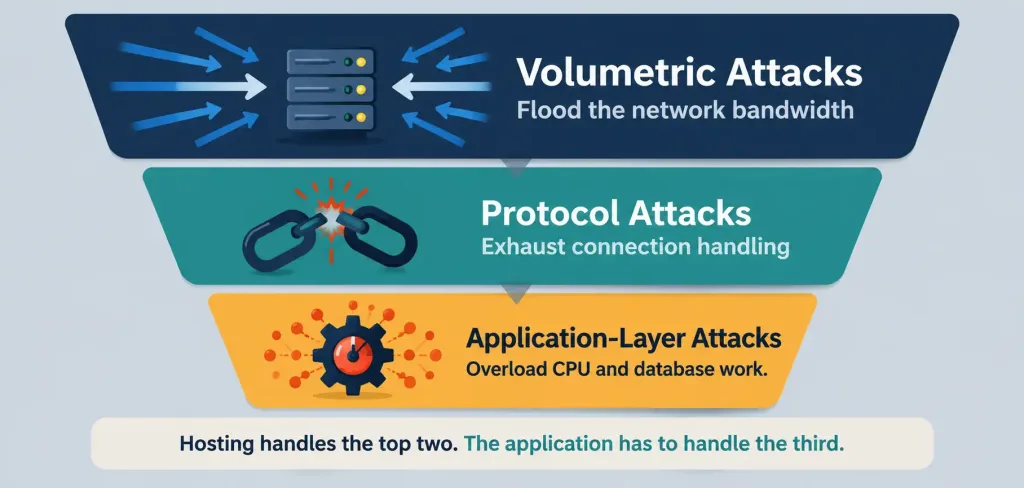
Volumetric attacks: These try to consume available bandwidth by sending very large amounts of traffic.
Protocol attacks: These target how servers and network devices handle connections.
Application-layer attacks: These send requests that reach the website or application itself and consume CPU, memory, or database resources.
The first two can often be handled higher up in the hosting or network layer.
Application attacks are trickier because the requests may look much closer to normal user activity.
Where hosting actually helps
Good hosting can give your website more breathing room.
A cloud virtual machine gives businesses more control over CPU, RAM, networking, and server configuration than basic shared hosting.
In several ways, this is possible.
With the new hosting environment, websites can manage more traffic on the internet before hitting their maximum working capacity. The providers employ traffic filtering that blocks any suspicious network traffic before it gets to your server.
The applications can be installed on several servers to allow them distribute their processing loads as opposed to running on one server.
The software will be able to monitor the unpredictable variations in the network traffic, CPU load, number of connections and the number of errors. The security will safeguard the applications by allocating some of its resources for security elsewhere.
Where hosting stops helping
This is the part many small businesses overlook.
A powerful server can still be brought to its knees by a badly designed application.
Suppose a product search triggers several expensive database queries. One real customer will barely make a difference. Thousands of automated requests hitting that same search endpoint can create a serious problem.
The traffic volume may not even look extreme.
The application simply has to do too much work for every request.
That means hosting needs help from application-level controls.
Expensive requests can be the real bottleneck
Some parts of a website cost more to process than others.
A static About page is cheap.
A search page, login request, checkout action, report, or database-heavy API call can require far more CPU and database work.
Attackers can focus on these expensive endpoints.
This is why businesses should pay attention to:
- Search pages
- Login forms
- Checkout routes
- Password reset pages
- Public APIs
- Contact forms
Rate limiting, caching, and query optimisation can make these areas much harder to abuse.
A slow database makes everything worse
DDoS traffic often exposes problems that were already there.
A database may work perfectly well with normal traffic and begin struggling once request volume increases.
Poorly written queries, oversized tables, too many connections, or missing indexes can turn the database into the main bottleneck.
Teams should watch:
- Query response time
- Database CPU use
- Connection counts
- Cache hit rates
- Slow queries
- Locking or blocked requests
A faster server helps only so much if every request is waiting on the database.
Login pages need extra protection
Login routes deserve special attention because they combine performance and security risks.
Repeated login attempts can consume application resources while also creating brute-force or credential-stuffing problems.
Useful protections include:
- Rate limits
- Multi-factor authentication
- Temporary lockouts
- Bot detection
- Request throttling
The controls exist above the hosting layer. The application must determine its maximum user capacity even though the server has sufficient resources.
A firewall will not solve the problem because a firewall serves a particular function but it cannot protect against all security threats. The system uses rules for ports and protocols and source addresses to determine which traffic can access the server.
The firewall protection fails because large DDoS attacks will consume all network resources before the incoming traffic reaches the firewall.
At that point, correctly rejecting the request is almost beside the point. The connection is already full.
This is why provider-level filtering matters.
Blocking malicious traffic further upstream reduces the amount of unwanted traffic that reaches the application environment.
Rate limiting gives the application some breathing room
Rate limiting will determine the maximum number of requests the client can make during a particular time frame.
This will help where a request is sensitive or expensive.
For instance, one will make a request to an API up to a certain number before limiting other requests from being made.
These limits may be used in logins, searches, checkouts, and password resets.
The limit should reflect the behavior of genuine users.
If they are too low, you may block your own customers.
If the limits are too high, then there is no protection at all.
Caching can reduce the amount of work each request creates
Caching is useful during normal traffic and even more useful when request volume suddenly rises.
If a popular page can be served from cache, the application does not need to rebuild it or query the database every time.
Useful layers include:
Page caching: Stores completed pages.
Object caching: Keeps commonly used application data in memory.
Database caching: Reduces repeated database work.
Content delivery caching: Serves static files closer to users.
The goal is simple: make each request cheaper for the server to handle.
DNS is part of website availability too
A website can have healthy servers and still be unreachable if DNS fails.
DNS is what helps users find the correct server address.
That means DDoS planning should also include questions such as:
- Does the DNS provider use redundant infrastructure?
- Can it handle sudden traffic increases?
- Are DNS records monitored?
- Is recovery documented?
Protecting the web server alone is only part of the picture.
Scaling helps, but it can also waste money
Cloud infrastructure makes it easier to add resources when traffic grows.
That is excellent when the extra traffic comes from real customers.
A DDoS attack changes the equation.
Automatically spinning up more servers to handle malicious requests can increase the bill without solving the attack.
This is why scaling should work together with filtering and rate limiting.
You want extra capacity for legitimate demand, not an unlimited budget for unwanted traffic.
A practical DDoS checklist for small businesses
You do not need a huge security team to improve resilience.
Start with the basics:
- Monitor normal traffic and server usage.
- Enable provider-level DDoS protection where available.
- Keep only required ports open.
- Add rate limits to sensitive routes.
- Cache frequently requested content.
- Keep applications and server software updated.
- Watch database performance.
- Protect login routes.
- Use reliable DNS infrastructure.
- Keep backups ready.
- Decide who responds during an incident.
- Review capacity as the website grows.
The main goal is to know what normal looks like before something unusual happens.
What to check when traffic suddenly spikes
If the website slows down unexpectedly, avoid guessing.
Check a few important measurements first.
Network traffic: Has inbound traffic increased sharply?
Requests per second: Is the application seeing far more requests than usual?
CPU and RAM: Is the server running out of resources?
Database activity: Are a few expensive queries responsible for the slowdown?
Error rates: Are visitors seeing timeouts or server errors?
Traffic patterns: Are repeated requests coming from suspicious sources or locations?
These clues help identify whether the problem is network-level, application-level, or somewhere in between.
Conclusion
Hosting services establish initial DDoS protection for websites, yet their security capabilities fall short of defending every website component. The system needs additional network capacity and traffic filtering and monitoring capabilities together with redundant infrastructure systems.
The application requires rate limiting and caching, database optimization and login security, dependable DNS, and an effective incident response plan. The optimal solution for small businesses requires multiple security layers.
The system should get enough capacity to ensure stability of operation, and all incoming requests should be limited to necessary operations of the system.
Frequently asked questions
Does VPS protect from a DDoS attack?
VPS can give more power and control compared to shared hosting, but it still depends on the filtering done by providers, available capacity, and application-level protection measures.
Does increasing server capacity help to avoid DDoS downtime?
It may help to deal with increased traffic, but capacity won’t save you from all attacks. For instance, large floods and costly requests are capable of overwhelming the environment.
What is the difference between a firewall and DDoS protection?
Firewall manages access to the site by controlling traffic. DDoS protection may include all above-mentioned techniques.
Can caching help with a DDoS attack?
Yes, it definitely can. Caching decreases the number of operations needed to handle request repetitions and helps to relieve application and database.



