Automated testing has become a vital part of modern software development, but it’s easy to fall into traps that limit its effectiveness. Teams often rush into test automation without clear goals, over-automate unnecessary scenarios, or neglect ongoing maintenance. The most common mistakes in automated software testing include lacking a clear strategy, automating the wrong tests, choosing the wrong tools, and failing to maintain test scripts over time.
These issues can slow down delivery, increase costs, and reduce software quality instead of improving it. By recognizing these pitfalls early, teams can build a more reliable testing process that genuinely supports faster releases and stronger products. Avoiding them requires planning, consistent upkeep, and a focus on testing what truly matters.
Key Takeaways
- Automated testing often fails due to poor planning and tool misuse rather than technical limitations.
- The most common mistakes include weak strategy, automating the wrong tests, poor tool selection, and neglected maintenance.
- Avoiding these pitfalls leads to stronger software quality, lower costs, and faster delivery.
Most Common Mistakes in Automated Software Testing
Teams often face recurring issues when implementing automated testing, ranging from unclear planning to neglected upkeep. These mistakes reduce efficiency, slow delivery, and create fragile testing processes that fail to support continuous integration and DevOps environments.
Lack of a Clear Automation Strategy
A major challenge comes from starting automation without a defined strategy. Teams sometimes rush into writing scripts without identifying goals, scope, or measurable outcomes, which leads to fragmented coverage and wasted effort. An effective automation strategy should define what to automate, when to automate, and why automation is needed. It should also align with the broader software development lifecycle and CI/CD pipeline — without that alignment, tests may not integrate smoothly into deployment workflows.
Teams benefit from documenting priorities, such as focusing on regression testing or high-risk user flows, and establishing guidelines for framework design, reporting standards, and test data management. By setting clear direction early, organizations reduce rework and ensure automation supports long-term quality objectives.
Automating the Wrong Tests
Not every test is suitable for automation. A common mistake is trying to automate highly complex, unstable, or rarely executed test cases, which creates brittle scripts that require constant fixing and provide little return on investment. Automation works best for repetitive, predictable, and high-value scenarios — smoke tests, regression suites, and cross-browser validation. Tests that involve frequent UI changes, subjective validation (such as visual design judgment), or one-time checks are usually better left to manual testing.
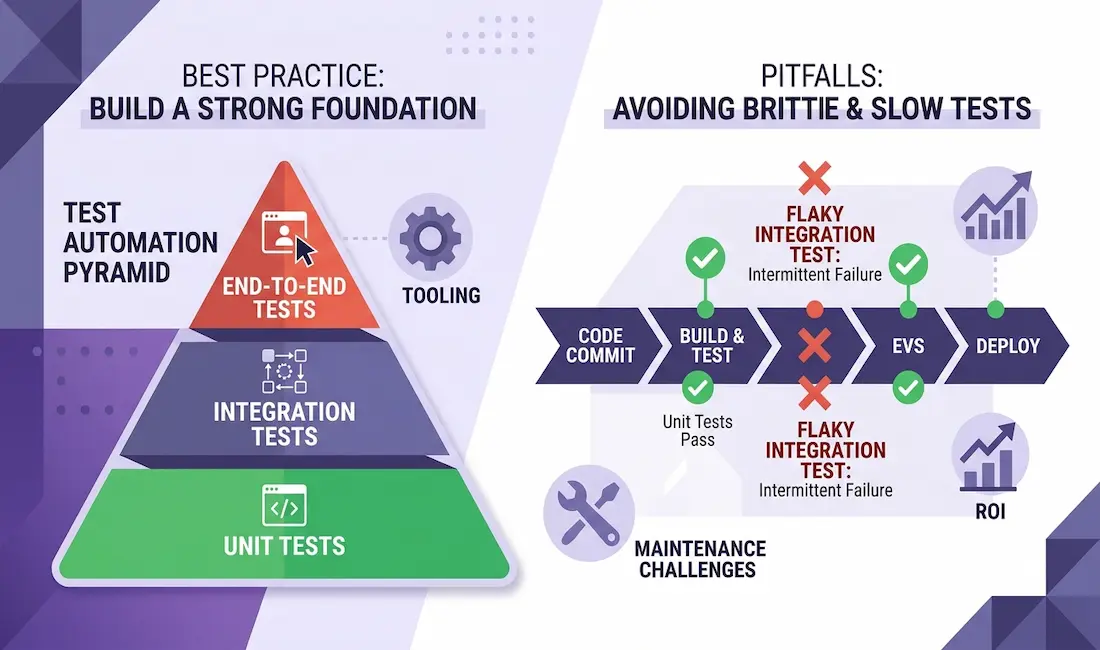
A helpful mental model here is the test automation pyramid. It suggests building the largest number of tests at the fast, stable unit level, fewer at the integration/API level, and the fewest at the slow, brittle end-to-end (UI) level. Many teams get this upside down — writing too many fragile UI tests and too few unit tests — which is a leading cause of slow, flaky suites. Keeping the pyramid in mind helps teams automate at the right layer.
To decide what to automate, evaluate candidate tests using factors such as repeatability, stability, and business impact. A simple checklist or scoring method helps prioritize where automation adds the most value, preventing wasted resources and ensuring automation accelerates delivery rather than slowing it down.
Poor Tool Selection and Evaluation
Choosing the wrong automation tool can undermine the entire testing effort. Many teams select tools based on popularity alone, without considering project requirements, team skills, or integration needs. A proper evaluation should weigh criteria such as:
- Supported platforms — web, mobile, and API testing needs (for example, Selenium, Cypress, and Playwright are common for web; Appium for mobile; and Postman or REST Assured for APIs).
- Ease of integration with your CI/CD and DevOps pipelines.
- Learning curve and community support — a strong community and good documentation ease adoption.
- Scalability and reporting features — the ability to run tests in parallel and produce clear, actionable results.
- Language and skill fit — a tool that matches your team’s existing programming languages will be adopted far more successfully.
Rather than committing on reputation alone, run a small proof-of-concept: build a handful of real tests in one or two shortlisted tools and see how they fit your application, team, and pipeline before standardizing. Matching the tool to the team’s skills and the project’s actual requirements is what prevents an expensive tooling mistake later.
Overlooking Test Maintenance and Updates
Even well-designed test suites degrade over time if not maintained. Application changes, updated frameworks, and shifting requirements often break automated scripts, and neglecting updates leads to false positives, unreliable results, and wasted debugging time.
Test maintenance should be treated as an ongoing responsibility, not an afterthought. Teams should schedule regular reviews to remove obsolete tests, refactor fragile scripts, and update test data. Version control and continuous monitoring help track changes and keep the suite reliable, while frameworks that support modular design and reusable components reduce maintenance overhead. By planning for maintenance from the start, teams keep automation aligned with evolving software and ensure consistent value.
Additional Pitfalls and How to Avoid Them
Automated testing often fails not because of tool limitations but due to overlooked practices. Stability problems, lack of training, poor data handling, and weak monitoring all reduce the long-term value of test automation.
Flaky Tests and Test Stability Issues
Flaky tests occur when the same test passes sometimes and fails at other times without any change in the code. These unreliable results waste time and erode trust in the entire suite. Common causes include timing issues, improper synchronization, and dependencies on external systems — for example, tests relying on unstable APIs or subject to network delays often produce inconsistent outcomes.
Teams should use explicit waits (rather than fixed delays), mock external services, and isolate test environments. Logging execution details helps identify patterns in failures, and regular reviews of failing tests prevent the suite from becoming bloated with unstable cases. Maintaining a dedicated process for triaging flaky tests ensures instability doesn’t accumulate. By treating test reliability as a priority, teams preserve confidence in automation results.
Inadequate Team Training and Learning Curve
Automation requires more than recording scripts; it demands coding skills, framework knowledge, and an understanding of test design principles. Without proper training, teams create fragile tests that are hard to maintain, and the learning curve can be steep when adopting new tools. Developers and testers may struggle with best practices like modular test design, reusable functions, and integration with CI/CD pipelines.
Organizations should invest in structured training, mentorship, and documentation. Pairing less experienced testers with skilled automation engineers accelerates knowledge transfer, and practical exercises — such as building small test suites before scaling — reduce mistakes. Encouraging continuous learning ensures the team adapts to evolving technologies.
Neglecting Test Data Management and Version Control
Test automation depends on consistent, predictable data. Poorly managed test data leads to false positives, false negatives, and wasted debugging time, and a lack of version control for scripts and data further complicates collaboration — without proper branching and history tracking, team members may overwrite or duplicate work.
Teams should create a clear strategy for generating, refreshing, and cleaning test data. Using anonymized production data in secure environments provides realistic scenarios without exposing sensitive information. Storing test data definitions and scripts in the same version control system as the application code improves traceability and lets teams align test cases with specific code changes.
Ignoring Return on Investment and Monitoring
Automation is not free — tools, infrastructure, and maintenance all require resources. Ignoring return on investment (ROI) leads to bloated suites that cost more to maintain than they save. Teams should measure metrics such as execution time saved, defect detection rate, and coverage improvements to get a clear picture of automation value.
Continuous monitoring of test results, execution logs, and system health ensures automation stays effective; without it, silent failures or skipped tests may go unnoticed. Including security and performance checks in monitoring pipelines broadens the benefits. By tracking both cost and effectiveness, teams can make informed decisions about where to expand or scale back automation.
How to Build a Reliable Automation Practice
Pulling these lessons together, a healthy automated testing practice tends to share a few habits: it starts with a clear strategy tied to the CI/CD pipeline; it automates selectively at the right layer of the test pyramid; it chooses tools by fit rather than fashion; it treats maintenance and flaky-test triage as ongoing work; it manages test data and version control deliberately; and it measures ROI so automation stays a net benefit. Tools that reduce maintenance overhead — including AI-assisted and “self-healing” testing platforms that adapt to UI changes automatically, such as autonomous software testing by Functionize or other similar solutions — can help, but they complement good practice rather than replace it.
Conclusion
Automated testing provides strong benefits, but its effectiveness depends on careful planning and disciplined execution. Teams most often struggle when they automate the wrong tests, neglect ongoing maintenance, or rely too heavily on fragile UI-based checks. Avoiding these mistakes requires a balanced approach that combines a clear strategy, selective test coverage, sensible tool selection, and close collaboration between development and QA. When teams focus on maintainable test design, consistent review, and realistic expectations, automation delivers what it promises: faster releases and more reliable software quality.
Frequently Asked Questions
What is the most common mistake in automated testing?
One of the most common is automating without a clear strategy — writing scripts without defined goals, scope, or alignment with the CI/CD pipeline. Closely related is automating the wrong tests, such as fragile UI or one-time checks, which produces brittle suites with poor return on investment.
Which tests should be automated and which should stay manual?
Automate repetitive, stable, high-value tests like smoke tests, regression suites, and cross-browser checks. Leave frequently changing UI flows, subjective or exploratory testing, and one-off checks to manual testing. The test automation pyramid — more unit tests, fewer integration tests, fewest end-to-end tests — is a good guide.
What causes flaky tests and how do you fix them?
Flaky tests usually stem from timing and synchronization issues or dependencies on external systems. Fixes include using explicit waits instead of fixed delays, mocking external services, isolating test environments, and maintaining a process to triage and repair flaky tests promptly.
How do you choose the right test automation tool?
Evaluate tools against your real needs: supported platforms (web, mobile, API), CI/CD integration, learning curve and community support, scalability and reporting, and fit with your team’s existing skills and languages. Run a small proof-of-concept with shortlisted tools before standardizing rather than choosing on popularity alone.
Why does test maintenance matter so much?
Applications and frameworks change constantly, so unmaintained tests break and produce false positives and unreliable results. Treating maintenance as ongoing work — removing obsolete tests, refactoring fragile ones, and updating test data — keeps the suite trustworthy and valuable over time.
How do you measure the ROI of test automation?
Track metrics such as execution time saved, defect detection rate, and coverage improvements, and weigh them against the cost of tools, infrastructure, and maintenance. Continuous monitoring of results and logs ensures the suite keeps delivering value rather than quietly degrading.