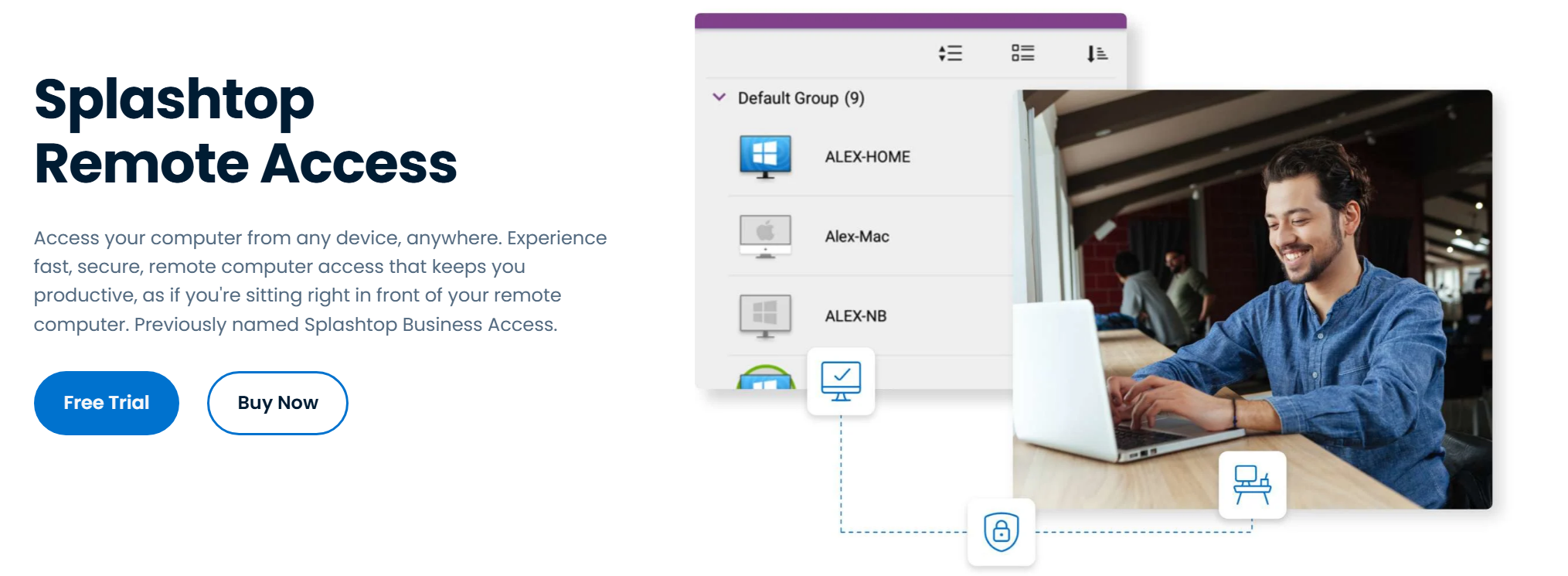
Choosing a remote access tool comes down to three questions: how fast and reliable it is, how well it protects each session, and what will it actually cost as you grow. Splashtop tops this list because it answers all three convincingly, delivering high-frame-rate performance, bank-grade security, and pricing that scales without punishing larger teams.
The five best remote access software vendors compared below are each ranked on those same three pillars, so you can match a tool to whichever one matters most to your organization.
The reliability pillar carries real financial weight.
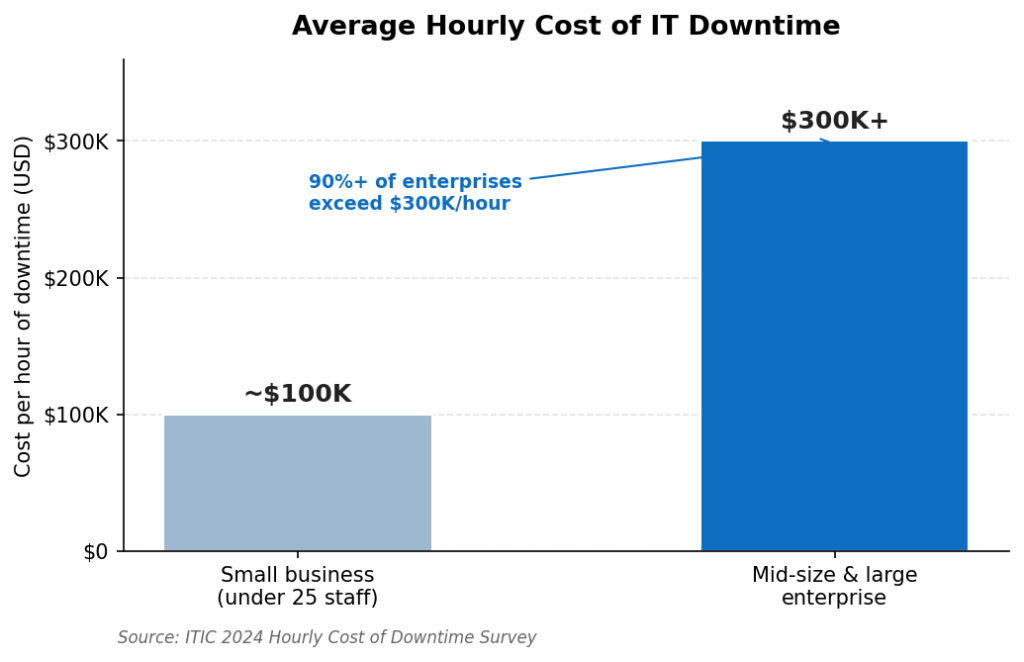
When remote access fails, work stops, and the bill adds up fast. Source: ITIC 2024 Hourly Cost of Downtime Survey.
A laggy or unreliable connection is not just frustrating; it is expensive, since the cost of downtime now tops $300,000 an hour for most mid-size and large enterprises. That is why performance and reliability sit at the top of this comparison.
How These Vendors Were Compared
Each vendor was assessed on three pillars that map directly to a buying decision.
Performance covers frame rate, latency, resolution, and connection stability, the difference between a tool that feels local and one that drags.
Security covers encryption strength, multi-factor authentication, certifications, and access control. Many teams still rely on a virtual private network for remote work, but purpose-built remote access tools add session-level controls a VPN alone does not provide.
Pricing covers the model as much as the number: per-device, per-user, per-concurrent-connection, or free tiers, and how cleanly that cost scales.
Comparison at a Glance
| Vendor | Performance | Security | Pricing Model |
| 1. Splashtop | 4K, low latency | AES-256, MFA, SSO | From ~$5/mo per user |
| 2. RealVNC Connect | Strong, tunable | Encrypted, MFA | Per-device or per-user |
| 3. ISL Online | Reliable | AES-256 E2E, ISO 27001 | Per-license, on-prem option |
| 4. RemotePC | Up to 60fps | AES-256, 2FA | Budget annual plans |
| 5. Iperius Remote | Lightweight, fast | E2E TLS 1.3, 2FA | Free tier; from ~€8/mo |
The 5 Best Remote Access Vendors in 2026
1. Splashtop – The Best Balance of Speed, Security, and Price
Splashtop wins on all three pillars at once. On performance, it streams at up to 4K with low latency, so remote sessions feel local even for graphics-heavy work. On security, every session runs over TLS with 256-bit AES encryption, backed by multi-factor authentication, device verification, single sign-on, and role-based access, and the platform is certified to SOC 2 Type II and ISO 27001 with HIPAA and GDPR support.
On pricing, it starts around $5 per month for solo use and roughly $8.25 per user monthly for teams, undercutting most rivals while including features they charge extra for. It runs across Windows, Mac, Linux, iOS, Android, and Chromebooks, and more than 30 million users rely on it, including 85% of the Fortune 500.
For teams reviewing the best remote access software vendors compared here, Splashtop is the safest all-around choice, and a free trial is available on Splashtop’s site.
“Splashtop Business Access makes it easy to remote into my primary network from any location.” Verified User, G2 (Splashtop Remote Access holds 4.8/5 from 500+ reviews)
Pros:
- 4K, low-latency performance
- AES-256 encryption, MFA, SSO, SOC 2 and ISO 27001
- Strong value with transparent per-user pricing
- Broad cross-platform support
Cons:
- Not a full virtual desktop infrastructure platform
- No built-in voice chat during sessions
Best for: Teams that want the best overall mix of speed, security, and price.
Contact: Website: https://www.splashtop.com HQ: Cupertino, California, USA
2. RealVNC Connect – Tunable Performance Across Platforms
RealVNC Connect is a long-established option known for stable connections and strong cross-platform reach, including solid Linux and headless server support. Performance is tunable, letting you trade quality for responsiveness on constrained links, and sessions are encrypted with multi-factor authentication available. Pricing follows a per-device or per-user model, which is predictable but can climb as device counts grow.
Pros:
- Stable, tunable performance
- Strong Linux and cross-platform support
- Encrypted sessions with MFA
Cons:
- Interface feels dated
- Per-device costs add up at scale
Best for: Teams managing mixed operating systems and servers.
Contact: Website: https://www.realvnc.com
3. ISL Online – The Security and Compliance Pick
ISL Online leads on the security pillar. It secures sessions with AES 256-bit end-to-end encryption, holds ISO/IEC 27001 certification, and offers cloud, on-premises, and private cloud deployment for data sovereignty. Two-factor authentication, role-based access, session recording, and audit logs make it a strong fit for regulated work, and its licensing does not cap the number of users or endpoints you support.
Pros:
- AES-256 end-to-end encryption and ISO 27001
- On-premises and private cloud deployment
- Session recording and audit logs
Cons:
- On-premises setup adds overhead
- Interface is functional rather than modern
Best for: Regulated organizations that put compliance first.
Contact: Website: https://www.islonline.com HQ: Ljubljana, Slovenia
4. RemotePC – Budget-Friendly Access With Solid Speed
RemotePC, from IDrive, balances respectable performance with some of the lowest pricing in this group. Its Performance Viewer streams at up to 60fps for crisp media, sessions are secured with TLS and AES-256 plus a per-computer Personal Key and two-step verification, and you can connect from a browser without installing anything. Annual plans are inexpensive, which makes it appealing for small teams watching their budget.
Pros:
- Up to 60fps performance
- AES-256 encryption with two-step verification
- Low-cost annual plans and browser access
Cons:
- Some advanced features are Windows-only
- Add-ons can raise the total
Best for: Budget-conscious small teams that still want good speed.
Contact: Website: https://www.remotepc.com
5. Iperius Remote – Free to Start, Secure by Design
Iperius Remote, built by an Italian developer, is the value standout. It is genuinely free for personal use with no time limits, and paid plans start around €8 per month based on concurrent connections, with unlimited devices and users on every tier.
Despite the low price, security is serious: end-to-end encryption over TLS 1.2 and 1.3, two-factor authentication, and GDPR and HIPAA compliance on ISO 27001 certified EU infrastructure. It is lightweight and fast, though brand recognition is smaller than the bigger names.
Pros:
- Free personal tier and affordable paid plans
- End-to-end TLS 1.3 encryption with 2FA
- GDPR and HIPAA compliant, unlimited devices
Cons:
- Smaller community and fewer integrations
- Occasional connection instability reported
Best for: Individuals and small businesses that want strong security at low cost.
Contact: Website: https://www.iperius.com
Understanding pricing models: A low headline price can be misleading. Per-device plans look cheap until your fleet grows, per-user plans suit stable teams, and per-concurrent-connection plans reward organizations where only a few technicians connect at once. Map the model to how your team actually works before comparing dollar figures.
What to Check Before You Buy
Run any shortlist through this quick checklist before committing:
- Test performance on your network: Trial each tool over your real connections, not a vendor demo, and watch for lag on high-resolution work.
- Confirm the security baseline: Look for strong encryption, multi-factor authentication, and access controls, plus certifications such as ISO 27001 if you are regulated.
- Match the pricing model: Decide whether per-device, per-user, or per-concurrent-connection fits your usage before comparing prices.
- Check platform coverage: Make sure every operating system your team uses is fully supported, not just listed.
- Plan for scale: Estimate the cost and admin effort at double your current size, not just today.
FAQs
What matters most when comparing remote access software?
It depends on your priority, but performance, security, and pricing are the three pillars that decide most purchases. A tool should feel responsive on your network, protect every session with strong encryption and multi-factor authentication, and use a pricing model that scales with how your team works rather than against it.
Is remote access software more cost-effective than a VPN?
Often, yes. Purpose-built remote access tools add session-level controls, easier setup, and better performance than routing everything through a VPN, and many offer transparent per-user or free tiers. A VPN still has its place for full network access, but for reaching specific machines, dedicated tools are usually simpler and cheaper.
How do remote access pricing models differ?
Common models include per-device, per-seat, per-concurrent-connection, and free tiers. Per-device suits small fixed fleets, per-user fits stable teams, and per-concurrent-connection rewards organizations where only a few people connect at once. The right model can matter more to your total cost than the headline price.
Why does Splashtop rank first?
Splashtop scores highly on all three pillars: 4K low-latency performance, AES-256 encryption with MFA and certifications, and transparent pricing from around $5 per month. That combination of performance, security, and value makes it a safe default for most teams.
Does Splashtop work across different operating systems?
Yes. Splashtop runs on Windows, Mac, Linux, iOS, Android, and Chromebooks, so you can connect to and from almost any device, which makes it practical for teams with mixed hardware.
The Bottom Line
With the best remote access software vendors compared on performance, security, and pricing, Splashtop comes out ahead by leading on all three at once: fast 4K sessions, strong encryption with full certifications, and pricing that scales fairly. RealVNC Connect offers tunable cross-platform performance, ISL Online leads on compliance, RemotePC delivers budget-friendly speed, and Iperius Remote pairs a free tier with serious security. Decide which pillar matters most to you, trial the top contenders on your own network, and confirm the pricing model fits before you commit.
References:
- Fortinet. (2026). What Is a VPN? How Does a Virtual Private Network Work? https://www.fortinet.com/resources/cyberglossary/what-is-a-vpn
- Information Technology Intelligence Consulting. (2024). ITIC 2024 Hourly Cost of Downtime Report. https://itic-corp.com/itic-2024-hourly-cost-of-downtime-report/
- G2. (2026). Splashtop Remote Access Reviews. https://www.g2.com/products/splashtop-remote-access/reviews
- Iperius Remote. (2026). Secure Remote Desktop Software. https://www.iperius.com/