Xerox C305ae Review: Solid Color Laser All-in-One for Small Offices
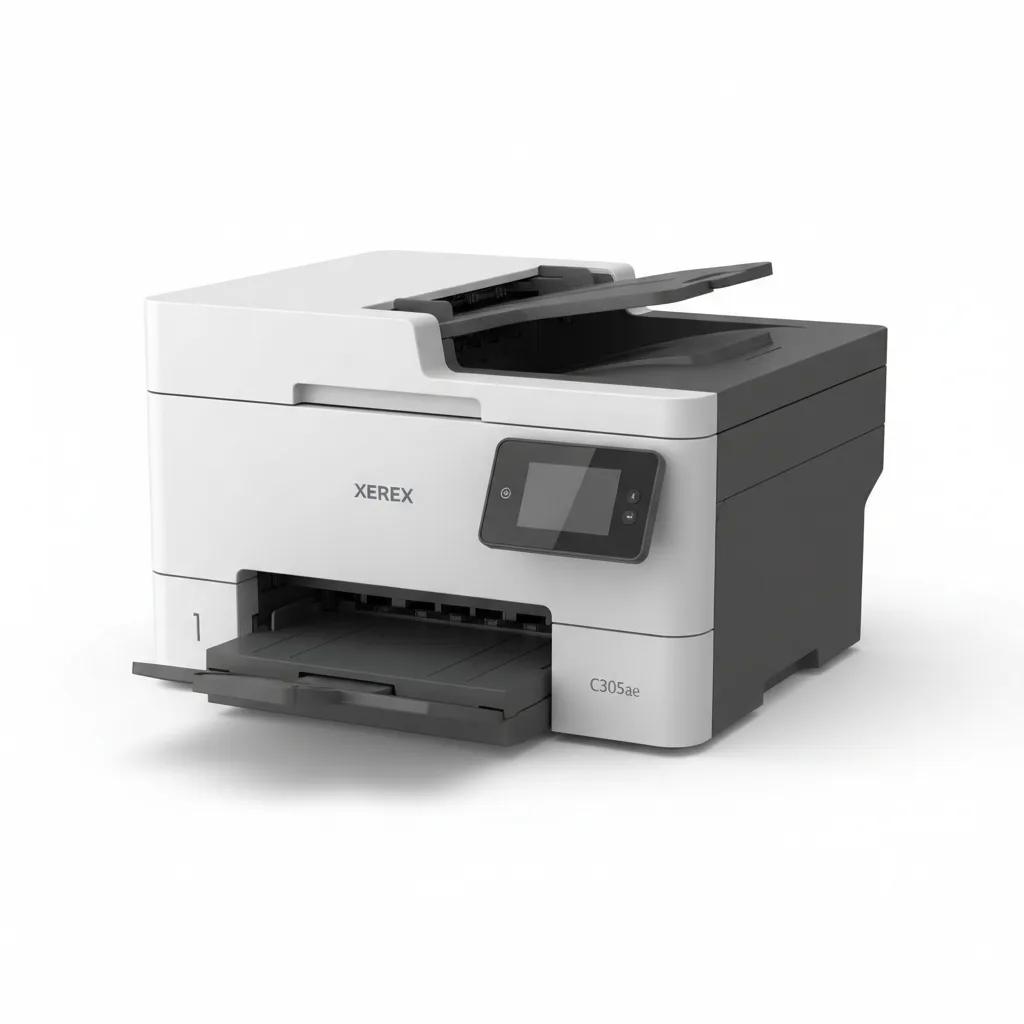
The Xerox C305ae is a compact color laser all-in-one that delivers 32 pages per minute in both color and monochrome, sharp 2400 x 600 DPI output, and a standout enterprise security stack — including TPM 2.0, hardware-enabled post-quantum cryptography, and TLS 1.3 — that you rarely find at this price point. The 4.3-inch color touchscreen and smartphone-guided setup via the Xerox Easy Assist app make daily operation accessible, while the 50-sheet ADF and Wi-Fi 7 (ac)-class wireless keep workflows moving. The main sticking points are a relatively modest 251-sheet standard paper input, toner yield that climbs quickly with color-heavy workloads, and a price (regular $759 at Office Depot, on sale for $639 as of August 2026) that sits above many Brother and HP alternatives with comparable print speeds. For legal offices, accounting teams, and any workgroup that handles confidential documents and needs proven data protection built into the device itself, the C305ae justifies the premium. For lighter users, the Brother MFC-L3780CDW is worth a look first.
Performance Analysis
The Xerox C305ae prints at up to 32 pages per minute in both color and monochrome at letter size — a meaningful correction from the original marketing claims of 35 ppm that circulate online. Office Depot and the Xerox store both confirm 32 ppm letter / 30 ppm A4 as the official rated speed, which places this machine solidly in the mid-range workgroup tier. Xerox also specifies a maximum monthly duty cycle of 75,000 pages and a recommended monthly volume of 1,001 to 6,000 pages — a realistic workload ceiling that suits a team of 5 to 15 people printing invoices, reports, and client materials without stress.
Print resolution of 2400 × 600 DPI produces sharp, professional text at small point sizes and renders color graphics with enough accuracy for brand-consistent marketing materials. Copy resolution is 600 × 600 DPI — sufficient for document reproduction but not suited for fine-art reproduction. The 50-sheet ADF handles duplex scanning in a single pass, making double-sided contract digitization and invoice batching efficient. Fax transmission runs at 33.6 Kbps with automatic redialing and a junk fax filter, covering the minority of offices that still rely on fax for legal documents.
One caution worth noting: the starter cartridges that ship with the C305ae are low-yield units — cyan, magenta, and yellow at approximately 1,200 pages each, and black at 2,000 pages. High-capacity genuine Xerox toner cartridges yield around 2,500 pages per color, with extra high-capacity black toner reaching 6,000 pages. This matters for cost-of-ownership calculations. Teams printing over 3,000 color pages monthly should budget for the extra high-capacity cartridge set from the outset rather than burning through starter and standard units.
Design and Build Quality
The Xerox C305ae occupies 16.2 × 15.7 × 17.7 inches — a compact but not tiny footprint for a machine offering print, copy, scan, and fax. It fits on a credenza or dedicated printer stand without dominating the space, and the front-access paper tray and document output make it manageable in tight office corners. At just over 40 pounds (per multiple retailer listings), it requires two people to move but stays put once placed. The exterior uses a professional dark plastic chassis with clean lines — functionally neutral rather than visually distinctive.
The 4.3-inch color touchscreen is the primary operator interface for job selection, settings changes, and workflow routing. It sits at an accessible tilt angle for standing users. Menus are logically organized, and the Xerox Easy Assist App extends management to smartphones — letting administrators monitor toner levels, check print counts, and access troubleshooting guides remotely without sitting at the device. This is a genuine convenience for IT-light small offices where nobody has time to dig into printer admin consoles.
The 251-sheet standard paper tray is the design’s most notable limitation. In a busy office printing 100 to 200 pages per day, this capacity requires at least one daily reload. Many competing machines — including the Brother MFC-L3780CDW and HP Color LaserJet Pro MFP 4301fdw — offer 250-sheet trays as standard too, so this is not unique to the Xerox, but it is something teams with high daily volume should account for when setting up the machine’s location. The 50-sheet ADF capacity is typical and adequate for standard office scanning batches.
Software and User Experience
Initial setup through the Xerox Easy Assist App is genuinely simpler than traditional printer setup. The smartphone-guided process walks through network connection and basic configuration without requiring a CD or a long driver download session. Once installed, the printer appears reliably across Windows 11/10, macOS 14/15/26, and Chromebook environments. Windows Server 2016 through 2025 are all supported, making this a practical choice for organizations running Active Directory or print server environments.
The 4.3-inch touchscreen provides direct access to copy, scan, fax, and print settings without requiring a connected computer. Scan jobs can be routed to USB, email, or network folders from the panel. The Xerox Print and Scan Experience app (available for Windows) extends scan routing and job tracking to desktop computers. Admin-level functions — network configuration, security policy enforcement, toner thresholds — are managed through Xerox’s web-based CentreWare interface accessed from any browser on the network. This is a step down in sophistication from the full ConnectKey workflow platform found on Xerox’s larger office devices, but appropriate for the C305ae’s workgroup scale.
The 1-year limited warranty covers manufacturing defects, with Xerox offering extended care pack options through resellers. Firmware updates are digitally signed — a security feature that prevents unauthorized modification of device software, relevant for any organization that treats printer security as part of its IT posture. Xerox also notes predictive support capabilities through its management tools, allowing proactive toner alerts and service notifications before problems interrupt productivity.
Battery Life
Not applicable — this is a corded office printer.
Value for Money and Competition
The Xerox C305ae’s regular price of $759 (on sale for $639 at Office Depot as of August 2026) puts it above several capable alternatives. The Brother MFC-L3780CDW ($499–$530) is the most direct competition: it prints at a similar 31–33 ppm, offers a 6,500-page XXL toner option (versus Xerox’s ~2,500 high-capacity color cartridges), has a 3,000-page monthly duty cycle recommendation, and costs roughly $200 less to purchase. The Brother wins on toner economics and upfront price; the Xerox wins decisively on security, with TPM 2.0 and post-quantum cryptography that the Brother does not offer.
The HP Color LaserJet Pro MFP 4301fdw ($530 at retail) is the other natural comparison. It prints up to 33 ppm, carries HP’s strong software ecosystem, and benefits from HP Instant Ink subscription pricing that reduces per-page color costs substantially for enrolled users. The Xerox matches it on print speed and beats it on security hardware and duty cycle (75,000 vs HP’s 50,000-page max). For teams that are already in the HP ecosystem and want managed ink costs, the HP is a reasonable choice. For security-focused teams, the Xerox’s TPM 2.0 and FIPS-validated cryptography is a clear differentiator. For more printer buying context, our guide to the best office equipment for growing teams covers the wider landscape, and our look at networking and productivity tools for small offices includes related infrastructure considerations.
Verdict
The Xerox C305ae earns its place as the right choice for a specific type of small office: one that takes document security seriously, handles confidential client information daily, and needs a laser all-in-one that can be deployed with confidence on a managed network. The verified 32 ppm speed, 75,000-page duty cycle, PostScript 3 support, and the full security stack — TPM 2.0, post-quantum cryptography, TLS 1.3, WPA3, FIPS 140-3 validation — combine to make this the most security-capable color laser AIO available below $800.
For offices without strict security requirements that are primarily looking for low cost-per-page or the cheapest route to reliable color printing, the Brother MFC-L3780CDW at roughly $200 less delivers comparable speed and superior toner economics. The Xerox asks you to pay a premium, and the justification is its security architecture and Xerox’s proven reliability track record in office environments.
Check the current price for the Xerox C305ae at Office Depot or on the Xerox store directly. At $639 on sale, the value proposition improves noticeably over the $759 regular price.
Rating: 3.9 / 5 — The strongest security profile in its class, held back only by toner costs and a limited paper tray.
Sources: Xerox C305ae Official Store | website, Xerox C303a/C305ae Official Datasheet PDF | website, Office Depot — Xerox C305AE Product Page | website, Amazon — Xerox C305ae Product Listing | website, Xerox Official Toner Cartridge Yields | website — August 2026.
Sources: Xerox C305ae Official Store, Xerox C303a/C305ae Datasheet (PDF), Office Depot u2014 Xerox C305AE Product Page with Full Specs, Amazon u2014 Xerox C305ae Product Listing, Staples u2014 Xerox C305ae Wireless Color Laser AIO, Xerox Extra High Yield Black Toner for C305ae, Xerox High Yield Cyan Toner Cartridge for C305ae — August 2026
Frequently Asked Questions
Is the Xerox C305ae worth buying in 2026?
What is the print speed of the Xerox C305ae?
How does the Xerox C305ae compare to the Brother MFC-L3780CDW?
Where can I buy the Xerox C305ae at the best price?
Does the Xerox C305ae support mobile printing?
What touchscreen size does the Xerox C305ae have?
+Pros
- Verified 32 ppm color and mono printing — fast enough for workgroups of 5–15 people
- TPM 2.0 and hardware-enabled post-quantum cryptography — enterprise-grade security at SMB pricing
- 75,000-page monthly duty cycle handles peak workload months without strain
- 50-sheet duplex ADF enables efficient double-sided document scanning
- Supports all major mobile and wireless print standards (AirPrint, Mopria, Chromebook, Wi-Fi Direct)
- FIPS 140-3 validated, EPEAT compliant, ENERGY STAR certified
- Smartphone-guided setup via Xerox Easy Assist App reduces IT burden
−Cons
- 251-sheet standard paper tray requires frequent reloading in high-volume offices
- Starter toner cartridges have low yields (1,200 pages color); total cost of ownership climbs with heavy color printing
- No Xerox ConnectKey workflow apps (SharePoint, Box) — those require larger Xerox models
- Brother MFC-L3780CDW offers similar speed and higher toner yields at $200 less
- 4.3-inch touchscreen is functional but smaller and less responsive than higher-end panels