
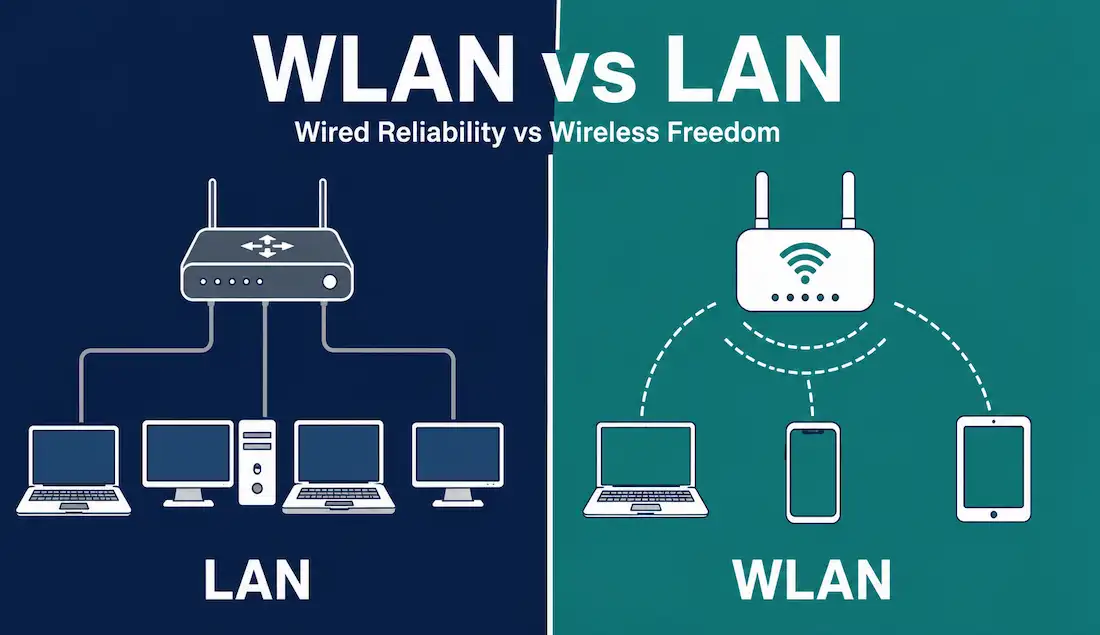
Every network connects devices so they can share data. The two most common local network types are LAN and WLAN. A LAN uses physical cables to link devices together. A WLAN uses radio waves instead. Both serve the same basic purpose. But they differ in how they move data, how secure they are, and how they perform under load.
This guide compares WLAN and LAN in detail. It covers the IEEE standards behind each, their physical differences, how each handles collisions, and where each one fits best. By the end, you will know exactly when to choose wired, when to choose wireless, and when to use both together.
What Is a LAN?
A Local Area Network, or LAN, connects computers and devices within a single building or campus. It uses Ethernet cables, switches, and routers to move data. Devices plug directly into the network using RJ45 connectors.
LANs are the backbone of most offices, schools, and data centers. They deliver fast, stable, and predictable performance. Because the signal travels through a shielded cable, it faces far less interference than a wireless signal.
A LAN’s biggest strength is reliability. Cables do not suffer from radio interference, weather, or physical obstructions the way wireless signals do. A LAN’s biggest limitation is mobility. Every device needs a cable, which restricts where you can place it.
What Is a WLAN?
A Wireless Local Area Network, or WLAN, connects devices using radio frequency (RF) signals instead of cables. A wireless access point (AP) broadcasts a signal that nearby devices pick up. Laptops, phones, tablets, and IoT devices connect without any physical link.
WLANs power home Wi-Fi networks, office wireless networks, and public hotspots. They let users move freely while staying connected. This mobility is the main reason WLANs have become so popular since the early 2000s.
A WLAN’s biggest strength is flexibility. Users can roam within signal range without losing their cable-bound tether. A WLAN’s biggest limitation is exposure. Because RF signals travel through open air, anyone within range can potentially intercept them.
IEEE 802 Standards: 802.3 vs 802.11
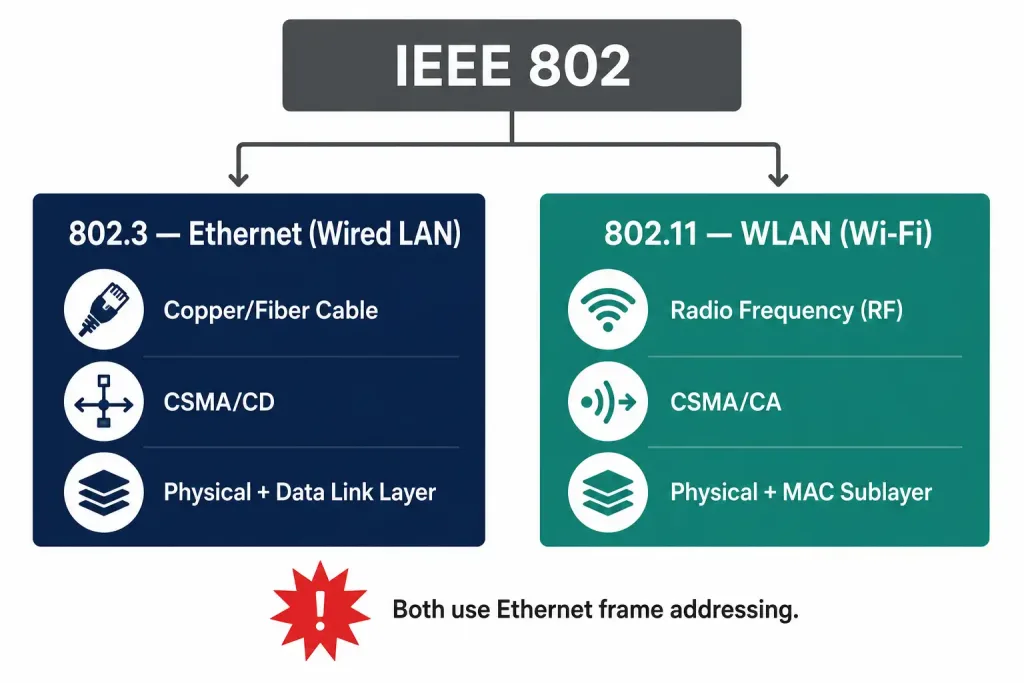
Both LAN and WLAN trace back to the same standards body. The IEEE created the 802 family of standards to define how local and metropolitan area networks operate. Two standards matter most for this comparison.
IEEE 802.3 defines Ethernet, the standard behind wired LANs. It specifies cabling types, connector formats, and how devices share a wired medium. IEEE 802.11 defines WLAN, commonly known as Wi-Fi. It specifies how devices communicate over RF instead of cable.
Both standards operate at the physical layer and the data link layer of the OSI model. But they solve the same problem — multiple devices sharing one medium — in very different ways. Wireless LANs use radio frequencies instead of cables at the physical layer and the MAC sublayer of the data link layer.
Physical Layer Differences
At the physical layer, the difference is straightforward. A LAN sends electrical signals through copper cable, or light pulses through fiber. A WLAN sends radio waves through open air on specific frequency bands, typically 2.4 GHz and 5 GHz, with 6 GHz added under Wi-Fi 6E.
Cable-based signals are contained within an insulating sheath. This shields them from most outside interference. RF signals have no such shielding. They reflect off walls, refract around obstacles, and lose strength as they travel. Weather, building materials, and even other electronic devices can all degrade a wireless signal.
Radios operating in the same geographic area on the same or an overlapping frequency can interfere with each other. This is a common problem in dense office buildings and apartment complexes, where dozens of Wi-Fi networks compete for the same limited channels.
Medium Access Control: CSMA/CD vs CSMA/CA
Wired and wireless networks also differ in how devices decide when to transmit. This is called medium access control, and it prevents devices from talking over each other.
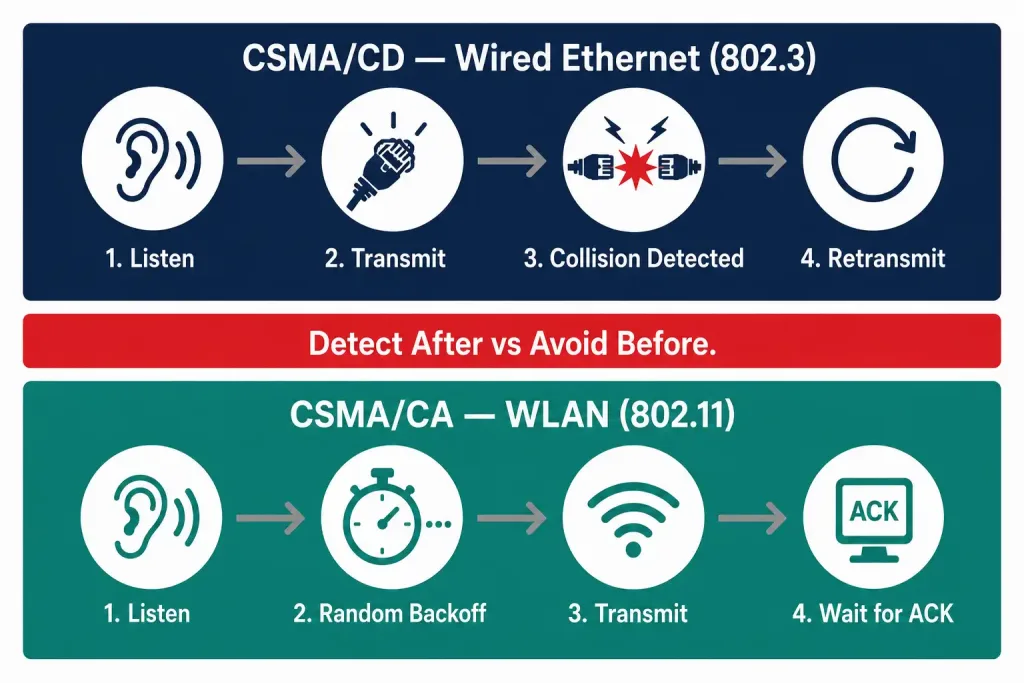
Traditional Ethernet networks used Carrier Sense Multiple Access with Collision Detection, or CSMA/CD. A device would listen for other traffic, transmit if the line was clear, and detect a collision if one happened, then retransmit. Modern switched Ethernet networks rarely need this anymore, since full-duplex links let devices send and receive at the same time without colliding. But it remains part of the 802.3 standard and its history.
WLANs cannot use collision detection the same way. A wireless device transmitting at full power cannot reliably listen for a collision on the same channel at the same time. So 802.11 uses Carrier Sense Multiple Access with Collision Avoidance, or CSMA/CA, instead. A device checks whether the channel is clear, waits a random backoff period, and then transmits. Optional Request to Send / Clear to Send (RTS/CTS) signaling can further reduce collisions in crowded environments.
This distinction matters for the CCNA exam and for real-world troubleshooting. If you remember one thing, remember this: wired Ethernet detects collisions after they happen, while Wi-Fi tries to avoid them before they happen.
Frame Format Differences
WLAN frames are not identical to wired Ethernet frames. The 802.11 MAC header carries extra fields that Ethernet does not need, including fields for power management, duration/ID values, and up to four address fields to support access point relaying. This extra overhead exists because wireless communication has to manage things a cable never has to worry about, like signal retries and roaming between access points.
Mobility and Installation
Mobility is where WLAN clearly wins. Devices can move freely throughout the coverage area of an access point, and users can roam between multiple access points without dropping their connection. This makes WLAN the natural choice for laptops, phones, and any device that needs to move.
LAN devices, by contrast, are generally fixed in place. A desktop computer plugged into a wall jack stays wherever that jack is located. Moving it means running a new cable or using a longer one.
Installation effort runs the opposite direction. A WLAN is usually faster to deploy because it skips the need to run cable through walls, ceilings, and floors. A LAN requires planning cable routes, installing patch panels, and terminating each cable run — more upfront labor, but a payoff in long-term stability.
Range and Signal Reliability
A LAN’s range is limited only by cable length and by Ethernet standards, which generally cap a single copper run at 100 meters before requiring a repeater or switch. Within that limit, a wired connection stays consistent regardless of what else is happening in the building.
A WLAN’s range depends on the access point’s power output, the frequency band in use, and physical obstructions like walls and furniture. As a device moves farther from the access point, the signal weakens, static-like interference increases, and eventually the connection drops. Lower frequencies like 2.4 GHz travel farther but carry less data; higher frequencies like 5 GHz and 6 GHz carry more data but cover less distance.
Security Considerations
Wireless networks face a fundamentally different threat model than wired ones. An attacker needs physical access to tap into a LAN cable or plug into a switch port. An attacker only needs to be within radio range to attempt to intercept a WLAN signal, which makes wireless inherently more exposed to eavesdropping and unauthorized access attempts.
This does not mean WLAN is unsafe. Modern encryption standards like WPA3 provide strong protection when configured correctly. But it does mean wireless networks need extra layers of defense: strong passphrases, enterprise authentication (802.1X) where possible, guest network segmentation, and regularly updated firmware on access points.
LAN security depends more on physical control and internal segmentation. Locked wiring closets, port security on switches, and VLANs to separate traffic all reduce risk on the wired side. Wireless networks also increase privacy exposure in a different way: RF signals often reach beyond the intended coverage area, into a parking lot or a neighboring unit, where someone outside the building can attempt to capture them.
Interference and Regulatory Factors
WLANs must share unlicensed spectrum with a wide range of other devices: cordless phones, Bluetooth accessories, microwave ovens, and neighboring Wi-Fi networks all compete on the same bands. Regulatory bodies like the FCC and equivalent agencies elsewhere set power limits and channel allocations to manage this shared spectrum.
LANs face no equivalent problem. A dedicated copper or fiber cable carries only the traffic you put on it. This is a major reason wired connections remain the standard for latency-sensitive applications like video production, financial trading systems, and data center backbones.
Performance and Reliability
Wired LANs generally deliver more consistent throughput and lower latency. Modern Ethernet standards support multi-gigabit speeds over standard cabling with minimal jitter. Because the medium is enclosed and shared with no one else, performance stays predictable under load.
WLAN throughput varies more. Signal strength, channel congestion, the number of connected devices, and physical interference all affect real-world speed. A WLAN might perform excellently in an empty room and poorly in a crowded conference hall on the same access point.
Capacity and Connected Devices
A LAN’s device capacity is defined by hardware: the number of available Ethernet ports on a switch or router. Need more devices? Add another switch. This scales in a straightforward, predictable way.
A WLAN’s capacity is defined by the access point’s specifications and the available airtime on its channel. Every additional device competing for that same channel slightly reduces the bandwidth available to everyone else. Enterprise environments manage this by deploying multiple access points and load-balancing clients across them.
Cost Considerations
Initial WLAN deployment is often cheaper for small spaces, since there is no cabling labor involved — just access points and a wireless controller if needed. Large facilities tell a different story: enterprise-grade Wi-Fi coverage across a big building can require many access points, careful RF planning, and ongoing management, which adds up.
LAN deployment costs more upfront in cabling and installation labor, especially in older buildings. But once installed, a wired network has a long service life and lower ongoing maintenance costs compared to a wireless network that needs continuous monitoring for interference and coverage gaps.
Common Use Cases
LANs remain the standard for servers, data centers, security systems, and any device that stays in one place and needs guaranteed bandwidth. Desktop workstations in an office, point-of-sale terminals in a retail store, and backbone connections between switches all typically run over wired Ethernet.
WLANs dominate wherever mobility matters. Laptops, smartphones, tablets, wireless printers, and IoT sensors all rely on Wi-Fi. Public spaces like cafes, airports, and hotels use WLAN because running cable to every seat and table is impractical.
WLAN and LAN Together: Hybrid Networks
Most real-world networks use both. A typical office wires its servers, switches, and desktop workstations to a LAN backbone for speed and reliability, then layers a WLAN on top so laptops and mobile devices can connect without cables. Access points themselves usually plug into the wired LAN using Ethernet, bridging the two technologies together.
This hybrid approach gets the best of both worlds: the stability of wired connections where it matters most, and the flexibility of wireless where mobility matters most.
WLAN vs LAN Comparison Table
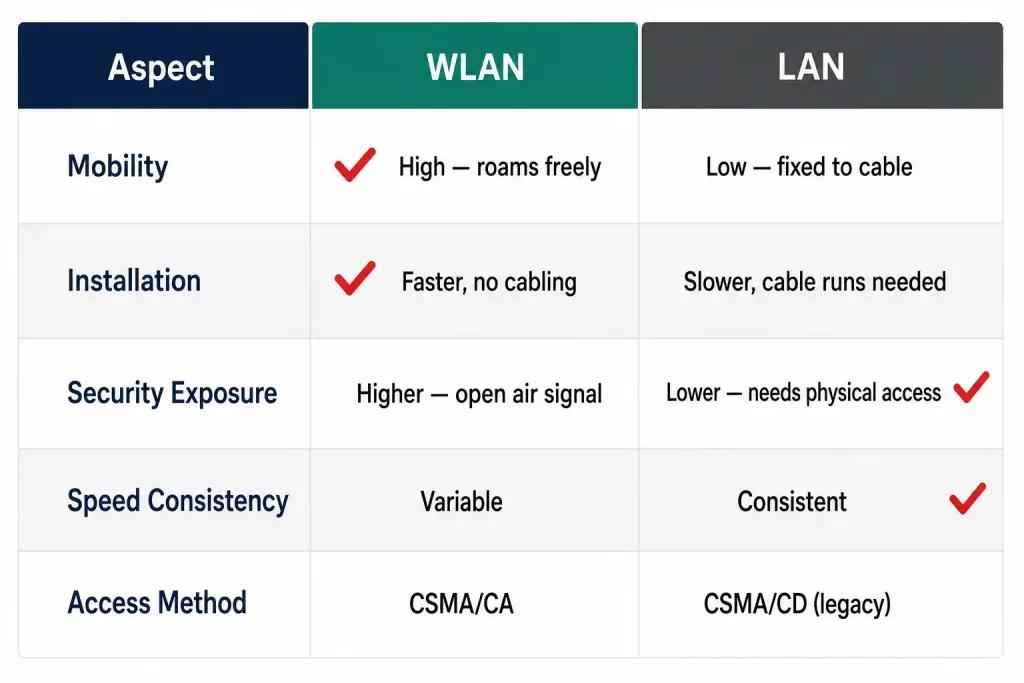
| Aspect | WLAN (Wireless LAN) | LAN (Wired LAN) |
|---|---|---|
| Governing Standard | IEEE 802.11 | IEEE 802.3 |
| Connection Medium | Radio frequency signals | Copper or fiber cable |
| Medium Access Method | CSMA/CA (collision avoidance) | CSMA/CD (collision detection, largely legacy) |
| Mobility | High — devices roam freely within range | Low — devices are fixed to a cable run |
| Installation Effort | Lower — no cable runs required | Higher — requires cable planning and labor |
| Range Limit | Varies with power, frequency, obstructions | Fixed by cable standard, typically 100m per run |
| Speed and Reliability | Variable, affected by interference and distance | Consistent, minimal interference |
| Security Exposure | Higher — signal travels beyond walls | Lower — requires physical access |
| Capacity Scaling | Limited by channel airtime and AP count | Limited by available switch ports |
| Typical Use Cases | Laptops, phones, IoT, public hotspots | Servers, data centers, fixed workstations |
Frequently Asked Questions
Is WLAN part of a LAN? Yes. A WLAN is a type of LAN that uses wireless transmission instead of cables. Both cover a similarly limited geographic area, like a home, office, or campus.
Which is more secure, WLAN or LAN? LAN is generally considered more secure by default, since it requires physical access to the cable or switch port. WLAN can be made highly secure with modern encryption like WPA3, but it starts from a more exposed position because the signal is broadcast openly.
Which is faster, WLAN or LAN? Wired LAN connections are typically faster and more consistent. Modern Wi-Fi standards have closed much of the gap in ideal conditions, but wired connections still win in high-density or interference-heavy environments.
Do I need both WLAN and LAN in my network? Most networks benefit from both. Use wired connections for stationary, high-bandwidth devices like servers and workstations. Use wireless for laptops, phones, and anything that needs to move around.
What replaced CSMA/CD in modern Ethernet? Full-duplex switched Ethernet largely made CSMA/CD unnecessary, since devices no longer share a single collision domain. It remains part of the historical 802.3 standard and is still tested on certification exams.
Conclusion
WLAN and LAN both connect devices within a local area, but they take fundamentally different paths to get there. LAN offers speed, reliability, and strong physical security through cables. WLAN offers mobility and easy deployment through radio waves, at the cost of more variable performance and a larger security surface to manage.
Neither one replaces the other. The strongest networks combine a wired backbone for stability with wireless access for flexibility, matching each technology to the devices and use cases it handles best.



