
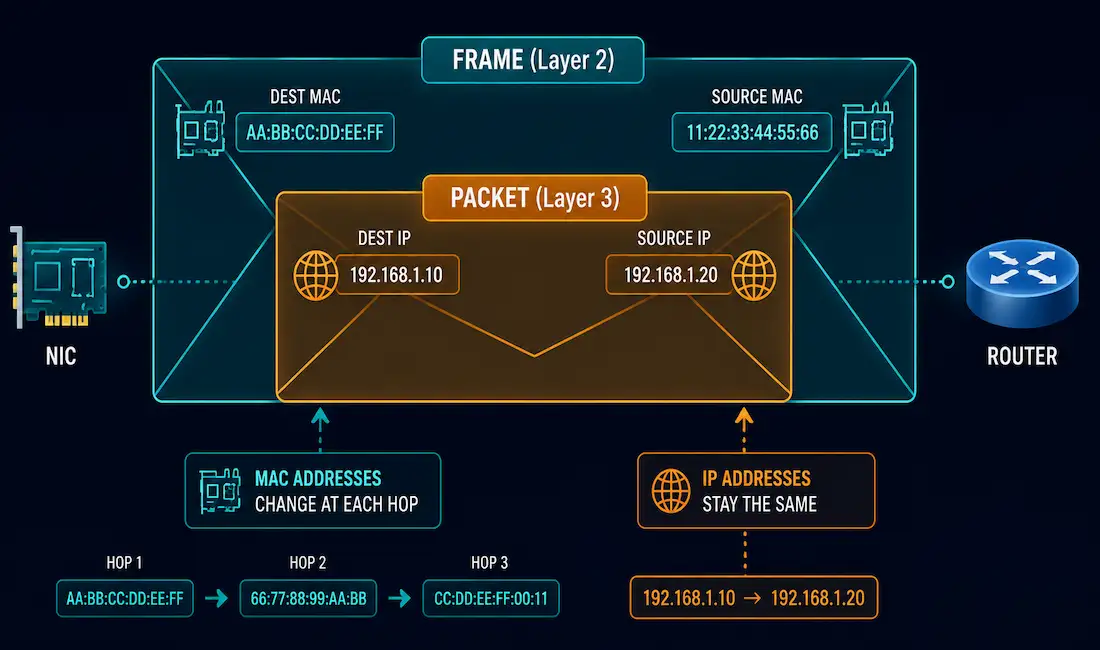
Every packet that crosses a network carries two different kinds of addresses at once. One address stays the same for the whole trip. The other changes at every single hop. Mixing these two up is one of the most common sources of confusion for anyone studying networking or working toward CCNA.
This guide breaks down exactly what each address does, why they behave so differently, and walks through a full worked example showing both addresses changing (or not changing) as a packet moves from one host to another across a router.
What Network Layer Addresses Do
The network layer is responsible for getting data from a source device all the way to a destination device. That destination might sit on the same local network, or it might be several networks away, reachable only after passing through one or more routers.
The address used at this layer is the IP address. It’s often called a logical address, because it’s assigned by an administrator or a DHCP server rather than burned into hardware. Every IP packet carries exactly two network layer addresses:
- Source IP address — the address of the device that originated the packet.
- Destination IP address — the address of the device the packet is ultimately meant to reach.
Here’s the key property that trips people up: these two IP addresses do not change as the packet travels through the network. A packet leaving your laptop bound for a web server three routers away keeps that same source and destination IP address the entire way, from the first hop to the last.
What Data Link Layer Addresses Do
The data link layer has a much narrower job. It only delivers a frame from one network interface card (NIC) to another NIC on the same physical network segment. It has no concept of “the final destination” the way the network layer does.
The address used here is the MAC address, also called the physical address. It’s burned into the NIC by the manufacturer and works completely differently from an IP address. Before an IP packet can travel over a wired or wireless medium, it gets wrapped inside a data link frame, and that frame carries its own pair of addresses:
- Source data link address — the physical address of the NIC sending the frame.
- Destination data link address — the physical address of the NIC meant to receive the frame. This is either the next-hop router’s interface or the final destination device, never anything further down the path.
Unlike IP addresses, MAC addresses change at every hop. When a router receives a frame, it strips off the old Layer 2 header entirely, decides where the packet needs to go next based on the IP address, and builds a brand new frame with new source and destination MAC addresses before forwarding it out the exit interface.
Example Topology
To make this concrete, picture two computers on separate private networks, each connected to its own router, with the two routers reaching each other across the wider internet. [See Topology Diagram]
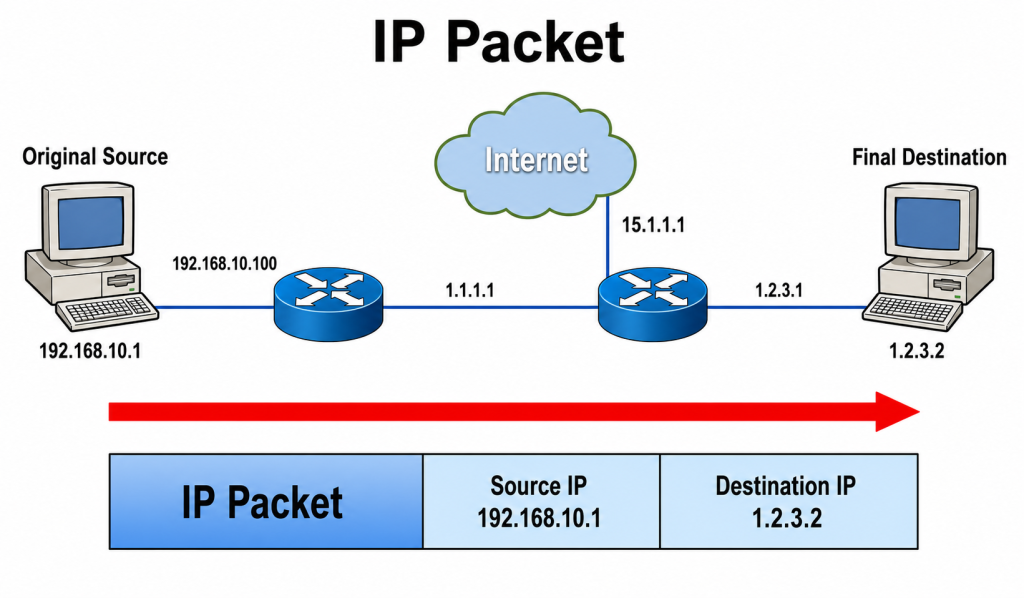
- PC1 (original source): IP 192.168.10.1, MAC AAAA.AAAA.AAAA
- R1 LAN interface (facing PC1): IP 192.168.10.100, MAC BBBB.BBBB.BBBB
- R1 WAN interface (facing the internet): IP 1.1.1.1, MAC CCCC.CCCC.CCCC
- R2 WAN interface (facing the internet): IP 15.1.1.1, MAC DDDD.DDDD.DDDD
- R2 LAN interface (facing PC2): IP 1.2.3.1, MAC EEEE.EEEE.EEEE
- PC2 (final destination): IP 1.2.3.2, MAC FFFF.FFFF.FFFF
PC1 wants to send a packet to PC2. Here’s what each frame looks like at each of the three hops along the way.
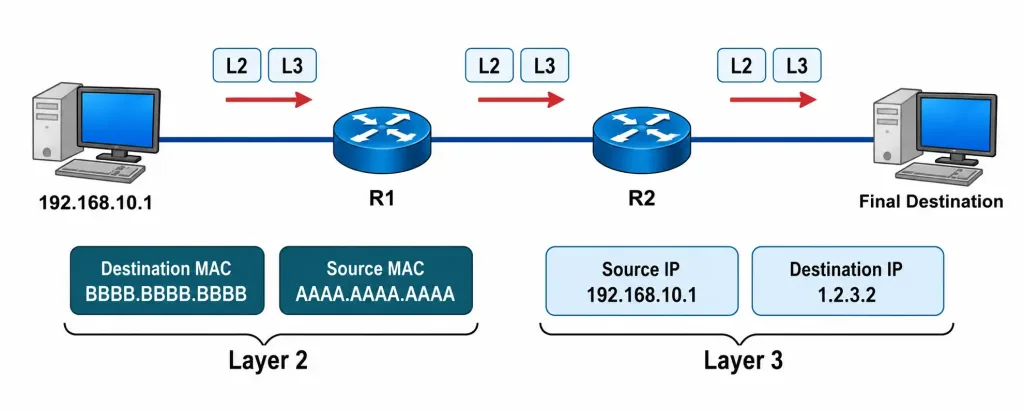
Hop 1: PC1 to R1
| Field | Value |
|---|---|
| Source IP | 192.168.10.1 |
| Destination IP | 1.2.3.2 |
| Source MAC | AAAA.AAAA.AAAA |
| Destination MAC | BBBB.BBBB.BBBB |
PC1 doesn’t know how to reach 1.2.3.2 directly, since it’s on a different network. So it sends the frame to its default gateway, R1’s LAN interface, using R1’s MAC address as the destination.
Hop 2: R1 to R2
| Field | Value |
|---|---|
| Source IP | 192.168.10.1 |
| Destination IP | 1.2.3.2 |
| Source MAC | CCCC.CCCC.CCCC |
| Destination MAC | DDDD.DDDD.DDDD |
R1 strips the old frame, checks its routing table, and finds that 1.2.3.0/24 is reachable across the internet via R2 (represented here as 15.1.1.1). It rebuilds the frame with its own WAN interface as the new source MAC and R2’s WAN interface as the new destination MAC. Notice the IP addresses haven’t moved at all.
Note: if R1 were performing Network Address Translation on this link — which real internet-facing routers typically do, since 192.168.10.1 is a private address that isn’t routable on the public internet — the source IP itself would also change here, to R1’s public WAN address. This walkthrough assumes a routed path without NAT, to isolate exactly how Layer 2 and Layer 3 addressing behave on their own.
Hop 3: R2 to PC2
| Field | Value |
|---|---|
| Source IP | 192.168.10.1 |
| Destination IP | 1.2.3.2 |
| Source MAC | EEEE.EEEE.EEEE |
| Destination MAC | FFFF.FFFF.FFFF |
R2 sees that 1.2.3.2 is directly connected, builds one final frame with its own LAN interface MAC as the source and PC2’s MAC as the destination, and delivers it. The IP addresses are exactly what they were on hop 1. Only the MAC addresses ever changed.
Network Layer vs. Data Link Layer Addresses: Side-by-Side Comparison
| Characteristic | Network Layer (IP) Address | Data Link Layer (MAC) Address |
|---|---|---|
| Also known as | Logical address | Physical address |
| Assigned by | Administrator, DHCP server | Manufacturer (burned into NIC) |
| Length | 32 bits (IPv4) or 128 bits (IPv6) | 48 bits |
| Scope | End-to-end, entire path | One hop, single physical segment |
| Changes en route? | No — stays constant | Yes — changes at every hop |
| Used for | Routing between networks | Delivery within one network |
| Example format | 192.168.10.1 | AAAA.AAAA.AAAA |
How the Two Addresses Work Together
It helps to think of this like mailing a package through a chain of regional sorting hubs. The shipping label with the final home address never changes; that’s your IP address. But at every sorting hub, a new internal routing tag gets slapped on and peeled off, telling the next hub exactly where to hand the package physically. That internal tag is your MAC address.
This division of labor is what lets IP routing scale across the entire internet. A router only ever needs to know how to reach the next hop physically. It never needs to track every possible MAC address in existence, only the ones on its own directly connected segments. The network layer handles the big picture of where a packet is ultimately going. The data link layer handles the immediate, local problem of getting it one hop closer.
Common Misconceptions and Troubleshooting Notes
“The router changes the IP address at each hop.” This is one of the most common misunderstandings in early networking study. Routers do not touch the source or destination IP address during normal forwarding (aside from Network Address Translation, which is a separate, explicit function). Only the Layer 2 header is rewritten.
“ARP resolves the destination IP into the destination MAC for the whole path.” Not quite. ARP only ever resolves an IP address to a MAC address for a device on the same local segment. PC1 uses ARP to learn R1’s MAC address, not PC2’s. It has no way to learn PC2’s MAC directly, since PC2 isn’t on its local network.
“A switch changes MAC addresses like a router changes them.” A switch does not rewrite MAC addresses. It reads the destination MAC address in an incoming frame, checks its MAC address table, and forwards the frame out the correct port unchanged. Only routers rebuild the Layer 2 header, because only routers connect separate networks.
Frame not reaching the next hop? If devices can’t reach each other despite correct IP addressing, check the ARP table on the sending device first (arp -a on a PC, show ip arp on a Cisco device). A missing or incorrect ARP entry means the frame can’t be built at all, since the destination MAC is unknown.
A Note on IPv6: ARP Is Replaced, Not the Concept
Everything above uses IPv4 examples, but the same two-layer split applies just as strongly in IPv6 networks. The only real difference is the mechanism used to resolve a Layer 3 address into a Layer 2 address. IPv4 uses ARP, a broadcast-based protocol. IPv6 replaces ARP with Neighbor Discovery Protocol (NDP), which uses multicast instead of broadcast and runs on top of ICMPv6.
The underlying logic hasn’t changed at all. A host still needs to learn the MAC address of its default gateway before it can send a frame off its local segment, and a router still rebuilds the Layer 2 header at every hop while leaving the IPv6 source and destination addresses untouched. If you understand the IPv4 version of this process, the IPv6 version is the same idea with a different resolution protocol underneath it.
Why This Distinction Matters for Troubleshooting and Exams
This split between logical and physical addressing isn’t just theory. It’s one of the most heavily tested concepts on the CCNA exam, and it’s also one of the fastest ways to diagnose a real connectivity problem.
When a host can ping its default gateway but nothing beyond it, the problem is almost always at Layer 3 or higher, since Layer 2 connectivity to the gateway is clearly working. When a host can’t even reach its default gateway, the problem is usually local: a missing ARP entry, a duplicate IP address on the segment, a VLAN mismatch, or a physical cabling issue. Knowing which layer owns which job tells you exactly where to start looking instead of guessing.
This is also why packet captures are so useful for troubleshooting. A single capture at any point in the path shows you both addressing layers at once. If the IP addresses look right but the MAC addresses look wrong for that segment, you’ve likely found a Layer 2 problem. If the MAC addresses look right but the IP addresses are unexpected, the problem sits higher up the stack, often in routing or NAT.
Frequently Asked Questions
Does the source IP address ever change as a packet crosses multiple routers?
No, under normal IP forwarding the source and destination IP addresses stay exactly the same from the first hop to the last. The only common exception is Network Address Translation, which deliberately rewrites the IP address at a NAT boundary. In the topology above, if R1 sat at the edge of a private network and performed NAT, PC1’s private address would be translated to a public one before leaving R1, which is why the walkthrough explicitly assumes a routed path without NAT.
Why do MAC addresses need to change at every hop if IP addresses don’t?
MAC addresses only have meaning within a single physical network segment. Once a frame crosses a router into a new segment, the old MAC addresses are meaningless there, so the router has to build an entirely new Layer 2 header using addresses that make sense on the next segment.
What happens if a device doesn’t know the MAC address it needs to send a frame?
It sends an ARP request, a broadcast asking “who has this IP address, tell me your MAC.” The device that owns that IP address replies directly, and the sender caches the answer in its ARP table for future frames.
Can two devices on the internet have the same MAC address without a conflict?
Yes. Since MAC addresses only need to be unique within a single local segment, not globally, duplicate MAC addresses on unrelated networks elsewhere in the world cause no problems at all.
Is a MAC address the same thing as a physical address?
Yes, MAC address and physical address refer to the same thing: the 48-bit hardware identifier burned into a network interface card by its manufacturer, used for delivery within one local network segment.
Do wireless networks use MAC addresses the same way as wired networks?
Yes. Wi-Fi NICs have MAC addresses just like Ethernet NICs, and the same source/destination addressing behavior applies at the data link layer, even though the physical transmission method is different.
Why does a router need both an IP address and a MAC address on each interface?
Each router interface needs an IP address so it can participate in Layer 3 routing decisions and act as a default gateway for its segment, and it needs a MAC address so it can send and receive frames at Layer 2 on that same segment. Both addresses work together on every interface.



