
Every packet that moves across a network is delivered using one of three fundamental communication methods: unicast, multicast, or broadcast. Each defines how many devices receive a given transmission — one, a selected group, or all of them — and choosing the right one is central to how efficiently a network runs. As video streaming, IoT, and 5G continue to drive up data volumes, understanding these three methods is more useful than ever.
This article breaks down how unicast, multicast, and broadcast work, their addressing and protocols, where each is used, and their trade-offs. It builds on the fundamentals of IPv4 addressing; if you’re new to network and host portions of an address, it’s worth reviewing those basics first.
Unicast: One-to-One Communication
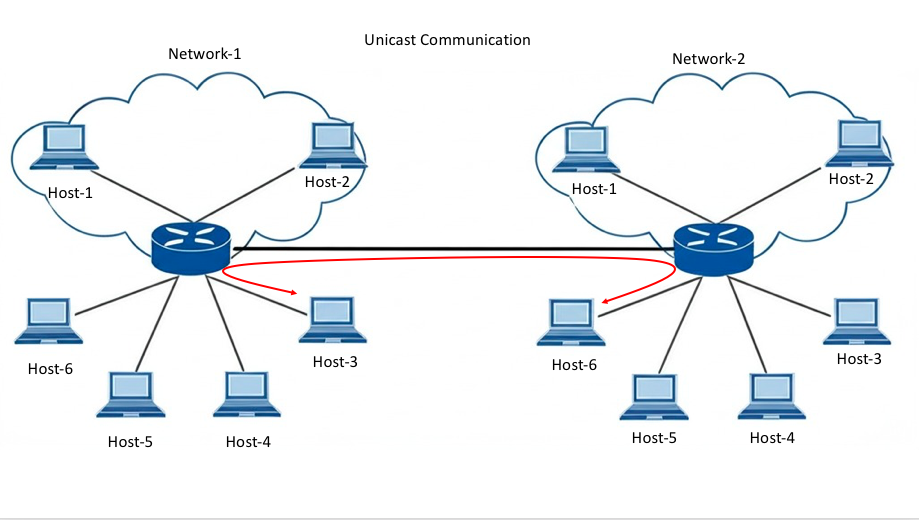
Unicast is direct communication between a single sender and a single receiver. There is exactly one source and one destination, and the packet carries the destination device’s unique address, so it can be routed across an internetwork to that specific host.
In IPv4 unicast communication, the sending host encapsulates its own IPv4 address as the source address and the receiving host’s address as the destination address. A packet’s source address is always the originating host’s unicast address. The IPv4 unicast range runs from 0.0.0.0 to 223.255.255.255, though many addresses within that range are reserved for special purposes (such as loopback and network/broadcast identifiers) and can’t be used as ordinary host destinations.
A simple everyday example: when you load this page, your browser (the client) sends an HTTP request to the web server, and the server responds with the page data — a one-to-one exchange between two hosts.
Protocols and Modern Examples
Unicast underpins most direct, reliable communication on the internet. TCP/IP establishes reliable unicast sessions using the three-way handshake (SYN, SYN-ACK, ACK). More recently, HTTP/3 and QUIC have changed how this works under the hood: rather than running on TCP, QUIC runs over UDP and implements its own reliability, congestion control, and stream multiplexing, which avoids TCP’s head-of-line blocking and reduces latency — well suited to video-on-demand and modern web traffic.
Use Cases
- Video streaming: Services like Netflix deliver individually requested streams to each viewer over unicast.
- Online gaming: Real-time games rely on unicast for low-latency, per-player communication.
- Everyday tasks: Email, web browsing, and file transfers between two devices are all unicast.
Pros and Cons
| Pros | Cons |
|---|---|
| Reliable, direct delivery | Bandwidth-heavy when scaling to many receivers |
| Secure, end-to-end path | High server load for large audiences |
Multicast: One-to-Many Communication
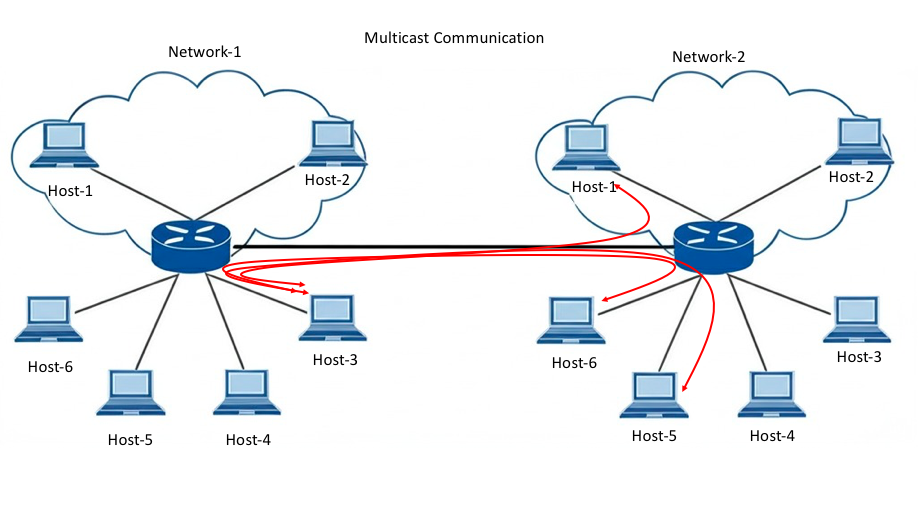
Multicast sends data from one (or more) sources to a specific group of interested receivers, rather than to everyone. It’s far more efficient than sending an identical unicast stream to each recipient, because the source sends a single stream that the network replicates only where needed to reach group members.
The IPv4 range 224.0.0.0 to 239.255.255.255 is reserved for multicast. Group membership is managed by IGMP (Internet Group Management Protocol), which lets hosts join and leave multicast groups, while routers use PIM (Protocol Independent Multicast) to build distribution trees that forward multicast traffic only along paths that lead to subscribers. Whether a router forwards a given multicast stream depends on whether there are group members downstream — if no one has joined, the traffic isn’t forwarded down that path.
When a host subscribes to a multicast group, it processes packets addressed both to that multicast group address and to its own unique unicast address. Multicast is also widely used by routing protocols to exchange information: for example, OSPF uses 224.0.0.5 and 224.0.0.6, and RIPv2 uses 224.0.0.9.
Reserved Multicast Addresses
Several multicast addresses in the local-network-control block are reserved for specific purposes:
| Address | Purpose |
|---|---|
| 224.0.0.0 | Base address (reserved) |
| 224.0.0.1 | All hosts on the same network segment |
| 224.0.0.2 | All routers on the same network segment |
| 224.0.0.4 | DVMRP (Distance Vector Multicast Routing Protocol) routers |
| 224.0.0.5 | All OSPF routers (Hello packets) |
| 224.0.0.6 | OSPF designated routers (DR/BDR) |
| 224.0.0.9 | RIP version 2 routers |
| 224.0.0.10 | EIGRP routers |
| 224.0.0.18 | VRRP (Virtual Router Redundancy Protocol) |
| 224.0.0.19–21 | IS-IS over IP |
| 224.0.0.102 | HSRPv2 and GLBP |
| 224.0.0.251 | Multicast DNS (mDNS) |
| 224.0.0.252 | Link-Local Multicast Name Resolution (LLMNR) |
| 224.0.1.1 | NTP (Network Time Protocol) |
| 224.0.1.41 | H.323 Gatekeeper |
Technical Notes
- Source-Specific Multicast (SSM): Restricts a receiver to traffic from specific named sources, improving security and simplifying address management.
- Reverse Path Forwarding (RPF) check: Prevents loops by verifying that multicast packets arrive on the interface the router would use to reach the source.
Use Cases
- Live streaming to many viewers: Broadcast-style live video (such as IPTV) can use multicast to send one stream to many subscribers efficiently.
- IoT and firmware updates: Multicast can push the same update to many devices at once, reducing bandwidth compared with individual unicast transfers.
- Financial data feeds: Market-data distribution commonly uses multicast to deliver the same feed to many subscribers simultaneously.
Pros and Cons
| Pros | Cons |
|---|---|
| Bandwidth-efficient for group delivery | More complex to configure |
| Scales well for large groups | Requires multicast-enabled routers and network support |
Broadcast: One-to-All Communication
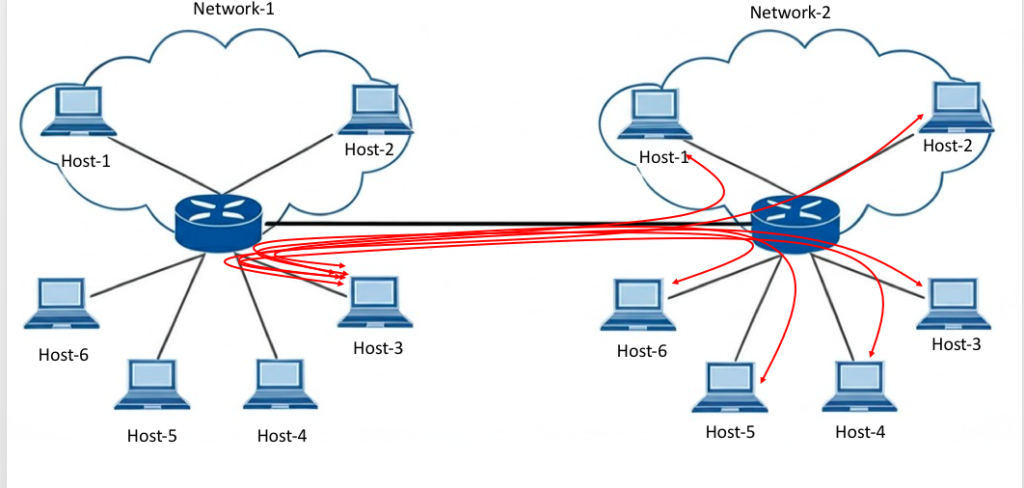
In broadcast communication, a single host sends a packet to every other host on the local network. There is one sender, but all connected hosts on the network receive and process the packet. A broadcast packet uses a destination address with all ones in the host portion, meaning the entire local network receives it.
When a host receives a packet sent to the broadcast address, it processes it as it would a packet sent to its own unicast address. Common examples include DHCP (a device broadcasts to locate a DHCP server) and ARP (a host broadcasts to resolve an IP address to a MAC address). Wi-Fi networks also use a broadcast technique to advertise their SSID so nearby devices can discover them.
Directed vs. Limited Broadcast
There are two types of broadcast:
- Directed broadcast: Sent to all hosts on a specific network — for example, a host sending to 200.100.50.255 targets every host on the 200.100.50.0/24 network. This is a routable address, so a router can forward it to that network’s gateway if configured to do so (though this is often disabled for security).
- Limited broadcast: Sent to 255.255.255.255, reaching all hosts on the local network only. This address is not routable, so routers do not forward it beyond the local segment.
By default, routers do not forward broadcasts. Because every host on a network must process each broadcast packet, excessive broadcast traffic consumes resources and can degrade performance. This is one reason networks are subdivided: each router interface bounds a separate broadcast domain, and segmenting networks (for example, with VLANs) limits broadcast scope and improves performance.
Broadcast Storms
An uncontrolled flood of broadcast traffic — a “broadcast storm” — can overwhelm a network, often caused by switching loops. Storm control on switches and loop-prevention protocols like Spanning Tree Protocol (STP) help mitigate this.
Pros and Cons
| Pros | Cons |
|---|---|
| Simple to implement | Wastes bandwidth reaching uninterested hosts |
| Effective for local discovery on a LAN | Security risks (any host can receive the data) |
Head-to-Head Comparison
| Feature | Unicast | Multicast | Broadcast |
|---|---|---|---|
| Recipients | One specific host | A selected group | All hosts on the network |
| Addressing | Single unicast IP | Group IP (224.0.0.0–239.255.255.255) | All ones in the host portion |
| Scalability | Poor for large audiences | Excellent for groups | Limited to the local network |
| Typical protocols | TCP, HTTP, QUIC | IGMP, PIM | ARP, DHCP |
| Routable across networks | Yes | Yes (with multicast routing) | Limited broadcast: no; directed: optionally |
When to Use Which
- Unicast: On-demand and personalized content, secure transactions, direct host-to-host communication.
- Multicast: One-to-many live delivery — streaming to groups, financial feeds, group IoT updates.
- Broadcast: Local network functions like address resolution (ARP) and device/service discovery (DHCP).
Modern Trends in Data Transmission
As networks evolve, multicast in particular is finding renewed relevance in large-scale, one-to-many scenarios:
- 5G and mobile multicast: 5G broadcast/multicast capabilities allow the same content — such as a live event in a crowded stadium — to be delivered efficiently to many devices at once, rather than as thousands of separate unicast streams.
- IoT at scale: As deployments grow into thousands of devices, multicast helps synchronize and update large groups of sensors or endpoints while conserving bandwidth.
- Cloud multicast: Cloud providers have added multicast support to their virtual networks (for example, AWS Transit Gateway supports multicast), letting enterprises run multicast workloads across cloud environments without re-architecting applications.
Security remains a consideration across these use cases. Multicast deployments should guard against misuse with access control lists (ACLs) and SSM, and broadcast domains should be controlled with storm control and proper segmentation.
Conclusion
Unicast, multicast, and broadcast each serve a distinct role in networking. Unicast handles direct, one-to-one communication and carries most internet traffic. Multicast efficiently serves a defined group, making it ideal for live streaming and large-scale IoT. Broadcast reaches every host on a local network and underpins essential discovery functions like ARP and DHCP. As 5G and IoT continue to expand one-to-many use cases, multicast’s importance is likely to grow — but all three remain fundamental building blocks that every network relies on together.
Frequently Asked Questions
What is the key difference between unicast, multicast, and broadcast?
Unicast is one-to-one (a single sender to a single receiver), multicast is one-to-many (a sender to a selected group of subscribers), and broadcast is one-to-all (a sender to every host on the local network). Each suits different needs, from private data transfer to efficient group delivery to network-wide discovery.
What are real-world examples of unicast?
Everyday tasks like sending an email, browsing a website, or transferring a file between two devices use unicast. On-demand streaming, where one user requests specific content, is also unicast.
When is multicast most useful?
Multicast is ideal when the same data must reach many recipients at once — live video, IPTV, webinars, financial data feeds, or pushing updates to many IoT devices. It conserves bandwidth by sending one stream that the network replicates only where needed.
How does broadcast benefit network operations?
Broadcast supports essential functions like ARP (resolving an IP to a MAC address) and DHCP (locating a DHCP server). It lets a device reach all hosts on the local network to discover services or resources.
What are the drawbacks of broadcast?
Broadcast reaches every device, including those that don’t need the data, which wastes bandwidth and can cause congestion. In extreme cases, a broadcast storm can severely degrade network performance, so broadcast should be used only where necessary.
How does multicast save bandwidth compared with unicast?
Unicast requires a separate stream for each receiver, duplicating data. Multicast sends a single stream that the network replicates only at the points needed to reach group members, greatly reducing load when delivering the same content to many recipients.
Can a network support all three at once?
Yes. Modern networks use all three simultaneously — unicast for direct communication, multicast for group delivery, and broadcast for local discovery — each configured to work together without interfering.



